Astro Bot PC Port (AstroHybrid)
Astro Bot PC Port (AstroHybrid) is a native PC port of Astro Bot for Windows with DLSS Super Resolution, Frame Generation, and Reflex support.
- Type: PC port
- Game: Astro Bot
- Runs on Windows
- By imnotsharingmyname
- Latest release v1.0.7, 2026-11-13
- Source: https://github.com/imnotsharingmyname/pcportastrobot
README
Astro Bot native PC port (AstroHybrid): DLSS Frame Generation, Reflex, any controller
A personal research project: running my own legally owned PS5 copy of Astro Bot (PPSA21567, v01.019.000) natively on Windows, with NVIDIA DLSS Super Resolution, DLSS (Multi) Frame Generation and Reflex added on top.
No game files are in this repository or in the download, and none will be: no game executable, assets, shaders, keys, saves or game artwork. You need your own decrypted dump of the game; the setup converts it on your PC.
Download and play
- Download the AstroBotPC-AstroHybrid zip from the latest release and extract it anywhere with about 1 GB free (the game itself stays where your dump is).
- Start AstroHybrid.exe. Setup asks for your Astro Bot dump folder (Browse, or paste the path and press Check folder, then Install) (the one with
eboot.bin,sce_module,sce_sys) and builds the Windows version of the game from it in about two minutes. Your dump is only read. - The app picks the best settings for your PC once (graphics card, CPU, RAM, display); change anything on the Graphics, Controller and Advanced pages.
- Press Play.
The download is the same build as the development PC: the same PS5 system libraries, kyty_gpu.dll (DLSS,
frame generation, Reflex, controller fixes), the same launcher settings, and setup makes the same AstroBot.exe
byte for byte from a 01.019.000 dump. Other Astro Bot versions are accepted: the faster-lighting patch and
real-time game speed switch themselves off when that version's code differs (they depend on exact code
locations); everything else works the same way. Only 01.019.000 has been tested.
Requirements: Windows 10/11 x64, a Vulkan GPU; DLSS needs an RTX card, frame generation an RTX 40 or 50.
Controllers: DualSense, DualShock 4, Xbox, Switch Pro and compatible pads, generic pads (the one you press plays).
Command line: AstroHybrid.exe --setup "<dump folder>" runs the setup without a window; --remove-game removes
what setup built.
Screenshots
| Home | Graphics |
|---|---|
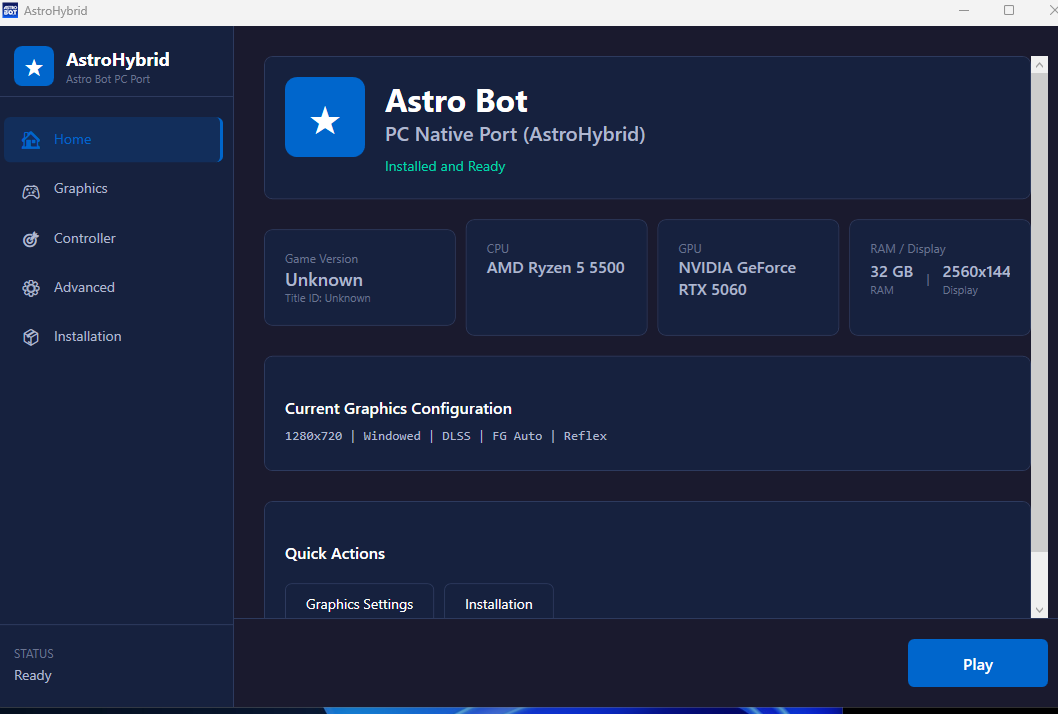 | 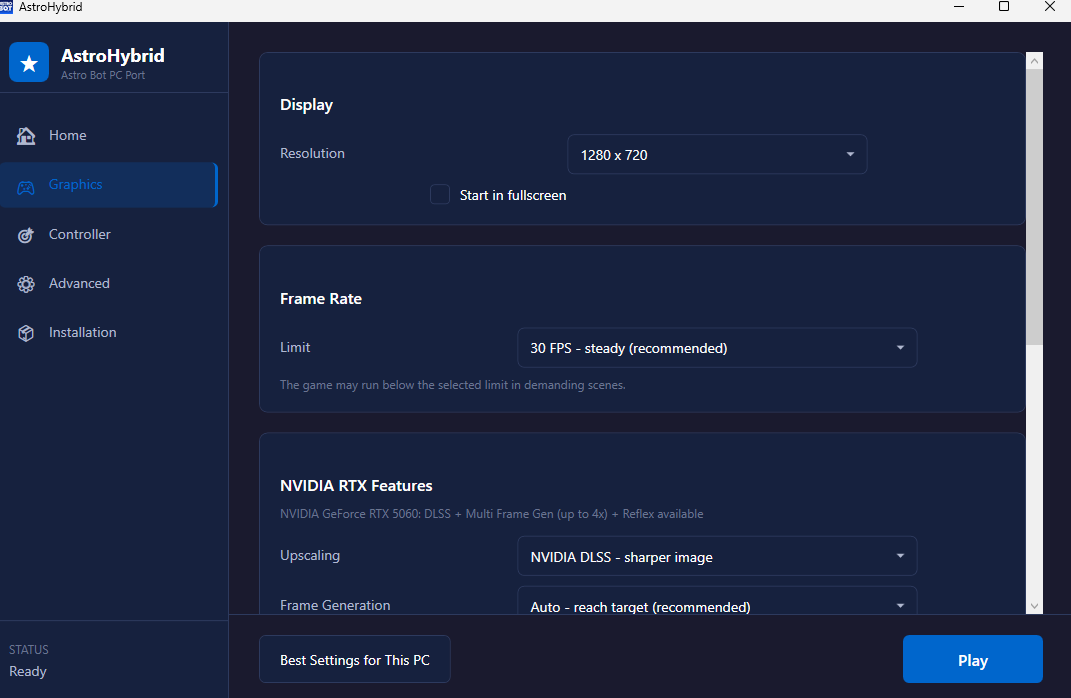 |
| Controller | Advanced |
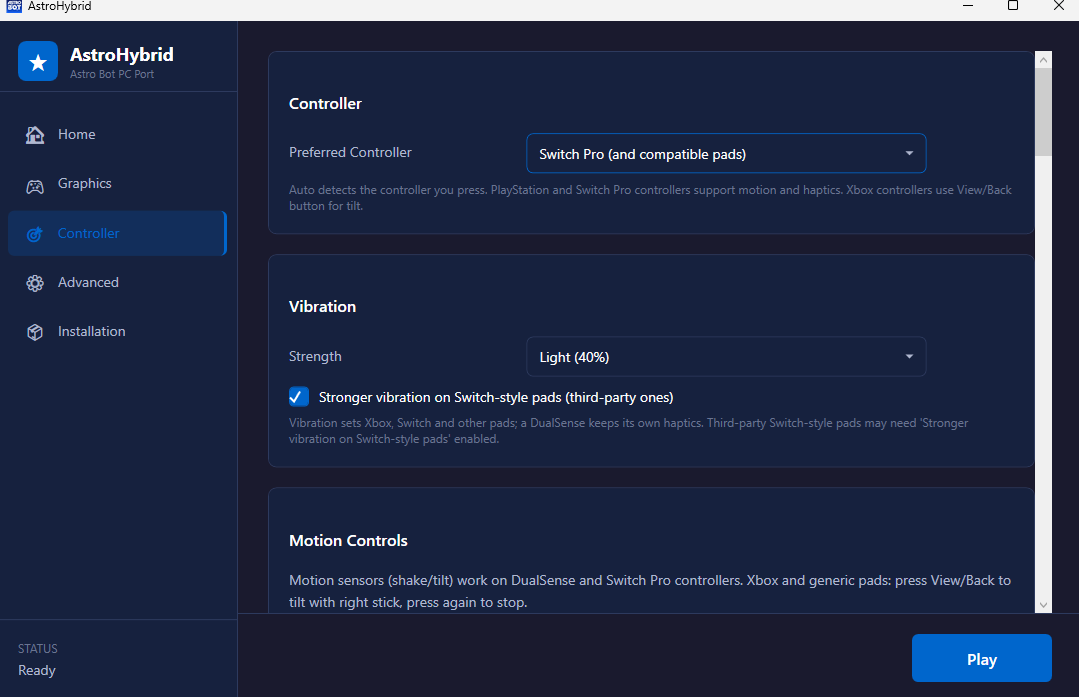 | 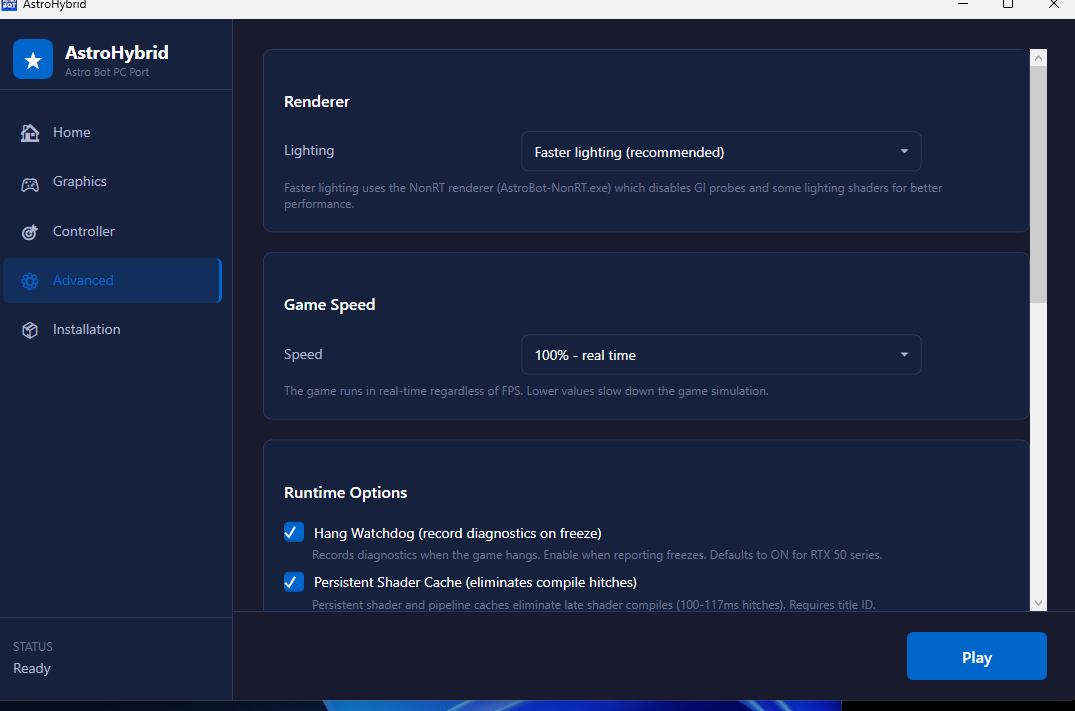 |
What it is
This is not an emulator. It is a native port:
- AnyPS5 relinks the game's own x86-64 code into a Windows
.exe(AstroBot.exe). The PS5 system libraries (kernel, libc, pad, audio, save data and so on) are reimplemented natively as Windows modules. - AstroHybrid: the PS5 GPU side (AGC command buffers, shaders, VideoOut) is handled by a GPU stack taken from
KytyPS5 and built as
kyty_gpu.dll. It translates the GPU work to Vulkan and is loaded by the native exe. - NVIDIA RTX layer (new): the game's own temporal upscale pass is found at run time and its inputs (colour, depth, motion vectors, jitter, camera matrices) are handed to DLSS and to DLSS Frame Generation through NVIDIA Streamline 2.14.16 on Vulkan.
Benchmarks (real measurements, one PC)
Ryzen 5 5500 (6 cores / 12 threads), RTX 5060 8 GB, 32 GB RAM, 2560x1440 165 Hz, NVIDIA driver 621.
| What | Result |
|---|---|
| Sky Garden (heaviest area found), game's own frame rate | 32-34 FPS uncapped; a 30 FPS cap holds in every 10 s window |
| Other levels (start positions) | Hoover beach 51-53, snowy canyon 43-44, Cymbal party land 37-39 FPS |
| Frame Generation 2x (window focused) | exactly 2.00 frames shown per game frame, about 63 FPS on screen |
| Multi Frame Generation 4x | exactly 4.00 per game frame, about 124-128 FPS on screen |
| Adaptive Frame Generation (target 60) | game held at 24 FPS: switches itself to 3x = 72 on screen; game at 30: 2x = 60 |
| "Faster CPU path" (commit epoch fast path) | about 0.3 us less per continued draw, roughly 1 ms of command-processor time per frame; verify mode: 0 mismatches |
| Real-time game speed | the game ran at 0.50x speed when capped at 30 FPS; now 0.98x real time |
| DLSS Super Resolution | runs every frame on the game's 1920x1080 -> 2432x1368 upscale pass, picture correct |
Where the time goes: a 30 ms frame is about 22 ms of draw commit on one CPU thread (about 4,900 draws a frame), so the game is CPU-limited; the GPU has headroom. That is why Frame Generation is the main smoothing tool here, and why lowering the resolution does not raise the frame rate.
Tried and rejected (measured): AVX2 build of the GPU DLL (no difference), write-fault window and lock-spin
tuning (within noise), Lossless Scaling x2 (stutter and input lag), AnyPS5's own renderer instead of Kyty's
(does not boot). Every result, good or bad, is in Docs/OVERNIGHT.md.
Caveat: numbers move with background load. With a browser playing audio the same 30 FPS-capped scene read 22-25 FPS in one evening session, so compare runs on a quiet machine.
What's new in this update
- DLSS Super Resolution (
ASTROHYBRID_DLSS=1). Needed a fix in AnyPS5's libc: CUDA (which DLSS uses) needs a 48 GiB address window below 1 TiB, which the PS5 memory map had taken (ASTROHYBRID_CUDA_HOLE=1). - DLSS Frame Generation and Multi Frame Generation through Streamline (
ASTROHYBRID_DLSSG=1, 2x / 3x / 4x), with an adaptive mode that picks the multiplier in game every half second to stay at or above a target on screen (ASTROHYBRID_DLSSG_TARGET). The game itself is never capped below 30 FPS. - NVIDIA Reflex for Vulkan through
VK_NV_low_latency2(ASTROHYBRID_LOW_LATENCY=1). - Cloth and bubble stability (
KYTY_BUFFER_RANGE_FIXES=1,ASTROHYBRID_COMMIT_EPOCH_FASTPATH=0, plus 60 Hz cloth physics step cap during real-time speed below 60 FPS; issues #30, #35). - Performance overlay shows frames on screen and the game's own rate with Frame Generation.
- Controllers: DualSense (rumble, light bar, adaptive triggers, motion), Xbox, Switch Pro and compatible pads, generic pads. The pad you press becomes player 1 (before, a second pad got no input), vibration strength for non-DualSense pads, a stronger-rumble option for third-party Switch-style pads.
- Launcher (
AstroBot Launcher.exe, source inTools/hybrid/launcher):- new NVIDIA RTX section: upscaling, frame generation (Off / Auto / 2x / 3x / 4x), on-screen target, Reflex;
- new Controls section: controller choice and vibration strength;
- "Best settings for this PC": reads the graphics card, CPU, RAM and display and fills in everything, also on first start. RTX 50: DLSS + Frame Generation Auto (x2-x4) to 120 on a 120 Hz+ display; RTX 40: Auto to 60 (x2); RTX 20/30: DLSS + Reflex at a steady 30; others: the game's own upscaling at 30;
- real-time game speed and the faster CPU path are always on (their checkboxes are gone).
All new behaviour is behind environment switches that are off by default; the launcher turns them on.
Two graphics cards (laptops)
A laptop with Intel or AMD integrated graphics plus an NVIDIA card (Optimus / hybrid) used to show only the integrated chip, so the RTX section stayed off. Both launchers now list every adapter, not only the one that drives the screen:
- Graphics page → Display → Graphics card: "Automatic - best graphics card" (default) or a named card. DLSS, Frame Generation and Reflex follow the card you pick; picking a non-RTX chip turns them off.
- The renderer itself already prefers a discrete card, so Automatic is right for almost everyone. Pick the integrated chip only to compare performance.
- "Best settings for this PC" in the classic launcher now reads the discrete card on these laptops too.
Requirements for the NVIDIA features
- DLSS Super Resolution and Reflex: any RTX card. Frame Generation: RTX 40 or newer; 3x and 4x: RTX 50.
- The Streamline SDK 2.14.16 and the DLSS runtime, downloaded by you from NVIDIA; the runtime files go next to
the game (
ASTROHYBRID_DLSS_PATH). They are not in this repository. - Frame Generation runs only while the game window is focused. Do not combine it with NVIDIA Smooth Motion.
- Only whole multipliers: NVIDIA's dynamic (fractional) multiplier is D3D12-only.
Known issues
- Xbox and other pads without motion sensors: the motion hand does not work yet (tilt emulation with View/Back + right stick reaches the pad library but the game did not react in the user's test).
- Vibration on third-party Switch Pro pads (for example Data Frog) is not confirmed yet.
- With no FPS limit and Frame Generation off, the first loading screen stays black for about 35 s (it runs at about 144 FPS and slows the loading threads); capped starts take about 20 s. It is not a hang.
- Input latency with Frame Generation has not been measured. The DLSS jitter sign is set by eye.
- The game is CPU-limited at about 30-34 FPS on a Ryzen 5 5500 in the heaviest areas.
What is here
| Folder | Contents |
|---|---|
Source/patches | AnyPS5 patch series (native libraries, AstroHybrid host, DualSense input/rumble/triggers/motion, CUDA address window) |
Source/hybrid/patches | KytyPS5 patch series for kyty_gpu.dll (frame pacing, real-time speed, fast path, Reflex, DLSS, Frame Generation, overlay, controllers) |
Source/game-patches | Small optional byte patches applied at load time (lighting mode, GI probes, fixed 1080p) |
Source/experiments | Measured experiments that were not kept, with their patches |
Tools/hybrid | Launcher, run-folder builder, Kyty build script, reverse-engineering helpers |
Tests | Benchmarks and A/B test scripts |
Docs | Build instructions, technical plans, reverse-engineering notes, and the full results log (OVERNIGHT.md) |
Run-AstroHybrid*.bat | Start scripts: plain, DLSS, Frame Generation |
AstroHybrid.App | The AstroHybrid app (WPF, .NET Framework 4.8): setup from a dump (Services/GameSetup.cs, a C# port of AnyPS5's unwrap_self.py), settings, best settings for the PC, launch |
Tools/release | make_release.ps1 builds the download from a working install (with a guard against game files); make_icon.ps1 draws the app icon |
Status
Work in progress, personal use. Not affiliated with or endorsed by Sony Interactive Entertainment, Team ASOBI or NVIDIA. Astro Bot is a trademark of its owners; NVIDIA, DLSS and Reflex are trademarks of NVIDIA.