Atlantis Native
Atlantis Native is a native port of Atlantis The Lost Tales for Windows, macOS, Linux and the web, with optional HD mode and bug fixes.
- Type: PC port
- Game: Atlantis: The Lost Tales
- Runs on Windows, Linux and macOS
- By RipleyXLR8
- Latest release v0.2.0, 2026-10-18
- Source: https://github.com/ripleyXLR8/atlantis-native
README
Atlantis Native
Return to Atlantis, on today's machines.
A native port of Atlantis: The Lost Tales (Cryo Interactive, 1997), written in Rust, for Windows, macOS, Linux and your browser.






▶ Play in your browser (your own copy of the game needed)
Download · Quick start · Features · Controls · Player's guide · Technical notes
Seth, the queen's new guard, wakes up in Atlantis just as Queen Rhea disappears. Atlantis Native brings back the whole adventure: the 360° panoramas, the cinematics, the talking heads with their 3D mouths in time with the voices, the seventeen puzzles and the end credits. It plays from the first screen to the last.
It is the original game, pixel for pixel and sample for sample: the engine is a translation of the Atlantis engine written for ScummVM's CryOmni3D engine, itself rebuilt by reverse engineering the original executable. Each behaviour is traced to an address in the original code. On top of that come optional fixes of the original's bugs and an optional HD mode.
Screenshots
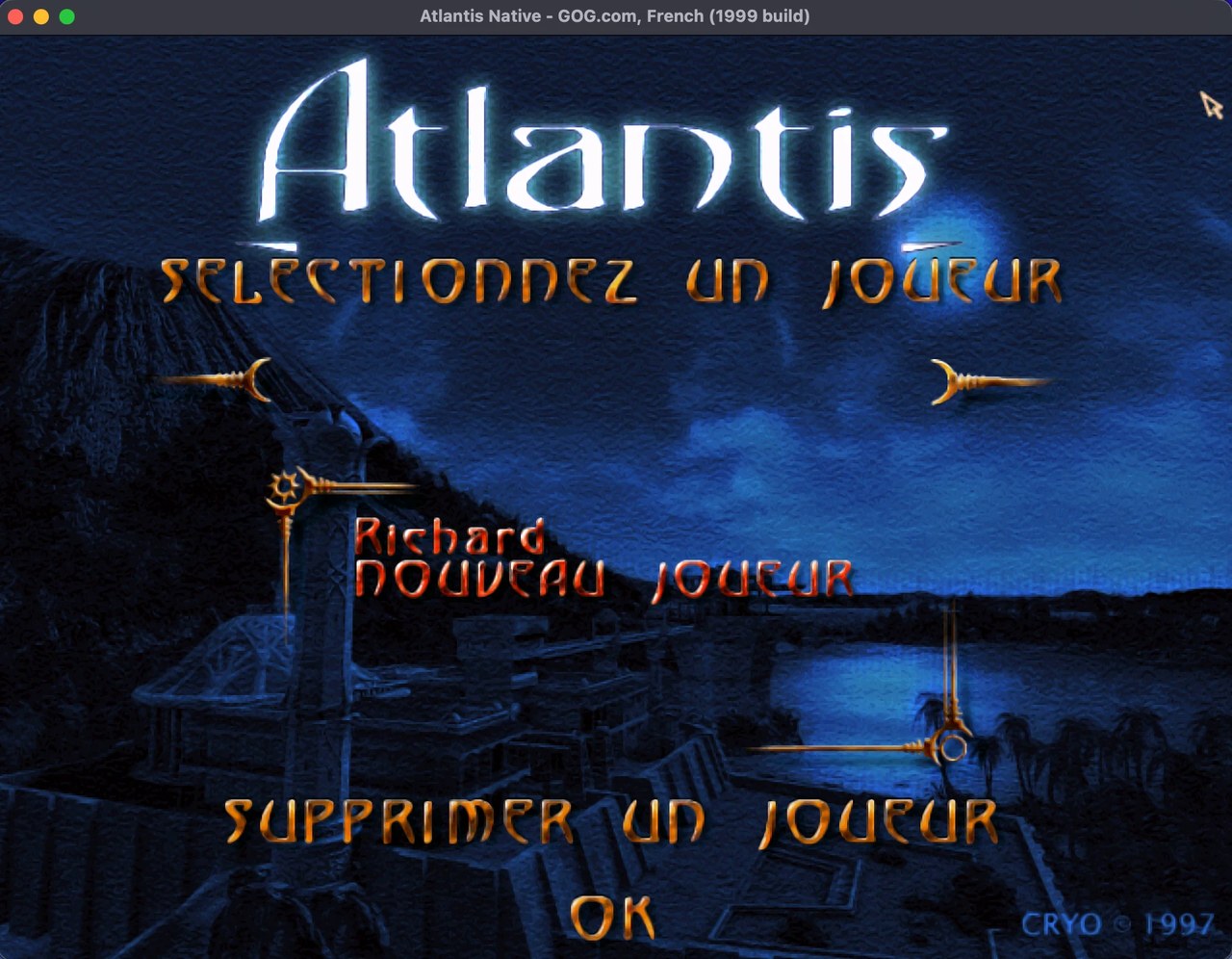
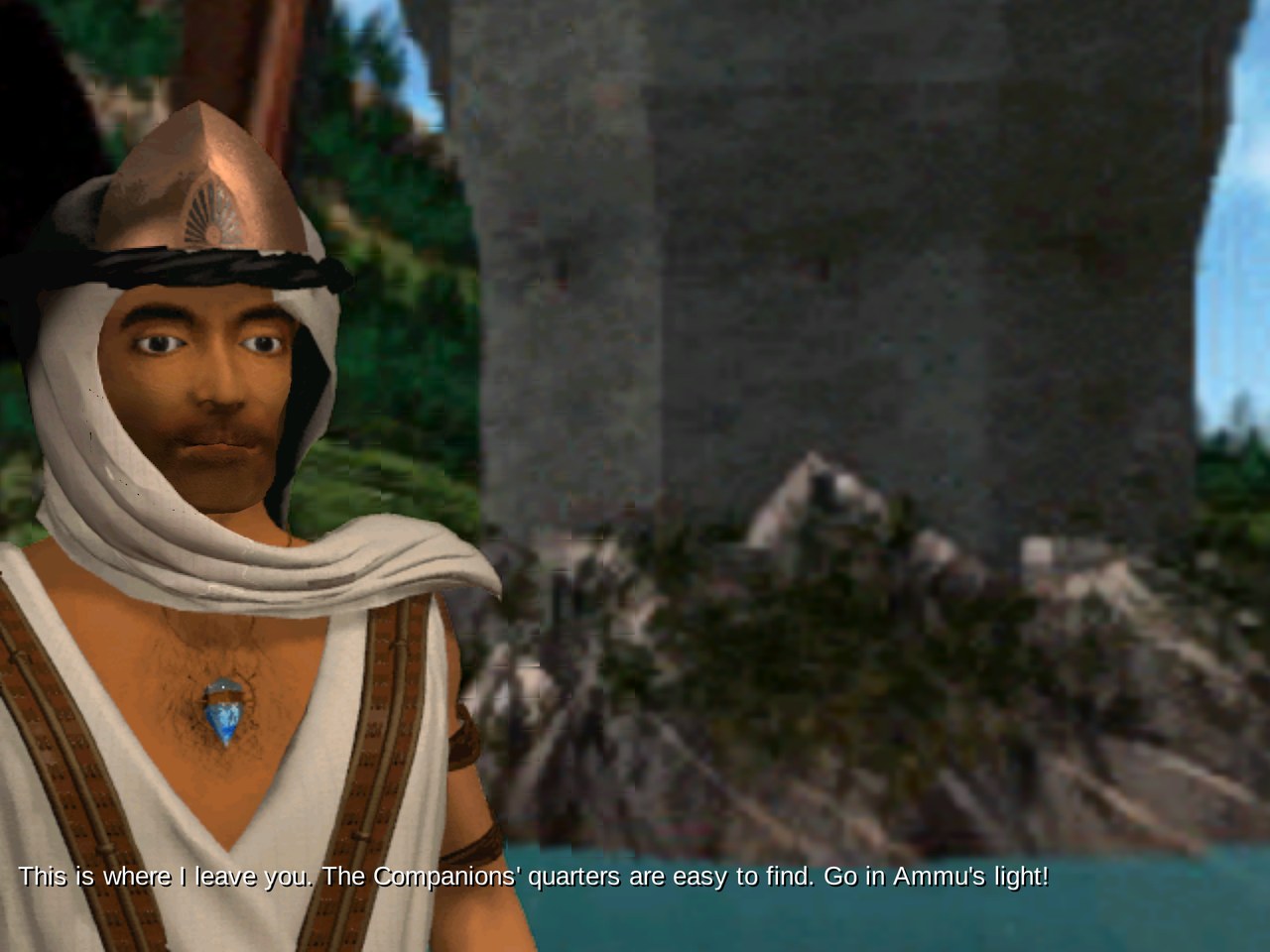
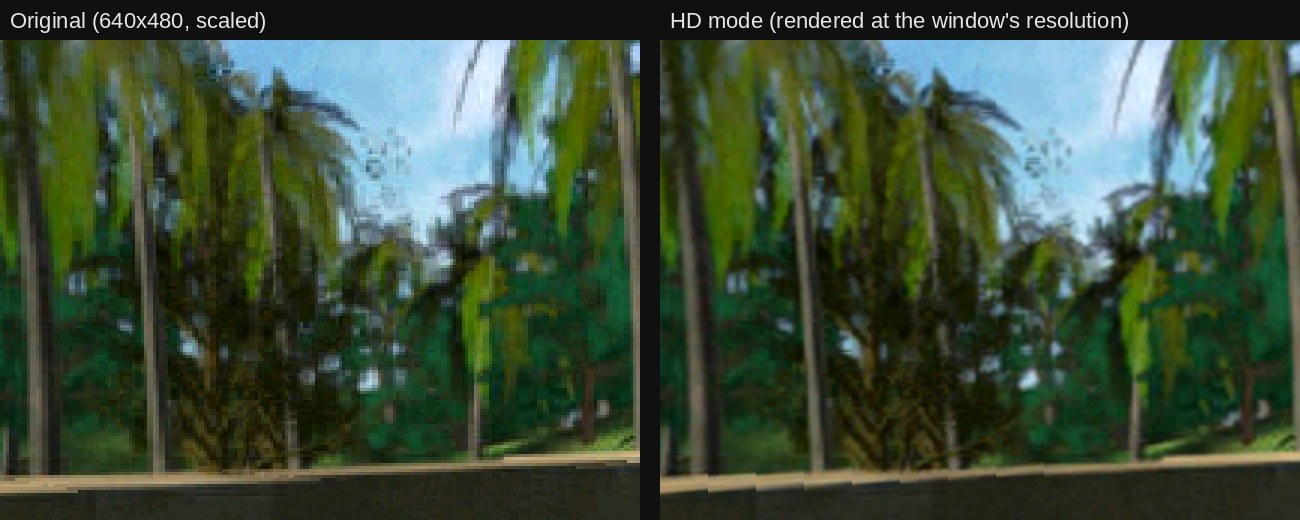
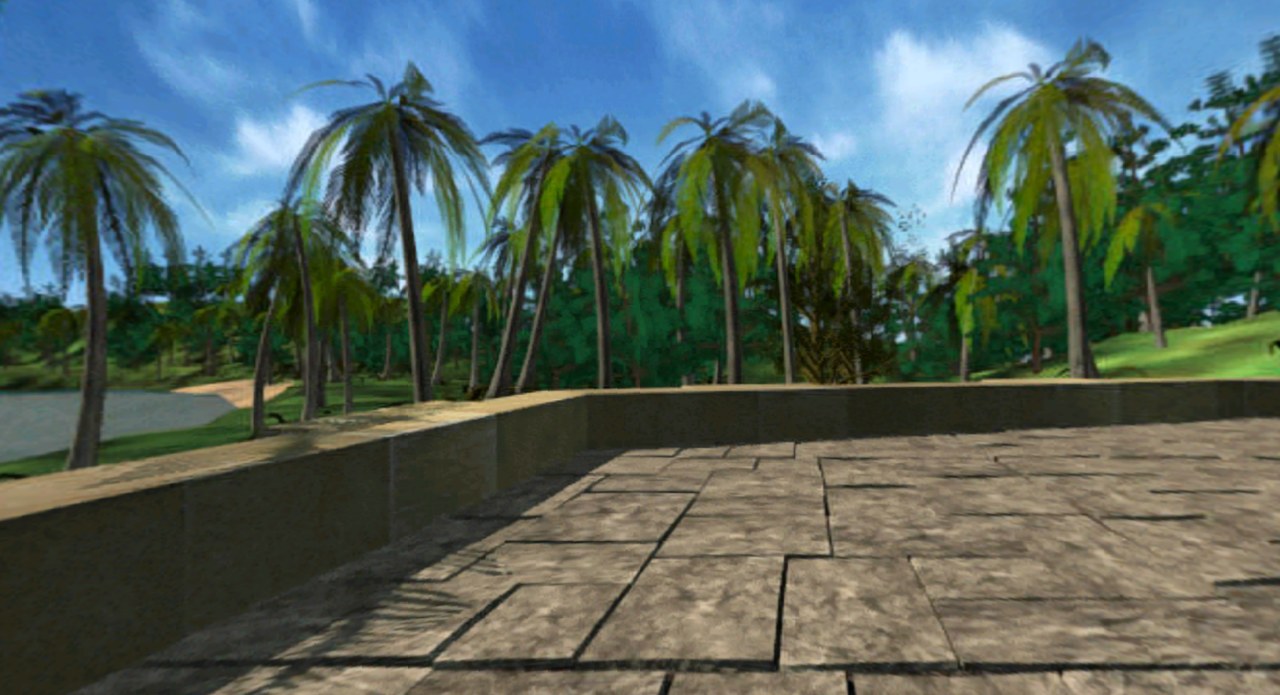
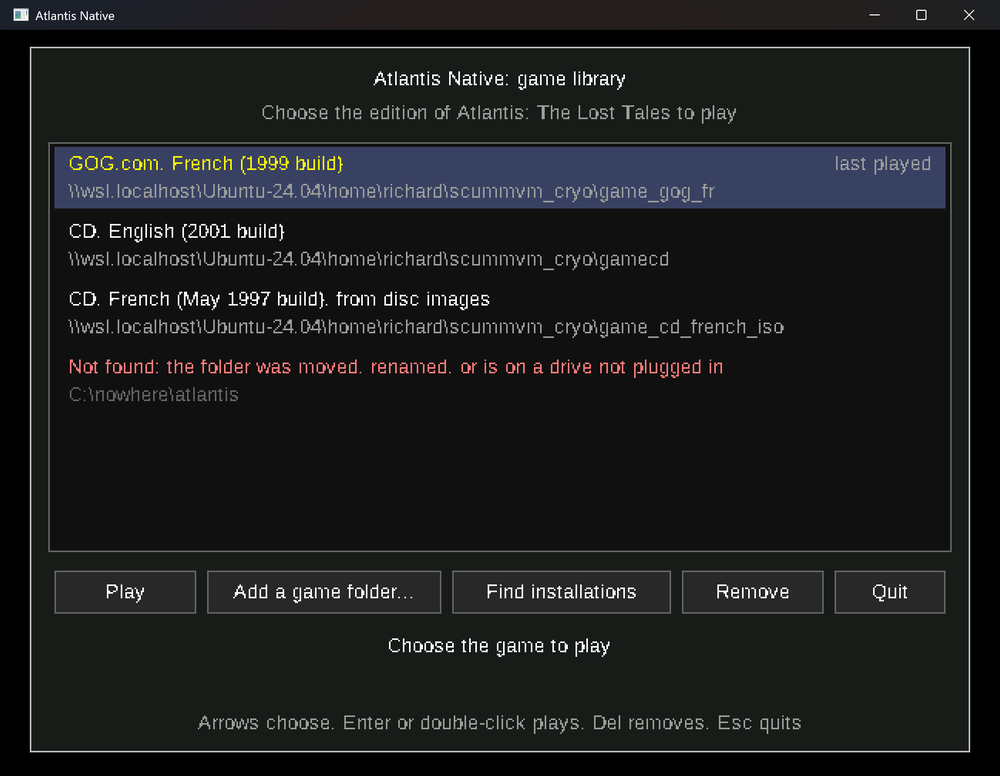
From top to bottom: the player screen (macOS, HD mode); a dialog with its 3D talking head drawn at the window's resolution; the same view in the original's 640x480 and in the HD mode; widescreen; the game library. The game's pictures and text are © Microids (Cryo Interactive Entertainment), shown here to illustrate the engine; Atlantis Native contains none of them.
Features
- 🖥️ Windows, macOS (Apple Silicon), Linux and the web: one engine, the same game everywhere, even in a browser tab.
- 🎯 Faithful: the scripts, dialogs, music, 3D heads and puzzles run the original's own logic. The heads are drawn with the original's arithmetic, so the pixels match on every platform.
- ✨ HD mode (optional): the panoramas and 3D heads rendered at your window's resolution, sharp subtitles, and the interface art upscaled with xBR. With Widescreen on, the panorama fills the whole of a wide window, the projection carried on past the original's edges; beside the videos, black bars, the frame's edges blurred, the frame zoomed to the width (easing in and out of a move), or (for the moves) the panoramas of the places left and reached (up to a 2.4:1 picture, black beyond on wider screens).
- 🐞 Bug fixes (optional): seamless music loops, talking-head overlays drawn correctly, and other fixes of the original's bugs. One switch turns them all off for the game exactly as it shipped.
- 💾 Your saves, compatible: the game saves at every chapter, in the original's own file format. An existing installation's players and checkpoints are taken over on the first start.
- ⚙️ Options menu (F10, or O): graphics, HD settings and enhancements, changed at once while you play.
- 📚 Game library: several editions (GOG.com, CD, disc images...) in one list, to choose the one to play at start-up or switch from F10.
- 🪟 A modern window: resizable, the picture kept in its 4:3 proportions, the mouse captured while you look around.
Download
The latest release holds the builds of the current version; the nightly release those of the latest commit:
| System | File |
|---|---|
| Windows 10 and later, 64-bit | atlantis-native-windows-x64.zip |
| macOS 11 and later, Apple Silicon | atlantis-native-macos-arm64.dmg |
| Linux x86-64 (glibc 2.35+, ALSA) | atlantis-native-linux-x64.tar.gz |
| Linux 64-bit ARM, such as a Raspberry Pi 4 or 5 (glibc 2.35+, ALSA) | atlantis-native-linux-arm64.tar.gz |
| Web (a static site to serve over HTTP; on the nightly release) | atlantis-native-web.zip |
The web version of the latest commit is also online: https://ripleyxlr8.github.io/atlantis-native/ (Chrome, Edge, Firefox or Safari). Pick your game folder there: its files are read inside your browser and never sent anywhere; the saves stay in that browser.
Windows: the program is not code-signed (a certificate costs money each year), so Windows SmartScreen may warn that it "protected your PC" the first time. Click More info, then Run anyway. It opens normally from then on. Download Atlantis Native only from its releases page: the builds there are made by this repository's public workflow.
macOS: the app is signed ad hoc but not notarised by Apple (that needs a paid Apple Developer account), so macOS blocks it the first time. Since macOS 15 a right-click is not enough:
- Open Atlantis Native once (macOS says it cannot verify it).
- Go to System Settings → Privacy & Security and click Open Anyway next to the message about Atlantis Native.
- Confirm with Open. It opens normally from then on.
Or, in the Terminal:
xattr -dr com.apple.quarantine "/Applications/Atlantis Native.app"
You need the game
Atlantis Native contains no game data. Bring your own copy:
| Release | Languages | What to point it at |
|---|---|---|
| CD (2001 build) | English | the folder with atlantis.exe and BIGCD1.BIG … BIGCD4.BIG |
| CD, retail release (May 1997 build) | English | the folder with atlantis.exe and BIGCD1.BIG … BIGCD4.BIG |
| CD, retail release (August 1997 build, 4 CDs) | French | the folder with atlantis.exe and BIGCD1.BIG … BIGCD4.BIG |
| CD, retail release, first pressing (May 1997 build, 4 CDs) | French | the folder with atlantis.exe and BIGCD1.BIG … BIGCD4.BIG |
| CD, retail release (August 1997 build, 4 CDs) | German | the folder with atlantis.exe and BIGCD1.BIG … BIGCD4.BIG |
| CD, retail release (June 1997 build, 4 CDs) | Dutch | the folder with atlantis.exe and BIGCD1.BIG … BIGCD4.BIG |
| CD, retail release (June 1997 build, 4 CDs) | Swedish | the folder with atlantis.exe and BIGCD1.BIG … BIGCD4.BIG |
| CD, retail release (August 1997 build, 4 CDs) | Spanish | the folder with atlantis.exe and BIGCD1.BIG … BIGCD4.BIG |
| CD, retail release (July 1997 build, 4 CDs) | Italian | the folder with atlantis.exe and BIGCD1.BIG … BIGCD4.BIG |
CD with Cryo's patch 1.01 (AT1CDINT.EXE, 1999 build) | English, French, German, Dutch, Swedish, Spanish or Italian CD (French interface) | the folder with the patched atlantis.exe and BIGCD1.BIG … BIGCD4.BIG |
| GOG.com | English, French, German, Spanish, Italian | the installation folder |
Each build plays as it shipped: the 1997 English CD, the May 1997 French CD and the Dutch and Swedish CDs, for one, draw their subtitles in their own 8x8 pixel font (see Game builds).
How to get the files from your CD or GOG.com: see Getting the game files.
The game you chose is shown in the window's title and at the foot of the options menu, e.g. GOG.com, French (1999 build).
Quick start
- Download and unpack the build for your system.
- Double-click atlantis-native (on macOS, Atlantis Native).
- The first time, choose your game folder. It is remembered. With more than one edition, the game library lets you choose the one to play (hold Shift at start-up to open it).
That's it: the Cryo logo plays, create a player, and Atlantis awaits.
From a terminal you can also pass the folder:
atlantis-native /path/to/game. More options (--original, --hd,
--new-game, …) are in the player's guide.
Controls
| Action | Control |
|---|---|
| Look around | move the mouse, or the arrow keys (or F5 / F6 / F7 / F8) |
| Go somewhere, talk, use | left click where the cursor animates |
| Next dialog line | left click |
| Skip a talking head's lines | Escape |
| Inventory | right click (the bar's edges scroll it) |
| In-game menu (load, options, quit) | Escape in the panoramic view |
| Port options (graphics, HD, bug fixes, game library) | F10 (or O, for a keyboard without function keys), at any time; the game pauses |
| Full screen | F, F11 or Alt+Enter |
| Diagnostic overlay | F9 |
On the player screen, click the last row to type a new name, then Enter or OK.
Build from source
cargo build --release
cargo run --release -- /path/to/game
On Linux, install the ALSA headers first (libasound2-dev or
alsa-lib-devel). The web build is made by web/build.sh; see the
technical notes.
Learn more
- 📖 Player's guide: command line, where the saves and settings live, known differences from the original.
- 🔧 Technical notes: the engine's layout, the enhancements, how the HD mode works, subtitles, the web build, tests, roadmap.
Code signing policy
Windows builds are to be signed with a free code signing certificate provided by SignPath.io, certificate by SignPath Foundation (in progress: until then the builds are unsigned).
- Committers and reviewers: ripleyXLR8
- Approvers: ripleyXLR8
Only the executable built by this repository's GitHub Actions workflow from its own sources is signed; every release is approved by hand.
Privacy: this program does not transfer any information to other networked systems. It only reads the game files you point it at and writes its saves, settings and log to your own user folder (in the web version, to your browser's storage: the page is downloaded from GitHub Pages, the game files and saves never leave your computer).
AI use
Atlantis Native was written for the most part by an AI (Anthropic's
Claude, through Claude Code), directed and reviewed by its maintainer:
the commits it wrote carry a Co-Authored-By: Claude line. The engine
follows the original game's code, reverse engineered and checked against
it: the tests compare the port's results with the original's own code run
under emulation (subtitles, talking heads, puzzles, tables), pixel for
pixel where it matters, on every edition supported. Reports of anything
that differs from the original are welcome.
Support the project
Atlantis Native is free. If you enjoy it, you can buy me a coffee ☕: it helps keep the work going (more editions, fixes, the HD and widescreen modes). The link is also in the game: "Buy me a coffee..." in the F10 menu, and at the foot of the game library. Now and then (rarely, never more than once a week) a small thank-you screen at start-up offers the same links; "Don't show this again" turns it off (see the guide).
Licence
GNU General Public License, version 3 or later (see LICENSE). The code is
derived from ScummVM's CryOmni3D engine, Copyright (C) the ScummVM team.
The program's icon (assets/icon/, drawn by make_icon.py) is the
project's own, under the same licence.
The subtitle font, Liberation Sans Regular
(assets/fonts/LiberationSans-Regular.ttf, Copyright (c) 2010 Google
Corporation, Copyright (c) 2012 Red Hat, Inc.), is licensed under the SIL
Open Font License, version 1.1 (see assets/fonts/LICENSE-LiberationSans).
Atlantis: The Lost Tales is a trademark of its owners. This project is not affiliated with them.