Atomic Bomberman — Modern
Atomic Bomberman — Modern is a from-scratch reimplementation of Atomic Bomberman for PC, rebuilt by reverse engineering the original and checking every rule against it.
- Type: PC port
- Game: Atomic Bomberman
- Runs on Windows and Linux
- By elraro
- Latest release v1.0, 2026-10-05
- Source: https://github.com/elraro/atomic-bomberman
README
💣 Atomic Bomberman — Modern
A clean, from-scratch reimplementation of Atomic Bomberman (1997), rebuilt by reverse engineering the original and checking every rule against it.







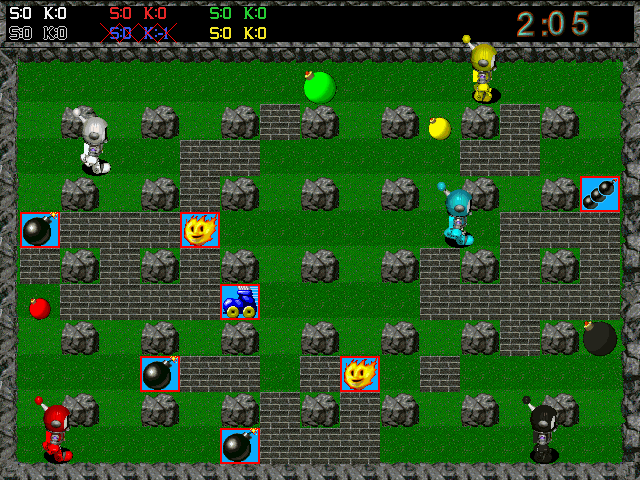
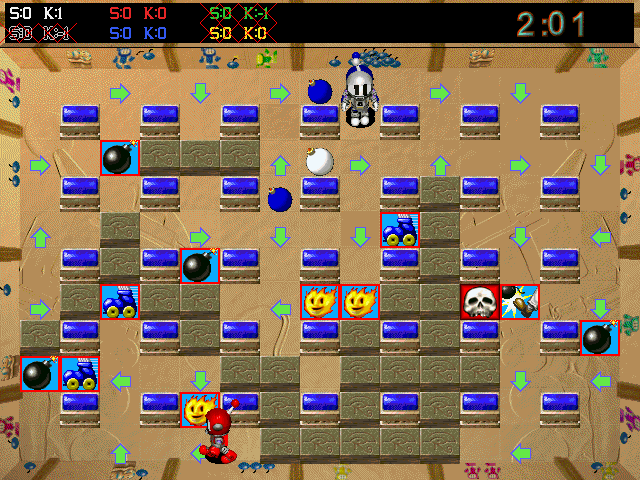
Unofficial fan project. Not affiliated with Interplay, Hudson Soft or Konami. No original game files are included. It plays out of the box with its own free graphics and sounds; with your own copy of the original you get the original look and sound. See the disclaimer.
💬 Community
Come and talk about the project, find people to play with, report what breaks and share your arenas: join the Discord server.
🔥 What is this?
Atomic Bomberman is a 1997 Windows game. This project does two things:
- Reverse engineers it — the executable, its data formats and its behaviour — and writes down what it does, with the evidence.
- Rebuilds it as a modern C++20 program on SDL3 and OpenGL, whose rules come from that study rather than from translating the old code.
The original is then run side by side (under Wine, driven by scripted key presses) to check that the rules were understood correctly.
🎮 What you get
| 💥 The real rules | Movement, corner sliding, bombs, chain reactions, kicks, punches, grab and throw, spooge lines, trigger and jelly bombs, goldflame, duds, nine diseases, 13 powerups |
| 🗺️ All 11 levels | With their arrows, conveyor belts, warp holes and trampolines, and every original scheme |
| 🤖 Computer players | Modelled on the original's own behaviour list |
| 👥 Up to 10 players | Two on the keyboard, gamepads, the rest AI; free-for-all or team play |
| 🌐 Network play | A new client-server mode over TCP/UDP: host from the menu or run the dedicated server; lobby, chat, LAN search |
| ⏱️ The endgame | Round clock, "hurry", closing walls, draws, match victories |
| 🆓 Playable without the original | A free set of graphics, sounds, music and arenas, made by the program's own code |
| 🎨 Original look and sound | Graphics, HUD fonts, sound effects and music loaded from your own copy of the game, if you have one |
| 🧪 Tested | Automated tests of the game rules run on every push (67 tests at the time of writing); 33 mechanics confirmed against the running original |
📸 Screenshots
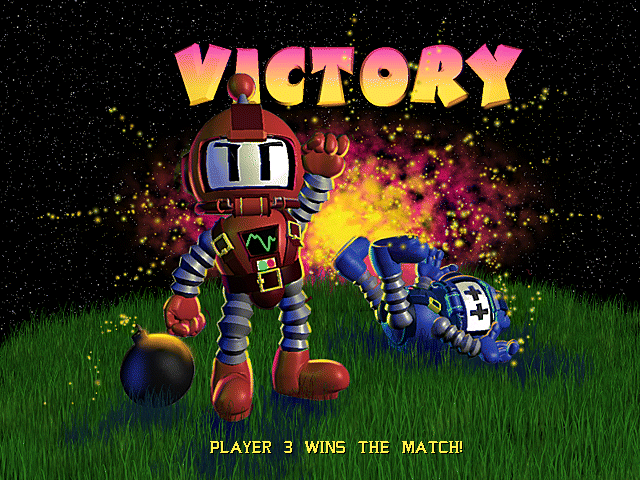
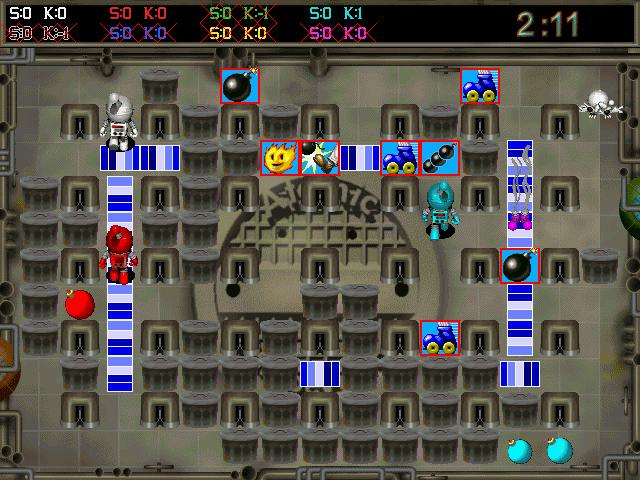
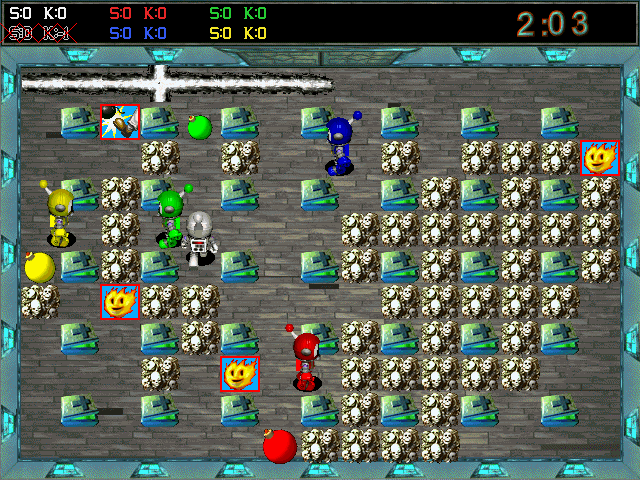
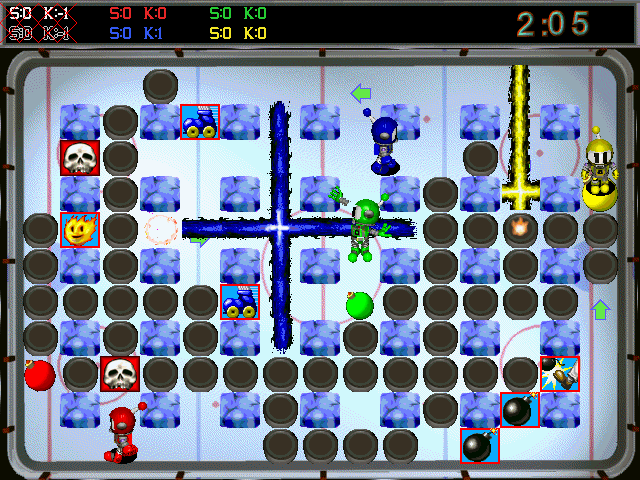
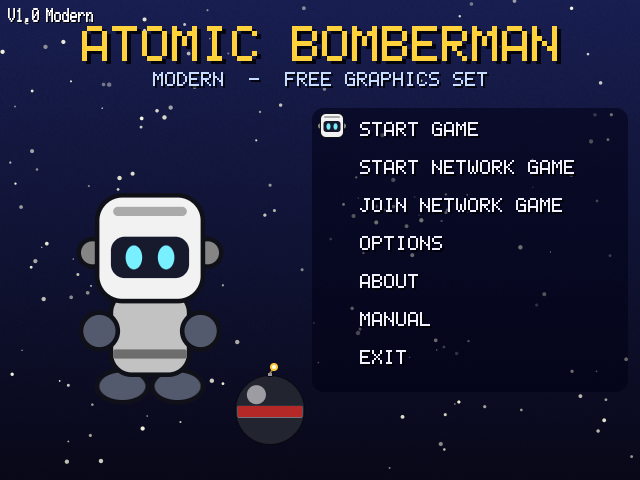
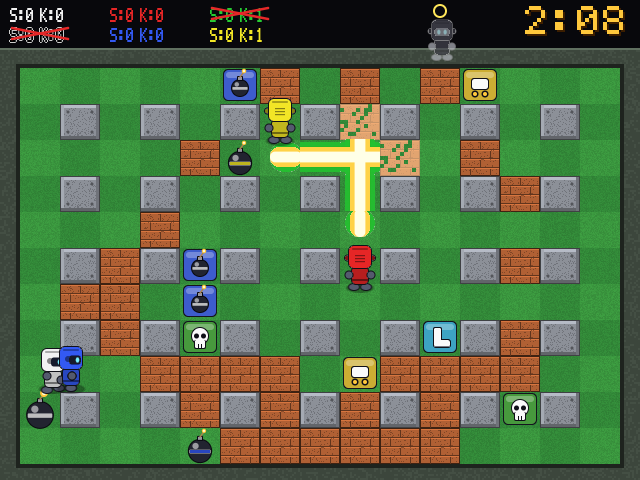
Without the original game the program uses its own free set (robots instead of the original characters, synthesised sound):
🚀 Quick start
- Get a build from the Actions artifacts or a release, or build it yourself (below).
- Play:
That is all: with no original game on the machine it starts with the free asset set../atomic - Optional, if you own the original game (installed or on CD): import its data once for the original graphics, sounds, music and all its arenas. The game offers this on its first start and under Options → Original Game Data (choose the folder, watch the progress bar); you can do it at any later time, and Options → Graphics And Sound switches back to the free set. Or with a command:
./atomic --import-assets /path/to/original/game--freeswitches back to the free set at any time.
Full instructions, folder locations and troubleshooting: INSTALL.md.
📱 Android
There is an Android build (an APK among the downloads): the same game with on-screen controls. It plays with the free asset set, or with the original game's data if you put your copy of the game on the device and choose its folder when the app asks on its first start (it converts it by itself, remembers the folder, and converts again with each new release). It is new and was built and checked on an emulator. How it works, how to build it and what it cannot do yet: android/README.md.
🛠️ Build from source
cmake -S . -B build -DCMAKE_BUILD_TYPE=Release -DAB_FETCH_SDL3=ON
cmake --build build --config Release
ctest --test-dir build -C Release --output-on-failure
Needs CMake 3.20+ and a C++20 compiler. -DAB_FETCH_SDL3=ON downloads SDL3 and links it in; leave it out to use an installed SDL3 (libsdl3-dev). Without SDL3 only the game core and the tests are built. Linux, Windows (both for x86-64 and 64-bit ARM), macOS and Android packages are built by .github/workflows/build.yml.
🕹️ Running and controls
./build/atomic
The program looks for the original game's data in: --game-dir PATH, the ATOMIC_GAME_DIR environment variable, an imported assets folder (next to the executable, in the current folder, or in the per-user data folder), or a game folder with a copy of the original. The terminal prints INFO Game files: … with what it uses. If none of these holds the original, it plays with the free asset set, which it writes to the per-user data folder on first start (how it is made).
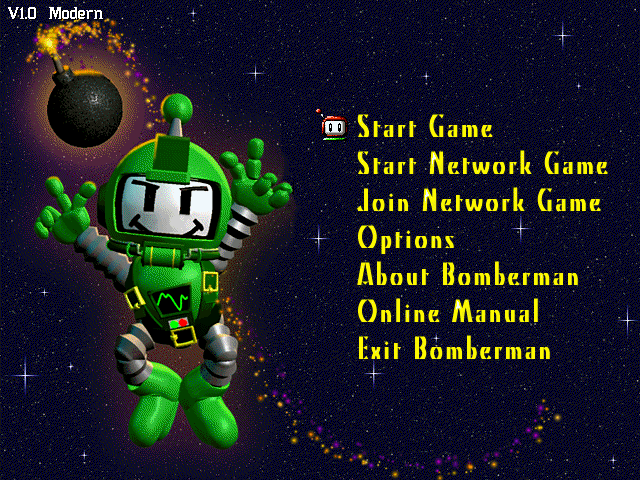
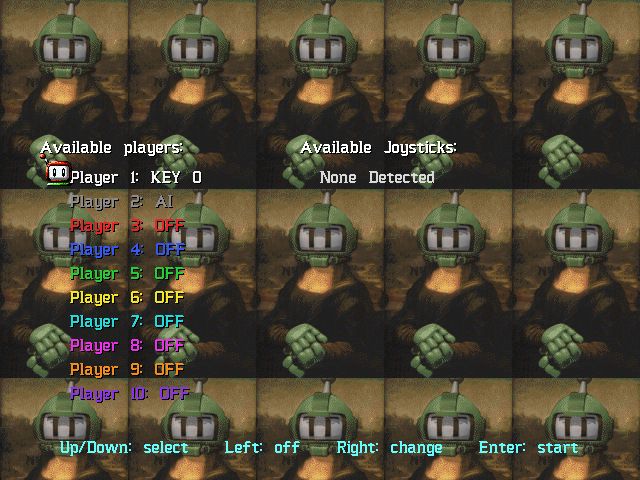
The program opens on the main menu. Choose Start Game, set up the player list (Up/Down select a slot, Right cycles AI → KEY 0 → KEY 1 → OFF, Left switches a slot off), press Enter, then choose level, scheme and wins (Left/Right) and press Enter to play. By default player 1 uses the first key set and player 2 is a computer player, as in the original. Options, About Bomberman, Online Manual and Exit work as well; Start Network Game and Join Network Game open the network mode described below. F1 opens the help pages from any screen. As in the original there are two hidden features: press Ctrl-E six times on the main menu for the level (scheme) editor, and C five times on the player list for campaign mode. Schemes made with the editor are saved in a schemes folder next to your saved settings (Linux: ~/.local/share/atomic-bomberman-modern/atomic/schemes) and appear in the scheme list.
| Move | Bomb | Action | |
|---|---|---|---|
| KEY 0 | arrow keys | Space | Enter |
| KEY 1 | R (up) D (left) F (down) G (right) | S | A |
Options → Sound Test lists every sound file of the game data and plays the one you choose (Tab switches between all, the ones the game never plays, and the ones it uses). The original's disc holds about a thousand sounds the game never plays; 844 of them, voice lines of the kinds the game does play, are imported with the rest; the others only if you ask: atomic --import-assets PATH --all-sounds.
Unused voice clips. Options → Adjust Audio → Unused voice clips: Yes lets the game say those 844 lines too, at the moments it says the listed ones of their kind (taunts after a death, powerups, diseases, strings of bombs, a match won). It is off by default: the original never plays them, and some are coarse. Which clip goes where, and how sure that is: docs/specifications/unused-voices.md. An asset folder imported by an earlier release has to be imported once more for it.
These are the original's default keys. Change them under Options → Define keyboard layouts.
Connected gamepads appear in the player list as JOY n (left stick or d-pad to move, A / cross to bomb, B or X / circle or square for the action). A gamepad also works the menus: d-pad or left stick for the arrows, A to confirm, B to go back, Start for the way out of a local match and for the menu of a network match. A gamepad plugged in while the game runs is taken up. Gamepad support is untested with a real controller: none was available, and the checks press the buttons by script.
The action button punches the bomb ahead (punch), stops your kicked bombs (kicker) and detonates trigger bombs. Pressing the bomb button while standing on your own bomb picks it up (grab; release to throw) or lays a line (spooge).
In a match: Esc or Ctrl-Q returns to the menu, R restarts the round, P pauses, N advances one step while paused, F1 opens the help pages. The result screen waits for Enter or Space (it goes on by itself after six seconds when only computer players are in the game, or after Alt-W); the first player to reach the wins target takes the match. With --debug (or the environment variable KWD=1, as in the original) three of the original's debug keys work in a match: Ctrl-A lists the animation sequences, Alt-D shows an information window, F10 clears a campaign stage.
Options: --scheme NAME (file in data/schemes, default basic), --level N (0-10: graphics, music and extras), --wins N (default 2), --players N --humans H (preset the player list; --humans 0 or --demo is all computer players), --start (skip the menu), --campaign NAME (play a campaign file: simple, ghosts, crouton), --no-intro (skip the intro movie, the logo and the title screens), --roulette (bonus-game wheel for the winner of a match, before the next match), --connect ADDRESS (join a network game at once), --host [PORT] (host one at once), --seed N, --mute, --free (the free asset set even when the original is installed), --shapes, --native (640×480 window), --frames N --screenshot out.ppm (automated capture), --result-shot (capture the first result screen), --script up,down,left,right,enter,esc (scripted menu keys, one every 10 frames; pad=a, pad=b, pad=x, pad=y, pad=start, pad=up and so on press a gamepad's buttons).
🌐 Network play
This is a new network mode, not the original's (which used IPX and serial links). One server runs the game; everybody else connects to it. Up to ten players, up to four at one computer; free seats can be filled with computer players. The design is in docs/specifications/networking.md.
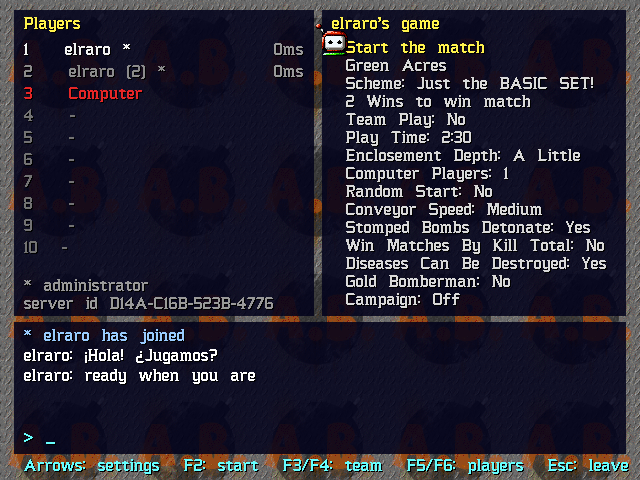
Host from the game. Main menu → Start Network Game: set your name, a name for the game, the port (default 27410) and optionally a password, then Start the server. You land in the lobby as its administrator.
Join. Main menu → Join Network Game: games on your local network are listed; for any other, type the host's address (host or host:port) and press Enter (or choose Join this address). Or start the game with --connect ADDRESS.
Lobby. Seats and ping times on the left, the match settings on the right, the chat below. Just type to chat. Under them is a row of actions, chosen with left/right and Enter: Start (administrator) or Ready (everybody else), Team (with team play), Players (how many play at your computer: the second uses the second key set; each can use a gamepad), Chat and Leave. The administrator (marked *, the player who has been there longest) changes the settings with the arrow keys (up from the actions) and can start only when every other player has said Ready (green mark before the seat); /kick NAME or /ban NAME in the chat removes a player. The keys of before still work: F2 start, F7 ready, F3 your team, F4 the second player's team, F5 / F6 one player more / fewer at your computer. The settings include the roulette ("Gold Bomberman": everybody watches the wheel before the match) and a campaign to play together against rovers and ghosts. Esc twice leaves.
In the match you play with the first key set (arrows, Space, Enter by default) or the first gamepad. T opens the chat line. Esc twice (or Ctrl-Q twice) takes you back to the lobby: you stay on the server, a computer player takes over your seat until the match ends, and you are in the next one; Esc twice in the lobby leaves the server. Whoever connects during a match watches it and gets a seat when it ends.
With a gamepad alone. Every screen of the network mode can be worked without a keyboard. A text field (name, address, password, chat) opens an on-screen keyboard: A presses the chosen key, X erases, Y is a space, Start is "done", B closes it. In a match, Start opens a menu with Resume, Chat, Back To Lobby and Leave The Server.
Online, through a master server. Where somebody runs a master server for the game, games are found without exchanging addresses: on the host screen set Announce online to Listed for everybody or By its code only, and the lobby shows a six-digit code; on the join screen Browse online games lists the public ones and Join online by code takes the six digits. The game must be told where that service is (--online-config URL --online-key HEX, or the settings keys online_config_url and online_config_key): nothing is built in yet, because nobody runs a public one for this project. With a relay set up there (coturn), the games find a way between players behind routers by themselves, straight or through the relay; without one, a host has to be reachable from outside on its port. On a network that lets no UDP out only hosts with an open port can be reached. Setting one up: docs/operations/online.md; in containers: deploy/.
Certificates, records, tournaments. A dedicated server can show a certificate saying who answers for it (the lobby then says "verified server of ..."), and keeps a signed record of every round, which each player's game checks and which anybody can play again with atomic_verify. A tournament is a file signed by its organiser that names the players by their keys, the servers and the matches; Join Network Game → Tournament opens it and takes you to your match. All of this is described in the same document.
Dedicated server. atomic_server is the same server without a window; it needs no graphics and no SDL:
./atomic_server --name "Friday bombs" --port 27410 --game-dir /path/to/assets --computers 2
It reads schemes, tuning values and level extras from the same game data as the game (--game-dir, ATOMIC_GAME_DIR, an assets folder, or the per-user folder), and logs joins, chat and results. Type status, say TEXT or quit on its console; --help lists the options (--password, --level, --wins, --play-time, --team-play, --hidden, ...). The first player to join is the administrator.
Reaching a server. The host's port must be reachable for TCP and UDP. A game hosted from the menu asks the router to open the port by itself (UPnP) and says in the lobby whether that worked and which address to give your friends; atomic_server --upnp does the same. If the router does not cooperate, forward the port by hand, or announce the game online (see above): where a master server with a relay is set up, the others reach it through the routers, or through the relay when there is no other way, also from networks that let only web traffic out. Servers on your local network are found on any port. IPv6 addresses work too ([address]:port). If only TCP gets through the game still works, a little less smoothly. Players need the same version of the program; they do not need the same schemes, because the server sends the arena.
Privacy and bad behaviour. Connections are encrypted (the chat, the names and the password cannot be read or altered on the way), and the password itself is never sent. Each server has an identity your game remembers: if the server at an address is later a different one, you are warned instead of connected. What lies under the bricks and what chance will decide next are kept on the server, so a tampered game cannot peek. The administrator can hand the role over (/admin NAME), /kick NAME (out for five minutes) or /ban NAME (out until /unban ADDRESS); the dedicated server's console has kick, ban, unban and bans. The server also limits connections, password guesses and message floods per address. This protects a game among people who mostly trust each other; it is home-made cryptography that passes the standard test vectors, not an audited security product, and a ban follows an address, not a person.
What to expect. Your own moves are shown at once (client-side prediction) and confirmed by the server a moment later; other players are shown where the server last confirmed them, so on a slow link they are a moment behind. The sounds of your own actions are immediate too; explosions and other players are heard with the link's delay. Options → Network: Show Own Moves At Once switches prediction on and off (it applies to the next game you join). This mode has been tested on one machine at a time only: automated tests over the loopback interface on Linux and Windows, including with 40 % packet loss, and matches against a dedicated server with scripted clients on Linux. It has not yet been played between two real computers, and the router port opening was tested against a simulated router only.
🔬 How it was made
| Step | Where |
|---|---|
| Inventory of the original, executable analysis, Ghidra work | docs/reverse-engineering/ — start with JOURNAL.md |
| What the game does, independent of the old code | docs/specifications/ |
| Experiments on the running original | dynamic-analysis.md |
| What is confirmed, tested, or neither | validation-status.md |
| How the modern program is put together | docs/migration/ |
| Open questions | unknowns.md |
A few things learned along the way:
- The bomb fuse is exactly 2.000 s on the original, measured on 84 bombs.
- The original has no frame limiter; on a modern machine it runs about 960 frames per second, which quietly changes the rules that count frames instead of time.
- Chain reactions are not instant: each link costs one frame.
- A dying player still counts as alive for one second, which is how draws happen.
- The main menu's lettering is part of the background picture; the game only draws the cursor.
📂 Repository layout
| Path | Contents |
|---|---|
src/game/ | Gameplay core and computer players. Deterministic, no platform dependencies |
src/app/, src/rendering/, src/audio/ | SDL3 window and input, OpenGL 3.3 renderer, sound and music |
| `src/resou |