ReBusters 2nd
ReBusters 2nd is a native PC port of Beast Busters: Second Nightmare that allows play with mice, controllers, or PC light guns and supports up to three players.
- Type: PC port
- Game: Beast Busters: Second Nightmare
- Runs on Windows
- By QuietClubGames
- Latest release v0.1.1, 2026-11-22
- Source: https://github.com/QuietClubGames/ReBusters2nd
README
ReBusters 2nd
Beast Busters: Second Nightmare, rebuilt for Windows.
An unofficial PC version of SNK and ADK's 1998 Hyper Neo Geo 64 light-gun shooter.




Download · Install · How to play · Guns, mice and controllers · The menu · Playing online · Troubleshooting
Important
ReBusters 2nd does not include the game. You need your own legally obtained copies of two arcade ROM
sets, as MAME names them: bbust2.zip (Beast Busters: Second Nightmare) and hng64.zip (the Hyper Neo
Geo 64 system ROMs). Setup builds the game from them on your PC. The download contains only ReBusters 2nd's
own code and the open-source tools it uses.
Tip
The pause menu: press Tab or Esc (on a controller, Back + Start). Inside the menu the mouse works too: point at something to choose it, click to change it.
Warning
This is an early test release. In automated tests the game plays from power on to the ending with three players. PC light guns, several mice at once, three controllers at once and online play are experimental: they have only been tested on one PC with simulated devices and a simulated internet connection, never by real players on real hardware. So far the game has been played for real with one mouse. Reports of how the rest works for you are very welcome.
Contents
- What ReBusters 2nd adds
- The game
- What you need
- Install, update and uninstall
- How to play
- Guns, mice and controllers
- Two or three players
- The menu
- Arcade settings
- Playing online (experimental)
- Your files
- Troubleshooting
- Known gaps
- For developers
- About and credits
What ReBusters 2nd adds
| No light gun needed | The mouse is your gun: point and click to fire, right-click to reload, middle-click for a bomb. |
| Up to three players | Each player can have their own mouse, controller or set of keys. With "one mouse per player", each mouse's first click claims the next gun. |
| PC light guns | Sinden, GUN4IR and the like point straight at the screen, with a white-border option for Sinden. (Experimental.) |
| Controllers | Xbox-style controllers for all three players. The stick aims faster the further you push it, two ready-made layouts, full remapping. |
| Sharper 3D | The 3D is redrawn on your graphics card at your screen's resolution. Or keep the original picture (F9 switches). |
| Your screen, your way | Window, borderless or exclusive full screen; 4:3, stretched or pixel-perfect scaling; sharp, smooth, scanlines, or the look of an arcade monitor (CRT, flat or curved). |
| Arcade settings in a menu | Free play, a two- or three-gun cabinet, difficulty, blood and gore, language, demo sound, coin prices. |
| Online co-op (experimental) | Two players over the internet or a home network, with rollback. See Playing online. |
| Native | Not an emulator: the arcade code is recompiled into a Windows program. |
The game
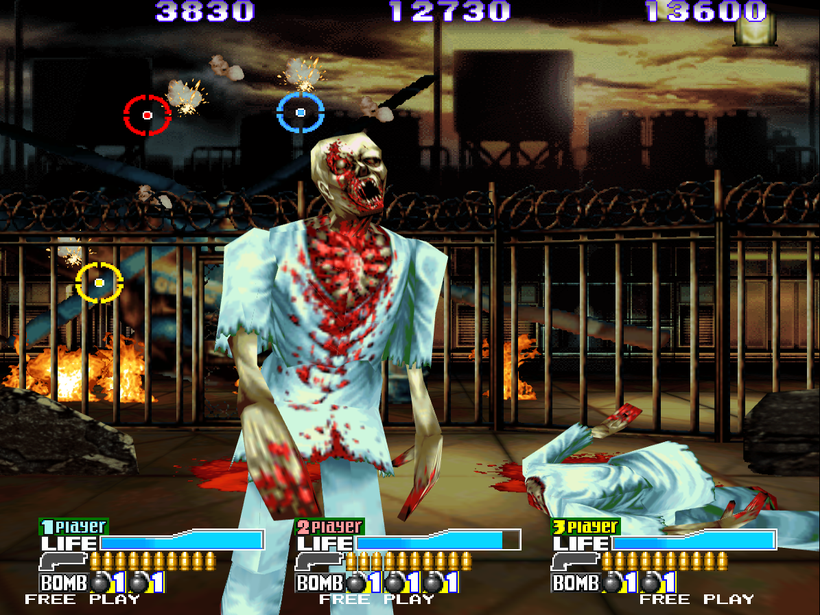
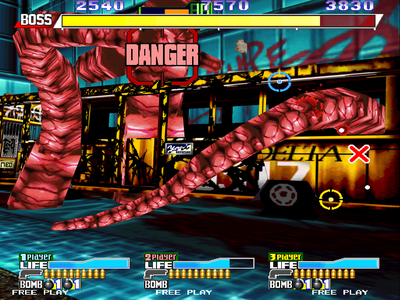
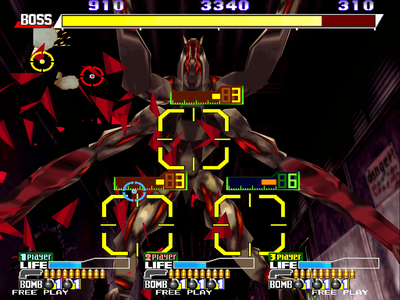
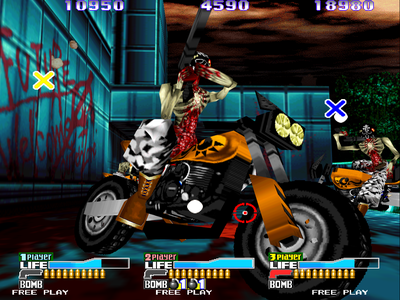
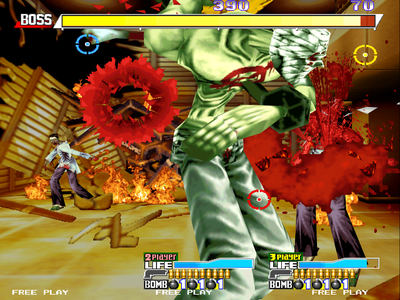
Beast Busters: Second Nightmare is a rail shooter that SNK and ADK released in arcades in 1998 on the Hyper Neo Geo 64 board, the sequel to SNK's 1989 Beast Busters. Up to three players, each with a gun: three marines are sent into New Port Town, a floating city where a disease has turned people into monsters. Each gun has a trigger, a pump to reload, and a bomb button. Six stages, a boss at the end of each, and an ending.
What you need
- 64-bit Windows 10 or 11.
- A graphics card with Direct3D 11.
- Your own
bbust2.zipandhng64.zip(see the note at the top). - About 600 MB of free disk space while installing. The installed game takes about 120 MB.
- A mouse. Extra mice, Xbox-style (XInput) controllers or a PC light gun for more players; the keyboard always works.
Install
- Download
ReBusters2nd-Setup.zipfrom the latest release and unzip the whole folder anywhere. - Run
Setup.exe. - Choose your
bbust2.zipandhng64.zipand where to install, then press Install.
Setup checks the ROMs, builds the game from them on your PC and adds desktop and Start menu shortcuts. It takes a minute or two. No administrator rights are needed and nothing is downloaded: everything Setup uses is in the folder you unzipped, which you can delete afterwards. Setup also makes the pause menu's picture and the game's icon from your own ROMs, so the download holds none of the game's artwork.
Any MAME version's sets work as long as they are complete: Setup finds the files it needs by checksum,
whatever they are named. hng64.zip must include the I/O board file tmp87ph40an.bin.
Note
Setup isn't code-signed, so Windows may show "Windows protected your PC". Choose More info, then
Run anyway. If your antivirus blocks Setup.exe, that is an automatic guess about new, unsigned
programs: allow it in the antivirus's history list and run Setup again.
Updating
Download the new ReBusters2nd-Setup.zip and install into the same folder as before. Your settings,
controls and the arcade's saved records are kept.
Uninstalling
Windows Settings → Apps → ReBusters 2nd → Uninstall, or run Uninstall.exe in the install folder. It
asks whether to keep your settings, and removes only the game's own files.
How to play
- Start the game from its shortcut. It boots like the arcade machine, into the story and the title.
- Insert a coin, then press Start. With Free play on (menu, Game page), Start alone is enough.
- Point at the monsters and shoot. When the gun is empty the game tells you to reload (pump): right click. A bomb (middle click) clears the screen when you're surrounded.
The other players join at any time by pressing their own Start (after a coin, unless free play is on).
Guns, mice and controllers
The mouse
| Fire | Left button |
| Reload (the pump) | Right button |
| Bomb | Middle button |
| Insert coin / Start | Back / forward side buttons |
These are the defaults. To change them, for a mouse with fewer buttons or if you'd rather fire with the right button: menu, Controls → Show: Mouse buttons. Each of fire, reload, bomb, insert coin and Start can be any mouse button, or none. Mouse defaults puts them back.
One mouse (the default): the Windows pointer is player 1's gun, wherever it is over the picture.
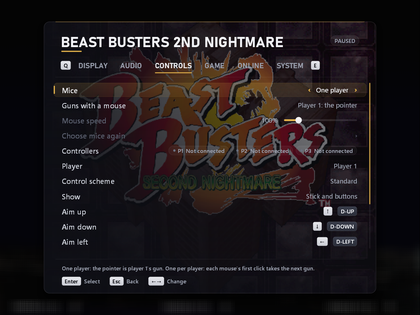
One mouse per player (menu, Controls page, Mice): plug in a mouse for each player. Each mouse's first click claims the next free gun: the first is player 1, the next player 2, then player 3. Choose mice again starts over. While players own mice, the pointer stays inside the game window. Mouse speed sets how far a sight moves per mouse movement.
PC light guns (experimental)
Sinden, GUN4IR and other PC light guns act as mice that point straight at the screen, so they work like the mouse above. For a Sinden, turn on Display → Light-gun border: a white frame round the picture, which the gun needs to find the screen. The picture shrinks to fit inside it, so nothing is covered.
Controllers
The first controller connected is player 1, the second player 2, the third player 3.
| Standard (default) | Face buttons | |
|---|---|---|
| Aim | Either stick, or the D-pad | Left stick, or the D-pad |
| Fire | Right trigger or A | A |
| Reload | Right bumper or X | B |
| Bomb | Left bumper or B | X |
| Start / insert coin | Start / Back | Start / Back |
| Menu | Back + Start | Back + Start |
The further you push a stick, the faster the sight moves, and held right over it speeds up a little more. Stick speed and the dead zone are on the Controls page.
Keyboard
| Player 1 | Player 2 | Player 3 | |
|---|---|---|---|
| Aim | Arrow keys | R F D G | I K J L |
| Fire / reload / bomb | Z / X / C | A / S / Q | U / O / P |
| Start / insert coin | 1 / 5 | 2 / 6 | 3 / 7 |
| Menu | Tab or Esc |
Changing controls
On the menu's Controls page, choose Player and the control, and press Enter (A on a controller). Press a controller button to add it (again to take it off; up to three per control), or a key to make it the keyboard key. Esc closes the box. Restore defaults puts all three players back on the original keys and the Standard scheme.
Two or three players
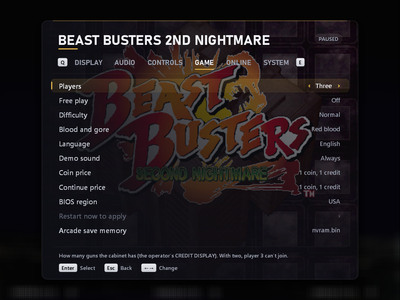
The arcade machine came as a two-gun or a three-gun cabinet, and the operator told the game which. In ReBusters 2nd that is Game → Players in the menu. New installs start at Three. If a third player can't join (for example with save data from an older version, or one copied from elsewhere), set it to Three.
Free play is a separate setting on the same page: with it on, each player just presses their Start, no coins needed.
The menu
Press Tab or Esc on the keyboard, or Back + Start on a controller. The game pauses while the menu is open. Its backdrop is the game's title screen, made from your ROMs.
| Mouse | Controller | Keyboard | |
|---|---|---|---|
| Move | Point at a row (or the wheel) | D-pad or stick | Arrow keys |
| Choose / change | Click (‹ › step a value back and forth) | A | Enter |
| Back | Right click | B | Esc |
| Switch pages | Click the page's name | LB / RB | Q / E |
| Close | Right click | Start | Tab |
Whatever the pointer is over lights up softly, so you can see what a click will do.
| Page | What's there |
|---|---|
| Display | Window / borderless / exclusive full screen, window size, monitor, picture shape (4:3, stretch, whole-number), enhanced or original graphics, quality, screen filter (sharp, smooth, scanlines, CRT, CRT curved), frame pacing, graphics card, light-gun border, frame-rate counter |
| Audio | Volume, mute |
| Controls | Mice (one player, or one per player), mouse speed, controller schemes, keys and buttons for each player, sticks, stick speed, dead zone, restore defaults |
| Game | The arcade's settings (below), and the BIOS region |
| Online | Experimental. Host a game, join one by address, input delay, this PC's address, leave |
| System | Resume, the arcade's operator menu, restart, quit |
| Key | Does |
|---|---|
| Alt+Enter or F11 | Window / full screen |
| F9 | Enhanced graphics on / off |
| F2 | The arcade's Test button (operator menu) |
| 9 | The arcade's Service button |
Arcade settings
The arcade machine had an operator's menu for the owner of the cabinet. ReBusters 2nd puts its settings on the pause menu's Game page and keeps them in the arcade's own save memory, so they agree with the original menu (still there: System page, or F2). They apply straight away.
- Players: a two- or three-gun cabinet (see above).
- Free play: Start alone begins a game.
- Difficulty: Easy, Normal, Hard, Hardest.
- Blood and gore: green or red blood, with or without flying body parts. Red with body parts is the most there is, and the default here.
- Language: English or Japanese.
- Demo sound: whether the attract demo plays sound.
- Coin price and continue price (with free play off).
- BIOS region: which of the board's BIOS chips to use (its start-up screens). Applies after a restart.
Playing online (experimental)
This part is experimental. It has been tested with two copies of the game on one PC, through simulated slow and unreliable connections (up to 120 ms and 10% of packets lost), and the two stayed in step every time. It has not yet been played between two real PCs. It connects the two players' PCs directly: there is no server, lobby or matchmaking.
Two players, each on their own PC with their own copy. One hosts and is player 1; the other joins and is player 2. Each plays with their own Player 1 controls: mouse, keys or first controller. (Player 3 isn't available online yet.)
- Host: open the menu, go to Online, choose Host a game. The game restarts and shows a waiting screen with your address.
- Joiner: on the Online page choose Address to join, type the host's address (Enter to start typing, Ctrl+V pastes), then Join a game.
- The game starts from power on for both of you, with the host's settings. Free play on the host saves putting in coins.
- Same network: the joiner types the address the host's waiting screen shows.
- Over the internet: the host's router must forward UDP port 7600 to the host's PC, or both players use a virtual-LAN tool such as Tailscale, ZeroTier or Radmin VPN.
- Windows Firewall asks the first time you host. Choose Allow.
- Both players need the same BIOS region, the same ROM sets and the same version of ReBusters 2nd.
- Input delay (Online page, the host's choice): 2 suits most connections. Raise it if the picture often jumps.
How it works, briefly
Both copies run the whole game from power on with the same settings, and send each other only what each player does: the buttons, and where the gun points. Each plays your own presses a couple of frames late (the input delay), which is usually enough for the other player's to arrive in time. When they are late, the game carries on with a guess; if the guess was wrong, it goes back to its saved state from that moment and replays the frames since, in about a thousandth of a second per frame. That is "rollback". Every second the two copies compare a fingerprint of the game's memory, to be sure they are still playing the same game.
Your files
The game keeps everything in its install folder. It sends nothing over the internet except, in an online game, your controls to the other player.
| File | What it is |
|---|---|
settings.ini | The pause menu's settings |
controls.ini | Keys, controller buttons and schemes. It can be edited by hand; the comments at its top explain it |
nvram.bin | The arcade's own save memory: operator settings and high scores |
menu_art.bmp | The menu's picture, made from your ROMs. Put your own menu_art.png next to it to use that instead |
bbust2.log | What happened in the last run. bbust2.old.log is the run before |
setup.log | What Setup did |
To start completely fresh, delete settings.ini, controls.ini and nvram.bin while the game is closed.
Troubleshooting
Setup says a ROM file is missing or wrong.
Setup names the file. Both sets must be complete, and hng64.zip must include the I/O board file
tmp87ph40an.bin (older MAME sets don't have it).
Player 3 can't join.
Menu, Game page, Players: Three. See Two or three players.
My second mouse moves player 1's sight.
Set Controls → Mice to One per player, then click once with each mouse in turn: the first click claims the next free gun. Choose mice again starts over.
The picture looks wrong.
Press F9 to switch between Enhanced and Original graphics. If Original is right and Enhanced is not,
update your graphics driver, and please report it with bbust2.log.
The game runs slowly.
Set Quality to Auto or Performance (Display page).
No sound.
Check Volume and Mute on the Audio page, and which device Windows is playing to.
If something else goes wrong, please open an issue and attach bbust2.log from the install
folder, and setup.log if the problem was with installing. For an online problem, the logs from both players
help.
Known gaps
- Not yet compared frame by frame with the arcade board; reports of anything that looks or sounds wrong are welcome.
- PC light guns, several mice, three controllers and online play are experimental (see the top).
- Online play is for two players and connects directly (no lobby).
- The sound chip's echo effect isn't reproduced. The game does use it, but nobody has worked out exactly how the chip produces it (MAME doesn't reproduce it either), and inventing one would only be a guess.
- Two unused songs are left out. Fans have found two pieces of music the arcade game never plays, known as "The Strange Visitor" and "Othello" (the second has been suggested as a continue-screen theme). "The Strange Visitor" is in the game's sound data but nothing in the game ever plays it; "Othello" isn't in the game's sound data at all. Nobody knows where either was meant to go, so ReBusters 2nd plays the music exactly as the arcade game does rather than guess.
- Setup is not code-signed. Windows only.
For developers
- docs/DEVELOPING.md: building from source, the tools, the test options.
- NOTES.md: the working diary. It records what was found in the game and the hardware, and why things are the way they are.
About and credits
ReBusters 2nd is made the same way as ReBuriki and ReSho 64: the arcade program is translated into a native Windows program (a static recompilation), and portable code stands in for the arcade hardware.
Made with Claude, Anthropic's AI model. It stands on MAME and its Hyper Neo Geo 64 driver (the hardware code is ported from it), N64Recomp by Wiseguy, ReBuriki and ReLayer. Licences: LICENSE.md.
A fan project, not affiliated with or endorsed by SNK or ADK. Beast Busters and Hyper Neo Geo 64 are trademarks of their owners.