BBLIT-Remaster
BBLIT Remaster is a PC port of Bugs Bunny: Lost in Time that runs the game smoothly at any refresh rate, in widescreen, with increased draw distance and modern gamepad controls.
- Type: PC port
- Game: Bugs Bunny: Lost in Time
- Runs on Windows
- By InLineR495
- Latest release v1.0-beta2, 2026-10-19
- Source: https://github.com/InLineR495/BBLIT-Remaster
README
BBLIT Remaster
English · Русский
Bugs Bunny: Lost in Time (PC, 1999) on a modern renderer. The game itself is untouched: same logic, levels, physics and save files. A new renderer draws it, smooth at any refresh rate, in widescreen, with a longer draw distance and modern gamepad controls.
The mod is a single ddraw.dll plus a remaster.ini settings file. No game files are modified: delete ddraw.dll and the game is back to stock.
Version 1.0-beta2. Tested on Linux (Steam + Proton, Legion Go 2 / Bazzite). The levels of the first era were tested thoroughly, the rest were spot-checked. Windows builds should work but haven't been tested on real hardware yet. If something goes wrong, please open an issue and attach
BIN\remaster.log.
Before / after
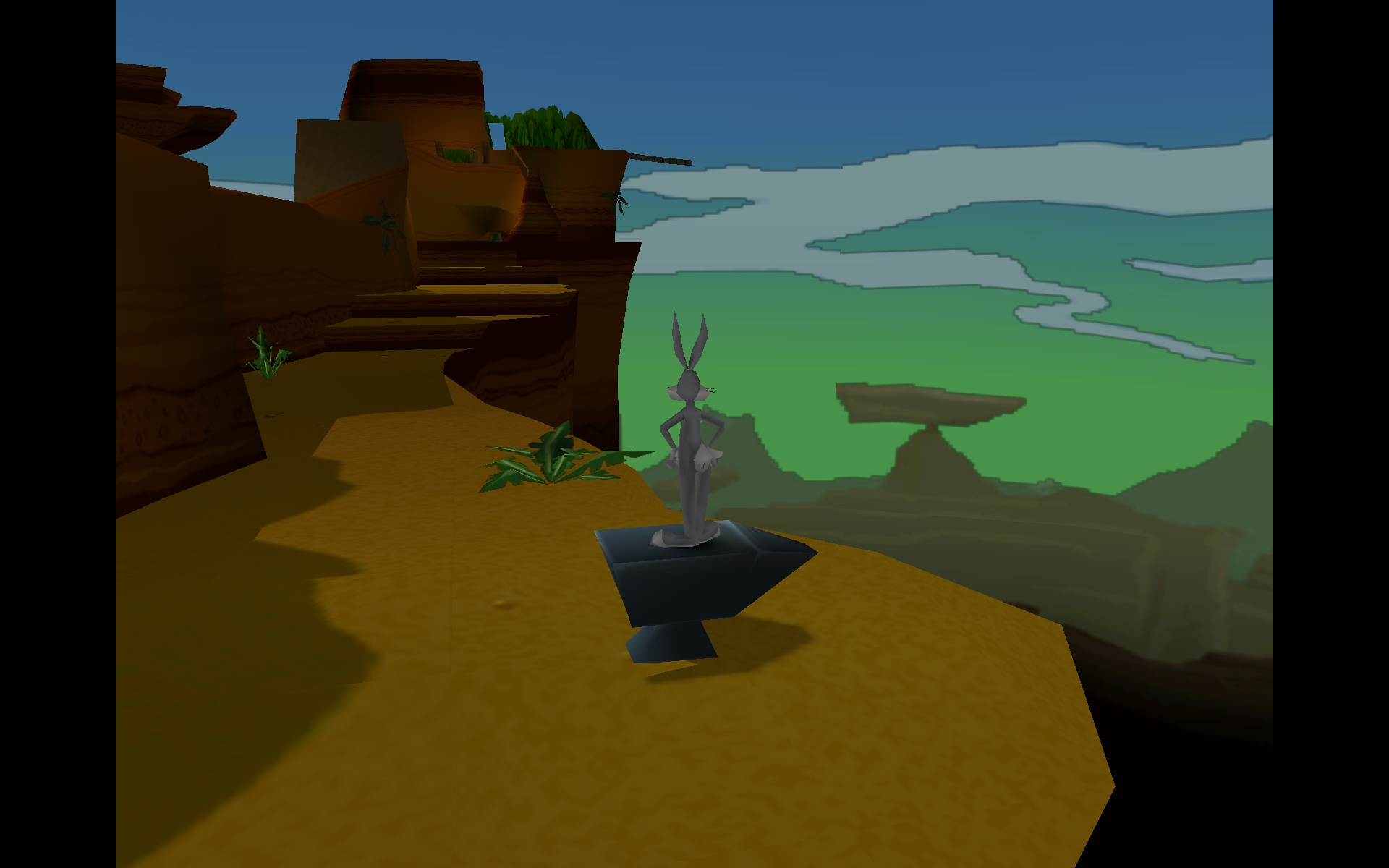
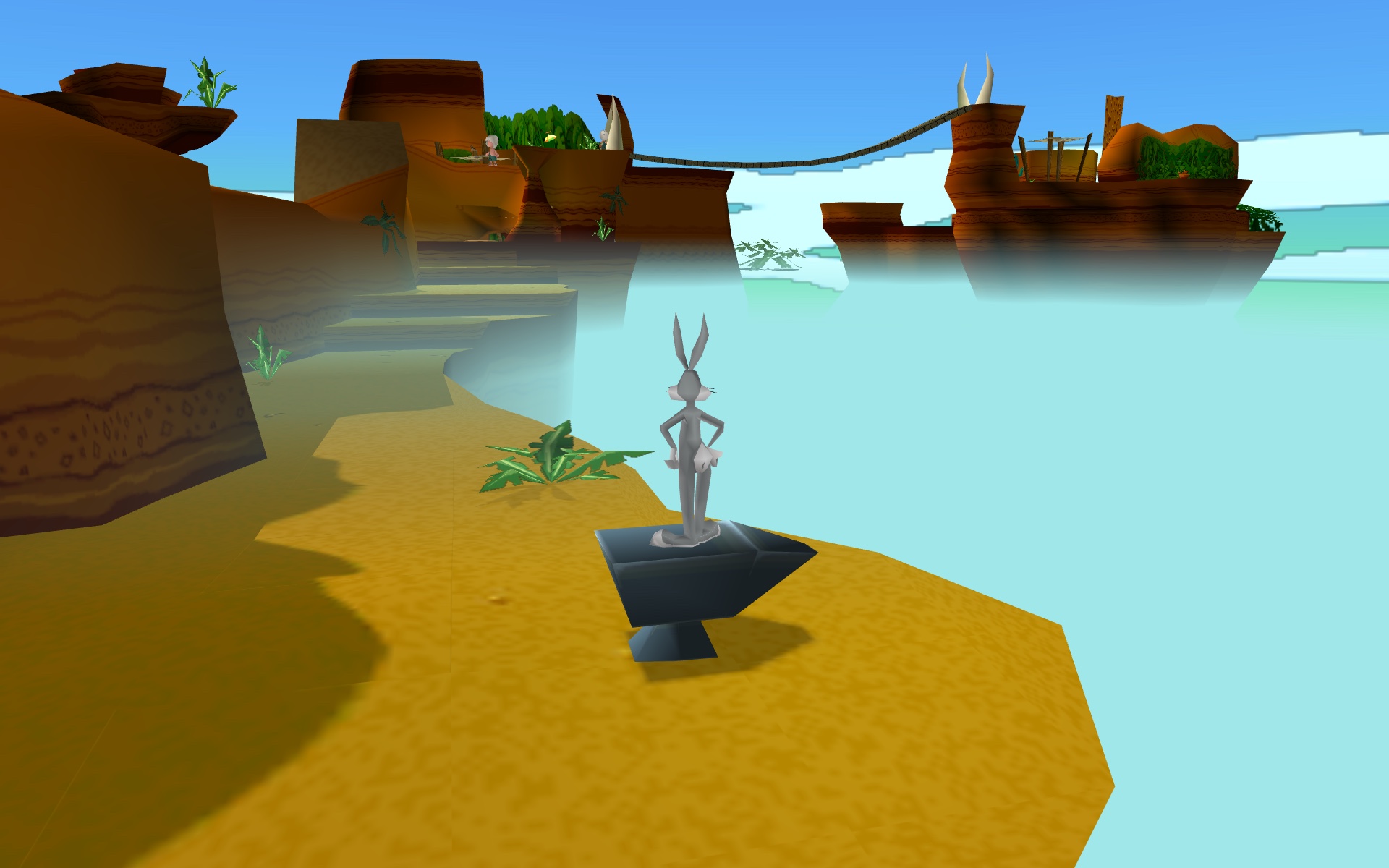
"Wabbit on the run!", same spot and camera. Top: the original (4:3, stock draw distance). Bottom: BBLIT Remaster (widescreen, 2× draw distance, ground haze, PS1 brightness).
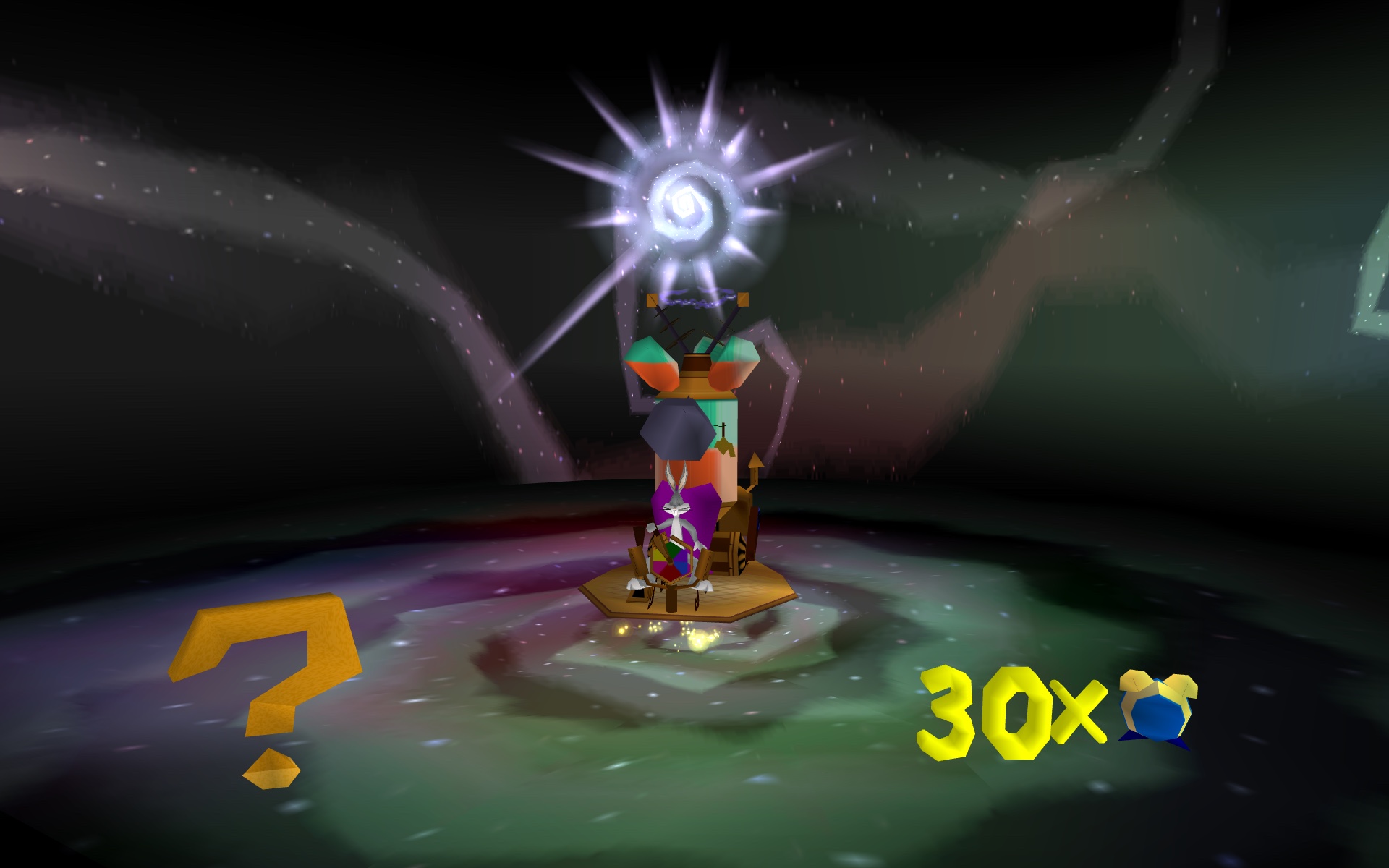
The time vortex between eras, BBLIT Remaster:
What you get
Smooth at any refresh rate. The original is hard-locked to 30 fps: position, camera and animation advance once per frame, so raising the cap just speeds the game up. The mod keeps the game logic at its native 30 ticks per second and draws in-between frames. Character, camera and animation movement is interpolated, so 60, 90, 120 and 144 Hz all play at the correct speed. By default the frame rate follows your display's refresh rate.
This is not frame interpolation: nothing is guessed from finished images the way TV motion smoothing or frame generation does, so there is no ghosting or warping. Every frame is rendered from the game's own geometry. The mod takes the positions of characters, objects and the camera from two consecutive game ticks and draws the scene in between. Only motion is interpolated: movement, camera and animation. The game logic itself (physics, collisions, enemies, input) still runs at its native 30 ticks per second, exactly as in the original. Because each frame sits between the two latest ticks, the picture trails the game logic by one tick (about 33 ms).
Widescreen without stretching (Hor+). 16:9 and 16:10 show more of the world at the sides with correct proportions. HUD counters move to the screen edges (on screens wider than 16:9 they stay within a 16:9 frame, so you don't have to turn your head; hud_aspect changes this), and menus stay centred.
2× draw distance. The world is visible twice as far, and characters and items four times as far as in the original. Distant objects fade in smoothly instead of popping in.
Fog, because the world got bigger. With the longer draw distance, the far edge of the world would end in a hard cut-off. So distant geometry blends smoothly into each level's sky colour, and the edge doesn't stand out.
"Wabbit on the run!" and "Magic Hare Blower" also get ground haze. It hides where the distant cliffs end; without it, for example, the dinosaur's neck hangs in mid-air. Other levels have no haze, because there it only darkened the horizon.
Brightness as on the PS1. The PC port divides vertex colours by 255, while the PS1 treats 0x80 as neutral, so the PC world was about half as bright as the PS1 one. The mod restores PS1-like brightness, slightly toned down (×1.8 instead of ×2) to avoid overexposure. This is adjustable with ps1_light.
Clean image.
- 4× MSAA.
- PS1 transparency (water, glass, effects) uses the proper blending modes instead of the PC port's alpha fakes, so it no longer flickers.
- The cracks where you could see the sky through bends in cliffs are closed.
- No holes or torn edges at the screen border when you swing the camera.
- Texels that are opaque on the PS1 stay opaque inside semi-transparent polygons, so the ship and palm-island silhouettes on the horizon are dark, as on the PS1.
Modern gamepad controls (XInput).
- Analogue movement: tilt the stick slightly to walk, fully to run.
- Camera on the right stick. LT/RT turn the camera towards the pressed trigger.
- Jump buffer: pressing jump just before landing still counts.
- Start opens and closes the pause menu. Back pauses and goes back in menus. B goes back in the pause menu.
Fixes.
- Bugs no longer sinks halfway into the stones he pushes. This bug dates back to the PS1 version: the stone's collision shape is offset from its model.
- The time machine's carrot no longer sticks through the logo on the title screen.
- The holes in the hub (LS01) no longer flicker or vanish: they are shallow pits under a solid ground mesh, now drawn over the ground as on the PS1.
- A palm leaf right in front of the camera no longer cuts holes in Bugs, the time machine and the hub holes behind it.
- No thin seams along the edges of leaves or square outlines inside the hub holes (the original PC port has them too).
- The level-entrance vortices in the hub spin smoothly instead of twitching and "restarting" when you walk up to them.
- No disc needed: the CD check of the European and North American releases is switched off in memory (the Russian release never had it). The game files are not modified.
- Save slots in the main menu stay inside their panel instead of one row jumping to the screen edge.
- Startup logos fill the whole screen with their background instead of sitting between black bars.
- "Hey What's Up, Dock?": diving into the burrow by the floating barrels no longer throws Bugs back. The longer character draw distance had switched on the second burrow, which grabbed Bugs towards the wrong end; now it ignores the dive, as in the original. Confirmed by playing the dive; if it still misbehaves for you, set
dive_gate=0and tell us in the issues. - Looping sounds (torch fire, fuses) no longer play forever after Bugs walks away. The original engine leaves them running at low volume until the level is reloaded; with the longer character draw distance that happened all the time. They now go quiet out of earshot and come back when Bugs returns (
fix_sfx). - "Hey What's Up, Dock?": the floating platform is no longer drawn as a flat decal on the ground, the sky islands and the sun no longer clash with the ship's hull in depth (no palm tree "stuck" on the ship), Bugs' shadow falls on the floating barrel, and the helm and the drawbridge no longer pop in and out at the original radius.
Handheld PCs (Linux/Proton). On CPUs that have both fast cores and efficiency cores (such as the Z2 Extreme in the Legion Go 2), the game's main thread is pinned to the fast cores. On Windows its own scheduler handles this. On the Legion Go 2 at a 10 W TDP, this raised the heaviest scenes from 111–116 fps to 119–120 fps.
Requirements
-
The PC version of Bugs Bunny: Lost in Time with one of these
bugs.exefiles. The mod recognises which one it is at start-up; with any otherbugs.exeit stays off and the game runs as usual.Edition Release bugs.exeSHA-256Tested Europe 1.0, multi-language Infogrames disc (English, French, German, Italian, Spanish). Usually shared as Bugs Bunny - Lost in Time [En,Fr,De,It,Es] (PC).iso74ab71e175a3f186460582cf5b870c2d216ff10d7fedd683b960aa59269f1be4Linux / Proton, short check (starts, title, a level) North America 1.6 Infogrames disc (English, French, Spanish). Usually shared as Bugs Bunny Lost in Time.iso6e15f92076614e3ee218c34c5dee566bf273e5bfee77d831cfbf78aa2d29e235Linux / Proton, short check (starts, a level) Russian 1.6 CITY, translated by "Дядюшка Рисёч" 7342f72443aad4f6efb366449f123dbe2baf7d45cbd1f3e8512aa70506512139Linux / Proton Spanish 1.0 "Bugs Bunny: Perdido en el Tiempo" 3eae4e369d79a02d0b3cafeb7c5f80f6bbba7cf4ffc02a56876aaa885d5bc050Recognised, not run with this build (an earlier separate build was tried on Windows by a contributor) All of them are 772 096 bytes. Not sure which copy to use? Take the European or the North American disc: they are the most common ones, and with the mod they need neither the disc nor a no-CD patch. To check your copy, run
certutil -hashfile bugs.exe SHA256in theBINfolder on Windows, orsha256sum bugs.exeon Linux. Patched copies (no-CD cracks, other mods) have different code and are not supported; use the originalbugs.exe. With an unsupported file,BIN\remaster.logcontains the line "неподдерживаемый bugs.exe" ("unsupported bugs.exe"); see Other editions. -
A GPU with OpenGL 4.6 (tested): Mesa (AMD, Intel) on Linux, or a current AMD, NVIDIA or Intel driver on Windows. Older drivers down to OpenGL 3.3 should also work.
-
An XInput gamepad: Xbox-compatible, Steam Deck, Legion Go, or a DualSense through Steam Input. The keyboard works as in the original.
Installation
Installing the game from the European or North American disc
- Windows: run
Setup.exefrom the disc and install as usual. - Linux, Steam Deck: no installer is needed. Copy the folders
bin,bze,data,speechesandtrackfrom the disc'sDatasfolder into a new folder (for example~/Games/Bugs Bunny), renamebintoBIN, and make the copied files writable (chmod -R u+w ~/Games/Bugs\ Bunny): saves and settings are written toBIN. The game then starts in English.
Some copies of the disc image are raw CD images (2352-byte sectors) despite the .iso name, and archive managers or mount cannot open them. Convert such an image first, for example with iat image.iso fixed.iso (package iat).
Download BBLIT-Remaster-1.0-beta2.zip from Releases and extract it into the game folder. ddraw.dll and remaster.ini must end up in the BIN folder, next to bugs.exe.
Run BIN\bugs.exe directly, not the BugsBunny.exe launcher, with these arguments: /opengl /win /b0 /x800 /y600.
/openglselects the engine's OpenGL mode; the mod only works in it./winstarts in a window; the mod turns it into borderless fullscreen./b0goes straight to the main menu and skips the intro video./x800 /y600sets the engine's internal viewport; the mod still renders at your display resolution.
Linux (Steam + Proton, Steam Deck, Bazzite)
- In Steam, choose "Add a Game" → "Add a Non-Steam Game…" and select
BIN/bugs.exeof your installed game. - In the shortcut's Properties → Compatibility, choose Proton Experimental (the tested version).
- Set the launch options:
WINEDLLOVERRIDES="ddraw=n,b" PROTON_NO_NTSYNC=1 PROTON_NO_FSYNC=1 PROTON_NO_ESYNC=1 %command% /opengl /win /b0 /x800 /y600WINEDLLOVERRIDES="ddraw=n,b"makes Wine load the mod'sddraw.dllinstead of its built-in one.PROTON_NO_NTSYNC/FSYNC/ESYNC=1are required: with Wine's newer synchronisation primitives the game freezes, and so does the unmodded original.
- Use the "Gamepad" Steam Input layout. Don't bind buttons to F1–F12.
- In Game Mode you can limit the refresh rate in the performance menu, and the game adapts to it.
Windows
Not tested with this build. A contributor tried an earlier, separate Spanish build on Windows. If you try it, please report how it went in the issues.
- Copy
ddraw.dllandremaster.iniinto the game'sBINfolder. - Create a shortcut to
BIN\bugs.exeand add the arguments after the quotes in the shortcut's "Target" field:"C:\...\Bugs Bunny\BIN\bugs.exe" /opengl /win /b0 /x800 /y600 - Always start the game through this shortcut. The launcher doesn't pass
/opengl /win. Set the shortcut's Start in directory to the game'sBINdirectory; the engine opens assets through relative paths. Openingbugs.exewithout the arguments can also enter startup paths requiring resources absent from some distributions (such asLANGUAGE.BZE). Do not rename another BZE file to fill that role. - Turn vertical sync on for
bugs.exein your driver control panel (NVIDIA: Vertical sync → On; AMD: Wait for Vertical Refresh → Always On). The mod paces its frames to vsync. - With display scaling above 100 %, the mod switches the game to DPI-aware mode, so it renders at full resolution.
Checking that it works
After launch, remaster.log appears in BIN, and its first lines contain BBLIT Remaster 1.0-beta2. The picture fills the whole wide screen, and the right stick turns the camera.
Uninstalling
Delete ddraw.dll from BIN (and remaster.ini / remaster.log if you like). On Linux, also remove the launch options.
Controls (gamepad)
| Button | Action |
|---|---|
| Left stick | Move: slight tilt to walk, full tilt to run |
| Right stick | Turn the camera |
| LT / RT | Turn the camera (L2/R2 on PS1) |
| A / B / X / Y | ✕ / ○ / □ / △ of the PS1 version |
| LB / RB | L1 / R1 |
| Start | Open/close pause; "Press Enter" on the main menu |
| Back | Pause; "back" in menus |
| B in pause | Back |
Settings
The main settings live in BIN\remaster.ini and are commented there. The [live] section is re-read once per second, so you can edit it while playing. The most useful keys:
| Key | Section | Default | What it does |
|---|---|---|---|
fps | [remaster] | 0 | 0 = display refresh rate, -1 = nearest multiple of 30 below it, a number = your own cap |
msaa | [remaster] | 4 | Anti-aliasing: 0, 2, 4, 8 |
cam_speed, cam_invert | [remaster] | 52, 0 | Right-stick camera speed and inversion |
draw_dist | [live] | 200 | World draw distance, % of the original (100 = stock) |
actor_dist | [live] | 400 | Character and item draw distance, % |
haze | [live], [levelN] | 0 / 100 | Ground haze strength, %; per-level overrides go in [levelN] sections |
ps1_light | [live] | 18 | World brightness ×10: 20 = exactly as on the PS1, 10 = like the PC port, 0 = PC port path |
xinput | [remaster] | 1 | 0 = original gamepad handling |
big_cores | [remaster] | 1 | Pin the main thread to the fast cores on hybrid CPUs (Linux/Proton) |
dive_gate | [remaster], [live] | 1 | Burrows (docks level): 1 = a burrow kept awake by actor_dist ignores a dive, as in the original; 0 = off; 2 = log only |
fix_sfx | [remaster], [live] | 1 | Looping sounds out of earshot: 1 = stop and resume when Bugs returns; 2 = just stop; 0 = original (they play forever) |
sky_dome | [remaster], [live] | 1 | The sky dome that follows the camera (docks level: islands, sun) is drawn as a backdrop; 0 = like the engine does |
shadow_act | [remaster], [live] | 25 | Shadows that fall on characters and objects (Bugs on a barrel): % of the usual pull toward the camera, 0 = off |
part_extra | [remaster] | 1024 | Extra parts in the pool for distant characters (own buffer); 0 = the engine's own pool |
hud_aspect | [live] | 178 | Widest frame for the HUD counters, aspect ratio ×100: 178 = a 16:9 frame (the screen edges on 16:9 and 16:10 screens, closer to the centre on ultrawide ones), 0 = always the screen edges, 133 = the original 4:3 positions |
splash_fill | [remaster] | 1 | Startup logos: extend their plain background into the side bars; 0 = black bars as in the original |
Known beta limitations
- Textures are the original ones, with no replacement or upscaling.
- At a low TDP, the heaviest scenes occasionally (about once per second) repeat one frame.
- Windows has not been tested with this build (a contributor tried an earlier, separate Spanish build there).
- Only the editions listed under Requirements are supported.
Other editions
If your bugs.exe is not in the table above, open an issue and attach BIN/remaster.log together with the output of this read-only check (Python 3, no extra packages):
python3 -I tools/verify_exe.py "/path/to/BIN/bugs.exe"
It prints the file's SHA-256, its .text CRC32 and how many hook sites match each known code layout. Please don't bypass the checks: another edition needs every code address the mod uses mapped and verified (docs/porting-editions.md).
Building from source
You need the MinGW-w64 cross-compiler for i686 and Python 3 (build.sh first checks that every code address in the sources goes through the edition table):
# Ubuntu/Debian: sudo apt install gcc-mingw-w64-i686
# macOS:         brew install mingw-w64
./build.sh          # → build/ddraw.dll
GitHub Actions builds every push. A v* tag publishes a release with the ready-to-use archive.
How it works:
ddraw.dllis a proxy. It forwards DirectDraw to the system DLL, recognises the edition ofbugs.exeby the CRC32 of its code, translates its hook addresses to that edition's code layout (src/addr.h) and installs the hooks, checking the expected bytes at every site first.- The engine's OpenGL calls are recorded into snapshots, one per logic tick.
- The mod's own renderer (OpenGL 4.6, shaders) draws the frames between snapshots with interpolation.
- XInput input is fed into the game's own gamepad parser.
Source comments are in Russian. Reverse engineering was done with Ghidra and REA.
License
MIT, see LICENSE. Bugs Bunny and Looney Tunes are trademarks of Warner Bros. This mod contains no game files; you need your own copy of the game.