Castlevania ReBirth Recomp
Castlevania ReBirth Recomp is a native recompilation of Castlevania: The Adventure ReBirth for Windows and Linux.
- Type: PC port
- Game: Castlevania: The Adventure ReBirth
- Runs on Windows
- By darkuni
- Latest release v0.4, 2026-10-30
- Source: https://github.com/darkuni/castlevania-rebirth-recomp
README
Castlevania: The Adventure ReBirth - native recompilation
A static recompilation of Castlevania: The Adventure ReBirth (WiiWare, NTSC-U, title WD9E) to native code. The
game's PowerPC executable is translated to C++ and runs on Windows (and Linux) with a small runtime
that replaces the Wii hardware, IOS and the DSP. The game logic, Nintendo SDK and NW4R sound library
run as recompiled code.
No game data is included. You need your own copy of the game as a WAD (WiiWare, NTSC-U).
Download
Get the latest CastlevaniaReBirth-<version>-win64.zip from Releases,
unzip it, put your WAD in the same folder and run castlevania.exe: the first start builds the
game folder from it. Nothing else to install. The zip's README.txt has the controls and keys. To build it yourself, see
Building.
Status
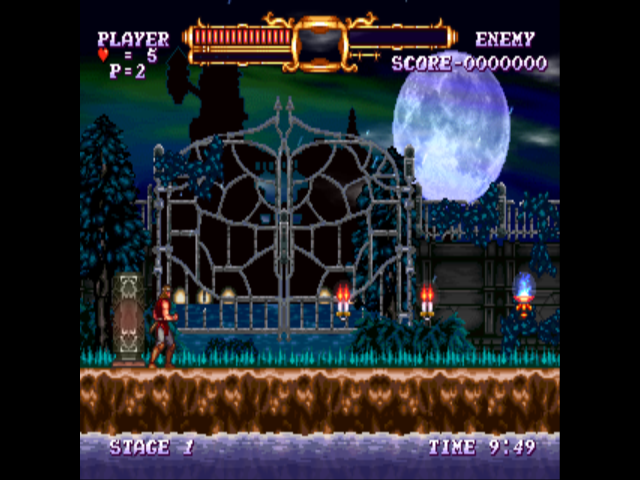
- Boots through the health screen, Konami logo, save creation, title, story intro and Stage 1 gameplay with the HUD and stage timer running (headless Linux test runs).
- Windows: same runtime as the Geometry Wars and My Life as a King recomps, which are play-tested on Windows.
- The game draws a pillarboxed 4:3 picture in 16:9 mode.
Changes:
- v0.4 (Oct 30, 2026): no Python or setup tool needed - on the first start the game builds its
gamefolder from your WAD placed next to the exe (decryption and unpacking are built in). - v0.3 (Oct 30, 2026): graphics (the GX command stream) is processed and drawn on its own thread beside the
game thread, like the Wii's GPU; faster vertex handling (index buffers, cached vertex setup); audio is sent
to the sound card straight from the mixer (no clicks at 3 ms frame boundaries);
castlevania.lognext to the exe. - v0.2.1: window and event pump on their own UI thread (fixes the window freezing / "Not Responding" on Windows while the game kept running).
- v0.2: audio fixes (no dropped audio periods, 60 ms jitter buffer), game speed 1x-8x, depth and format EFB copies.
Layout
| Path | What it is |
|---|---|
src/recomp.py | Recompiler: main.dol + symbols -> src/gen/*.cpp (one C++ function per guest function) |
src/runtime/ | Runtime: CPU context and memory, threads, IOS (ES/FS/NAND), GX -> OpenGL 3.3, AX audio mixer, input |
src/runtime/game.h | Castlevania-specific addresses the runtime needs |
src/hle.txt | Guest functions replaced by host code or stubbed |
config/symbols.txt | Function/object symbols (dtk analysis + library naming); symbols.dtk.txt is the raw dtk output |
config/splits.txt, config.yml | decomp-toolkit (dtk) project files |
tools/prepare_wad.py | Unpacks a WAD into the game folder (decrypts contents, decompresses the DOL) |
tools/match.py, tools/xmatch.py, tools/apply_xmatch.py | Library naming passes used to build config/symbols.txt |
Building
The generated C++ is in src/gen (made with step 2 from the NTSC-U executable), so step 2 is only needed
to regenerate it. GitHub Actions builds every push (see .github/workflows/build-windows.yml); version tags
publish a release. Everything below is tested on Ubuntu 24.04; on Windows 10/11 use WSL (wsl --install -d Ubuntu-24.04
in an administrator PowerShell, then open "Ubuntu"). The build cross-compiles a Windows exe.
1. Tools (once)
sudo apt update
sudo apt install -y git wget python3 python3-pip cmake ninja-build mingw-w64 g++-mingw-w64-x86-64-posix
pip install --break-system-packages libWiiPy
wget https://github.com/libsdl-org/SDL/releases/download/release-2.30.9/SDL2-devel-2.30.9-mingw.tar.gz
tar xf SDL2-devel-2.30.9-mingw.tar.gz          # -> ~/SDL2-2.30.9
2. Unpack your WAD and generate the C++
git clone https://github.com/darkuni/castlevania-rebirth-recomp.git
cd castlevania-rebirth-recomp
python3 tools/prepare_wad.py /mnt/c/path/to/Castlevania_ReBirth_NTSC-U.wad game     # your own WAD (Windows drives are under /mnt/c)
cd src
python3 recomp.py ../game/main.dol ../config/symbols.txt gen 300
prepare_wad.py checks that the game's executable matches the one this recompilation was made from (NTSC-U).
A different version of the game needs its own symbols and game.h addresses.
3. Build the Windows exe
cmake -S . -B build-win -G Ninja -DCMAKE_TOOLCHAIN_FILE=mingw.cmake -DSDL2_DIR=$HOME/SDL2-2.30.9/x86_64-w64-mingw32
ninja -C build-win -j1        # the generated code is large: -j1 keeps memory use down (raise it if you have RAM to spare)
4. Put the game folder together (example: C:\Games\castlevania)
D=/mnt/c/Games/castlevania; mkdir -p $D
cp build-win/castlevania.exe $HOME/SDL2-2.30.9/x86_64-w64-mingw32/bin/SDL2.dll \
   /usr/x86_64-w64-mingw32/lib/libwinpthread-1.dll runtime/ipl-font-licenses.txt $D/
cp -r ../game $D/
Linux test build (headless, EGL; writes screenshots): cmake -S . -B build -G Ninja -DCMAKE_CXX_COMPILER=clang++ && ninja -C build,
then SHOT_EVERY=150 SHOT_DIR=shots TIMEOUT=120 ./build/castlevania ../game.
Running (Windows)
Requirements: 64-bit Windows 10/11 and a GPU with OpenGL 3.3. Run castlevania.exe from the folder above (or
castlevania.exe <path to game folder>).
- F1 / Esc (or Start+Back on a gamepad): settings menu - resolution scale, widescreen, vsync, MSAA, texture
filtering, controls, game speed. Settings are saved in
castlevania.ini. - F11 / Alt+Enter: fullscreen. Hold Tab (or click the right stick): fast-forward.
- Saves go in a
nandfolder next togame. castlevania.lognext to the exe is the log of the last run - include it with bug reports.
Controls (controls = in the ini or the settings menu; pick the matching grip if the game asks):
| Layout | Gamepad | Keyboard |
|---|---|---|
| sideways (default): Wii Remote held sideways | d-pad / left stick = move, A = 2, B = 1, X = A, Y = B | arrows = move, X = 2, Z = 1, A = A, S = B |
| nunchuk: Wii Remote + Nunchuk | left stick = Nunchuk stick, d-pad = remote d-pad, A = A, B = B, X = 1, Y = 2, LB/LT = Z, RB/RT = C | arrows = stick, X = A, Z = B, Shift = Z, C = C, I/J/K/L = d-pad |
| classic: Classic Controller | buttons by label (A/B/X/Y), LB/RB = L/R, LT/RT = ZL/ZR, both sticks, d-pad | arrows = d-pad, X = A, Z = B, S = X, A = Y, Q/W = L/R, 1/2 = ZL/ZR |
All layouts: Start/Enter = +, Back/Backspace = -, Guide/H = HOME.
Credits
- decomp-toolkit (dtk) for DOL analysis and splitting.
- Symbol lists from public decompilation projects (doldecomp/ogws, SeekyCt/spm-decomp, doldecomp/mkw, doldecomp/brawl, zeldaret/ss, xbret/xenoblade) were used to name SDK and library functions.
- Dolphin: ES view formats used as a reference; the
system-font replacements embedded in
src/runtime/ipl_fonts.hare Dolphin's Droid Sans fonts (Apache License 2.0, seesrc/runtime/ipl-font-licenses.txt). - libWiiPy for WAD unpacking.
Disclaimer
This is an unofficial fan project. It is not affiliated with, endorsed by, or sponsored by Konami Digital Entertainment, M2 Co., Ltd.
or Nintendo. Castlevania: The Adventure ReBirth and all related names and marks belong to their respective owners. This
repository and its releases contain no game data (graphics, sound, levels): those come from your own
legally obtained WAD. src/gen and the release exe contain code machine-translated from the game's executable.
License
The project's own code is released under the MIT License. Bundled third-party components (fonts, OpenGL headers) keep their own licenses; see THIRD_PARTY_NOTICES.md.