Colin McRae: DiRT Launcher
Colin McRae: DiRT launcher (rea-dirt) is a tool for Windows and Linux that fixes crashes, sets screen resolution, and integrates Wine and DXVK for Colin McRae: DiRT.
- Type: tool
- Game: DiRT
- Runs on Windows and Linux
- By AkitaOnRails
- Latest release v0.3.2, 2026-11-05
- Source: https://github.com/akitaonrails/rea-dirt
README
Colin McRae: DiRT Launcher
Play your own copy of Colin McRae: DiRT (2007) on Windows 10/11, the Steam Deck and Linux (Proton, Wine or the AppImage). Point the launcher at your installed game and press Play. It fixes the crash on modern CPUs, sets up your screen's resolution, and on Linux brings Wine and DXVK with it. The launcher plays from its own private copy and only reads your game folder.
This project contains no game files: you need your own copy of the game.
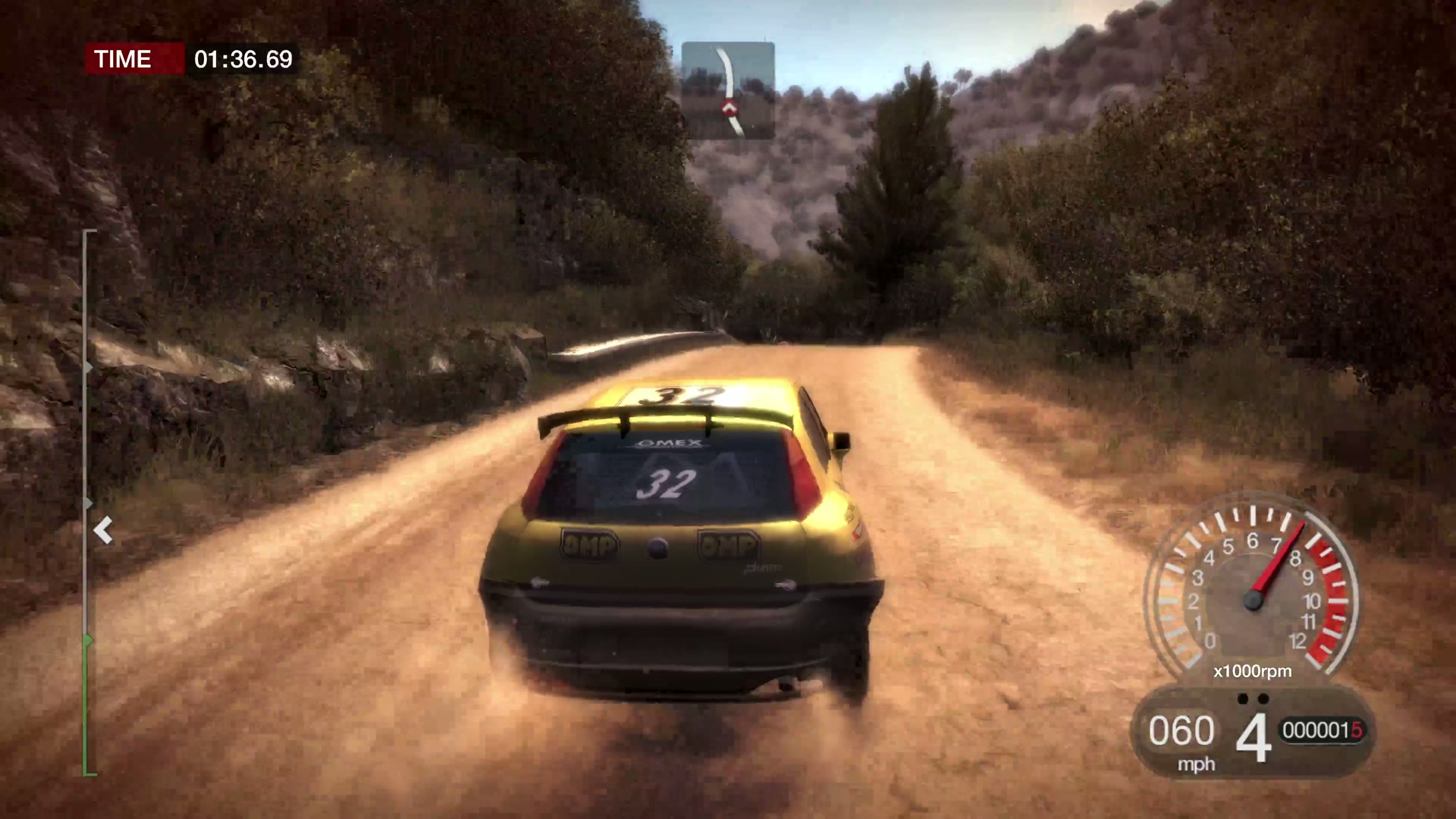
A full race at 4K, 16:9, Ultra graphics and native XInput. Click to watch.
Problems this launcher solves
| Problem | What the launcher does |
|---|---|
| On CPUs with many threads the game crashes while a race loads. | Writes corrected worker maps that cap the engine at 4, 8 or 12 threads, based on the community's CMCR-DiRT-MTFix, and skips the game's broken 6-core map. |
| The 32-bit game can run out of memory. | Sets Large Address Aware in its private copy of DiRT.exe (up to 4 GB). |
| The game starts at a low resolution and medium detail. | Uses your screen's size and shape, Ultra detail and 60 Hz vsync; Steam Deck and Original 2007 looks are one click away. |
| Fullscreen can land on the wrong monitor or fail. | On Linux it runs inside gamescope or in its own Wine desktop at the chosen size; on Windows it falls back to a window when the screen has no such mode. |
| On Linux it needs Wine, DXVK and setup by hand. | The AppImage brings Wine and DXVK; dirt-play sets up a private Wine prefix, the GPU and gamescope. |
| Fixes usually mean deleting the game's settings or editing XML. | Writes only the settings it owns into DiRT's hardware XML; your other settings stay. |
| Patching the game folder risks the copy you own. | Your folder is only read; the launcher works on its own private copy. |
Screenshots
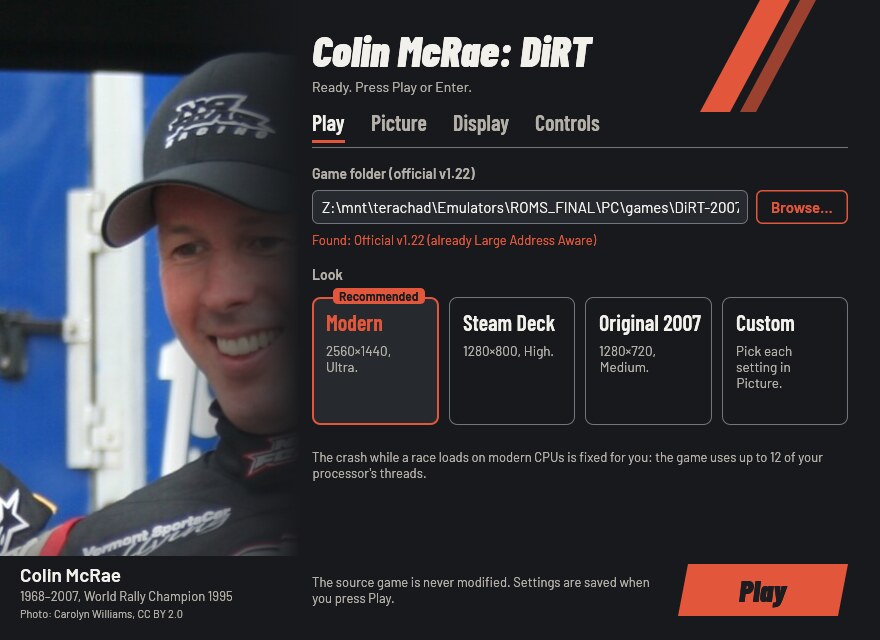
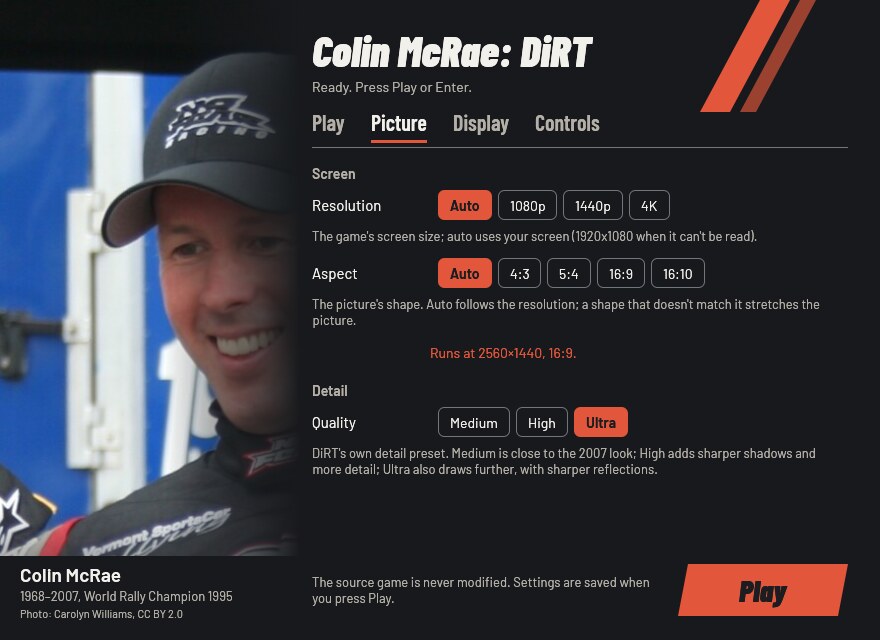
| Play | Picture |
|---|---|
 |  |
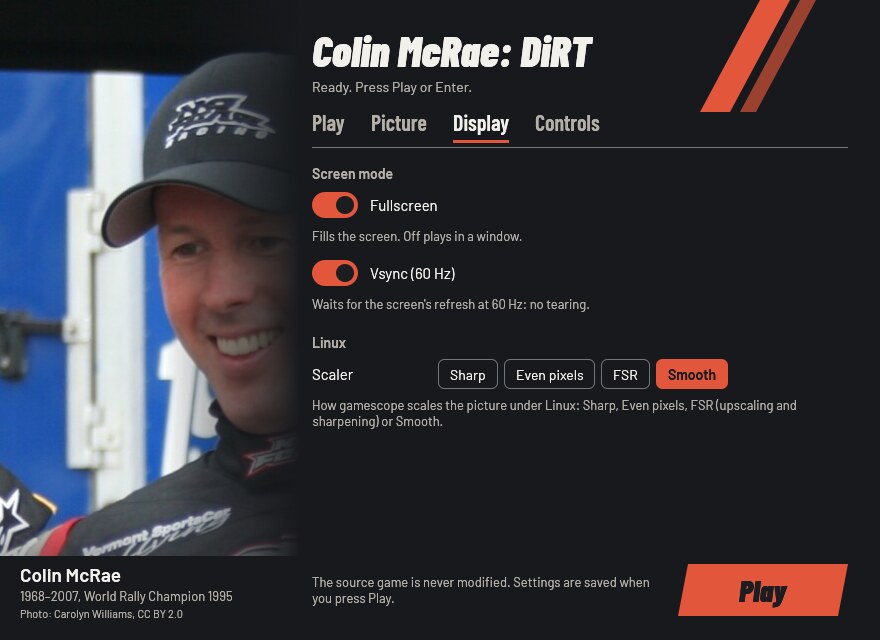
| Display | Controls |
|---|---|
 |  |
What you need
Your installed PC copy of Colin McRae: DiRT, updated to the official
v1.22: the folder with DiRT.exe and the game's other folders
(system, tracks, cars and so on). v1.22 is the version without the
disc check. An older copy needs the official updates (1.1, 1.2, 1.21,
1.22, in that order) first; other DiRT games are not supported.
The launcher knows each supported DiRT.exe by its fingerprint (SHA-256):
v1.22 as installed, and the same v1.22 with only the Large Address Aware
flag set. Another version is refused with its code and a link to the
unknown version
form, so it can be added. Report the code, never the game's files.
Download and install
Download from the latest release:
- Windows, Steam Deck and Proton:
DiRTLauncher-<version>.zip - Linux:
DiRTLauncher-<version>-x86_64.AppImage
Windows
- Unzip
DiRTLauncher-<version>.zipanywhere outside the game folder. Keep thelinuxfolder next toDiRTLauncher.exe. - Run
DiRTLauncher.exeand follow First run. The launcher is unsigned, so the first start from a downloaded zip may show "Windows protected your PC": click More info, then Run anyway.
Steam Deck
- In Desktop Mode, unzip the release, then in Steam choose Games → Add a
Non-Steam Game to My Library… and pick
DiRTLauncher.exe. - In its Properties → Compatibility, force a Proton version.
- Back in Game Mode, start it: the window works with the controls and recommends the Steam Deck look.
The Steam Deck itself has not been tested yet.
Linux: AppImage
chmod +x DiRTLauncher-*-x86_64.AppImage
./DiRTLauncher-*-x86_64.AppImage
It brings its own Wine and DXVK, so nothing else needs to be installed. It
keeps its Wine prefix in ~/.local/share/dirt-launcher/prefix and uses
gamescope when it is
installed.
Linux: Steam (Proton)
Unzip the release, add DiRTLauncher.exe as a non-Steam game and force a
Proton version in its compatibility settings, as on the Steam Deck.
Linux: your own Wine
Run linux/dirt-play from the unzipped release:
linux/dirt-play            # the settings window, then the game
linux/dirt-play --play     # the game with the saved settings, no window
linux/dirt-play stop       # end the game
linux/dirt-play status     # running or idle
It needs Wine; gamescope is optional. Options, a distrobox and more: linux/README.md.
First run
- In the window's Play tab, press Browse… and choose the folder
with
DiRT.exe. Under Wine your Linux files are on driveZ:, for exampleZ:\home\you\Games\DiRT. - Pick a look: Recommended suits most screens.
- Press Play (or Enter, or Start on a gamepad).
The first start copies the game into the launcher's private folder (about 11 GB, so it takes a while); later starts copy only what changed. Your choices are remembered.
The settings window
- Play: the game folder and the look. The modern-CPU fix needs no setting.
- Picture: resolution, aspect (with the size the game will run at) and DiRT's detail preset.
- Display: fullscreen, vsync, and gamescope's scaler on Linux.
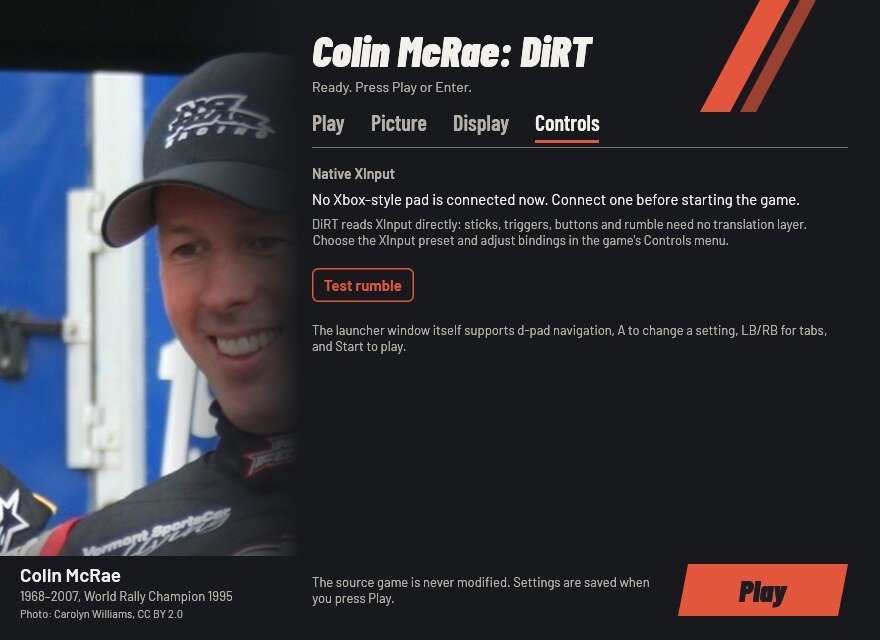
- Controls: whether an Xbox-style pad is connected, and a rumble test.
| Look | What it sets | When to pick it |
|---|---|---|
| Modern | Your screen's size and shape, Ultra, fullscreen, vsync | Most screens (picked on the first run) |
| Steam Deck | 1280×800, 16:10, High, fullscreen, vsync | The Steam Deck (picked on a Deck) |
| Original 2007 | 1280×720, 16:9, Medium, fullscreen, vsync | To play it closer to how it looked in 2007 |
| Custom | Any change in the other tabs |
The window works with a gamepad (d-pad moves, A changes the focused setting, LB/RB switch tabs, Start plays) and with the keyboard alone (Tab moves, arrows pick, Ctrl+Tab switches tabs, Enter plays). A control that can't be used right now is greyed out and says why.
Gamepad
DiRT reads Xbox-style pads (XInput) itself: sticks, triggers, buttons and rumble work with no translation layer. In the game, pick the XInput preset in its Controls menu and change bindings and force feedback there.
Options
Every option has the same name in the window, in launcher.cfg (with
underscores) and on the command line (with hyphens); DiRTLauncher.exe --help lists them. The first run writes a commented launcher.cfg
(Where things live).
launcher.cfg / flag | In the window | Values | Unset | What it changes |
|---|---|---|---|---|
game / --game | Play: Game folder | a folder | asked on the first run | The folder with DiRT.exe; only read. Remembered. |
look / --look | Play: Look | modern, steam-deck, original, custom | worked out from the values | Sets the picture options at once; options given after it win. |
workers / --workers | none (advanced) | auto, 4, 8, 12 | auto | How many CPU threads the engine uses. Auto picks up to 12 from your CPU; set it only if a race still crashes while loading. |
resolution / --resolution | Picture: Resolution | WIDTHxHEIGHT, auto | your screen (1920×1080 if unknown) | The game's screen size. |
aspect / --aspect | Picture: Aspect | auto, 4:3, 5:4, 16:9, 16:10 | from the resolution | The picture's shape. A shape that doesn't match the resolution stretches the picture (seen in the game). |
quality / --quality | Picture: Quality | medium, high, ultra | ultra | DiRT's own detail preset. |
fullscreen / --fullscreen | Display: Fullscreen | on, off | on | Fills the screen; off plays in a window. |
vsync / --vsync | Display: Vsync (60 Hz) | on, off | on | Waits for the screen's refresh at 60 Hz: no tearing. |
scaler / --scaler | Display: Scaler | nearest, pixel, fsr, linear | linear | How gamescope scales the picture (Linux helper only). |
runtime / --runtime | none (file and flag only) | a folder | %LOCALAPPDATA%\DiRTLauncher\DiRT | Where the launcher keeps its private copy of the game. |
Unset means the launcher's default above. The launcher writes these values into DiRT's hardware settings on every start, so change them in the launcher, not in the game's menu. Sound, controls, gamma and the rest of your in-game settings stay yours.
Any option on the command line skips the window and plays; options
override launcher.cfg for that run only, and only --game is
remembered. The launcher's own switches:
--no-window: play with the saved settings, no window.--check: check the game folder without playing (exit 0 ready, 1 not).--setup: prepare the private copy and the game's settings without playing.--settings: only the settings window (exit 0 Play pressed, 3 closed without Play, 4 no window possible).--linux: started bydirt-playor the AppImage (puts DXVK in the copy).--help: every option and its values.
A bad flag or value is refused with a message naming what it takes and
the usage, exit 2: printed in a terminal, a dialog only from a shortcut.
Only one launcher runs at a time: a second start brings the open window
forward, or says the game is already running (exit 5). --check and
--setup while another launcher is open say so and exit 5 too.
Where things live
| What | Windows | Linux (AppImage, dirt-play) |
|---|---|---|
Settings (launcher.cfg) and log (launcher.log) | %LOCALAPPDATA%\DiRTLauncher\ | in the Wine prefix, drive_c/users/<you>/AppData/Local/DiRTLauncher/ |
| The launcher's copy of the game | %LOCALAPPDATA%\DiRTLauncher\DiRT (the runtime option moves it); on the game's drive its 9 GB of static data are hard links, not copies | the same folder inside the prefix |
| DiRT's saves (profile, career) | savegame\ inside the private copy (%LOCALAPPDATA%\DiRTLauncher\DiRT\savegame) | the same, inside the prefix |
| DiRT's graphics settings | hardwaresettings\ inside the private copy, and %USERPROFILE%\Documents\Codemasters\DiRT\ | the same, inside the prefix |
| Wine prefix | — | ~/.local/share/dirt-launcher/prefix |
dirt-play's logs and lock | — | ~/.config/dirt-launcher |
Registry: the fast GPU for the copy's DiRT.exe | HKCU\Software\Microsoft\DirectX\UserGpuPreferences, value <private copy>\DiRT.exe = GpuPreference=2; (a per-user Windows setting; launcher.log says when it is set) | — |
Registry: DXVK's d3d9 for DiRT.exe | — | in the prefix, HKCU\Software\Wine\AppDefaults\DiRT.exe\DllOverrides, value d3d9 = native,builtin, and the launcher's record of it, HKCU\Software\rea-launcher\DllOverrides\DiRT.exe |
| Registry: the settings window draws through GLX | — | in the prefix, HKCU\Software\Wine\X11 Driver, value UseEGL = N (only when it was unset) |
A launcher.cfg next to DiRTLauncher.exe is used instead (a portable
install). Under Proton everything is inside Steam's prefix for the
non-Steam game (steamapps/compatdata/<id>/pfx), the Wine registry
values too.
Troubleshooting
- "This DiRT.exe is not the official v1.22": install the official updates up to v1.22. If your copy is v1.22 already, open the unknown version form with the code the message shows.
- A race still crashes while loading: add
workers = 4tolauncher.cfg(or start with--workers 4), and report your CPU withlauncher.log. - You changed resolution or detail in the game and it went back: the launcher sets those on every start. Change them in the launcher.
- Graphics problems on Linux: use the AppImage or
dirt-play, which put DXVK in the private copy. Don't add your ownd3d9.dlloverride. - Anything else: run
DiRTLauncher.exe --check, then open a bug report withlauncher.logattached (remove personal paths). Never attach game files.
Known limitations
- Only the official v1.22 is supported; the launcher doesn't install the official updates for you.
- Played end to end on Linux (Wine and gamescope, 4K, an Xbox-style pad).
Not yet tested on native Windows, the Steam Deck, or Proton without
dirt-play; see docs/RUNTIME_NOTES.md.
Uninstall
- Back up your saves first: the private copy's
savegamefolder,%LOCALAPPDATA%\DiRTLauncher\DiRT\savegame(inside the Wine prefix on Linux). Saves in your game folder's ownsavegamefolder are brought into the copy on the first start and never overwritten. - Delete the folder you unzipped the launcher into (or the AppImage).
- Windows: delete
%LOCALAPPDATA%\DiRTLauncher(settings, log, the private copy of the game and its saves), and inregeditthe value named after the private copy'sDiRT.exeunderHKEY_CURRENT_USER\Software\Microsoft\DirectX\UserGpuPreferences. - Linux: copy your saves out of the prefix, then delete
~/.local/share/dirt-launcherand~/.config/dirt-launcher. With Proton, removing the shortcut in Steam offers to delete its prefix, saves included. The Wine registry values above go with the prefix; in a prefix of your own, delete them withwine regedit.
Your game folder was never changed, so there is nothing to undo there.
For developers
Rust (edition 2024), MinGW-w64 with lld for the Windows target, Wine for
the Windows-target tests and cargo-deny. The
gaming distrobox has
them all.
cargo fmt --all --check
cargo test --workspace --locked                 # host tests, the settings window headless
cargo clippy --target i686-pc-windows-gnu --workspace --all-targets -- -D warnings
cargo deny check
for t in linux/tests/*.sh packaging/tests/*.sh; do sh "$t"; done
cargo build --release --locked --target i686-pc-windows-gnu
sdk/scripts/wine-test --locked --workspace      # Windows-target tests under Wine, headless
sh ../rea-launcher-sdk/scripts/sdk-sync --check .   # sdk/ matches the pinned SDK
- New SDK release:
sdk/scripts/sdk-bump vX.Y.Zmoves the Cargo tags,sdk/and the workflow pins together and prints the migration notes. - Golden snapshots of everything the launcher writes are in
crates/dirt-launcher/tests/snapshots/; review a change like code. - Free the disk space builds take:
sdk/scripts/clean(a dry run), thensdk/scripts/clean --yes. - Real-game tests read your installed copy and never change it:
DIRT_GAME_DIR=<game folder> cargo test -- --ignored. - Third-party components are fetched at package time from pinned URLs
with SHA-256 (
packaging/third-party.txt); GitHub Actions (the SDK's reusable workflows) runs the checks, builds the zip and the AppImage, and publishes a release for eachv*tag.
Rules for contributors and coding agents: AGENTS.md. Community fixes and decisions: docs/RESEARCH.md; what was verified in the real game: docs/RUNTIME_NOTES.md.
Built on rea-launcher-sdk
The private copy of the game, launcher.cfg and the option table, the
settings window's widgets, the Linux helper's library (rea-play.sh),
packaging and CI come from
rea-launcher-sdk,
shared by every rea launcher. It is pinned by tag in Cargo.toml and
vendored in sdk/ (the tag is in sdk/VERSION). This repository keeps
what is specific to Colin McRae: DiRT.
Contributing
- About Colin McRae: DiRT (its versions, the worker maps, its
settings,
dirt-play's game settings, this README): issues and pull requests here. - Shared code (the private copy, the settings window's widgets, the
option table,
rea-play.sh, packaging, CI workflows, anything undersdk/): issues and pull requests at rea-launcher-sdk. - How to tell: code under
sdk/or from area_launcher*crate is the SDK's; if the same problem would happen with another rea launcher, it's the SDK's. Not sure? Open it here and it will be moved. - Never patch
sdk/or copy SDK code here: fix the SDK and bump the tag. - Never attach game files (executables, saves, data) to an issue.
Credits
- CMCR-DiRT-MTFix by xatornet found the multi-core crash and its corrected 8- and 12-core maps; the launcher writes its own equivalent files.
- PCGamingWiki for the game's fixes and settings files.
- DXVK by Philip Rebohle and contributors (Direct3D 9 on Vulkan, Linux).
- Wine and Kron4ek's Wine builds in the AppImage, with the AppImage tools.
- The photo of Colin McRae by Carolyn Williams (CC BY 2.0, Wikimedia Commons).
- The Barlow fonts by Jeremy Tribby (SIL Open Font License).
- rea-launcher-sdk.
Full list with licences: THIRD_PARTY.md.
Legal
Colin McRae: DiRT is © Codemasters. This project is not affiliated with or endorsed by Codemasters or Electronic Arts, contains no game files, and only runs a copy you own. Our code is MIT OR Apache-2.0 (LICENSE-MIT, LICENSE-APACHE); bundled components keep their own licences (THIRD_PARTY.md).