Colin McRae Rally 2005 launcher (rea-colin-mcrae-2005)
Colin McRae Rally 2005 launcher is a tool for Windows and Linux that plays your copy of the game with widescreen and improved frame rates.
- Type: tool
- Runs on Windows and Linux
- By AkitaOnRails
- Latest release v0.2.1, 2026-11-04
- Source: https://github.com/akitaonrails/rea-colin-mcrae-2005
README
Colin McRae Rally 2005 Launcher
Plays your own copy of Colin McRae Rally 2005 on Windows 10/11, the Steam Deck and Linux (Proton, Wine or the AppImage). Point it at your game, or at the GOG installer you downloaded, and press Play. Everything the game needs is bundled and set up for you: no patchers, no winetricks, no DLL overrides, no registry edits by hand. Your game folder is only read, never changed; the launcher plays from a private copy.
This project contains no game files: you need your own copy of the game.
Played end to end on Linux with the AppImage and with Wine 11 inside gamescope: unpacking the GOG installer, the intro videos, the menus and a stage, every look, quitting by closing the window, a gamepad set up in the game's menu. Not tested yet: Windows itself, the Steam Deck and Proton. Reports are welcome: open an issue.
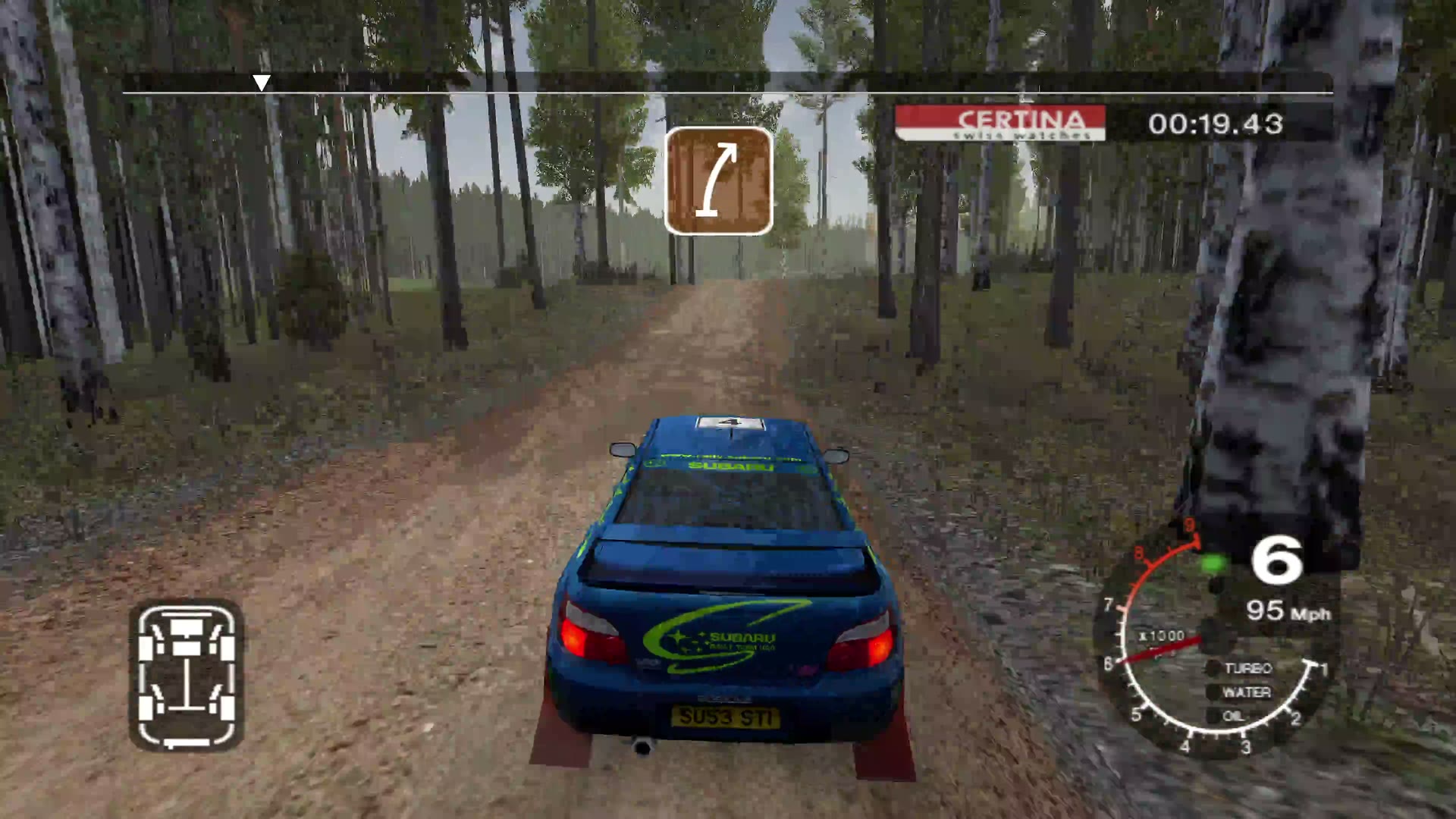
From the launcher to a Finland stage in the Impreza, at 4K on Linux with a gamepad. Click to watch (3:03, with sound).
Problems this launcher solves
| Problem | What the launcher does |
|---|---|
| On Linux the game crashes as soon as it starts, before the first menu (the "Wine dead-end"). | The game looks for its files through settings its installer writes. Without them it loads no fonts and crashes. The launcher writes them on every start, pointing at its private copy. |
| GOG's installer hangs under Wine, so Linux players can't install the game at all. | Point the launcher at the installer files. It unpacks the game itself on the first start (with innoextract, bundled) and never runs the installer. |
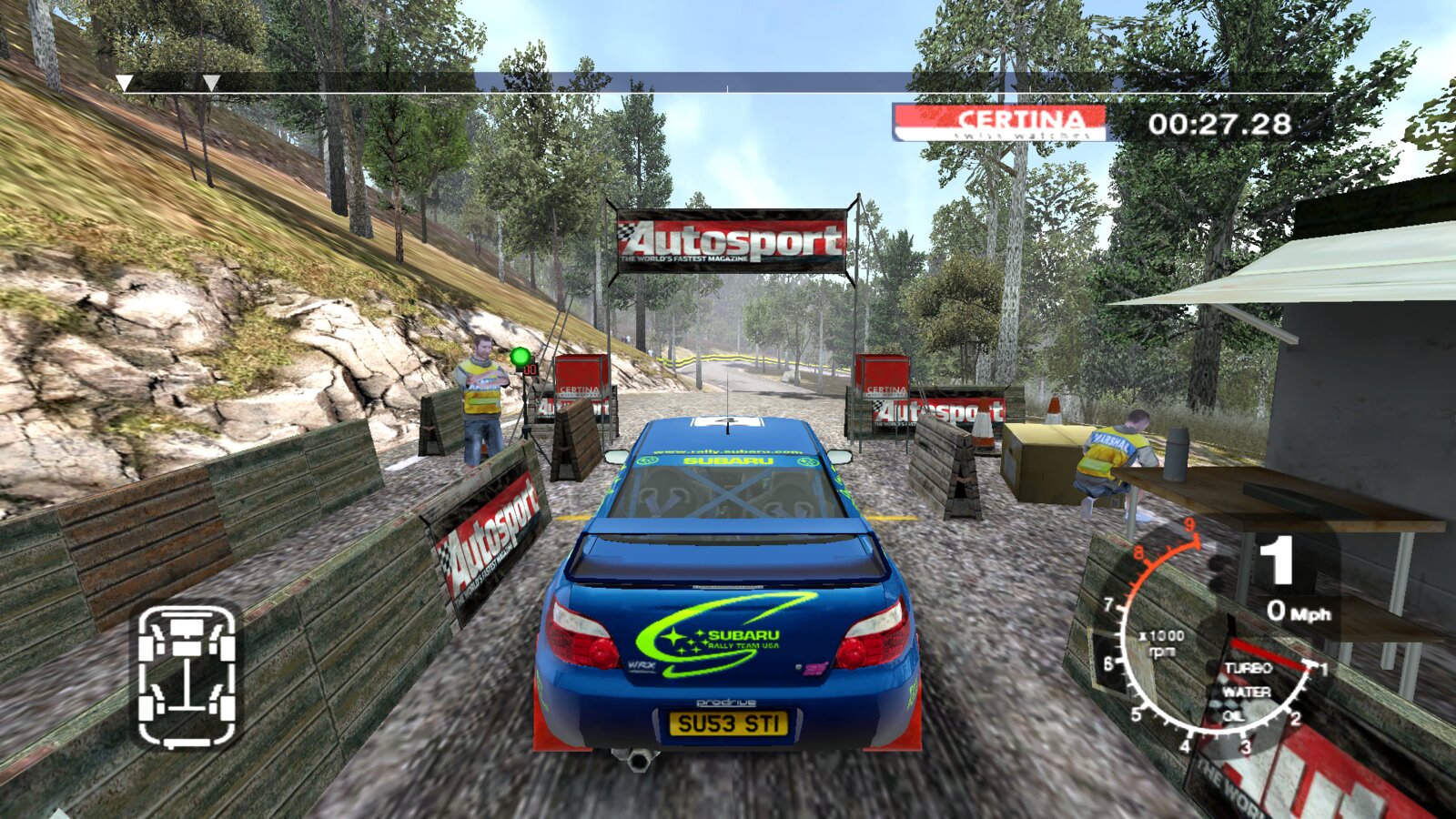
| The game starts at 640×480 in the corner of the screen. | The picture follows your screen: the Widescreen look uses the largest 16:9 size that fits, with the game's own widescreen view. |
| Under Wine a stage runs at about 20 frames per second. | The launcher brings DXVK for Wine and Proton: the same stage runs at hundreds of frames per second, with a frame-rate cap and VSync you can set. |
| Alt+F4 and the window's close button do nothing, so the game had to be killed. | Closing the window (or Super+W, or your desktop's close shortcut) ends the game and the launcher. |
| Saves sit inside the game folder, and copying or patching the game risked them. | Your saves get a folder of their own, outside the game and the launcher's copy. Saves already in your game folder are copied there once. |
Screenshots
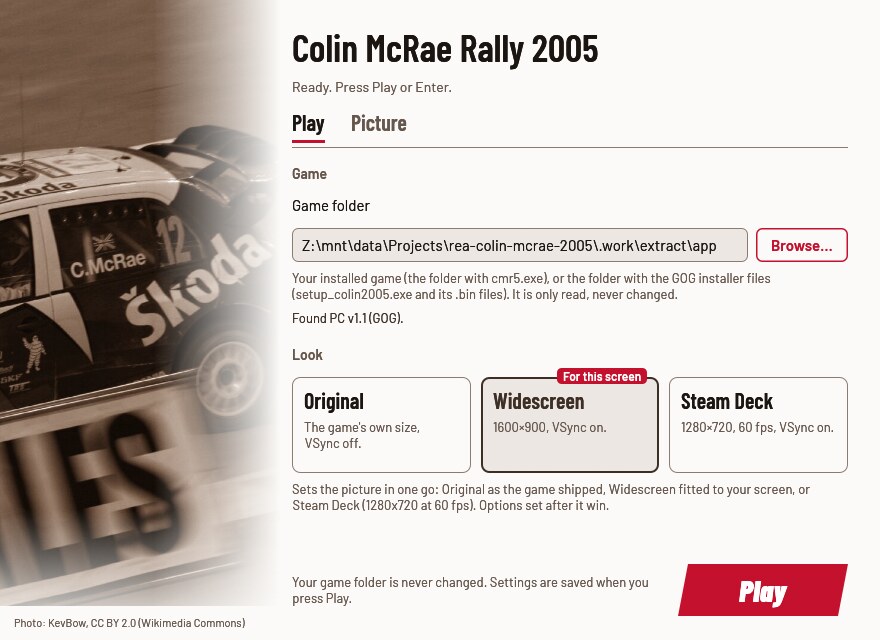
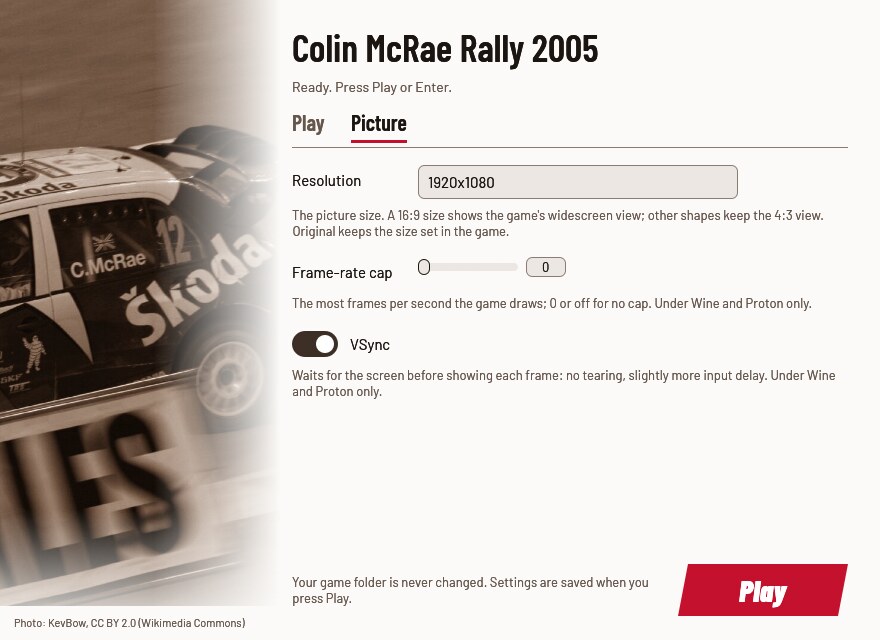
| Play | Picture |
|---|---|
 |  |
What you need
- Colin McRae Rally 2005 for PC, the GOG release (version 1.1). Either
the installed game, the folder with
cmr5.exe, or the three installer files you downloaded from GOG (setup_colin2005.exe,setup_colin2005-1.bin,setup_colin2005-2.bin). - About 3.5 GB free if you start from the installer files: the launcher unpacks the game once.
- The retail DVD versions use StarForce copy protection and are not supported.
If your cmr5.exe or setup_colin2005.exe is a version the launcher does
not know, it stops and shows a code (SHA-256). Please
report it
with that code and where your copy came from. Report the code, never the
file itself.
Download and install
Download from the latest release:
CMR2005Launcher-<version>.zip for Windows, Proton and your own Wine, or
CMR2005Launcher-<version>-x86_64.AppImage for Linux.
Windows
- Unzip anywhere outside the game folder.
- Keep the
componentsfolder next toCMR2005Launcher.exe. - Run
CMR2005Launcher.exe.
The launcher is unsigned, so the first start from a downloaded zip may show "Windows protected your PC": click More info, then Run anyway.
Steam Deck
- In Desktop Mode, keep the AppImage (or unzip the zip) somewhere in your home folder.
- Steam → Add a Non-Steam Game → choose it. For the zip's
CMR2005Launcher.exe, open its Properties → Compatibility and force a Proton version. - Back in Game Mode, start it. The Steam Deck look is picked for you.
Game Mode has not been tested yet.
Linux: AppImage
chmod +x CMR2005Launcher-*-x86_64.AppImage
./CMR2005Launcher-*-x86_64.AppImage
It brings its own Wine and keeps its Wine prefix in
~/.local/share/cmr2005-launcher/prefix. When gamescope is installed the
game runs inside it. Your Linux files are drive Z: in the window.
Linux: Steam (Proton)
Add the zip's CMR2005Launcher.exe as a non-Steam game and force a Proton
version, as on the Steam Deck. Proton brings its own DXVK. Not tested yet.
Linux: your own Wine
From the zip:
linux/cmr2005-play            # the settings window, then the game
linux/cmr2005-play --play     # the game with your saved settings
linux/cmr2005-play stop       # end the game
linux/cmr2005-play status     # running or idle
More, including a distrobox, in linux/README.md.
First run
- Press Browse… and choose the folder with
cmr5.exe, or the folder with GOG'ssetup_colin2005.exe. Under Wine your Linux files are driveZ:, for exampleZ:\home\you\Games\Colin McRae Rally 2005. - Pick a look. Widescreen is recommended (Steam Deck on a Deck).
- Press Play (or Enter).
From the installer files, the first start unpacks the game, about 3.6 GB, in a window that shows the progress and the time left (about three minutes in testing). Cancel stops it and leaves nothing behind. After that, starts are quick.
Then set up the game itself in its own Options menu: the graphics detail and effects, and your gamepad (see Gamepad below). The resolution is the one exception: the launcher sets it on every start from your look (or the Picture tab), so change it in the launcher. To keep the resolution you pick in the game, choose the Original look.
The settings window
Play holds the game folder and the looks. Picture holds the resolution, the frame-rate cap and VSync. Changing one of those by hand leaves the look cards unselected (your own mix).
| Look | Resolution | Frame-rate cap | VSync | When to pick it |
|---|---|---|---|---|
| Original | the game's own (it starts at 640×480) | none | off | to see the game as it shipped |
| Widescreen | the largest 16:9 size that fits your screen, widescreen view | none | on | most screens (picked on the first run) |
| Steam Deck | 1280×720, widescreen view | 60 fps | on | the Deck (picked there on the first run) |
The game's widescreen view is only correct at 16:9 sizes. Other shapes (16:10, 21:9, 4:3) keep the game's 4:3 view.
The window works with the keyboard alone: Tab moves, Enter or Space activates, Enter plays. A control that can't be used says why.
Gamepad
The launcher adds nothing for pads: the game reads them itself. Set yours up once in the game's Options, in its controller settings: choose the pad, then the buttons and the steering and pedal axes. A gamepad was set up this way and played a full stage on Linux.
Options
Every option has the same name in the window, in launcher.cfg and as a
flag (fps_limit in the file is --fps-limit on the command line).
launcher.cfg is described under Where things live. The first run
writes it with every option commented and the recommended look's values
filled in.
launcher.cfg / flag | In the window | Values | Unset | What it changes |
|---|---|---|---|---|
game / --game | Play: Game folder | a folder | asked in the window | Your installed game, or the folder with GOG's installer files. Only read. |
look / --look | Play: the look cards | original, widescreen, steam_deck | none | Sets the resolution, cap and VSync at once; options set after it win. |
resolution / --resolution | Picture: Resolution | WIDTHxHEIGHT, original | the game's own | The picture size. A 16:9 size gets the widescreen view. |
fps_limit / --fps-limit | Picture: Frame-rate cap | 0–1000, off | no cap | The most frames per second. Under Wine and Proton only. |
vsync / --vsync | Picture: VSync | on, off | the game's own | Waits for the screen: no tearing. Under Wine and Proton only. |
runtime / --runtime | — (file and flag only) | a folder | beside launcher.log | Where the launcher keeps its private copy. |
Unset keeps the game's own value.
Any option on the command line skips the window and plays, overriding
launcher.cfg for that run; only --game is remembered. The launcher's
own switches:
| Switch | What it does |
|---|---|
--settings | only the window: exit 0 after Play, 3 when closed, 4 when no window can open |
--no-window | play with the saved settings, no window |
--check | check the game folder and exit: 0 ready, 1 not (details in launcher.log) |
--linux | started by linux/cmr2005-play |
--help | the options |
A bad flag or value exits with 2 and says what is wrong. Starting the launcher while it (or its game) already runs brings its window to the front; when there is no window, it says the game is running and exits with 5.
Where things live
| What | Windows | Linux (AppImage, cmr2005-play) |
|---|---|---|
Settings (launcher.cfg) and log (launcher.log) | %LOCALAPPDATA%\CMR2005Launcher\ | in the prefix, drive_c/users/<you>/AppData/Local/CMR2005Launcher/ |
| Your saves | %LOCALAPPDATA%\CMR2005Launcher\saves\ | in the prefix, …/AppData/Local/CMR2005Launcher/saves/ |
| The launcher's copy of the game | %LOCALAPPDATA%\CMR2005Launcher\runtime\ | …/CMR2005Launcher/runtime/ |
| The game unpacked from GOG's installer | %LOCALAPPDATA%\CMR2005Launcher\game\ | …/CMR2005Launcher/game/ |
| Wine prefix | — | ~/.local/share/cmr2005-launcher/prefix |
cmr2005-play's logs and lock | — | ~/.config/cmr2005-launcher |
A launcher.cfg next to CMR2005Launcher.exe is used instead (a portable
install). Under Proton everything is inside Steam's
compatdata/<appid>/pfx.
The copy of the game links the big data files instead of copying them where the disk allows, so it takes little extra space.
Registry entries the launcher writes:
| Entry | Where | What |
|---|---|---|
| The game's own key | Windows: HKEY_LOCAL_MACHINE\SOFTWARE\CODEMASTERS\Colin McRae Rally 2005 (SOFTWARE\WOW6432Node\… on 64-bit Windows). Without administrator rights Windows keeps it per user in HKEY_CURRENT_USER\Software\Classes\VirtualStore\MACHINE\SOFTWARE\WOW6432Node\CODEMASTERS\Colin McRae Rally 2005, and the game reads it from there. Linux: the same key inside the prefix. | INSTALL_PATH, SAVEGAME_PATH, and WIDTH/HEIGHT when a look or resolution is set |
| The fast-GPU preference (Windows only) | HKEY_CURRENT_USER\Software\Microsoft\DirectX\UserGpuPreferences | a value named after the private copy's cmr5.exe (by default %LOCALAPPDATA%\CMR2005Launcher\runtime\cmr5.exe): GpuPreference=2;, written once, when it isn't there yet |
| DXVK for the game (Wine and Proton only) | HKEY_CURRENT_USER\Software\Wine\AppDefaults\cmr5.exe\DllOverrides, and the launcher's record of it in HKEY_CURRENT_USER\Software\rea-launcher\DllOverrides\cmr5.exe | d3d9 = native,builtin |
| OpenGL through GLX for the settings window (Wine and Proton only) | HKEY_CURRENT_USER\Software\Wine\X11 Driver | UseEGL = N, when it isn't set yet |
Troubleshooting
- "This cmr5.exe is not a build this launcher knows" (or the same for
setup_colin2005.exe): your copy is a version the launcher has not seen. Report the code it shows. - A .bin file "is missing" or "has … bytes": the installer download is incomplete. Download it again from GOG.
- "Unpacking the game needs about 3 GB free": free some space, or set
runtimeto a folder on another drive (the unpacked game goes beside it). - Alt+F4 does nothing in the game: the game keeps the keyboard to itself. The launcher reads Alt+F4 from the keyboard, but the game only notices when something else happens at the same time: hold Alt+F4 and move the mouse. Or close the window, or quit from the game's menu.
- "Colin McRae Rally 2005 is already running from this launcher":
the game (or another launcher) is still running, perhaps hidden. Quit
it first; on Linux,
linux/cmr2005-play stopends it. - The game opens in a window called "CMR2005 - Wine Desktop": your
main monitor is in portrait, and the game only works on the main
monitor, so the launcher gives it a landscape screen of its own inside
that window. Make it fullscreen with your desktop's shortcut, or play
through gamescope (the AppImage and
cmr2005-playuse it when it is installed). On Windows, make a landscape monitor the main one. - Short freezes of about half a second during a stage: reported once on Linux, when a co-driver call starts, and not reproduced since. If you see them, please report it with your sound setup and pad.
- Anything else: run
CMR2005Launcher.exe --check, then open an issue with the bug form and attachlauncher.log(remove personal paths). Never attach game files.
Known limitations
- The game's widescreen view is exact only at 16:9. On 16:10 and ultrawide screens the Widescreen look uses a 16:9 picture inside the screen.
- Alt+F4 pressed inside the game works only while the mouse moves (or another message reaches the game). Closing the window works.
- The frame-rate cap and VSync work under Wine and Proton only. On Windows the game keeps its own behaviour.
- Online play used GameSpy, which is gone.
- With a portrait main monitor under Wine (no gamescope) the game runs in a window you make fullscreen yourself; on Windows it needs a landscape main monitor.
- Not tested yet: Windows 10/11, the Steam Deck and Proton. See docs/RUNTIME_NOTES.md.
Uninstall
- Back up your saves:
%LOCALAPPDATA%\CMR2005Launcher\saveson Windows, ordrive_c/users/<you>/AppData/Local/CMR2005Launcher/savesinside the prefix on Linux. The next steps delete them. - Delete the launcher's folder (or the AppImage).
- Windows: delete
%LOCALAPPDATA%\CMR2005Launcher(settings, log, the private copy, and the unpacked game, about 3.5 GB). In the registry (regedit), delete the value named after the private copy'scmr5.exe(…\CMR2005Launcher\runtime\cmr5.exe) underHKEY_CURRENT_USER\Software\Microsoft\DirectX\UserGpuPreferences. Keep the game's key (…\CODEMASTERS\Colin McRae Rally 2005, in HKEY_LOCAL_MACHINE or the VirtualStore, see Where things live) if you still play the game without the launcher; otherwise you can delete it. - Linux: copy the saves out, then delete
~/.local/share/cmr2005-launcherand~/.config/cmr2005-launcher; the registry entries live in that prefix and go with it. Under Proton, removing the Steam shortcut offers to delete its prefix, saves and registry entries included.
Your game folder was never changed, so there is nothing to undo there.
For developers
Rust (edition 2024), MinGW-w64 for i686-pc-windows-gnu linked with lld
(GNU ld mis-links the import tables), Wine for the Windows-target tests,
cargo-deny. The gaming distrobox from
distrobox-gaming has them all.
cargo fmt --all --check
cargo test --workspace --locked                 # host tests, the window headless
cargo clippy --workspace --all-targets -- -D warnings
cargo clippy --target i686-pc-windows-gnu --workspace --all-targets -- -D warnings
cargo deny check
for t in linux/tests/*.sh packaging/tests/*.sh; do sh "$t"; done
cargo build --release --locked --target i686-pc-windows-gnu
sdk/scripts/wine-test --locked --workspace      # Windows-target tests under Wine, headless
sh <sdk>/scripts/sdk-sync --check .             # sdk/ matches the pinned SDK tag
- Moving to a new SDK:
sdk/scripts/sdk-bump vX.Y.Z(sdk/docs/playbooks/sdk-change.md). Freeing disk space:sdk/scripts/clean, then--yes. packaging/package.shbuilds the zip and the AppImage. DXVK and innoextract are fetched from pinned URLs and checked by SHA-256 (packaging/third-party.txt); the close hook is built from the pinned SDK. GitHub Actions run the checks and publish a release on av*tag.- AGENTS.md has the rules for contributors and coding agents; docs/RESEARCH.md has the reverse engineering (why the game crashed, the widescreen view); docs/RUNTIME_NOTES.md says what was verified in the game and how.
How it works
- Identifies the game folder: a known
cmr5.exe, or GOG's installer (the first start unpacks it with innoextract). - Brings the game into a private copy, linking the big data files.
- Under Wine or Proton, adds DXVK's
d3d9.dlland writes itsdxvk.conf(frame-rate cap, VSync). - Writes the game's registry values: where its files are, where to save, the screen mode.
- Starts the game, with
WIDESCREENDISPLAYat 16:9 sizes, and a small hook that turns a window close into quitting.
Built on rea-launcher-sdk
The runtime copy, launcher.cfg and the option table, the settings window's
widgets, the registry and Wine helpers, the close hook, rea-play.sh,
packaging and CI come from
rea-launcher-sdk, pinned
by tag in Cargo.toml and vendored in sdk/ (the tag is in
sdk/VERSION). This repository holds what is Colin McRae Rally 2005's own:
the editions, the registry fix, the installer unpacking, the looks.
Contributing
- About Colin McRae Rally 2005 (its editions, fixes, settings,
cmr2005-play's game settings, this README): issues and pull requests here. - Shared code (the runtime folder, settings-window widgets, the option
table,
rea-play.sh, packaging, CI workflows, anything undersdk/): issues and pull requests at rea-launcher-sdk. - How to tell: code under
sdk/or from area_launcher*crate is the SDK's. If the same problem would happen with another rea launcher, it's the SDK's. Not sure? Open it here and it will be moved. - Never patch
sdk/or copy SDK code here: fix the SDK and bump the tag. - Never attach game files (executables, saves, data) to an issue.
- Test reports are welcome: the bug form.
Credits
- DXVK by Philip Rebohle and contributors: Direct3D 9 on Vulkan under Wine and Proton.
- innoextract by Daniel Scharrer: unpacks GOG's installer.
- Wine and Kron4ek's portable builds, and the AppImage tools, in the AppImage.
- Barlow by Jeremy Tribby (SIL OFL): the window's type.
- KevBow's [photo of Colin McRae at Wales