Colin McRae Rally 3 launcher (rea-colin-mcrae-3)
Experimental Launcher for Colin McRae 3 to make it work in modern PCs easily.
- Type: tool
- Runs on Windows and Linux
- By AkitaOnRails
- Latest release v0.3.0, 2026-11-03
- Source: https://github.com/akitaonrails/rea-colin-mcrae-3
README
Colin McRae Rally 3 Launcher
Play your own copy of the 2003 PC game Colin McRae Rally 3 on Windows 10/11, the Steam Deck and Linux (Proton, Wine or the AppImage). Point the launcher at your installed game and press Play. The disc-protection removal, widescreen, the 4K interface, the gamepad and the Vulkan renderer are bundled and set up for you, with no mods, patchers or settings to fix by hand. Your game folder is only read, never changed: the launcher plays from its own private copy.
This project contains no game files: you need your own copy of the game.
Work in progress. The game has been played end to end on Linux, through Wine with gamescope and through the AppImage. Native Windows, the Steam Deck and Proton without
cmr3-playare not tested yet. If you try one of them, please report what happens.
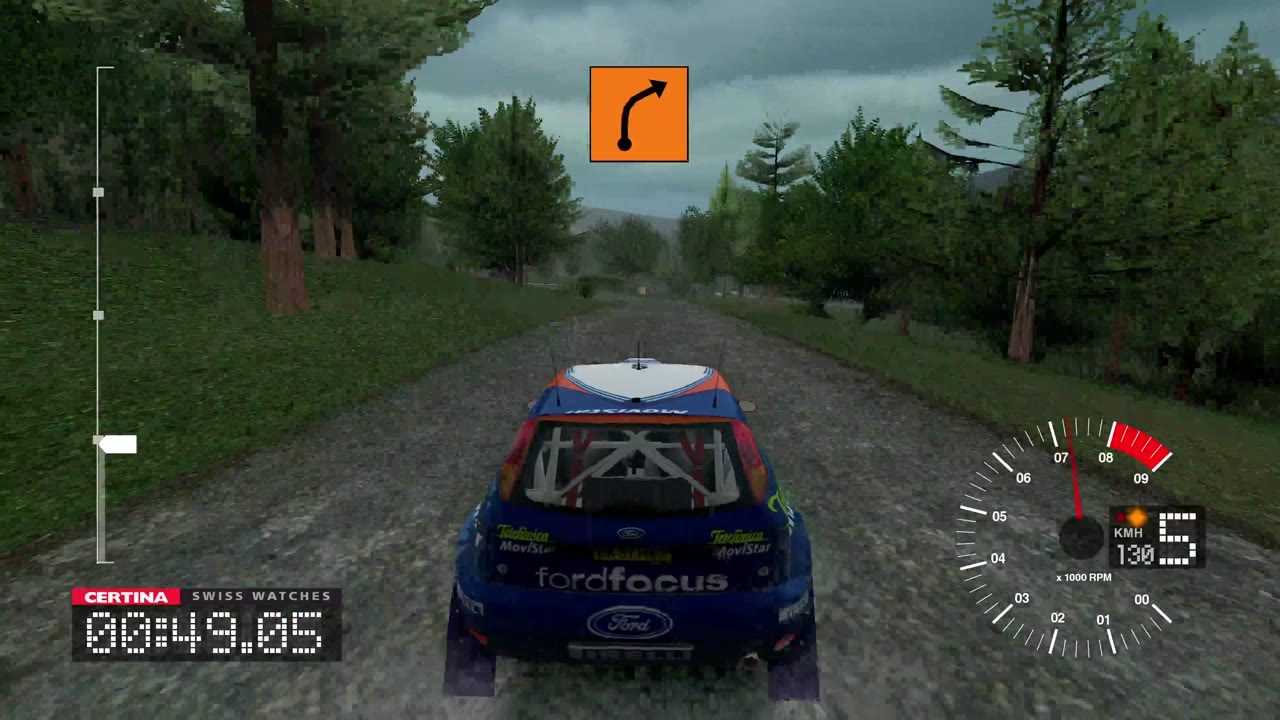
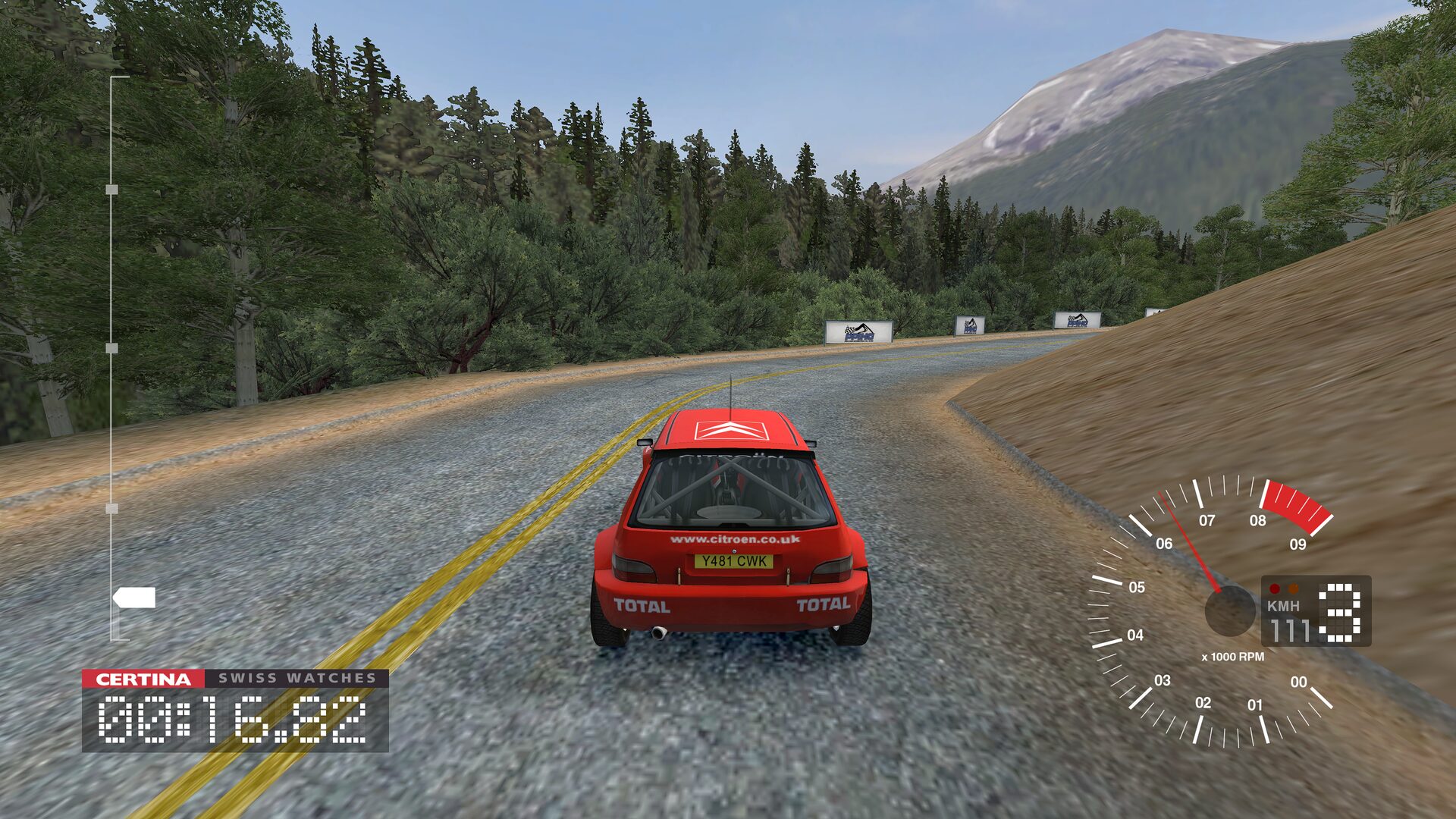
A stage on Linux through the AppImage, with the Cinematic look. Click to watch (1:56, with sound).
Problems this launcher solves
What goes wrong when you install the 2003 game on a computer today, and what the launcher does about it:
| Problem | What the launcher does |
|---|---|
| The game won't start on Windows 10/11: Windows has blocked its SecuROM/SafeDisc disc protection since 2015, and Wine can't run it either. | Converts your official 1.1 executable into the DRM-free one the publisher's later re-releases shipped, with the SilentPatch project's patches. |
| A stretched 4:3 picture, a short list of resolutions, and an interface laid out for 640×480. | Any resolution and aspect ratio. A 16:9 screen shows more to the sides, unstretched, and the interface is moved into place for wide screens (SilentPatch, bundled). |
| A tiny, blurry interface at 4K. | Bekoha's HD UI: fonts, menus and race graphics redrawn for 4K, in every language the game has. |
| Rendering bugs on modern graphics cards and CPUs: a flickering sun that hitches with anti-aliasing, broken water reflections, split-screen and timing faults on multi-core CPUs. | Fixed by SilentPatch. Sharper car shadows and 16× texture filtering come with the modern look. |
| Modern pads barely work: through DirectInput both triggers share one axis (no left-foot braking), a new profile has no controller chosen, the default bindings put steering on the right stick, and the menus ignore the pad. | Xidi turns the pad into a proper game controller. New profiles start with the pad chosen, steering on the left stick and the pedals on the triggers (both at once), and the d-pad and A work the menus. |
| Under Wine or Proton the game crawls at 4K (about 10 FPS) through Wine's OpenGL translator. | DXVK draws it through Vulkan, at full speed. On Windows the system's own Direct3D is used. |
| Under Wine, fullscreen opens on the wrong monitor or comes out cropped. | gamescope gives the game a screen of its own; without it, the game plays borderless. |
| Under Wine, a fault in Wine's video playback froze the game behind a hidden debugger, so it couldn't even quit. | The debugger and its crash dialog are off, so the game ends cleanly instead. |
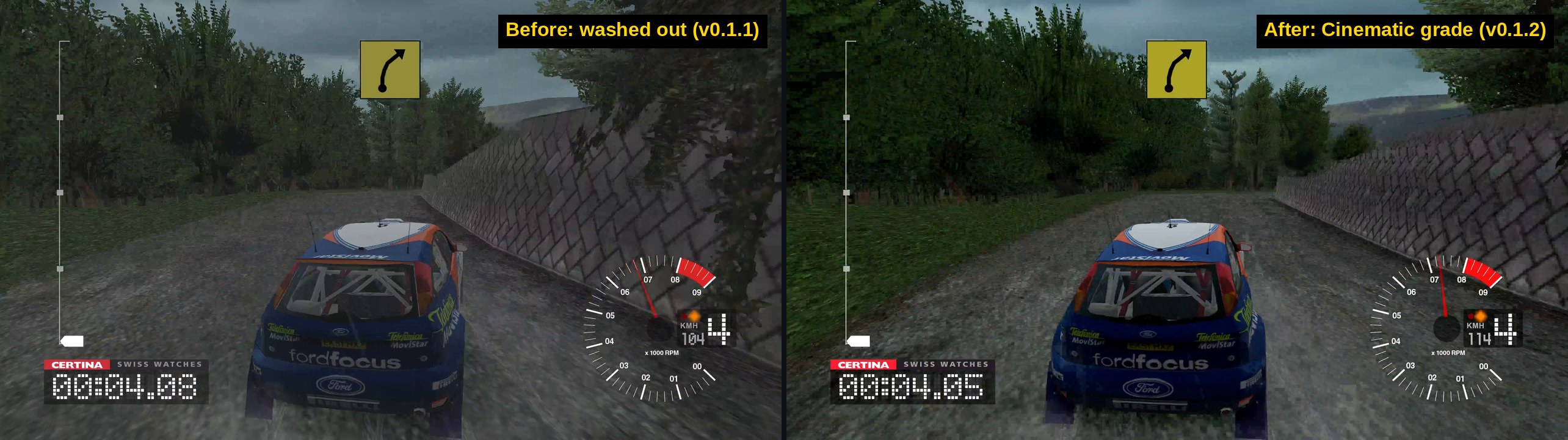
| A flat, washed-out picture with grey blacks. | On Linux, the Colour and Cinematic post-processing restores real blacks and contrast. |
| Patching the game folder risks the copy you own. | Your folder is only read; the launcher works on its own private copy, and your profile lives in a folder you choose. |
Screenshots
| Play | Picture | Controls |
|---|---|---|
 |  |  |
What you need
Colin McRae Rally 3 for Windows PC, installed and updated to the
official 1.1 patch. The folder holds Rally_3PC.exe next to Data,
fonts and shaders.
- Original CDs, a backup of an installed game, or a digital re-release all work. If your copy is still 1.0, install the official 1.1 patch first (download on PCGamingWiki).
- The DRM-free re-releases (the Polish eXtra Klasyka 2-CD, the German DVD) are already 1.1 and DRM-free.
- The launcher removes the disc protection from an official 1.1 executable by itself. It does not crack anything else, and it can't run v1.0.
The launcher knows each supported Rally_3PC.exe by its fingerprint
(SHA-256). Another version is refused with its code and a link to the
unknown version
form, so it can be added. Report the code, never the game's files.
Download and install
Download from the latest release:
- Windows, Steam Deck and Proton:
CMR3Launcher-<version>.zip - Linux:
CMR3Launcher-<version>-x86_64.AppImage
The zip holds CMR3Launcher.exe, its thirdparty/ folder (SilentPatch,
Xidi, the DRM-free patcher, DXVK and the HD UI) and linux/ (cmr3-play,
the Linux helper). Keep thirdparty/ next to the launcher.
Windows
- Unzip
CMR3Launcher-<version>.zipanywhere, for example into your game folder. Keep its folders next toCMR3Launcher.exe. - Run
CMR3Launcher.exeand follow First run.
Steam Deck
- In Desktop Mode, unzip the release, then in Steam choose Games → Add a
Non-Steam Game to My Library… and pick
CMR3Launcher.exe. - In its Properties → Compatibility, force a Proton version.
- Back in Game Mode, start it: the window works with the controls and recommends the Steam Deck look.
Game Mode has not been tested on a Deck yet.
Linux: AppImage
chmod +x CMR3Launcher-*-x86_64.AppImage
./CMR3Launcher-*-x86_64.AppImage
It brings its own Wine, so nothing else needs to be installed. It keeps
its Wine prefix in ~/.local/share/cmr3-launcher/prefix and runs the game
in gamescope when it is
installed.
Linux: Steam (Proton)
Unzip the release, add CMR3Launcher.exe as a non-Steam game and force a
Proton version in its compatibility settings, as on the Steam Deck.
Proton brings its own DXVK and runs without cmr3-play, so the Linux-only
rows (upscaling, post-processing) don't apply there.
Linux: your own Wine
Run linux/cmr3-play from the unzipped release:
linux/cmr3-play            # the settings window, then the game
linux/cmr3-play --play     # the game with the saved settings, no window
linux/cmr3-play stop       # end the game
linux/cmr3-play status     # running or idle
It needs Wine; gamescope is optional but recommended. Options, a distrobox and more: linux/README.md.
First run
- In the window's Play tab, press Browse… and choose the folder
with
Rally_3PC.exe. Under Wine your Linux files are on driveZ:, for exampleZ:\home\you\Games\Colin McRae Rally 3. The window says what it found. - Pick a look: Enhanced suits most screens and is picked the first time (on a Steam Deck, Steam Deck).
- Press Play (or Enter, or Start on a gamepad).
The first start copies the game into the launcher's private folder (about 3 GB). That is almost instant when your game folder and the launcher's folder are on the same disk, because the big data files are hard-linked. Later starts copy only what changed. Your choices are remembered.
The settings window
The window is the same on Windows and Linux, and larger on big screens. Every control has a line under it saying what it changes.
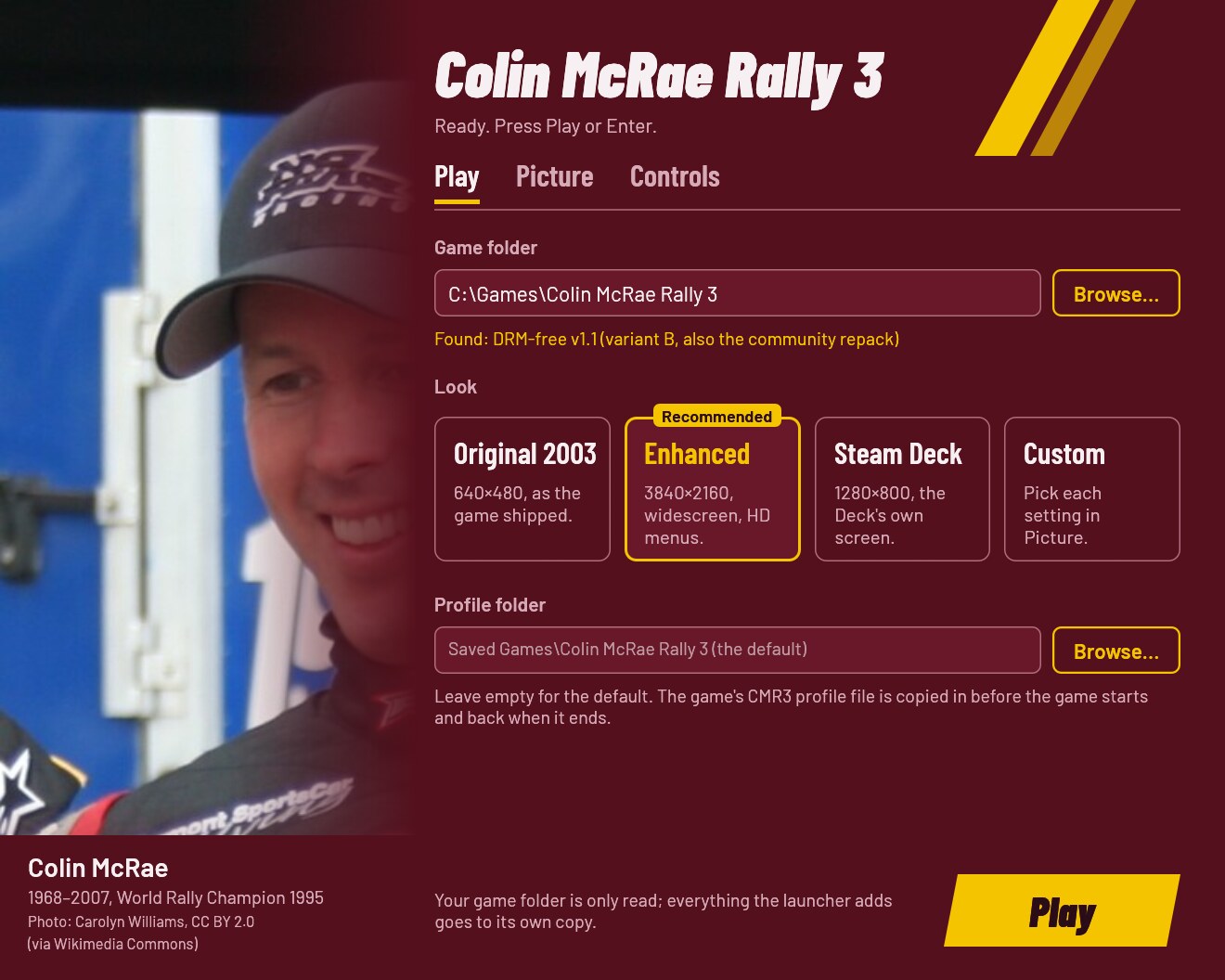
- Play: the game folder, the look, and the folder that keeps your profile.
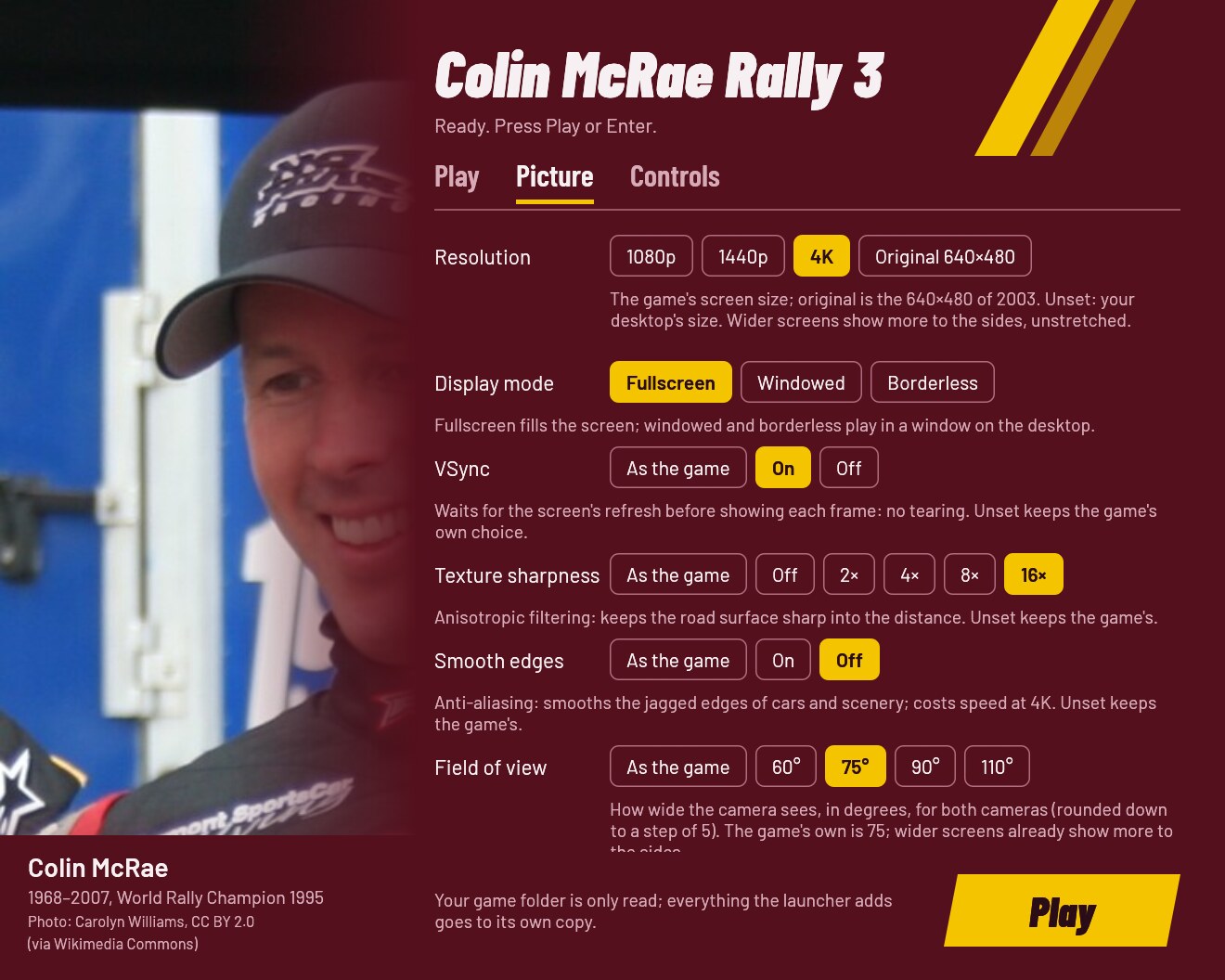
- Picture: resolution, display mode, vsync, texture sharpness, smooth edges, field of view, car shadows and the HD menus. On Linux also Vulkan (DXVK), gamescope's upscaling and post-processing.
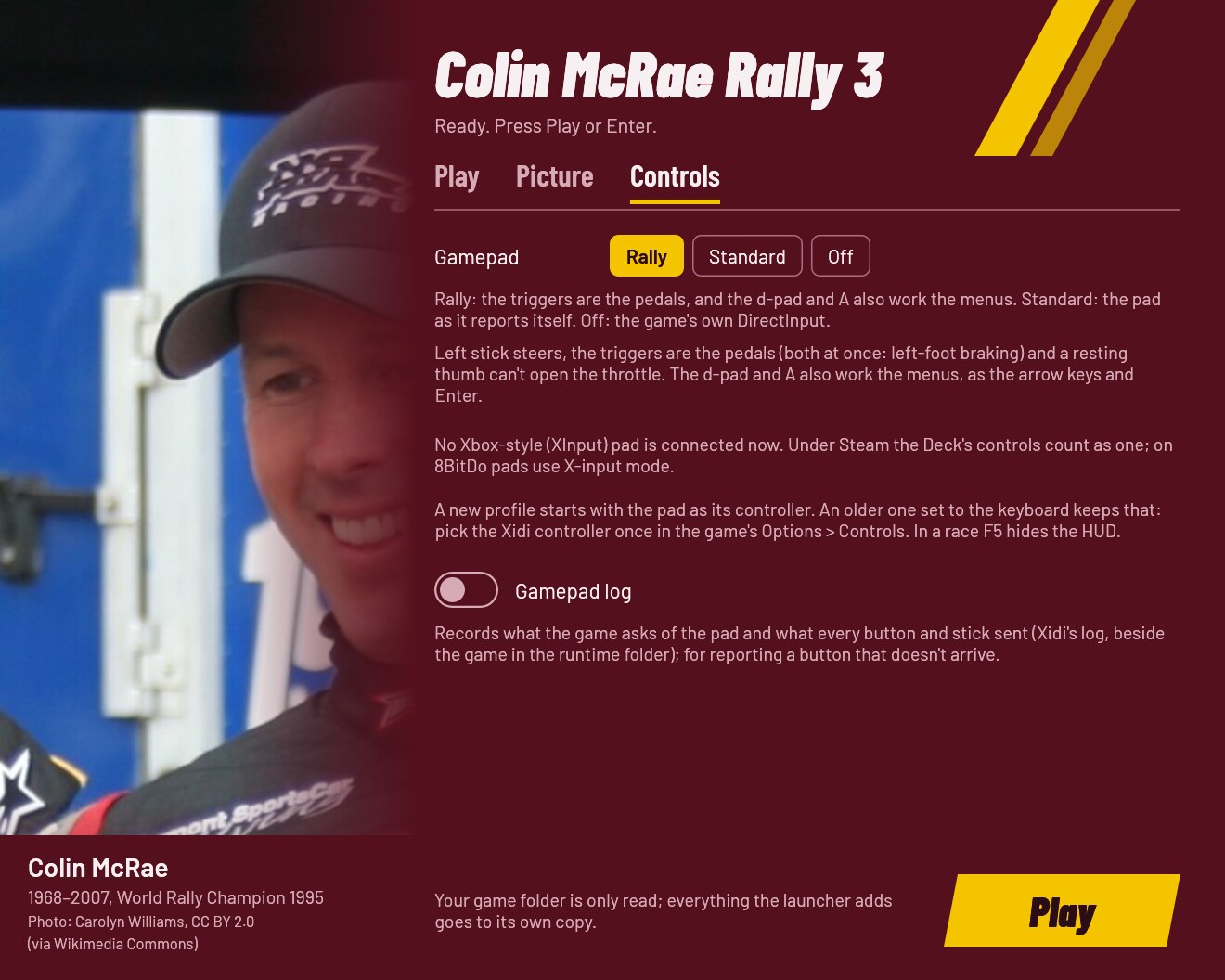
- Controls: the gamepad preset, how many pads are connected, and the gamepad log for bug reports.
| Look | What it sets | When to pick it |
|---|---|---|
| Original 2003 | 640×480, everything else as the game shipped | To play it as in 2003 |
| Enhanced | Your screen's size, widescreen, vsync, 16× texture filtering, the HD menus | Most screens (picked on the first run) |
| Steam Deck | 1280×800, vsync, 16× texture filtering, the HD menus | The Steam Deck (picked on a Deck) |
| Custom | Any change in the Picture tab |
The window works with a gamepad (d-pad moves, A changes the focused setting, LB/RB switch tabs, Start plays) and with the keyboard alone (Tab moves, arrows pick, Ctrl+Tab switches tabs, Enter plays). A control that can't be used right now is greyed out and says why.
Gamepad
Pick the Rally preset (the default) and play.
| On the pad | In menus | In a race |
|---|---|---|
| Left stick | Steer | |
| Right trigger / left trigger | Throttle / brake (both at once for left-foot braking) | |
| D-pad | Move | |
| A | Select |
Xidi (bundled) makes a modern XInput pad a game controller, and resting thumbs can't open the throttle. You can swap pads while the game runs. The game's menus answer only the keyboard, so the d-pad and A also press the arrow keys and Enter.
- A new profile starts with the pad as its controller and vibration at Medium. A profile from an earlier install that points at the keyboard keeps it: choose the Xidi controller once in the game's Options → Controls.
- Under Steam the Deck's controls arrive as an Xbox-style pad; on 8BitDo pads use X-input mode.
- If you prefer the game's own handling, set the gamepad to Standard (then bind the pedals to the left stick's Y axis in the game's control setup) or Off.
Options
Every option has the same name in the window, in launcher.cfg (with
underscores) and on the command line (with hyphens); CMR3Launcher.exe --help lists them. The first run writes a commented launcher.cfg
(Where things live).
launcher.cfg / flag | In the window | Values | Unset | What it changes |
|---|---|---|---|---|
game / --game | Play: Game folder | a folder | found next to the launcher | The folder with your Rally_3PC.exe; only read. Remembered. |
saves / --saves | Play: Profile folder | a folder | Saved Games\Colin McRae Rally 3 | Where your profile (the game's CMR3 file) is kept. |
runtime / --runtime | — (file and flag only) | a folder | %LOCALAPPDATA%\CMR3Launcher\Rally3 | Where the launcher's private copy goes (about 3 GB). |
look / --look | Play: Look | original, enhanced, steam_deck | the picture values saved | Every picture setting at once, as the window's look cards set them. Picture options given on their own win over it. The window saves the values themselves. |
resolution / --resolution | Picture: Resolution | WIDTHxHEIGHT, original | the desktop's size | Any size and aspect ratio; original is the 640×480 of 2003. |
display_mode / --display-mode | Picture: Display mode | fullscreen, windowed, borderless | fullscreen | Fullscreen plays borderless under Wine without gamescope. |
vsync / --vsync | Picture: VSync | on, off | the game's (Enhanced: on) | Waits for the screen's refresh: no tearing. |
anisotropic / --anisotropic | Picture: Texture sharpness | off, 2, 4, 8, 16 | the game's (Enhanced: 16) | Keeps the road sharp into the distance. |
fsaa / --fsaa | Picture: Smooth edges | on, off | the game's (Enhanced: off) | Anti-aliasing (SilentPatch fixes its rendering bugs); costs speed at 4K. |
fov / --fov | Picture: Field of view | 30–150, steps of 5 | the game's (75) | How wide both cameras see. |
shadows / --shadows | Picture: Car shadows | sharp, soft | the game's | Sharp is the 2005 look, soft the blur of 2003. |
hd_ui / --hd-ui | Picture: HD menus | on, off | off (Enhanced: on) | Bekoha's 4K interface. |
dxvk / --dxvk | Picture: Vulkan (DXVK), Linux only | on, off | on | Draws through Vulkan instead of Wine's OpenGL translator. Ignored on Windows. |
scaler / --scaler | Picture: Upscaling, Linux only | nearest, pixel, fsr, linear | linear | How gamescope enlarges the picture. Read by cmr3-play. |
postfx / --postfx | Picture: Post-processing, Linux only | off, color, cinematic | off | A colour grade over the finished frame: color gives real blacks, fuller contrast and sharpening, cinematic a stronger grade (ambient occlusion only if you add the MxAO shader, see docs/ENHANCEMENTS.md). Needs DXVK. Read by cmr3-play. |
gamepad / --gamepad | Controls: Gamepad | rally, standard, off | rally | Rally: the triggers are the pedals and the d-pad and A work the menus. Standard: the pad as it reports itself. Off: no Xidi. |
gamepad_log / --gamepad-log | Controls: Gamepad log | on, off | off | Xidi logs what the game asks and what each control sent, for bug reports. |
Unset means the game keeps its own value; a value you set and later unset goes back to the game's, unless you changed it in the game since.
Any option on the command line skips the window and plays; options
override launcher.cfg for that run only (with cmr3-play --play … too,
the gamescope ones included), and only --game is remembered. The
launcher's own switches:
--no-window: play with the saved settings, no window.--check: check a game folder, its executable (with its SHA-256) and the bundled parts without playing. An official 1.1 executable with disc protection is tried with the bundled patcher on a scratch copy and reported as "converted at Play"; the HD UI is optional. The report goes to the terminal andlauncher.log(exit 0 ready, 1 something needed is missing or unknown).--settings: only the settings window (exit 0 Play pressed, 3 closed without Play, 4 no window possible).--linux: started bycmr3-playor the AppImage.--help: every option and its values.
A bad flag or value exits with 2 and a message naming what it takes.
One launcher runs at a time. Starting it again while its window is open
brings the window to the front (exit 0). While the game runs, a second
start says so and exits 5, and so does Play when the game is still
running from the launcher's private copy (a launcher that was ended while
playing, say). --check runs alongside.
Where things live
| What | Windows | Linux (AppImage, cmr3-play) |
|---|---|---|
Settings (launcher.cfg) and log (launcher.log) | %LOCALAPPDATA%\CMR3Launcher\ | in the Wine prefix, drive_c/users/<you>/AppData/Local/CMR3Launcher/ |
| The launcher's copy of the game | %LOCALAPPDATA%\CMR3Launcher\Rally3 (the runtime option moves it) | the same folder inside the prefix |
| Your profile (saves) | %USERPROFILE%\Saved Games\Colin McRae Rally 3 (or your saves folder) | in the prefix, drive_c/users/<you>/Saved Games/Colin McRae Rally 3 |
| Wine prefix | — | ~/.local/share/cmr3-launcher/prefix |
cmr3-play's logs (play.log, settings.log) and lock | — | ~/.config/cmr3-launcher |
A launcher.cfg next to CMR3Launcher.exe is used instead (a portable
install). Under Proton everything is inside Steam's prefix for the
non-Steam game
(~/.steam/steam/steamapps/compatdata/<id>/pfx/drive_c/users/steamuser/…).
The game reads and writes its profile (CMR3) in the launcher's copy. The
launcher copies it in from your profile folder before the game starts and
back when it ends, so your progress lives in the profile folder. On
Windows the launcher also sets the game's graphics preference to the
high-performance GPU (HKCU\Software\Microsoft\DirectX\UserGpuPreferences).
Troubleshooting
- "This Rally_3PC.exe is not a version the launcher knows": your executable is neither a DRM-free 1.1 build nor an official 1.1 one the bundled patcher converts (an unofficial no-CD, or still v1.0). Re-install the official 1.1 patch and try again. If it is a 1.1 build anyway, open the unknown version form with the code the message shows and where your copy comes from.
- The game crawls at 4K under Wine: DXVK is off. Turn it on in the
settings window (Linux), or check that
thirdparty/dxvk/d3d9.dllis next to the launcher. - The pad has no throttle: use the Rally preset, and leave the game's accelerator and brake on the left stick's Y axis.
- Anything else: run
CMR3Launcher.exe --check, then open a bug report withlauncher.logattached (remove personal paths). Never attach game files.
Known limitations
- The interface languages come with your copy of the game. To use every language and co-driver together, add SilentPatch's Language Pack to your game folder yourself (we don't redistribute game content); the launcher picks the rest up from there.
- Only the official 1.1 executables (and the DRM-free ones) are supported; v1.0 needs the official patch first.
- Post-processing is Linux only (
cmr3-playwith DXVK). - Not yet tested on native Windows, a Steam Deck, or Proton without
cmr3-play; the full list of what was and wasn't checked is in docs/RUNTIME_NOTES.md.
Uninstall
- Back up your profile first:
%USERPROFILE%\Saved Games\Colin McRae Rally 3(or yoursavesfolder) holds your progress. On Linux it is inside the Wine prefix (see Where things live), so deleting the prefix in step 4 deletes it too. - Delete the folder you unzipped the launcher into (or the AppImage).
- Windows: delete
%LOCALAPPDATA%\CMR3Launcher(settings, log and the launcher's ~3 GB copy of the game). The graphics preference inHKCU\Software\Microsoft\DirectX\UserGpuPreferencesnames the copy'sRally_3PC.exe; you can delete that value too. - Linux: copy your profile out of the prefix, then delete
~/.local/share/cmr3-launcherand~/.config/cmr3-launcher. With Proton, removing the shortcut in Steam offers to delete its prefix, saves included.
Your game folder was never changed, so there is nothing to undo there.
For developers
Rust (edition 2024), MinGW-w64 with lld for the i686-pc-windows-gnu
target, Wine for the Windows-target tests and cargo-deny. The
gaming distrobox has
them all; run the last two commands there with an absolute path. lld is
required: GNU ld 2.47 leaves some of the launcher's imports unresolved
(.cargo/config.toml).
cargo fmt --all --check
cargo test --workspace --locked                 # host tests, the settings window headless
cargo clippy --release --target i686-pc-windows-gnu --workspace --all-targets -- -D warnings
cargo deny check
for t in linux/tests/*.sh packaging/tests/*.sh; do sh "$t"; done   # e2e.sh runs the game only with CMR3_E2E=1
sh <sdk>/scripts/sdk-sync --ch