CB2-Online
CB2-Online is a port of Crash Bandicoot 2: Cortex Strikes Back that adds online multiplayer with real-time player synchronization and speedrunning features like level timers and personal records.
- Type: PC port
- Game: Crash Bandicoot 2: Cortex Strikes Back
- Runs on Windows
- By ignzio
- Latest release v0.8.6, 2026-10-28
- Source: https://github.com/ignzio/CB2-Online
- Website: https://ignaziogandolfo.dev/CB2-Online/
README
CB2-Online
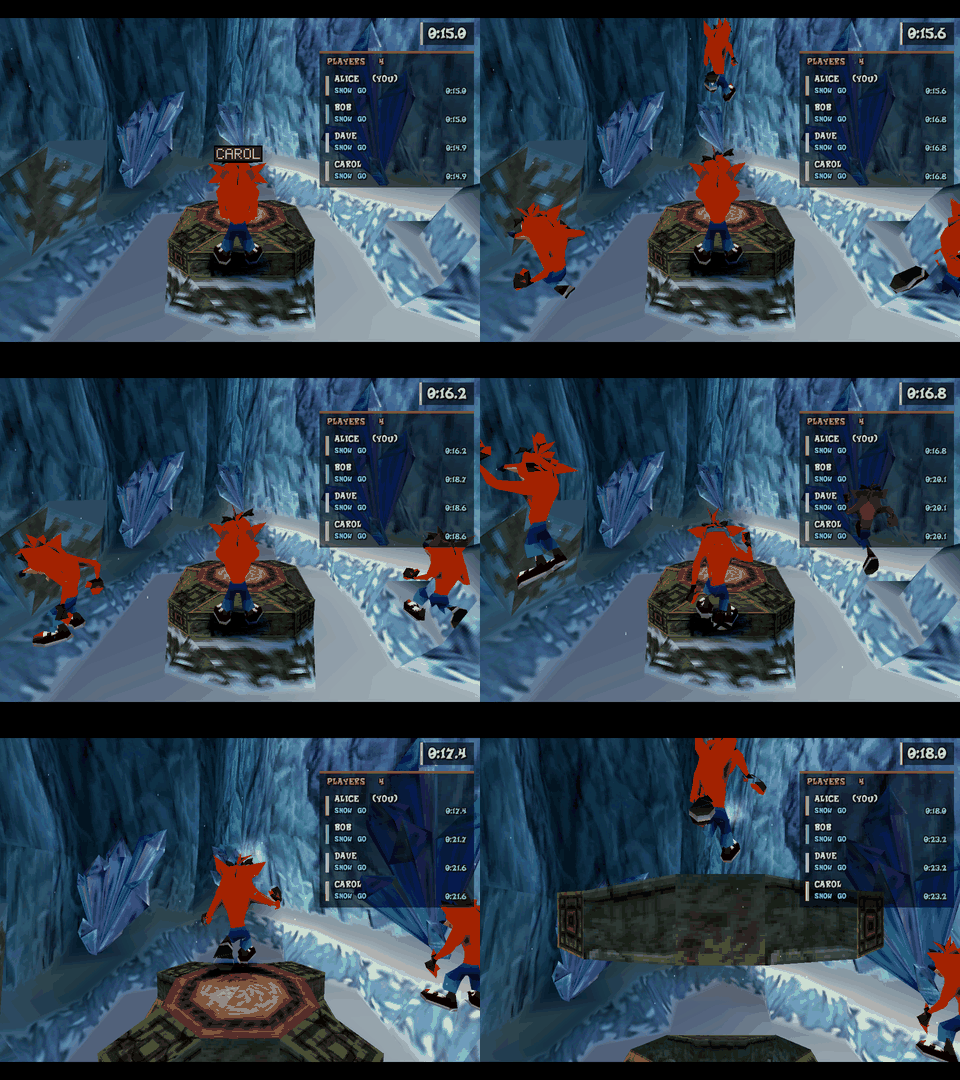
Crash Bandicoot 2 with online multiplayer. Play the original game, level by level, together with your friends: everybody who is in the same room appears in your game as an extra Crash with a name tag, in the same level, in real time. Add level timers and personal records, a live player list, 60 fps smoothing and an in-game menu, and you have a game built for racing and speedrunning together.
You need your own copy of the game. CB2-Online contains no game data: on the first start it asks for your own disc image of Crash Bandicoot 2 (European PAL,
SCES_009.67, or American NTSC-U,SCUS_941.54) and copies the files it needs. See Install and NOTICE.md.
Contents: Features · Install · Playing online · Controls · In-game menu · Level times and records · Graphics and speed · Save states · Settings · Updates · How it works · For developers · Known limits · Legal
Features
Both releases
- The European (PAL) and the American (NTSC-U) release both run, at their own speed (50 Hz and 59.94 Hz), with their own records and save states. With both installed the game starts the PAL one (
regionincb2.cfg); the lobby's RELEASE row switches to the other one (the game restarts) or, when it is not installed yet, adds it (the setup screen asks for its disc image). Players of the two releases play in separate rooms: their game data differs. See docs/REGIONS.md.
Multiplayer
- Play with friends in the same level at the same time: every other player is a real Crash in your game, with animation, position and a floating name tag.
- No host, no port forwarding, no addresses to type. Players in a room find each other on the same PC or network automatically, or through a rendezvous server on the internet; they can leave and come back at any time.
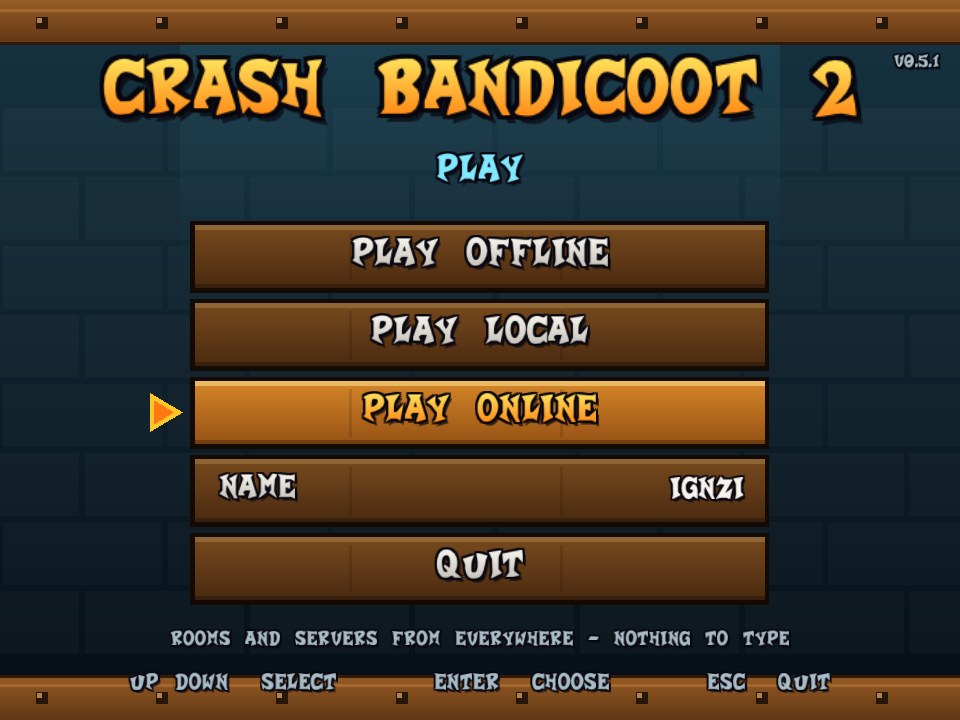
- Online lobby before the game: play offline, play on your network, or play online; your name; a public list of open rooms and servers.
- Rooms with a password: the person who creates a room can set one (a padlock shows in the list); only players who know it can join. It keeps unwanted players out; it does not encrypt the game traffic (docs/ONLINE.md, which also lists what the networking does against hostile input).
- Player list at the right edge: who is online, which level each one is in, how long they have been in it, their best time and latest finish (
F3). - Notices when somebody joins or leaves the room, enters or leaves a level, finishes a level or runs out of lives.
- Opacity slider for the other players' Crashes (10-100%), so they do not block your view.
- Others are shown, not solid: you do not collide with them or interact. Online, they see you standing still while your menu is open.
Speedrunning
- Level timer from the first frame Crash can move until the level ends (
F4), in the game's own time (59.94 Hz NTSC, 50 Hz PAL). - Personal records per level, saved in
records.txt; a Records page in the menu; new-best notices. - Your best time and latest finish are shared with the room. A server-side leaderboard is planned: SPEEDRUN.md.
- Save states (
F5save,F9load, four slots): practise a trick without replaying the cutscenes. - Hold
Tabto fast-forward.
Graphics and sound
- OpenGL renderer at up to 8x the original resolution (default 4x) with unrounded vertex positions, so the geometry does not wobble.
- 60 fps smoothing (optional, unstable, Esc → Settings → Experimental): the game draws 30 pictures per second; this draws the pictures in between.
- Smooth textures (optional): bilinear filtering instead of the blocky texels. Perspective-correct textures (optional): no more swimming textures on floors and walls.
- Native world (optional, unstable, Esc → Settings → Experimental): the level scenery is drawn by OpenGL straight from the level files, with a depth buffer and perspective-correct textures, instead of from the polygons the console's code projected. It is what makes widescreen show real geometry in the side margins, and it moves the camera exactly for the 60 fps pictures in between. Water and other see-through polygons stay the game's own.
- Widescreen (optional, unstable, Esc → Settings → Experimental): the picture at your window's aspect ratio (see the limits below).
- Skip the intro (Esc → Settings → Skip the intro, on by default): a new game starts in the warp room instead of playing the logos, the title and the story. The game's first level is a constant in its own
main()(ori a0, zero, 0x3C, the title); the program changes it to 2 in memory, which is all a modified executable does, so nothing on the disc or in a file is changed and no save state is involved. The warp room's own opening scene still plays (Tabspeeds it up). Switch it off to get the title screen (and Continue) back. docs/SKIP_INTRO.md. - Props (optional, unstable, Esc → Settings → Experimental): things that are not in the game but live in it. The first one is the game's own "?" crate (its model and textures are read from your Turtle Woods file) in the warp room: Crash cannot walk through it and bounces on it when he jumps on it; it is drawn among the game's own polygons and acts on Crash through the game's own jump code. Your own crates go in
props.txt. How it works, and why it is not a GOOL script yet: docs/PROPS.md. - High refresh rates: with 60 fps smoothing on a 90+ Hz monitor every refresh shows its own picture (160 Hz = 160 distinct pictures a second).
- Display filters (nearest / bilinear / sharp bilinear), fullscreen, vsync, 4:3 picture whatever the window shape.
- Volume slider; the original sound and music.
Bug reports
- Esc → Report a bug opens a GitHub issue in your browser with your version, system, graphics card, settings and the last crash filled in. Nothing is sent until you press Submit.
- If the game crashes it writes
crash.logand a minidumpcrash.dmpnext to the game (what failed, where, the loaded modules, the last events), and every session keeps an event log,cb2-session.log, that survives a killed process; a game that stops responding is recorded too (hang.dmp). If it vanishes without an error (killed, graphics driver reset) the next start notices that as well. Either way, the next start offers to open the bug report for you and shows the crash files; each release has a link map that turns the addresses into function names. See docs/CRASHES.md.
Controls
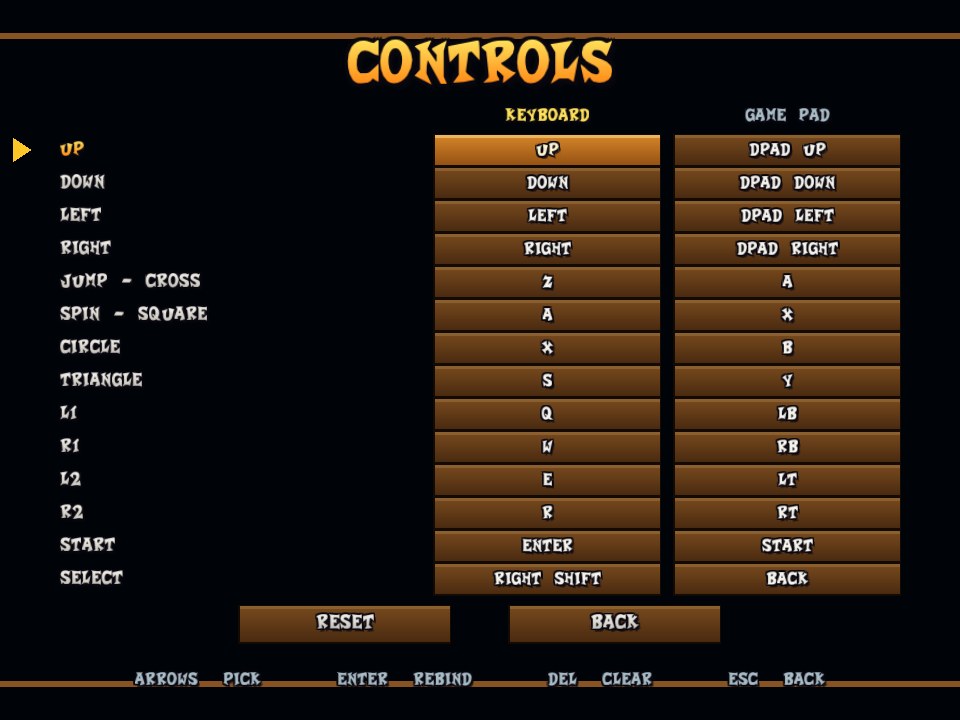
- Keyboard, game pad (XInput / SDL mapping) and mouse; every PS1 button is rebindable for both keyboard and pad, side by side in the menu.
Convenience
- Fast loading: zones and levels load in a fraction of a second (the emulated disc drive is 16 times faster than the console's;
disc_speedincb2.cfg). - In-game menu (
Esc): settings (display, sound and timer, experimental), online options, records, controls, report a bug, back to the main menu, quit; every row says what it does. - Automatic updates from GitHub Releases, verified by SHA-256; your files and saves are untouched.
- Disc importer: point it at your
.cue/.bin/.isoonce; it extracts what it needs. - Memory card saves in the standard 128 KiB image format (
memcard0.mcr). - Works as a single folder you can copy; the optional server is a separate small program for Windows and Linux.
For modders and developers
- Mod folders that overlay files onto the disc (
--mod), NSF/NSD level reader and writer, a GOOL script assembler, a scenery-to-OBJ pipeline, a level viewer. See For developers.
Install
- Download
CB2-Online-v<version>.zipfrom the Releases page and unzip it anywhere. - Run
Play.bat(orCrash2.exe). - First start only: the game's own setup screen asks which release you have - European (PAL) or American (NTSC-U) - and explains what that means: you play, and meet other players online,
with that release only (the two are kept apart: their rooms, saves, records and save states do not mix). Then the usual Windows file window opens on top of the game: pick the
.cue(or.bin/.iso) of that disc. The game checks that the disc really is the release you chose, copies the files it needs intodata-pal(European) ordata(American) with a progress bar, once, and starts. To add or switch to the other release later use the RELEASE row of the lobby,Add another release.batorCrash2.exe --setup. You can also drop the.cue/.isoonCrash2.exe(or on the setup window), or runCrash2.exe --import "path\to\disc.cue", which detects the release by itself. Compressed formats (.chd,.pbp,.ecm) are not supported. If you already have the files extracted, copySCES_009.67(European) orSCUS_941.54(American),SYSTEM.CNFand theS0..S3folders intodata-palordatayourself. - The lobby opens. Choose Play Online, or Play Offline to play alone.
The folder holds your own game files, so keep it for yourself; the release zip itself never contains them.
Windows Defender / SmartScreen warns about Crash2.exe? The program is new and not yet code signed, which these tools are suspicious of. More info -> Run anyway starts it; you can compare
Get-FileHash Crash2.exe with the SHA-256 GitHub shows next to the release file, and the full source is in this repository. See docs/RELEASING.md.
Crash2.exe            the game
data\                 your American game files (SCUS_941.54, SYSTEM.CNF, S0..S3), found automatically
data-pal\             your European game files (SCES_009.67, ...), if you have that release
states\               your save states
cb2.cfg               settings (name, room, server, picture ...)
memcard0.mcr          your game saves; records.txt: your level records
Crash2-Server.exe     rendezvous server (no game inside), only needed to host one
*.bat                 shortcuts: play, play offline (no lobby), add another release, start the server
Playing online
- Start the game and pick Play Online in the lobby. Type nothing: you get into the public room.
- Everybody who chose the same room is in your game from then on. To play with specific friends, put the same room name in your
cb2.cfg(room = MYFRIENDS) or start withCrash2.exe --room MYFRIENDS. - Walk into the same level. You see each other; the player list (
F3) shows who is where.
Private rooms: choose Create a room, type a name, then a password (leave it empty for an open room). Locked rooms show a padlock in the list and ask for the password when you join. Rooms are separate for the European and the American release, and the list only shows the rooms of your release.
| Way of playing | When to use it |
|---|---|
| Play Offline | alone; nothing is sent anywhere |
| Play Local | everybody is on the same PC or the same network: players find each other by themselves |
| Play Online | over the internet: the lobby service lists open rooms and servers, and a rendezvous server introduces the players (it never carries the game) |
Hosting your own rendezvous server, the lobby service and the network protocol are described in docs/ONLINE.md and
docs/LOBBY_PROTOCOL.md. Command line: --online, --room NAME, --rendezvous host:port, --name NAME, --no-lobby.
Controls
| Key | Action | Key | Action | |
|---|---|---|---|---|
| Arrows | D-pad | Esc | in-game menu | |
Z | Cross (jump) | F1 | cycle display filter | |
X | Circle | F3 | show / hide the player list | |
A | Square (spin) | F4 | show / hide the level timer | |
S | Triangle | F5 / F9 / F6 | save state / load state / next slot | |
Q W E R | L1 R1 L2 R2 | F11 | fullscreen | |
Enter / Right Shift | Start / Select | F12 | screenshot | |
Hold Tab | fast-forward | F2 | toggle the OpenGL renderer |
A game pad works as well (left stick = D-pad). Everything is rebindable in the menu.
In-game menu
Esc pauses the game and opens the menu. It works with keyboard, game pad and mouse: arrows / D-pad / hover to pick, Enter / A / click to choose,
Left-Right or dragging to move a slider, Esc / B / right click to go back.
| Page | What is on it |
|---|---|
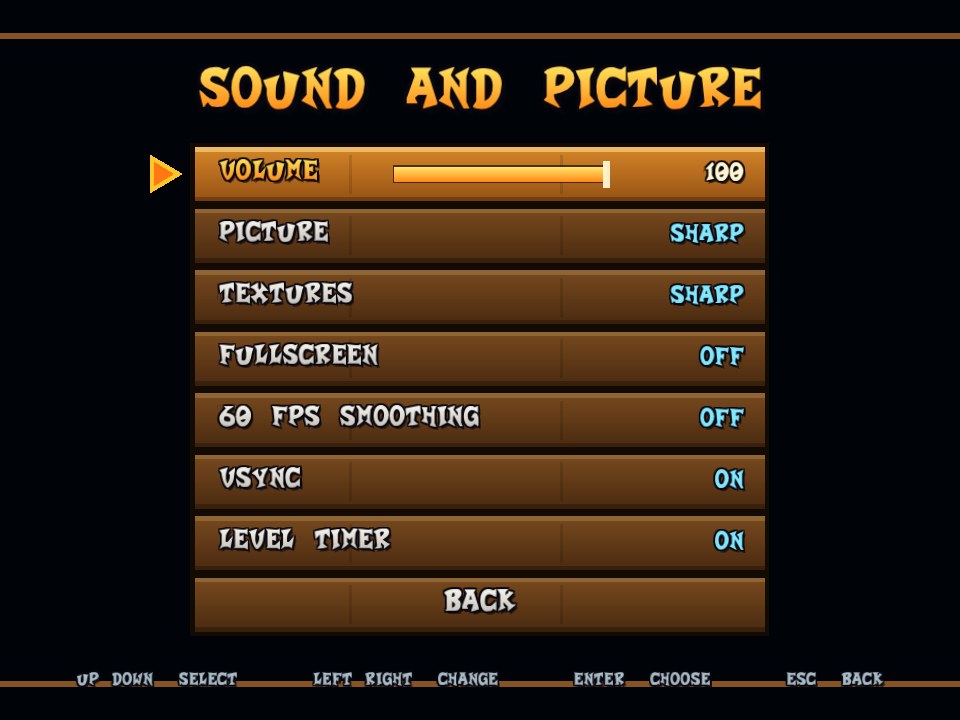
| Settings → Display | fullscreen, display filter, textures (sharp / smooth), perspective correction, vsync |
| Settings → Sound and timer | volume, level timer |
| Settings → Experimental | native world, widescreen, 60 fps smoothing and props (all marked UNSTABLE: they can flicker, miss parts or glitch; off is the safe choice) |
| Online | name tags, opacity of the other players, the player list |
| Records | your best time and runs per level |
| Controls | keyboard and game pad bindings side by side; Enter rebinds, Del clears, a key already in use swaps |
| Main menu | leave the room and return to the lobby (progress not saved on the memory card is lost) |
| Report a bug | opens a GitHub issue with your system and settings filled in |
| Quit game | close the game |
Level times and records
A timer at the top right times each level from the moment Crash can move until the game leaves the level. Finished runs become personal records
(records.txt, listed on the menu's Records page); running out of lives is counted as an attempt, never as a record. Everybody in the room sees
your best time for the level you are in and your latest finish. Details, the file format and the leaderboard plans: docs/SPEEDRUN.md.
Graphics and speed
- Resolution:
scale = 4incb2.cfg(1-8) is the multiple of the original resolution. - 60 fps smoothing: draws a picture between each pair of the game's 30 fps frames by moving every polygon half way to where it was in the previous frame. Adds one vblank (about 17 ms) of delay; the game's own timing is unchanged. Off by default.
- Textures: smooth: bilinear texture filtering in the shader, without bleeding between neighbouring textures. Default is the original sharp look.
- Speed: the emulator skips the engine's idle waiting, which halves its CPU use; frame pacing and vsync are tuned for an even rhythm.
- Fast loading: the emulated disc drive is 16 times faster than the console's, so a zone or level load takes 0.2-0.3 s instead of 2.5-5 s (
disc_speed = 1incb2.cfgfor the authentic waits).
All of it, with the reasoning and how to measure it, is in docs/PERFORMANCE.md.
Save states
F5 saves the whole game (all of the emulated console) into the current slot, F9 loads it, F6 switches between slots 1-4. Files: states\slotN.cb2state (states\pal-slotN.cb2state for the European release).
Useful for practice and for reproducing bugs without replaying the cutscenes. They do not touch your memory card saves, they are not portable between versions that
change the console emulation, and they only work with the normal (interpreter) engine.
Settings (cb2.cfg)
Everything in the menu is remembered in cb2.cfg next to Crash2.exe; the file is plain text (key = value). The main keys:
| Key | Meaning |
|---|---|
name, room | your name above your Crash; the room you meet people in |
scale | internal resolution multiplier (1-8) |
game, game_pal, region | the American and European game folders; region = auto (default) / pal / ntsc chooses which one to play when both are installed |
volume, filter, timer | Settings → Sound and timer and Display |
textures, perspective, native_world, widescreen, smooth, vsync, refresh_rate | Settings → Display and Experimental (widescreen and smooth are on the Experimental page; refresh_rate = 0 uses your monitor's rate) |
disc_speed | how many times faster than the console's drive the game's disc reads are (1-24, default 16) |
nametags, opacity, roster | the Online page |
key_<button>, pad_<button> | bindings |
rendezvous, directory | rendezvous server and lobby service (built in; set only to override) |
update = off, lobby = off | no update check; no lobby |
The full list is documented at the top of src/config.hpp and in cb2.cfg.example.
Players cannot see each other?
Usually an antivirus or firewall (Kaspersky in particular) blocks Crash2.exe from the network. The waiting room then shows a red notice after about ten seconds. Allow the program in the firewall's application rules and add it to the exclusions: step by step in docs/ONLINE.md and the FAQ of the project page.
Updates
When the lobby opens, the game checks this project's GitHub Releases for a newer version (one request, in the background). If there is one, the first row
becomes UPDATE TO Vx.y.z; choosing it downloads the new Crash2.exe, verifies its SHA-256 and restarts. Your game files, settings and saves are not
touched. update = off disables the check. How releases are made: docs/RELEASING.md.
How it works
CB2-Online does not remake the game: it runs the original game code and its scripts unmodified on a PlayStation platform layer written in C++ (R3000 CPU, exact GTE, GPU, SPU, CD-ROM, memory card, BIOS replacement), with an OpenGL window, audio and input. Online play hooks the game's own object routines: other players are created as extra Crash objects, fed with the positions and animations that arrive over UDP, and drawn by the game's own code. Details: docs/ONLINE.md, docs/PLATFORM.md, docs/ARCHITECTURE.md.
For developers
Building (Windows, Visual Studio 2022 + CMake), the command line, the test suite, the modding pipeline (NSF/NSD, GOOL, scenery), the research tools and the status of every part of the engine layer are in docs/DEVELOPMENT.md.
cmake -S . -B build -G "Visual Studio 17 2022" -A x64
cmake --build build --config Release
Roadmap
The goal is a complete multiplayer Crash Bandicoot 2: a fully speedrun multiplayer experience (synchronised race starts, live splits and standings, ghosts, public leaderboards), co-op mode (shared crates, enemies and checkpoints), a level editor and custom levels you can share with the room, skins, and a freeroam mode. The project page (docs/, served by GitHub Pages) lists them as milestones; see docs/WEBSITE.md.
Known limits
- Other players are shown, not solid: no collision and no shared crates or enemies