CrashRecomp: Crash of the Titans, Definitive Edition (PC)
Crash of the Titans statically recompiled for Windows: DLSS/FSR, PC controls, PT-BR subtitles and mod support.
- Type: PC port
- Game: Crash of the Titans
- Runs on Windows, Linux and Android
- By VitoMiguelF
- Latest release v1.10.1, 2026-10-31
- Source: https://github.com/VitoMiguelF/crashott-pc
README
CrashRecomp: Crash of the Titans, Definitive Edition (PC)
A native Windows port of Crash of the Titans (Xbox 360), made by statically recompiling the game's PowerPC code to x86-64 with XenonRecomp, plus a runtime that replaces the Xbox 360 (graphics, audio, input, files, saves) and a set of PC improvements.
v1.07: Linux / Steam Deck installer, colour subtitles and a reviewed PT-BR
- Linux and Steam Deck (in testing):
CrashSetup-v1.07-x86_64.AppImage, the same installer screens as on Windows, built from your own copy of the game (see "Linux and Steam Deck" below).- Subtitles: the speaker's name in their own colour, overlapping lines shown together, more reading time for short lines, and subtitles on the voice clips that share their audio with another. The Brazilian Portuguese texts were reviewed (enemy and titan names, titles, jokes and moves).
Already on v1.05 or v1.06? Click UPDATE in the launcher: your saves and settings stay, and the new subtitles are installed.
v1.06: Intel integrated GPUs fixed, and much faster on them
- No more black flicker on Intel integrated GPUs (issue #3): their driver read the draw constants past 128 MB of the upload ring as zeros, so about half of the frames went black or lost the scene. 455 of 901 frames before, 0 now.
- Faster shaders: the game's shaders with jumps and loops are translated to plain structured code instead of a state machine. On an Intel UHD: 34.8 -> 59.1 fps at 1280x800, 20.9 -> 36.4 fps at 1680x1050.
Already on v1.05? Click UPDATE in the launcher.
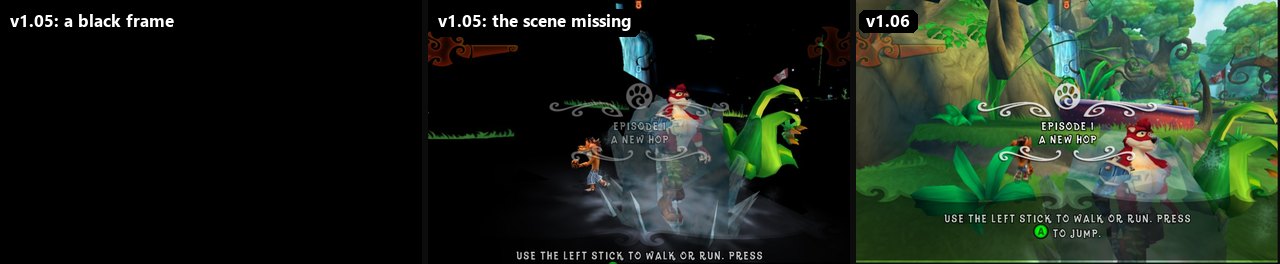
v1.05: a single .exe, ultrawide, no shader stutter, and updates from the launcher
- A single
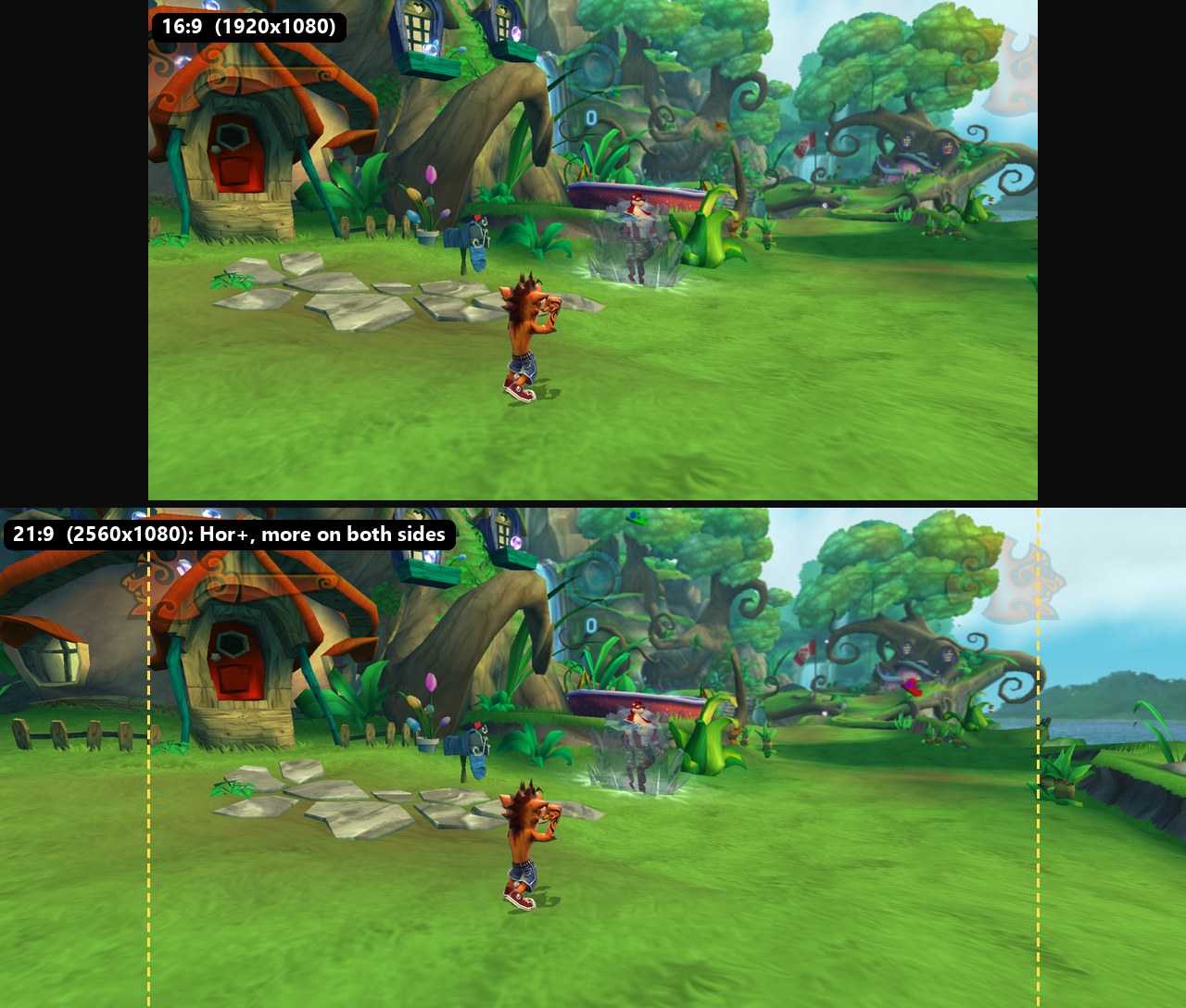
.exe: download onlyCrashSetup-<version>.exeand run it. No zip to extract, nothing else to install, offline; it asks where to install, makes the shortcuts and installs DLSS only on a GPU that runs it.- Ultrawide (21:9, 32:9) and 16:10 with Hor+: the same vertical view, more of the world on both sides, nothing stretched or cropped. The HUD and menus stay at 16:9 in the middle, menu backgrounds fill the screen, and videos play at 16:9 between black bars. SETTINGS > VIDEO > ASPECT RATIO (AUTO follows the monitor).
- Shaders compiled in the background: the first time an effect appeared, the game used to stop to build it (~34 ms each, up to 1.6 s in one frame in the village, and all of it again after every driver update). Now each part is compiled once, linked in under 1 ms and optimized on a worker thread, and the pipelines of earlier sessions are rebuilt at start: no hitches in the village or level 3, cold cache or not. GRAPHICS > SHADER COMPILATION (SYNCHRONOUS brings back the old way).
- UPDATE in the launcher: when a new release is out, the launcher shows it; one click downloads only the new installer
.exe, checks it and installs over the same folder, keeping saves, options and mods.
v1.04 made the game almost 3x faster (one-pass scene, native D3D command building: ~180 -> ~500 fps in the village on a Ryzen 7 5700X + RTX 5080); next is replacing the remaining Xbox 360 GPU emulation with direct Direct3D-to-Vulkan calls (the plan).
No game files are included. You need your own legally obtained copy of Crash of the Titans for Xbox 360. The installer builds everything from your copy on your PC. This repository has only original code, tools and documentation. Crash of the Titans is © Activision / Radical Entertainment; this is an unofficial fan project, not affiliated with or endorsed by them.
Features
- Native PC game: story, menus and saves run natively, at the original 30 fps or unlocked (60 / 120 / unlimited), in a window, borderless or fullscreen, at internal resolutions up to 4K.
- Ultrawide and 16:10: 21:9 (2560x1080, 3440x1440...), 32:9 (5120x1440...) and 16:10 (1280x800, Steam Deck) with a wider view (Hor+), the HUD and menus kept at 16:9 in the middle, menu backgrounds filling the screen and the videos at 16:9 between black bars. SETTINGS > VIDEO > ASPECT RATIO (AUTO follows the monitor).
- DLSS / DLAA (NVIDIA RTX) and FSR 3.1 (any GPU) upscaling, FXAA / SMAA, anisotropic filtering, adjustable motion blur, depth of field and shadow softness.
- Fast native rendering path: the scene is drawn in one pass instead of the Xbox 360's three screen tiles, the game's Direct3D command building runs as native code and its shaders are compiled at install and warmed up in the background. In the heaviest scene (the first level's village, unlimited FPS) this went from ~170 to ~500 fps on a Ryzen 7 5700X + RTX 5080.
- No shader stutter: new effects are compiled in the background (Vulkan graphics pipeline libraries) and the pipelines of earlier sessions are rebuilt at start, so a first visit or a driver update doesn't freeze the game (GRAPHICS > SHADER COMPILATION; SYNCHRONOUS brings back the old behaviour).
- PC controls: keyboard and mouse with rebindable keys, mouse camera, mouse in every menu, Xbox and PlayStation (DualSense) controllers, button icons that follow the last device used, and local co-op with two controllers (choose who is player 1 and player 2 in SETTINGS > CONTROLS).
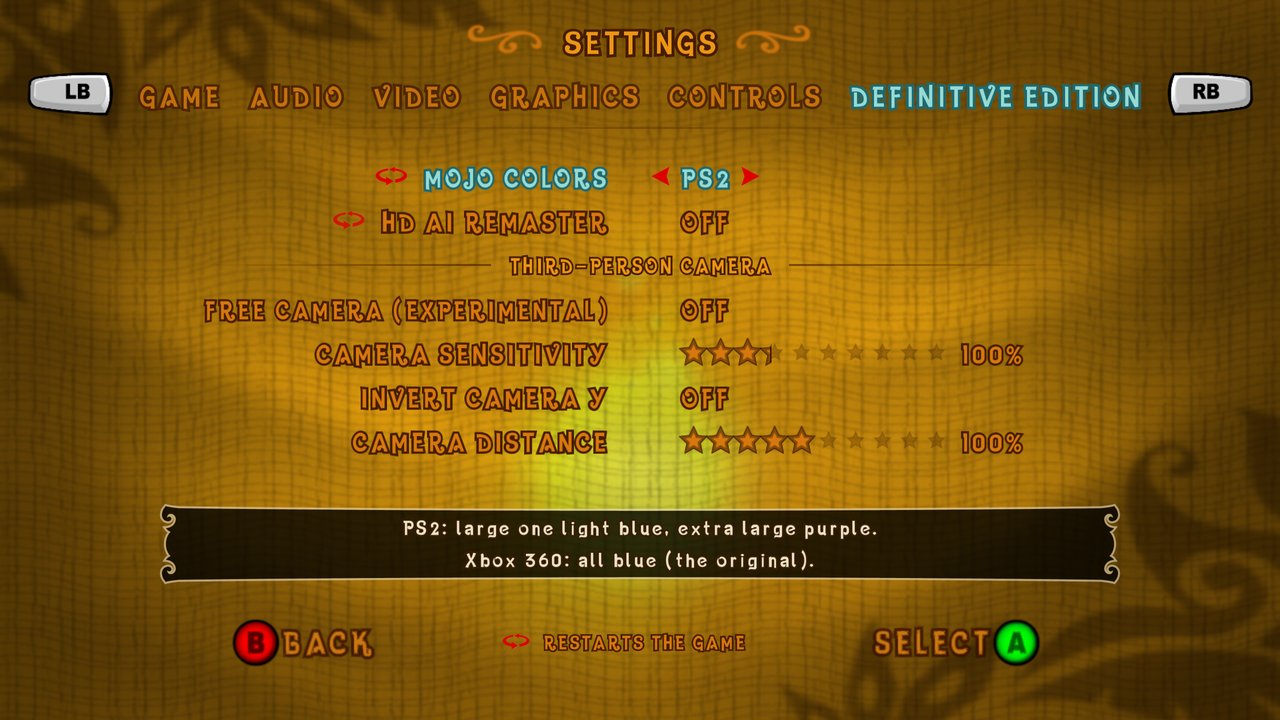
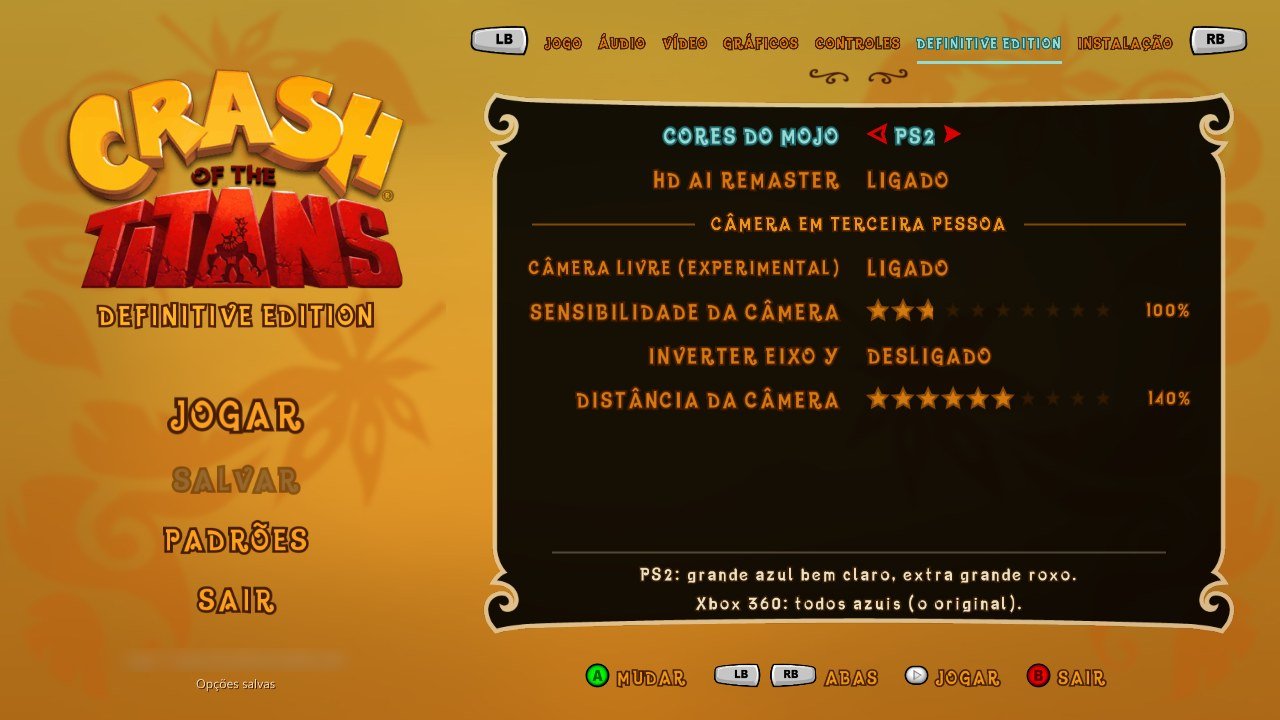
- Native settings screen in the game's own style (GAME, AUDIO, VIDEO, GRAPHICS, CONTROLS and
DEFINITIVE EDITION tabs), plus a launcher before playing: a simple page with the main options
(language, resolution, FPS limit, HD AI Remaster, lighting ORIGINAL / REMASTER) and an ADVANCED view
with every tab of the settings screen (the same rows and texts: both read
runtime/settings/options.*). - Brazilian Portuguese translation of every text, and subtitles for all dialogue and cutscenes (English transcript + PT-BR translation, optional download).
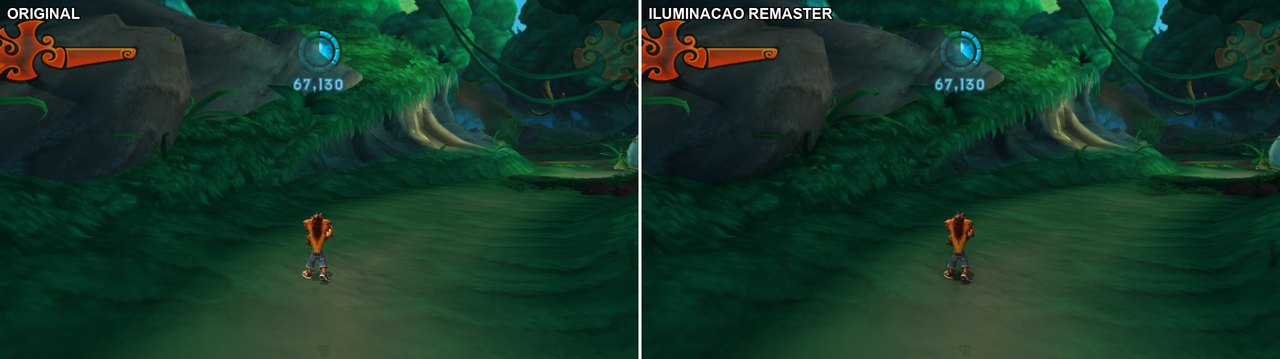
- Definitive Edition extras: PS2 mojo colours, an experimental free third-person camera, a lighting remaster (SSAO, one-bounce indirect light, contact and soft shadows), EXIT GAME, an on-screen keyboard for names and save deletion, and skippable cutscenes and intro videos (hold B / Esc; a small prompt shows in the corner).
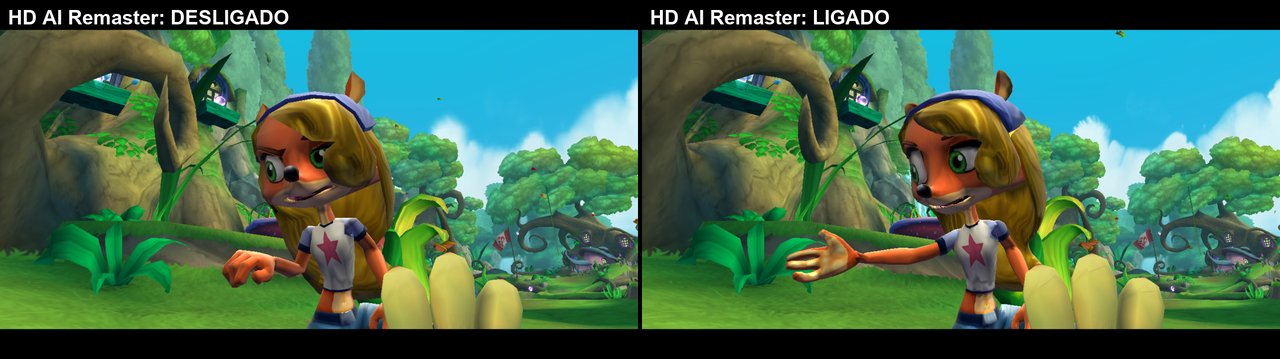
- HD AI Remaster (optional download, ~4.5 GB): AI-upscaled textures and smoothed models for the whole game.
- Modding: mods folder with load order, HD texture packs, and tools that export the game's sounds, videos, textures and 3D models to open formats (WAV, MP4, PNG, glTF) and build them back into mods.
- Dev tools for automation: test profiles with direct boot into any level, event-anchored input scripts, screenshots, input recording (F5), Lua inside the game's own scripting, benchmarks, and an optional in-game developer console (unlock all, mojo, god mode, teleport, level select, live skin switching, including the unused green Crash Hulk skin the game never shipped).
| Settings | Launcher |
|---|---|
 |  |
| HD AI Remaster (off / on) | Lighting remaster (before / after) |
|---|---|
 |  |
Requirements
- Windows 10/11 x64 and a GPU with Vulkan 1.3 and an up-to-date driver (for example NVIDIA GTX 900 or newer, AMD RX 400 or newer, Intel Iris Xe / Arc). The renderer is Vulkan only (Direct3D 12 was dropped in October 2026). A native Linux / Steam Deck version is in testing (below). DLSS needs an NVIDIA RTX GPU; on other GPUs the installer leaves it out and the options offer FSR 3.1 (any GPU above) or no upscaler.
- Your Crash of the Titans (Xbox 360) game files: the folder with
default.xex,default.rcf,english.rcf,sound1.rcf,sound2.rcfandshaders\(extracted from your disc). Only the known retaildefault.xexis supported (the installer checks its SHA-256). - About 4.3 GB of free space (1.3 GB + the 3 GB copy of your game; the installer shows what your options need: plus 9.5 GB for the HD AI Remaster, 18 GB for the asset export, mostly WAV sounds).
One file, nothing else to install. Since v1.05 the installer is a single CrashSetup-<version>.exe
with everything inside: our source, the build tools (llvm-mingw
clang, CMake, Ninja and the official embeddable
Python with numpy and Pillow) and the libraries (FFmpeg LGPL, AMD FSR,
Microsoft's dxcompiler.dll, NVIDIA DLSS; see THIRD_PARTY_NOTICES.md). No
Visual Studio, LLVM, Python or Git, nothing is installed on the system, and it works offline: only the
optional subtitles and HD AI Remaster are downloaded. It ships no game file and no recompiled code: the
game is built on your PC from your own copy.
Advanced: to build with an installed Visual Studio 2022+ / Build Tools and LLVM clang-cl instead, set
BUILD TOOLS = VISUAL STUDIO in the installer (or --toolchain msvc); it offers to install the missing
ones with winget.
Linux and Steam Deck (in testing)
A native Linux version is being tested: the same game, the same launcher and the same installer
screens, made for the Steam Deck first. It comes as CrashSetup-<version>-x86_64.AppImage: one
file with everything inside (zig as the compiler, CMake, Ninja, Python, FFmpeg, DXC, SDL3), so nothing
is installed on the system; like on Windows it builds the game from your own copy. Run it in the
Steam Deck's desktop mode (or any desktop), install (default ~/Games/Crash of the Titans Definitive Edition), then right click the launcher in the applications menu: Add to Steam puts it in Game Mode.
- DLSS works on NVIDIA RTX GPUs with NVIDIA's driver.
- FSR 3.1 is not available on Linux for now: AMD ships no Linux library and it isn't built from AMD's source yet. On the Steam Deck (AMD) and other non-RTX GPUs the game runs without an upscaler.
- Not on Linux yet: the launcher's UPDATE (run the new AppImage over the install instead).
- It needs glibc 2.38 or newer: SteamOS 3.8, Arch, Fedora 39, Ubuntu 24.04 or later.
Details for developers: docs/internals/linux_port.md.
Install
-
Download
CrashSetup-v1.07.exe(the latest, ~210 MB, one file) from the releases. (Up to v1.04 it was a zip withCrashSetup.exeinside; agit cloneof this repository: see CONTRIBUTING.md.) -
Run it. It first asks for your game folder and checks it is the supported Xbox 360 dump. Choose where to install (default
%LOCALAPPDATA%\Programs\Crash of the Titans Definitive Edition; any folder or drive of yours, the space needed and free is shown; your game is copied into the install), the options (subtitles, HD AI Remaster, asset export for modding) and click INSTALL. It unpacks its files there, recompiles the game code and builds everything (about 3 minutes on an 8-core PC, longer on slower ones). The installer checks your GPU: DLSS is installed only on an NVIDIA RTX card (NVIDIA's own check); elsewhere you get FSR 3.1. -
At the end it asks for a desktop shortcut and a Start menu entry for the launcher.
What it installs (only what building and running the game needs; docs, tests and development tools stay on GitHub):
Crash of the Titans Definitive Edition\
  CrashLauncher.exe            the launcher (the shortcuts point here)
  CrashOTTDE.exe               the game
  *.dll                        FFmpeg, FSR, dxcompiler (+ DLSS on NVIDIA RTX)
  game\                        your game files, copied here
  userdata\                    saves, settings.toml, shader cache
  mods\
  CrashRecomp\                 languages\, data\, licencas\ and what the game is built with
                               (toolchain\, build\, the source; the asset export's tools only with
                               ASSETS FOR MODDING)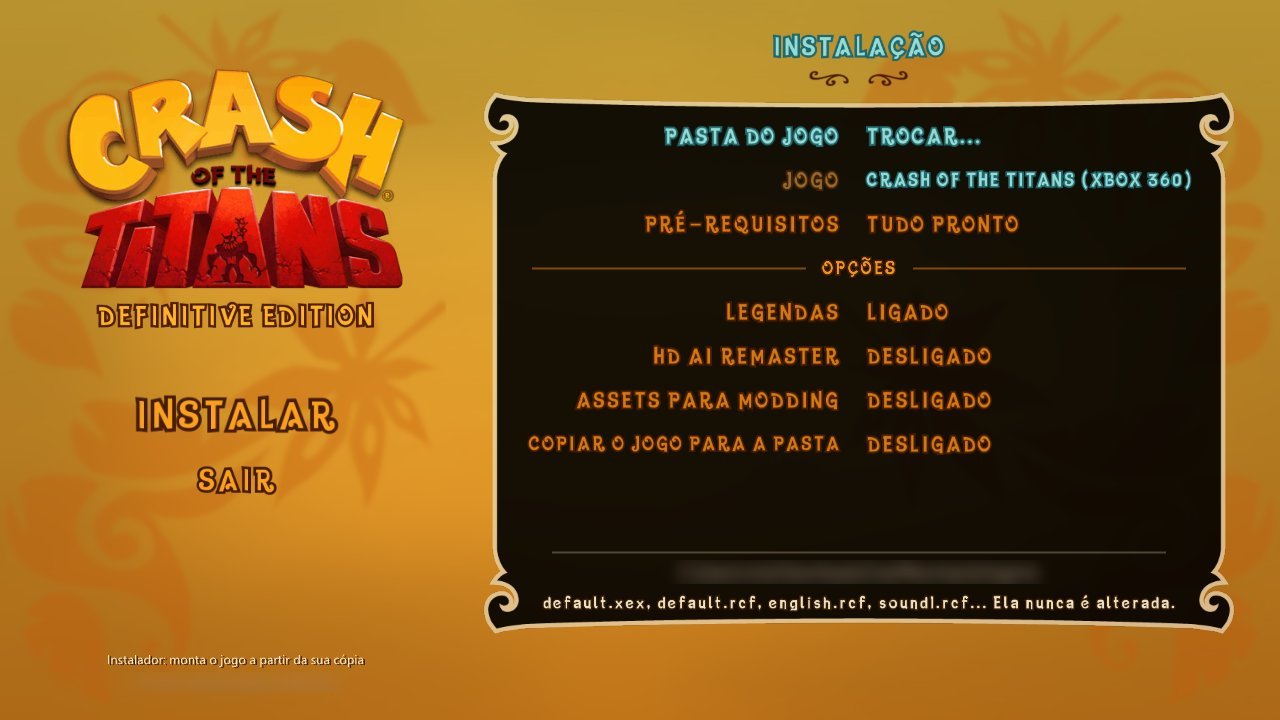
Without the GUI, the same in a terminal from a clone or the release zip's folder, with the bundled Python:
toolchain\python\python.exe tools\setup.py --game D:\Games\Crash --subtitles
toolchain\python\python.exe tools\setup.py --game D:\Games\Crash --remaster --extract-assets --copy-game
toolchain\python\python.exe tools\setup.py --game D:\Games\Crash --assets-only   :: retry only the asset export
Release zips placed next to
CrashSetup-<version>.exeare used instead of downloading them again. If only the asset export fails, the game is installed anyway: TRY AGAIN reruns just that step. To update, use UPDATE in the launcher's menu: it shows when a new release is out, downloads only its installer and runs it on the same folder (your saves and settings inuserdata\stay). Running the new installer on the same folder by hand does the same. -
Play with the shortcut,
CrashLauncher.exe(options, then PLAY) orCrashOTTDE.exe. (A clone built withtools\setup.pyplays fromdist\:dist\CrashLauncher.exe,dist\CrashRecomp.exe.)
Known issues
-
Windows Security flags
XenonRecomp.exe(Program:Win32/Contebrew.A!ml) and the install stops at the recompile step. It is a false positive: the installer compilesXenonRecomp.exeon your PC from XenonRecomp's open source code (the download has noXenonRecomp.exein it), and the!mlmeans Defender's machine-learning guess about a new, unsigned program, not a known threat. In Windows Security > Virus & threat protection > Protection history, open the item and choose Actions > Allow (or Restore), then run the installer again (finished steps are skipped). If it happens again, add an exclusion for the install folder'sCrashRecomp oolsfolder. -
v1.01: ASSETS FOR MODDING fails with
ModuleNotFoundError: No module named 'numpy'. The v1.01 installer doesn't install the Python packages the asset export needs (fixed in v1.02). The game itself is installed fine. Install them and run the installer again (finished steps are skipped):python -m pip install numpy pillowUse the same Python the installer uses: if
pythonisn't found or is a different one, trypy -3 -m pip install numpy pillow. -
Black screen flicker on some GPUs (reported on an Intel UHD iGPU, issue #3). With the game closed, set
gpu_safe_mode = "on"andgpu_diagnostics = trueunder[video]inuserdata\settings.toml. The safe mode turns off the renderer's riskier optimizations (it costs some FPS); the diagnostics add the GPU, driver and limits touserdata\crashrecomp_log.txt(written on every run; the previous run's iscrashrecomp_log_prev.txt) to attach to the issue. If the safe mode helps, a list instead of"on"("barriers","serial","present", ...) narrows down which part does it.tools\gpu_report.batruns all of these in turn and packs the logs intogpu_report.zip.
Playing
dist\ is the game folder: CrashLauncher.exe, CrashRecomp.exe, game\ (your dump, if copied),
mods\, userdata\ (saves, settings.toml, shader cache), languages\, data\ (subtitles, HD AI
Remaster). Nothing depends on where the project is. Shortcuts in game: F1 overlay, F12 screenshot,
Alt+Enter fullscreen, F8 lighting remaster on/off, and with DEFINITIVE EDITION > DEVELOPER CONSOLE on
(off by default, or --dev-console), the key left of 1 or F10 opens the developer console (help).
Cheats: in the pause, hold RT and press Y Y X X (keyboard: hold Shift, then Tab Tab Backspace Backspace; touch screen or mouse: tap the top-left, top-right, top-left and top-right corners) for the cheat menu: invincibility, +1 life, 1 hit titan, disable AI, and unlock all moves / skins / episodes / everything. The unlocks are permanent (the game writes them to your save); the rest lasts until you quit the game.
Achievements: the original Xbox 360 achievements (47, 1000 G), read from your own default.xex (names,
descriptions and icons in the game's language). Earning one shows the Xbox 360 style popup; they are kept in
userdata\achievements.toml with the date, for every save slot (NEW GAME included). BACK on the main menu, the
HUB or the pause (keyboard: Tab on the main menu and the pause; mouse / touch: the hint at the bottom) opens the
list.
Default settings are the original experience (1280x720, 30 fps, no upscaler, extras off). Turn things on
in SETTINGS (main menu or pause > OPTIONS) or in the launcher; for the HD AI Remaster, install it and
then switch DEFINITIVE EDITION > HD AI REMASTER on. The launcher opens on its simple view: LIGHTING
REMASTER turns on the whole lighting remaster (SSAO high, indirect light, contact and soft shadows),
ORIGINAL turns it off, and CUSTOM means a mix set one by one; ADVANCED (the simple view's last item, or Y / F2)
shows every option, and the launcher remembers the last view. Lists longer than the box (CONTROLS) show a
scroll bar and scroll with the wheel or by dragging them (a finger on a phone). Mods' HD texture packs need no option: they
load from mods\ by themselves ([graphics] hd_textures = false in settings.toml turns them off).
Mods and exporting the game's assets
Put each mod in dist\mods\<name>\ (optional load_order.txt). Mods can replace any .rcf entry, add
HD textures without touching the game files, or replace sounds.
The game's assets are not distributed, but you can export them from your own copy (installer option ASSETS FOR MODDING, or with the bundled Python, which already has numpy and Pillow):
set PY=toolchain\python\python.exe
%PY% tools\assets.py all          :: everything to private\assets (about 9 minutes, 18 GB)
%PY% tools\textures.py export     :: or step by step: textures -> PNG
%PY% tools\models.py export       :: models, skeletons, animations -> glTF (.glb)
%PY% tools\audio.py export        :: sounds and voices -> WAV
%PY% tools\audio.py videos        :: Bink videos -> MP4
(Another Python 3.11+ works too after python -m pip install -r tools\requirements.txt.)
Edit the exported files and build them into a mod with textures.py build, models.py build or
audio.py build --mod <name>. The full guide (formats, indexes, examples) is in
docs/GUIA_DO_PROJETO.md, section "Extraindo e modificando assets" (PT-BR).
Mods made from the game's files are derived content: share them with care.
Documentation
- docs/GUIA_DO_PROJETO.md: the full project guide (PT-BR): layout, building by
hand, test profiles (
tools\run_game.py), every feature and setting, performance, modding, reading the game's code. - runtime/NOTES.md: the runtime's development notes (PT-BR), step by step.
- docs/dev_features.md: developer console, Lua, invincibility, teleport, unlocks, skins.
- docs/internals/: short English cheat sheets of addresses, hooks and traps per area.
- CONTRIBUTING.md: setting up, branches and pull requests, tests, reporting bugs.
Credits and licenses
- Code of this project: MIT (LICENSE), by VitoMiguelF,