TwinsanityEvolved
TwinsanityEvolved is a native PC port of Crash Twinsanity that supports mods and multiple languages.
- Type: PC port
- Game: Crash Twinsanity
- Runs on Windows, Linux and macOS
- By menaman123
- Latest release v0.9.3, 2026-11-05
- Source: https://github.com/menaman123/TwinsanityEvolved
README
TwinsanityEvolved
Native PC port of Crash Twinsanity: the twinsanity-reversed
decompilation (game/) running on the NativeEE engine (engine/).
The game is compiled to wasm32 and lowered to C with wasm2c; its linear memory is the engine's 32 MB main memory; the
decompilation's own include/platform/*.h is the only seam. On the PS Vita the game's code is compiled natively for the
console's ARM processor instead, with the same seam and the 32 MB as a block of the program. No game data of any kind is in
this repository — you need your own disc image, which is read at run time.
What's new
Since v0.1.8 (the full list for players is in RELEASE-NOTES.txt):
- The launcher installs the finished game for Windows, macOS, Linux or the PS Vita from the releases, into one game folder that holds the game, your settings, your memory cards and your mods.
- The North American disc plays, and every disc is recognised by its content against the known dumps of the original discs.
- Mods: mods packaged as Mod Crates are supported, as are patched disc images, xdelta / PPF / BPS patches, folders of files and single archive files, added on the launcher's Mods page or with the mod tool.
- Languages: the text and the speech are two settings, and the game's texts can be read in Arabic.
- PS Vita: a package in every release, the PAL console's 50 Hz game loop, its movies, shadows and title sequence fixed, and a steadier, faster picture.
- Fixed: at 50 Hz the game no longer plays in slow motion, on every system.
Play: download the game
- From the latest release, download the zip for your system:
twinsanityevolved-<version>-windows-x64.zip,-macos-arm64.zip(Apple silicon),-macos-x86_64.zip,-linux-x86_64.zipor-linux-aarch64.zip. - Unzip it anywhere you like, on any drive.
- Start
twinsanityevolved(twinsanityevolved.exeon Windows). The first time, it asks for your disc image: choose your own Crash Twinsanity image (.iso) -- the PAL disc (SLES-52568) or the North American disc (SLUS-20909 v2.00). That is all: nothing is installed, nothing else is downloaded, and nothing is written outside the game's folder.
The game remembers your disc in disc-image.txt and keeps its memory cards and settings in userdata\ beside it
(an earlier install's ~/.twinsanityevolved keeps being used if you have one). Deleting the folder removes everything.
The zip holds only the program, the mod tool (twinsanityevolved-modtool, see Mods), the Arabic language pack
(mods/arabic, see Arabic), their libraries and the licences: no game data, which is read from your disc while you play (every release
zip passes tools/ci/asset_scan.py, which fails on any disc file or game asset).
50 Hz. A PAL console runs the game at 50 frames a second; the port runs it at 60 by default. For the PAL console's own
50 ticks a second, open Options → graphic options → game rate and choose 50 hz (pal): it takes effect the next time
the game starts (the setting is game.hz = 50 in userdata/ps2r.ini; --hz 50 does the same for one run). The game moves
at the same real-time speed at either rate (its clock counts real time: each 50 Hz frame is 1/50 s of game time). At 50 Hz
the frame rate row's 60 shows every frame the game makes, i.e. 50 frames a second.
Loading screens. A load shows the game's loading picture for under a second. On the console a load takes about 12
seconds: its DVD drive reads the level's 13-21 MB at 2.2 MB/s, and the game's loader waits a second before it reads a part
of the level, once for the level and once more for the parts linked to it (that wait is meant for play, where a part of the
level is read only once you have stayed near it for a second). Here, while the loading picture is up, the disc image is read
at the speed of the device you play on, and the loader goes on as soon as its reads are in. What is left is the picture's
half-second fade-in and the time your machine needs to read and set up the level: LOAD GAME's two loads, the title's and
the hub's, take 41 frames each, 0.7 s on a recent Mac (the reload after a game over 1.1 s: the game over picture fades out
first); on the PS Vita a load takes what its memory card and processor need. The level is the one a console-paced load gives, only fewer frames pass. During
play the disc keeps the console's pace, so an area that streams in while you walk arrives a piece at a time instead of
stalling a frame. For the console's pace in the loads too, set disc.speed = console in userdata/ps2r.ini
(--disc-speed console for one run; a run with --deterministic uses it, as the judges do). The memory card messages
still show for their two seconds.
The PS Vita's memory card. The PS Vita reads your disc image from its memory card on a thread of its own, and while the
game plays the card is slower than the console's DVD drive (1.6-3 MB/s in reads of ~200 KB in the device logs). The game
streams a level's parts as you move: the bus chase at the end of Rooftop Rampage reads the next part, 6 MB, while you run
at it. So the parts a level's links lead to are read into memory as soon as you enter the part beside them, about a minute
before the game asks for them (up to 10 MB of them at a time, of a 16 MB budget); the rest of a file the game starts reading
comes off the card in reads of 1 MB; and when the card is late all the same, the game plays on and the part arrives a few
frames later, as from a slow DVD, instead of the picture stopping until the card has it. The game's log has the card's figures: [te.io] card:
once at start-up (its speed by the size of a read), and in every window [te.io] ... the game waited for the card N times
(none in play is the aim), read ahead: ... and [te.stream] ... reads put off for the card. To try a card that slow on a
computer or in Vita3K: TE_DISC_ASYNC=1 TE_DISC_SLOW_MS=53 (53 ms for every 128 KB read; on the PS Vita in args.txt);
TE_STREAM_WAIT_CARD=1 TE_DISC_AHEAD_MB=0 puts back the old way (the game waiting for the card, nothing read ahead) for a
comparison. TE_CHUNK_LOG=1 (on by itself on the PS Vita) writes a line each time a part of the level changes: its files
waiting, loading or loaded, and whether the picture drew it ([te.io] chunk loaders @...).
The launcher
The launcher (twinsanityevolved-launcher-windows-x64.zip, twinsanityevolved-launcher-macos-arm64.dmg or
twinsanityevolved-launcher-linux-x86_64.AppImage on the release) does all of the above for you. You need two things:
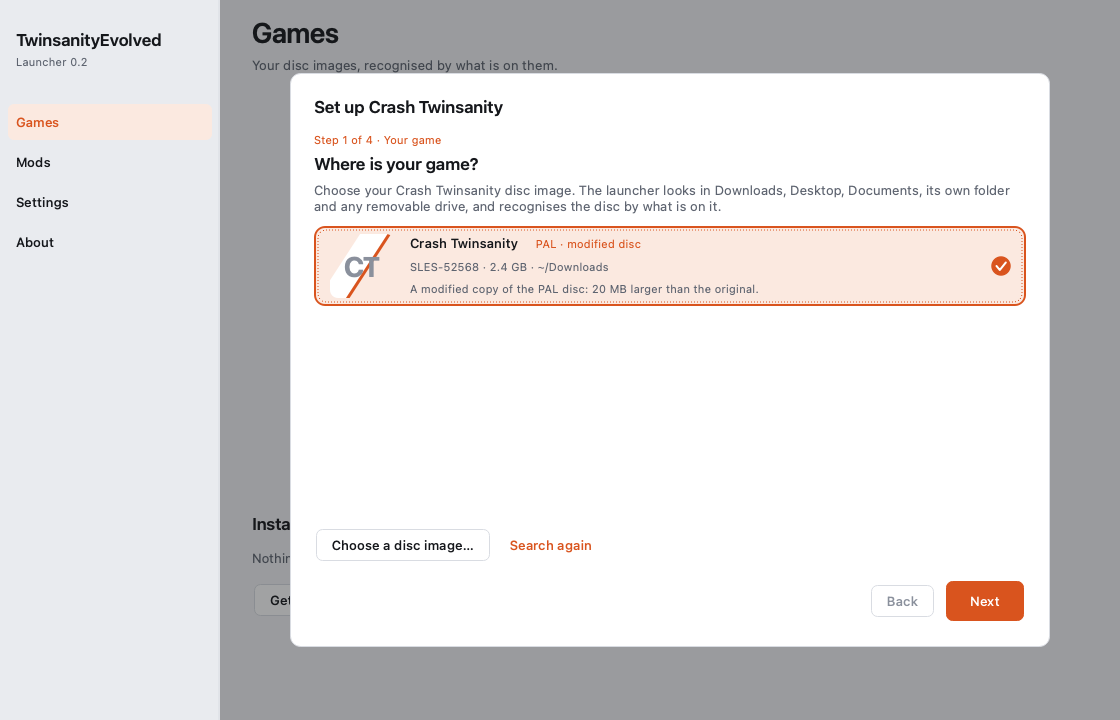
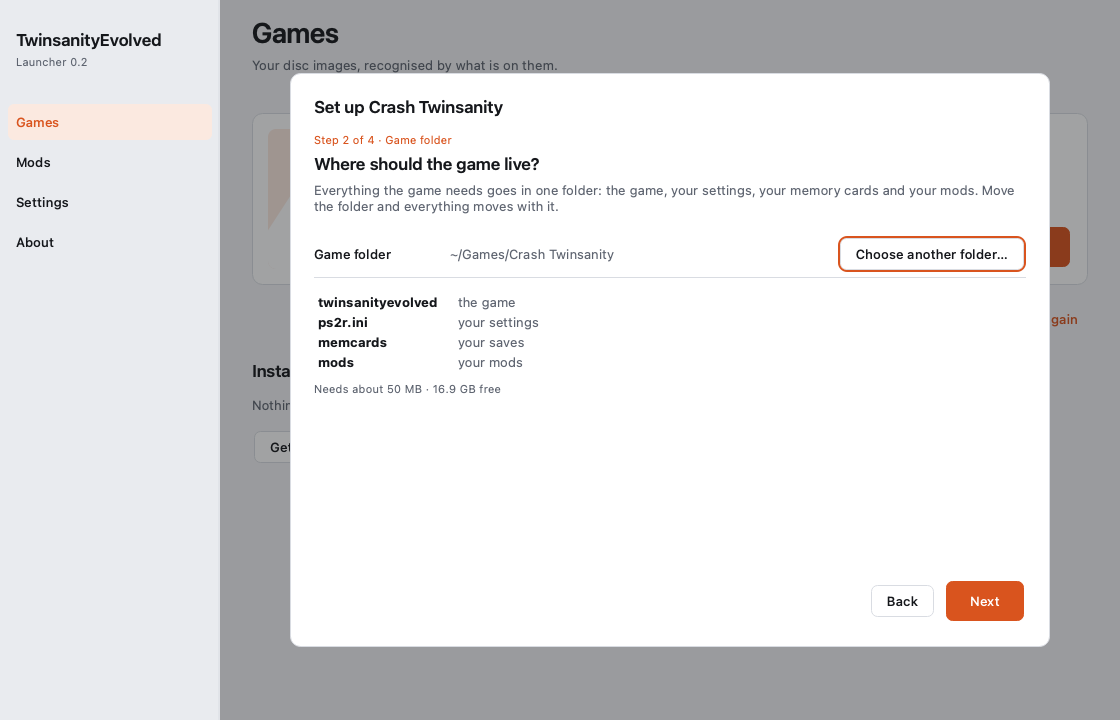
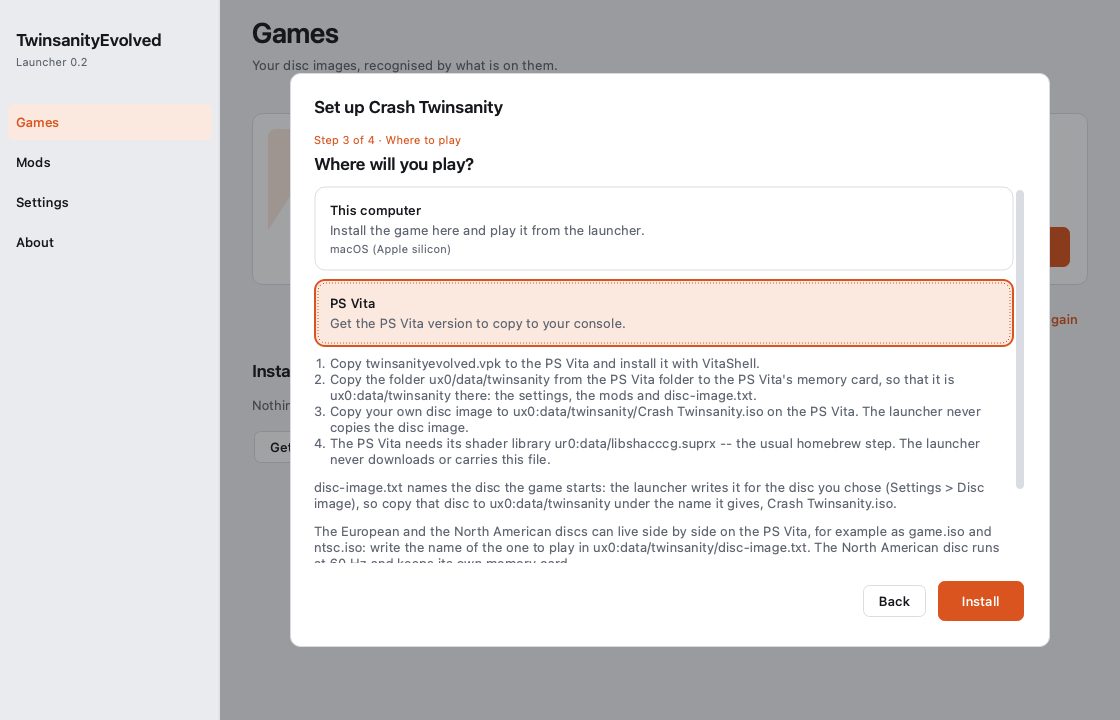
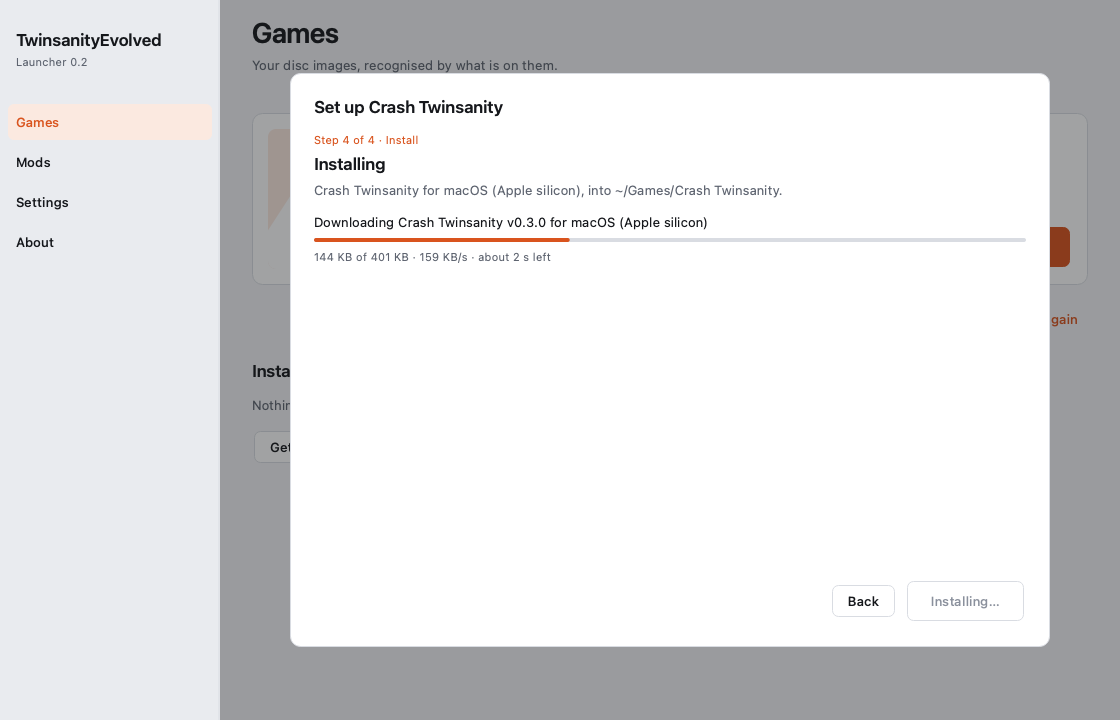
your Crash Twinsanity disc image and the launcher. The first time it opens, one sheet asks four questions; nothing is
typed, and Back always works.
- Where is your game? The launcher looks in Downloads, Desktop, Documents, its own folder and any removable drive, and recognises your disc by what is on it: the region (PAL, NTSC-U, NTSC-J) and whether it is the original disc -- the whole image is compared with the known dumps of the original discs, a few seconds the first time -- or a modified copy ("PAL · modified disc"). Drop the file on the window, or choose it, if it is somewhere else.
- Where should the game live? One folder,
~/Games/Crash Twinsanity(%USERPROFILE%\Games\Crash Twinsanityon Windows) unless you choose another. The game, your settings (ps2r.ini), your memory cards (memcards) and your mods (mods) all live in it: move the folder and everything moves with it. - Where will you play? This computer, a PS Vita, or another computer (Windows, macOS, Linux).
- Installing. The finished game for that machine comes from the latest release, is checked against the release's checksums and is put in the folder. Then Play.
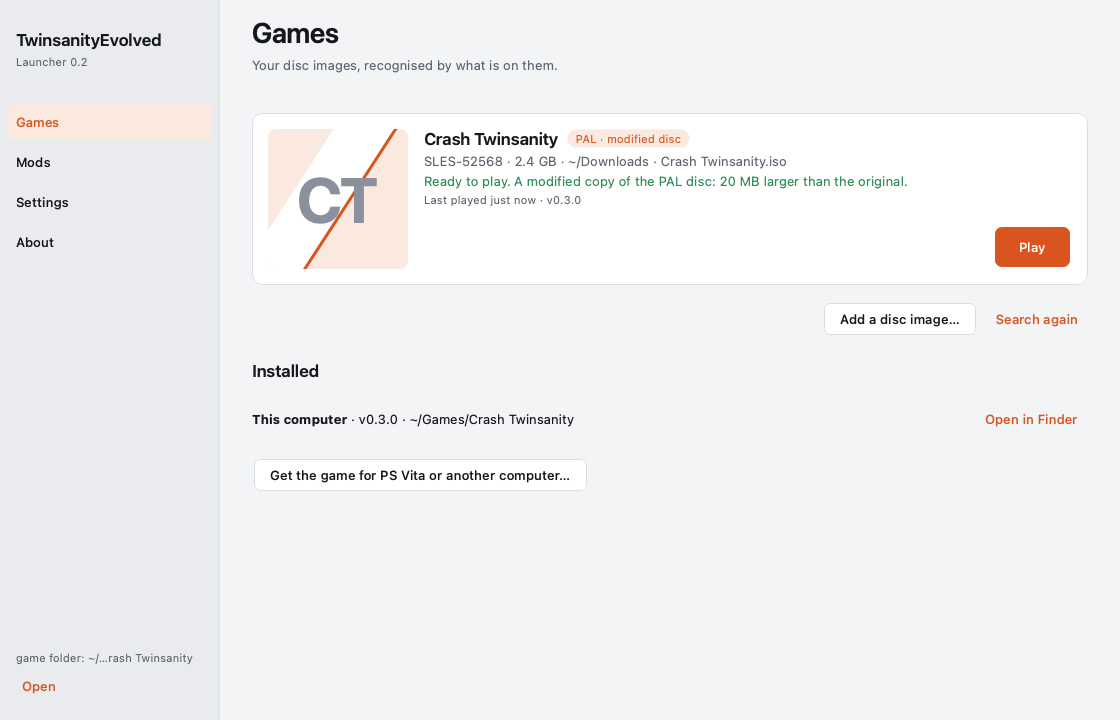
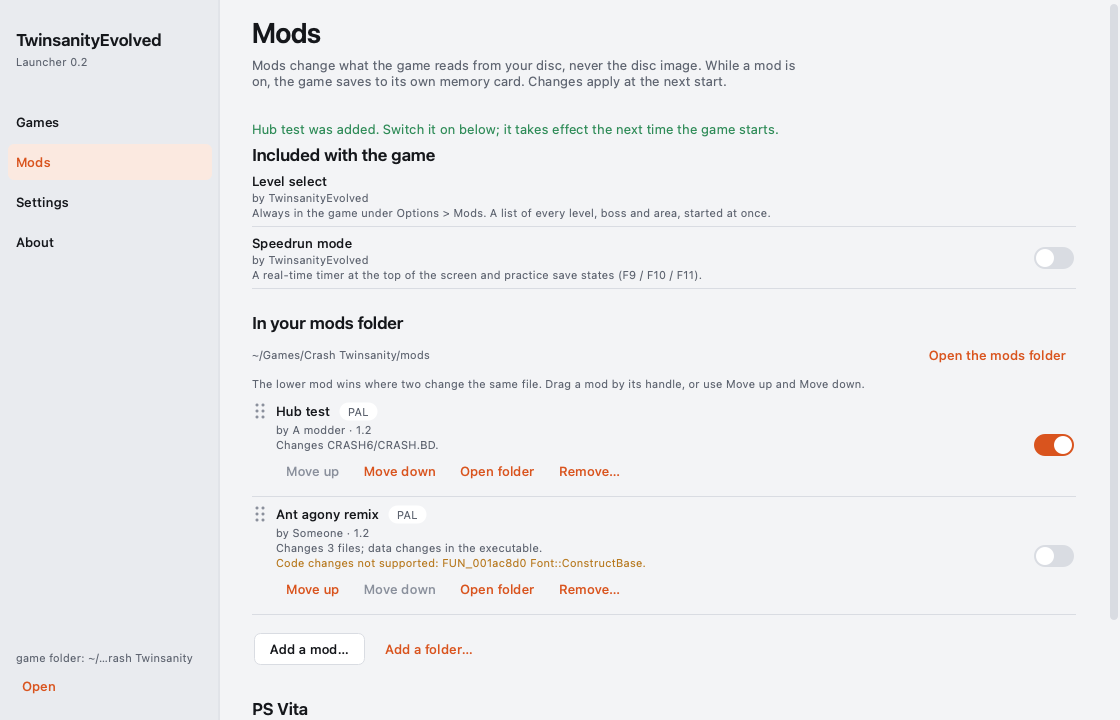
After that the launcher has four pages: Games (your discs, each with Play; Update when a new version is out),
Mods (the mods that come with the game and the ones in your mods folder, each with a switch and a line saying what it
changes; drop a mod crate, a patched disc image, a patch file, a folder of files or one file of the game's archive on the
page to add it; drag the mods into order, the lower one wins where two change the same file; a change takes effect the
next time the game starts),
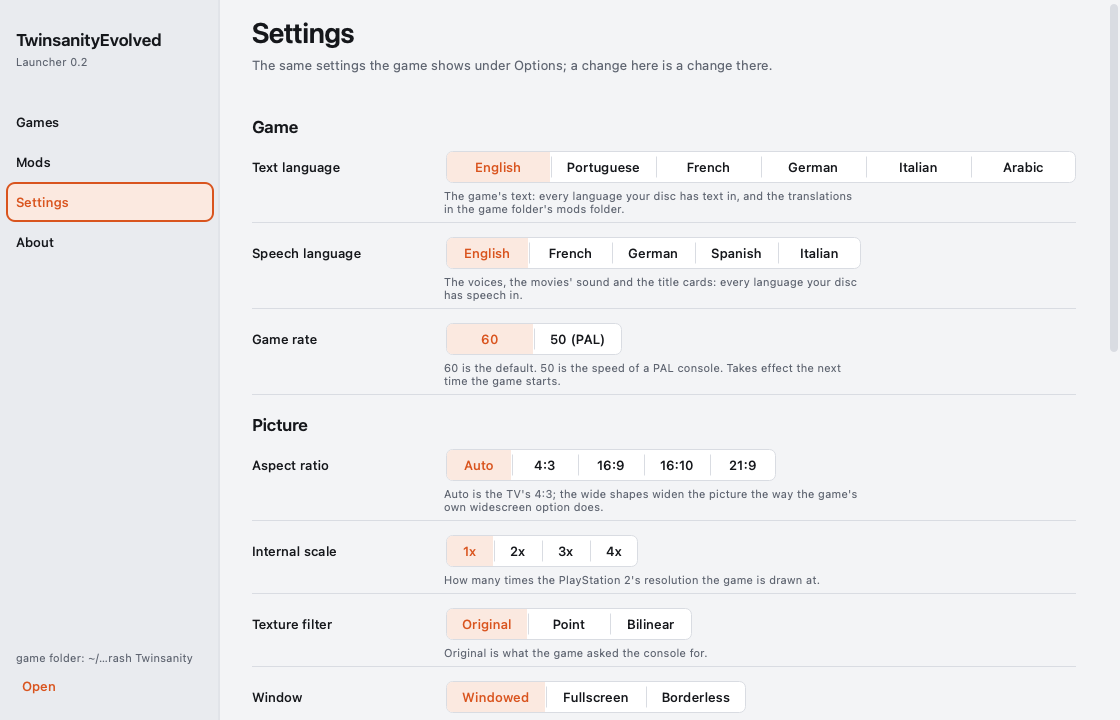
Settings (the game's own Options in plain language: the same ps2r.ini the in-game menu writes, so a change in one is
a change in the other; its Text language and Speech language offer what your disc carries, see Language) and
About.
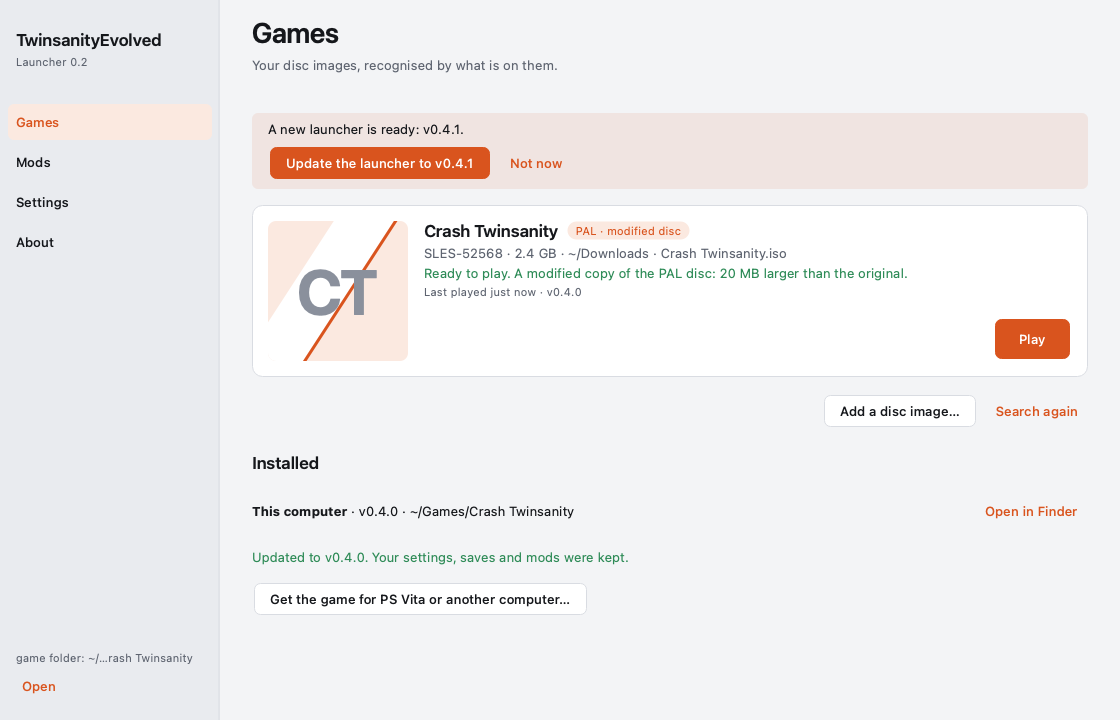
The launcher updates itself. Each time it opens, the launcher looks for a newer launcher in the releases. When there
is one, the Games page says A new launcher is ready: vX. with Update the launcher to vX: the new launcher is
downloaded, checked against the release's checksums, put in the place of the one you opened, and opened again by itself;
your games, settings, saves and mods stay as they are (About has Check for a newer launcher). Where it cannot replace
itself -- a folder your account cannot change, such as Applications for a standard account, or the launcher opened
straight from its disk image -- it says why, and Download it opens the release's page. The game itself is updated as
before, with Update on its card. On macOS the launcher is not signed by Apple: after an update macOS may ask again
before the launcher reads a disc image in Downloads, Desktop or Documents.
PS Vita. Choose PS Vita in step 3 (or Get the game for PS Vita or another computer… on the Games page) and the
launcher makes a folder ready to copy, vita/ in your game folder: twinsanityevolved.vpk, README-vita.txt with the
steps, and ux0/data/twinsanity/ as the console's memory card has it -- your game folder's settings (ps2r.ini, without
the computer's own folders, picture size, window and game rate: the PS Vita has its own), a copy of the language packs and
of the mods you switched on, and disc-image.txt naming your disc's file name. Then:
- Copy
twinsanityevolved.vpkto the PS Vita and install it with VitaShell. - Copy
ux0/data/twinsanityto the PS Vita's memory card, so that it isux0:data/twinsanitythere. - Copy your own disc image into
ux0:data/twinsanity/under the namedisc-image.txtgives (the launcher never copies the disc image; withoutdisc-image.txtthe game startsux0:data/twinsanity/game.iso). - The PS Vita needs its shader library
ur0:data/libshacccg.suprx-- the usual homebrew step. The launcher never downloads or carries this file.
After you import a mod, switch one on or off or change a setting, Make the PS Vita folder again -- at the foot of the
Mods page, under PS Vita, and on the Settings page -- brings the folder up to date (only what changed is copied); copy
ux0/data/twinsanity again. Mods are added and switched on the computer, never on the PS Vita. The launcher's About page
has the whole PS Vita flow in six sentences. On the PS Vita, ux0:data/twinsanity/disc-image.txt
switches discs: two can sit side by side (game.iso and, say, ntsc.iso) and the file's one line names the one the game
starts with (a file name beside game.iso, or a full ux0: / uma0: path). The North American disc plays there as on a
computer -- at 60 Hz (the PS Vita's 50 Hz default is the PAL disc's), with its own memory card
(ux0:data/twinsanity/memcards-SLUS-20909) and English only in the two language rows; the mods in
ux0:data/twinsanity/mods and the Arabic language pack work as they do on a computer. Importing a mod is the launcher's
job, on a computer. The PS Vita's resolution row offers 1x or 2x: 2x, the console's maximum, runs at half the frame rate or
less, and a ps2r.ini that names 3x or 4x is read as 2x. The package runs the game's code natively on the console's ARM
processor.
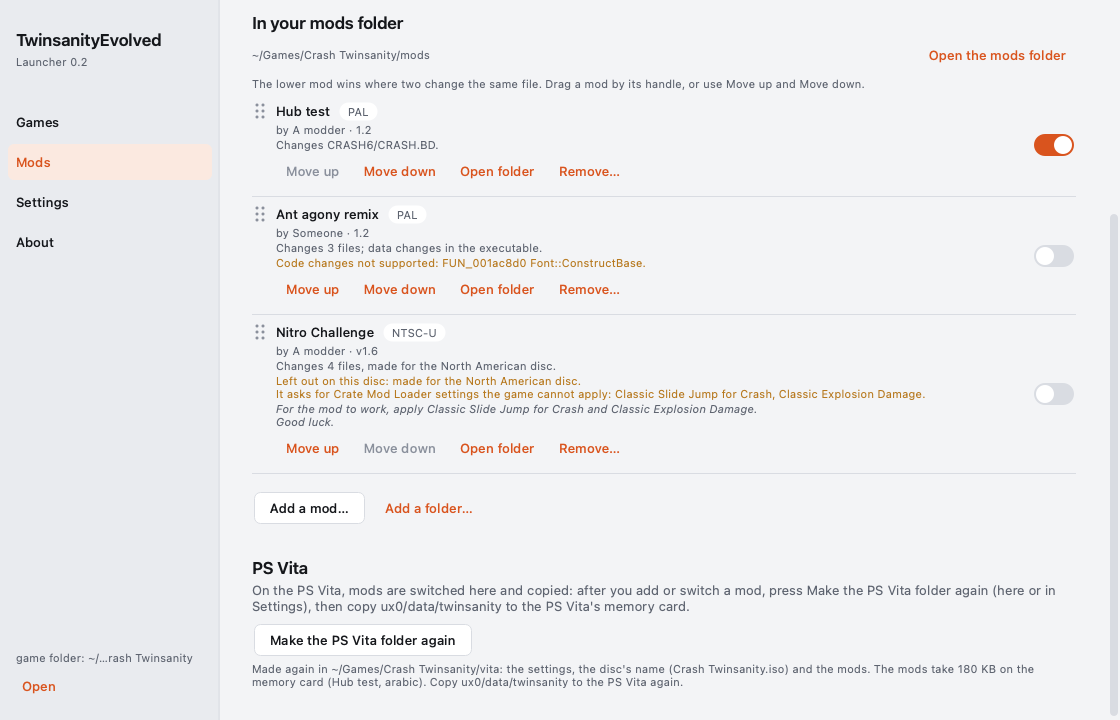
The launcher keeps only its own notes (the discs it knows, its window, its logs) in its app-data folder
(%LOCALAPPDATA%\TwinsanityEvolved on Windows, ~/Library/Application Support/TwinsanityEvolved on macOS,
~/.local/share/TwinsanityEvolved on Linux); deleting that folder removes them. The game folder is yours. Every screen
of the launcher is in docs/launcher/screenshots/.
Mods
Mods change what the game reads from your disc, never the disc image itself. Add one on the launcher's Mods page (drop
it on the page, or Add a mod…) or with twinsanityevolved-modtool, which comes with the game, and switch it on there:
the launcher's Mods page is where the mods of your mods folder are switched, and the game starts with them in place. A
change takes effect the next time the game starts. What a mod is, is decided by what
is in it, never by its name; mods are taken as the community ships them:
- Mod Crates -- the community's usual shape, made for Crate Mod Loader: a
.zipor a folder withModCrateInfo.txt,layer0/(files of the disc) andlayer1/(entries of the game's archive). A large crate (over a gigabyte) takes about half a minute to add. The author's notes inModCrateInfo.txtare shown under the mod on the launcher's Mods page. - A patched disc image (
.iso): only the files that differ from your disc are kept. - A patch made against the original disc -- xdelta, PPF or BPS: applied to a temporary copy of your disc (its free space is checked first; the copy is removed afterwards), then kept as the files that differ.
- A folder of files laid out like the disc, loose files such as a whole
CRASH.BD+CRASH.BH, or a folder that is already a mod (mod.json). - One file of the game's archive -- what the Twinsanity Editor writes: a level chunk (
.rm2,.sm2), a picture (.psm), a text bank (.txt), passed around bare like aDefault.rm2. It is placed by its name: the one entry of the archive with that name is replaced (Default.rm2becomes the moddefault). A name several entries share (English.txt) is refused with them listed: put the file in folders named like the one it replaces.
Each becomes one folder of your mods folder (<game folder>/mods/<id>/, described by its mod.json), holding only
what the mod changes. Where two mods change the same file, the lower one on the launcher's Mods page wins.
The same mod again replaces it. A mod's id is its name (My Level Pack -> my_level_pack);
adding a mod whose id you already have -- a new version of it, or the same file again -- replaces the one you have once
the new one is complete. The launcher asks first ("Replace ? The copy you have is removed
first."; Cancel adds nothing), the mod tool replaces it; the mod keeps its switch and its place in the order. A folder of
that name that is not a mod is never touched: the addition stops and says so.
twinsanityevolved-modtool import "a mod crate.zip" --iso "/path/to/your disc.iso" --mods "<game folder>/mods"
twinsanityevolved-modtool inspect "a patch.xdelta" --iso "/path/to/your disc.iso"       # what it is, without adding it
twinsanityevolved-modtool verify "<game folder>/mods/<id>" --iso "/path/to/your disc.iso"   # every file, byte for byte
A mod is made for your disc. Its folder records the files it was made over, and the game checks them when it
starts: a mod added with one disc and played with another (whose files differ) is left out, with a line in the game's
log. The European and the North American discs are different discs: a mod made for the North American disc carries the
NTSC-U badge on the launcher's Mods page, and on a European game folder its row says "made for the North American
disc"; when it was made over that disc's files (an imported crate's archive is), the game leaves it out at its start and
the row says so in amber: "Left out on this disc: made for the North American disc." One file of the archive made for
the other disc is refused when it is added ("... it was made for the European disc").
A crate made for the North American disc and added over the European one plays with the European disc's text files:
texts its level scripts add to the North American file (Language\AgentLab\American.txt, which the European program
never reads) are not there, so the signs that show them stay empty, and the game's log names each one
([te.mods] tolerated: a script shows text 110, the scripts' text file has 100 lines: shown empty). Added over the
North American disc, the crate has all its texts.
Not supported -- refused with a sentence saying why, or listed under the mod:
- Code changes in a modified executable. A mod's
SLES_525.68is used for its data (tables, texts, numbers: those apply), but this port runs its own code, not the executable's: changed code is listed under the mod on the launcher's Mods page ("Code changes not supported: ...") and does not apply (new code a crate adds is such a change). ModCrateSettings.txt-- the property edits Crate Mod Loader makes to the game's code -- and crates with scripts. The same settings asked for in a crate's notes ("apply Classic Slide Jump for Crash and Classic Explosion Damage") cannot be applied either: the mod is added, and its row says so in a warning.- xdelta patches with secondary compression (
-S djw,fgkorlzma; xdelta3 3.1 with LZMA support uses LZMA by default): apply such a patch yourself (xdelta3, Delta Patcher) and add the patched image. - RAR and 7-Zip archives, CHD / CSO / ECM images,
.cuesheets, UPS and IPS patches, encrypted zips; emulator texture packs and cheat codes (they are not disc content).
The built-in mods come with the game, off by default:
level select— one row that opens the list of the game's levels, bosses and areas at once; choosing one starts it through the game's own saved-level path (from the main menu as a new game would, from the pause menu with the current progress). The level starts with the character its own start gives, alone: nothing of the level left comes along (Cortex beside Crash, the Rollerbrawl of Cavern Catastrophe).speedrun mode— one real-time timer (mm:ss.cc) in the game's font, centred at the top of the safe area, started at NEW GAME or the first level entered. The in-game time and a split on every level entry / exit are written into a--record-padrecording (# split …lines: a recorded run carries its timer and its splits). Practice save states on a ring of 8: F9 saves, F10 loads the newest in place, F11 the one before (~/.twinsanityevolved/practice/); F12 or Mods > speedrun > reset to run start resets.infinite lives— while it is on, a death costs no life: the lives panel still comes up at each death, showing the number it showed before, and the restart at the checkpoint never ends in a game over. The game's font has digits only, so there is no infinity sign: the count simply stops going down. Lives you collect still count (a hundred wumpa fruit, an extra life). Switched off, the count goes on from where it is.
In the game, OPTIONS > MODS lists the built-in mods, which apply at once: level select, speedrun mode : off|on and
infinite lives : off|on.
The mods of your mods folder