Arizona Vamp Recomp
Arizona Vamp Recomp is a native PC port of Darkwatch made by static recompilation with a shader disk cache and an in-game settings menu.
- Type: PC port
- Game: Darkwatch
- Runs on Windows
- By Clergyman0013
- Latest release v0.2.0-beta.3, 2026-10-20
- Source: https://github.com/Clergyman0013/arizona-vamp-recomp
README
Arizona Vamp Recomp
A native PC port of Darkwatch (original Xbox, 2005), made by static recompilation.
The game's Xbox executable is translated ahead of time into native x86-64 code. Its graphics and sound calls are answered by modern APIs: Direct3D 8 runs on Direct3D 12, DirectSound on XAudio2. Nothing is emulated at run time, so the game runs at full speed with PC features layered on top: real display modes, render scaling, keyboard and mouse, and an in-game settings menu.
No game data is included. You need your own copy of Darkwatch for the original Xbox. This project is not affiliated with or endorsed by the game's publisher or developer.
Status
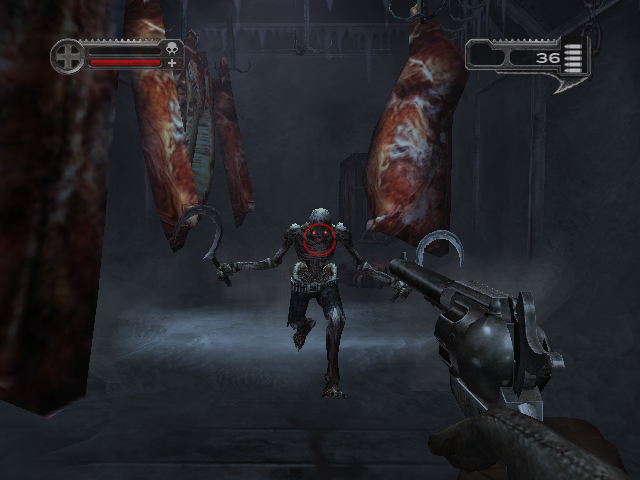
Early, but playable into the first level on Windows. The game boots, plays its movies, and goes through the front end and briefing into the first level (THE WRONG TRAIN). There it runs at 60 fps with sound, lighting, fog and the HUD close to the console. A full play-through has not been done yet; that is the next big step.
| Platform | State |
|---|---|
| Windows 10/11 x64 | Main target. Builds natively; reaches and plays the first level. |
| macOS (Apple silicon) | Later. A headless test harness builds and reaches PRESS START. |
| Android | Later. |
Day-to-day progress, findings and open bugs are in STATUS.md.
Features
Runs natively
- Statically recompiled game code: no CPU emulation, no JIT.
- Direct3D 12 renderer with a shader disk cache: shaders compile once, later runs load without hitches.
- Shader pre-compile at launch: the pipelines earlier play used are kept for your graphics driver. When the driver changes (or the cache is cleared) they compile again at launch behind a progress bar, with Skip and Don't show this again (turn it back on under PC settings, Graphics).
- XAudio2 sound, including the game's XACT audio.
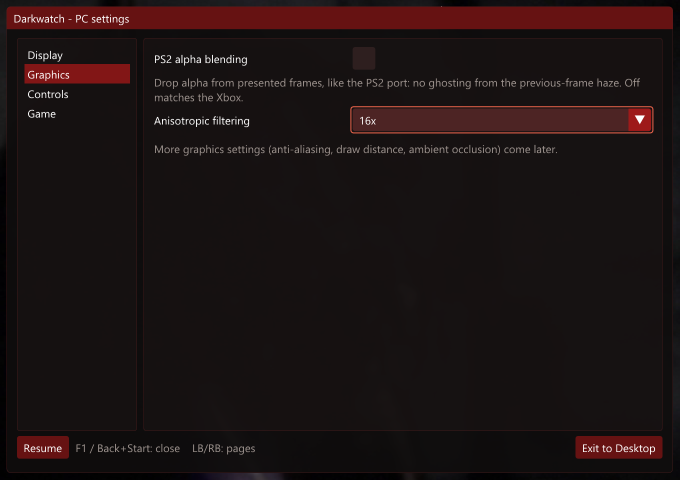
PC settings menu, in game: press F1, press Back + Start on a controller, or pick PC SETTINGS in the pause menu or the main menu's OPTIONS (it replaces the Xbox Live entry).
- Display: fullscreen / borderless / windowed, resolution, render resolution 25-200%, frame-rate cap, V-Sync. A new display mode asks to be kept and goes back after 15 seconds.
- Graphics: anisotropic filtering (16x by default), optional PS2 alpha blending (removes the previous-frame ghosting that the Xbox version has).
- Controls: keyboard and mouse on or off, mouse look and sensitivity, key rebinding.
- Game: frame-rate counter.
- Changes apply at once and are saved to
settings.toml. Exit to Desktop is one click away.
Input
- Controllers work as on the console.
- Full keyboard and mouse support for player 1, with raw mouse look and rebindable keys.
For testers
- F4 opens a bug-report box: type what you saw, and a folder with your note, a frame capture, the log tail and
your settings is saved to
reports\. - F3 captures a frame (every draw call, render target and shader) for debugging.
Fixes over a straight port
- Fog-streak fix in the meat-locker corridor (the game's own screen-space texture scale, patched).
- Xbox Live entries turned into the PC settings menu.
Installing (Windows)
- Download the zip from the latest release and unpack it anywhere (about 3 GB free needed).
- Put your game in the
assetsfolder: your disc image (.iso), ordefault.xbewith the game's folders beside it. - Run
Darkwatch.exe. The first start builds the game's code for your PC from your own copy, behind a progress window. That takes a while and happens only once; after it, the game starts straight away.
The release contains no game code: it ships the recompiler and a compiler (Clang and LLD) instead, and the game is built on your PC from your files, as in BLACK-XBERecomp.
Building from source (Windows)
You need:
- Windows 10 or 11, 64-bit, and a GPU with Direct3D 12.
- Visual Studio 2022 (Community is fine) with Desktop development with C++.
build.batoffers to add the Clang and CMake components it needs. - Git.
- Your own Darkwatch game files:
default.xbeand the folders beside it, from your disc.
git clone https://github.com/Clergyman0013/arizona-vamp-recomp.git
cd arizona-vamp-recomp

rem the recompilation SDK, at the tested commit, with this project's patch
git clone https://github.com/TGP482/XboxXBERecomp.git third_party\XboxXBERecomp
git -C third_party\XboxXBERecomp checkout 99078b1
git -C third_party\XboxXBERecomp apply ..\..\patches\xboxxberecomp-darkwatch.patch

rem copy default.xbe and the game's folders into darkwatch-hle\assets\, then:
darkwatch-hle\build.bat
The first build recompiles the game and takes 30 to 90 minutes; later builds take a few minutes. The result
is darkwatch-hle\out\build\release\Darkwatch.exe, with the game code in Darkwatch.dll beside it. build.bat
offers to start it when it is done. darkwatch-hle\release.bat then makes the release zip (it needs
7-Zip), without the game code.
If CMake fails while fetching its dependencies (some PCs with Mandatory ASLR on cannot run Git's shell scripts),
run darkwatch-hle\tools\deps_windows.bat once, then build.bat again.
Playing
Run Darkwatch.exe. Settings live in settings.toml beside it, written on the first run; the menu edits it for
you.
| Key | Action | Key | Action |
|---|---|---|---|
| W A S D | move | Mouse | look |
| Left click | fire | Right click | left trigger |
| Space / Enter | A (jump, select) | E / Backspace | B (back) |
| R / Q | X / Y | C / F | black / white |
| Left Shift | left stick click | Middle click / V | right stick click |
| Arrow keys | d-pad | Escape / Tab | Start / Back |
| F1 | PC settings menu | F2 | free / take the mouse |
| F3 | frame capture | F4 | report a problem |
The full list, with the key names settings.toml accepts, is in
README-release-windows.txt.
Roadmap
The quality bar is BLACK-XBERecomp, built on the same SDK. The full list is in ROADMAP.md. In short:
- Play-through QA: play the whole game, file F4 reports, fix as they come.
- More PC options: field of view and viewmodel FOV, monitor choice, MSAA / SMAA, draw distance, FMV scaling, pause on focus loss, mouse invert, HDR10.
- Polish: a native EXIT TO DESKTOP entry in the game's own menus, hide the leftover Xbox Live notices, background shader compiles so even the very first run does not stutter.
- More platforms: macOS, then Android.
How it works
- The SDK lifts every function in
default.xbeto C++ (thegenerated/code, never committed: it is derived from the game) and builds it intoDarkwatch.dll. A release does this on the player's PC on its first start. - The Xbox kernel and the XDK libraries (Direct3D 8, DirectSound, XInput, file system) are replaced by high-level
implementations on Windows APIs.
config/game.tomlnames the XDK functions inside the game. - Game-specific fixes hook single recompiled functions (
darkwatch-hle/src/game/), and the PC menus sit on the SDK's ImGui layer (darkwatch-hle/src/common/). - Changes to the SDK itself are kept as one patch, patches/xboxxberecomp-darkwatch.patch, with each change explained in patches/README.md.
Repository layout
darkwatch-hle/          the port (main line)
  src/common/           PC settings menu, bug-report box, game settings
  src/game/             game-specific hooks and fixes
  config/game.toml      XDK symbols found in the game
  tools/                build helpers, QA scripts, release notes
darkwatch/              the older xboxrecomp-based port, kept as a reference (docs/xboxrecomp-port.md)
patches/                changes to the two toolkits, as patches against upstream
references/             reference screenshots: console captures and the port's progress
STATUS.md               current state, findings and open bugs
BRINGUP.md, PLAN.md     bring-up history and decisions
Contributing
Bug reports are welcome. The most useful report is an F4 report folder (zip it) with what you expected to see; see CONTRIBUTING.md. Please do not attach game files or anything extracted from them.
Credits
- XboxXBERecomp by TGP482: the static recompilation SDK this port is built on.
- BLACK-XBERecomp: the quality bar.
- xboxrecomp by sp00nznet: the toolkit behind the reference port (with parts from xemu, LGPL-2.1).
- Dear ImGui, SDL, Zydis, toml++.
Legal
This repository holds only original code, patches and documentation, under the MIT license. It contains no game code, game data or Xbox system software, and building it requires a legally obtained copy of the game. Darkwatch and all related names and marks belong to their respective owners.