Digimon World — Recompiled
Digimon World — Recompiled is a native PC port of Digimon World that offers widescreen, high-resolution rendering, save states, and rewind.
- Type: PC port
- Game: Digimon World
- Runs on Windows
- By Lordsouth
- Latest release v0.6.0, 2026-11-10
- Source: https://github.com/Lordsouth/psx-recomp-port
README
Digimon World — Recompiled
Digimon World running natively on your PC. Not an emulator: the game's code is translated into a real Windows program, so you get widescreen, sharp high-resolution rendering, save states, rewind, and a mod menu.
Getting it
Check the Releases
page for a setup package (digimon-world-*-windows-x64.zip). If none is attached,
build one yourself — see DEVELOPING.md.
Either way there is no playable download: the port is generated from your own disc, on your machine. The game itself is never distributed here. The one optional extra, the HD Backdrops art pack, is a separate download.
Before you start
A Windows PC. 64-bit.
Python 3. If you don't have it: python.org/downloads. Run the installer and tick "Add Python to PATH" on the first screen — this matters, the setup won't find it otherwise.
Your own copy of the game, as a .bin + .cue pair on your PC. Nothing
here includes game data. See DISC.md for the exact
version and how to check yours is right.
Installing
These steps assume you have the setup package
(digimon-world-*-windows-x64.zip) from Releases, or one you built yourself per
DEVELOPING.md. It contains no game data either way.
1. Extract the zip. Right-click → Extract All. Put it somewhere you'll keep
it, like C:\Games\Digimon World. Don't run it from inside the zip.
2. Run Digimon_World_Recompiled.exe.
Windows may warn you the app is unrecognised. Click More info → Run anyway. That warning appears for any program without a paid code-signing certificate.
3. Follow the first-run setup.
It will offer to download build tools (about 100 MB). Leave the box ticked and click Next.
4. Point it at your game. Click Browse Disc and select your .cue
file — the small one, not the big .bin.
5. Wait. It now builds your copy of the game. This takes 10–30 minutes depending on your PC, and it only ever happens once. It's normal for it to look busy or briefly unresponsive.
6. Press PLAY. Every future launch skips all of the above and starts in seconds.
Why does it have to build?
Because that is what keeps this above board. The download contains none of the game's data. The build step reads your disc on your PC and produces your own personal copy. Nothing game-related is distributed to you, which is exactly why you have to supply the disc yourself.
Playing
Saving works like the original. You can only save by sleeping. Your partner needs the ZZZ bubble over its head — then open the menu and choose Sleep. The option is greyed out at any other time. There is no save point, and no save option in the menu otherwise. (The Save Anywhere mod changes that.)
Controller: plug it in before launching. In the launcher, leave the Player 1 toggle on D-Pad. If you switch it to Analog, every button stops working — this game only understands the digital controller, and that is not a bug in the port.
Keyboard: Enter = Start, X = Cross, S = Circle, A = Triangle, Z = Square, arrow keys = D-Pad. Rebind them in the launcher's Controls page.
Handy keys: F7 save state, F8 rewind (turn Rewind on in Mods first), Alt+Enter fullscreen.
Save states and rewind capture the game as modded. If you take a state with mods on, load it with the same mods on. Ordinary memory-card saves are the ones to keep for the long term.
Mods
Click Mods in the launcher. Everything is off by default — including widescreen from 0.1.7 on — except Battle End Freeze Fix, which only stops a crash-like freeze; tick what you want.
| Mod | What it does | With 1.5 |
|---|---|---|
| Digimon World 1.5 | Capablemite's fan mod (Test Build 1.3.1) on your own disc: Veemon, Wormmon, Renamon and Guilmon lines, new eggs and special attacks. Has its own memory cards — see below | — |
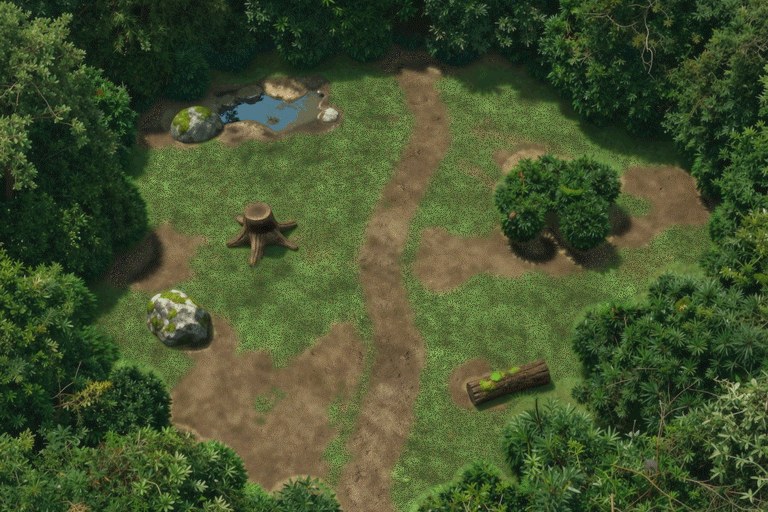
| Hidden Glade | A new map to explore: a quiet forest glade with a pond, painted for this port, and a secret fight, with a new exit in Native Forest — see below | No |
| Expanded Roster | Adds 52 Digimon. Machinedramon fills the game's one unused slot; the other 51 — Tentomon, Myotismon, Guardromon, Gigadramon, Panjyamon, BlueMeramon, Otamamon, Gotsumon and more — are finished Digimon that were on the disc all along as enemies only. All of them become partners you can genuinely raise and evolve into — see below | No |
| Trainer | Fifteen independent toggles: never hungry, tired, sick or dead; no lifespan loss; plus the Training group below | Yes |
| Perfect Training | Every training session pays the jackpot rate. The slot minigame secretly grades your reels into a reward multiplier, from 0.5x for a miss up to 10x for triple sevens — this makes every spin pay the top rate | Yes |
| Lucky Reels | The gentler version: the slot machine always tries to help you find the sevens, so the reels really do land on jackpots and you still stop them yourself | Yes |
| Training Multiplier | Multiply everything training awards, 2x to 10x | Yes |
| Guaranteed Item Drops | Every Digimon you defeat drops its item | No; use the 1.5 edition |
| Guaranteed Item Drops (1.5) | The same for Digimon World 1.5: every Digimon you defeat drops its item, the new species included. Ticking it ticks 1.5 | 1.5 only |
| Quality of Life | Make your partner live longer than the stock 15 in-game days; slow the world clock so hunger, tiredness and ageing all relax together | Yes |
| Save Anywhere | Save from the field menu without going to sleep: pick Sleep while your partner is not sleepy and the game's own save prompt opens. No time passes and nothing about your partner changes | Yes |
| Text Speed | Dialogue without the wait. Fast draws each page at once; Instant also opens the box without its zoom-in. The text itself is unchanged | Yes |
| Run Speed | Your tamer runs 1.5x or 2x faster in the field. Walls, doors, exits and talking work as normal; your partner catches up when you stop | Yes |
| Battle End Freeze Fix | On by default. Fixes a freeze in the original game: a battle hung on its results when the win lifted Brains past 700, 800, 900 or 999, losing everything since your last save | Built into 1.5 here |
| Gameplay | Better odds of learning techniques in battle; lower the stat requirements for evolutions | Tech Mastery yes; Evolution Unbound no, use the 1.5 edition |
| Evolution Unbound (1.5) | Lower the stat requirements for 1.5's evolutions, the new lines included: Relaxed (75%) or Open (50%). Ticking it ticks 1.5 | 1.5 only |
| Widescreen | 16:9, 16:10 or 21:9. The wider view is rendered at full width and shown 1:1, so nothing is stretched — menus, text boxes and the HUD keep their original shapes, and the extra width is real extra view on both sides. Two rough edges remain, listed under Mods below | Yes |
| HD Texture Packs | Loads replacement art. With the free HD Backdrops download, every background is redrawn at 4x — see HD Backdrops | Yes |
| Rewind | Step back in time: press F8 (or Select+R3 on a controller), pick a moment from the strip of pictures with Left/Right, and press Cross to carry on from there. Keeps about the last 12 seconds by default; a bigger buffer reaches further back. Off by default because the history lives in memory, about 185 MB at the default size | Yes (short test) |
| Cheats | All 57 GameShark-style codes as toggles, grouped by what they affect — infinite HP, freeze the clock, max stats, every card and item, and more. Off by default; while it is off, cheats.txt decides instead | Yes |
| Fast Loading | Shorter loads. Off by default and best left off on this game -- it speeds up real time whenever it thinks a load is happening, and on Digimon World it stays engaged, running the whole game at 4x. | Not checked |
Turning a mod off restores the original game exactly — every change is a guarded patch, nothing is permanent. Two things a save can carry across, though: a save made with Expanded Roster on expects it to stay on (see below), and if you raised one of the new Digimon on 0.3.3 or earlier, the flags that recorded it stay set. Neither breaks anything.
Digimon World 1.5
Digimon World 1.5 is Capablemite's fan mod, Test Build 1.3.1: Digimon from Adventure 02 and Tamers on File Island, four new partner lines, new eggs, new special attacks, a four-page Digivolution Chart. You do not need a patched disc. Keep using your normal one; tick the mod and the launcher applies 1.5 to it in memory each time you play. Your disc file is never changed.
- Start a new game. Saves from the original game may not work in 1.5.
- It has its own memory cards, in
saves/dw15/. Your normal saves insaves/are not touched, and they come back when you untick it. - Some mods cannot run with it, because 1.5 rewrote the parts of the game they edit: Expanded Roster (it uses the same free Digimon slots), Evolution Unbound, Guaranteed Item Drops, the Native Evolution Engine and Hidden Glade. Ticking 1.5 turns them off. Evolution Unbound and Guaranteed Item Drops have 1.5 editions, which work on 1.5's own tables, and Battle End Freeze Fix is built in. The rest of the Trainer, Quality of Life (Save Anywhere, Text Speed and Run Speed included), Tech Mastery, the cheats and Widescreen work with it. The "With 1.5" column above says which is which.
- It is a test build. Report 1.5's own bugs to its author on the Digimon World 1.5 Discord; report anything that only happens in this port here.
Hidden Glade
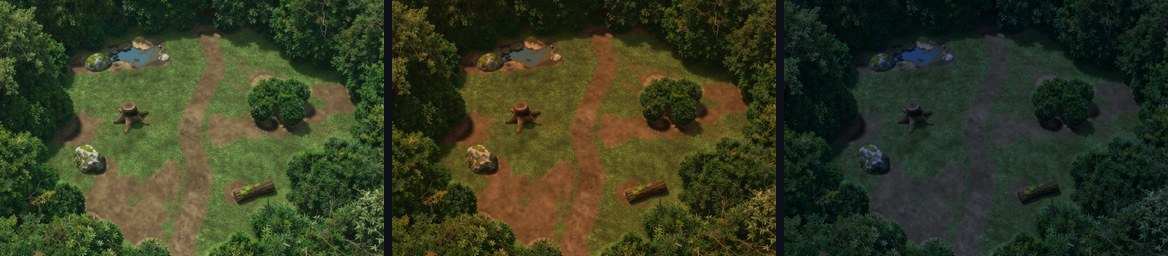
The glade's own backdrop, in the game's day, dusk and night lighting.
A map the original game never had, with a secret fight at the end of its dirt path. Its art, walkable ground and bushes you can walk behind are all this port's own; no game data is in the mod.
- How to get there: go to the Native Forest screen where Palmon waits, and walk north through the gap in the bushes at the top right. The path at the bottom of the glade brings you back.
- The secret fight is hard: bring a fully grown, well-trained partner and strong healing items. It starts only when you press confirm next to it, you can run, and losing costs what any lost battle costs. Win or lose, it is back on your next visit.
- Your saves are safe. Saving works as usual, but a save made inside the glade resumes just outside it, in Native Forest. No memory card ever depends on the mod, so you can turn it off at any time. Savestates stay with the mod settings they were made under, as they do for Expanded Roster.
- It needs the exact disc image listed in DISC.md. With any other image the game will not start while it is ticked: untick it to get back in.
- It cannot run with Digimon World 1.5, which rewrites the same files.
- It is small for now: it has no other Digimon, and no items of its own yet.
What is still rough in Widescreen
Worth knowing before you turn it on, so nothing looks like a fault in your copy:
- For about a second after a wild battle the picture drops back to 4:3 before widening again.
- A few interiors were only ever built as far as the original camera could see, so their edges can be dark. That is missing scenery on the disc, not a rendering fault, and nothing in the port can invent it.
- The smallest rooms are narrower than the picture: 36 of them at 21:9, 19 at 16:9. Past their edges the room's own art carries on, mirrored, and fades into black instead of stopping at a hard black bar. Rooms that are drawn floating in black keep their black surround. On Vulkan the bars are still plain black.
Anything else you see in widescreen is worth reporting. The picture should not be stretched, the sides should not go black while you walk, and no piece of the HUD should sit out on its own.
HD Backdrops (optional download)
Every one of the game's 242 pre-rendered backgrounds, redrawn at 4x resolution. The colours match the original at every time of day, and the HD art also fills the extra width in widescreen. Characters, items and other 3D objects are unchanged.
It is a separate download because it is large (6.2 GB in four parts): HD Backdrops release.
1. Download all four parts, digimon-world-hd-backdrops-part1of4.zip to
part4of4.zip. You need every part; each one holds a different set of maps.
2. Extract each part into your game folder, the folder that has
Digimon_World_Recompiled.exe in it. Right-click a part → Extract All… →
Browse to your game folder → Extract.
Windows suggests a new folder named after the zip, e.g.
C:\Games\Digimon World\digimon-world-hd-backdrops-part1of4. Delete that last part so the box ends at your game folder, or the game won't find the pack.
Do the same for all four parts, into the same game folder. If Windows asks
about merging folders, say Yes. When you're done you'll have
mods\texture-packs\SLUS-01032\ in your game folder with about 15,900 files in it.
3. Turn it on. Run the game, click Mods, tick HD Texture Packs
(under Visual), and press PLAY. Leave the folder setting as it is; it
already points at mods\texture-packs\SLUS-01032.
It needs the OpenGL renderer, which is the default. On Vulkan or Software the game shows the original backgrounds.
Turning it off: untick HD Texture Packs. To remove it completely, delete
the mods\texture-packs\SLUS-01032 folder.
Not working? You'll see the original, blocky backgrounds. Check that
Hashes.ini sits directly in mods\texture-packs\SLUS-01032\, not one folder
deeper, and that all four parts were extracted.
The art was generated with local AI upscaling, from tiles cut out of the
game's own backgrounds. Now and then it adds a small detail that isn't in the
original. The tool that made it is
tools/gen_hd_backdrops.py.
Raising the new Digimon
Turn on Expanded Roster in the Mods panel before starting. Fifty-two Digimon the disc has always contained then become partners you can raise — reached the ordinary way, by how you raise your partner.
They slot into the tree at every stage. Your In-Training partner can now become one of six Rookies instead of two, those new Rookies grow into new Champions, and the new Ultimates hang off Champions you already know. As always weight decides, so each new option sits at its own weight; the classic evolutions are untouched and still happen at the weights they always did.
The fifty-two are twenty-one Rookies, twenty-four Champions and seven Ultimates. Forty-six of them you reach by raising: sixteen Rookies, twenty-three Champions and all seven Ultimates, Machinedramon included.
Six have no evolution path in. Panjyamon is reached with the Noble Mane item instead, described below. The other five — Sharmamon, ClearAgumon, Darkrizamon, SandYanmamon and SnowGoburimon — are fully built but genuinely unreachable: the game has only four In-Training Digimon with four evolution slots each, and that is a hard limit of the original design, not something the mod chose.
These evolve from a Champion, the same way any other Ultimate does:
| Raise this Champion | …and you can become |
|---|---|
| Tyrannomon or Greymon | Machinedramon |
| Airdramon | Gigadramon |
| Devimon | Myotismon |
| Seadramon | WaruSeadramon |
| Numemon | WaruMonzaemon |
| Sukamon | MetalEtemon |
| Kokatorimon | Tekkamon |
As always, what you get depends on how you raised them — weight matters, and each of these wants a different build. Four of them are the dark counterparts of Digimon you already know, and they want what you would expect: they are the only evolutions in the game that ask you to have made more care mistakes rather than fewer.
The three evolution items finally work
Digimon World has always contained three items that do nothing:
| Item | What it says |
|---|---|
| Giga Hand | "Digivolve to Gigadramon!" |
| Noble Mane | "Digivolve to Panjyamon!" |
| Metalbanana | "Digivolve to MetalEtemon!" |
They have names, icons, descriptions and prices, and they point at three Digimon the game never let you have. Feed one to your partner and it now does exactly what it says — including on an Ultimate, which normally can never evolve again.
Machinedramon is the demanding one: 5000 HP and MP, 500 Offense and Defense, 400 Speed and Brains, at most 5 care mistakes, 100 discipline, 50 battles won and 35 techniques learned.
One caveat worth understanding: a save created with this mod on expects it to stay on. If you turn it off, that save's partner data no longer lines up. Either keep it enabled for that playthrough, or start a separate file.
Cheats: tick Cheats in the Mods panel and choose from the list — every code is there, grouped by what it affects. Turning that on hands the whole cheat list to the launcher.
You can still do it the old way: open cheats.txt in Notepad, change [ ] to
[x] on any code and restart. Leave the Mods entry off and that file keeps
deciding, exactly as it always did.
Many of these codes exist nowhere else — they were derived from a decompilation of the game rather than copied from published lists, and the published ones were re-checked against it rather than trusted.
Two worth knowing: "Skip all movies" is on by default and takes you straight to the title instead of the two-minute intro, and "Freeze the game clock" stops hunger, tiredness, ageing and the lifespan countdown at once.
Back up your saves folder before using them. Several write things the game
keeps on the memory card, so their effects outlive switching the cheat off. And
if a Mods-panel feature seems to stop working, check here first: a cheat rewrites
memory every frame, so where the two overlap the cheat wins.
If something goes wrong
"Python was not found" — Python isn't installed, or you missed the "Add Python to PATH" tickbox. Reinstall it with that box ticked.
"Disc not recognised", or setup rejects your file — you picked the .bin
instead of the .cue, or your copy is a different release.
DISC.md lists the file size and checksums to compare against.
The game is running too fast? Open the Mods panel and make sure Fast Loading is off. It accelerates real time during loads, and on this game it stays on permanently, running everything at 4x speed. It is off by default from 0.1.5 onward.
Controller does nothing — the Analog/D-Pad toggle is on Analog. Switch it to D-Pad. This is the single most common problem.
The build failed — check you have about 5 GB free, and that antivirus isn't quarantining the compiler. Antivirus is the usual culprit: it sees a program writing and running new executables.
If the message on screen is not enough to go on, the full compiler output is in
psxrecomp-build.log, written next to the game. That file is what to attach
when reporting a build problem; the one line the launcher shows is usually not
the line that matters.
Stuck on the intro movie — the movie runs about two minutes and only then
shows "Press Start Button" for a short window. The "Skip all movies" cheat is
already on by default and takes you straight to the title; if you are sitting
through the intro, check it has not been switched off in cheats.txt.
Reporting a problem
Open an issue on the [pr