EmotionalSense P3
EmotionalSense P3 is a native PC port of DJMax Portable 3 for Windows and Linux that recompiles the game from your own disc.
- Type: PC port
- Game: DJMax Portable 3
- Runs on Windows and Linux
- By burnermanx
- Latest release v0.1.0, 2026-11-19
- Source: https://github.com/burnermanx/emotionalsense-p3
README
EmotionalSense-P3

DJMAX Portable 3 (PSP, 2010 --
ULKS46236) statically recompiled to a native game for Linux and Windows (x86-64 and arm64) that a small launcher builds on your own computer from your own disc. Built on psprecomp.
Caution
No game data lives in this repository or in any download. The ISO, everything extracted or decrypted from it, the C generated from the game's code and the binaries built from it are derived from your own disc. They stay on your machine and must never be committed or redistributed -- that includes the game you prepare.
What you need
- Your own ISO of the Korean version of DJMAX Portable 3 (
ULKS46236), or a CHD made from it (see CHD images). Other regions and other titles are refused. - Optionally, the Korean 1.02 data update (the folder that holds
PSP/GAME/ULKS46236/DATA.TPA); seedocs/update-1.02.md. The update's own patcher is never run. - A computer with a Vulkan graphics driver (the software renderer works too, but
slowly). Nothing else: the compiler travels inside the launcher, so no CMake,
git, compiler,
-devpackages or network are needed. The game window and the launcher are keyboard or gamepad driven.
Download
Get the package for your system from the
releases page and
check it against SHA256SUMS:
| System | Package |
|---|---|
| Windows x86-64 | EmotionalSense-P3-0.1.0-windows-x86_64.zip |
| Windows arm64 | EmotionalSense-P3-0.1.0-windows-arm64.zip |
| Linux x86-64 | EmotionalSense-P3-0.1.0-linux-x86_64.AppImage or ...-linux-x86_64.tar.gz |
| Linux arm64 (aarch64) | EmotionalSense-P3-0.1.0-linux-aarch64.AppImage or ...-linux-aarch64.tar.gz |
A release also carries the source tarball and the source of the third-party GPL
tool the launcher runs (see THIRD_PARTY_NOTICES.md).
The AppImage and the tar.gz hold the same launcher. Windows: unzip anywhere you
can write to (not Program Files) and run EmotionalSense-P3.exe. Linux: make
the AppImage executable and run it, or unpack the tar.gz and run
EmotionalSense-P3/EmotionalSense-P3.
First use
- Start the launcher and choose your ISO or CHD. It extracts the disc, decrypts
EBOOT.BIN, recompiles the game to C and compiles it with the compiler it carries. This happens once (about half a minute on a modern 16-thread machine) and again when the launcher or the ISO changes. - Press Play. The language of the launcher follows the system (Portuguese of Brazil, English, Spanish, Japanese, Korean); the Spanish, Japanese and Korean texts are machine-written and need review by a native speaker.
- The first start of a new data folder asks for a player name, like the PSP game.
Where your data lives (portable)
Everything is kept next to the program, in a folder called
EmotionalSense-P3-data:
- Windows: next to
EmotionalSense-P3.exe; - AppImage: next to the
.AppImagefile (not inside the image); tar.gz: next to the launcher binary.
It holds the launcher's settings, the extracted disc, the recompiled game, the
caches, your save (ms/PSP/SAVEDATA/ULKS46236<>/SD.BIN; on Windows the folder is
ULKS46236%3C%3E), your Respect scores (es_scores.json), the 1.02 update, the
logs and the crash reports. Nothing is written to
your home folder, %APPDATA%, %LOCALAPPDATA%, ~/.cache, ~/.config or
~/.local. To move the game, move the program and that folder together; to
remove it, delete both.
If the program sits in a folder you cannot write to, the launcher says so and
asks you to move it (it never falls back to your home folder). If it finds data of
an older version in the old places, it offers to copy it into the new folder
(nothing is moved or deleted). The launcher's "Back up save" button copies SD.BIN
and es_scores.json to save-backups/.
Controls
| Keyboard | Controller | PSP |
|---|---|---|
| Arrows | D-pad | D-pad |
| -- | Left stick | Analog |
| Z / X / A / S | A / B / X / Y | cross / circle / square / triangle |
| Q / W | LB, LT / RB, RT | L / R |
| Enter / Backspace | Start / Back | Start / Select |
| Alt+Enter | borderless full screen <-> window | |
| F11 | full screen at the rate chosen in the launcher <-> window | |
| Esc | on the title screen: quit the game (asks first) |
The PSP game confirms with circle; Western players expect cross. The launcher's
Confirm button option is Automatic (circle for Japanese and Korean, cross for
every other language), circle or cross; it only applies to menus, never to the
lanes. Quitting from the title screen returns to the launcher.
Options
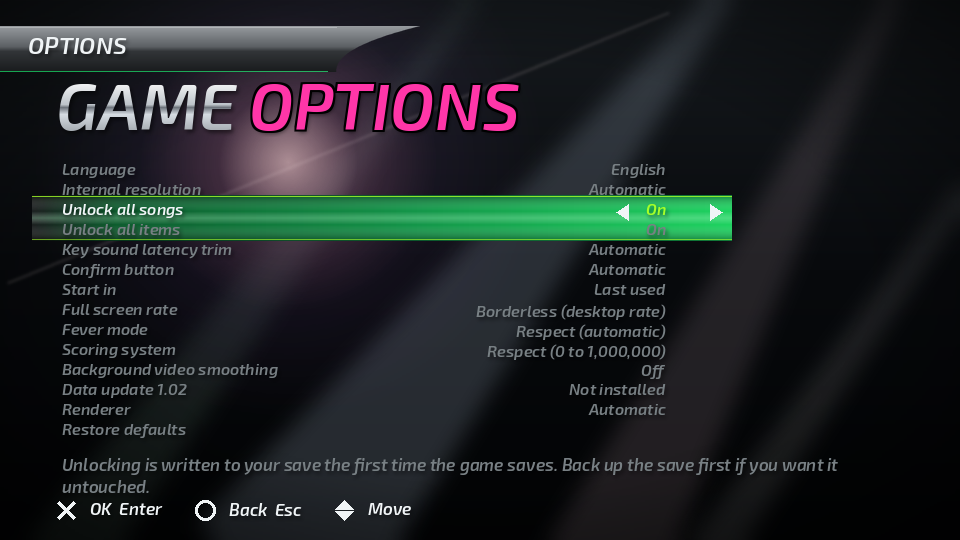
Everything is in the launcher's Options screen and saved automatically.
| Option | What it does |
|---|---|
| Language | launcher and in-game prompts: Automatic, Portuguese (Brazil), English, Spanish, Japanese, Korean |
| Internal resolution | Automatic (the smallest scale that covers the window), 1x to 4x |
| Unlock all songs / items | all charts, DJ icons, crews, gear, notes, gallery, videos and the 4.2T / 6.2T modes. The unlock is written to your save the first time the game saves; back up SD.BIN first if you want it untouched. See docs/unlock-table.md |
| Key sound latency trim | tunes keysound against music by ear (default: both equal) |
| Confirm button | see Controls |
| Start in | last used, window or borderless full screen (a Steam Deck in game mode starts in full screen) |
| Full screen rate | Borderless (default, desktop rate) or an exclusive 60 / 120 Hz mode for F11 |
| Fever mode | Respect (default): the Fever starts by itself when the gauge fills and the lane speed you chose is kept. Original: the PSP game untouched (docs/fever.md) |
| Scoring system | Respect (default): your judgment percentage out of 1,000,000 (87.8 % reads 878,000; 100 % reads exactly 1,000,000), on the result screen and in the song list. Original: the PSP score. Display only: the game keeps writing its own record in both modes (docs/score.md) |
| Speed system | Respect (default): Auto Velocity. R and L change the speed in steps of 0.1 (1.0x to 7.0x) and the number is the apparent speed: 2.0 scrolls the same on a 100 and a 200 BPM song (a tempo change inside a song still speeds the notes up or down as in the game). A label AV 2.3 replaces the game's speed sprite. Original: the PSP speeds, 0.5x to 7.0x in steps of 0.5 (docs/speed.md) |
| MISSION | Fever, scoring and speed are always Original in MISSION mode (the missions are balanced for the PSP rules), whatever the options say |
| Background video smoothing | blends the 30 fps background video (off by default) |
| Data update 1.02 | installs or removes the optional update |
| Renderer | Automatic, Vulkan or software |
Custom textures
The game loads PNG files from EmotionalSense-P3-data/textures/ (a texture pack made by hand, named by the
key the game uses; see docs/technical.md) and shows them in place of the original
art. There is no texture pack in v0.1 and none is provided.
If the game crashes
The game writes a report to EmotionalSense-P3-data/crashes/crash-<date>-<time>.txt
and the launcher then offers to open the folder, copy the report or open an issue
on GitHub with a short summary filled in. Nothing is sent automatically: read the
report and attach it yourself. It lists the version, your system and graphics card,
the game options and what the game was doing; it holds no save, no disc content and
no environment variables, and your home folder appears as ~. A freeze (no frame
for 20 s) writes a report too, and the game keeps running.
docs/diagnostics.md describes the report.
Common problems
- "This folder cannot be written to": move the program to a folder you can
write to (Documents, a Games folder), not
Program Filesor a system folder. - The launcher says the file is not a PSP image / wrong region: only the Korean
version
ULKS46236is supported. - No picture or a very slow game: the game uses Vulkan; update the graphics driver. Choose the Vulkan renderer in the options; software rendering is a fallback.
- Choppy or late sound: use the "Key sound latency trim" option; see
docs/audio.md. - The unlock changed my save: that is documented above; restore
SD.BINfromsave-backups/. - A "No Memory Stick Duo has been inserted... Failed to load Install Data" message on the first run: expected on a brand-new save. The game then shows its tutorial. Data Install is not needed; nothing is wrong.
- Open an issue with the crash report for anything else.
CSO / ZSO images and extracted folders
The launcher also reads CSO (CISO v1/v2) and ZSO (the LZ4 variant, maxcso --format=zso) images in
place, with no temporary ISO. If the disc is already extracted, a game folder (the one
that holds PSP_GAME) next to the program is offered as the source and copied (never moved), and a
data folder that already holds the extracted disc is reused without asking for the image again.
CHD images
The launcher reads CHD files as well as ISOs, so the game can stay compressed on disk (about 14% smaller than the ISO). It uses libchdr (the CHD reader of PPSSPP and RetroArch) and only reads the file: no temporary ISO is written, and the check against the known dump is made on the decoded data, so a CHD made from a good ISO passes it like the ISO does.
Supported: a CHD of the disc as a DVD/UMD image (chdman createdvd -i game.iso -o game.chd, any compression, including -c zstd) or as a CD image whose first track
is data, mode 1 or mode 2 form 1, cooked or raw (chdman createcd -i game.cue -o game.chd). Audio-first discs, GD-ROM and hard-disk CHDs, and CHDs that need a parent
file are refused with a message; so is a damaged or truncated CHD. chdman comes with
MAME ("mame-tools" in most distributions). Choose the .chd in the launcher, or pass it
to --iso.
Command line
For scripts and CI: EmotionalSense-P3 --iso game.iso --prepare, --run,
--verbose,
--backup-save, --selftest, --lang xx, --data DIR,
--confirm auto|circle|cross, --update FOLDER / --remove-update,
--migrate-legacy. The game binary has --version, --help
and the EMOTIONALSENSE_* variables listed in
docs/diagnostics.md. The launcher is EmotionalSense-P3
and the game it starts is EmotionalSense-P3-game (.exe on Windows).
The launcher and the game print nothing to the terminal unless something stops them
from running. --verbose makes the launcher print its progress and the game its
diagnostic log (also EMOTIONALSENSE_LOG=1 for the game; see
docs/diagnostics.md).
Building from source
The released path needs a kit (the compiler, SDL2 and FFmpeg for one target) built
by scripts/make_kit.py; scripts/build_launcher.py packs the launcher around it
and .github/workflows/release.yml shows every pinned input for the six targets.
For development on Linux:
git clone --recursive https://github.com/burnermanx/emotionalsense-p3 && cd emotionalsense-p3
./scripts/install-deps-arch.sh        # or the equivalent packages: cmake, ninja, SDL2, FFmpeg, Vulkan headers
cmake -B build -G Ninja && cmake --build build
python3 launcher/es_dev.py --iso game.iso --data <a data folder of your own>   # whole pipeline, system compiler
python3 -m unittest discover launcher/tests
Never point the pipeline at a data folder holding a save you care about while
testing: the routes in scripts/ finish songs, and the game then writes the save.
Technical notes (how it works, what the fork adds, how correctness is decided,
debugging, building for Windows): docs/technical.md; the
version history is CHANGELOG.md.
AI assistance
This port is built by a person and AI agents working together, and it says so because the result is judged on the measurements above, not on how it was written.
The loop that produced most of it: an agent reads the disassembly, the memory and the traces and writes a task list with acceptance criteria; another agent implements a task at a time and verifies it against those criteria; the person runs the result on real hardware, plays the game and decides whether it is right. The human owns the goal, the acceptance and every merge.
Concrete cases where the split mattered:
- The "all songs" CWCheat code was being applied at the wrong address and in
the wrong format, which corrupted the song list and hung the music select.
The agent found it by reading the unlock test at
0x53144and the list build at0x56918(the loop that calls the test is0x56980..0x569E0); the person reported the hang and played the fixed build. - The 4.2T mode stayed locked in PLAY MODE SELECT, and the first explanation
was wrong: the agent read a
u16at0x134960as a mode bitmap, wrote to it, and the mode only appeared to unlock because the save had reached the level the game asks for. Reading the two lock checks (0x27C78and0x2D780) showed the real rule -- 4.2T is gated on the player level, and 6.2T on an ownership bit -- and the fix moved to a wrap on the level query. The lesson kept indocs/unlock-table.md: a save diff says which bytes differ, not which one decides. - Internal resolution ran at 20 frames per second. The agent found the cost by timing each stage (reading 8 MB from a non-cached mapping); the person judged the picture.
- Audio drifted out of sync and clicked in long keysounds. The agent measured the ring level and the underruns and changed the pacing; the person reported the symptom and will be the one to say it is gone.
The prose in docs/ and in this file is written by agents and edited by the
person who owns the project; the measurements in it come from runs on the
project owner's machine and, where noted, from wine.
Legal
MIT (see LICENSE), like psprecomp. pspdecrypt (GPL-3.0) is built from a pinned
revision and shipped as a separate program that the launcher executes -- never linked
or vendored; its source is attached to every release (THIRD_PARTY_NOTICES.md,
licenses/). DJMAX is a trademark of NEOWIZ; this project contains none of its code
or data.