DOOM Recomp
DOOM Recomp is a native Apple Silicon port of DOOM (2016) that recompiles the Windows executable for macOS.
- Type: PC port
- Game: Doom (2016)
- Runs on macOS
- By NightSightProductions
- Latest release v1.1.0, 2026-11-18
- Source: https://github.com/NightSightProductions/DOOM-Recomp
README

DOOM Recomp
DOOM Recomp is a native Apple Silicon port of DOOM (id Software, 2016), made by statically recompiling the original Windows release.
DOOM (2016) never had a Mac version. DOOM Recomp translates the game's own 64-bit Windows executable, function by function, into C and compiles it for arm64, so id Tech 6 runs natively on macOS, with no Wine, no Rosetta and no x86 emulation at run time. The engine and game code run unchanged; the parts that talked to Windows (windows and input, files, threads, audio, networking, Steam) are replaced with native implementations, and the game's Vulkan renderer runs on Metal through KosmicKrisp, Mesa's Vulkan driver for Apple GPUs.
This is an unofficial community project. It is not affiliated with or endorsed by id Software, Bethesda or ZeniMax. You need your own copy of the game: none of the game's code or data files are included in this repository or in its downloads.
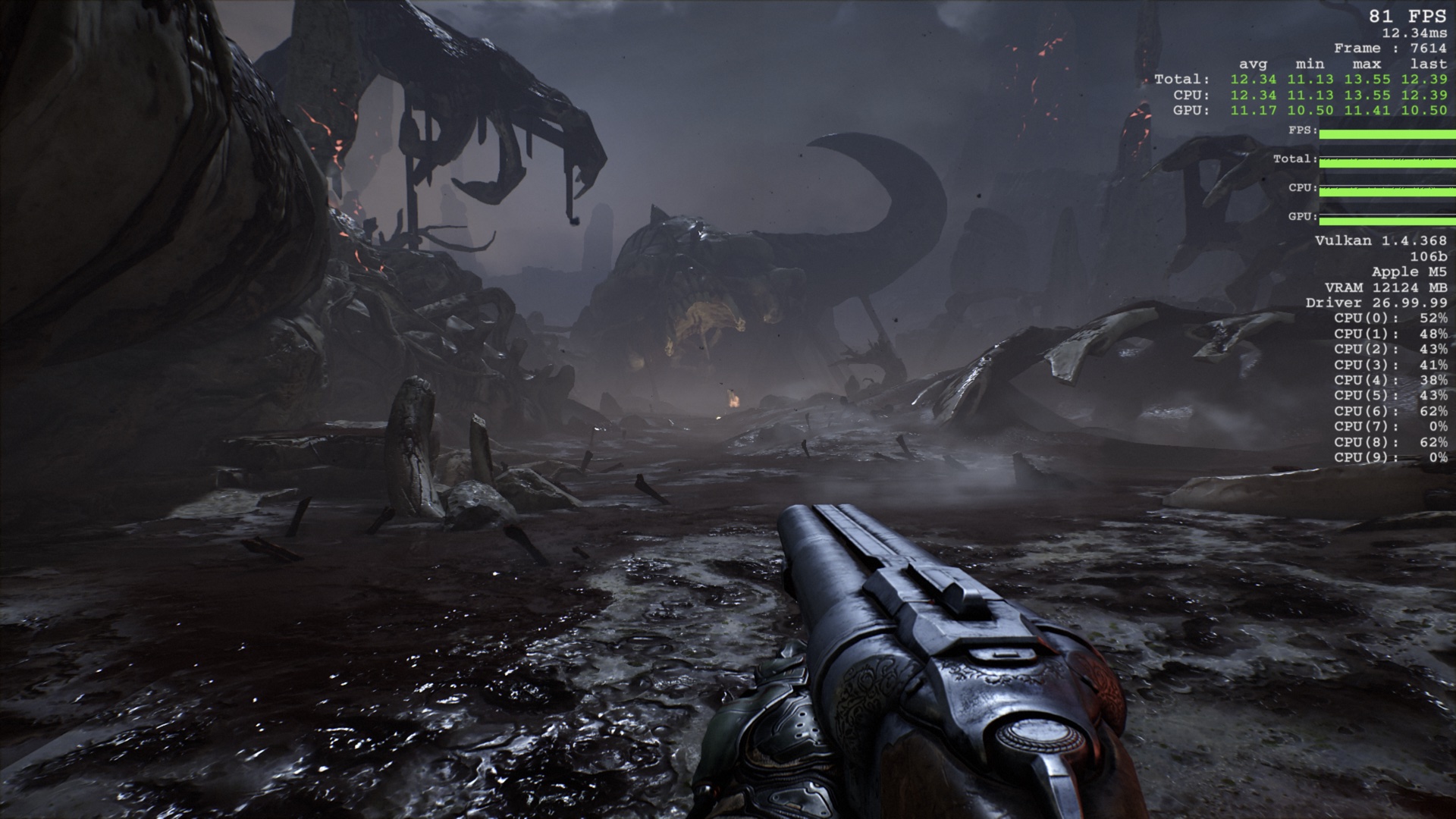
Playing on macOS
- Install the Windows version of DOOM (2016) from Steam or GOG, for example with Steam for Windows or GOG's installer in CrossOver or Whisky. Make sure the game is fully downloaded and updated.
- Download
DOOM-Recomp-macOS.dmgfrom the Releases page. - Open it and run Install DOOM Recomp. The installer finds your copy of the game, checks that it is the supported release, and builds the game on your Mac. The build takes about 15 minutes, needs about 4 GB of temporary disk space, an internet connection and Apple's Command Line Tools (the installer offers to install them).
- Launch DOOM from your Applications folder.
Note: release builds are not notarized by Apple yet, so macOS blocks the installer the first time it is opened. To allow it, go to System Settings > Privacy & Security and click Open Anyway.
Some things worth knowing:
- Saved games and settings are stored in
~/Library/Application Support/doom-recomp. The game data is read from your installation of the game, which is never modified. - Online features (Steam sign-in, achievements and stats, Bethesda.net, the main menu's live
tiles) work when the Steam for Mac client is running and logged in. DOOM Recomp uses the copy of
Valve's
libsteam_api.dylibthat comes with the Steam client, so nothing else needs to be installed; without Steam, the game runs offline. - The GOG release always runs offline: the campaign, saves and settings work as with Steam, but there are no achievements, cloud saves or online features (GOG Galaxy is not supported). The Steam Play tool below needs DOOM in your Steam library, so the installer skips it for a GOG copy.
- Use Adaptive vertical sync. On is classic double-buffered vsync, which drops to 30 FPS whenever a frame runs long, as it does on Windows.
- The fullscreen resolutions in the game's Video settings are scaled to your screen; windowed mode opens a window of the chosen size.
Steam Play (optional, needs NotProton)
Steam for Mac has the same compatibility-tool support as Steam on Linux, but it is switched off. NotProton switches it on. With NotProton installed, the installer's Steam Play: NightSight Recomp option (off by default) registers DOOM with NightSight Recomp (NSR), the one Steam Play tool all NightSightProductions ports share. Restart Steam, then choose it under DOOM > Properties > Compatibility > Force the use of a specific Steam Play compatibility tool > NightSight Recomp (NSR). Steam then installs the Windows release of DOOM in its Mac library, and Play on DOOM's own library entry starts DOOM Recomp, with the Steam overlay (Shift+Tab) and playtime as for any Steam game. NotProton plugins switched on for the game are loaded into it too. CrossOver or Whisky isn't needed in that setup.
Leave DOOM's Steam launch options empty: with a tool other than NotProton's own, Steam for Mac can't start a
launch that has them ("OS Error 260"). Settings for the game go into NSR instead, for example
python3 framework/tools/nsr.py set-env --appid 379720 NAME=value. From a source build, make steam-play
registers build/DOOM.app (pass APP_PATH=/Applications/DOOM.app for an installed one).
NSR lives in ~/Library/Application Support/Steam/compatibilitytools.d/nsr, and each launch is logged to
~/Library/Logs/nsr.log. The uninstaller removes DOOM's entry and keeps the tool for other games; it also removes
the per-game doom_recomp tool earlier versions registered. Without NotProton the tool does nothing.
How It Works
DOOM Recomp is built on Recomp-Framework,
NightSightProductions' static recompiler, included as the framework/ submodule
(clone with git clone --recursive, or run git submodule update --init).
- The framework's translator (
framework/tools/recomp64.py) reads the game's executable (DOOMx64vk.exe, a 64-bit Windows PE) and its two code DLLs (superscriptx64.dll,bink2w64.dll) and translates every function into C that runs against the original x86-64 register state, with guest memory mapped at the addresses the game expects. Guest registers live in C locals, SSE math becomes NEON vector code, and integer memory accesses keep x86's ordering guarantees, which the engine's lock-free job system relies on. - The framework's runtime (
framework/runtime/) is what the translated code runs on: the CPU state, threads, fibers and synchronization, and re-implementations of the Windows APIs the game imports: kernel32, user32 windows and messages on AppKit, files, DirectInput, WASAPI and XAudio2 on CoreAudio, WinHTTP on NSURLSession, sockets, bcrypt, Vulkan on KosmicKrisp, and a Steam layer that bridges to the Steam for Mac client. - This repository holds what is specific to DOOM:
src/game.c: the game's settings for the runtime (executable, folders, Steam app ID, save sync);src/native_idtech.candtools/native.txt: hot routines inside the executable replaced with native code (memcpy/memset/strlen, zlib'sinflate_fast, id Tech's string compares);tools/patches.txt: instruction patches (hiding the OpenGL option in the Video menu);tools/native_gog.txtandtools/patches_gog.txt: the same for the GOG release, a different build of the executable (the Makefile picks the set by the executable's SHA-256);- the installer, Steam shortcut and save import tools.
- KosmicKrisp is built from Mesa source (
make kosmickrisp, with the framework's patches) because the id Tech workarounds it needs are not in a release yet; the installer ships it prebuilt. - The build happens on your machine from your copy of the game, and the app loads the game's data from your installation at run time.
License
The code in this repository is licensed under the terms of the MIT License. You can find the entire license in the LICENSE file.
DOOM, its executable, DLLs and data remain the property of their respective owners. The C code
that the build generates from the game's code (gen/, gen_superscript/, gen_bink/) is derived
from the game and must not be redistributed; the repository is set up so that it is never committed.
The DOOM logo and screenshots are shown only to identify the game; the logo is a trademark of its respective owners.
Third-party components: the Khronos Vulkan headers (framework/third_party/vulkan, Apache-2.0 OR MIT); the
installer's prebuilt KosmicKrisp driver (Mesa, MIT) and Vulkan loader (Khronos, Apache-2.0).
Features
DOOM Recomp provides:
- Native Apple Silicon (arm64) build of the original Windows release, with the original engine code
- The full campaign, with Bink cutscenes, music and sound
- Vulkan rendering on Metal through KosmicKrisp, with emulated fullscreen resolutions, windowed mode and adaptive vsync
- Keyboard, mouse and game controller input
- Multiplayer and SnapMap
- Steam and Bethesda.net online services through the Steam for Mac client
- A macOS installer that builds the game from your own copy
Known Issues
- The Steam overlay only works when DOOM Recomp is started through NightSight Recomp (see above). Started any other way, Invite Friend opens a simple friends list instead of the overlay.
- Multiplayer matchmaking and SnapMap work, but some of id's regional multiplayer servers no longer respond.
- On Macs without a fan (MacBook Air), the frame rate drops as the Mac heats up during long sessions.
Support and Feedback
When reporting a problem, include ~/Library/Logs/DOOM-recomp.log from the session where it happened.
The log is replaced every time the game starts.
System Requirements
Operating System
| macOS | |
|---|---|
| Min Version | macOS 26, Apple Silicon (M1 or later) |
Note: only macOS 27 on an M5 has been tested so far.
Note: Intel Macs are not supported.
Software
| Min Version | |
|---|---|
| DOOM (2016), Windows version from Steam or GOG | - |
Xcode Command Line Tools xcode-select --install | 26 |
| Python 3 (included with the Command Line Tools) | 3.9 |
The build downloads two Python packages, Capstone 5.0.6 and
LIEF 0.16.6, into a local .venv folder.
Building KosmicKrisp yourself (make kosmickrisp) additionally needs Homebrew's llvm, libclc,
spirv-llvm-translator, meson and ninja, and the Vulkan SDK for its
static SPIRV-Tools.
Build Instructions
-
Clone the repository:
git clone https://github.com/NightSightProductions/DOOM-Recomp.git -
Build the Vulkan driver (once, and whenever you want a newer Mesa):
make kosmickrisp -
Build the game from your copy (the usual CrossOver and Whisky Steam and GOG locations are searched if no path is given):
scripts/build.sh "/path/to/steamapps/common/DOOM"(or the GOG folder withDOOMx64vk.exe)This verifies the game files, translates them (
make gen gen-dll gen-bink), compiles them (make boot) and createsbuild/DOOM.app(make app), using the game's own icon from your install. -
Run it:
open build/DOOM.appor from a terminal, with the log on screen:
./build/boot orig.exe "/path/to/steamapps/common/DOOM" +com_skipIntroVideo 1Any arguments after the game folder are passed to the game. The retail game has no
mapcommand, so levels are loaded from the menu. -
To build the installer disk image, run:
setup/macos/build_installer.sh
Debugging Options
These environment variables are read by the game when started from a terminal:
| Variable | Effect |
|---|---|
RT_STRICT=1 | Stop on any call into a Windows function that is not implemented, instead of logging it |
RT_WATCHDOG=secs | Print what every guest thread is doing when the game stops making progress |
RT_FPS=1 | Log the frame rate and worst frame time every 5 seconds |
RT_SCREENSHOT=n, RT_SCREENSHOT_FILE=path.ppm | Save the image of frame n |
RT_QUERY_STATS=1 | Log Vulkan query activity and driver time |
RT_HTTP_TRACE=1 | Log every HTTP exchange with online services in full |
RT_NO_HTTP=1 | Run as if WinHTTP were unavailable |
DOOM_STEAM_OFFLINE=1 | Do not connect to Steam |
DOOM_STEAM_API=path | Use this libsteam_api.dylib |
RT_SPIN_YIELD=1 | Plain yielding in the engine's wait loops (by default they nap) |
RT_NCPU=n | Report n processors to the game |
RT_GPU_CAPTURE=secs | Save a Metal GPU capture of one frame, secs seconds after launch, to ~/Library/Application Support/doom-recomp/debug/frame.gputrace (opens in Xcode) |
MTL_HUD_ENABLED=1 | Apple's Metal performance HUD |
Profiling works with Instruments: Time Profiler for the CPU, where every translated function is named
F_<address> after its address in the original executable, and Metal System Trace for the GPU.
Acknowledgements
- KosmicKrisp and the Mesa project, for Vulkan on Apple GPUs, and its developers for the id Tech depth-bounds workaround
- Capstone and LIEF, used by the translator
- The Khronos Group, for the Vulkan headers and loader