BT4decomp
BT4decomp is a native desktop port of Dragon Ball Z: Budokai Tenkaichi 4 for Windows, Linux, and macOS that supports simultaneous team battles.
- Type: PC port
- Game: Dragon Ball Z: Budokai Tenkaichi 4
- Runs on Windows, Linux and macOS
- By NauTaro
- Latest release v0.1.39.3-R1.1, 2026-11-02
- Source: https://github.com/NauTaro/DBZ-BT4-Tag-Team-Decomp
- Website: https://github.com/NauTaro/DBZ-BT4-Tag-Team-Decomp/releases/latest
README

BT4decomp
Budokai Tenkaichi 4 B14 Rev2. Native desktop runtime. Simultaneous team battles.
Online Tag Team, tournaments, spectator rooms and proximity voice, built on Tenkaichi3Decomp.




BT4decomp adapts BT4 B14 Rev2 for Windows, Linux and Apple Silicon. It runs the game code natively rather than emulating a console. Installation requires your own compatible Spanish or English BT4 ISO; disc images and extracted game data are not distributed here.
Fight together
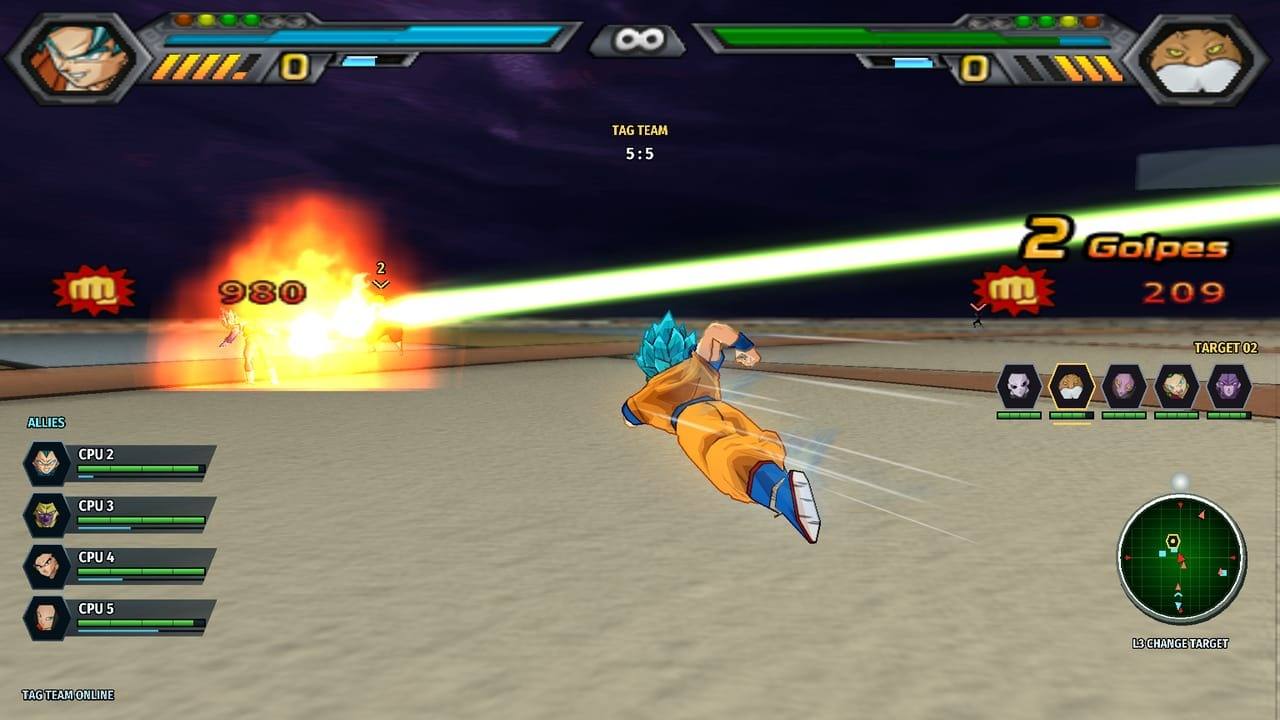
| Mode | What it offers |
|---|---|
| Tag Team | Simultaneous battles with up to five fighter slots per team, six-player Free for All, room codes and individual targeting. Tag Team Quick Match gathers four players for 2 vs 2; Create Room offers team and Free for All presets. |
| 1 vs 1 | Peer rollback netplay, custom rooms with configurable rollback and input delay, and duel Quick Match. |
| Tournaments | Two to eight entrants, automatic byes, a live bracket and match rejoining. |
| Spectators | Join without occupying a fighter slot; follow either side or use a split view. |
Game menus support English and Spanish, with an optional Brazilian Portuguese pack. Setup supports English, Spanish and Brazilian Portuguese. F1 settings support English, Spanish and Brazilian Portuguese. F1 > Spectator offers free camera, fighter tracking and fight overview, with target, speed, zoom and reset controls. Keyboard and controller camera input replaces local fighter input while the camera is active; Start remains available. Panoramic mode expands menus and HUD across the viewport. Hiding the combat HUD also dismisses the Start pause menu; press Start to open it again.
Voice and presentation
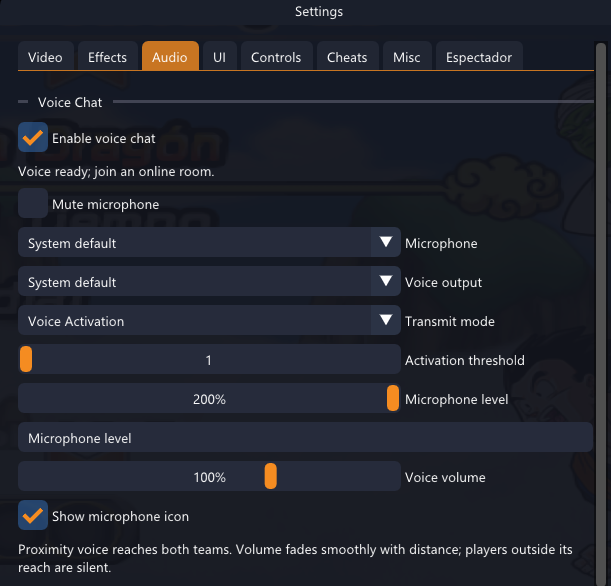 |
Proximity voiceTalk across both teams, with volume adjusted by fighter distance. Choose microphone and output devices, voice activation, threshold and playback volume. Display controlsWindows offers Vulkan, Direct3D 12 and OpenGL. Adjust render scale, aspect ratio, effects and motion presentation independently of combat simulation. Custom contentAdd compatible stages with matching PNG previews, or install custom music. See the stage guide and music guide. |
Installation
| System | Package | Requirement |
|---|---|---|
| Windows | BT4decomp-windows-x64.zip | x64 |
| Linux | BT4decomp-linux-x64.zip | x86-64, glibc 2.35 or later |
| macOS | BT4decomp-macos-arm64.zip | Apple Silicon, macOS 15 or later |
- Download your platform's ZIP from the latest published release and extract it completely.
- Run
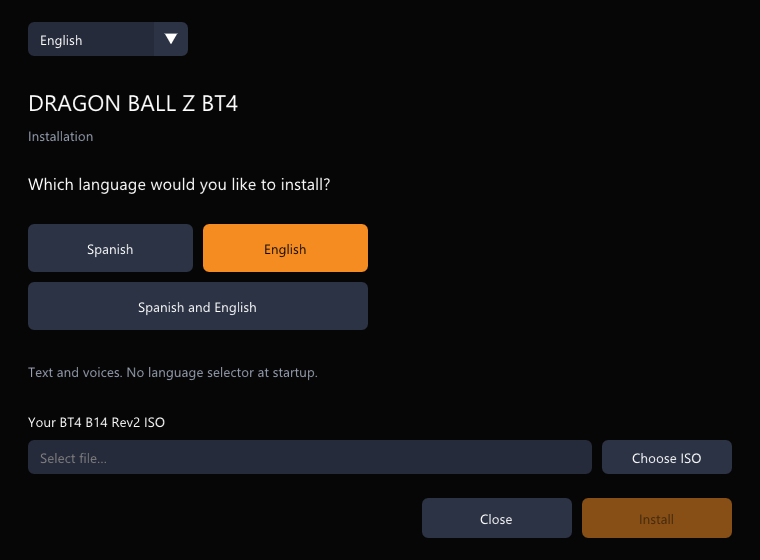
BT4decomp-setup.exeon Windows, or./BT4decomp-setupon Linux and macOS. - Select the setup language, game language and your compatible BT4 B14 Rev2 ISO.
- Start
BT4decomp.exeon Windows, or./BT4decompon Linux and macOS.
Language installation and setup preview
A single-language installation opens directly in that language. Selecting both languages downloads the alternate package from this repository and enables language selection at startup. Public language and HD texture packages download without GitHub sign-in.
For Linux permissions, macOS download handling and source builds, see native platform setup. Intel Macs and Linux ARM are not targets of these packages.
Automatic updates
The launcher checks this repository for the latest signed package for its platform. It verifies the archive SHA-256 and Ed25519 signature, then applies the update at the offline main menu. Saves, settings, installed game data and custom content remain outside the replacement list. Updating does not restart an active battle or online session.
Installations that predate the signed updater need one initial package installation. Subsequent published signed updates can install through the launcher.
Revision tags follow the upstream engine version, for example v0.1.39.3-R1. A new upstream adaptation starts at R1; subsequent BT4 changes increment the revision. Patch revisions are also supported. All Tag Team participants must use the same room protocol and a compatible published build.
Source and online compatibility
The source integrates Tenkaichi3Decomp 0.1.39.3, with BT4 revisions tracked separately as R1, R2, R3 and onward. The main branch can contain changes awaiting release; the Download button points to the published package. See the changelog for source changes and release notes for packaged builds.
Use compatible BT4 data and the same published launcher on every participating computer. The selected language does not define the online compatibility family.
Networking implementation and validation
1 vs 1 uses the upstream peer rollback path. Lobby matches can relay through the lobby owner when the assigned fighters cannot connect directly.
Rooms and Quick Match use authenticated private Supabase signaling. Tag Team room authority runs on the owner's computer from admission onward; gameplay and voice travel between participants. The default connection no longer uses Cloudflare coordination or a hosted game/audio relay. STUN assists direct connection discovery. Networks that block peer traffic, including some CGNAT configurations, can still prevent a direct connection. No public relay is bundled.
The Free signaling project has provider quotas, including concurrent Realtime connection limits. P2P reduces server traffic; it does not provide unlimited hosting capacity. R6 was validated with local native multi-client combat, tournaments and synthetic voice; this is not a cross-ISP or load-capacity benchmark.
The online hub shows an authenticated aggregate of players in the online menus, refreshed every five minutes. Entries expire after a missed refresh. The active route supplies measured ping. A single human fighting CPU uses local input scheduling. If the native coordinator leaves, the round ends; live coordinator migration is not implemented. Geographic routes and network conditions still affect latency.
Voice and gameplay have separate queues. Native packages include the RTC SDK. SDP and ICE negotiation use private Supabase inboxes; Opus audio travels over peer media tracks. The default provider does not relay voice through WebSockets.
See the compatibility and validation profile, signaling architecture and native SDK build notes. Local tests and package builds do not establish performance on every remote PC, router or graphics driver.
Development and feedback
Start with the contribution guide and documentation index. Bug reports should include BT4_VERSION.txt, system specifications, game mode, renderer, resolution scale, reproduction steps and relevant excerpts from bt3_log.txt or bt3_crash.txt.
For combat issues, include characters, costumes, stage and player count. Remove credentials and personal information before attaching logs. Open a bug report.
Support development
Support work on BT4decomp through NauTaro's Ko-fi.

Credits and licenses
The original decompilation and native runtime are developed by the Tenkaichi3Decomp contributors. BT4decomp adapts that work for BT4 B14 Rev2. UPSTREAM_LOCK.json records the exact source revision; README_UPSTREAM.md preserves the upstream reference.
BT4 content, artwork and icons retain their respective authors' rights. See presentation credits, AGPL, MIT and the bundled third-party notices.