Dragon Ball Z: Burst Limit Recompiled
Dragon Ball Z: Burst Limit Recompiled is a native Windows x64 port of Dragon Ball Z: Burst Limit that allows installing from disc image and features an in-game settings menu.
- Type: PC port
- Game: Dragon Ball Z: Burst Limit
- Runs on Windows and Linux
- By iExplosiveRage
- Latest release v0.4.2-alpha, 2026-10-10
- Source: https://github.com/iExplosiveRage/DBZ-Burst-Limit-Recompiled
README

Dragon Ball Z: Burst Limit Recompiled
A static recompilation of Dragon Ball Z: Burst Limit (Xbox 360) to native Windows x64, built on the ReXGlue recompiler/runtime.
The game's PowerPC code is translated ahead of time into C++ and compiled with Clang, so it runs as a normal Windows program instead of inside an emulator.
This repository contains no game data. You need your own legally obtained copy of the game.
Only the US (NTSC-U) version of the game works. The game code is translated ahead of time from the US
default.xex; other versions (European/PAL, Japanese) aren't supported. See Which version.
Features
-
Native x64 build of the game code (no JIT), Direct3D 12 renderer.
-
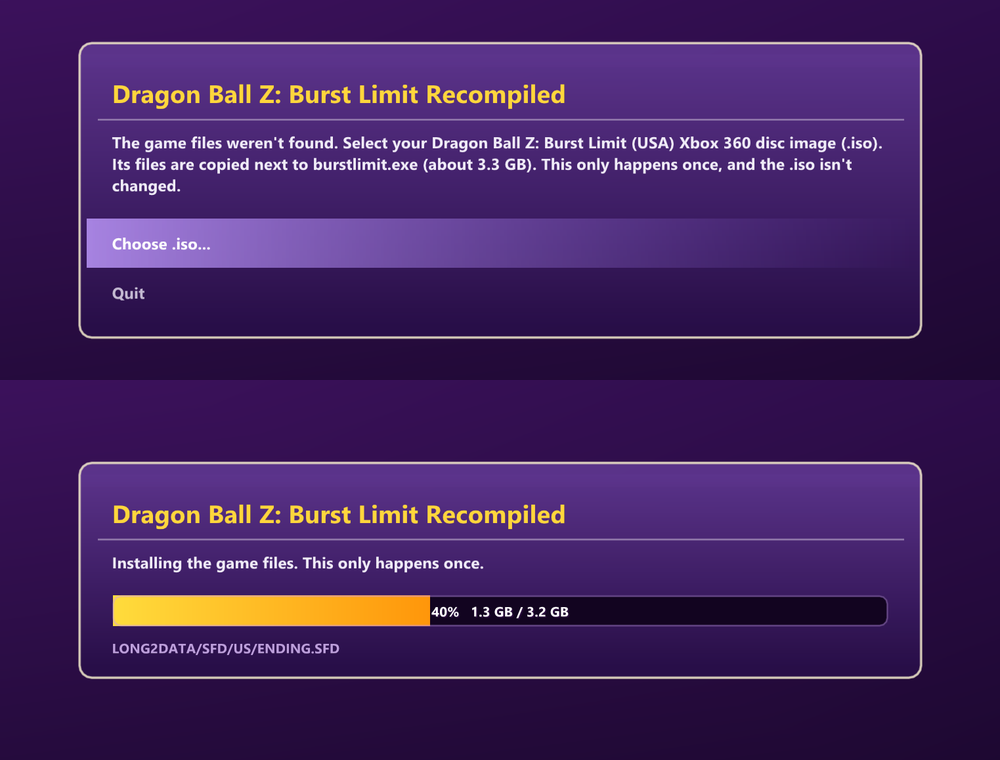
Install from your disc image: on the first start without game files, pick your Burst Limit (USA) Xbox 360
.isoand the game files are copied next toburstlimit.exe(about 3.3 GB, once). The.isois checked to be the US version first and isn't changed.--install_iso=<path>does the same without the file picker. -
Start screen (
start_screen) in the game's own style - the main menu's Goku, the logo, the game's font and menu sounds, read from your game files: Play, Mods, Settings, Update and who's online right now (players, how many on your version, the open rooms). "Play - don't show this screen again" skips it.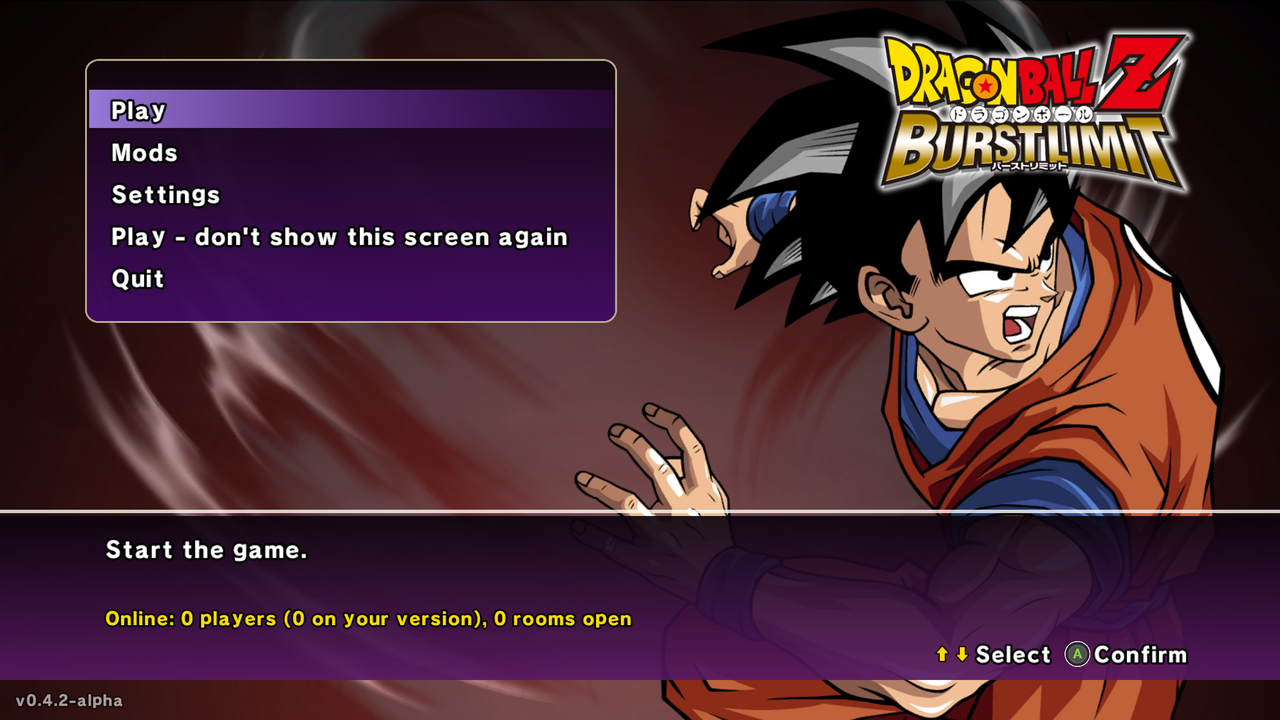
-
Updates from inside the game (
update_check_url): when GitHub has a newer release, the start screen shows an Update button that downloads it, puts its files next to the exe (keepingburstlimit.toml, the game files, saves, mods and textures) and restarts. -
Faster rendering: clears done in place instead of EDRAM transfers, no per-frame re-upload of untouched memory, and the unclipped draws' extents worked out on the CPU - about 2x the FPS at native 4K (100 -> 190+ on an RTX 4080) and +40 % with DLAA; +32 % on an AMD integrated GPU at 1080p.
-
In-game settings menu: F1, or Back + Start on the controller, in the game's menu style (its font, menu box, button icons and sounds): DISPLAY, GRAPHICS, EFFECTS, GAME, ONLINE and SAVE. Resolution, window size, upscalers, frame rate, field of view, post effects, free camera and more; changes apply right away and are saved to
burstlimit.toml.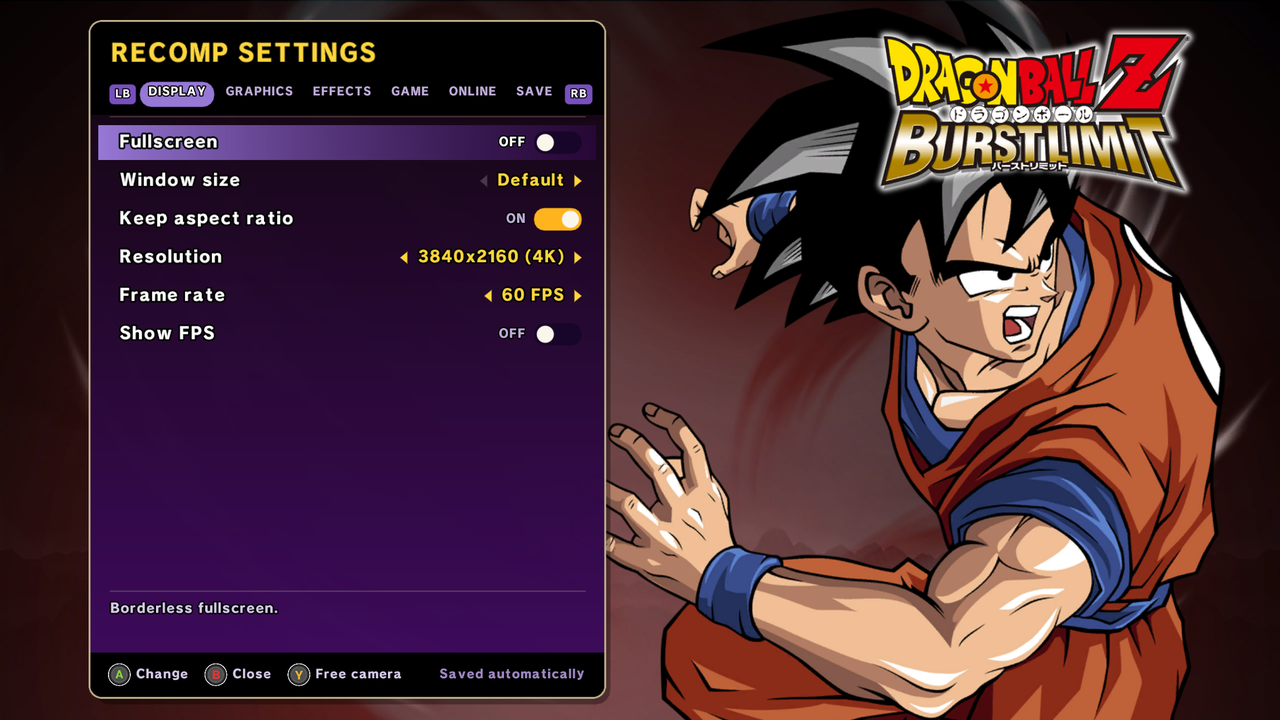
-
Window size (
window_size, when not fullscreen): 512x448 up to 2560x1440, and Keep aspect ratio (present_letterbox): black bars, or the picture stretched to fill the window (a 4:3 screen, say). -
Frame rate cap (
frame_rate): 30 (the original), 60, 120, 144 or unlocked, with fixes for pause, quitting a match and Training's "Reset Standing Position" above 30 FPS. -
Resolution and upscaling: internal resolution up to 4K and beyond, changeable while playing; AMD FSR 1/2/3 and CAS sharpening, FXAA, anisotropic filtering, and a Texture detail option (
texture_lod_bias) for sharper textures in the distance. -
AMD FSR 4 / FSR 3.1.5 (
fsr_mode,fsr_sharpness): AMD's anti-aliasing and upscaling for the 3D scene, like DLSS below (same jitter, motion vectors and HUD handling). FSR 4 on AMD RX 9000 GPUs (and RX 7000 with AMD's FSR 4 driver support), FSR 3.1.5 on any other GPU. Native AA keeps the resolution; Quality to Ultra Performance render the scene lower and upscale it. FSR 4 hasn't been tested on AMD hardware yet - reports welcome. -
NVIDIA DLSS and DLAA (experimental) (
dlss_mode,dlss_preset): NVIDIA's AI anti-aliasing and upscaling on RTX GPUs, applied to the 3D scene before the HUD, with the jitter and camera motion vectors it needs reconstructed from the game's draws. DLAA keeps the chosen resolution; Quality, Balanced, Performance and Ultra Performance render the scene lower and upscale it, for more FPS, while the HUD is still drawn at the full resolution. -
Sharper picture (
soft_filter): the game's last pass blurs the whole picture slightly (a soft look made for 720p). Above 720p it took away much of the resolution's sharpness, so it's off by default now; turn it back on in Settings > Effects > Soft filter. -
Field of view option (
field_of_view, 50-200 %), applied where the game builds its projection, so the effects it places on the screen (flares, speed lines, distortions) stay on the fighters. -
Cleaner image at high resolution: the game's depth of field, glow blur and motion blur sample at fixed 720p distances, which leaves halos and ghost copies around the characters above 720p. They are off by default and can be turned back on (
depth_of_field,glow_blur,motion_blur). -
Smooth cutscenes: the story's cutscenes moved the characters and the camera at 30 FPS even with the game at 60. At a frame rate of 60 or more they now move at the full 60.
-
Four hidden costumes (
story_costumes): costumes the game only uses in Z Chronicles, now on the character select with Y (Change Color): Goku battle-damaged (from the fight with Frieza) and Goku as Ginyu (green scouter), Kid Gohan in his Raditz-saga outfit, and Teen Gohan battle-damaged (Cell Games), with all their transformations. -
Three new stages (
extra_stages): Dying Namek, Wasteland and Seaside Cliffs, stages the game only uses in Z Chronicles, are added to the stage select of Versus and Training, with their own pictures, and RANDOM can pick them too. Offline only: online matches keep the original list. -
Start transformed: on the character select, RB / LB pick the form a character starts the match in (Super Saiyan Goku, Final Form Frieza, Perfect Cell, ...), shown in a tag under its name with the form's face. Works in Versus, Training and online lobby matches (each player picks their own; the choices are sent to the other PC); Z Chronicles battles keep their own forms.
start_formsturns it off (online: the host's setting is used by both players). -
Free camera / photo mode (
free_camera): fly the camera anywhere - also in cinematics and super attacks - hide the HUD, zoom and tilt. Freeze game (freeze_game) stops the fight and its cutscenes while you move around (offline only). Keyboard: Insert and Numpad 0, both rebindable in the settings menu. For repeatable shots, the console commandsfree_camera_where(logs the current camera as a command) andfree_camera_pose <x> <y> <z> <yaw> <pitch> [fov] [roll](puts the camera there). -
Sharp Xbox Series, PlayStation and Nintendo Switch button icons (
button_icons): the game's small Xbox 360 button prompts - menus, tutorials and the fight HUD's "press repeatedly" buttons, the settings and Mods menus - show the buttons of the controller in use, by position (A = Cross / B, B = Circle / A, LB = L1 / L, ...), drawn at high resolution, and the Xbox 360 pad of Control Settings and the tutorial becomes an Xbox Series controller, a DualSense or a pair of Joy-Cons. Auto follows the controller you play with; Settings > Game > Button icons picks one. -
FPS panel (F3): frame rate, frame time graph, render resolution and upscaler, in any corner.
-
Mods menu (
mods_enabled): a Mods entry in the main menu, under Options, in the game's own style and sounds (and on the start screen). A mod is a folder inmods\next toburstlimit.exewith replacement game files named like the files inLONG2DATA_US.CPK(for exampleBCGOK002.NUX); PlayStation 3 model mods are converted on the fly. Switches apply without restarting, from each file's next load. The game's archive itself is never changed. Online, rooms only match players with the same mods on. See Mods. -
Ki charge (
ki_charge,ki_charge_rate, off by default): hold L3 to charge Ki, like Shin Budokai - on the ground or in the air, with a finishing pose when the gauge is full, the Aura Spark motion and wind / dust in your aura's color. Works online (the host's setting is used by both players). -
"Online" instead of "Xbox LIVE" (
online_branding): the menus' text and the Online Battle title. -
Save export / import (Settings > Save): your save as a zip in the
savesfolder next toburstlimit.exe, and back - also saves exported from Xenia. The current save is backed up first. -
Online over the internet, no VPN (
online_lobby_url): rooms appear in the game's own Player Match menus (Create Match / Custom Match), served by a small lobby server; the two PCs then connect directly (ICE with STUN hole punching, a TURN relay when that isn't possible). See Online play. -
Smooth online fights (
online_input_delay): every frame's input is sent right away over a side channel and both PCs run it a fixed number of frames later (2-8, the host's choice), instead of the game's 3-frame packs - no slow motion while the ping stays under the delay. The guest takes the host's online settings, every datagram is sent again a few ms later (online_redundancy), and a desync check compares the fight's state every frame. Rooms are only listed between identical builds. -
Older online method over LAN / Radmin VPN: Xbox LIVE sign-in, session create/search/join and player matches, emulated on top of plain UDP, with a configurable match driver step (
online_fast_tick,online_tick_sleep): the game normally sends input in 12-frame batches (~1 second of input delay even on LAN). -
Texture dumping / replacement (
texture_dump_enabled,texture_replace_enabled): put a texture pack intextures\replaceand turn on Texture pack in the settings menu. PNG and DDS (BC1/BC2/BC3/BC7 and uncompressed) files are read. Replacements get mipmaps and never stall the game: one not decoded yet shows the original texture for a moment while it's decoded and its upload prepared in the background (texture_replace_async) - with a large DDS pack the worst hitch went from 1.7 s to 0.07 s, about the same as without a pack. Small packs are also decoded at startup; bigger ones (overtexture_replace_ram_mb) load as they're used, and the least recently used ones leave RAM. -
Play time fix: the game counts play time in presented frames, so above 60 FPS it ran fast; it counts real time now.
-
Discord status (
discord_presence): your Discord profile shows that you're playing and what - the menus, Z Chronicles, Training, Versus or online - through the Discord app's local connection (no SDK or DLL). -
The game's menu sounds (
menu_sounds) on the start screen and in the settings menu, read from the game's sound bank.
Download (no build needed)
Grab the latest alpha from the Releases page:
- Download
DBZ-Burst-Limit-Recompiled-*.zipand extract it anywhere. - Run
burstlimit.exe. The first time, it asks for your Burst Limit (US version) Xbox 360.isoand installs the game files from it. (Or copy your extracted game files into thegame_data_rootfolder yourself, see Game files.)
Building from source (below) is only needed if you want to change the code.
Linux / Steam Deck
Download DBZ-Burst-Limit-Recompiled-*-linux.zip instead: the same build with
vkd3d-proton and DXVK
(Direct3D 12 to Vulkan) next to it and a run_linux.sh launcher for Wine. Put your game files in
game_data_root and run ./run_linux.sh. Steam / Proton works too: add burstlimit.exe as a non-Steam game
and force Proton Experimental in its Compatibility settings. The .iso install works there too.
Requirements
To play
- Windows 10/11 x64
- A GPU with Direct3D 12 support
- Your own copy of Dragon Ball Z: Burst Limit for Xbox 360, US (NTSC-U) version, extracted to a folder (see Game files)
To build
| Tool | Version | Notes |
|---|---|---|
| Visual Studio 2022 | 17.x | Install the Desktop development with C++ workload (for the Windows SDK and linker). |
| LLVM / Clang | 20 or newer (tested with 21.1) | clang / clang++ must be on PATH. |
| CMake | 3.25 or newer | |
| Ninja | 1.11 or newer | Must be on PATH. |
| Git | any recent | Needed for the SDK submodule. |
About 15 GB of free disk space is needed for the SDK dependencies and build output. A full first build takes 10–30 minutes depending on your CPU.
Getting the source
git clone --recursive https://github.com/iExplosiveRage/DBZ-Burst-Limit-Recompiled.git
cd DBZ-Burst-Limit-Recompiled
If you cloned without --recursive:
git submodule update --init --recursive
The ReXGlue SDK lives in thirdparty/rexglue-sdk (branch burstlimit of
iExplosiveRage/rexglue-sdk). It contains the Burst Limit
specific runtime changes (online, settings menu, upscalers, frame pacing, texture replacement, overlay,
codegen fixes).
Game files
The released build installs them from your .iso on its first start (see Download).
To do it by hand, or to build from source: extract your copy of the game (for example with extract-xiso) and copy it into a folder called
game_data_root at the root of this repository:
DBZ-Burst-Limit-Recompiled/
└─ game_data_root/
   ├─ default.xex
   └─ LONG2DATA/
      ├─ LONG2DATA_US.CPK
      ├─ STREAM_US.CPK
      ├─ STREAM_JP.CPK
      ├─ SFD/
      └─ SOUND/
default.xex is needed at build time (the recompiler reads it) and the whole folder is needed at
run time.
Which version
Only the US (NTSC-U) Xbox 360 version works. This project is built from this default.xex:
| Region | NTSC-U (USA) |
| Size | 7,983,104 bytes |
| SHA-1 | aec598f88cf51181fc377b148e0b1ad30db4485c |
To check yours: certutil -hashfile default.xex SHA1 on Windows, sha1sum default.xex on Linux.
With another version the game closes right after it opens, and its log (in the logs folder next to
burstlimit.exe) shows No function registered at .... The recompiled code only matches the US
default.xex, so another version would need its own build.
Building
From a normal command prompt in the repository folder:
build.bat
build.bat will:
- Find Visual Studio 2022 and set up the x64 build environment.
- Fix the symlinks inside the SDK's
libmspacksubmodule (Git for Windows checks them out as text files). - Configure with the
win-amd64-relwithdebinfoCMake preset. - Run the recompiler (generates
generated/default/*.cppfromdefault.xex). - Build
out\build\win-amd64-relwithdebinfo\burstlimit.exe.
To build manually instead:
cmake --preset win-amd64-relwithdebinfo
cmake --build out\build\win-amd64-relwithdebinfo --target burstlimit_codegen
cmake out\build\win-amd64-relwithdebinfo
cmake --build out\build\win-amd64-relwithdebinfo --target burstlimit
Other presets: win-amd64-debug, win-amd64-release.
Note: the recompiler only re-runs when the manifest or the game executable changes. If you change the SDK's code generator, delete
generated/defaultbefore building.
Optional: AMD FSR 2 / FSR 3
FSR 1 and CAS are always built in. FSR 2 and FSR 3 need the AMD FidelityFX SDK, which needs the Vulkan SDK 1.3.250 or newer installed. Configure with:
cmake --preset win-amd64-relwithdebinfo -DREXGLUE_ENABLE_FIDELITYFX=ON
The build copies amd_fidelityfx_dx12.dll next to burstlimit.exe; keep it there.
Optional: AMD FSR 4 / FSR 3.1.5 (scene upscaler)
Configure with -DREXGLUE_ENABLE_FSR_SDK=ON (D3D12 only). The build downloads the files it needs from AMD's
FidelityFX SDK v2.3.0 (headers plus AMD's signed amd_fidelityfx_loader_dx12.dll and
amd_fidelityfx_upscaler_dx12.dll, checked against pinned SHA-256 hashes), or uses a local copy laid out like the
SDK's Kits/FidelityFX given with -DREXGLUE_FSR_SDK_DIR=C:/path/to/FidelityFX. It copies both DLLs next to
burstlimit.exe; keep them there. The DLLs are under AMD's license (docs/license.md of the SDK), not this
project's. FSR 4 itself comes with the AMD driver on GPUs that support it; elsewhere the DLL runs FSR 3.1.5.
Optional: NVIDIA DLSS
Configure with -DREXGLUE_ENABLE_DLSS=ON. The build downloads the DLSS SDK files it needs (header, library and
nvngx_dlss.dll, checked against pinned SHA-256 hashes), or uses a local copy given with
-DREXGLUE_DLSS_SDK_DIR=C:/path/to/dlss_sdk. It copies nvngx_dlss.dll next to burstlimit.exe; keep it there.
The DLSS SDK is under NVIDIA's own license (RTX SDKs), not this project's.
The new stages' pictures
The thumbnails of the three extra stages are made from screenshots of the game, so they aren't in this
repository: they're built into the release burstlimit.exe from src/burstlimit_stage_thumbs.inc. Without
that file the build still works, and those three entries show placeholder pictures.
Running
run.bat
This starts out\build\win-amd64-relwithdebinfo\burstlimit.exe with game_data_root from the repository.
You can also copy burstlimit.exe and the .dll files from the build folder next to a game_data_root
folder and run it directly.
Settings are stored in burstlimit.toml (see burstlimit.toml.example). Most of them can be changed in the
settings menu (F1). Any setting can also be passed on the command line, e.g. --frame_rate=60.
Controls
- Xbox, PlayStation and Nintendo Switch controllers work out of the box (also on the start screen and the installer).
- Keyboard: start with
--mnk_mode=true(Space = A, Backspace = B, Enter = Start, WASD = move). - F1 or Back + Start: settings menu (the buttons can be changed to L3 + R3 in the menu). Y in the menu turns the free camera on or off.
- F3: FPS panel.
- Character select: RB / LB change the start form (transformation), next to Y (Change Color).
- Insert: free camera on / off. Numpad 0: freeze the game. Both keys can be changed in the settings menu (Game).
- Free camera: left stick moves, right stick looks, LB/RB down/up, LT/RT slower/faster, D-pad up/down zoom, D-pad left/right tilt, A hides the HUD, X freezes the game, Y resets, B exits.
- Input only goes to the focused window.
Stuck at 30 FPS on an NVIDIA GPU? Don't set a Max Frame Rate of 60 for this game in the NVIDIA Control Panel / NVIDIA App: it locks the game to 30. Use the game's own Frame rate setting (F1 -> DISPLAY) instead.
Settings
| Setting | Default | Description |
|---|---|---|
start_screen | true | The start screen before the game (Play, Mods, Settings, Update, who's online). |
update_check_url | (GitHub releases) | Where the start screen looks for a newer release (empty = never). |
window_size | (empty) | Window size when not fullscreen, e.g. 640x480 (empty = the default). |
present_letterbox | true | Keep the 16:9 picture with bla |