Dragon Valor Recompiled
Dragon Valor Recompiled is a PC port of Dragon Valor for Windows, macOS, and Linux that includes cheats and widescreen support.
- Type: PC port
- Game: Dragon Valor
- Runs on Windows, Linux and macOS
- By victor-takai
- Latest release v0.1.0, 2026-10-21
- Source: https://github.com/victor-takai/dragon-valor-recomp
README
Dragon Valor Recompiled



Static recompilation of Dragon Valor (USA) built on psxrecomp and recomp-ui.
Action RPG by Namco; two-disc NTSC-U release.
Unofficial fan project. Not affiliated with, endorsed or sponsored by Bandai Namco Entertainment or Sony Interactive Entertainment. Dragon Valor, its characters, art and music belong to Bandai Namco Entertainment (originally Namco); PlayStation is a trademark of Sony Interactive Entertainment. Free and non-commercial. Apart from the game's program, recompiled, and the launcher's cover art, the download holds nothing of the game and does not run on its own: graphics, audio, video and levels are read from your own discs (
DISC.md).
| Players | 1 |
| Region | USA |
| Publisher | Namco |
| Year | 2000 |
Supported discs: SLUS-01092 (disc 1) and SLUS-01164 (disc 2), USA.
Both boot the same executable; the launcher lets you pick the disc. This is
the native 60 Hz version; the PAL bring-up that preceded it is recorded in
docs/HISTORY.md.
State, open issues and pitfalls: docs/STATUS.md. Build /
debug workflow: docs/DEVELOPMENT.md. Ahead-of-time
overlays: docs/AOT.md. Controls: CONTROLS.md.
Testing the game and reporting: docs/PLAYTESTING.md.
Playing
- Unpack a release and run
DragonValorRecompiled(Windows: the.exe; it opens no console window). From a build tree,DragonValor.batdoes the same forbuild-release. - The launcher opens. On the first run browse to your own
Dragon Valor (USA) (Disc 1).cue(seeDISC.mdfor the dumps that work); it checks the serial, region and ISO header and remembers the location. The same screen has the Disc 1 / Disc 2 choice, controller and its mode (Analog / D-Pad), memory cards, video and audio settings and mods. - Play. Press Start during the intro movie to skip it.
- Escape (or Select+Start on the pad) opens the in-game menu: pause,
cheats (infinite HP/MP, a gem or scroll every N kills, Val, stats,
spell levels, items), texture
filtering, scanlines, fullscreen, volume, save/load state, disc change,
back to the launcher. Arrows / D-pad move, Enter / Cross selects,
Escape / Circle goes back; the mouse works too (hover, click, wheel,
right button = back). Every row is remembered between runs (video rows
in
settings.toml, mods inmods/state.toml, volume and the menu's own look indragonvalor_settings.toml, all next to the exe).
Xbox / PlayStation / Switch pads work out of the box; the game reads the
analog stick. Memory cards live in saves/.
The launcher's Mods page lists the bundled features, off by default
except PGXP (on) and the Cheats holder (on, with every option off):
the framework's enhancements (HD texture packs, PGXP, CD speed, 8 MB RAM,
bezel) and this project's packages: Dragon Valor Cheats (Infinite HP,
Infinite MP, a gem or scroll every N kills; also switchable in-game, where
Val, stats, spells and items can be edited too) and Dragon Valor Skip
Intro (presses Start for you as soon as the intro movie starts) and
Dragon Valor Widescreen (experimental: the stages render at 16:9 or
wider with real scenery at the sides; title, menus and movies stay 4:3).
Tick a feature, set its options, Play. See
docs/DEVELOPMENT.md.
| PlayStation | Keyboard | PlayStation | Keyboard | |
|---|---|---|---|---|
| D-pad | Arrow keys | L1 / R1 | Q / W | |
| Cross | X | L2 / R2 | E / R | |
| Circle | S | L3 / R3 | T / Y | |
| Square | Z | Start | Enter | |
| Triangle | A | Select | Right Shift |
| Key | Action |
|---|---|
F | FPS readout |
F7 | Save-state slot picker: Left / Right pick the slot, S saves, L loads, F7 / Esc close |
F8 | Rewind (hold; only when Rewind is on in the launcher) |
F6 | Scanlines |
Numpad + / - | Volume |
Tab (hold) / F9 | Turbo |
Alt+Enter, Ctrl+F | Fullscreen |
Retro Launcher
You can run this title standalone (download the release zip, point it at your disc, play), or manage installs, updates, and disc/BIOS wiring with Retro Launcher — the Retro Compilation Manager hub for self-compiling recomps.
Downloads · Full README & features
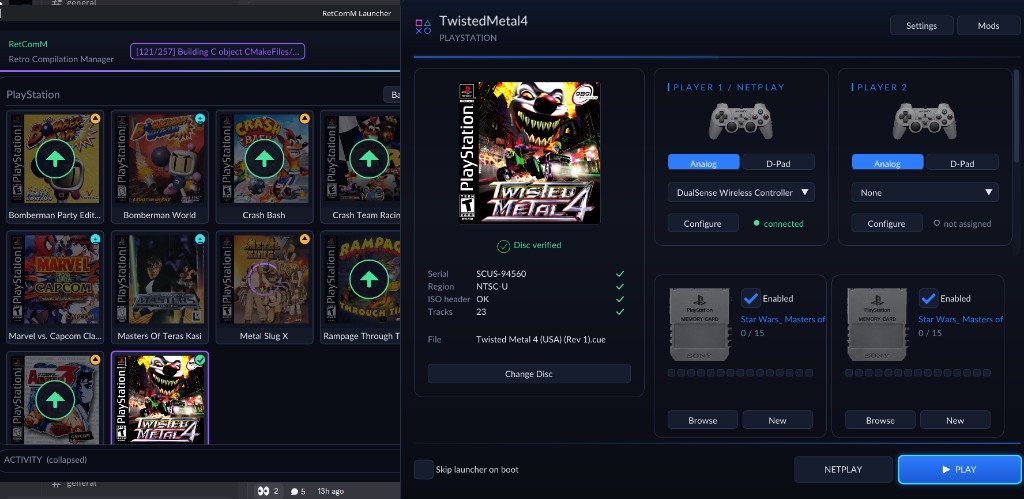
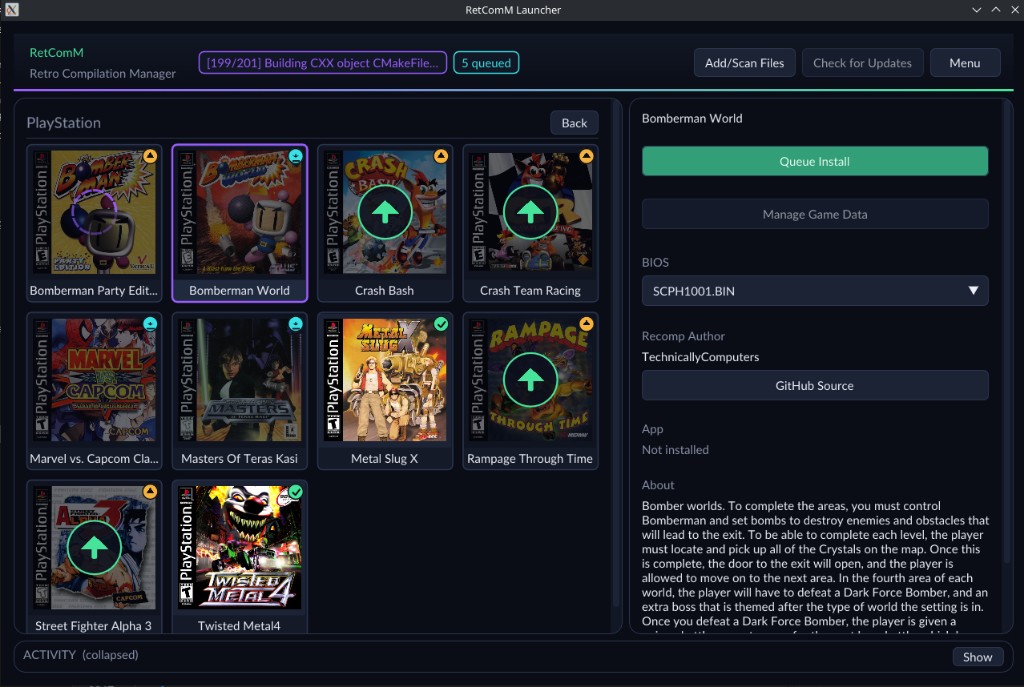
Retro checks for updates, installs the prebuilt release zips, and automates BIOS/ROM/save plumbing so you are not stuck repeating each game’s first run by hand.
Legal
An unofficial fan project (notice at the top). You must own the original
game. Disc images under disc/ are gitignored and
must never be committed. Retail BIOS dumps are not redistributed and no C
derived from one may be committed; releases run on the bundled MIT OpenBIOS.
generated/ (the recompiled game C) is committed: releases ship the
compiled game, built by CI from that tree. Regenerate and commit it whenever
seeds or the framework pin change.
App icon: assets/psxrecomp.ico (and .png / .svg), our own pixel art, a sword on a crimson field with a cyan glint, after the idea of the game's memory-card save icon (no pixel of it is used); tools/make_app_icon.py draws all three. Windows builds embed the .ico via APP_ICON; the .png beside the exe is the window, taskbar and launcher icon.
Optional box art under launcher_assets/img/ may come from
libretro-thumbnails
(Named_Boxarts); see BOXART_SOURCE.txt when present.
Licensing
Our own files (tools/, scripts/, tests/, docs/, assets/ (the app
icon), mods/, patches/,
aot/, seeds/, codegen_setup.c, the CMake and config files) are MIT, see
LICENSE. The committed
generated/ tree is machine output derived from the game's code and carries
no licence grant from us. The framework (psxrecomp/) is PolyForm
Noncommercial 1.0.0 and the launcher (recomp-ui/) is MIT, so a built
executable inherits the framework's noncommercial terms. Apart from that
code and the launcher's cover art (launcher_assets/img/, see
BOXART_SOURCE.txt), nothing of the game is included: its graphics, audio,
video and levels come from the player's discs. THIRD_PARTY_NOTICES.md lists every
component that ships and its licence.
Quick start (dev)
The full recipe (toolchain on PATH, generate, rebuild of both build
dirs, --disc) is in docs/DEVELOPMENT.md. In
short, from Git Bash with C:\retcomm-toolchain\bin first on PATH and
PSXRECOMP_TOOLCHAIN_DIR set:
git submodule update --init --recursive
bash psxrecomp/tools/ci/build_emitters.sh
python psxrecomp/psxrecomp_cli.py rebuild --config game.toml --project-root . --build-dir build-release --no-pgo
generated/ is committed, so a fresh clone needs no disc to build.
Releases: tag vX.Y.Z or run the Release builds workflow
(.github/workflows/release.yml, generated from the framework template). CI
builds the committed generated/ C on Linux, Windows and macOS and attaches
DragonValorRecompiled-<version>-<platform>.zip, the compiled game. 0.x
versions publish as GitHub pre-releases. A dispatch with publish unticked
is a rehearsal: the zips land as run artifacts, with no tag and no release.
Locally: scripts/package_release.sh build-release windows-x64.
Symbols
Progressive map: symbols.toml → python3 tools/sync_symbols.py →
psx_symbols.h (PSX_FN_*). See psxrecomp/docs/SYMBOLS.md.
Framework pins
Submodule gitlinks (psxrecomp, optional recomp-ui, nested recomp-net)
are authoritative. framework_pins.txt is an optional scaffold snapshot;
release CI logs SHAs with record_pins.sh but builds whatever the gitlinks
resolve to. Bump submodules deliberately — do not float on main/master
in release CI.
R.A.I.D. — Retro AI Development · a Discord for AI-assisted retro reverse-engineering, decomp & recomp