Drakengard 3 Recompiled
Drakengard 3 Recompiled is a native PC port of Drakengard 3 for Windows and macOS that allows for higher resolutions and frame rates.
- Type: PC port
- Game: Drakengard 3
- Runs on Windows and macOS
- By SoyJack
- Latest release v0.2.3-alpha, 2026-10-12
- Source: https://github.com/soyjxck/dod3-recomp
README
Drakengard 3 Recompiled
A native PC port of Drakengard 3 (Drag-On Dragoon 3, PlayStation 3, BLUS31197) for Windows and macOS, made by static recompilation of the game's code on the ps3recomp toolkit.
The game's PowerPC and SPU code is translated to C++ ahead of time and built into a normal executable, with the PS3's system libraries replaced by native implementations and the RSX graphics by Direct3D 12, Metal or Vulkan. There is no emulation at run time.
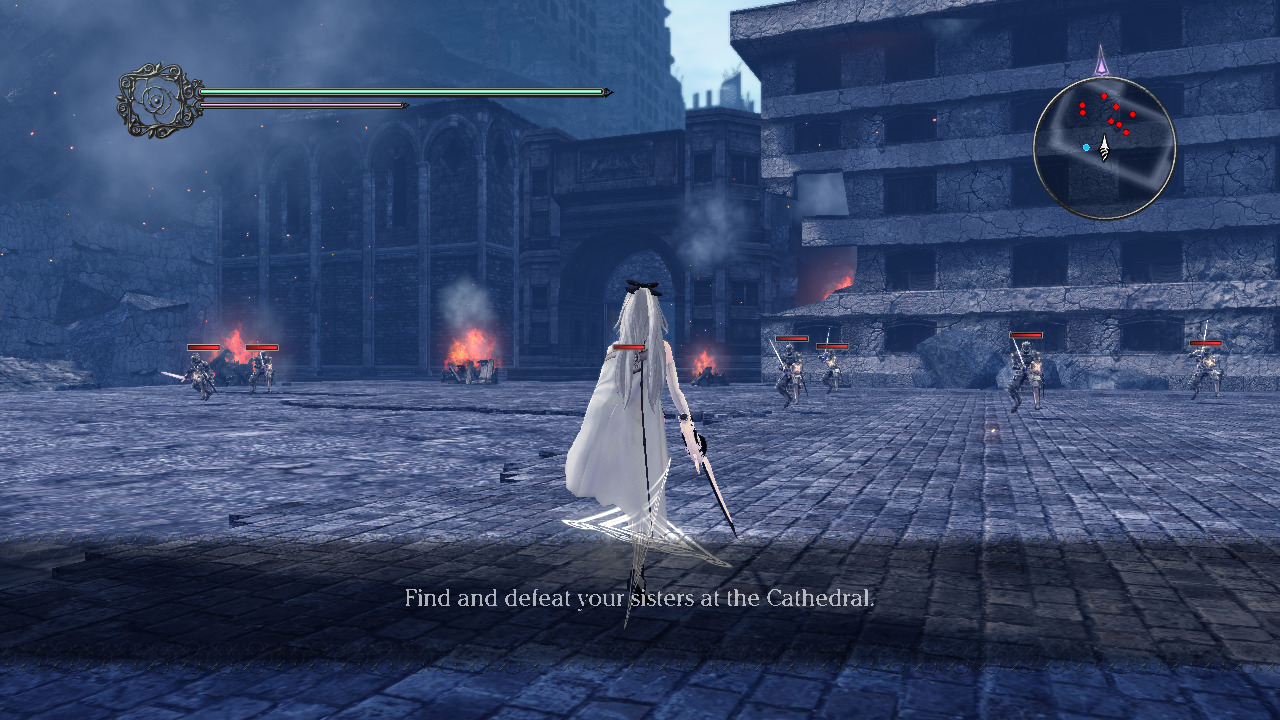
Nothing of the game is in this repository. You need your own copy of Drakengard 3: the US disc and the game's 1.01 update, plus whatever DLC you own. The installer takes them from there.
If this helped you, consider buying me a coffee
Installing
What you need:
- A PC with Windows 10 or 11 (64-bit), a GPU with Direct3D 12 and a CPU with AVX2 (Intel Haswell / AMD Zen or newer), or a Mac with Apple silicon on macOS 13 or newer. About 16 GB of free disk space, 10 GB more for the Japanese voice pack.
- Your disc, US release (BLUS31197), dumped to a folder or a decrypted
.iso(PS3 Disc Dumper writes one; an image from an ordinary disc tool is still encrypted and is refused, as are other regions). - The 1.01 update, as the package a PlayStation 3 downloads:
UP0082-BLUS31197_00-DOD3PATCH0000000-A0101-V0101-PE.pkg. - Optionally, the DLC packages you own (
UP0082-NPUB31251_00-...). No licence files are needed.
Windows:
- Download
dod3-recomp-<version>-win64.zipfrom the releases and unzip it anywhere (not inside Program Files). - Run
dod3.exe. SmartScreen may warn the first time, as the program is not signed: "More info", then "Run anyway". - In the setup that opens, add your files (the disc image or folder, the
update package, any DLC packages) with Add Files / Add Folder, in any
order, then Install. The game's files are copied into the
gamefolder next todod3.exe(a few minutes). - Start Game.
macOS:
- Download
dod3-recomp-<version>-macos-arm64.zipfrom the releases, unzip it and move "Drakengard 3 Recompiled.app" to Applications. - The app is not notarised, so macOS refuses it the first time. On macOS 15 and later: open it once, then allow it in System Settings > Privacy & Security ("Open Anyway"). On macOS 13 and 14: Control-click the app, choose Open, then Open again.
- The setup opens as on Windows. The game's files go into
~/Library/Application Support/Drakengard 3 Recompiled.
Settings (resolution, display mode, frame-rate cap, anti-aliasing, field of
view, draw distance, skipping the intro) are in the game's own Settings
menu, under Graphics Settings, System Settings and Advanced Graphics, or in
dod3.ini.
docs/PLAYING.md has the controls, the saves, the Japanese
voices, and what to do if something goes wrong.
Building
The port is built in three steps: the game's PPU code is lifted to C++, its SPU programs are lifted, and the whole is compiled with CMake. Lifting needs the game's executable, so you need your own copy of the game first.
-
Toolchain. Windows: Visual Studio 2022 or newer (the Build Tools are enough, with "Desktop development with C++" and the Windows SDK), LLVM with clang-cl, CMake 3.20 or later, Ninja, Python 3.11 or later, Git for Windows, and vcpkg with
zlib:x64-windowsandsdl2:x64-windows(VCPKG_ROOT, orC:\vcpkg). macOS: Xcode's command-line tools and, from Homebrew,cmake ninja python zlib sdl2 glslang spirv-cross. -
The sources.
git clone --recurse-submodules https://github.com/soyjxck/dod3-recomp cd dod3-recomp python3 -m venv .venv # py -3 -m venv .venv on Windows .venv/bin/pip install -r ps3recomp/tools/requirements.txt -r tools/requirements.txt -
The game's files. Any built
dod3(a release's, or one from another machine) installs the game into the repository root, which decrypts the update's executable toelf/EBOOT_101.ELFand lays outgame/disc:DOD3_INSTALL_BASE=. path/to/dod3 --install <disc .iso or folder> <update .pkg> [DLC .pkg ...] -
Lift the PPU code (a few minutes; about 550 MB of C++ in
recompiled_101/):.venv/bin/python ps3recomp/tools/ppu_loader.py elf/EBOOT_101.ELF -o out/v101/ .venv/bin/python ps3recomp/tools/ppu_lifter.py elf/EBOOT_101.ELF \ --functions out/v101/EBOOT_101.functions.json \ --hle-stubs out/v101/EBOOT_101.imports.json \ --code-end 0x157fc00 \ --nonvolatile-locals \ --hook 0x000C1E50 --hook 0x00EE7728 --hook 0x00272E58 \ -o recompiled_101/ -
Lift the SPU programs into
spu/, with the native fast paths hooked in:tools/lift_spu.sh -
Compile. Windows, from a plain command prompt (the script finds Visual Studio, LLVM, CMake and vcpkg):
tools\build_win.batmacOS:
cmake -S . -B build -G Ninja -DCMAKE_BUILD_TYPE=Release
cmake --build build
A clean build takes about 15 minutes, nearly all of it the lifted code.
-
Run the game installed in the repository root:
DOD3_INSTALL_BASE=. build/dod3
docs/BUILDING.md has the CMake options, the developer run form, packaging a release and regenerating the committed tables; docs/TECHNICAL.md how the port works; docs/DEBUGGING.md the switches, profiling and the regression tests; CONTRIBUTING.md the layout of the tree and the conventions.
Status
| Windows 10/11, Direct3D 12 | Playable. 60 fps at 4K on an RTX 4090 / i9-13900K (chapter 1 through the heavy destruction scene, open areas, the village); 120 fps holds at lower resolutions |
| Windows, Vulkan | Experimental (RSX_BACKEND = vulkan) |
| macOS 13+, Apple silicon, Metal | Playable. 60 fps at 1080p in battle on an M1 Pro |
| Game version | The 1.01 update (required) |
| DLC | All 20 packs, including the Japanese voice pack |
What the port adds over the original: any internal resolution (supersampling included), windowed, borderless or full-screen display, a frame-rate cap of your choice (60 and 120 tested) or one that follows the scene, with the frames shown at even intervals, FXAA or MSAA, anisotropic filtering, a wider field of view, sharper shadows, a longer draw distance for scenery and for trees, skipping the intro logos and movie, and pausing or muting when the window is in the background -- all from a Graphics Settings, a System Settings and an Advanced Graphics page added to the game's own Settings menu.
Known issues: the game has been tested on few machines.
How it fits together
elf/EBOOT_101.ELF  --ppu_loader/ppu_lifter-->  recompiled_101/*.cpp  (the game's PPU code as C++)
SPU programs       --tools/lift_spu.sh------>  spu/                  (SPURS tasks, jobs, the audio DSP)
src/               --------------------------->  the port: the runner, native fast paths, the settings menu, the installer
ps3recomp/         --------------------------->  runtime, HLE libraries, the RSX draw engine and its backends
The executable dod3 installs the game from your files (a Dear ImGui
installer, src/install/ and src/ui/) and runs it.
Legal
This project is not affiliated with or endorsed by Square Enix, Access Games or Sony Interactive Entertainment. Drakengard 3 and all of its assets belong to their owners; none are included, and the port only runs from a copy of the game you own.
The code in this repository is under the MIT License. It builds on ps3recomp (MIT) and includes Dear ImGui (MIT); see THIRD_PARTY_NOTICES.md.
Credits
- ps3recomp by sp00nznet: the
recompiler, the runtime and the PS3 library implementations. This port's
changes to it are in the soyjxck/ps3recomp
fork, the
ps3recomp/submodule. - RPCS3: the reference for much of the PS3's behaviour, and the source of two techniques used here (write-watched texture memory, a guest clock that stops while the game is paused).
- XenonRecomp and Unleashed Recompiled: the model for a recompiled port, and for its installer.
- Dear ImGui by Omar Cornut: the installer's user interface.