Dune Dynasty
Dune Dynasty is a native PC port of Dune II that enhances the classic RTS game with modern features like widescreen graphics and improved controls.
- Type: PC port
- Game: Dune II
- Runs on Windows, Linux and macOS
- By gameflorist
- Latest release v1.6.4, 2025-05-31
- Source: https://github.com/gameflorist/dunedynasty
README
Dune Dynasty








About
(This fork is a continuation of the abandoned sourceforge project - see development history for details.)
Dune Dynasty is an enhancement of the classic real-time strategy game Dune II by Westwood Studios. It's goal is to make Dune II playable on modern systems with additional features, bugfixes and QoL-improvements. It is not a remake. It builds upon the original game engine as reverse-engineered by the OpenDUNE project.
Note: The original Dune II game data files are required to run Dune Dynasty.
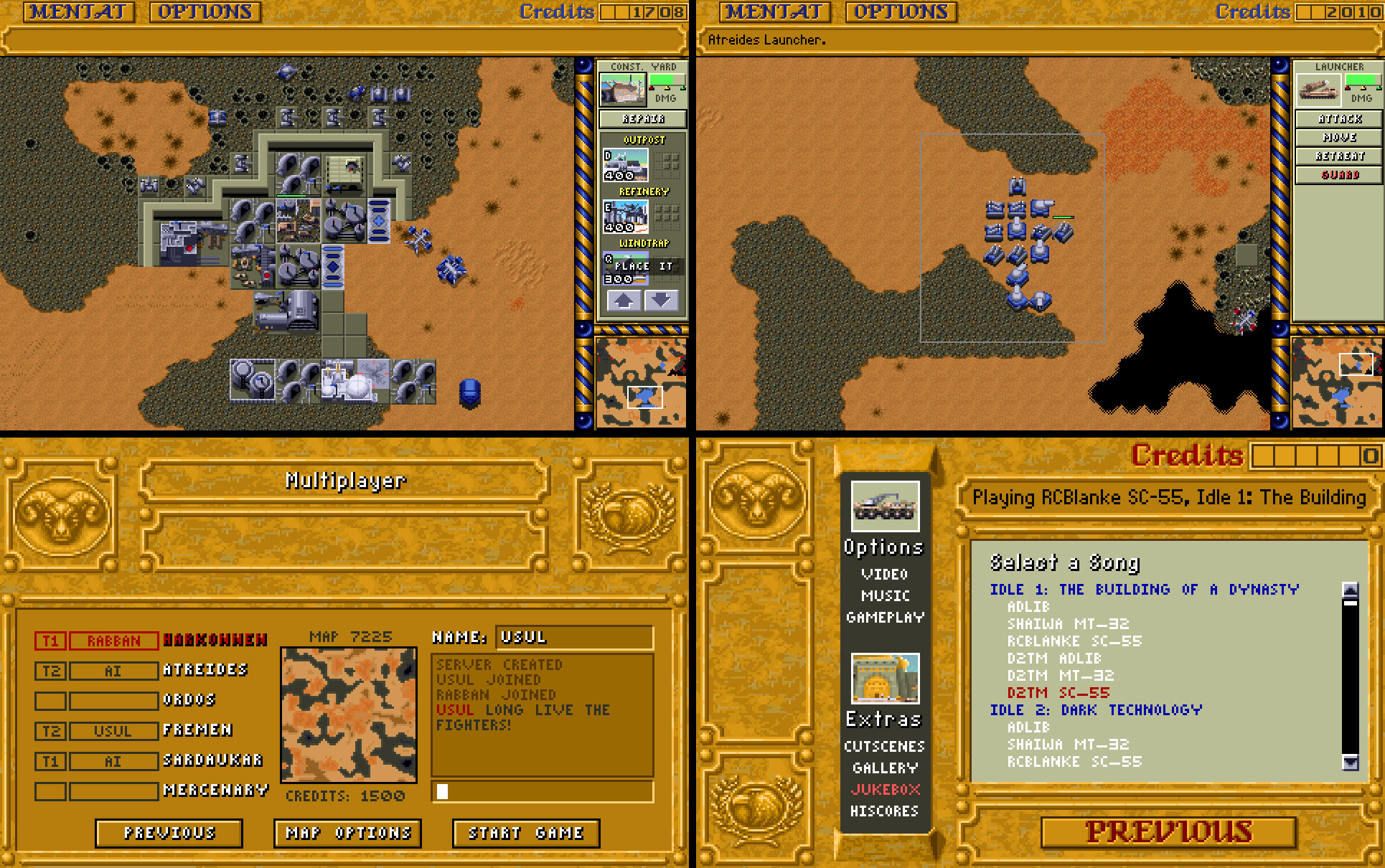
Dune Dynasty features these modern enhancements for Dune II:
- Runs natively on modern machines (OpenGL or Direct3D):
- Windows (32bit, 64bit and ARM64)
- macOS (Intel x86_64 and Apple Silicon M1 ARM64)
- Linux (x86_64 and ARM64)
- Graphics Enhancements:
- High-resolution widescreen graphics
- Separate customizable scaling of menubar, sidebar and map/viewport for HiDPI displays
- Aspect-ratio correction
- Smoother unit animation (optional)
- High-res overlay (optional)
- Control Enhancements (Command & Conquer style):
- Build/order units and structures in scrollable sidepanel
- Queue building of multiple items
- Select and command multiple units by drawing a rectangle
- Select all units of same type in viewport via double-click (or CTRL-LMB)
- Save/load unit control groups via keyboard hotkeys
- Set rally points for buildings
- Show target lines of selected units like in Tibarian Sun (optional)
- Pan viewport by keeping RMB pressed
- Zoom in/out viewport via mousewheel
- Windows Touchscreen Support
- Skirmish and Multiplayer:
- With 3 additional factions: Fremen, Sardaukar and Mercenaries
- For up to 6 human or AI players
- Fully custom alliances with up to 6 teams
- Random generated maps (or enter fixed map seed)
- Settings for starting credits, amount of spice fields, worm count and lose condition (structures/units)
- Sound and Music Enhancements:
- Emulated AdLib sound and music playback
- MIDI playback via the system's MIDI output or via FluidSynth (supporting SoundFonts)
- Support for external music sets:
- Recorded AdLib, MT-32, SC-55 and PC speaker versions of the original soundtrack
- SCDB's excellent 5-Device Mix
- Sega Mega Drive soundtrack (mostly different songs, but also very good!)
- Amiga soundtrack
- Dune 2000 game soundtrack
- Emperor: Battle for Dune game soundtrack
- Dune (1992) game by Cryo (an excellent, award winning, much more chill soundtrack of Dune II's predecessor in three different flavours)
- Dune (1984) Original Motion Picture Soundtrack
- Dune: Part One (2021) Original Motion Picture Soundtrack and "The Dune Sketchbook" soundtrack
- Dune: Part Two (2024) Original Motion Picture Soundtrack
- ...with many options for randomly combining them during gameplay
- ...all playable in in-game jukebox
- Multiple sound channels
- Gameplay Enhancements (optional):
- Health bars
- Fog of war
- Brutal AI mode
- Infantry squad corpses
- Raise structure and unit limits
- Start level selection
- Consistent directional damage
- Instant wall construction
- Extend light vehicle sight range
- Extend spice sensor range
- Support for Custom campaigns:
- Various bug fixes
Development History
Dune Dynasty was initially developed by David Wang, with the source code hosted on SourceForge. Its last official version was v1.5.7 from 2013. After that David added lots of new features (mainly multiplayer) up until 2015, but never released a new version. Later some github-repos emerged with additional fixes and improvements (by 1oom-fork and neg3ntropy), but again no new release. This fork is intended to merge these improvements, fix further bugs, add minor features, and provide new releases (v1.6.0+) with binary download-packages for Windows, macOS and Linux.
Screenshots
Alternatives
Here are some alternatives for enjoying Dune II on modern systems:
- OpenDUNE: Reverse-engineered source port of Dune II, upon which Dune Dynasty is based on. It's goal is to keep it as close to the original as possible and thus has significantly less features and modernizations than Dune Dynasty. OpenDUNE and Dune Dynasty can both read original file formats (e.g. save games).
- Dune Legacy: A Dune II clone / engine recreation / remake with a similar feature-set as Dune Dynasty, but deviating more from the original's look and feel. Has multiplayer support and map editor.
- Dune II - The Maker: Another Dune II remake with modern features and upscaled graphics. Also deviates quite a bit from the original's look and feel.
- There is also a Dune II mod for OpenRA, an open source engine for the early Command & Conquer games.
- A unique and amazing take on the game is UnDUNE II - a de-make re-created from scratch in PICO-8.
- Dune II is also perfectly playable using DOSBox.
Dune Dynasty's unique selling points are probably it's faithfulness to the look and feel of the original (due to it basing on an engine re-creation of the original) combined with many control modernizations, it's support for fan-generated campaigns, various music soundtracks and multiplayer.
Changes
You can find the list of changes between versions in the file CHANGES.txt.
Download
The most current Windows, macOS and Linux binaries and source code can be downloaded from the Github release page:

Installation
You will need the \*.PAK data files from the EU v1.07 release of Dune II. See the file data/FILELIST.TXT for a complete list of needed files.
The location to put the files depends on the OS / release bundle (see below).
Installation on Windows
The recommended place is the directory named data next to the dunedynasty executable.
As an alternative, you can also use the personal data directory, which depends on the 64bit or 32bit version:
- 64bit:
C:\users\<your user>\AppData\Roaming\Dune Dynasty\data - 32bit:
C:\users\<your user>\Application Data\Dune Dynasty\data
Installation on macOS
Using the macOS app-bundle, the data folder is located inside the app package under the following folder:
Dune Dynasty.app/Contents/Resources/data
You have to right click on the Dune Dynasty app and click Show Package Contents in the context menu to be able to access it and copy your data there.
As an alternative, you can also use/create a personal data directory at $HOME/Library/dunedynasty/data.
Due to the executable and included dylibs not being built with an Apple Developer ID, the Gatekeeper service might put them in a quarantine after download. A setup script is included to lift quarantine from all files. You will have to open the script with the right- or control-click menu, choose Open in the warning dialog, and then y on the terminal-prompt. After the script has run, you should be able to start the app without problems. If you get a disallowed by system policy error, your system policy does not allow to load the included libraries (mainly to happen with company macs).
Installation on Linux
Linux Flatpak package
The recommended package for Linux is the Flatpak package. For this you need to have Flatpak installed (see setup instructions).
On a GUI-distribution you can simply double-click DuneDynasty.flatpak to install it.
Via command line you can install the Flatpak package by calling:
flatpak install --user DuneDynasty.flatpak
Next start the Flatpak app once using:
flatpak run io.github.gameflorist.dunedynasty
This will create the needed resource folders. Now you can place the data files at:
~/.var/app/io.github.gameflorist.dunedynasty/data/dunedynasty/data
Linux regular package
Using the regular Linux package, you will also have to install the libraries Dune Dynasty depends on:
# Debian/Ubuntu
sudo apt install liballegro5.2 liballegro-acodec5.2 liballegro-image5.2 libenet7 libfluidsynth3 libmad0 libgl1

# Fedora
sudo dnf install allegro5 allegro5-addon-acodec allegro5-addon-image enet fluidsynth-libs
If libfluidsynth3 is not available on your distribution, try libfluidsynth2 instead.
The data-files can be placed at one of the following locations:
- The directory named
datanext to the dunedynasty executable, - or
~/.local/share/dunedynasty/data.
Recommended mods
Normalized VOC.PAK
Many sound effects in Dune II were built with an DC offset. This leads to distortions when playing a lot of sounds together, such as pops and clicks. A fixed version of the affected VOC.PAK file was made by Tiddalick and can be downloaded on ModDB.
Configuration
Just as the data-files, the configuration file dunedynasty.cfg will be read from one of two places:
-
In the same directory as the dunedynasty executable. (Using the macOS bundle you have to use the
Dune Dynasty.app/Contents/Resourcesfolder inside the app). -
In a personal data directory. This is the default behaviour - meaning
dunedynasty.cfgwill be created here on initial launch. The location depends on your operating system:-
Windows 64bit:
C:\users\<your user>\AppData\Roaming\Dune Dynasty\dunedynasty.cfg -
Windows 32bit:
C:\users\<your user>\Application Data\Dune Dynasty\dunedynasty.cfg -
macOS:
$HOME/Library/Application Support/dunedynasty/dunedynasty.cfg -
Linux Flatpak package:
~/.var/app/io.github.gameflorist.dunedynasty/config/dunedynasty/dunedynasty.cfg -
Linux regular package:
~/.config/dunedynasty/dunedynasty.cfg
-
See the sample file dunedynasty.cfg-sample for a list of configuration
options. You can modify the existing dunedynasty.cfg file or
replace it with dunedynasty.cfg-sample.
Portable mode
If you place dunedynasty.cfg in the same directory as the dunedynasty executable, Dune Dynasty will operate in portable mode - keeping everything (e.g. savegames) inside the install directory.
Using the macOS bundle you have to use the Dune Dynasty.app/Contents/Resources folder inside the app.
Video Settings
Display mode and resolution can be changed in the game's "Options and Extras" menu. The game initially launches in Fullscreen Window mode (using your Desktop-resolution).
Note that Fullscreen mode does not work on Linux and macOS currently.
You might want to increase or decrease the scaling factors of the menubar, sidebar and viewport. You can do this in-game in the Game Control menu.
Aspect ratio correction
In contrast to modern displays, old CRT-monitors had rectangular non-square pixels. All non-in-game graphics (menus, cutscenes, mentat screens, etc.) were designed with rectangular pixels in mind. The game/map/command-screen itself however seems to have been designed for square pixels (presumably due to targetting multiple platforms), meaning it always had a rather stretched look in the original DOS version - with a tile or the construction yard not being a perfect square.
Dune Dynasty allows various options to deal with aspect ratio via the "Aspect Ratio Correction" option in the Video Options (correct_aspect_ratio in the config-file). It's value can be:
- None (
none): No aspect ratio correction is applied, meaning all pixels will be displayed as square pixels. This means, the game will appear squashed on modern monitors. Use this setting, if you are playing on an old CRT-monitor. - Menu Only (
menu): Non-square pixels are used for non-in-game graphics (menu, cutscenes, mentat screens, etc.) and square pixels for the game itself. This will display all graphics in the (presumably) intended aspect ratio on modern displays. - Full (
full): This will apply the aspect ratio correction on all graphics - essentially displaying everything as in the original DOS version on a CRT-monitor. It will retain the stretched look of the in-game graphics. - Auto (
auto): Same as optionmenu, except when the screen height is less than 800 pixels, optionnonewill be used for better readability.
This is the default setting.
The applied correction ratio is 1.2.
Controls
The controls should be similar to most real-time strategy games.
You can finally select multiple units by dragging a rectangle, or shift clicking. You can also select all units of the same type in the current viewport via a double click or via Ctrl + LMB.
Right click issues commands to units, and sets the rally point on buildings. You can also change this to Left Click (which is very useful for touchscreen input).
You can pan the viewport by keeping your right mouse-button pressed, and zoom in/out via the mouse-wheel.
Keyboard shortcuts are mostly just the first letter of the action.
A           Attack or Harvest
H           Harvest
M           Move
G, S        Guard (Stop)
P           Place constructed structure

Ctrl-1      Assign control group 1
Ctrl-2      Assign control group 2, etc.
1-0         Select control group 1-0 (press 2 times to center in viewport)

Ctrl + LMB  Select all units of the same type in current viewport
Double LMB  Select all units of the same type in current viewport
Ctrl + RMB  Set rally points for all similar buildings
Space       Focus viewport on selected structure
Tab         Select next building of the same type
Esc         Pause/Cancel factory task


-, +        Zoom in or out
[, ]        Toggle size of menu and side bars
Alt-Enter   Toggle windowed mode

F1          Mentat
F2          Options
F3          Click structure icon
F4          Select construction yard (press 2 times to center in viewport)
F5          Show current song
F6          Decrease music volume
F7          Increase music volume
F11         Toggle windowed mode
F12         Save screenshot into data directory
There are also keyboard shortcuts for constructing buildings with the construction yard. They are displayed in the build-panel.
Touchscreen Support
Dune Dynasty works very well with touchscreens (e.g. like Microsoft Surface Pro), since most actions are performed using the left mouse button. You can perform a right button click via a long (ca. 1 sec.) press. Commands are issued via the right button by default, but you can change this by setting Control Style to Left Click in the Game Control options. Then you can quickly select and command your units via short taps with your finger. To deselect units or structures perform a long press or simply draw an empty rectangle into the sand. You can even zoom the viewport with a pinch finger-movement.
Gameplay Enhancements
Dune Dynasty (and it's parent project OpenDUNE) feature several optional as well as always active enhancements and fixes over the original Dune II. A detailed list of various fixes be found in the file enhancement.txt.
Here is an explanation of all optional enhancements, that can be enabled in-game in the main menu or game control options. They are disabled by default (except otherwise noted).
Gameplay options (main menu)
-
Skip introduction video:
Should be self explanatory. -
Brutal AI:
Various AI changes to make the game tougher. Includes double production rate, half cost, flanking attacks, etc. -
Fog of war:
Regrowing (Warcraft-style) shroud. -
Insatiable sandworms:
In the original game, sandworms disappear after eating a set number of units. This makes them insatiable. -
Raise unit cap:
Dune II has 3 types of unit caps:- A unit cap defined per house by the scenario (usually 25 for the player, and 20 for the CPU)
- A hard-coded overall cap of 102
- And a hard-coded cap per unit/group of units:
- Caryalls and Ornithopters: 11
- Saboteurs: 3
- All others (ground units): 80
This enhancement sets the scenario unit cap for all houses to 50, raises the overall cap to 322 and allows a total of 300 ground units (incl. saboteurs). This enhancement is always enabled in multiplayer/skirmish.
-
Raise structure cap:
Dune II limits total structures on a map to about 70. This enhancement raises that limit by 100. This enhancement is always enabled in multiplayer/skirmish.