F2 Touch (Fallout 2 CE Mobile)
F2 Touch is a Fallout 2 port for Android and iOS with a rebuilt touch interface and support for mods.
- Type: PC port
- Game: Fallout 2
- Runs on Android
- By imbaner
- Latest release v1.3.0-mobile.12, 2026-11-11
- Source: https://github.com/imbaner/fallout2-ce-mobile
- Website: https://f2touch.com/
README
Fallout 2 CE Mobile (F2 Touch, unofficial)
A touch port for your own copy of Fallout 2. Every screen of the game is rebuilt for fingers: no cursor, nothing to switch. An Android app, and a web app for iPhone and iPad that installs to the Home Screen and plays offline. Phones and tablets, in landscape. Built on Fallout 2: Community Engine. Free. Beta.
Android: download the APK · iPhone and iPad: play.f2touch.com · Telegram · YouTube · Report a problem
This is an unofficial, fan-made, modified version of Fallout 2 CE. It is not affiliated with or endorsed by Microsoft, Bethesda Softworks, ZeniMax Media or Interplay. Fallout is a trademark of its owners. The app contains no game data: you need your own copy of Fallout 2 (GOG, Steam, Epic Games).
In play
What is changed (modified software notice)
On top of CE (its engine, fixes and sfall compatibility are kept and updated from upstream):
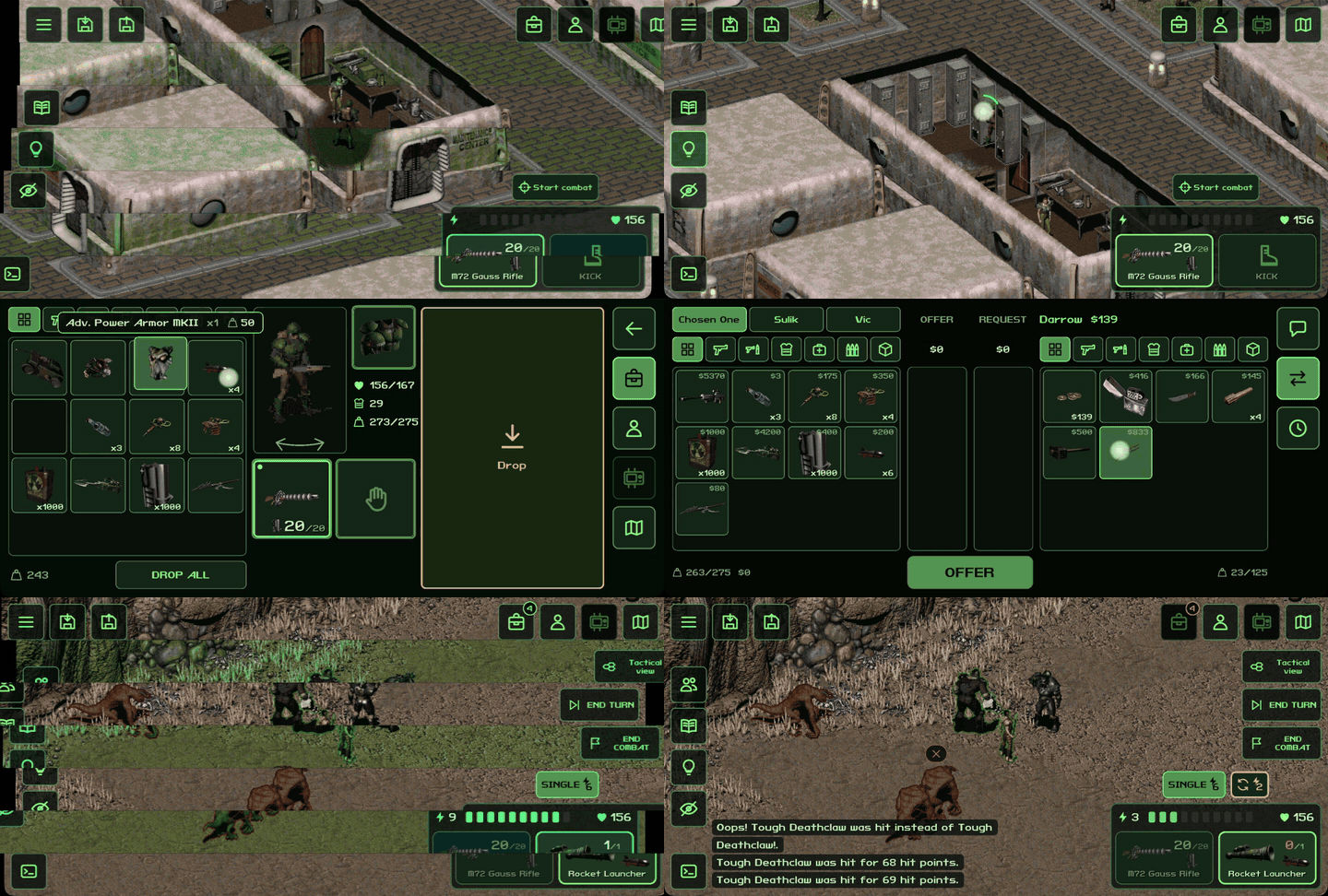
- Touch UI. The game's screens are replaced with screens made for fingers and the phone's resolution: dialogue, barter, inventory, loot, character and level-up, character creation, Pip-Boy (quests, holodisks with their voice, maps, videos, rest), automap, world map and town maps, skills, game menu, settings, save/load, main menu, dialog boxes, called shots. No cursor: tap to act, long press for the action menu, drag to move items, two fingers to zoom the map.
- Tablets. Game screens open as windows over the world, laid out for tablet screens (4:3 too); the UI size follows the screen and is a setting.
- HUD. Buttons anchored to the screen's edges (sized in dp), both hands with their attack modes and AP, reload, start and end combat, end turn, the message log. The highlight button also shows containers and bodies with loot (settings).
- Tactical view in combat (a button, can be turned off in the settings): figures turn see-through, the hexes you can reach and everyone's hex are drawn on the ground, so a tile behind an enemy can be picked and an enemy chosen by its hex.
- Mod features built in where the mods can't run on CE: Inventory Filter's filters and party tabs in loot and barter; sfall's Hero Appearance (race and hairstyle, with RPU) as a tab of character creation.
- Saves. A save list sorted by when saves were made, quick saves that never overwrite manual ones (their number is a setting), "Continue" in the main menu, saves interrupted midway are restored, optional marks for saves made with other game files or mods.
- Android app. The game's files are imported from a folder or any archive (.zip, .7z, .rar, .tar...) copied from a computer, with RPU and other mods and the saves; "Replace game" for new builds and mod updates; export and import of saves; verified updates from GitHub Releases.
- Web app (iPhone, iPad, Android browsers): the same engine and touch UI in the browser. Installs to the Home Screen, plays offline, keeps the game and saves in the browser's storage, updates from the site.
- The port's own improvements are settings (
[enhancements]infallout2.cfg; on Android in the app's own settings file, shared by its games).
The full list of changes is the git history over upstream.
Install on Android
- Download the APK from Releases and install it:
-arm64.apk, or-armv7.apkfor older 32-bit phones. Android 7.0 or newer. - Copy your Fallout 2 folder from a computer to the phone: as is, or as one archive (cable, cloud drive, messenger). Mods installed there (for example RPU) and saves come along.
- Start the app and choose that folder or archive.
Tested on a Redmi 15C (Android 16); players also run it on tablets (Alldocube). Later versions install over earlier ones; the game and saves stay.
Play on iPhone and iPad (web app)
- Open play.f2touch.com in Safari.
- Share → Add to Home Screen, then start the game from its Home Screen icon. Do this first: game files chosen in a Safari tab don't carry over to the Home Screen app.
- On a computer, pack your Fallout 2 folder (with RPU or another mod installed, if you play with one) into one .zip. Send it to the iPhone (AirDrop, iCloud Drive, a messenger) and choose it in the app.
After that the game starts without the internet. New versions come from the site by themselves; the game and saves stay. Removing the Home Screen app or clearing the site's data in Safari deletes the game and its saves, so back the saves up now and then (Export saves). The web app takes a .zip only (an RPU Windows installer is run on a computer first).
On Android the web app runs in Chrome too (⋮ → Install app). Desktop browsers work, but the web app is made and tested for phones and tablets.
Which game
Plain Fallout 2 from GOG, Steam or Epic works, with or without mods. The game's language is taken from its own files, older translations included; if your copy doesn't work, please open an issue.
Recommended setup: Fallout 2 + Restoration Project (RPU) 2.4.34. The port is played and tested with it. RPU relies on sfall, which this engine reimplements: Fallout 2: Community Engine, the continuation of the original Fallout 2 Community Edition. Install RPU into the game folder on a computer, then copy the folder (Android) or its .zip (web).
Big mods, early support: Fallout Et Tu (Fallout 1 in the Fallout 2 engine), Fallout: Sonora, Fallout of Nevada and Fallout: Resurrection start and play, but they are not tested end to end. Install the mod on a computer as its authors describe, then copy the whole folder. When the folder holds both Fallout 2 and a mod that uses its files (Et Tu), the app asks which one to install. Tell us what breaks.
App updates
Android. Settings → About lets you check for updates and turn off automatic checks (on a full launch, at most once an hour by default). A new release appears quietly on the main menu. Update downloads its APK and opens Android's installation confirmation; installation is available only from the main menu. Closing the update window never launches an installer later. A completed download survives restarts and can be installed later or deleted from Settings → About.
The app contacts GitHub (api.github.com, github.com and download servers
under *.githubusercontent.com) to check for and download updates. Game
files, saves and player actions are not sent. With automatic checks off,
network requests happen only at your request. Before installation, the
APK's SHA-256 is checked against GitHub's release metadata; its package,
version and signing certificate are checked against the installed app.
Full licenses are available separately, offline, in About.
Web. New versions come from the site by themselves. The start screen shows the version and build at the bottom, for example 1.3.0-mobile.9 · 960fcb10. The game files and saves are kept apart from the app's files and stay; an interrupted download keeps the previous version.
- Build 960fcb10 and later. When you open the app, a new version downloads in the background ("Downloading an update…" under the Play button; only the files that changed) and the start screen reloads into it by itself. A game started meanwhile keeps running on the current version; the new one comes when you're back on the start screen or on the next start.
- Builds up to 0903a2ec (only a build number at the bottom). The whole app, about 7 MB, downloads silently. Open the app and stay on the start screen until it reloads by itself (up to about half a minute), or close the app fully and open it again. This brings 960fcb10 and the faster way of updating.
Known limitations
- Landscape only; portrait is planned.
- iPhone and iPad: the web app only (no App Store app); it takes a .zip of the game.
- Big mods: early support, not guaranteed.
- No gamepad controls yet.
- Made for phones and tablets; the desktop builds keep CE's original windows (
[touch] mobile_ui=0) and are not the focus of this fork. - Mods with their own script windows are not covered by the touch UI (none of the popular ones use them).
News and support
- Telegram: developer news.
- YouTube: videos and install guides.
- Issues: bugs and requests. Please write your device, the app version and the game or mod.
- Boosty: an optional thank-you. Everything stays free; a thank-you gives no early builds, features or priority.
Building
Android: JDK 17, Android SDK with NDK 27.3.13750724.
cd os/android
./gradlew assembleRelease -PabiFilters=arm64-v8a
A release build is signed with your own key: point the Gradle property fallout2ce.releaseKeystoreProperties to a properties file with storeFile, storePassword, keyAlias, keyPassword (never commit it). Desktop builds are as upstream's (CMake).
Web: see the web build instructions for the complete static app build and local RPU testing.
License
The engine is under the Sustainable Use License, as upstream: free, non-commercial distribution only, with the license and notices kept. Third-party components: SDL 2, zlib, LodePNG (zlib license), libarchive (BSD), liblzma from XZ Utils (0BSD), stb (MIT / public domain), fpattern, Fallout Classic Dialog font (MIT), PT Mono font (SIL OFL 1.1); the web app also uses zip.js (BSD-3-Clause). The app shows all of them in Settings → About.
Credits: Alexander Batalov and the Fallout 2 CE contributors for the engine; the sfall, RPU and Inventory Filter authors, whose features are reimplemented here by their behavior (no code taken).
Fallout 2: Community Engine
Fallout 2:CE is a fully working re-implementation of the classic Fallout engine, optimized for a hassle-free experience on multiple platforms, including Windows, Mac, iOS, Android, and Linux. It provides high resolution support, quality-of-life improvements, and dozens upon dozens of bug fixes.
This is a fork of the original Fallout 2:CE project, which is no longer getting regular updates.
Popular total conversion mods are supported:
- Fallout Et Tu: Full Support. Use v2.0+
- Fallout: Sonora: Full Support.
- Fallout 2 Restoration Project: Full Support.
- Fallout of Nevada: Supported with minor tweaks needed.
- Olympus 2207, Resurrection, Yesterday: partially work but not fully supported.
CE has broad (though not total) compatibility with Sfall scripting extensions. Many traditional Fallout mods work out of the box, including NPC Armor, Party Orders, FO2Tweaks (we recommend v14.5+), Talking Heads, and many others.
Installation — Download Latest CE Release
You must own the game to play. Purchase your copy on GOG, Epic Games or Steam.
Download CE from the link above, then extract the archive into your game folder. Launch fallout2-ce.exe on Windows (or the platform-specific executable) to play. CE has a lot of enhancements that require configuration. See Configuration for examples.
For detailed instructions on how to play on Mac, Linux, iOS, or Android, see the Platform-specific instructions.
Quality of life benefits over vanilla Fallout
- High resolution support
- Party members can loot and barter in place of PC
- Directly equip party members instead of convincing them to use the right equipment.
- Expanded 2-column inventory, loot screens
- Expanded 4-row barter screen
- Expanded AP bar
- Ctrl-click to quickly move items when bartering, looting, or stealing, and auto-balance caps
- Music continues playing between maps
- Auto open doors
- Integrated "HELP" menu
- 44.1 kHz stereo sound/music supported, in .ogg and .wav format as well as legacy .acm
- Last used save slot is remembered
- You can cancel elevator floor selection using ESC
- Spiffy ammo meter with burst-mode segmentation
- Item/Corpse/Container/Critter highlighting (configure using mods/sfall-mods.ini)
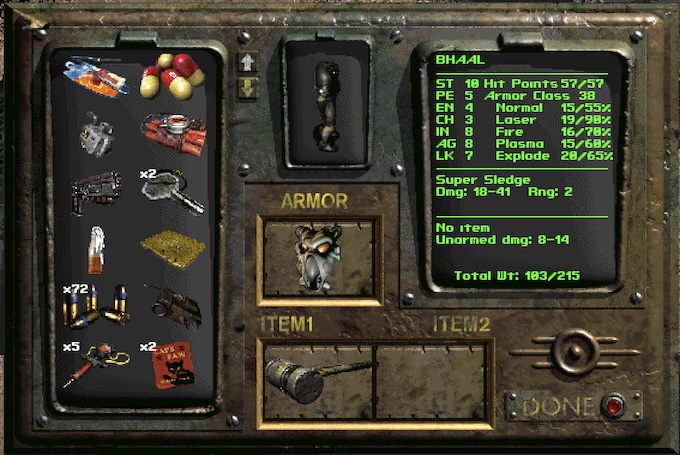 Expanded 2-column inventory |
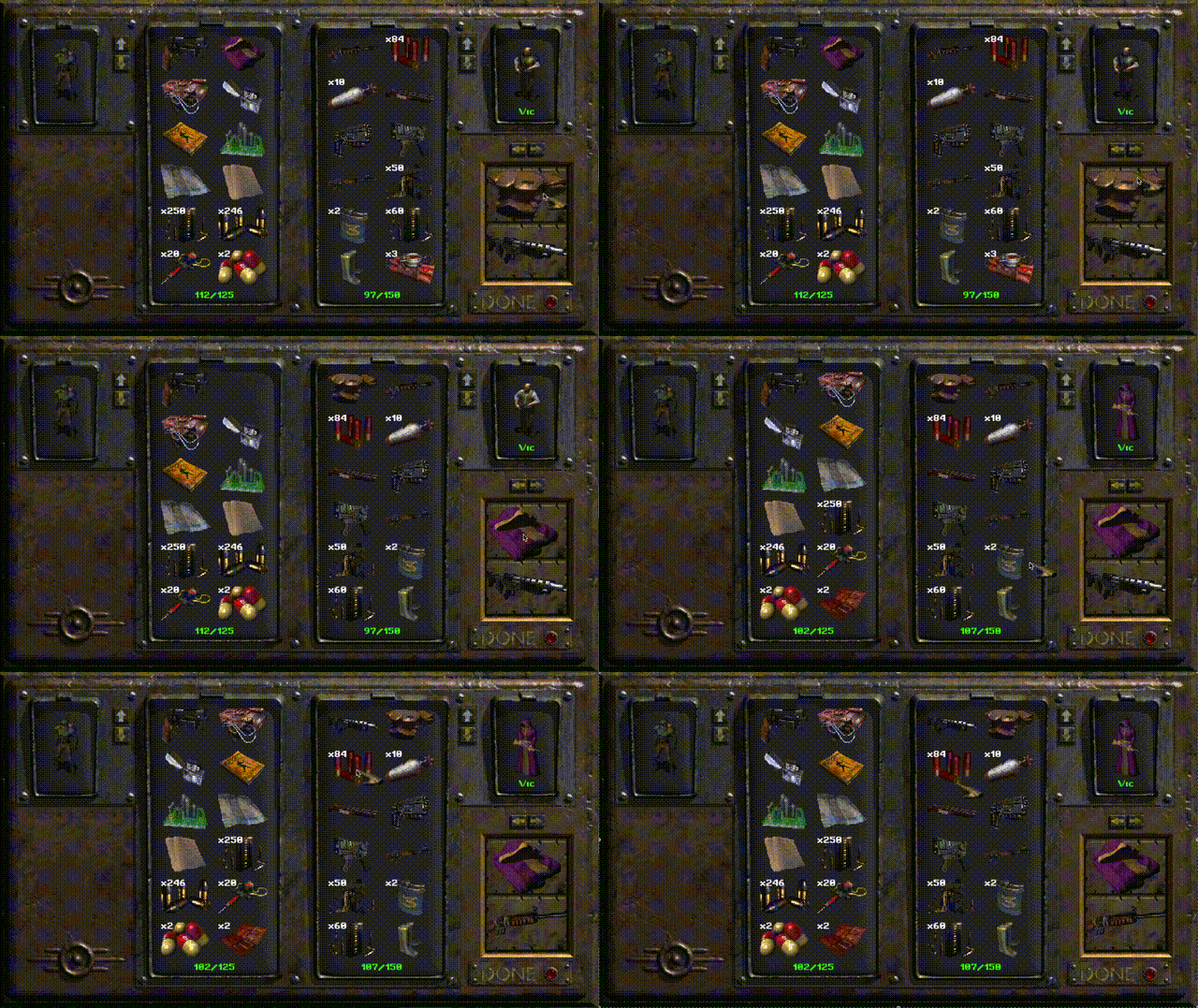 Companion equip screen |
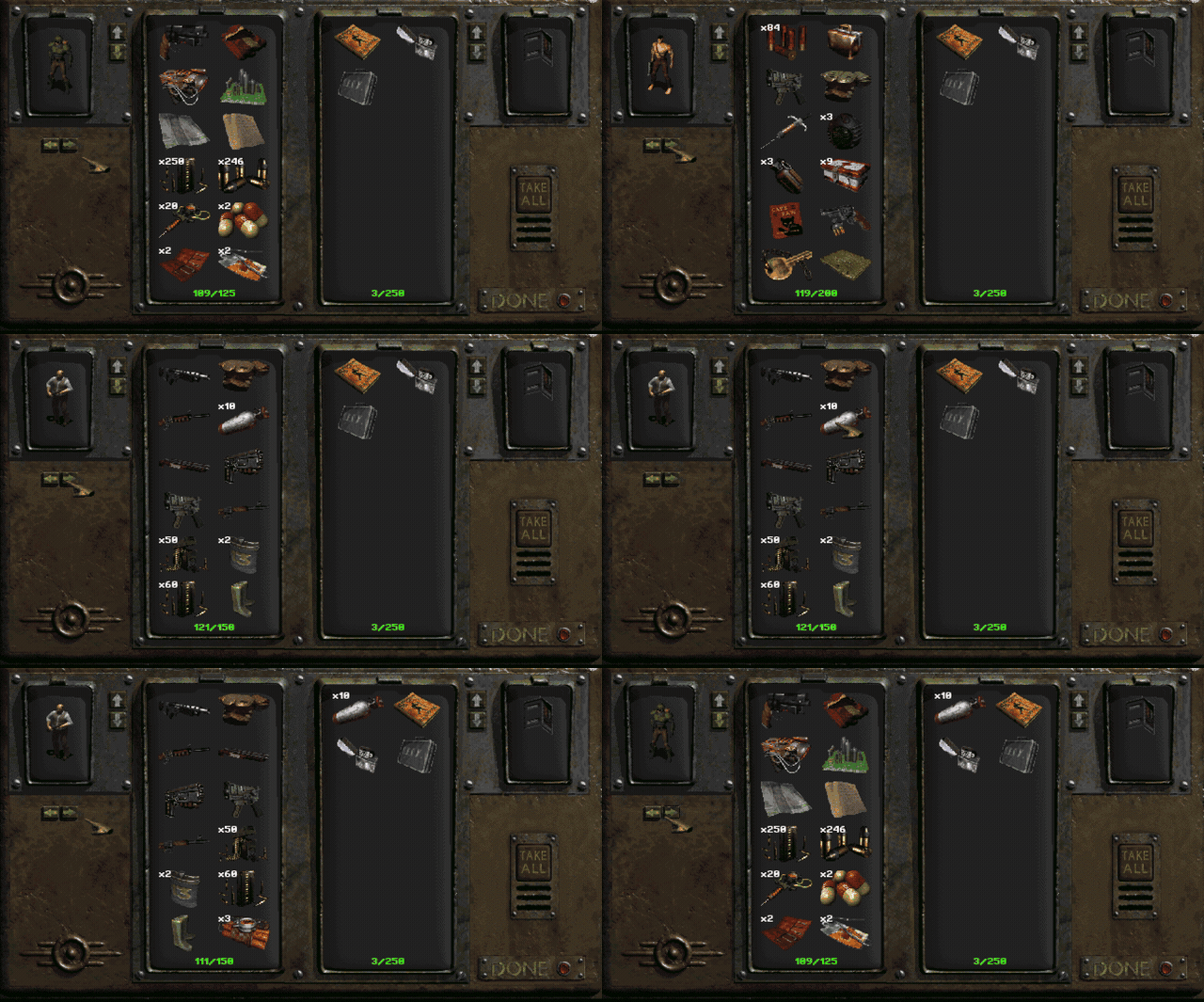 Party member loot |
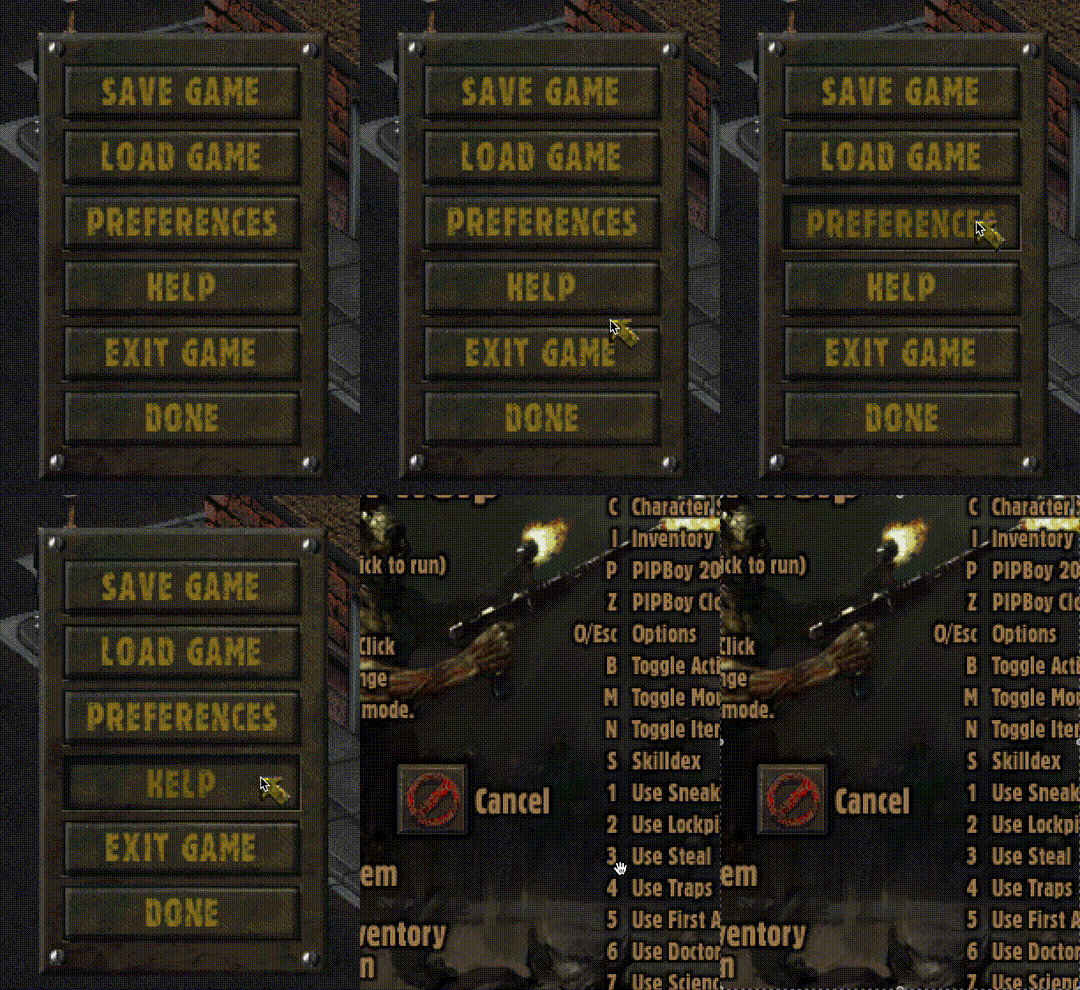 Integrated HELP menu |
There are also dozens of small things that just work a little better than they did in the original. Better pathfinding, fewer graphics glitches, less finicky weapon stacking, and much more.
Configuration
The main configuration file is fallout2.cfg. This contains original game config as well as new CE settings.
Additional settings for screen resolution, UI customization, and map options are now integrated into the main fallout2.cfg file (previously part of f2_res.ini from Mash's HRP).
Here are some important settings in fallout2.cfg under the [screen] and [ui] sections. See the example config for a full list of settings.
[screen]
resolution_x=1600 ; actual game window size (screen resolution), in pixels
resolution_y=1080
windowed=1 ; 0 = fullscreen
scale=2 ; 1 = original scale, 2 = 2x scale, etc. (e.g. at scale 2 and screen resolution 1920x1080, in-game resolution will be 960x540, thus every pixel is twice as wide and tall)

[ui]
; Maximum number of columns shown in the main inventory and loot/steal windows (valid range: 1..2)
inventory_columns=2

; Set to 1 to expand the barter/trade window vertically, adding a 4th item slot per side (requires ce.dat)
expand_barter_window=1

[qol]
; Allow opening party member inventory from the long-press context menu.
party_trade_from_menu=1

; Allow switching to companions' inventories in loot screens (and barter, in the future)
party_loot_and_barter=1
Recommendations:
- Desktops: Use any size you see fit.
- Tablets: Set these values to logical resolution of your device, for example iPad Pro 11 is 1668x2388 (pixels), but its logical resolution is 834x1194 (points).
- Mobile phones: Set height to 480, calculate width according to your device screen (aspect) ratio, for example Samsung S21 is 20:9 device, so the width should be 480 * 20 / 9 = 1067.
In time this stuff will receive an in-game interface, right now you have to do it manually. To see all currently working fallout2.cfg settings, just run the game once and quit. It will be automatically updated with defaults for every supported setting.
Note: Use of the IFACE_BAR settings requires the f2_res.dat file, which contains graphical assets. Various versions are available, but one compatible with the above settings can be found here: f2_res.dat
Note: There are a few settings that are still configured in ddraw.ini. They will be migrated to cfg over time.
Platform-specific installation
Windows
Download and unzip into your Fallout2 folder. Launch the game using fallout2-ce.exe.
Linux
-
Use Windows installation as a base - it contains data assets needed to play. Copy
Fallout2folder somewhere, for example/home/john/Desktop/Fallout2. -
Alternatively you can extract the needed files from the GoG installer:
$ sudo apt install innoextract
$ innoextract ~/Downloads/setup_fallout_2_1.02_gog_v1_\(77792\).exe -d Fallout2
-
Download the Linux release archive, extract
fallout2-ceandce.dat, and copy them into this folder. -
Run
./fallout2-ce.
macOS
NOTE: macOS 10.11 (El Capitan) or higher is required. Runs natively on Intel-based Macs and Apple Silicon.
-
Use Windows installation as a base - it contains data assets needed to play. Copy
Fallout2folder somewhere, for example/Applications/Fallout2. -
Alternatively you can use Fallout 2 from Macplay/The Omni Group as a base - you need to extract game assets from the original bundle. Mount CD/DMG, right click
Fallout 2->Show Package Contents, navigate toContents/Resources. CopyGameDatafolder somewhere, for example/Applications/Fallout2. -
Or if you're a Terminal user and have Homebrew installed you can extract the needed files from the GoG installer. Note: You must use "Offline backup game installer", not the main game installer.
$ brew install innoextract
$ innoextract ~/Downloads/setup_fallout_2_1.02_gog_v1_\(77792\).exe -d fallout2
$ mv fallout2 /Applications/Fallout2
-
Download and copy
Fallout II Community Edition.appto this folder. -
Run
Fallout II Community Edition.app.
Android
NOTE: Fallout 2 was designed with mouse in mind. There are many controls that require precise cursor positioning, which is not possible with fingers. Current control scheme resembles trackpad usage:
- One finger moves mouse cursor around.
- Tap one finger for left mouse click.
- Tap two fingers for right mouse click (switches mouse cursor mode).
- Move two fingers to scroll current view (map view, worldmap view, inventory scrollers).
NOTE: From Android standpoint release and debug builds are different apps. Both apps require their own copy of game assets and have their own savegames. This is intentional. As a gamer just stick with release version and check for updates.
-
Download the Android release, which contains an .apk file and
ce.dat. -
Use Windows installation as a base - it contains data assets needed to play. Copy
Fallout2folder to your device, for example toDownloads. You needmaster.dat,critter.dat,patch000.dat, anddatafolder. Watch for file names - keep (or make) them lowercased (see Configuration). Copyce.datinto this folder. -
Copy
fallout2-ce.apkfrom the release to your device. Open it with file explorer, follow instructions (install from unknown source). -
When you run the game for the first time it will immediately present file picker. Select the f