Folklore Recomp
Folklore Recomp is a native PC recompilation of Folklore for PlayStation 3, featuring a launcher and enhanced graphics options.
- Type: PC port
- Game: Folklore
- Runs on Windows
- By Mava-b
- Latest release v0.5, 2026-11-06
- Source: https://github.com/Mava-b/folklore-decomp
README
Folklore (PS3) — native PC recompilation
If you like this feel free to buy me a coffee :) https://ko-fi.com/mavab
Folklore (Game Republic / SCE, 2007) statically recompiled from its PS3 executable to native x86-64 Windows code with ps3recomp. There is no emulator: the game's PowerPC and SPU code is translated to C++ and runs on a runtime that stands in for the PS3's OS, with Direct3D 12 for graphics.
This repository contains no game code and no Sony code. You build the game
yourself from your own disc; setup does the translation on your PC. No PS3
firmware is needed: the SPU job system the game runs on (SPURS) is
reimplemented here (folklore/docs/SPURS.md).
Status: playable on the author's PC (Windows 11, Ryzen 7 7800X3D): it boots,
does the first-boot install, and plays, including capturing Folks with
the original motion controls. Expect rough edges.
folklore/docs/STATUS.md is the full engineering
log.
New in v0.5: the launcher
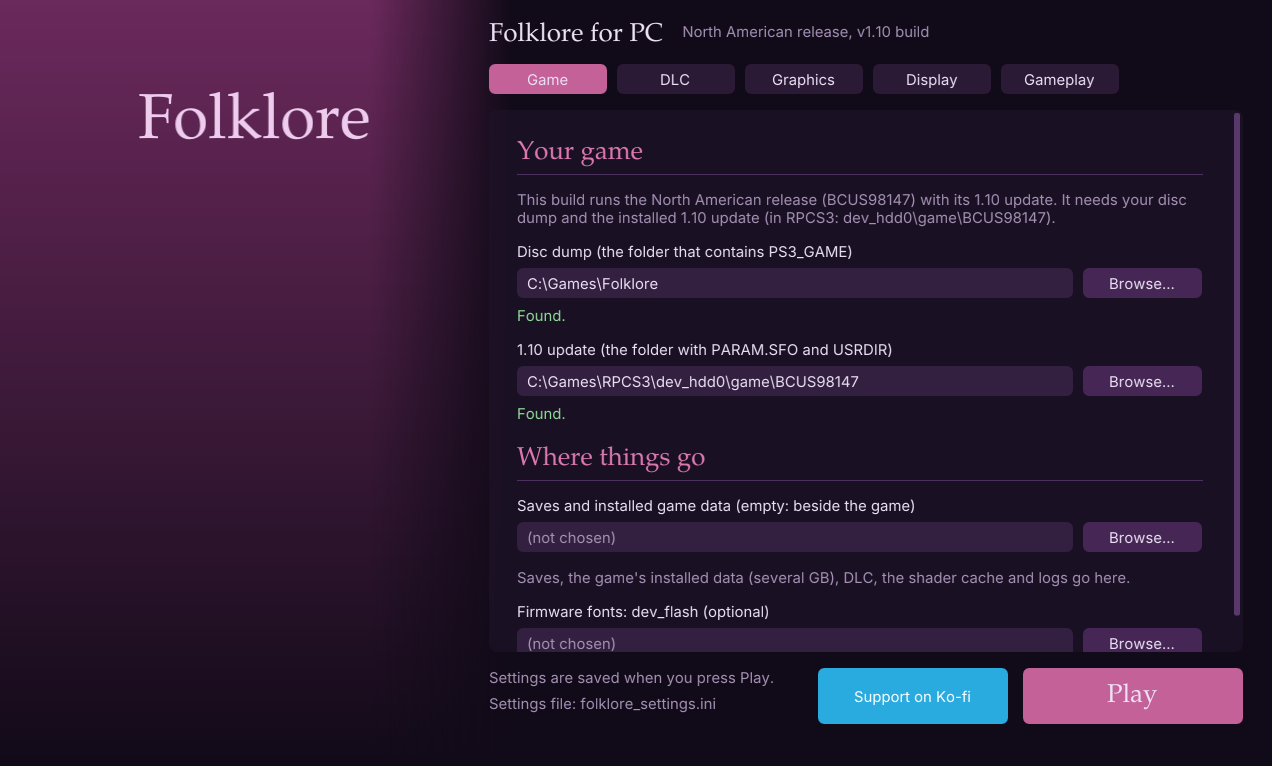
FolkloreLauncher.exe (double-click run_launcher.bat) sets the game up in one window: your disc dump, the 1.10 update and your DLC, each checked as you choose it, and every graphics, display and gameplay setting. Then press Play. No scripts or settings files to edit; the in-game engine menu is still there too. See The launcher.
Also in v0.5: licences (.rap) added from a button, the title bar showing the real render size, and a fix for the logo movie looping over a blue screen when the game was started outside run.ps1 in a project folder.
What's better than on the PS3
All of these are in the in-game engine menu (L3 + R3 or F1); each can be turned back to the original.
- Frame rate: 60 fps or unlimited (up to your display's refresh rate), with physics stepped to match so cloth and hair stay stable.
- Resolution: up to 3x the PS3's 1280×720, borderless fullscreen.
- Ultrawide: 21:9, 32:9 or your display's shape, with a wider field of view rather than a stretched picture; the map and gauges move out to the screen's edges (with a How far out slider), and menus, speech bubbles and fades stay where they belong.
- Anti-aliasing: SMAA (sharp, clean edges) or FXAA.
- Sharper textures: finer texture levels in the distance, plus up to 16x anisotropic filtering and optional sharpening.
- Ambient occlusion: soft shading where surfaces meet — corners, under ledges, around characters' feet.
- Soft shadows: the characters' shadows with soft edges instead of hard, stair-stepped ones.
- Smooth depth of field: a soft, round blur using the game's own focus, without the original's doubled image.
- Smooth bloom: a steady glow, without the original's flicker.
- Cleaner Id souls: the enemies' souls as a soft shimmer (or a clear translucent shape) instead of pixel static.
- Faster busy scenes: objects drawn again and again (Doolin's streets) reuse work instead of being redrawn from scratch, unchanged models stay on the graphics card instead of being copied every frame, and large textures are no longer re-read every frame — boss fights hold 60 fps.
- A launcher: set the game's folders, DLC and every setting in one window, then Play.
- Quality of life: skip the opening logos with Start, save backups and restores, no RPCS3 needed to decrypt the game, downloadable content added from the menu, motion controls on any controller with motion sensors.
Builds can be made from the v1.00 disc or from the game's 1.10 update (rumble, and the newer Folk data), and the downloadable content you bought can be added from the in-game menu — see 1.10 with the DLC, step by step.
Requirements — read this first
You need both of these. Neither is in this repository and neither can be downloaded from it.
1. Your own Folklore disc: North American or European release
- Title ID BCUS98147 (North America) or BCES00050 (Europe), disc version
1.00. The code is translated from those exact executables; the Japanese
release will not work. A build is made from one of them and runs that one
(
folklore/docs/REGIONS.md). - Optionally, the 1.10 update for your release. A build can be made from the update's executable instead (it adds rumble, the game's own Vibration option, and the newer table of Folks that later downloadable content uses); it still reads everything else from your disc dump. See The 1.10 update below.
- Dumped from your disc to a folder (the "JB folder" format RPCS3 uses): a
folder that contains
PS3_GAME\, withPS3_GAME\PARAM.SFOandPS3_GAME\USRDIR\EBOOT.BINin it. Your dump is only ever read, never written to.
2. The game's EBOOT: nothing to do
The dumped PS3_GAME\USRDIR\EBOOT.BIN is encrypted; setup and the game
decrypt it themselves (no RPCS3 needed) into a decrypted\ folder here —
nothing is written to your dump. An EBOOT.elf RPCS3 already wrote beside it
(Utilities → Decrypt PS3 Binaries) is used as it is. The decrypted file is
6,518,936 bytes (BCUS98147) or 6,518,912 bytes (BCES00050); setup
checks this. (folklore/docs/SELF.md has how.)
decrypted\ holds the game's own code: like folklore.exe, don't share it.
The 1.10 update (optional)
Install the update in RPCS3 (File → Install Packages/Raps/Edats, choose
the update's .pkg). RPCS3 puts it in dev_hdd0\game\BCUS98147 (or
BCES00050) inside its own folder — not in your disc dump, even though
RPCS3's game list shows the game as 1.10 and Open game folder opens the
dump. Its USRDIR\EBOOT.BIN is decrypted here too: the European one needs
nothing, the North American one its licence (UP9000-BCUS98147_00-FOLKLORE20000003.rap),
which RPCS3 installs with the update into dev_hdd0\home\<user>\exdata —
setup finds it there. Give setup both folders:
.\setup.ps1 -GameDir D:\Games\BCUS98147 -UpdateDir D:\RPCS3\dev_hdd0\game\BCUS98147
setup lifts the update's executable instead of the disc's and saves both
folders; build.ps1 and run.ps1 work as before. On each start the game
copies the update's three data files (LMonS2.bi5_, a corrected Spanish
text file, and their list) from the update folder into hdd0\ here and
records them as installed, as the game itself would; neither folder is
written to. .\setup.ps1 -GameDir <dump> without -UpdateDir goes back to
the disc version. Saves are the same files in both versions.
Also needed
- Windows 10 or 11, 64-bit, a Direct3D 12 graphics card, and a CPU with AVX2 (x86-64-v3: Intel Haswell / AMD Zen or newer).
- About 30 GB free on the drive you clone to (tools, build files, and the game's own first-boot install of several GB).
- An internet connection for setup (it downloads its tools).
- A controller: any XInput pad, or for motion controls a DualShock 4, DualSense (or Edge), Switch Pro Controller (USB or Bluetooth, no extra software), or a DualShock 3 with DsHidMini in SXS mode.
Building
Clone this repository (or download it as a ZIP and unzip it) somewhere with
the space free — a short path such as D:\Folklore is best. Open
PowerShell in that folder and run these one at a time:
powershell -ExecutionPolicy Bypass -File .\setup.ps1
powershell -ExecutionPolicy Bypass -File .\build.ps1
powershell -ExecutionPolicy Bypass -File .\run.ps1
- setup.ps1 (15–30 minutes, once)
- First it asks for your dump: a folder picker (choose the folder that
contains
PS3_GAME). It is checked; if something is wrong (still encrypted, wrong version) it says what and asks again. You can also pass it:.\setup.ps1 -GameDir D:\Games\BCUS98147 - Then it runs on its own: downloads Git, CMake, Ninja, Python and FFmpeg
into
tools\, and — only if you have no Visual Studio with clang-cl — Visual Studio 2022 Build Tools (about 6 GB, one UAC prompt; the Visual Studio Installer always goes on C:). - Translates the game's code from your
EBOOT.elfintofolklore\src\recomp\(about a minute). It stays on your PC. - Builds the ps3recomp runtime library.
- First it asks for your dump: a folder picker (choose the folder that
contains
- build.ps1 compiles about 1.5 million lines of translated C++: roughly
10–30 minutes the first time on a modern 8-core CPU, incremental after
that. Result:
folklore\build\folklore.exe. - run.ps1 starts the game and writes
logs\run-<date-time>.log. It uses the game folder you gave setup (saved infolklore_settings.ini), and the game's first boot copies several GB of data intohdd1\. run.bat does the same with a double-click (any run.ps1 options can follow it, e.g.run.bat -ResetInstall).
Or, after build.ps1, double-click run_launcher.bat instead of run.ps1: the launcher asks for the same folders in its own window and starts the game with Play.
With both releases (an EU copy of this folder beside it, see Sharing what
you built), .\build_all.ps1 builds this folder, brings the EU copy up to
date and builds that too; then run.bat in either folder runs its build.
Once the 1.10 copies exist (package_all.ps1 -UsUpdateDir/-EuUpdateDir, see
Sharing what you built) it builds those as well.
If something fails
- Every step writes a log in
logs\(setup-*.log,build.log,run-*.log); the error message names the one to look at. - setup can't find clang-cl after installing Build Tools: open Visual Studio Installer → Modify → Individual components → tick C++ Clang Compiler for Windows and MSBuild support for LLVM (clang-cl), then run setup.ps1 again.
- "Could not decrypt ... needs its licence" (North American 1.10 update):
install the update's
.rapin RPCS3 (File → Install Packages/Raps/Edats), or put it in alicencesfolder here. - "not a v1.00 EBOOT of a supported release": your disc is the Japanese
release, or you gave
-GameDirthe 1.10 update's EBOOT (give the update folder as-UpdateDir, with-GameDiryour disc dump). Only BCUS98147 and BCES00050 work. - "not the 1.10 update of a supported release": the
-UpdateDirfolder is not the 1.10 update — most often the disc dump was given instead of RPCS3'sdev_hdd0\game\<title id>(see The 1.10 update). An oldUSRDIR\EBOOT.elfthere made from the wrong EBOOT also causes it: delete it. - Both releases: a build follows the dump setup lifted.
.\setup.ps1 -GameDir <dump of the other release>switches it (setup lifts the game code again, thenbuild.ps1rebuilds everything). To keep one of each, use two copies of this folder. - setup and build are safe to re-run; each step skips what is already done.
Playing
The launcher
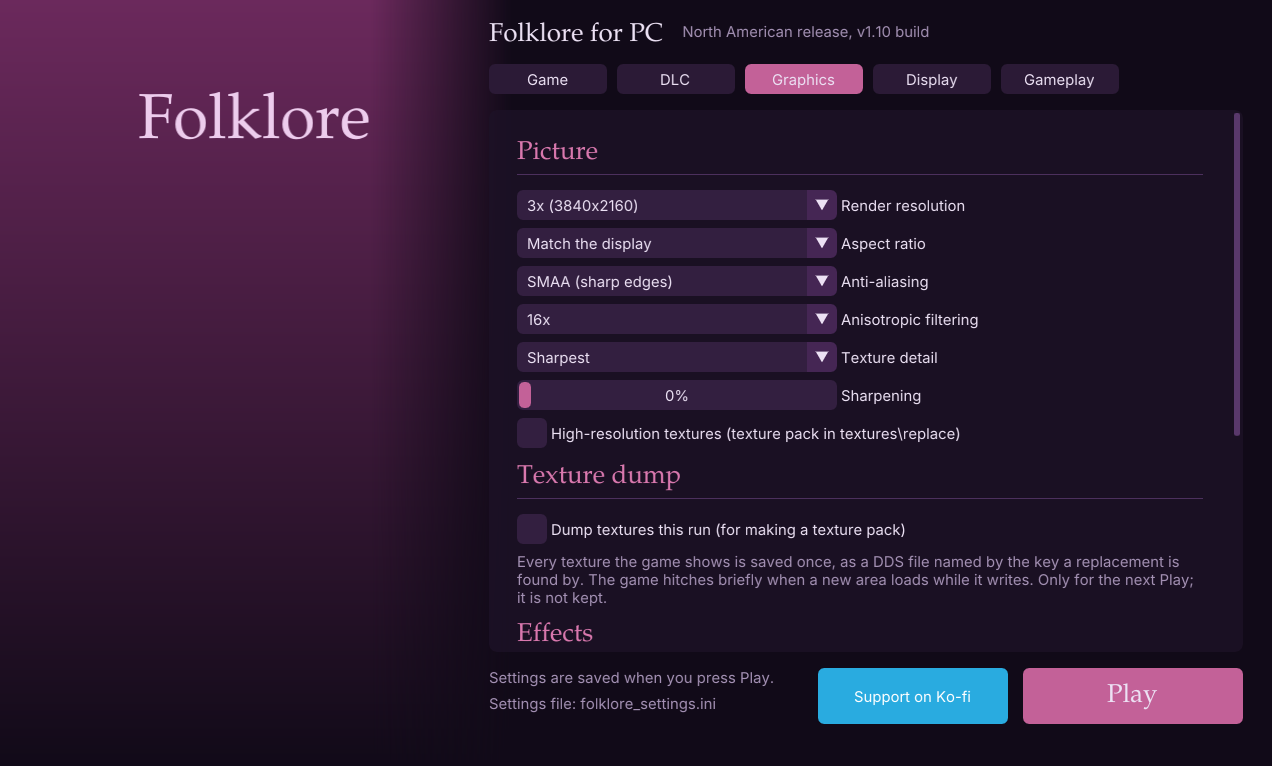
FolkloreLauncher.exe (built beside folklore.exe, and in every package)
sets everything up in one window before the game starts. Double-click
run_launcher.bat to open it: in the project folder it opens the one in
folklore\build with this folder's settings, hdd0, saves and logs (the
ones run.ps1 uses).
- Game: your disc dump and, for a 1.10 build, the installed 1.10 update, each checked the way the game checks them; where saves and installed data go; optional firmware fonts.
- DLC: the packs installed, Add DLC from RPCS3... and Add licences (.rap)..., and any pack still missing its licence.
- Graphics, Display, Gameplay: every setting of the in-game engine menu, including the ones that only apply when the game starts.
- Dump textures this run (Graphics page): the next Play starts the game
with the texture dump on, into
textures\dump(asrun.ps1 -DumpTextures); not kept between runs. - Play saves
folklore_settings.iniand starts folklore.exe; Support on Ko-fi beside it opens the project's Ko-fi page.
Its picture is launcher_art.jpg (or .png) in the project folder (or
beside the launcher): put your own copy of the cover art there and it fills
the left-hand panel. It is not in the repository; without it the launcher
shows the plain panel in the screenshots above.
From a package: unzip, double-click run_launcher.bat, choose your disc
dump (and the 1.10 update for a 1.10 build) on the Game page, press Play.
Engine menu
Press L3 + R3 together (or F1) in game. D-pad / left stick or the arrow
keys move, Cross / A or Enter changes a setting, Circle / B, Start or Esc
closes. The game ignores the controller while the menu is open. Settings are
saved to folklore_settings.ini.
- Frame rate: 30 fps (the game's own limiter), 60 fps or unlimited. Unlimited runs as fast as your display refreshes (120 or 144 fps on a high-refresh monitor, if your PC keeps up); movies still play at their own speed. Above 30 is experimental — the game was built for 30.
- Precise frame limiter: wakes every 1 ms instead of every 10 ms, so frames end on time (on by default).
- Motion controls (on by default): capture Folks by moving the controller, as on the PS3. Works with any controller that has motion sensors (below); a controller without them still captures by itself. Turn it off and every capture completes by itself, whatever the controller -- boss captures too (Time, Beat, Balance, Stop & Go: the capture bar fills over a few seconds and the game finishes the capture as if you had). The menu shows which controller is connected and whether its sensors are live.
- Opening logos: Play them (as on the PS3), Start skips them (the default: press Start, or Enter, once the logos have been on for a moment, and the logo movie and the still logos after it are all skipped, straight to the title screen), or Never show them (the game starts at the title screen after a blank second). The game's own legal notice before the title screen still shows.
- Physics: step physics by the frame time, which keeps cloth and hair stable above 30 fps (on by default).
- Language (European build only): English, French, Spanish, German or Italian, for the menus, text, subtitles and cutscene sound. The game picks its language as it starts, so a change applies on the next start. The North American disc only has English.
- Graphics
- Fullscreen (borderless; Alt+Enter toggles it any time).
- Render resolution: 1x (1280×720, the PS3's), 2x or 3x. Applies on the next start.
- Aspect ratio: 16:9, match display, 21:9 or 32:9 — a wider field of view, not a stretched picture. Next start.
- Menus and HUD (when wider than 16:9): Map and gauges at the edges (the default: everything at its own shape, the map pushed out to the left and the health gauges, folk and button hints to the right, with a How far out slider), Centred (all of it in the middle 16:9) or Stretched to fit (as before). Full-screen fades and backdrops always cover the whole screen. Applies at once.
- Anti-aliasing: SMAA (the default for new settings: smooth edges that stay sharp, text and texture detail kept), FXAA (softer) or Off. Applies at once. Anisotropic filtering (up to 16x), Sharpening.
- Texture detail: Sharper (the default), Sharpest or Original — finer texture levels, so walls, ground and clothing keep their detail further away. Applies at once.
- Depth of field: Smooth (the default: a soft blur using the game's own focus, without the doubled edges) or Original (the PS3's). Next start.
- Bloom: Smooth (the default: steady glow, without the flicker and shimmer of the original's low-resolution sampling) or Original. Next start.
- Shadows: Soft (the default), Softer or Original — the characters' shadows with soft edges instead of hard, stair-stepped ones. Applies at once.
- Ambient occlusion: Subtle (the default), Strong or Off — soft shading where surfaces meet (corners, under ledges, where characters stand), worked out from the depth buffer. Next start.
- Build new shaders in the background (no hitch when an effect first appears).
- Fast repeated objects (on by default): objects the game draws again and again with only their position changed reuse the previous draw's work — faster in busy towns like Doolin.
- Game files: the game folder in use (change it here; it applies on the next start) and where the installed data and saves are.
- Downloadable content: the add-on packs installed, Add DLC from RPCS3... to bring in your own, and Remove per pack (below).
- Performance overlay: fps, frame time and where the time goes.
- Save data snapshots: copy the game's saves to
save_snapshots\and put any snapshot back later, then load it from the game's own Load menu.
Escape closes the menu; it does not quit the game (use the window's close button or Alt+F4).
1.10 with the DLC, step by step
What you need, all your own: the Folklore disc dump (as above), the 1.10
update .pkg for your release, and each add-on pack's .pkg with its .rap
licence. RPCS3 is used only to install them.
-
Install the update and the packs in RPCS3. File → Install Packages/Raps/Edats, then select the update's
.pkg, every pack's.pkgand every.rap(several at once is fine). They go into RPCS3's owndev_hdd0: the update and packs intodev_hdd0\game\BCUS98147(orBCES00050), the licences intodev_hdd0\home\00000001\exdata. You do not need to start the game in RPCS3. -
Build the 1.10 version (the update's EBOOT is decrypted for you). In this folder:
.\setup.ps1 -GameDir D:\Games\BCUS98147 -UpdateDir D:\RPCS3\dev_hdd0\game\BCUS98147 .\build.ps1-GameDiris your disc dump,-UpdateDirthe update folder from step 1. To keep the disc version too, leave this folder as it is and use.\build_all.ps1 -UsUpdateDir <RPCS3>\dev_hdd0\game\BCUS98147(and/or-EuUpdateDir ...\BCES00050): it builds the 1.10 versions in copies beside this folder (Folklore-1.10,Folklore-EU-1.10).With a ready-made 1.10 package instead (
Folklore-<date>_1.10.zip): skip this step; the first time you start it, it asks for the disc dump and then for the update folder. -
Start the game with
run.bat(in the 1.10 copy, if you usedbuild_all.ps1). The game's options now have a Vibration setting. -
Add the DLC. Press F1 (or L3+R3), go to Downloadable content and press Add DLC from RPCS3.... Choose RPCS3's folder — the one with
dev_hdd0in it. A progress bar runs for about half a minute, then the menu lists the packs it installed (and any it could not, with the reason: usually a missing.rap). -
Restart the game. F1 now shows Installed: Add-on pack 1, ..., and the new quests and Folks are in the game as they were on a PS3.
Good to know:
- Copied RPCS3's game folder into
hdd0\gameby hand instead? RPCS3 keeps the paid packs encrypted with your licences, so the port decrypts them at start when it finds the.rapfiles — copy RPCS3'sdev_hdd0\home\00000001\exdatatohdd0\home\00000001\exdatatoo, press Add licences (.rap)... and pick the.rapfiles, or just press Add DLC from RPCS3.... F1 lists, in red, any pack still missing its licence (without it, its costumes and Folks are broken and the game can crash). - Each project copy (and each package folder) has its own
hdd0\, so add the DLC once in each one you play.run.bat -ResetInstallemptieshdd0\, DLC included; press Add DLC agai