F1 06 PC
F1 06 PC is a native Windows port of Formula One 06 for PlayStation 2, built by static recompilation.
- Type: PC port
- Game: Formula One 06
- Runs on Windows
- By KevinL50-sysadmin
- Latest release v1.1.1, 2026-11-16
- Source: https://github.com/KevinL50-sysadmin/F1-06-PC
README
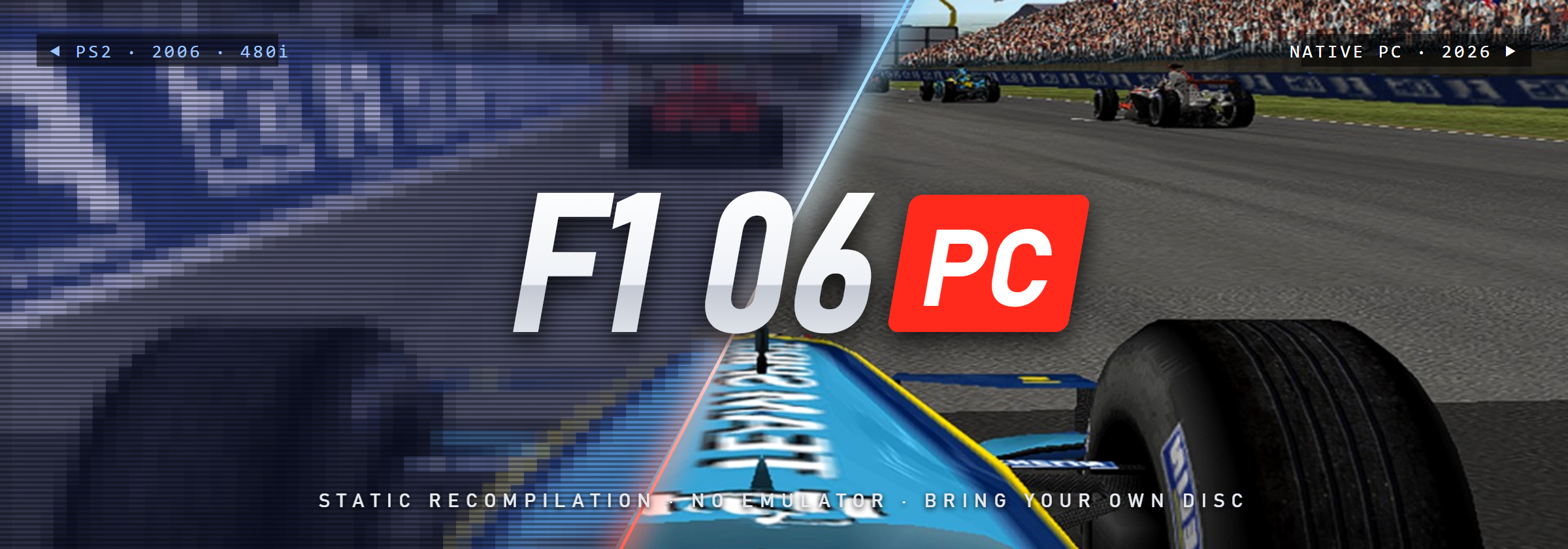


F1 06 PC: a native Windows port of Formula One 06 (PS2) by static recompilation
Fan project. Not affiliated with, endorsed by or connected to Sony Interactive Entertainment, SCE Studio Liverpool, Formula One Group, the FIA or any other rights holder. No game data is distributed: you need your own copy of the game. Español más abajo.
F1 06 PC turns the European PlayStation 2 release of Formula One 06 (PAL, SCES-53950) into a native Windows
program. This is not an emulator running the disc: the game's MIPS code (about 14,000 functions) is translated ahead
of time into C++ with PS2Recomp and compiled into a normal .exe, together with
a runtime that stands in for the PS2 hardware (EE, IOP, VU1, SPU2) and draws the GS graphics on your graphics card
through paraLLEl-GS (Vulkan). On top of a faithful 1.0 base (the
full PS2 game, all 18 circuits, championship, split screen), it adds PC options that live inside the game's own menus,
with its own fonts, colours and controller navigation: no overlays, no external launchers.
Highlights
- Native PC executable built by static recompilation, running at 50 fps like the PAL original.
- GPU rendering (paraLLEl-GS over Vulkan) with supersampling (x1 to x16), double resolution and image filters (nearest, bilinear, sharp, AMD FSR 1, CRT); software (CPU) mode as a fallback.
- Display: window, borderless or fullscreen, the game's own widescreen 16:9 option, aspect auto / 4:3 / 16:9 / square pixels, VSync, FPS counter, wider field of view (+5 % to +30 %) for the race cameras.
- Beyond-PS2 detail: a CAR DETAIL option with REDUCED, AS ON PS2 (default), HIGH or MAXIMUM, where every car is drawn with the player car's full detail, and a SCENERY DISTANCE option (AS ON PS2, FAR, VERY FAR) that pushes the scenery fade distances further out.
- Photo mode: freezes the race, free camera, switch to any car and any race camera; replays with rewind and fast-forward.
- PNG screenshots (F12), race HUD full / minimal / hidden, fast loads (race load about 2 s shorter, back to menu about 3.5 s shorter, boot to title about 15 s shorter).
- Finer AI difficulty (11 steps from EASY to HARD), crash damage also in short races (1-3 laps), colour-blind filters, mono audio, audio latency and vibration strength settings.
- Controllers: DualSense (with vibration), DualShock 4, XInput pads and a fully configurable keyboard
(
config\controls.ini). Two players in split screen. - Steering wheel: a Logitech G29 is presented to the game as its own Driving Force Pro, with the game's native steering, pedals, menu buttons and force feedback.
- Netplay over IP (experimental): one PC hosts and runs the game; a second PC joins as player 2 of split screen, receiving image and sound. LAN or private VPNs (Tailscale, ZeroTier); every packet is signed with a password.
- Mods folder: loose files in
mods\replace the disc file with the same path. - Autonomous testing: 842 unit tests and scripted full-game regressions (all game modes, the 18 circuits, championship save/load), checked with screenshots and logs.
Screenshots
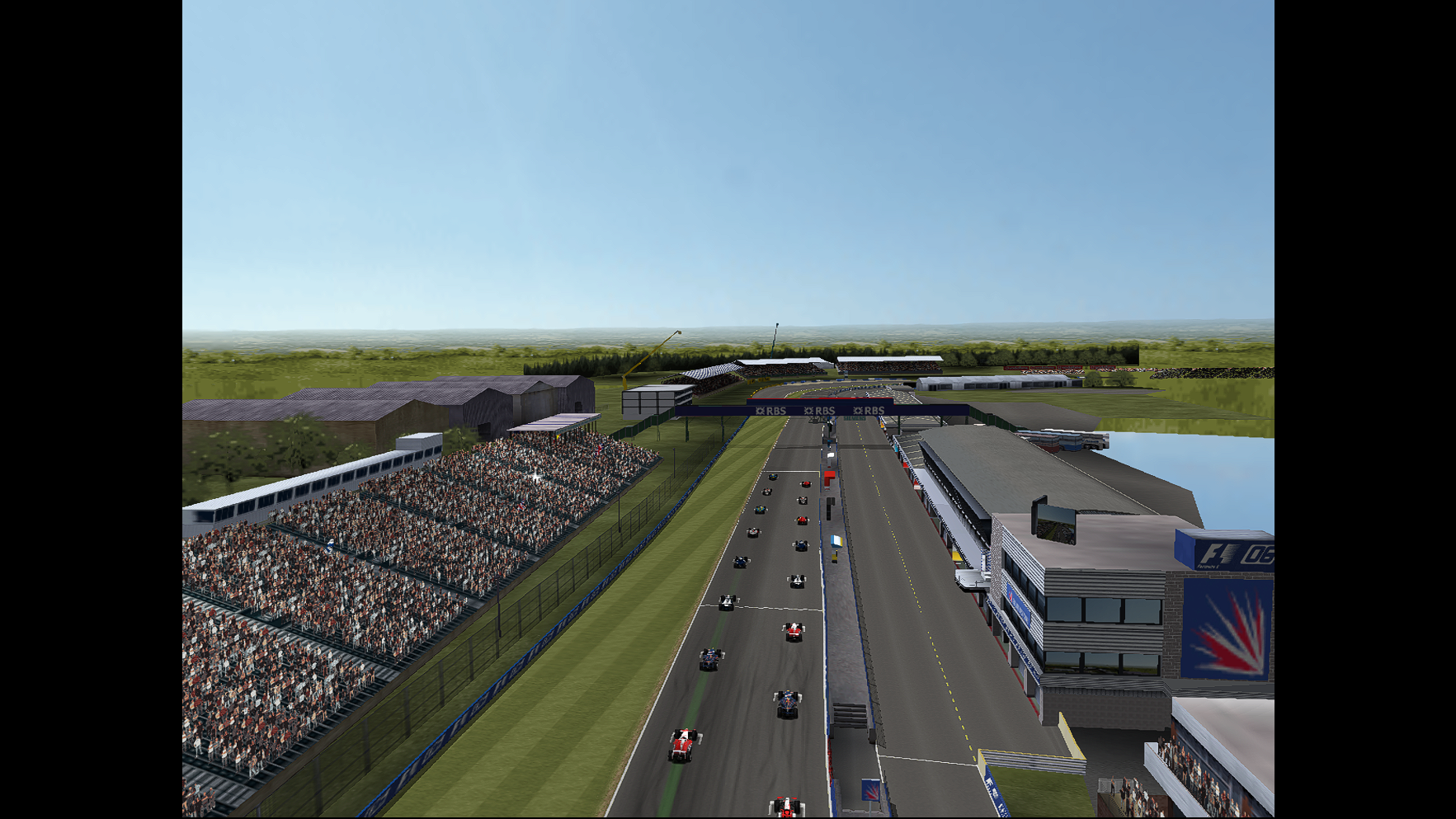 | 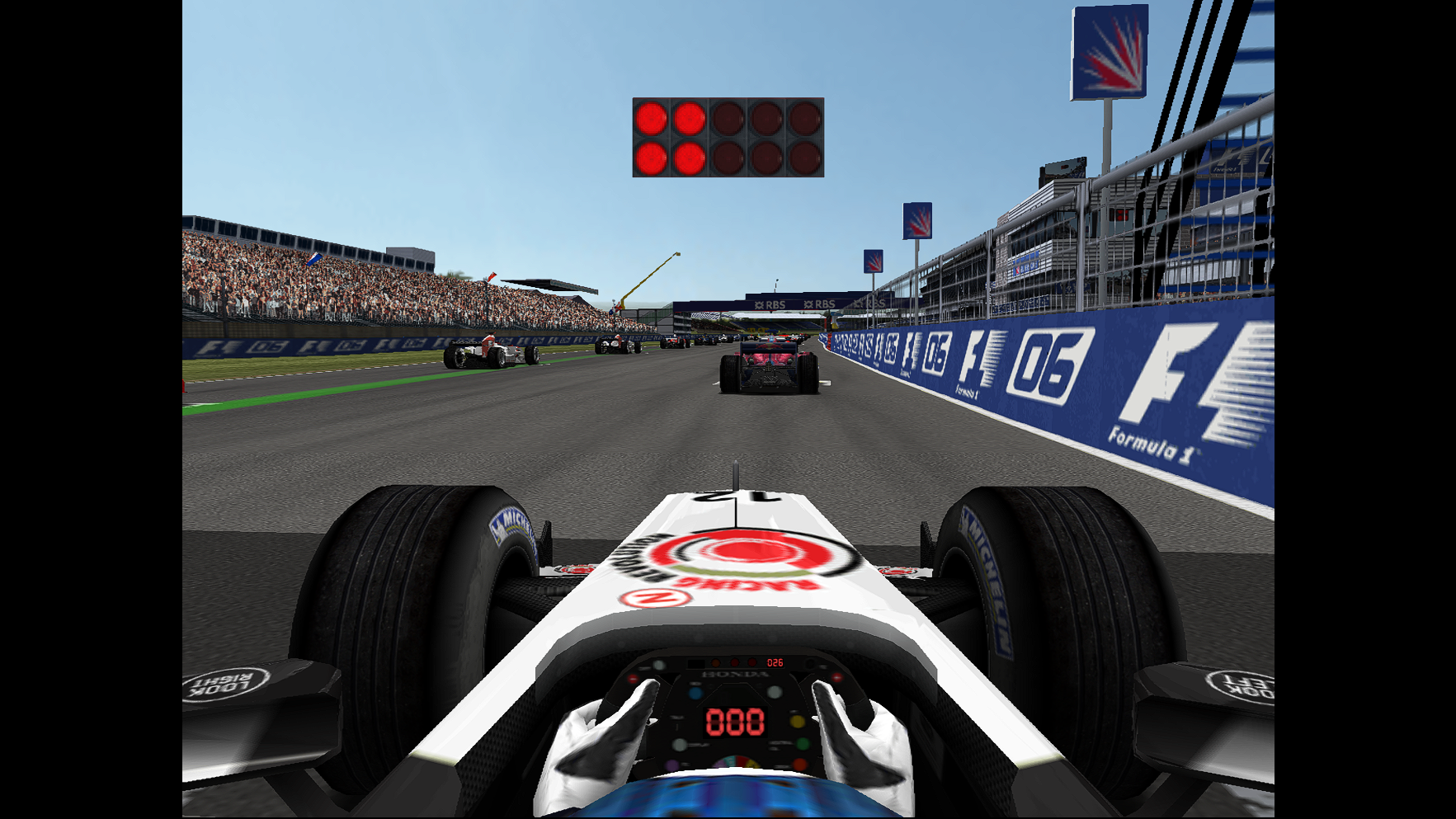 |
| Silverstone grid, 22 cars, SCENERY DISTANCE: VERY FAR | Start lights from the cockpit, CAR DETAIL: MAXIMUM |
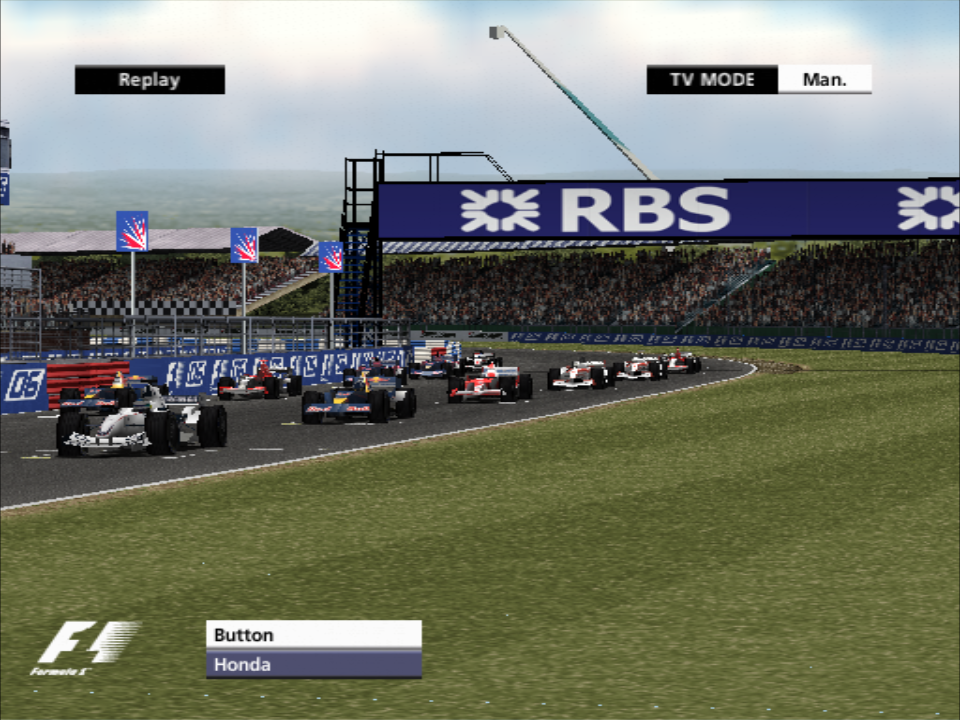 | 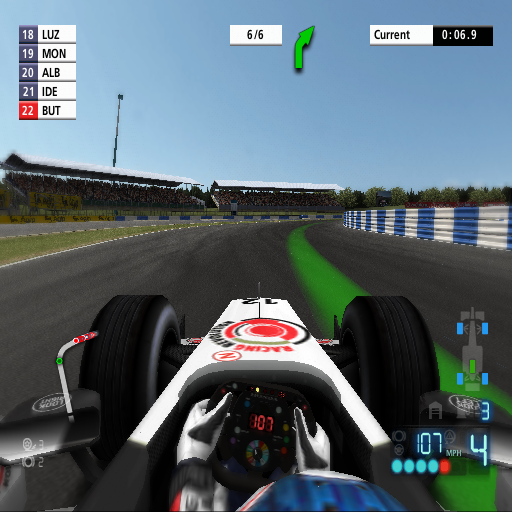 |
| Replay, TV camera | In race, cockpit camera and HUD |
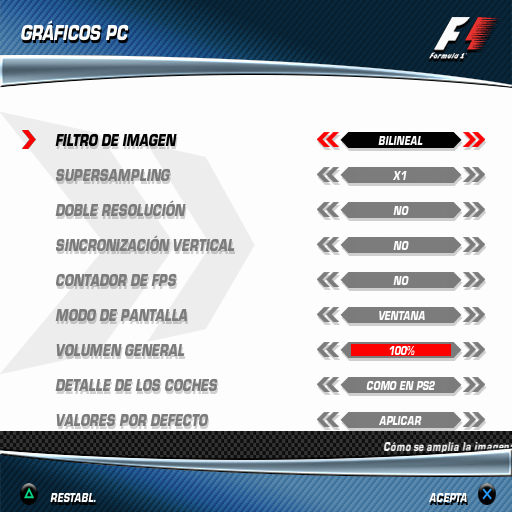 | |
| PC GRAPHICS, a native page in the game's OPTIONS menu |
Screenshots are in-game captures from the game's own data; the trademarks and logos visible in them belong to their owners.
Requirements
- Windows 10 or 11, 64-bit.
- A graphics card with Vulkan for the normal (GPU) mode; without it the game draws in software mode (slower).
- Your own copy of Formula One 06 for PS2, European PAL version (SCES-53950), dumped from your own disc to an
.isofile. - CPU: no minimum has been established (the port has been measured on a single PC). The game's main thread is CPU-bound, so single-core speed matters most: the race start with 22 cars is the most demanding moment, and when the cores stay below about 4 GHz (for example with Windows' Balanced power plan) it drops under 50 fps for a few seconds (see Known limitations). As a guideline, a recent desktop processor with high boost clocks.
Installation
- Download either the installer (
.exe) or the portable.zipfrom the latest release. What changed in each version is in CHANGELOG.md.- Installer: creates "F1 06 PC" shortcuts in the Start menu and on the desktop; uninstall from Settings > Apps (it
asks whether to also delete your saves and options). Your saves and settings go to
Documents\My Games\F1-06. One installer page lets you pick your ISO (already filled in if one is found in your Downloads or on your Desktop) and copies the game data during the installation; leave it blank to do it on the first run instead. - Portable: unzip the folder anywhere and open
F1-06.exe. Everything is saved inside that folder, so you can move it or carry it on a USB stick.
- Installer: creates "F1 06 PC" shortcuts in the Start menu and on the desktop; uninstall from Settings > Apps (it
asks whether to also delete your saves and options). Your saves and settings go to
- First run: if the game data is not there yet, the game asks once for your Formula One 06 ISO. It offers an ISO
found in your Downloads folder, on your Desktop or next to the
.exe(or lets you browse for one), checks that it is the PAL version (SCES-53950), copies the game data with a cancellable progress bar (about 4 GB: portable, intodata\next to the.exe; installed, into%LOCALAPPDATA%\F1-06\data) and starts. The ISO is only read. After that you just play. - Windows may show "Windows protected your PC" (SmartScreen) because the
.exeis not signed: click More info and then Run anyway.
Dump your own disc: the project will never tell you where to download a game image, and does not ship one.
Controls and options
- All PC options are in OPTIONS > PC OPTIONS in the main menu, with four pages: PC GRAPHICS, PC DISPLAY,
PC SETTINGS and PC NETPLAY. Each page has a DEFAULT VALUES row. Changes are visible at once; ACCEPT saves them to
config\settings.ini. The race pause menu also has PC GRAPHICS and PHOTO MODE. - Keys: F11 fullscreen / window, F10 aspect, F12 screenshot, H HUD mode, F8 photo mode. With a controller, R3 enters and leaves photo mode and L3 shows or hides the help bar. Close the window (X or Alt+F4) to quit; Esc never closes the game.
- Photo mode: left stick moves the camera, right stick turns it, R2/L2 up/down, L1/R1 tilt, d-pad up/down zoom, d-pad left/right changes car, △ cycles the race cameras, ○ takes the photo, START returns to the race (keyboard: W S A D, R F, arrows, Q E, Z X, TAB, V).
- Replays: SELECT pauses, R2 fast-forward (x2, then x4), L2 rewinds (keyboard: K, L, J).
- Controls are configured in
config\controls.ini(pad, keyboard, wheel; a[jugador2]section for the second player). Wheel settings in its[volante]section: setgrados_volanteto the rotation configured in G HUB (900 by default);girois the lock-to-lock range the game uses (200 by default, like the original Driving Force Pro). - Netplay: the host turns HOST on in PC NETPLAY and tells the guest the address, port (TCP 50650 by default) and
password; the guest opens
Play online - Guest.cmd(installed: "F1 06 PC - Jugar en red (invitado)" in the Start menu; orF1-06.exe --invitado) and does not need the game data. Image quality low / medium / high uses about 4 / 8 / 15 Mbit/s. Full details inREADME.txtinside the package (Spanish:LEEME.txt).
Known limitations
- Race start performance: the game runs at 50 fps, but with Windows' Balanced power plan and other programs open, the start with 22 cars can drop to about 42-45 fps for a few seconds. Use the High performance power plan or close what you don't need to stay at 50.
- CAR DETAIL: HIGH costs about 16 % more CPU time at the start (measured 45.2 vs 48.6 fps) and MAXIMUM about 1.9 times as much (around 25 fps at the start); FAR and VERY FAR scenery cost about 5 % and 9 %. AS ON PS2 is the default.
- No 60 fps mode (the game runs at the PAL 50 fps). Internal resolution is the PS2's (paraLLEl-GS can double it); higher resolutions are upscaled.
- Netplay is experimental: two players only (it streams the host's split screen to the guest), tested on one PC over 127.0.0.1 so far; a test across two PCs with a real firewall is pending. Traffic is signed but not encrypted: outside your home, use Tailscale or ZeroTier rather than opening a port.
- The original game had no online mode; this port does not add one (yet).
- DualShock 4 vibration is untested.
- The executable is not code-signed, so SmartScreen warns on first run.
FAQ
Why do I need my own ISO? The game's code, graphics, sounds and music belong to their rights holders. This project only distributes its own work: the recompilation tooling and runtime changes. The executable needs the original game data to run, and the only legal way to get it is from a disc you own.
Is it legal? The project ships no game data, no ISO and no BIOS, and is not a commercial product. Making a personal backup of a game you own is treated differently from country to country, so check your local law. If you are a rights holder and have a concern, please open an issue at https://github.com/KevinL50-sysadmin/F1-06-PC/issues.
Is there online play? Not over the internet with accounts. Today there is experimental 2-player netplay between two PCs. Online play with accounts and community servers is something we would like to explore in the future, but it is a goal, not a promise.
Is this an emulator? No. An emulator interprets the PS2 program while it runs; here the game's code was translated to C++ and compiled for x86-64 ahead of time. Parts of the hardware (graphics synthesiser, sound, I/O processor) are still reproduced by the runtime, so you can think of it as a native game with a small PS2 "operating layer".
Which version of the game works? Only the European PAL release, SCES-53950. Other regions use a different executable and are not supported.
Support the project
If you'd like to support the work, there is a Ko-fi: https://ko-fi.com/kevinl50. Donations fund the time spent on the port, the tools behind it and, hopefully one day, community servers. They never buy builds, features or game content: everything stays free for everyone.
Bug reports are just as valuable
(issues): please attach F1-06.log (portable: logs\ inside the game folder; installed:
%LOCALAPPDATA%\F1-06\logs).
Follow progress and news on X: https://x.com/KevinLA50.
Legal notice
Formula One 06 is © its respective owners. "Formula One", "Formula 1", "F1", "PlayStation", "PS2" and related marks are trademarks of their respective owners and are used here only to describe what the project is compatible with. This is an independent, non-commercial fan project. It is not affiliated with, endorsed by or sponsored by Sony Interactive Entertainment, SCE Studio Liverpool, Formula One Group, the FIA or any other rights holder. No game assets, ISO images or BIOS files are distributed; no official logo is used as project branding.
Credits and third-party software
- PS2Recomp: the PlayStation 2 static recompiler and runtime this port is
built on (GPL-3.0). This project's changes to it are kept as patches in
parches/. - paraLLEl-GS: GS rendering on the GPU with Vulkan (LGPL-3.0
or later), with Granite (MIT), volk (MIT) and Vulkan-Headers
(Apache-2.0 or MIT). Full source and licenses ship in the package's
licenses\folder. - raylib (zlib) and Dear ImGui (MIT), pulled in by PS2Recomp's runtime; other PS2Recomp build dependencies: fmt, ELFIO, toml11, libdwarf, rabbitizer, nlohmann/json (each under its own license).
- AMD FidelityFX Super Resolution 1 (EASU and RCAS, MIT), adapted to GLSL for the FSR image filter.
- FFmpeg DLLs for the game's videos (LGPL).
- Michroma font (SIL Open Font License 1.1), used for the port's on-screen notices.
- Modelled on the god-of-war-recomp project, with ideas (never code) taken from the F1 Championship Edition PS3 recompilation.
- Thanks to SCE Studio Liverpool for the original game, and to the PS2 preservation and recompilation communities.
Project license: GNU GPL-3.0, the same as PS2Recomp, which the runtime derives from. The license covers the port's own code only; Formula One 06 and its data belong to their owners and are never included.
Building from source (developers)
Source: https://github.com/KevinL50-sysadmin/F1-06-PC. The repository holds only the project's own work:
src/ (game-specific overrides), parches/ (patches over PS2Recomp), gpu/pgs_puente/ (the paraLLEl-GS bridge
DLL), config/recomp.toml, scripts/ (build, packaging and analysis tools; comments in Spanish) and the root .cmd
build scripts. It never contains game data.
Outline (Windows, from the project root):
- Clone PS2Recomp into
third_party\PS2Recomp, check out the base commit2c5fbb9389e11dd95693385969490c9e8e6f57b4and applyparches\*.patchon top of it in numeric order (for examplegit apply --whitespace=nowarnfor each one, from0001up). - Put portable MSVC, Windows SDK, CMake and Ninja in
tools\(entorno.cmdsets up a console with them). compilar-ps2recomp.cmdbuilds PS2Recomp inbuild\ps2recomp.- Extract your own disc into
juego\(scripts\iso_ps2.py), thenrecompilar.cmdtranslatesjuego\SCES_539.50to C++ and builds the executable (compilar-runner.cmdrebuilds it after changes insrc\). scripts\obtener-parallel-gs.ps1fetches paraLLEl-GS at the pinned commit and buildspgs_puente.dll.ejecutar.cmdruns the development build;scripts\empaquetar.ps1makes the portable package and installer.
Español
Proyecto de fans. Sin relación con Sony Interactive Entertainment, SCE Studio Liverpool, Formula One Group, la FIA ni ningún otro titular de derechos, ni respaldado por ellos. No se distribuye nada del juego: necesitas tu propia copia.
F1 06 PC convierte la edición europea de PlayStation 2 de Formula One 06 (PAL, SCES-53950) en un programa nativo
de Windows. No es un emulador que lee el disco: el código MIPS del juego (unas 14.000 funciones) se traduce de
antemano a C++ con PS2Recomp y se compila en un .exe normal, con un runtime que hace de hardware de la PS2 y dibuja
los gráficos en tu tarjeta gráfica con paraLLEl-GS (Vulkan). Sobre una base 1.0 fiel (el juego completo, los 18
circuitos, el campeonato, la pantalla partida) añade opciones de PC dentro de los propios menús del juego, con su letra,
sus colores y manejo con mando: sin ventanas superpuestas ni lanzadores.
Funciones: 50 fps como el original PAL; supersampling, doble resolución y filtros (FSR 1, CRT, nítido...);
panorámico 16:9 del propio juego y campo de visión hasta +30 %; DETALLE DE LOS COCHES (REDUCIDO, COMO EN PS2, ALTO,
MÁXIMO) y DISTANCIA DEL ESCENARIO (COMO EN PS2, LEJOS, MUY LEJOS); modo foto con cámara libre; repeticiones con
atrás y adelante; fotos en PNG; HUD ocultable; cargas rápidas; IA en 11 niveles; daños también en carreras cortas;
DualSense, DualShock 4, mandos XInput y teclado; volante G29 como el Driving Force Pro del juego, con fuerza de
respuesta; pantalla partida y juego en red por IP (experimental); carpeta mods\; pruebas automáticas (842 tests y
regresiones completas guionizadas).
Requisitos: Windows 10/11 de 64 bits, tarjeta gráfica con Vulkan (sin ella, modo Software, más lento) y tu
propia copia de Formula One 06 PAL (SCES-53950), volcada de tu disco a una .iso. CPU: sin mínimo establecido;
lo que más cuenta es la velocidad de un núcleo (por debajo de unos 4 GHz la salida baja de 50 fps unos segundos).
Instalación: descarga el instalador o el .zip portable de
la última versión. El instalador crea los accesos "F1 06 PC"
y puede copiar los datos de tu ISO durante la instalación. Si no, la primera vez el juego te pide la ISO una sola vez
(te ofrece la que encuentre en Descargas o en el Escritorio, o la buscas tú), comprueba que es la PAL (SCES-53950),
copia los datos con una barra de progreso y arranca; después, a jugar. La ISO solo se lee. Si Windows avisa con SmartScreen ("Windows protegió su PC"), pulsa "Más información" y "Ejecutar de todas
formas". Vuelca tu propio disco: el proyecto no dice dónde descargar imágenes de juegos ni las distribuye.
Opciones: OPCIONES > OPCIONES PC (GRÁFICOS PC, PANTALLA PC, AJUSTES PC, JUEGO EN RED PC). Teclas: F11 pantalla
completa, F10 aspecto, F12 foto, H HUD, F8 o R3 modo foto. Todo explicado en LEEME.txt dentro del paquete.
Limitaciones conocidas: con el plan de energía Equilibrado y programas abiertos, la salida con 22 coches puede bajar
a 42-45 fps unos segundos (con Alto rendimiento, 50); DETALLE ALTO cuesta un 16 % y MÁXIMO va a unos 25 fps en la
salida; sin 60 fps; el juego en red es experimental (2 jugadores, firmado pero sin cifrar; falta la prueba en dos PC
con cortafuegos real); la vibración del DualShock 4 no está probada; el .exe no está firmado.
Online: hoy hay juego en red experimental para 2 PC. Un online con cuentas y servidores comunitarios es algo que nos gustaría explorar en el futuro: un objetivo, no una promesa.
Apoyo: Ko-fi en https://ko-fi.com/kevinl50. Las donaciones apoyan el trabajo del port, las herramientas y, ojalá, futuros servidores comunitarios; nunca compran versiones, funciones ni contenido del juego: todo sigue gratis para todos. Novedades en X: https://x.com/KevinLA50.
Aviso legal: proyecto de fans independiente y sin ánimo de lucro. Formula One 06 y las marcas "Formula One", "F1", "PlayStation" y relacionadas pertenecen a sus dueños y solo se nombran para describir la compatibilidad. No se distribuyen recursos del juego, ISO ni BIOS, ni se usa ningún logotipo oficial como imagen del proyecto.
Créditos: PS2Recomp (GPL-3.0), paraLLEl-GS (LGPL-3.0+), Granite, volk y Vulkan-Headers, raylib, Dear ImGui, AMD FSR 1,
FFmpeg y la letra Michroma (OFL 1.1); detalles y licencias en la sección en inglés y en licenses\ del paquete.