hl360-forza3
hl360-forza3 is a Windows PC port of Forza Motorsport 3 that runs natively and includes a launcher for installation and configuration.
- Type: PC port
- Game: Forza Motorsport 3
- Runs on Windows
- By 0herculabs
- Latest release 0.1.1, 2026-10-15
- Source: https://github.com/0herculabs/hl360-forza3
README
Forza Motorsport 3 — Native PC Recompilation
A work-in-progress static recompilation of the Xbox 360 racing game for modern Windows PCs.






Download 0.1.1 · Supported version · Launcher · Build from source · Porting notes
A work-in-progress static recompilation of Forza Motorsport 3: Ultimate Collection that runs natively on Windows PCs. The Xbox 360 PowerPC code is translated to C++ using the ReXGlue SDK, while the runtime provides the console services required by the game, including graphics, audio, input, profiles, file-system access, and downloadable content.
The project includes its own launcher for installing and verifying both game discs, managing local profiles, configuring the port, and installing Project Forza Plus 3.
[!IMPORTANT] No copyrighted game files are included. You must provide your own original Xbox 360 copies of Forza Motorsport 3: Ultimate Collection.
[!WARNING] This project is still under active development. Menus, videos, Free Play, and races are working at 60 FPS, but the full Career mode, local multiplayer, and other game modes still require more testing. Xbox Live is not available.
Supported version
The only version currently supported is Forza Motorsport 3: Ultimate Collection (USA), Title ID 4D53084D, Media ID 6F74359D, with default.xex version 0.0.0.8.
Development and testing are performed with the following exact disc images:
| Disc | Size | MD5 |
|---|---|---|
| Disc 1 — Play Disc | 7,838,695,424 bytes | A527154D55C7B39849EC68CD46F17281 |
| Disc 2 — Content Install Disc | 7,838,695,424 bytes | E65FF1CDC189F3EB9B1D0F14F97BAEA4 |
The MD5 values are provided only to identify the correct disc dumps; they are not intended as cryptographic guarantees. After extracting Disc 1, the launcher also verifies every installed file against game_files.sha256 using SHA-256. Other regions, editions, or revisions may contain a different executable and are not currently supported.
Launcher
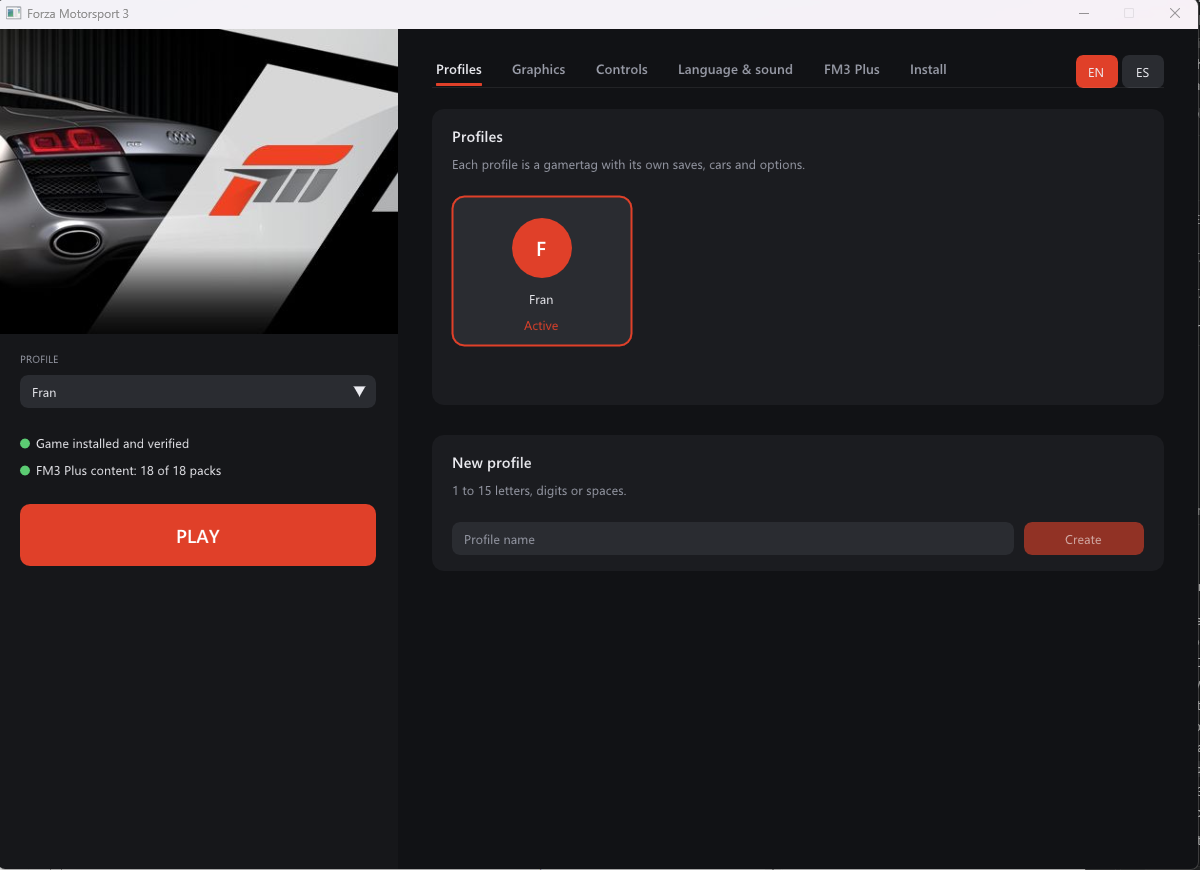
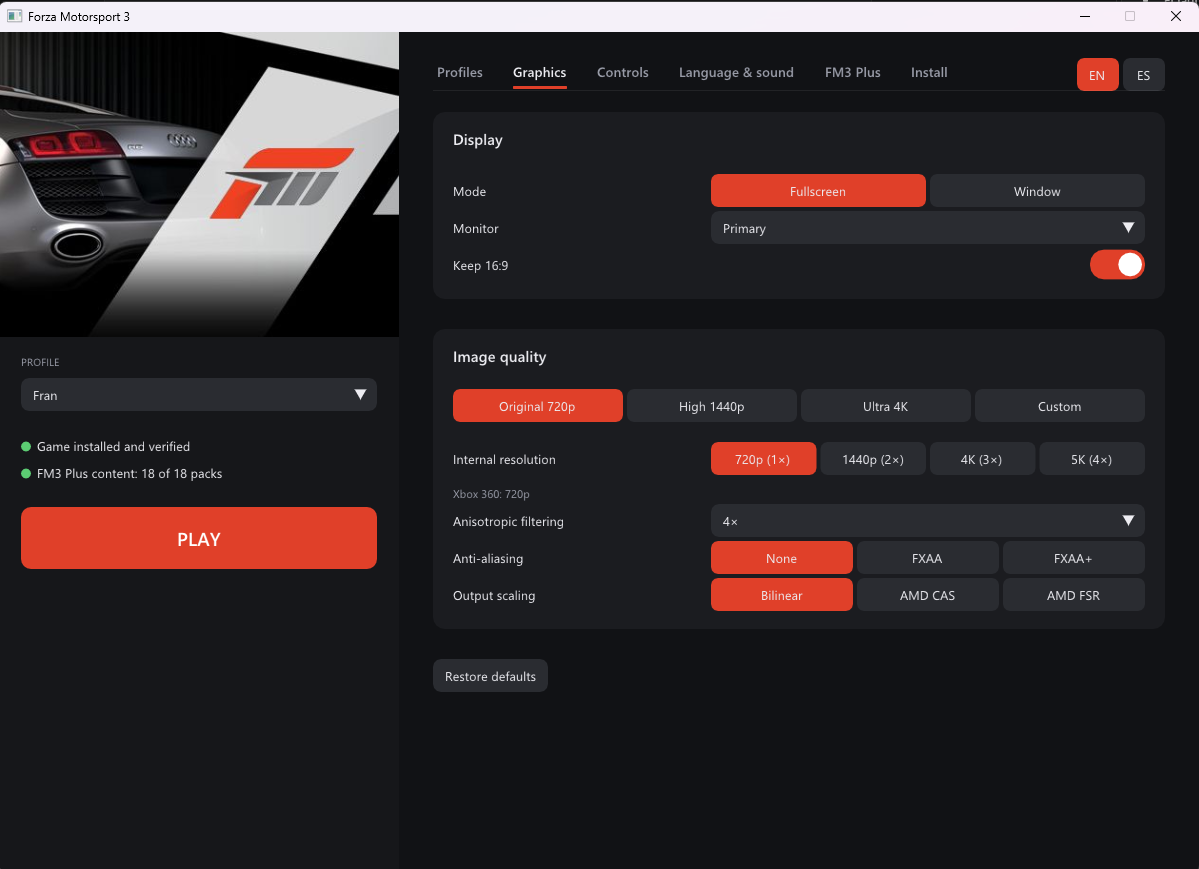
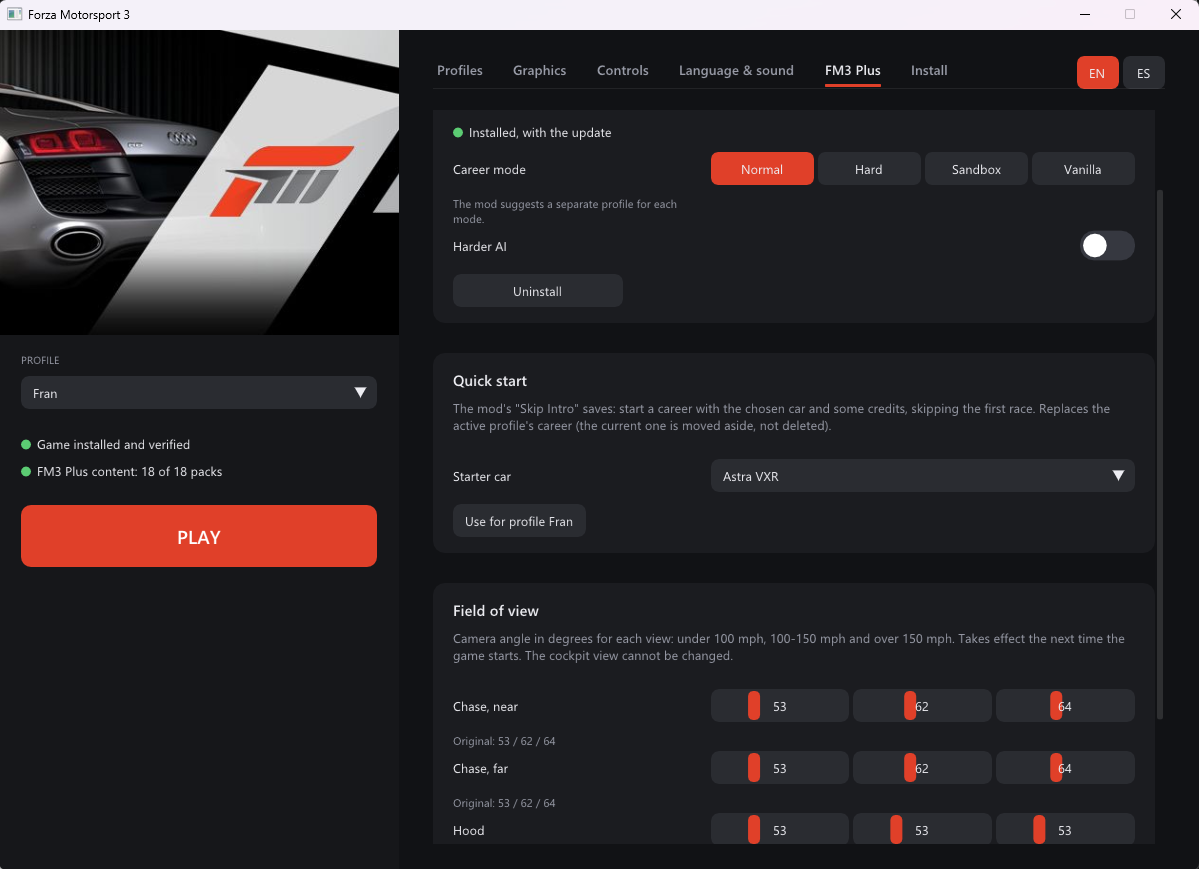
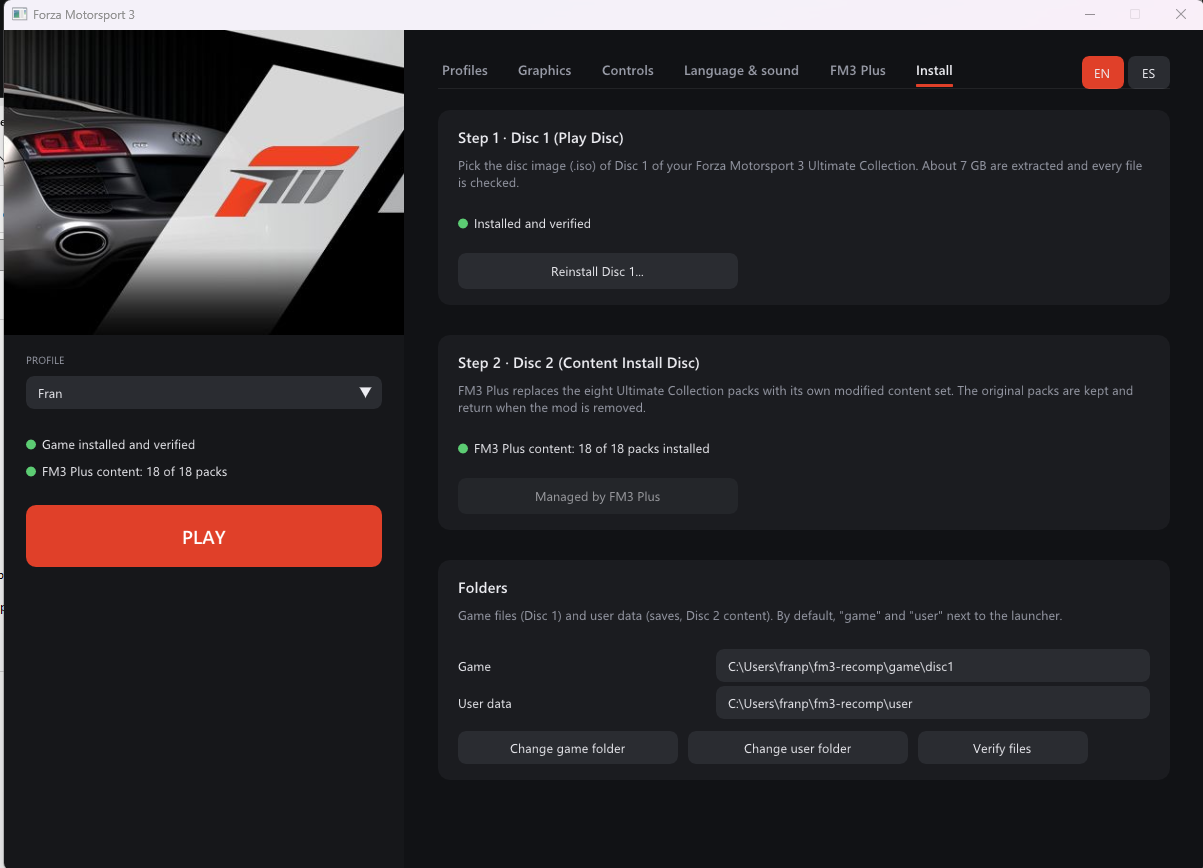
The launcher is based on the one created for the Forza Motorsport 2 recompilation and uses SDL3, SDL_GPU, and Dear ImGui. Its interface is available in English and Spanish. On first launch it follows the operating-system language, and it can be changed at any time with the EN/ES selector.
| Profiles | Graphics |
|---|---|
 |  |
| Project Forza Plus 3 | Installation and verification |
|---|---|
 |  |
Features
- Two-disc installation: the launcher automatically identifies each ISO and guides you through the process.
- Disc 1 — Play Disc: extracts approximately 7 GB of game data, excluding
$SystemUpdate, and verifies every file against the SHA-256 manifest. - Disc 2 — Content Install Disc: extracts all eight car and track content packages.
fm3tool install-dlcinstalls them, including their licence headers, in the format expected by the game.
- Disc 1 — Play Disc: extracts approximately 7 GB of game data, excluding
- Local profiles: create, select, and remove named profiles. Each profile has its own offline XUID and separate save directory under
user\<XUID>\.... Deleted profiles are preserved inuser\deleted-profiles\. - Graphics: windowed or fullscreen mode, monitor selection, window size, 16:9 output, 720p/1440p/4K presets, 1×–4× internal resolution, anisotropic filtering, FXAA, and Bilinear, AMD CAS, or AMD FSR scaling.
- Controls: Xbox and other SDL/XInput-compatible controllers, remappable keyboard controls, and optional mouse input mapped to the right stick.
- Language and audio: select the in-game language or mute game audio.
- Project Forza Plus 3: install, update, configure, and remove the mod from its ZIP archives. Available options include Career mode selection, harder AI, and field of view.
- Shader precompilation: prepares graphics pipelines before play to reduce first-time stutter.
Direct3D 12 and readback_resolve = "fast" are selected automatically. FM3 requires render readback for the road surface and vehicle thumbnails, while the synchronous full mode limits the game to 30 FPS. These settings are therefore not exposed in the launcher.
Project Forza Plus 3 supplies an alternative set of 18 content packages. During installation, the launcher safely backs up the eight Ultimate Collection packages and replaces them with the modded set. Removing the mod restores the original packages.
[!NOTE] Keep the user-data path reasonably short. Windows' legacy 260-character path limit applies, and some Disc 2 file names add up to 162 characters. The launcher rejects user-data paths longer than 96 characters.
Project Forza Plus 3 has longer paths than the original Disc 2. Its v1.3 ZIP requires a user-data root of at most 53 characters for the longest packaged file. Use short folders such as
C:\FM3\gameandC:\FM3\user. The launcher checks the actual mod archive paths before changing an existing installation. To relocate existing user data, close the game and launcher, copy the entire user folder to the shorter location, then select that folder under Install > Change user data folder. Keep the old copy until the game and saves have been checked.
Building from source
Requirements
- Windows 10 or Windows 11, x64
- Visual Studio 2022 Build Tools with MSVC and the Windows SDK
- LLVM/Clang 20 or newer (
winget install LLVM.LLVM) - CMake 3.25 or newer
- Ninja
- Git for Windows, with
shavailable onPATH
Clone the repository together with its submodules:
git clone --recursive https://github.com/0herculabs/hl360-forza3.git
cd hl360-forza3
Build the SDK once, then build the game, launcher, and supporting tools:
Before building the game, extract your supported Disc 1 into game/disc1/;
game/disc1/default.xex is required to generate the recompiled sources. After
building the SDK you can use its extraction helper as follows:
scripts\build_sdk.cmd
:: Build just the extraction helper; this does not require generated game code.
cmake --preset win-amd64-release -DCMAKE_PREFIX_PATH="%CD%\thirdparty\rexglue-sdk\out\install\win-amd64"
cmake --build --preset win-amd64-release --target fm3tool
scripts\install_game.cmd "C:\path\Disc 1.iso"
Run the CMake commands from a terminal with scripts\devenv.cmd loaded.
:: Apply patches\sdk\*.patch and install the SDK into out\install
scripts\build_sdk.cmd

:: Build the game, launcher, and tools into out\build\win-amd64-release
scripts\build.cmd release
scripts\devenv.cmd loads the MSVC environment and places Clang from C:\Program Files\LLVM\bin at the beginning of PATH.
Recompiled code is generated in generated\default\ from fm3_manifest.toml and config\*.toml. The build system automatically runs the code generator again whenever one of those inputs changes.
Launcher command line
The launcher also provides non-interactive modes that use the same internal installation and verification paths as the graphical interface:
fm3-launcher --import-iso <iso> --game-dir <dir> --user-dir <dir> [--log <file>]
fm3-launcher --verify --game-dir <dir> [--log <file>]
fm3-launcher --screenshot <file.bmp> [--tab profiles|graphics|controls|audio|plus|install]
Configuration files
The following files are stored next to fm3.exe:
| File | Purpose |
|---|---|
fm3.toml | Default port settings, copied from config\fm3.toml during the build |
fm3.user.toml | Player-selected settings, paths, and active profile; written by the launcher and overrides fm3.toml |
launcher.toml | Launcher language and profile list |
game_files.sha256 | Disc 1 verification manifest generated by tools\make_manifest.py |
cover.jpg | Cover artwork extracted from the Disc 1 nxeart asset |
logs\ | Runtime logs, crash reports, and minidumps |
fm3.exe can be launched without command-line arguments and reads these files automatically. While the game is running, F4 opens the SDK cvar editor and F3 opens the debugging overlay.
Repository layout
| Path | Purpose |
|---|---|
fm3_manifest.toml | ReXGlue manifest defining the input XEX and code-generation output |
config/codegen.toml | Function boundaries, setjmp/longjmp, and fibre configuration |
config/fptr_functions.toml | Functions reachable only through pointers |
config/fm3.toml | Default settings distributed with the executable |
src/ | Game application (Fm3App) and crash-reporting code |
launcher/ | Graphical launcher and installer |
tools/fm3tool/ | ISO/STFS extraction, DLC installation, and XEX dumping |
tools/*.py | Disassembly, function-pointer discovery, and manifest utilities |
patches/sdk/ | Project-specific ReXGlue SDK changes |
scripts/ | Command-line build and installation scripts |
Porting notes
- Code generation: 15 functions reachable only through tail calls or vtables, plus three getters with a shared epilogue, required explicit function boundaries.
config/fptr_functions.tomldeclares roughly 200 functions reached only through pointers such as vtables, callbacks, and thread entries.tools/find_fptrs.pyfinds pointers in.rdata/.dataandlis+addipairs;tools/prune_fptrs.pyremoves false positives. If the runtime stops withCall to invalid or unregistered function at guest address X, address X is probably missing from this list. - Fibres: XAPI fibres use the native SDK implementation configured under
[rexcrt]. setjmp/longjmp: addresses0x82534B20and0x825345E0must be declared. Without them, libjpeg error handling corrupts registers and causes a crash when entering a race.cache:device: FM3 writes to paths such ascache:\replay_streamduring races without mounting the device itself.Fm3Appmounts it atuser\cache_partition.- Disc 2 content: installed packages require their licence headers and are registered through the SDK's
ContentManager::InstallContentimplementation. - Project Forza Plus 3: the mod includes 18 pre-extracted content packages. Its
default.xexbelongs to the original 2009 edition and is not used. The port rebuilds the protected-file signature table in memory instead. - Render-to-texture:
readback_resolve = "fast"is fixed and hidden from the launcher. Readback is required for roads and vehicle thumbnails, whereasfullis synchronous and caps FM3 at 30 FPS. - Frame pacing: the SDK's
vsynccvar represents the console vblank timer, not display synchronization. FM3 uses that timer internally and runs too fast without it, so it is fixed infm3.toml. Achievement notifications are also disabled because an active notification causes the presenter to repaint at the monitor refresh rate, resulting in misleadingly high frame counters and severe pacing issues. Synchronous pipeline compilation andgpu_allow_invalid_fetch_constantsfollow the FM2 recompilation settings. - Audio: FM3 submits blocks of only 256 samples, or 5.33 ms at 48 kHz.
audio_maxqframes = 16gives the audio queue enough headroom to survive brief CPU or GPU stalls without audible SDL underruns, for a maximum buffer of approximately 85 ms.
ReXGlue SDK patches
The patches under patches/sdk/ are applied by scripts\build_sdk.cmd:
0001-user-profile-setters— active-profile name and XUID setters.0002-content-diagnostics— content enumeration and access diagnostics.0003-gpu-fixes-from-xenia— GPU fixes from newer xenia-canary/xenia-edge revisions, primarily addressing FM3's square shadows and road rendering:d119505: rescale texture reads that use integernum_format.- xenia-edge
c0e1129d7: force the sampler border-colour alpha to 1. - xenia-edge
4e2964f85: use point sampling for formats that do not support linear filtering under D3D12. - xenia-edge
9781a75a2: do not treat a texture with invalidated memory as already loaded. - xenia-edge
c02060f22: downscale resolve readback when the internal resolution is above 1×. The included HLSL and GLSL shaders are rebuilt with Windows SDKfxcandglslangValidator; the latter can be built withscripts\build_glslang.cmd. - xenia-edge
2d7ca4fb3: do not report empty resolves as errors, eliminating approximately 170 unnecessary log messages per second in FM3.
The SDK is built with REXGLUE_USE_VULKAN=ON, but the port selects Direct3D 12 because the Vulkan backend does not yet render FM3 correctly.
Compatibility references
Initial compatibility settings were informed by xenia-manager/optimized-settings and xenia-canary compatibility report #409. Xenia recommends readback_resolve = "full" for accuracy; this port uses fast because it preserves the readbacks FM3 needs without reducing output to 30 FPS.
The only FM3 entry in game-patches, Disable hash checks, does not match this Ultimate Collection default.xex and is not applied.
Antivirus check
The release candidate was scanned with Microsoft Defender on 15 October 2026
(security intelligence version 1.461.35.0). No threats were detected in the
packaged executables, libraries, or ZIP. This is the result of that specific
scan, rather than a guarantee that every antivirus product will report the same
result. No antivirus false positive was reproduced during this review.
The Forza 2 v0.3.0 release notes
document generic or heuristic detections involving rexruntime.dll in that
port's earlier 0.2.0 package. Those reports concern different binaries and do
not establish the detection status of this Forza 3 release.
Credits and legal notice
Built with the ReXGlue SDK and the work of the Xenia and XenonRecomp projects.
This is an independent preservation and compatibility project. It is not affiliated with, endorsed by, or sponsored by Microsoft or Turn 10 Studios.