fm4-static-recomp
fm4-static-recomp is a Windows port of Forza Motorsport 4 that supports DLSS, FSR 2, and FSR 3 upscaling.
- Type: PC port
- Game: Forza Motorsport 4
- Runs on Windows
- By i2kiselev
- Latest release v0.3.0, 2026-10-28
- Source: https://github.com/i2kiselev/fm4-static-recomp
README
FM4 Static Recomp




An unofficial static recompilation of the Xbox 360 release of Forza Motorsport 4 for Windows, built on your own PC from your own disc.
The game's PowerPC code is translated ahead of time into C++ by the ShiftGlue SDK and compiled for x86-64. Its GPU commands run on ShiftGlue's native Vulkan renderer, written for Pinyon Shift (Forza Horizon) and extended here for FM4.
New in 0.3.0: DLSS, FSR 2 and FSR 3




Tip
Temporal upscalers now work with FM4. Render at 720p and get a sharp 1440p or 4K picture, or use them as anti-aliasing at your screen's resolution. The Xbox 360 game never computed motion, so this port rebuilds the camera, jitter and every moving car, wheel, driver and shadow from the game's draws. Choose UPSCALER on the GRAPHICS page (BACK + START on a controller, or F6). How it works and what to pick: Upscalers. Everything else in this version: release notes.
Note
Experimental release. The offline game modes play without known blocking problems (see Tested). This repository contains no game code or assets: you need your own legally obtained copy of the game (see Legal).
| 3840x2160 (3x), 120 fps | 2560x1440 (2x), 160 fps |
|---|---|
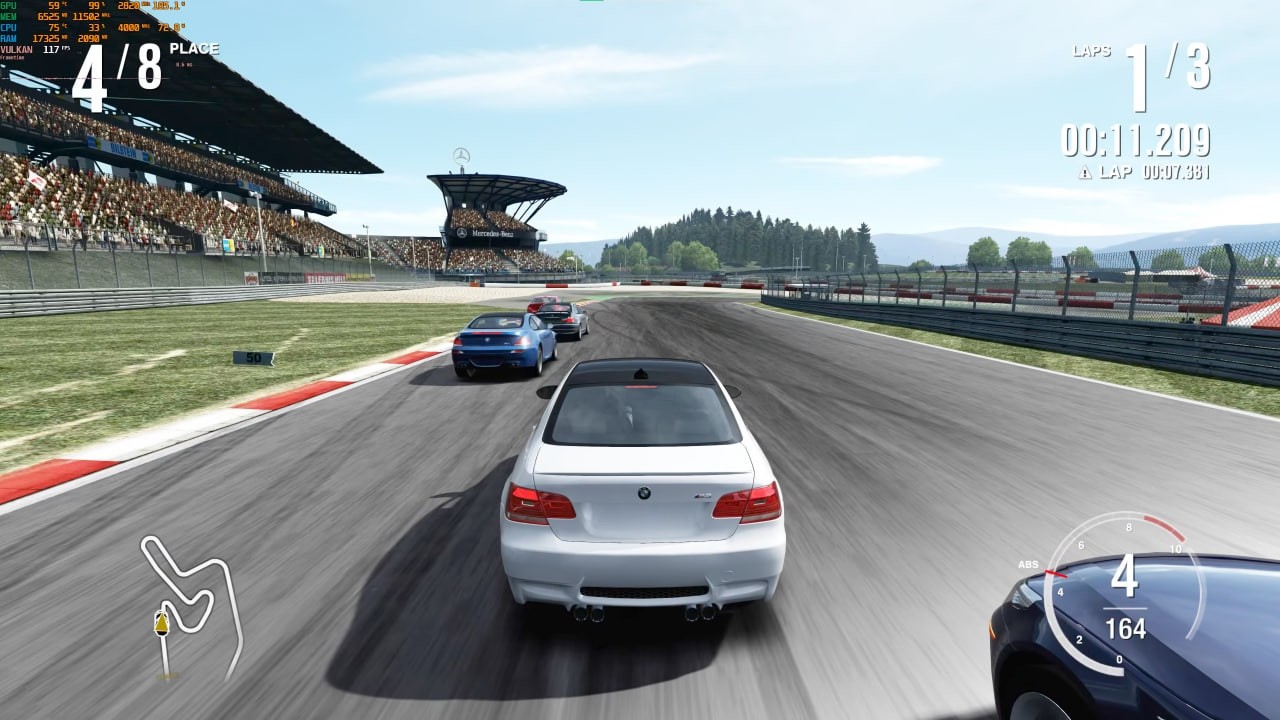 | 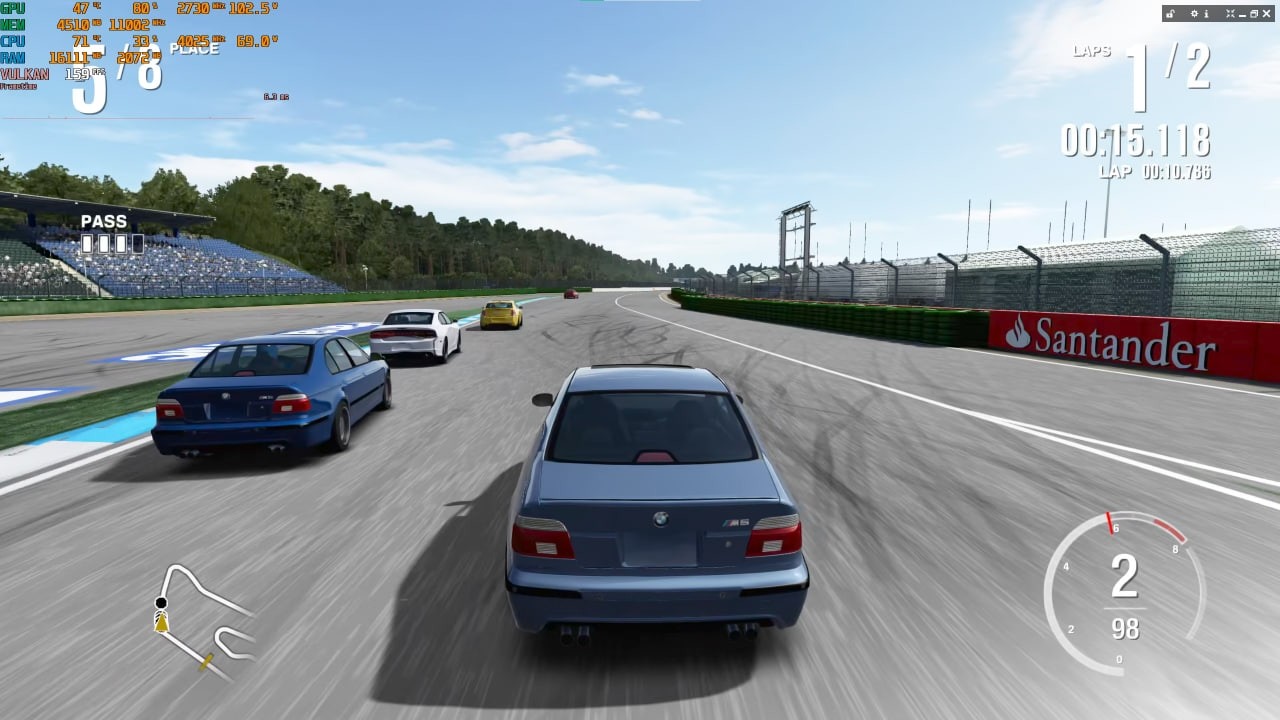 |
| Nürburgring GP, BMW M3 E92 | Hockenheimring Short, BMW M5 |
YouTube plays video at up to 60 fps; the frame rates are the game's during the recording.
Quick start
- Download
FM4StaticRecomp-Launcher.zipfrom the latest release and extract it into a short folder you own, for exampleD:\FM4. - Start
FM4StaticRecompLauncher.exeand follow its five setup steps: Disc 1, Disc 2 (optional), the Microsoft licence, the build and your profile. - Press PLAY.
Note
The first start compiles the game's shaders for your GPU before the title screen: about 30 seconds, longer on a processor with fewer threads. The game may look frozen meanwhile; let it finish. Later starts take a second or two; the compile runs again after an update and after a GPU driver update.
The first setup takes about 40 minutes. Details: Launcher guide. Prefer the command line? See the manual install.
Documentation
| Guide | What's in it |
|---|---|
| Launcher | First setup, profiles, content, the data folder, updates |
| Manual install | Command-line setup, Disc 2 and DLC, updating |
| Graphics settings | The in-game GRAPHICS page, presets, what each setting does |
| Upscalers | DLSS, FSR 2 and FSR 3: what to pick, how the port feeds them, known limits |
| High frame rates | Picking a frame rate, how the game runs at up to 240 fps at real speed, limits |
| Keyboard | Key layout for driving and menus, rebinding |
| Launch options | Command-line options, languages, -Compat, frame generation, setting options, logs and crash reports |
| Debug options | Debug views, A/B switches of rendering fixes and diagnostics |
| Testing and benchmarks | What was played, frame rates and VRAM, comparison with Xenia |
| Reporting issues | Checklist and template for a bug report |
Features
Compared with the original console, and with the same translation built against the stock ShiftGlue SDK (without this project's game hooks and renderer changes):
| Xbox 360 | Stock ShiftGlue SDK | FM4 Static Recomp | |
|---|---|---|---|
| Resolution | 1280x720 | 1x to 4x of 720p, but the road and car shadows render wrong | 1x to 4x of 720p (up to 5120x2880), switchable live |
| Race frame rate | 60 fps | The console's pacing | 60 fps up to the display's refresh rate (at most 240) (how) |
| Menus and showroom | 60 / 30 fps | The console's pacing | The race frame rate; animations and the showroom camera run at real time |
| Race loading | Console speed | Console speed | Faster |
| Sun and lights | Correct | Screen-filling glare | Correct |
| Anti-aliasing | The game's 2x/4x MSAA | The game's MSAA | Showroom and race MSAA 4x, 2x or off each, FXAA, FXAA Extreme, DLAA |
| Upscaling | - | DLSS, FSR 2 and FSR 3 with Forza Horizon's camera tracking, which does not fit FM4 | DLSS, FSR 2 and FSR 3 with FM4's own depth, camera cuts and per-object motion (how) |
| Graphics settings | Fixed | Launch options only | In-game GRAPHICS page (BACK + START or F6) with presets and per-setting switches, saved between sessions |
| VRAM at 3x | - | About 8 GB | About 2.5 GB |
| Input | Controller | XInput gamepad | XInput gamepad and keyboard, with keycap button prompts |
| Disc 2 and DLC | From the disc and Marketplace | Not wired up | Installed at launch from folders you name |
| Frame generation tools | - | Not visible to them | Opt-in for Lossless Scaling and NVIDIA Smooth Motion |
| Xbox LIVE, Kinect | Yes (LIVE servers closed) | No | No |
About twice Xenia's frame rate at every scale on the same PC (benchmarks).
Supported game
| Game | Forza Motorsport 4, Xbox 360, retail, title ID 4D530910 |
| Disc 1, 1.0 PAL | Europe, Australia, media ID 61D62D9F |
| Disc 1, 1.0 USA | USA, media ID 26FF1101 |
| Disc 2 | Optional: the install disc's four content packages (more cars and tracks) |
| DLC | Optional: Marketplace packages for title 4D530910 |
Both Disc 1 releases carry the same code; only their executables' headers differ. Any other
version of default.xex will not work, because the translation is made for this exact code.
Other releases are untested. config/supported-discs.json lists every Disc 1 file with its
size and hash.
Warning
The 1.1 re-release (Rev 1) of Disc 1 is not supported (media ID 42C67824); its Disc 2
works.
What you need
- Windows 10 version 2004 (build 19041) or newer, 64-bit.
- A GPU with a current Vulkan driver.
- An XInput gamepad (an Xbox controller, or another pad through a mapper), or the keyboard.
- Your own Forza Motorsport 4 Disc 1, as an ISO or a Games on Demand (GOD) copy. Disc 2 and DLC are optional.
- An internet connection for the first setup. No administrator permission and no Visual Studio: setup downloads the parts of Microsoft's C++ runtime and Windows SDK the build needs (about 300 MB) once you accept their licences.
- About 17 GB of disk space (Disc 1 7.6 GB, the repository with the SDK and build 3.3 GB, the build tools with Microsoft's files and their downloads 6.3 GB), plus about 5 GB for Disc 2 and DLC.
- About 40 minutes for the first setup; a rebuild after an update takes minutes.
Known issues
Known problems are tracked as open issues. Found a new one? See Reporting issues.
Roadmap
- Upscaler polish: the mirrors and the remaining shimmer (see Known limitations).
- Project Forza Plus support.
- Racing wheels, starting with MOZA wheels.
- Linux: a native build of the game and the launcher.
- Other disc releases, such as the Essentials Edition.
- More tests on niche or legacy hardware.
Repository layout
Where things are
| Path | What it is |
|---|---|
src/ | The host app: game hooks, built-in defaults, Disc 2 and DLC install, the GRAPHICS page |
src/input/ | Keyboard play: bindings, driving smoothing, keycap prompts |
tests/ | Unit tests of the host app |
config/rexglue/ | The recompiler's input: function analysis, hooks, the manifest |
config/*.json | The pinned toolchain and SDK, the supported discs' file lists |
tools/setup.ps1, build.ps1, codegen.ps1, run.ps1 | Setup, build and launch |
launcher/ | The launcher (Avalonia, .NET 8): its core library with tests, and the app |
tools/package-release.ps1 | Builds the release assets and the players' zip |
config/shaders/ | The pipeline list and vertex shader table setup builds the shader cache from |
tools/shader_list.py, tools/warm-up.ps1, config/warm-up/ | Development tools that make that list: a scripted warm-up, its profile, list merging and checks |
DEBUG_OPTIONS.md | Debug views, A/B switches of rendering fixes and diagnostics |
tools/ (the rest) | Development tools; several assume the author's folder layout |
guide/ | The player guides linked above |
Credits
- Pinyon Shift by arcanite24: the
Forza Horizon recompilation whose native renderer, host UI and build scripts this
project builds on (see
THIRD_PARTY_NOTICES.md). - ShiftGlue SDK, Pinyon Shift's fork of the
ReXGlue SDK: the recompiler and runtime. This
project uses a fork of it (branch
fm4-static-recomp) with FM4's renderer fixes. - Xenia, from which much of the runtime and GPU emulation in ReXGlue derives.
- fm4-recomp, an earlier FM4 recompilation on ReXGlue, which inspired this project.
AI use: code, scripts, documentation and reverse engineering of the game binary are AI-assisted.
License
The source in this repository is under the BSD 3-Clause License (LICENSE). Parts adapted
from Pinyon Shift keep their own BSD 3-Clause notice (THIRD_PARTY_NOTICES.md). The license
covers this project's code only: the game, its assets and any executable built from its
translation are not covered, and must not be redistributed.
Legal
This is an unofficial fan project. It is not affiliated with, endorsed, sponsored or approved by Microsoft Corporation, Xbox Game Studios, Turn 10 Studios, or any other company or person that made, published or licensed Forza Motorsport 4, including the car manufacturers, track owners and other licensors whose names and brands appear in the game. Forza, Forza Motorsport, Xbox and Xbox 360 are trademarks of Microsoft Corporation; every other trademark belongs to its owner. This repository contains no game code, game assets, disc images, generated translation or prebuilt game executable: you need your own legally obtained copy of the game, and the executable is built on your computer.