Freegemas
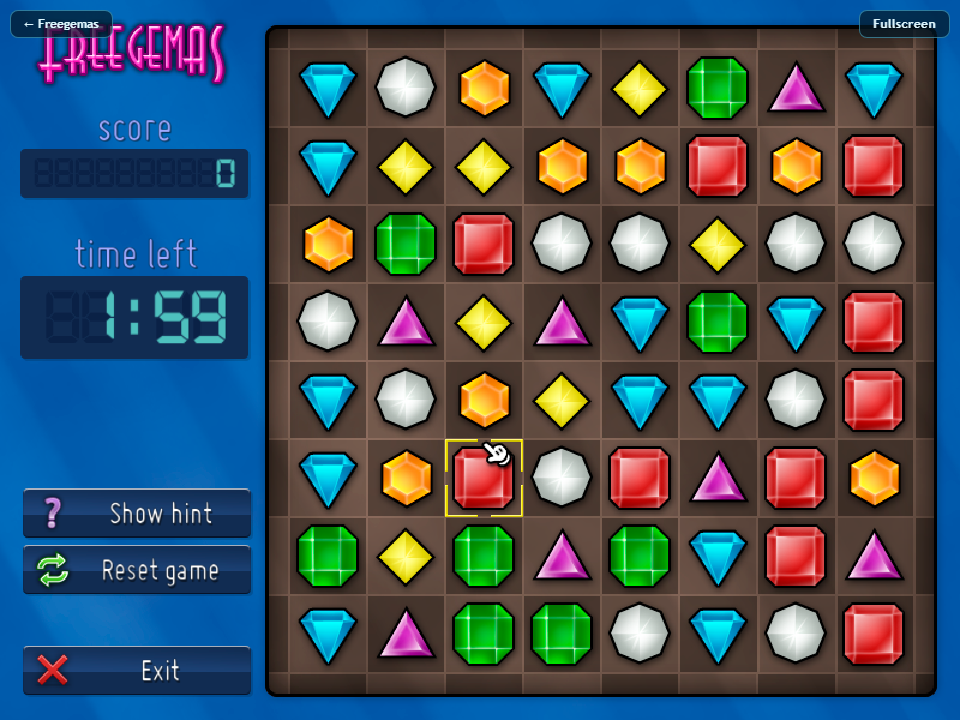
Freegemas is an open source clone of Bejeweled for PC, PlayStation Portable, Linux, macOS, and Windows.
- Type: standalone game
- Runs on Windows, Linux and macOS
- By JoseTomasTocino
- Latest release 26.11, 2026-11-18
- Source: https://github.com/JoseTomasTocino/freegemas
README


Freegemas is an open source version of the well known Bejeweled, for GNU/Linux, Windows, Mac and Playstation Vita. It's written in C++ using SDL3. In the past it used Gosu instead of SDL3, and the old repository can be found at Google Code.

Installation on Debian-based GNU/Linux systems
SDL3 and its satellite libraries are built from the bundled submodules, so only the system development headers they need have to be installed:
sudo apt-get install git build-essential cmake \
    zlib1g-dev libasound2-dev libxkbcommon-dev libdrm-dev libgl1-mesa-dev \
    libgbm-dev libwayland-dev libdecor-0-dev
After that, clone the repo:
git clone --recursive https://github.com/JoseTomasTocino/freegemas.git
Do an out-of-source compilation and run the program:
cd freegemas
mkdir build
cd build
cmake ..
cmake --build .
./freegemas
Installation on OS X
This assumes that you are already using Homebrew. SDL3, SDL3_mixer, SDL3_ttf and JsonCpp are built from the bundled submodules, so Homebrew is only needed for CMake:
brew install cmake
After that, clone the repo:
git clone --recursive https://github.com/JoseTomasTocino/freegemas.git
Do an out-of-source compilation, install the app bundle and run it:
cd freegemas
cmake -S . -B build -DCMAKE_BUILD_TYPE=Release -DCMAKE_INSTALL_PREFIX="$PWD/dist"
cmake --build build
strip build/freegemas.app/Contents/MacOS/freegemas
cmake --install build
open dist/freegemas.app
Building a universal app
The executable has no third-party dylib dependencies. SDL3, SDL3_mixer,
SDL3_ttf (including freetype) and JsonCpp are built as static archives from the
submodules and linked into the binary, so Contents/MacOS/freegemas carries
everything it needs and Contents/Frameworks stays empty. The only libraries
it loads are Apple's own, from /usr/lib and /System/Library.
Build one bundle that runs on both Apple Silicon and Intel with:
cmake -S . -B build -DCMAKE_BUILD_TYPE=Release \
    -DCMAKE_OSX_ARCHITECTURES="arm64;x86_64" \
    -DCMAKE_INSTALL_PREFIX="$PWD/dist"
cmake --build build -j"$(sysctl -n hw.ncpu)"
strip build/freegemas.app/Contents/MacOS/freegemas
cmake --install build
open dist/freegemas.app
The minimum macOS version is CMAKE_OSX_DEPLOYMENT_TARGET, which defaults to
11.0. It is baked into the binary (minos) and written to
LSMinimumSystemVersion in the bundle's Info.plist, so Finder and
Gatekeeper refuse to launch it on anything older. Override it the usual CMake
way if you need a different floor:
cmake -S . -B build -DCMAKE_OSX_DEPLOYMENT_TARGET=13.0 ...
The floor is written to both the binary (minos) and Info.plist, and the
two always match. Two limits apply:
arm64cannot go below11.0, because 11.0 is the first macOS release that runs on Apple Silicon. A lower value therefore only applies to thex86_64slice:-DCMAKE_OSX_DEPLOYMENT_TARGET=10.15produces a binary that is10.15onx86_64and11.0onarm64.- This does not mean the build is tested on that floor. Nothing in the current setup runs the app on anything older than the machine that built it.
To hand the bundle to someone else, zip the app together with the licences:
mkdir -p release/freegemas-macos-universal
cp -R dist/freegemas.app release/freegemas-macos-universal/
cp LICENSE THIRD-PARTY-LICENSES.md README.md release/freegemas-macos-universal/
(cd release && zip -qry freegemas-macos-universal.zip freegemas-macos-universal)
Verify the result with:
codesign --verify --verbose dist/freegemas.app
lipo -info dist/freegemas.app/Contents/MacOS/freegemas
plutil -p dist/freegemas.app/Contents/Info.plist | grep LSMinimumSystemVersion
There is no LC_RPATH and no non-system LC_LOAD_DYLIB in the executable,
which is what makes the bundle relocatable. Confirm that with:
otool -L dist/freegemas.app/Contents/MacOS/freegemas \
    | grep -vE "^\s*(/usr/lib/|/System/Library/)"
That should print nothing beyond the executable header. To see what is actually loaded at run time, rather than what the load commands claim:
DYLD_PRINT_LIBRARIES=1 dist/freegemas.app/Contents/MacOS/freegemas 2>&1 \
    | grep -vE "/(usr/lib|System)/"
Nothing outside the bundle should appear.
Signing
The install step ad-hoc signs the bundle, so it is not redistributable as
built. An ad-hoc signature (Signature=adhoc, no TeamIdentifier) is
accepted only on the machine that produced it; once the zip is downloaded
elsewhere, Gatekeeper quarantines it and reports the app as damaged or
unidentified. Copying it to another Mac will not work around this.
Shipping to other people requires a Developer ID certificate and notarization:
codesign --force --options runtime --timestamp \
    --sign "Developer ID Application: Your Name (TEAMID)" \
    dist/freegemas.app
ditto -c -k --keepParent dist/freegemas.app FreeGemas.zip
xcrun notarytool submit FreeGemas.zip --wait \
    --apple-id "you@example.com" --team-id TEAMID --password "app-specific-password"
xcrun stapler staple dist/freegemas.app
Check available identities with security find-identity -v -p codesigning;
without one of those, only an ad-hoc build is possible.
Installation on Playstation Vita
For building for Vita, the Vita SDK should be installed.
After that, clone the repo:
git clone --recursive https://github.com/JoseTomasTocino/freegemas.git
Do an out-of-source compilation:
cd freegemas
mkdir vita
cd vita
cmake -DCMAKE_TOOLCHAIN_FILE="${VITASDK}/share/vita.toolchain.cmake" ..
cmake --build .
Now freegemas.vpk can be tranfered and installed on Vita.
Running in the browser (WebAssembly)
The browser build requires Emscripten and CMake 3.28 or newer. Clone the repository with its submodules, then activate Emscripten:
git clone --recursive https://github.com/JoseTomasTocino/freegemas.git
source /path/to/emsdk/emsdk_env.sh
Build from the repository root with the helper script:
./platform/wasm/build.sh
On Windows:
.\platform\wasm\build.ps1
The helper scripts also pick up EMSDK automatically when it is set. The output
is written to build-wasm/ and the entry point is build-wasm/freegemas.html.
The build is a static site and can be hosted on GitHub Pages or any other web server. To test it locally, serve the output directory over HTTP:
python3 -m http.server 8000 --directory build-wasm
Then open http://localhost:8000/freegemas.html. Opening the HTML file directly from disk does not work because browsers block the runtime's file fetches. Click Play once to enable browser audio.
The browser shell has two small controls: ← Freegemas in the top-left returns
to the landing page (or the previous page when the build was opened from one),
and Fullscreen in the top-right enters the browser's fullscreen mode. In
fullscreen the game fills the whole display and the button changes to
Exit fullscreen; press Esc to leave fullscreen.
Music licensing
The music in the game is Easy Lemon by Kevin MacLeod Licensed under Creative Commons: By Attribution 3.0