God Hand: Rearmed
God Hand: Rearmed is a native PC port of God Hand for Windows that offers 60FPS gameplay, ultrawide support, modern controls, and many enhancements.
- Type: PC port
- Game: God Hand
- Runs on Windows
- By K
- Latest release v0.6.9, 2026-11-19
- Source: https://github.com/God-Hand-Rearmed/God-Hand-Rearmed
README

God Hand: Rearmed (かみて · おもてなし)
God Hand for PS2. Recompiled, Refined, Rearmed.
An unofficial, fan-made native PC port of Clover Studio's God Hand (PlayStation 2, 2006). The game's own code is recompiled into a Windows program: no emulator running the show. It plays start to credits at a smooth 60, on any screen, with as much or as little of our own nonsense as you want.
Warning
Beta! Plays from the first punch to the credits, but expect the odd bug. Found one? Tell us.
No game files included! Play your own damn copy! (USA, SLUS-21503; see DISC_HASHES.md).
Get It Running
- Grab the latest
GHR-v….zipfrom Releases. - Unzip it somewhere you can write to, Not Program Files!
- The launcher updates the game in place and Windows won't let it write there.
- Run GHR.exe.
- Windows SmartScreen may complain about an unknown publisher: More info > Run anyway.
- Point the launcher at your disc image (.iso or .chd) once, and it checks it for you.
- Pick a preset and hit "Play"!
- Beat thugs™, demons™, women™!
The first start compiles shaders for your GPU, so the screen may stay black before coming back. Patience, young ass-whooper.
When a new version is out, the launcher says so: What's new shows the changes, Update installs them and restarts. Your settings, saves, and mods stay where they are.
What's In It
God Hand - Gone Native!
Recompiled as a Windows program under Vulkan or DX11; PCSX2 as the renderer until later.
You've Been Hit by, You've Been Struck by, My Smooth Visuals!
True 60FPS (fists punching swiftly) game logic, that by a thousand fixes was achieved. Remastered+
Wider Than Yo Momma!
I'll kick up your goddamn Aspect Ratio, boy!
Up to 32:9. With enemy behavior adjusted, so everyone on screen is
invited to kick your ass, too! Remastered+
No UI stretching in gameplay; menus at 4:3 unless you like 'em on the thicker side!
Modern Controls, Tank Me Later!
Switch between classic tank controls and modern third-person freecam on the fly. Remastered+
Includes a toggle to automatically enter Brawl Mode (tank controls) in combat.
The alpha's Hold to Brawl is back: hold L1 for tank controls, double-tap it to spin around. Rather toggle Brawl Mode with R3? Pick Modern: Toggle. Remastered+
Smokin' S | E | X | Y Style Switching!
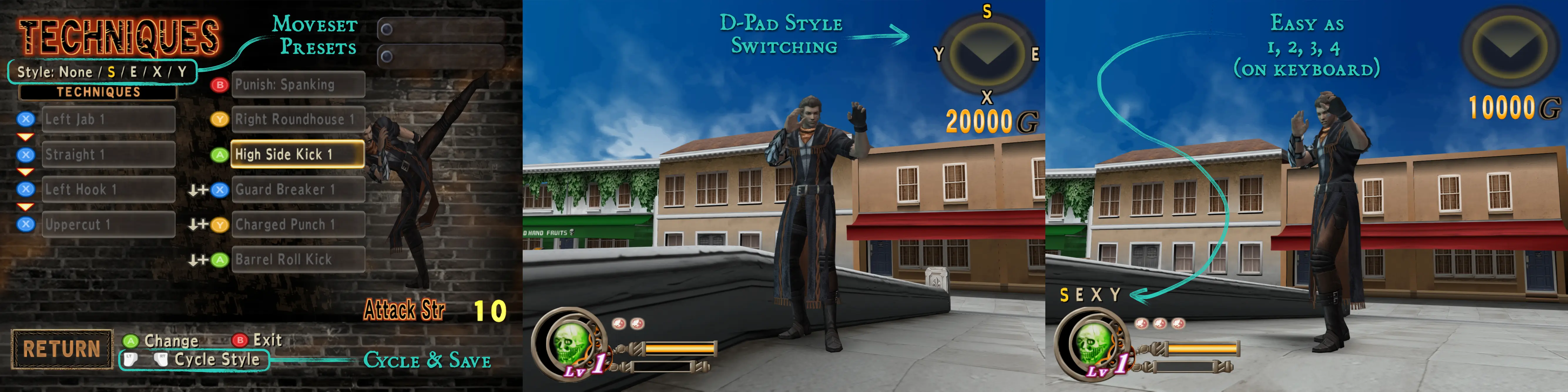
Set up Moveset Presets in the Techniques screen, switch with the d-pad in gameplay. Rearmed+
For the Buck Breakers out there, you can also pick your pummel per style. Rearmed+
I'm Into BDSM: Bindings & Device Scheme Mappings!
Customizable controls with button prompts for Xbox, PlayStation, Nintendo, Steam, and keyboard and mouse (for the freaks who want to play God Hand at their desks).

Just Liek... Play Game!
Too many choices? How about just one? Pick a preset and get to playing right away.
NOTE: Everything that changes Clover's original gameplay is opt-in, so no bitchin!
The Presets
| Preset | Tagline | What you get |
|---|---|---|
| Classic | Clover's Vanilla Thrilla | Cinetastic 30FPS, 4:3, Classic Camera & Controls, as handed by God. |
| Remastered | Spitshine Edition | Smooth Sexy Silky 60FPS, Fills your screen - edge to edge, Modern Controls, etc. |
| Rearmed | That's the Spice! | Adds: New Cam Angle, Roulette Refinements, Moveset Presets, Buck Breaker, Busta-Chan Jive, and Misqué & Risqué. |
| Sleazy Mode | ...is Now Selectable! For the girl who just wants to have fun. | Adds: Cunt Punter, Tension - Off the Cuff, and Wild Curry Funk. |
Each one includes everything before it. Change any option a preset sets and you're on Custom. The tags below say
which preset first switches a feature on; Toggle means none does, it's yours to flip.
Everything Else
Controls
- Camera & FOV presets (As on the PS2, Wider, Widest, Action) or your own field of view, distance and tilt; enemies conduct themselves accordingly at any setting.
Remastered+ - See Through: walls between you and the action go see-through instead of vanishing.
Rearmed+ - Menu controls - Western, Japanese or Classic: confirm on the button you're used to.
- (Nearly) every button rebindable, with a full keyboard & mouse layout and save states (F5 / F9; Select / Select + Start).
Display & Graphics
- Fullscreen (borderless), maximized or windowed; any aspect ratio from 4:3 to 32:9.
- Internal resolution up to 8x, Vulkan by default with Direct3D 11 as the fallback.
- Texture filtering from the PS2's own smoothing to Dangerously Crunchy, plus trilinear, anisotropic, FXAA, brightness and depth of field.
- HD texture packs in PCSX2's format, with the game's own transparency kept intact. (K recommends this texture pack, and no, Santins, you didn't fix the transparency issues, but no worries, GHR fixed 'em for you)
Interface
- The HUD out at the screen edges or where the PS2 had it.
Remastered+ - Sway Bar: a stun gauge for enemies and bosses.
Rearmed+ - Button prompts that follow your controller (Xelu's prompt art; PlayStation pads keep the game's own).
Gameplay
- Click-Stick Dash: press and hold the stick (or bind) to dash.
Remastered+ - Intro Skipper: skip developer intros straight to the title screen.
Remastered+ - Hard-On: Hard difficulty from the start, no clear needed.
Remastered+ - Target Select: switch Roulette targets with the right stick or the d-pad.
Rearmed+ - Dry Spinning: open the Roulette with no balls to your name.
Rearmed+ - Busta-Chan Jive: sprint attacks slide under and vault over railings and through windows.
Rearmed+ - Misqué & Risqué: better shop and casino poses, and more.
Rearmed+ - Cunt Punter: Ball Buster works on women.
Sleazy Mode - Tension is Placable: leash the God Hand early and keep what's left; Off the Cuff unleashes it with any Tension. `Sleazy Mode`
- Wild Curry Funk: pick up, carry and throw more objects. Mostly chairs.
Sleazy Mode - Roulette Timer: double time to pick your move.
Toggle
Sound
- Separate Music, Sound Effects and Voices volumes; Roulette Ratchet clicks as you flick.
Remastered+
The Launcher
- Install and check your disc, every option in one place, presets, Add to Steam (a library entry with art), and updates in place.
Muscleanious Improvements
The following are default features of GHR you'll have to deal with cause I ain't cluttering the options any more than they already are:
- Spin Me Right Round: You can rotate Gene on the Techniques screen with the Right Stick.
- Roulette Finesse: You can scroll the Roulette with the d-pad, up and down too.
- Don't Not Fix What's Not Broken't: A bunch of base game bugs and minor issues were fixed.
Controls
Defaults for new installs. Everything is rebindable in Options > Controls in game and in the launcher.
| Action | Controller | Keyboard & mouse |
|---|---|---|
| Move | Left stick | W A S D |
| Dodge | Right stick | Shift + W A S D |
| Combo | X / ▢ | Left click |
| Assigned move | Y / △ | Right click |
| Assigned move | A / ✕ | Space |
| Action (talk, pick up, open) | B / ○ | E |
| 180° turn | LB / L1 | Q |
| Roulette | RB / R1 | R |
| Taunt | LT / L2 | F |
| Unleash the God Hand | RT / R2 | G |
| Brawl mode / freecam (Modern: Toggle) | Right stick click | Middle click |
| Brawl mode while held, double-tap for the 180° turn (Modern: Hold) | LB / L1 | — |
| Dash (Click-Stick Dash on the controller) | Left stick click | Double-tap a direction |
| Styles S / E / X / Y (Moveset Presets) | D-pad up / right / down / left | 1 2 3 4 |
| Pause | Start / Options | Esc |
In menus the keyboard works as you'd expect: arrows or WASD to move, Enter / Space to confirm, Esc / Backspace to go back, Q / E to switch tabs. F2 opens the developer menu (live camera, poses, debug switches); F3 the FPS counter; F11 fullscreen.
Options
Every option, with the same help text you'll see in the launcher and in game.
Controls
Camera
- Camera & FOV: How far you see to the side. Works with Aspect Ratio; enemies adapt. As on the PS2 / Wider / Widest / Action / Custom (F2 while playing tunes it live)
Remastered+- Field of View: How much the camera shows, both ways, outside fights. 100%: as on the PS2 / 110% / 120% / 130% / 140% / 150%
- Field of View in Fights: The same while the game's battle camera is on (Gene has an enemy targeted). 100% frames fights as on the PS2. 100%: as on the PS2 / 110% / 120% / 130% / 140% / 150%
- Camera Distance: At a wider field of view, how far back the camera stays. 0% keeps Gene the size he is at 100%; 100% shows more round him. 0%: Gene keeps his size / 50%: halfway out / 100%: wider view looks zoomed out
- Camera Tilt: At a wider field of view, the camera also rises and looks down at Gene by this much: more of the floor ahead, less sky. None / 5 degrees / 10 degrees / 15 degrees
- Steady Idle Cam: Whether the camera bobs with Gene. (F2 > Camera switches it while playing)
- See Through: Instead of removing walls, the camera sees through them around Gene and enemies. (F2 > Camera sizes it while playing)
Rearmed+
Controller
- Vibration: Controller rumble. Girls know what it's for.
- Left Stick Deadzone: How far the left stick must move before it counts. Raise it if Gene walks on his own. 0% to 50%
- Right Stick Deadzone: How far the right stick must move before it counts. Raise it if the camera drifts or Gene dodges on his own. 0% to 50%
- Menu Controls: Western: bottom button confirms; right cancels. Japanese: right button confirms; bottom cancels. Western / Japanese / Classic
Display
Game Window
- Display Mode: Window, max window, or borderless fullscreen. You can also use F11, if you're into that. Fullscreen (Borderless) / Maximized Window / Window
- Window Size: The window's size when it opens (not maximized or fullscreen). Automatic (follows internal resolution) / PS2 size
- Aspect Ratio: Screen width from 4:3 to wider than yo momma! 4:3 (the PS2's) / 16:9 / 16:10 / 21:9 / 32:9 / Match the screen
Remastered+ - VSync: On: no screen tearing. Off: for G-Sync | FreeSync. The rest get torn up. On / Off
Graphics
Renderer
- Graphics API: Default: Vulkan | Fallback: DX11 Vulkan / Direct3D 11
- Internal Resolution: 1x: 448p | 2x: 896p | 3x: 1344p | 4x: 1792p 1x native (512x448) / 2x 1024x896 / 3x 1536x1344 / 4x 2048x1792 / 5x 2560x2240 / 6x 3072x2688 / 8x 4096x3584
Textures
- Texture Filtering: PS2: the game's original texture smoothing. Crunchy: unfiltered 3D. | Dangerously Crunchy: the UI too. PS2 (Bilinear) / Crunchy (Unfiltered 3D) / Dangerously Crunchy (3D+UI)
- Trilinear Filtering: PS2: the game's original texture smoothing. Forced: textures blend smoothly into the distance. PS2 / Forced
- Anisotropic Filtering: Keeps floors and walls sharp at a slant. Costs next to nothing. Max it out. Off / 2x / 4x / 8x / 16x
Effects
- Anti-Aliasing: FXAA smooths jagged edges. Makes the picture a little softer. Like you. FXAA / Off
- Brightness: 100% is the game as it was. Turn it up if you can't see who's kicking you. 50% to 150%
- Post Effects: The blur effects (depth of field, heat haze) are drawn from small copies of the frame. PS2 resolution keeps them aligned but grainy at high internal resolutions; Upscaled draws them sharp. PS2 resolution (PCSX2's fix) / Upscaled / No fix
- Depth of Field: Blur in the distance. It can't hurt you. (F2 switches it while playing)
Interface
HUD
- HUD Layout: Where the health bar, radar, and the rest of the in-game HUD go on a wide screen. Wider than 16:9 keeps them at the edges of a 16:9 area. 16:9: HUD at the screen edges / 4:3: HUD where the PS2 had it (F7 switches it while playing)
Remastered+ - Enemy Life Gauge: Select whether to display an enemy's life gauge.
- Sway Bar: Stun gauge for enemies and bosses. Fills up till they're stunned, then drains.
Rearmed+
Menus & Prompts
- Menu Width: Menus and screens (pause, options, roulette setup) are drawn for 4:3: shown 4:3 with side bars, or stretched to the screen. 4:3: as on the PS2, with side bars / Stretched to the screen
- Button Prompts: Controller button hint style. This choice reflects your value as a person. Automatic (follows your controller) / Xbox / PlayStation (the game's own) / Nintendo Switch / Steam
Overlays
- FPS Counter: Framerate and game speed statistics.
Gameplay
Speed & Feed
- 60 FPS: Play at a smooth sexy silky 60FPS. Leave OFF if you want the OG experience.
Remastered+
Move & Groove
- Control Style: Pad: Classic: PS2's OG fixed facing brawling. Modern (rebindable): Toggle Brawl (R3) | Hold to Brawl (L1). Classic / Modern: Toggle / Modern: Hold (F2 > Controls changes it while playing)
Remastered+- Modern: Auto: Brawling starts when dealing or taking damage. Press the stick (rebindable) to go back to freecam.
- Modern: Hold Mode: Hold to Brawl: hold L1 to brawl, double-tap it to turn. Hold to Cam: hold L1 for freecam, tap it to turn. Hold to Brawl / Hold to Cam
Remastered+ - Modern: Auto: Brawling starts when dealing or taking damage. It stops once no enemy is near.
Remastered+
- Control Style: KBM: Keyboard & mouse. Classic: PS2's OG brawling. Modern: mouse freecam. Classic / Modern: Toggle
Remastered+- Modern: Auto: Brawling starts when dealing or taking damage. Middle-click (rebindable) to go back to freecam.
- Modern: Mouse Look: Freak... (F2 > Controls sets the sensitivity)
- Click-Stick Dash: Press and hold the stick to dash. Rebindable in Controls.
Remastered+ - Busta-Chan Jive: Sprint attacks go through 99% of obstacles. Slide right through, swooce right over. (F2 > Debug > Stage collision marks them)
Rearmed+
Style Shuffle
- Moveset Presets: Configure up to 4 styles; switch with the d-pad. Letters around the radar show your sweet sexy styles.
Rearmed+- Signal Style Switch: Gene calls out each style as you switch to it, and his God Hand flashes.
Rearmed+
- Signal Style Switch: Gene calls out each style as you switch to it, and his God Hand flashes.
- Buck Breaker: Pick how to punish stunned enemies. Works with Moveset Presets. Some restrictions apply.
Rearmed+
Fightin' Excitement
- Cunt Punter: Ball Buster works on women. Name changes on target. This also works IRL, though your mileage may vary.
Sleazy Mode - Tension is Placable: After unleashing the God Hand, pull the trigger again to leash it early and keep your remaining Tension.
Sleazy Mode- Off the Cuff: Unleash the God Hand with any Tension, not just full. Gene is invulnerable only when unleashing at full Tension.
Sleazy Mode
- Off the Cuff: Unleash the God Hand with any Tension, not just full. Gene is invulnerable only when unleashing at full Tension.
- Wild Curry Funk: Carry and throw more types of objects. Mostly chairs. If it's not obvious, this makes the game easier.
Sleazy Mode
Roulette Charrette
- Roulette Timer: Time limit to select a move after opening the Roulette. Techniques fire off automatically at the end of the timer. Normal / Double time
- Target Select: Switch Roulette targets with the right stick and the d-pad. HINT: You can also use the d-pad to cycle Roulette moves.
Rearmed+ - Dry Spinning: You can open the Roulette even when you don't have balls. HINT: You can use the Roulette camera for targeting.
Rearmed+
Skip Poker
- Intro Skipper: Start at the main menu: no Capcom and Clover logos and no "Press Start" screen.
Remastered+ - Hard-On: Hard can be picked from the start instead of after a clear. Your save is not changed.
Remastered+
Misqué & Risqué
- Better Shop & Casino Poses: Give the shop and casino people better poses. Not sure what else you were expecting... (F2 > NPCs sets the poses)
Rearmed+ - Cash: Recommended: 115% 100% to 130%
Rearmed+ - Money: Recommended: 115% 85% to 130%
Rearmed+
Sound
Sound
- Mode: Select between monaural, stereo, or surround sound. Mono / Stereo / Dolby Pro Logic II
- Roulette Ratchet: When you flick, it clicks.
Remastered+
Volume
- Music: Set stage, boss, menu, and minigame music volume. 0% to 100%
- Sound Effects: Set the volume of ingame sound effects. 0% to 100%
- Voices: Set the volume of ingame voice lines. Cutscene music and voices are one track. 0% to 100%
Mods
Character
- Character: Who you play as. Currently, other characters use Gene's moves and his God Hand.
Texture Packs
- Replacement Textures: HD texture packs in PCSX2's format.
FAQ
Is this legal? GHR ships no game assets or disc files. It only runs with a disc image you dumped from your own damn copy.
Which disc? The USA release (SLUS-21503). Others may work; that's the one it's tested with. DISC_HASHES.md has the checksums.
Why is the screen black for a while on the first start? The shaders are being compiled for your GPU. Once. After that it's quick.
Windows SmartScreen is yelling at me. The exe isn't signed (certificates cost money; this is free). More info > Run anyway.
Steam Deck? Linux? Coming. For now it's Windows; Proton may run it, but no promises for now.
Will my PCSX2 texture pack work?
Yes: packs in PCSX2's format (a replacements folder). Put it in textures/SLUS-21503 next to GHR.exe, or point the
launcher's Mods > Texture Packs at it.
Can I bring my PCSX2 saves?
The port keeps its own memory card in memcards\mc0.
Where are my saves?
memcards\mc0 (the game's saves) and states (save states), next to GHR.exe. Updates never touch them.
How do I update? Start the launcher. If a new version is out, press Update. That's it!
I want it at 30 FPS! Switch off 60 FPS in Options > Gameplay, or pick the Classic preset.
Found a Bug?
Open an issue with your version (bottom
right of the launcher), what happened and logs\kamite.log. If something feels off at 60 FPS (too fast, too slow,
an enemy acting weird), the template explains how to record a test case o