God of War PSP Recomp
God of War: Chains of Olympus and God of War: Ghost of Sparta natively on Windows, recompiled from your own PSP disc, with 4K, MSAA, HDR and high frame rates.
- Type: PC port
- Game: God of War: Chains of Olympus, God of War: Ghost of Sparta
- Runs on Windows
- By DrummingBird1
- Latest release v1.4.0, 2026-10-30
- Source: https://github.com/DrummingBird1/gow-psp-recomp
- Website: https://github.com/DrummingBird1/gow-psp-recomp/releases/latest
README
God of War PSP: native PC ports (unofficial)




Play God of War: Chains of Olympus and God of War: Ghost of Sparta natively on Windows, recompiled from your own PSP disc, with 4K, MSAA, HDR and high frame rates.
Unofficial fan project. Not affiliated with or endorsed by Sony Interactive Entertainment or Santa Monica Studio. God of War is a trademark of its owner. No game content is included or downloadable here: you need your own, legally dumped disc image (
.chdor.iso) of the US release (UCUS98653 / UCUS98737). Everything built from it stays on your PC.
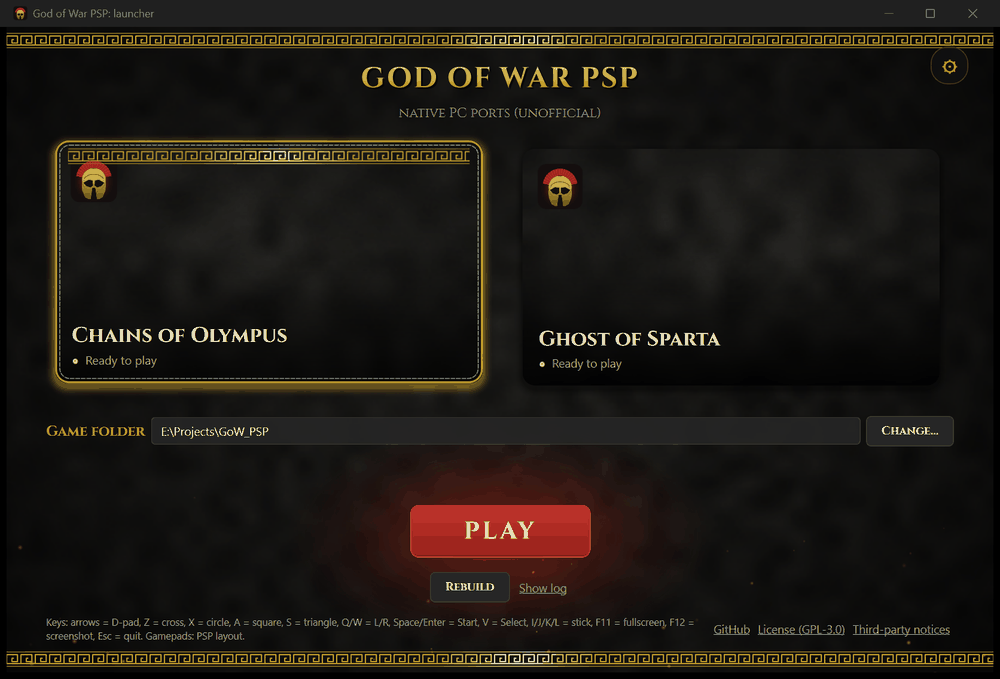
Status: preview (v1.4.0)
- Every level of both games loads and runs (automated tours: phase 11, phase 12).
- Saving and loading work; sound, music and movies play.
- No full playthrough of either game yet, so expect bugs late in a game. Known issues are listed in the phase write-ups, the launcher acceptance test and the changelog.
- Windows only for now (Linux / Steam Deck planned: see the roadmap).
Known issues
- Neither game has had a full playthrough yet: late levels, boss fights and endings may still have bugs.
- Only the US releases (UCUS98653 / UCUS98737) are supported.
- Warping into Ghost of Sparta's
scb_010_climbat spawn point 1 (a developer option) stops after a checkpoint restart; a normal playthrough does not start there (phase 12, bug 2). - Some movies end on a black frame, and some Ghost of Sparta geometry clips: both look the same on a PSP and in PPSSPP.
- The launcher is unsigned, so SmartScreen and some antivirus programs warn about it (FAQ).
Found something else? See Reporting a bug.
Bug reports are very welcome: see Reporting a bug (the log and input files the launcher writes), never game files or screenshots of the game.
Features
- Native executables: every function of the game recompiled to C, no emulator at run time.
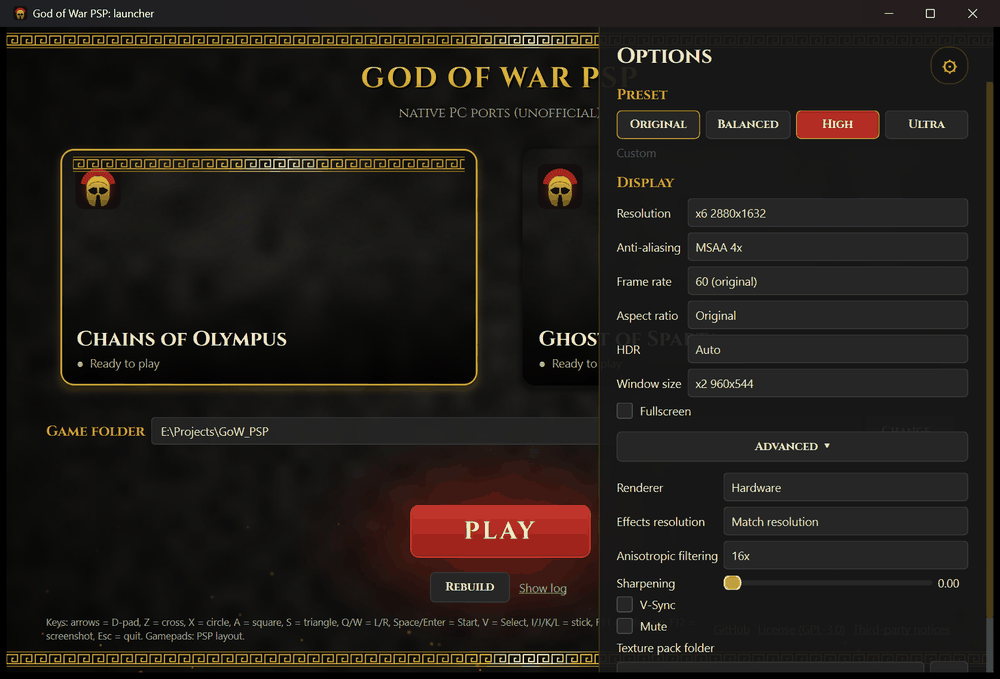
- Internal resolution up to 4K (and beyond), MSAA, anisotropic filtering, FXAA, sharpening.
- HDR10 / scRGB output.
- 60, 120, 144 FPS and more (both games step by elapsed time), V-Sync.
- 21:9, 32:9 and 4:3, and a CRT filter (scanlines).
- Keyboard, mouse buttons and gamepads (PSP layout, the right stick evades), saves, texture dump and replacement packs.
- Ghost of Sparta in English, French or Spanish; separate music and effects volume; gamepad rumble; import of PPSSPP saves; AI-upscaled texture packs made on your PC; the launcher in nine languages (English, German, Spanish, French, Italian, Brazilian Portuguese, Russian, Hebrew and Arabic).
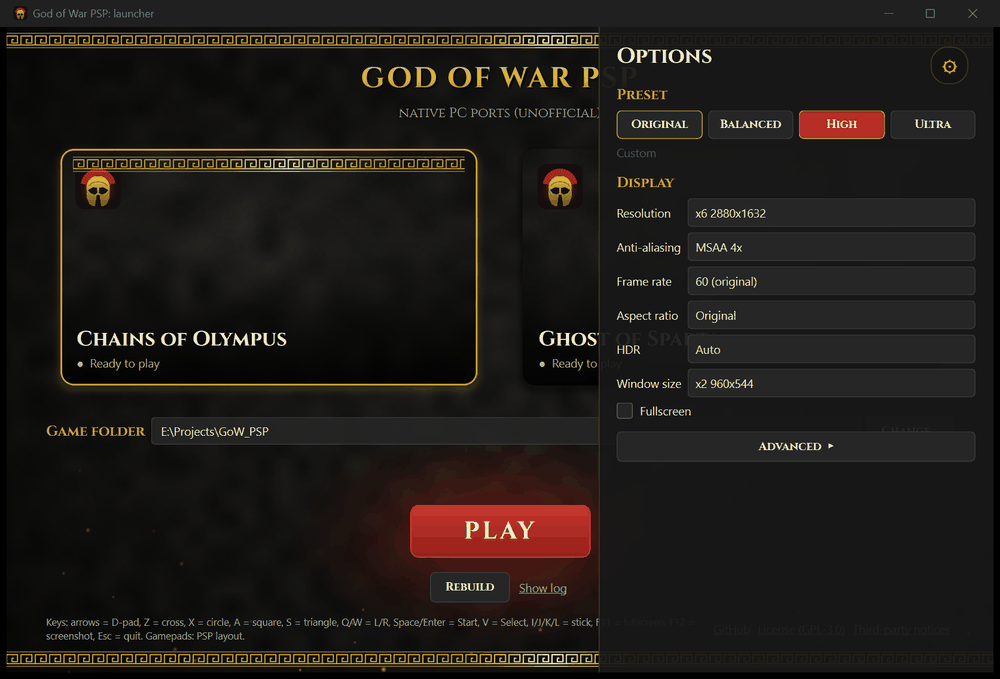
- A one-download launcher: finds your disc images, builds each game, graphics presets, Play.
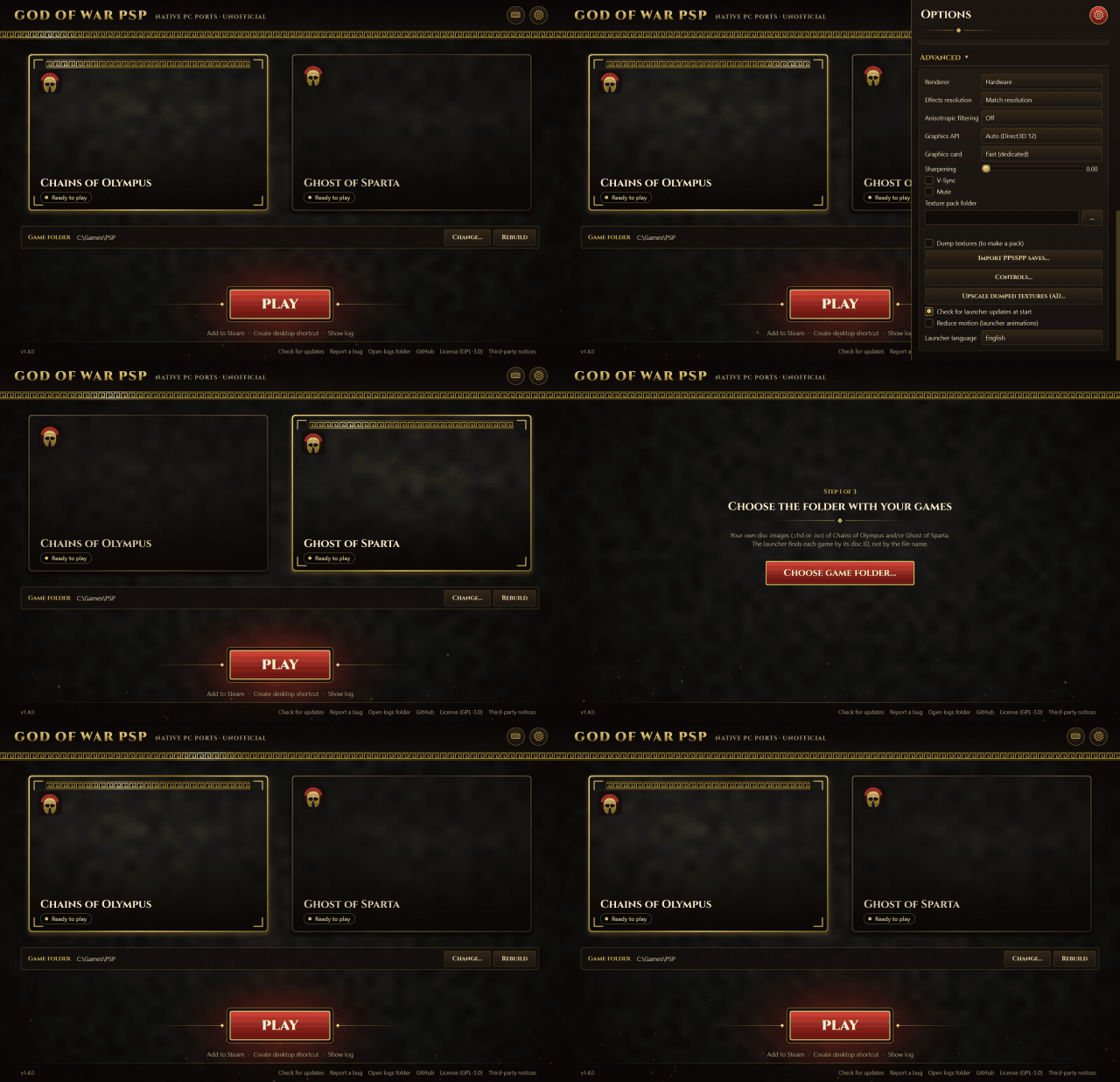
Quick start
You only download one file, the launcher. No Python, no manual setup.
- Download
GoW_PSP_Launcher-v1.4.0.zipfrom the latest release and extract it anywhere: you get oneGoW_PSPfolder withGoWLauncher.exeand a shortREADME.txt. Everything the launcher creates (sources, builds, saves, settings) goes intoGoW_PSP_datanext to the exe, so even a launcher started straight from Downloads adds only that one folder. - Run
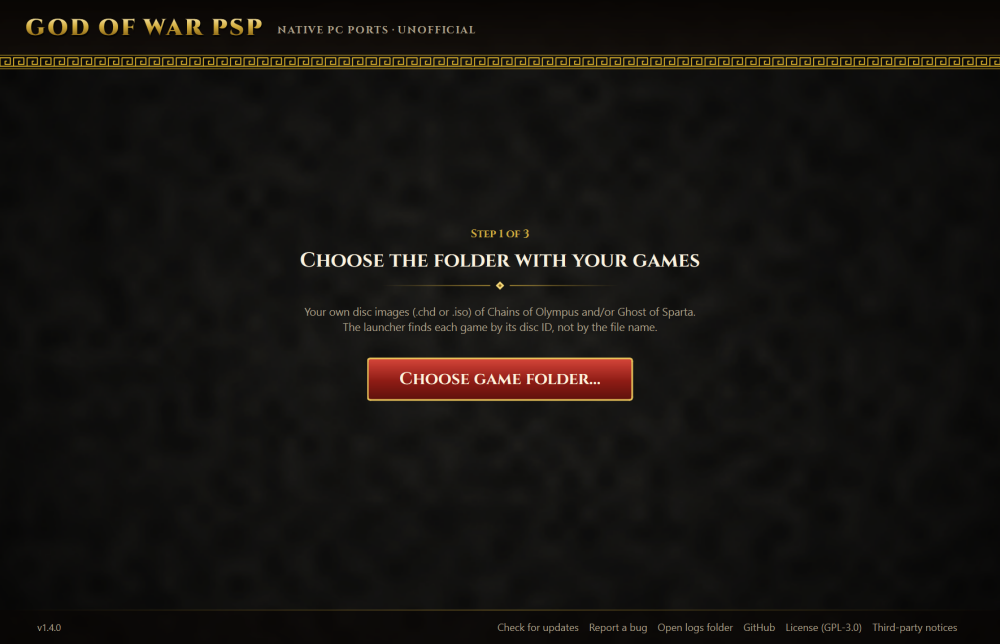
GoWLauncher.exeand choose the folder with your own disc images (.chdor.iso). It detects each game by its disc ID, not by the file name. - Press Build. The first time, the launcher asks to download its portable build tools (about 246 MB, once;
about 550 MB unpacked): llvm-mingw (Clang compiler), CMake and Ninja,
from their official releases, checked against pinned SHA-256 hashes. They stay in
GoW_PSP_data; no Visual Studio, no administrator rights, nothing installed in Windows. - Wait for the one-time build: about 4 minutes for the first game (including the download) and under 3 for the second, on a 20-thread CPU.
- Pick a graphics preset and press Play.
Windows warning?
GoWLauncher.exeis unsigned and built with PyInstaller, so Windows SmartScreen may show "Windows protected your PC" (click More info, then Run anyway), and some antivirus programs flag PyInstaller programs as a false positive. Check that your download is the real one (v1.4.0 SHA-256):
GoW_PSP_Launcher-v1.4.0.zip:a212651f306f214646ab72df9592a05daad70cb2c019074523a0fc24bf51a03eGoW_PSP\GoWLauncher.exe:0a9c4afd8e04d31fa59309a0cd3fb4bda94a8d7fb9ac335de899e28038795474(PowerShell:
Get-FileHash <file>). Each release lists its hashes in the release notes.
The launcher opens no console window. Its command-line options (GoWLauncher.exe --version, --check-update,
--update, --build coo) print in the terminal you start them from (in PowerShell, use
Start-Process -Wait -NoNewWindow .\GoWLauncher.exe --version to wait for it), or else to
GoW_PSP_data\build\launcher_cli.log.
The game starts in fullscreen (F11 or Alt+Enter switches to a window; the launcher's Fullscreen option sets the
default) without a console window. What it prints goes to GoW_PSP_data\build\launcher_coo.log (or
launcher_gos.log), your button presses of that session to launcher_coo_input.txt (or
launcher_gos_input.txt), and each frame's timings to launcher_coo_perf.csv (or launcher_gos_perf.csv). The next
Play overwrites them, so copy them right after the bug happens.
Reporting a bug
Open an issue, say which level and what happens, and
attach those two files from GoW_PSP_data\build\. They hold only text: the game's log and your key presses.
Mention whether you started from a new game or a save. Never attach game files, saves or screenshots of the game.
Problems? See Troubleshooting and FAQ: SmartScreen, where files are, updating, build failures, stutter.
Why build on your PC? The game code is generated from your own disc, so it can't be distributed; the launcher compiles it locally, once.
 |  |
Controls
| Keyboard | PSP | Gamepad |
|---|---|---|
| Arrows | D-pad | D-pad |
| Z / X / A / S | Cross / Circle / Square / Triangle | A / B / X / Y (PSP layout) |
| Q / W | L / R | shoulders or triggers |
| Space or Enter | Start | Start |
| V | Select | Back |
| I / J / K / L | analog stick | left stick |
| O / U (hold) | spin the analog stick clockwise / counter-clockwise, for the "rotate the stick" prompts | rotate the left stick |
| C (hold) | turbo: the face buttons and L/R you hold press and release 10 times a second, for the "press repeatedly" prompts | right stick click |
| evade (L + R + stick) | right stick |
- Skip a movie: Enter, Space, a mouse click, or gamepad Start or Cross. The game goes on to the menu or level as if the movie had ended; the press that skipped isn't passed on to the game.
- Quit: Alt+F4 or the window's close button quit at once. Esc asks "Quit the game?" with the game paused: Enter or gamepad Cross = yes, Esc or gamepad Circle = no. On a gamepad, hold Back + Start for 2 seconds. The game saves only at its own save points, so quitting loses progress since the last save. The launcher comes back when the game exits.
- F11 or Alt+Enter: fullscreen / window. F12: screenshot. F3: frame rate in the corner. F2: the buttons pressed, bottom left.
- Change them with the launcher's Controls… button (Options > Advanced): keys, mouse buttons and gamepad buttons. A key you give to a button leaves the button that had it, so WASD can move without also blocking (W is R by default). The right stick's evade can be turned off there.
While the game runs, the launcher minimizes itself and stops its animation, so it doesn't take time from the game.
Build from source
Install Python 3.15. For the compiler, either let the launcher download its portable toolchain (llvm-mingw, CMake,
Ninja; GOW_TOOLCHAIN=portable, or python tools/check_portable_toolchain.py), or install CMake and Visual Studio
2022 or later (or its Build Tools) with the C++ workload; run from source, the launcher uses Visual Studio when it
finds it (GOW_TOOLCHAIN=auto, the default; msvc forces it). Both produce identical software-renderer output.
Then:
py -3 -m venv .venv
.venv/Scripts/python -m pip install -r tools/requirements-dev.txt
.venv/Scripts/python tools/launcher.pyw            # the launcher UI
.venv/Scripts/python tools/launcher.pyw --build coo # or build from the command line (coo / gos)
.venv/Scripts/python tools/build_launcher.py        # GoWLauncher.exe (PyInstaller)
Details: recomp/README.md. The research setup (Ghidra, PPSSPP references) is under
Research and development.
How it works
This is a static recompilation, not an emulator. The game's MIPS (Allegrex) code is decrypted from your disc and
every function is translated ahead of time into C (recomp/), which is compiled with the C runtime (runtime/) into a
normal Windows program. The runtime replaces the PSP's operating system and hardware: threads and kernel objects,
the file system (reading straight from your .chd / .iso), the VFPU, the GE graphics chip (a software renderer and
a hardware renderer on SDL3 GPU / Direct3D 12 / Vulkan), sound, ATRAC3+, movies and saves. Because the GE output is
redrawn on the PC's GPU, it can render at any resolution and frame rate.
Research and development
Layout
| Path | Contents |
|---|---|
docs/ | Player FAQ, feasibility report and phase write-ups (index) |
re/scripts/ | Ghidra scripts (analysis export, metrics, import naming, function seeding) and build_nid_db.mjs |
re/out/ | Analysis results: metrics, function lists, imports, NID table (no game code) |
recomp/ | Recompiler (Python): loader/relocator, decoder, C emitter, driver, differential tests |
runtime/ | C runtime the generated code links against |
CMakeLists.txt | Builds gow_rt_<GAME> from build/gen/<GAME> |
cmake/ | Pinned file lists (SHA-256) of third-party sources CMake downloads, e.g. OpenH264's decoder |
tools/ | launcher.pyw (build and play), play/replay scripts, level tour, frame checks, documentation helpers |
Local only (ignored): *.chd, re/dumps/, re/ghidra/, build/, .venv/, re/ppsspp-*, media/ (screenshots and recordings; see docs/progress.md).
Setup on a new machine
- Tools: Ghidra 12.1.3 + ghidra-allegrex v21.4, JDK 21 and Python 3.15 for the analysis. For compiling, the portable
toolchain is enough (llvm-mingw, CMake, Ninja:
python tools/check_portable_toolchain.pydownloads it, orGOW_TOOLCHAIN=portable); Visual Studio 2022+ with the C++ workload and CMake also works. Git is only needed to clone this repository: the build downloads its third-party sources as pinned archives. - Decrypted EBOOT: the launcher does this for you (into
build/eboot/). By hand, buildgow_disc(cmake -S . -B build/cmake_tools -DGOW_TOOLS_ONLY=ONthencmake --build build/cmake_tools --config Release) and runbuild/cmake_tools/Release/gow_disc.exe --disc <your disc>.chd --decrypt-eboot re/dumps/UCUS98653_EBOOT.BIN(UCUS98737_EBOOT.BINfor Ghost of Sparta). A PPSSPP dump (DumpFileTypes = 3) gives the same bytes and is no longer needed. - Python environment for the tests:
py -3 -m venv .venvthen.venv/Scripts/python -m pip install unicorn. - PPSSPP reference sources used by
build_nid_db.mjs(optional, re-fetchable):Core/HLE/*.cpp(and, for the movies,Core/HW/MediaEngine.*andCore/HW/MpegDemux.*) intore/ppsspp-hle/,Core/MIPS/MIPSInt.cppandMIPSTables.cppintore/ppsspp-mips/, and the GE references (GPU/Software/*,GPU/GPUState.*,GPU/ge_constants.h,GPU/Common/VertexDecoderCommon.*,GPU/Common/TextureDecoder.*,GPU/GPUCommon*.cpp) intore/ppsspp-gpu/, and the audio references (Core/HW/SasAudio.*,Core/HW/SasReverb.*,Core/HW/Atrac3Standalone.*,Core/HLE/AtracCtx2.h,Core/Util/AtracTrack.*,ext/at3_standalone/) intore/ppsspp-audio/(tag v1.20.4). - For progress screenshots and recordings:
.venv/Scripts/python.exe -m pip install pillow numpy, and ffmpeg.
See recomp/README.md for the recompile/build/test commands and
docs/ for results.
Contributing
Questions, ideas and help: Discussions. Bugs:
Issues. Contributions are welcome: see CONTRIBUTING.md. Never attach or commit game files. Releases
are numbered vMAJOR.MINOR.PATCH, roughly following semantic versioning, and are listed in CHANGELOG.md.
Credits
- PPSSPP: the reference for the PSP's hardware and HLE; parts of it are ported in the runtime
(GPL-2.0-or-later), and its
at3_standalonedecoder and PrxDecrypter are used. - libkirk (PSP crypto), libchdr, SDL3, OpenH264.
- Cinzel font (SIL Open Font License).
- Qt for Python / PySide6 (LGPL-3.0, linked dynamically) for the launcher.
- The icon is original art (
tools/make_icon.py).
License
GPL-3.0-or-later (see LICENSE). CMake downloads the third-party sources at configure time (SDL3, libchdr,
OpenH264, PPSSPP's at3_standalone and libkirk) with pinned SHA-256s; they keep their own licenses and are not part
of this repository. The launcher ships its third-party notices (tools/launcher_assets/THIRD_PARTY_NOTICES.txt).