Gran Turismo 2 PC, VR & Browser
Gran Turismo 2 PC, VR & Browser is a native C++ port of Gran Turismo 2 with desktop and VR support, and a WebAssembly browser version.
- Type: PC port
- Game: Gran Turismo 2
- Runs on Windows
- By Gran Turismo 2 PC & VR contributors
- Source: https://github.com/dubrovskiy-yevhen-stakelogic/gt-2-pc
- Website: https://discord.gg/G5DdNQ9fD
README
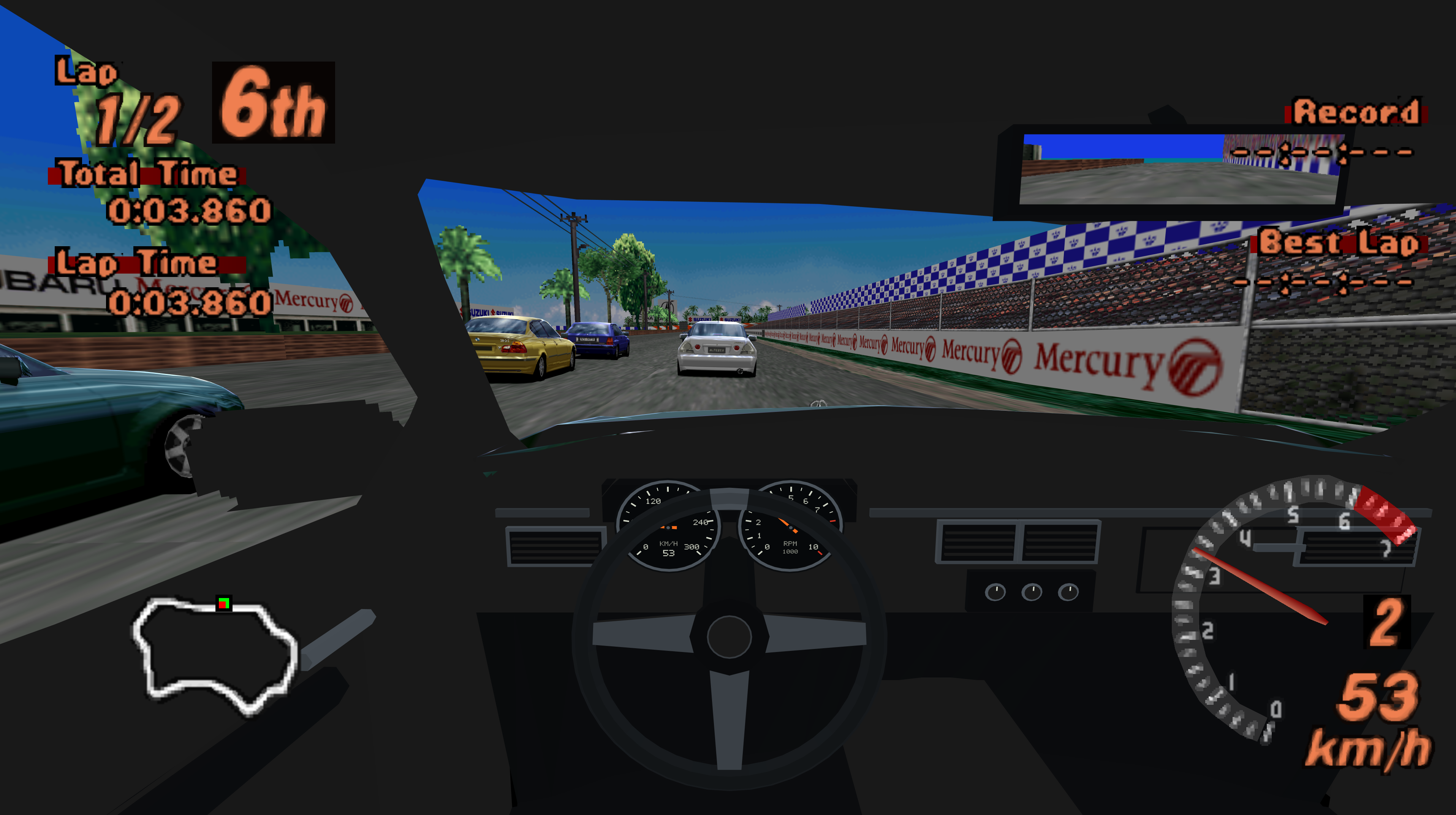
Gran Turismo 2 PC, VR & Browser
A native C++ port with Arcade and Simulation, cockpit driving, desktop and VR support. The browser compiles the same game code to WebAssembly and renders with WebGL2. Gameplay fixes belong to the shared C++ code and reach each platform when it is rebuilt.
Play the browser version — select your own BIN disc image to start.
Download the current complete release: GT2-0.9.0.zip. It contains the common
source, all platform installation/build scripts, precompiled Windows tools, a signed Quest APK, and a ready-to-deploy web/
folder. You do not need an older release for VR, macOS or Steam Deck.
| Platform | Start here | Where the game runs |
|---|---|---|
| Windows desktop | INSTALL-PC.bat, then PLAY.bat in the installed folder | Windows PC |
| Windows PCVR / OpenXR | INSTALL-PCVR.bat, then PLAY-PCVR-META.bat, PLAY-PCVR-STEAMVR.bat or PLAY-PCVR-VD.bat | PC with a connected headset |
| Quest standalone | INSTALL-QUEST.bat; see Quest installation | On the headset |
| macOS | INSTALL-MACOS.command | Mac, flat screen |
| Steam Deck / desktop Linux | INSTALL-STEAMDECK.sh | Linux, flat screen |
| Browser | Serve web/, open index.html over HTTP(S), select your BIN and press Start | Browser, flat screen |
Windows and Quest installers use the compiled files under native/ and prepare
your local disc data. Mac and Steam Deck installers build from the included source.
The browser files are already compiled. This is one release with different
platform entry points. Native applications retain their platform-specific VR,
controller and graphics features; the browser runs in flat-screen mode.
Supply your own supported disc images. Game data, BIOS and saves are not included. The screenshots illustrate gameplay. Release history is in CHANGELOG.md; the feature list below describes the current project.
Features
-
A fitted cockpit for live single-player Driver view, with moving steering wheel and hands, speed/RPM needles, seat adjustments and a central rear-view mirror. Replays and split-screen retain their existing views. See cockpit controls.
-
Native PC/Quest startup and a saved disc preference. Arcade and Simulation share graphics, HUD and control preferences while keeping separate memory cards. Desktop settings include HD media, intro visibility, all HUD switches, a profiler, gamepad bindings, DualSense pedals and both Arcade/Simulation cheats.
-
Windows PCVR through OpenXR, with theatre menus/movies, stereo races, tracked head movement and Touch controls. See PCVR setup.
-
USB save transfer in both directions between PC and Quest, with card validation, backups and verified copying. Desktop and PCVR share PC saves. See save transfer.
-
Arcade and Simulation discs, with a startup disc picker on PC and Quest, shared preferences and separate saves for each mode.
-
Arcade races, rally/time trials, opponent AI, ghost/replay sessions; Simulation career, licences, dealerships, garage, tuning and events.
-
Original fixed-step vehicle simulation, animated steering/suspension/wheels, car reflections, track scenery, particles and night lighting.
-
Native audio: engine, tyres, road effects, music and movies. Race pause stops timers and the entire race audio mixer. VR/system suspension does not advance the race.
-
Disc publisher/warning screens and Arcade intro, course previews and ending movies; button skipping. Optional playback of a locally prepared PlayStation startup; BIOS and captured startup media are not bundled or required to play.
-
Saved graphics and control settings, graphics overlay, configurable draw distance including the entire course and distant scenery, MSAA and texture filtering.
-
Original-resolution assets with higher-resolution rendering. PC supports fixed 720p, 1080p, 1440p and 4K, or 50–200% of window size; configurable FPS cap/VSync and interpolated presentation. Physics stays at 30 Hz.
-
Keyboard, XInput controllers and native DualSense / DualSense Edge support on PC, over USB or Bluetooth: buttons, sticks, trigger pedals, adjustable vibration and adaptive accelerator/brake resistance. Adaptive effects do not require Steam Input. Touch controllers have vibration, not adaptive triggers.
-
Quest theatre-screen menus/movies and head-tracked stereo driving/replays. The HUD is projected per eye; the cockpit mirror sits on a physical surface inside the cabin.
-
Three VR driving modes on PCVR and Quest: Stick, Virtual wheel and Motion. One/two-handed wheel grabbing with animated hands; all fingers stay closed while holding the wheel. Motion uses wrist rotation around the forearm, with grip-held steering and independent trigger pedals.
-
VR Controls submenu: driving bindings, steering sensitivity/dead zone, hold/toggle wheel grip, selected steering stick/motion hand, wheel position/size and height-only adjustment of the original starting flythrough. VR steering and native replays retain 12-bit precision. Automatic brake-to-reverse is available.
-
VR Graphics submenu: 50–200% eye resolution, available headset refresh rates, MSAA, distance, textures, foveation and vibration. Resolution changes require a restart; other supported settings apply immediately.
-
Saved km/h / mph selection in the VR HUD menu, with km/h as the default on both discs. Saved HUD visibility controls for map, lap/times, records, gauges, turbo, tyres, mirror, countdown, warnings, messages and replay caption.
-
FPS profiler: application FPS, frame time, GPU time, 1% low, peak frame interval, texture-cache coverage and frustum-culling counts.
-
Arcade cheats: unlock all course selections and the car roster as reversible overrides. Simulation VR cheats: gold licences, 99,999,999 credits, event unlocks and a car catalogue for adding cars to the garage. The original 100-car garage limit remains. Career cheat writes are checked and backed up before replacing a save.
-
VR performance features: multiview stereo, both-eye frustum culling, decoded texture caching, staged uploads, direct MSAA rendering to compatible XR images, fixed peripheral foveation and CPU/GPU performance requests.
-
Trees use position-based cylindrical billboards in VR: head rotation alone does not rotate them.
-
Developer tools for car/track export, JSON modifications, captures and reference comparisons. Arbitrary new-track geometry compilation is not implemented.
-
Native macOS support through SDL2 and Vulkan/MoltenVK, with disc import and optional HD media preparation.
-
Steam Deck / Linux support through SDL2 and Vulkan, with a graphical disc importer and Desktop Mode installer.
-
Browser play through WebAssembly/WebGL2, local BIN selection, keyboard/gamepad input, audio, persistent saves and save backup import/export.
-
Desktop render scale from 50% to 200% in 5% steps, plus fixed output resolutions.
-
Automatic brake-to-reverse for keyboard and supported controller bindings: hold Down to stop and then reverse; Up brakes reverse motion before driving forward.
GT4 cars
GT2 and GT4 cars can race together. The optional GT4 pack adds 722 cars to the catalogue and supplies 388 model replacements for existing GT2 entries. That makes 1,110 model mappings; some editions and replacement entries share the same underlying model. Added cars appear in GT4 Showroom in Simulation and the extended Arcade garage. The graphics setting can disable replacements for original GT2 entries while keeping added GT4 cars available.
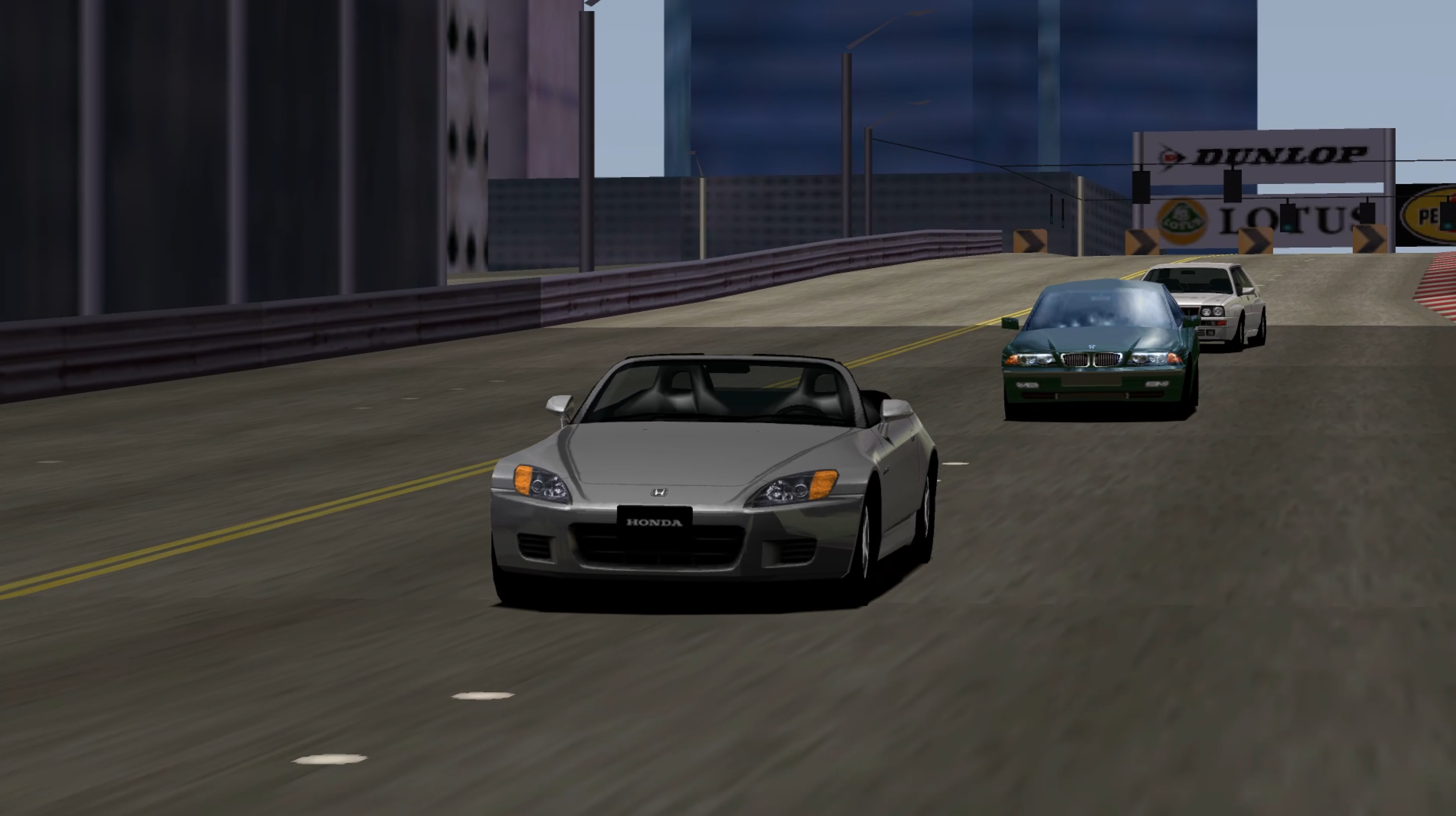
The importer was tested with Gran Turismo 4, USA, version 1.01 (SCUS-97328).
It checks the disc's table-of-contents SHA-256:
9ea0707b27466488fe14f68ebace3af31759efb13559d13584a3c714ef35a43c.
This identifies the tested disc layout; it is not a checksum of the entire ISO.
Other GT4 revisions have not been validated.
Supply your own disc images; converted car assets are not included in the release.
See GT4 import and installation.
Restored original cockpits: 66 GT4 models, used by 89 catalogue entries. These preserve their authored dashboard, seats and controls. The ORIGINAL INTERIOR badge identifies them in car selection. Other cars use a generated cockpit fitted to their body. Generated cockpits may have incorrect fit or clipping. The full catalogue has not been checked manually. Automated geometry and rendering tests do not replace checking every car in motion and in VR.
All 66 cars with restored GT4 cockpits
- AC Cars 427 S/C '66
- Alfa Romeo Spider 1600 Duetto '66
- Alfa Romeo Spider 3.0i V6 24V '01
- Audi R8 Race Car '01
- Auto Union V16 Type C Streamline '37
- BMW V12 LMR Race Car '99
- BMW Z4 '03
- Caterham Seven Fire Blade '02
- Chaparral 2J Race Car '70
- Chevrolet Corvette Convertible (C1) '54
- Chevrolet SSR '03
- Chrysler Prowler '02
- Daihatsu Copen Active Top '02
- Fiat Barchetta Giovane Due '00
- Ford Model T Tourer '15
- Formula Gran Turismo '04
- Honda BEAT '91
- Honda BEAT Version F '92
- Honda BEAT Version Z '93
- Honda S2000 '01
- Honda S2000 '04
- Honda S2000 '99
- Honda S2000 Type V '00
- Honda S2000 Type V '01
- Honda S2000 Type V '03
- Honda S500 '63
- Honda S600 '64
- Honda S800 '66
- Jay Leno Tank Car '03
- Lexus SC430 '01
- Lotus Elan S1 '62
- MG TF160 '03
- MGF '97
- Mazda MX-5 Miata (NA) '89
- Mazda MX-5 Miata 1.8 RS (NB, J) '98
- Mazda MX-5 Miata 1600 NR-A (NB, J) '04
- Mazda MX-5 Miata 1800 RS (NB, J) '00
- Mazda MX-5 Miata 1800 RS (NB, J) '04
- Mazda MX-5 Miata J-Limited (NA, J) '91
- Mazda MX-5 Miata J-Limited II (NA, J) '93
- Mazda MX-5 Miata S-Special Type I (NA, J) '95
- Mazda MX-5 Miata SR-Limited (NA, J) '97
- Mazda MX-5 Miata V-Special Type II (NA, J) '93
- Mazda MX-5 Miata VR-Limited (NA, J) '95
- Mercedes-Benz Benz Patent Motor Wagen '86
- Mercedes-Benz Daimler Motor Carriage '86
- Mercedes-Benz SL 500 (R230) '02
- Mercedes-Benz SL 55 AMG (R230) '02
- Mercedes-Benz SL 600 (R230) '04
- Mercedes-Benz SL 65 AMG (R230) '04
- Mercedes-Benz SLK 230 Kompressor '98
- NIKE One 2022
- Nissan 350Z Roadster (Z33) '03
- Nissan Fairlady 2000 (SR311) '68
- Pescarolo Courage C60/Peugeot Race Car '03
- Peugeot 206cc '01
- PlayStation Pescarolo C60/Judd Race Car '04
- Shelby Cobra 427 '67
- Suzuki GSX-R/4 '01
- TVR Griffith 500 '94
- TVR Tamora '02
- Toyota 7 Race Car '70
- Toyota MR2 Spyder '99
- Toyota MR2 Spyder (6-speed sequential manual transmission) '02
- Toyota Motor Triathlon Race Car '04
- Toyota SERA '92
Cars use the GT2 vehicle simulation with adapted GT4 specifications, not the original GT4 driving engine. Reconstructed cockpit detail depends on what exists in the source model. The native GT4 pack is supported by desktop and VR builds; the browser version does not load it.
Install and play
Extract the complete ZIP into a writable folder. Keep the source and scripts together. Native installation may download build prerequisites; no game images are downloaded. Existing data and saves are preserved by the normal update path.
- Windows / PCVR: run
INSTALL-PC.batorINSTALL-PCVR.bat. Open settings with F10. Select the PLAY launcher for your installed OpenXR runtime; see PCVR setup. - Quest: run
INSTALL-QUEST.bat; see Quest instructions.INSTALL-LINUX.shis the separate Linux-to-Quest installer, not the Steam Deck desktop game installer. - macOS: run
INSTALL-MACOS.command, then the installedGT2.app. See macOS setup. - Steam Deck: switch to Desktop Mode, extract the ZIP, run
INSTALL-STEAMDECK.shand open the installed GT2 shortcut. See Steam Deck setup. - Browser: run
python web/serve-web.py --directory web --port 8080, then openhttp://127.0.0.1:8080/. For deployment, upload the contents ofweb/to a static HTTPS host. Keepindex.html,launcher.js,gt2.jsandgt2.wasmtogether; serve Wasm asapplication/wasm. Opening the HTML throughfile://does not work. See browser build and hosting.
Supported disc revisions and image requirements are listed in European disc support and player installation. Use complete 2352-byte-sector BIN/CUE images. The browser accepts a single full BIN directly; native importers also support the formats documented for their platform. A 2048-byte ISO omits XA audio/video sectors.
Controls and saves
Menus use arrows/D-pad, Enter to select and Space to go back. Driving uses Up to accelerate, Down to brake and reverse after stopping with automatic transmission, Left/Right to steer, Space for the handbrake, C to change camera and Esc to pause. Brake-to-reverse can be disabled in controls settings; manual transmission keeps its explicit reverse binding. Desktop graphics settings offer 5% scale steps. In the browser, Shift+Q opens settings without using the browser's F10 shortcut.
PCVR and Quest offer stick, virtual-wheel and motion steering. Open VR settings with both stick clicks or both grips plus Menu. See Quest controls, cockpit adjustments and wheel setup. Windows supports native DualSense controls and adaptive pedal resistance. Physical wheels use the native Windows input backend; browser force feedback is not available.
Native desktop/PCVR saves share the installed save directory. Use the supplied transfer scripts for PC/Quest save exchange. Browser saves use IndexedDB for the current site origin; Export saves creates a backup and Import saves restores it before starting. Export before clearing browser data or moving to a different address. Disc contents stay local and are never uploaded.
Graphics and optional media
Cockpit seating and mirrors, draw distance, texture filtering, MSAA, HUD visibility and the frame profiler are configurable. VR additionally offers eye resolution, headset refresh selection and supported foveation. Higher settings increase GPU load; use the profiler to choose settings appropriate for the device.
Native installers can prepare HD menus, fonts, HUD and movies from local game assets. See HD media. An optional locally supplied BIOS can prepare the PlayStation startup sequence; a BIOS is not required for normal play. No firmware, extracted models or generated HD asset packs are distributed.
Requirements and limits
Browser play requires WebGL2, an 8192-pixel texture limit and at least 512 array texture layers. The complete BIN is held in memory. One disc is available per page session; reload after graphics-context loss. Browser VR and physical-wheel force feedback are not supported. See browser setup and platform compatibility.
Cross-platform multiplayer and PSVR2 Sense adaptive triggers are planned for a future release.
Build from source
The release contains the same C++ source used by all targets. Platform adapters handle windows, graphics APIs, devices and file storage.
cmd /c build.cmd build_local
ctest --test-dir build_local --output-on-failure
./scripts/build-web.ps1 -Emsdk C:/path/to/emsdk
macOS uses BUILD-MACOS.command; Linux uses BUILD-STEAMDECK.sh or
scripts/build-linux.sh. Android instructions are in QUEST.md.
Browser build instructions and the pinned toolchain are documented in WEB.md.
Run scripts/audit-source.ps1 -FileSystem before packaging a source snapshot.
Retail data, private research notes, credentials and build directories are excluded.
License and credits
Project code is available under the MIT License. Retain its copyright and permission notice when redistributing. Credit: Gran Turismo 2 PC & VR contributors. The license does not grant rights to game data, firmware, trademarks or extracted assets.
- Khronos Group: OpenXR headers/loaders, Apache-2.0; bundled JsonCpp retains its own license.
- VRMADA / UltimateXR: virtual hand meshes, poses and skin texture, MIT.
- Sean Barrett and stb contributors: image decoding/encoding, MIT.
- Hyllian: xBR contour processing, MIT.
- Emscripten and SDL contributors: browser toolchain and platform support; notices are included.
- RetroArch team: libretro API header for optional offline boot capture, MIT.
Optional offline media tools include Real-ESRGAN (BSD-3-Clause) and Beetle PSX libretro (GPL-2.0); these are separate tools and are not linked into the game. See THIRD_PARTY.md for full provenance and license locations.