Guardians of Heroes
Guardians of Heroes is a native Linux and Windows port of Guardian Heroes that supports 60 FPS at any resolution and up to 4 players on one PC.
- Type: PC port
- Game: Guardian Heroes
- Runs on Windows and Linux
- By trev82usa
- Latest release v0.1.0, 2026-11-13
- Source: https://github.com/trev82usa/Guardians-of-Heroes-static-recomp
README
Guardian Heroes Recomp
A native Linux and Windows port of Guardian Heroes (Xbox Live Arcade, Treasure / SEGA, 2011) made by static recompilation with ReXGlue. The game's Xbox 360 PowerPC code is translated to C++ and compiled into a normal program, with Xbox 360 graphics and audio handled by ReXGlue's runtime (Vulkan on Linux, Direct3D 12 on Windows).
No game data is included anywhere in this project. You need your own legally obtained copy of Guardian Heroes.
Not affiliated with or endorsed by SEGA, Treasure or Microsoft.
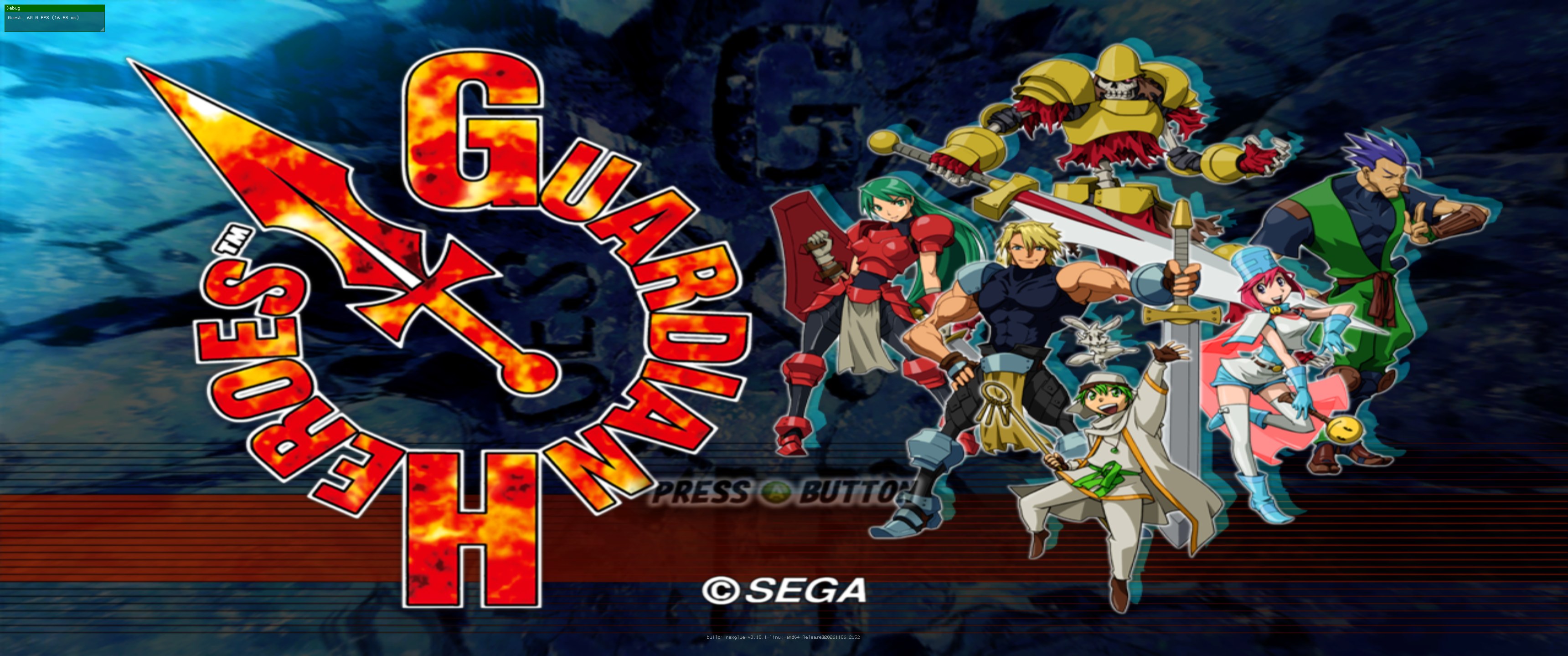
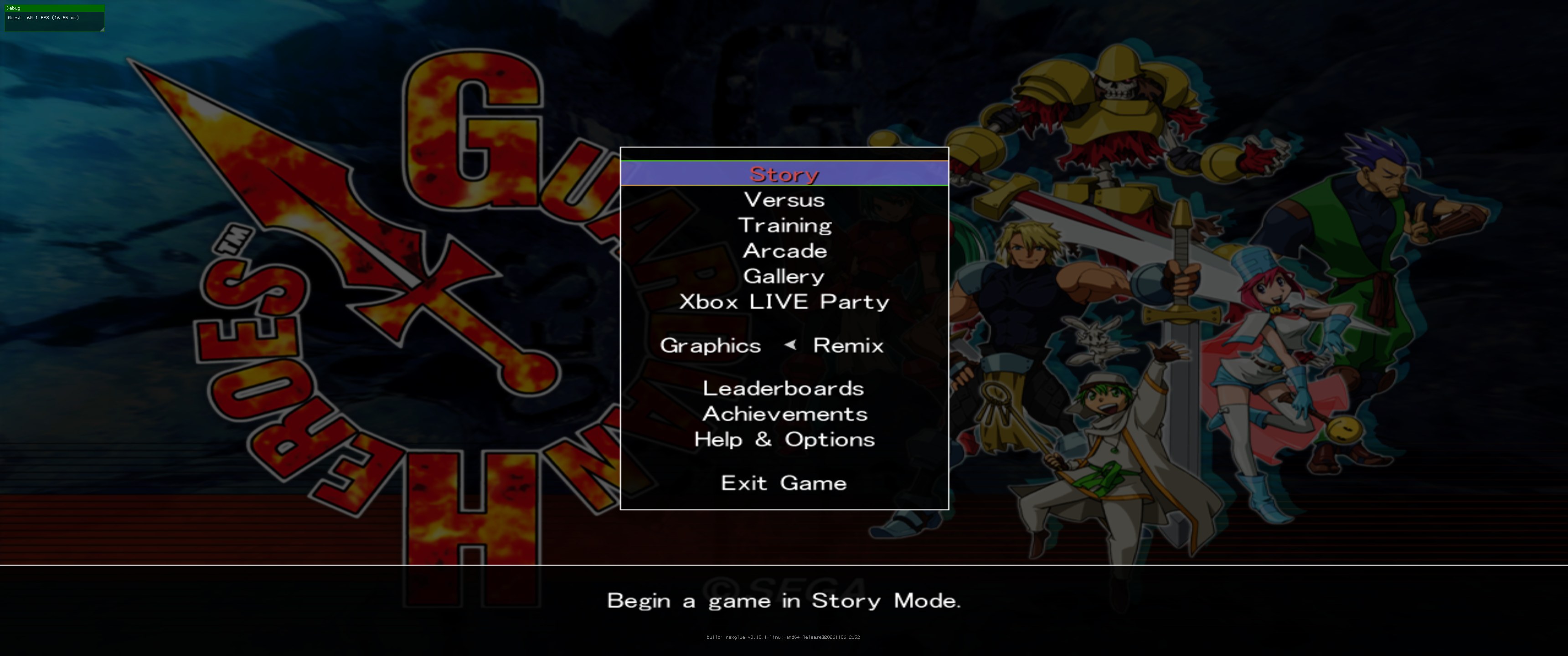
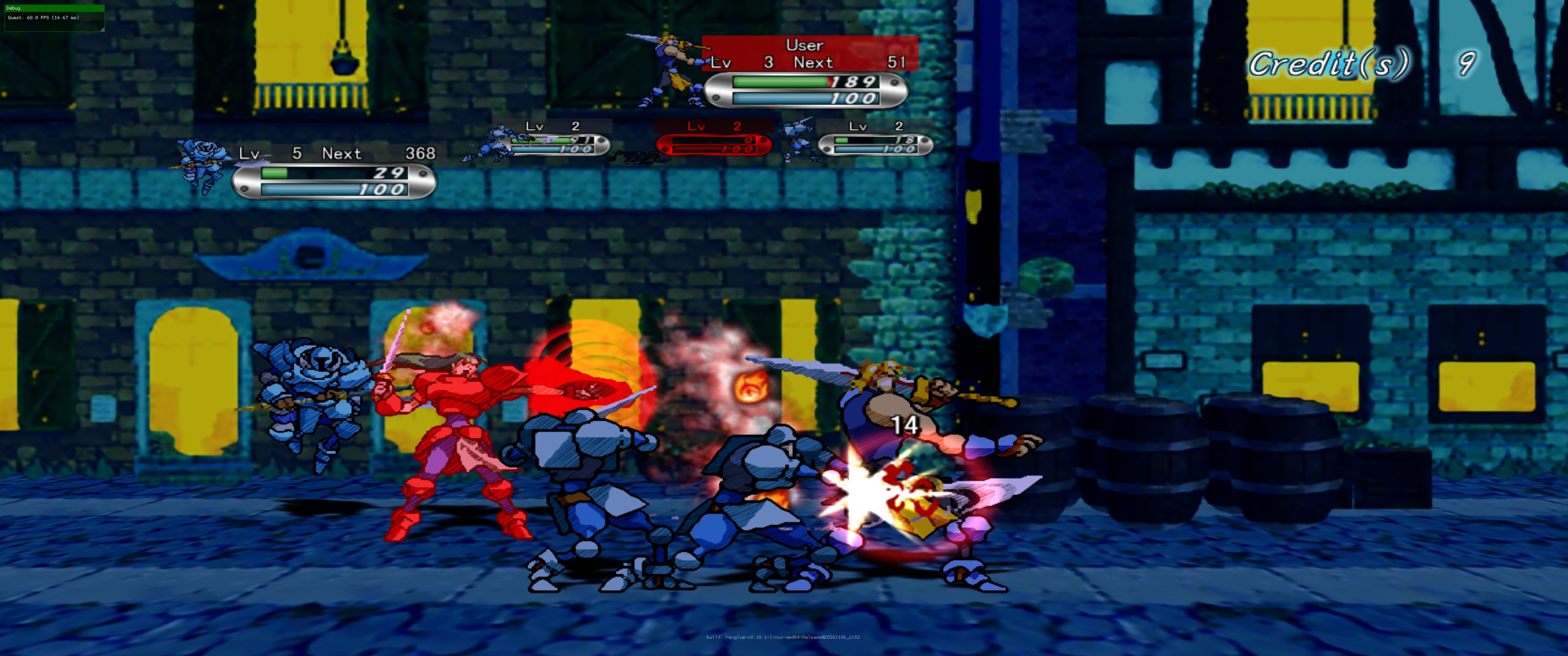
Title screen · main menu · Story mode at 2576×1078, 60 FPS on Linux (RX 6750 XT)
Features
- Native Linux and Windows builds: no emulator to set up, just extract and run.
- Full game, not the Xbox Live Arcade trial: Story, Versus, Training, Arcade, Gallery, and both the Remix and original Saturn graphics and rules.
- 60 FPS at any resolution, with a resolution scale up to 3x (4K).
- Up to 4 players on one PC: each controller is its own player, and the keyboard is player 1.
- In-game settings menu (F1) for graphics, sound, controls and players, with no config file editing needed.
- Controller or keyboard: any Xbox or PlayStation controller, or play on the keyboard.
- FPS overlay (F3) and an optional 60 fps frame limiter.
- System prompts (like "Create new game data?") are answered for you, so no mouse is needed.
- Quits properly from the game's own Exit Game option.
Status
Tested on a Radeon RX 6750 XT on Ubuntu 26.04: boots, menus, Story mode and fights at a locked 60 FPS with audio. The Windows build is made by the same CI and is less tested; reports welcome.
If the game ever closes with Call to invalid or unregistered function at guest address 0x… in
the log, please open an issue with that address (see Notes for developers).
Download and play
- Download the latest release: GuardianHeroes-linux-x64.tar.gz for Linux or GuardianHeroes-windows-x64.zip for Windows, and extract it.
- Copy your Guardian Heroes package file off your Xbox 360 (see Getting your game files).
- Run the installer next to the game: GuardianHeroes-Installer.exe on Windows (nothing else
needed),
./install_game.pyon Linux. Pick the package file and press Install. It fills theassetsfolder and checks the game version; if your copy needs the title update, it tells you and applies it. - Run
./guardianheroes(Linux) orguardianheroes.exe(Windows). If the game files are missing or the wrong version, the game says so in a popup instead of crashing.
Updating: copy the new program and its .so/.dll files over the old ones. Keep your
guardianheroes.toml and assets folder.
Linux
tar xzf GuardianHeroes-linux-x64.tar.gz
cd GuardianHeroes
# copy default.xex, ArcadeInfo.xml and the media folder into assets/
./guardianheroes
Requirements: 64-bit Linux with glibc 2.38 or newer (Ubuntu 24.04+, Fedora 39+, Arch, SteamOS 3.6+, ...), and a Vulkan driver (Mesa RADV for AMD, the NVIDIA driver, or Mesa ANV for Intel). The window uses X11, so on a Wayland desktop XWayland must be available (it is by default).
Windows
Requirements: 64-bit Windows 10/11, a DirectX 12 graphics card and a CPU with SSE4.1. The Visual
C++ runtime DLLs are included; if Windows still says MSVCP140.dll is missing, install the
Microsoft Visual C++ Redistributable (x64).
Settings menu (F1)
Press F1 (or LB + RB + X on a controller, Q + E + X on the keyboard) to open the
settings menu. Press Save to keep changes; they're written to guardianheroes.toml next to the
game. On a controller, LB / RB switch tabs and B closes the menu.
| Tab | Settings |
|---|---|
| Graphics & Sound | Resolution scale (1x 720p / 2x 1440p / 3x 4K), fullscreen, vsync, frame limiter, black bars on wide screens, texture filtering, mute, menu size |
| Controls | Keyboard on/off and smoothing, "all controllers act as player 1", and the full list of controls |
Other keys: F3 shows the FPS overlay, F4 has every advanced engine setting.
Controls
Each controller is its own player, up to 4, as on the console. On a keyboard (player 1):
| Key | Xbox button |
|---|---|
| ← → ↑ ↓ / W A S D | Move (up = jump) |
| Enter / Space / K | A |
| Backspace / L | B |
| X / J | X |
| Y / I | Y |
| Q / E | LB / RB |
| Z / C | LT / RT (lane shifts) |
| Escape / P | Start |
| Tab / R | Back |
How to play: Guardian Heroes plays like a 2D fighting game. Each stage has three lanes (front, middle, back); the triggers and bumpers jump between them to dodge or get round enemies. Up jumps, special moves and magic use fighting-game inputs, and you level up stats between stages. The game shows its own button layout under Help & Options, and Training is the place to try moves.
Troubleshooting
- Stutter or uneven frame pacing (high-refresh screens): turn on Frame limiter in F1 → Graphics & Sound.
- "Your default.xex is version …, which this download doesn't support": please open an issue with that version number. 0.0.0.2 and 0.0.0.3 are supported.
- Want to answer the game's own prompts (save data, device selection) yourself: set
headless = falseinguardianheroes.tomland click the buttons with the mouse. - Crashes:
crash.txtand the newest file in thelogsfolder show what happened. Please attach them to an issue. For more detail setlog_level = "info"inguardianheroes.toml, then set it back to"warn".
Getting your game files
Got the game package but not sure what to do with it? XBLA Installer is a standalone version of the installer (Windows .exe / Linux), handy if you want it without downloading the game build first.
This project doesn't include or link to the game. You need your own copy of Guardian Heroes, the
Xbox Live Arcade game bought on an Xbox 360 (title ID 58410B2B). The port always runs as the full
game, so please only use it with a copy you've paid for.
1. Copy the game package off your Xbox 360
- On the Xbox 360, go to Settings → System → Storage, set up a USB drive as a storage device, and copy Guardian Heroes to it under Games and Apps.
- Open the USB drive on your PC with an Xbox 360 storage tool such as Velocity or Horizon.
- Browse to
Content/0000000000000000/58410B2B/000D0000/and copy out the file inside (a long hexadecimal name, no extension). That's the game package, about 970 MB.
2. Install them with the installer
Run GuardianHeroes-Installer.exe (Windows) or ./install_game.py (Linux; the window needs
python3-tk, otherwise it asks in the terminal). Pick the package file and press Install.
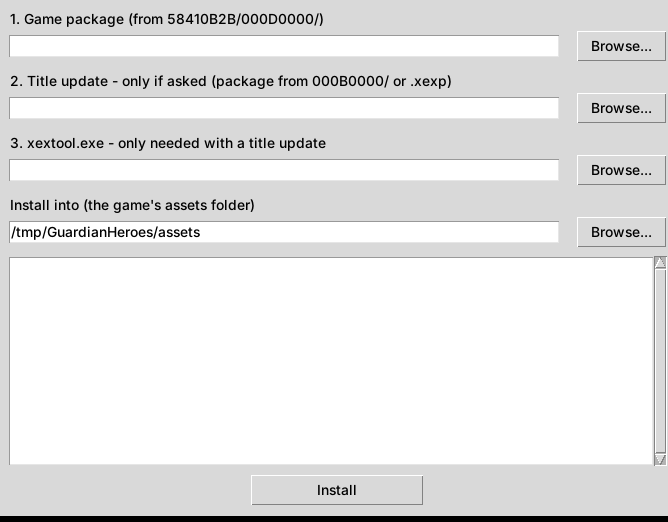
Supported versions: the download has a build for each of the two releases of the game, and starts the right one automatically:
| default.xex version | Release |
|---|---|
| 0.0.0.2 | Original 2011 release |
| 0.0.0.3 | Later full re-release (package 1.0.306) |
The installer shows which one you have. If it says yours is a different version, then also pick:
- your title update: the package from
Content/0000000000000000/58410B2B/000B0000/, or adefault.xexpfile, and - xextool.exe (xorloser's XexTool; not included here), which the installer uses to apply the update. Put it next to the installer and it's found automatically.
and press Install again. The original default.xex is kept as default.xex.orig.
Prefer doing it by hand? Extract the package with Velocity/Horizon or
python3 tools/stfs_extract.py "<package>" assets, and copy default.xex, ArcadeInfo.xml and
the media folder into assets.
Building it yourself (no local tools needed)
GitHub Actions can build it for you in a private copy of this repository (the build needs your
game's default.xex).
- Create a private repository from this one: Use this template → Create a new repository, set to Private (a fork of a public repository is always public, so don't fork).
- Get
default.xexas described in Getting your game files. - In your private copy, add it and push (a 0.0.0.2 copy goes in
private/v2/default.xexinstead or as well):git add -f private/default.xex git commit -m "Add my default.xex" git push - Open Actions → Build Guardian Heroes and wait for the run to finish (about 30–40 minutes). Download the GuardianHeroes-linux or GuardianHeroes-windows artifact.
In this public repository the workflow has no game files and just reports that there is nothing to build.
Building locally (Linux)
Needs clang 20, CMake 3.25+, Ninja and the ReXGlue SDK v0.10.1.
python3 tools/stfs_extract.py <package> game          # default.xex, ArcadeInfo.xml, media/
rexglue codegen guardianheroes_manifest.toml
cmake --preset linux-amd64-release -DCMAKE_PREFIX_PATH=<ReXGlue SDK>/linux-amd64
cmake --build out/build/linux-amd64-release
REXSDK_PREFIX=<ReXGlue SDK>/linux-amd64 tools/package_linux.sh .
Headless tests: tools/run_game.sh <seconds> <tag> and
tools/drive_test.sh <seconds> "<t>:<key|shot> ..." <tag> (Xvfb + Mesa lavapipe, screenshots in
logs/).
What's in here
| Path | Purpose |
|---|---|
guardianheroes_manifest.toml | ReXGlue project definition |
gh_fixes.toml | Analysis fix: a jump table the analysis read past its end |
gh_callback_functions.toml | Functions only reached through pointers (vtables, data tables) |
variants/v2/ | The build for game version 0.0.0.2 (guardianheroes-v2): its own manifest and fixes, same source code |
src/gh_version.h | The per-version settings (version number, two hook addresses) |
guardianheroes.toml | Runtime settings shipped next to the program |
src/guardianheroes_app.h | App hooks: game-file discovery, full-game licence, input, F1 menu, exit watchdog |
src/gh_menu.* | The F1 settings menu (ImGui), controller shortcut, writes guardianheroes.toml |
src/keyboard_input.* | Keyboard controls (an extra input driver that acts as controller 1) |
src/perf_tools.* | FPS counter (hooks the game's only VdSwap caller), frame limiter |
src/net_fixes.cpp | Linux translation of Windows ioctlsocket(FIONBIO/FIONREAD) for the system-link sockets |
src/usbcam_stubs.cpp | Xbox Live Vision camera imports (reports no camera) |
src/game_exit.cpp | Quits cleanly from Exit Game (hooks the XamLoaderLaunchTitle caller) |
src/crash_handler.* | crash.txt reports |
.github/workflows/build.yml | Linux and Windows builds: SDK download, rexglue codegen, compile, package |
tools/install_game.py | The installer (window or command line): extracts the package, checks the version, applies the title update |
src/game_files_check.h | Checks default.xex at startup and explains a missing or wrong-version copy |
tools/ | STFS extractor, scanners for missed functions, headless test and packaging scripts |
Notes for developers
- Two game versions, one download: each
default.xexversion has its code at different addresses, so each needs its own recompiled build.variants/v2buildsguardianheroes-v2from 0.0.0.2 with the same sources; at startup either program readsassets/default.xexand starts the one that matches. Functions found by hand in 0.0.0.3 were carried over by matching the code around them (most moved by a fixed offset per area).
Things this game needed beyond ReXGlue's automatic analysis:
- Unbounded byte jump table:
sub_826C6C70dispatches through anlbzxtable with no bounds check, so the analysis read hundreds of bogus entries, ran into the next function and emitted gotos to labels that don't exist there (use of undeclared label loc_826C7388).gh_fixes.tomlgives the table explicitly as a[[switch_tables]]entry. - Pointer-only functions: MSVC this-adjust thunks (
addi r3,r3,-N; b target), vcall thunks (lwz r11,0(r3); lwz r10,N(r11); mtctr r10; bctr) and small virtual functions have no.pdataand no direct callers, so calling one aborts with "Call to invalid or unregistered function".tools/find_thunk_slots.pyfills gaps next to known thunks; the rest came from runtime reports. Both scanners work from the generated C++ alone, without a decoded XEX. - System prompts: the game shows
XamShowMessageBoxUIprompts (e.g. "Create new game data?") that the runtime draws as an ImGui dialog needing the mouse.headless = trueanswers them with their default button. - Linux sockets:
ioctlsocket(FIONBIO)must be translated or the system-link socket stays blocking (same fix as the Simpsons Arcade port).
Credits and licence
- ReXGlue SDK (BSD-3-Clause), built on
Xenia (BSD-3-Clause). See
NOTICE.md. - Guardian Heroes is © SEGA / Treasure. This project is not affiliated with or endorsed by them.
- The code in this repository is released under the MIT licence (
LICENSE).