GHVanHRecomp
GHVanHRecomp is a native PC port of Guitar Hero: Van Halen for Windows that allows playing with an Xbox 360 guitar and offers high frame rates and wide screen support.
- Type: PC port
- Game: Guitar Hero: Van Halen
- Runs on Windows
- By ElGuslml
- Latest release v0.1.0, 2026-11-05
- Source: https://github.com/ElGuslml/GHVanHRecomp
README

GHVanHRecomp




🎸 Play Guitar Hero: Van Halen on your PC, natively. The Xbox 360 game (2009), recompiled to run directly on Windows: no emulator to set up, sharp graphics, wide screens, high frame rates, and your Xbox 360 guitar.
Important
💿 You need your own original copy of the game. This project does not include any of the game's files, and never will.
- To play, you need an Xbox 360 copy of Guitar Hero: Van Halen that you own (tested with the USA disc).
- You make an image (ISO) of your own disc, and the launcher installs the game from it.
- Please do not ask for the game's files, and do not share them or links to them.
This project is not affiliated with or endorsed by Microsoft, Activision, the game's developers or Van Halen.
Note
🤘 Beta. Songs have been played from start to finish with an Xbox 360 guitar, on guitar and bass parts. Drums and singing have not been tested in this game yet. Guitar Hero: Van Halen runs on Guitar Hero: Metallica's engine, and everything GHMetalRecomp fixes and adds is here too. If something goes wrong, please tell us!
Warning
⚠️ Not tested yet: AMD graphics cards, and Wii or PS3 instruments (guitars and drum kits). If you play with any of them and something goes wrong, please report it in issues or on Discord.
🎮 How to play
- Download the latest version from Releases:
- the installer (
GHVanHRecomp-...-setup.exe): installs for your Windows user, no administrator rights needed, with a Start menu shortcut; or - the zip (
GHVanHRecomp-...-win64.zip): extract it into any folder you can write to (notProgram Files).
- the installer (
- Open GH Van Halen Launcher. The first time, it asks for the ISO of your game, checks it and installs the game files (about 4.5 GB), then asks you to create your profile. You only do this once.
- Pick your settings and press PLAY. 🎉
- Calibrate: in the game's options, run the audio and video calibration once, so that the notes match what you hear on your own speakers or headphones.
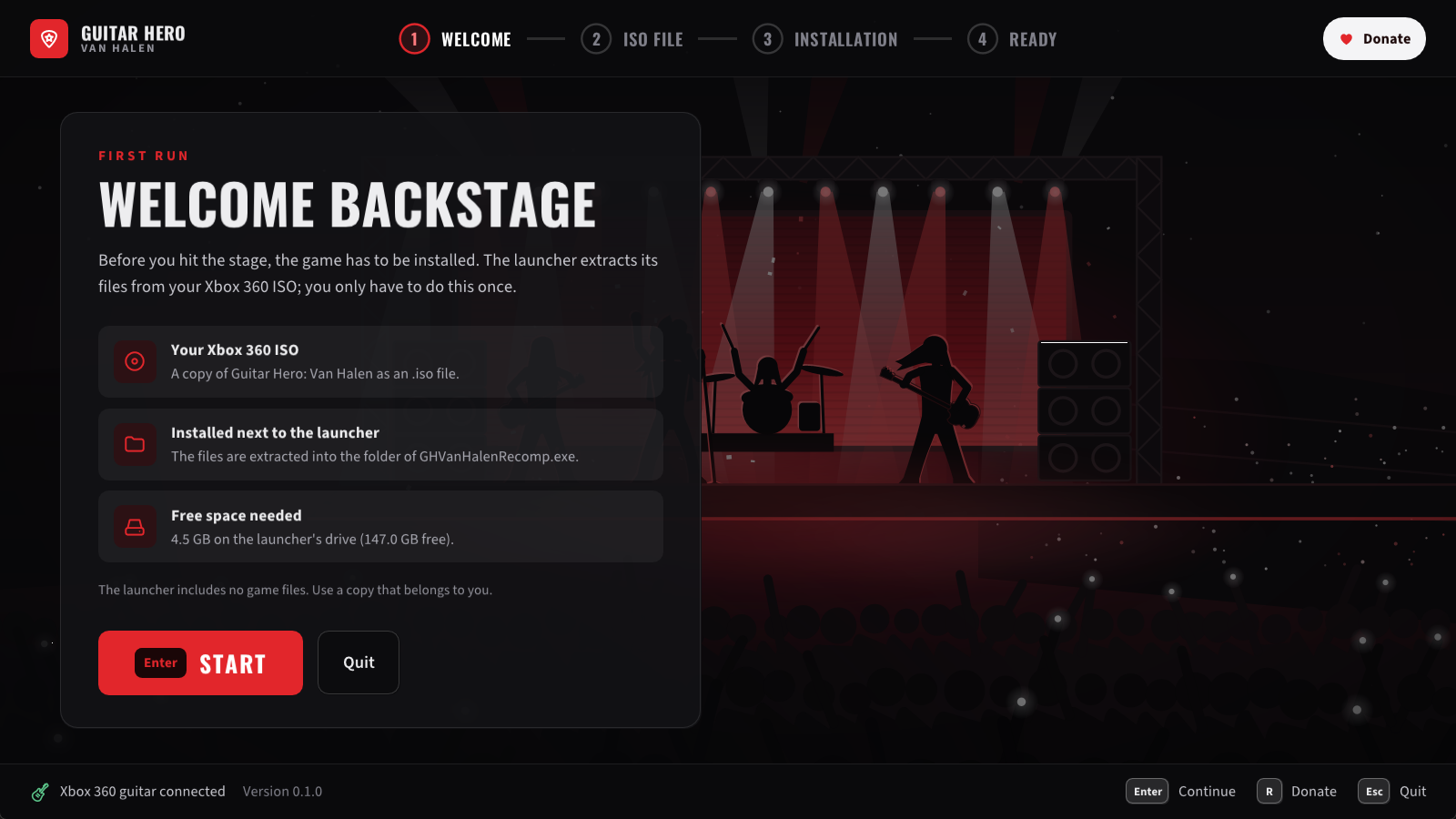
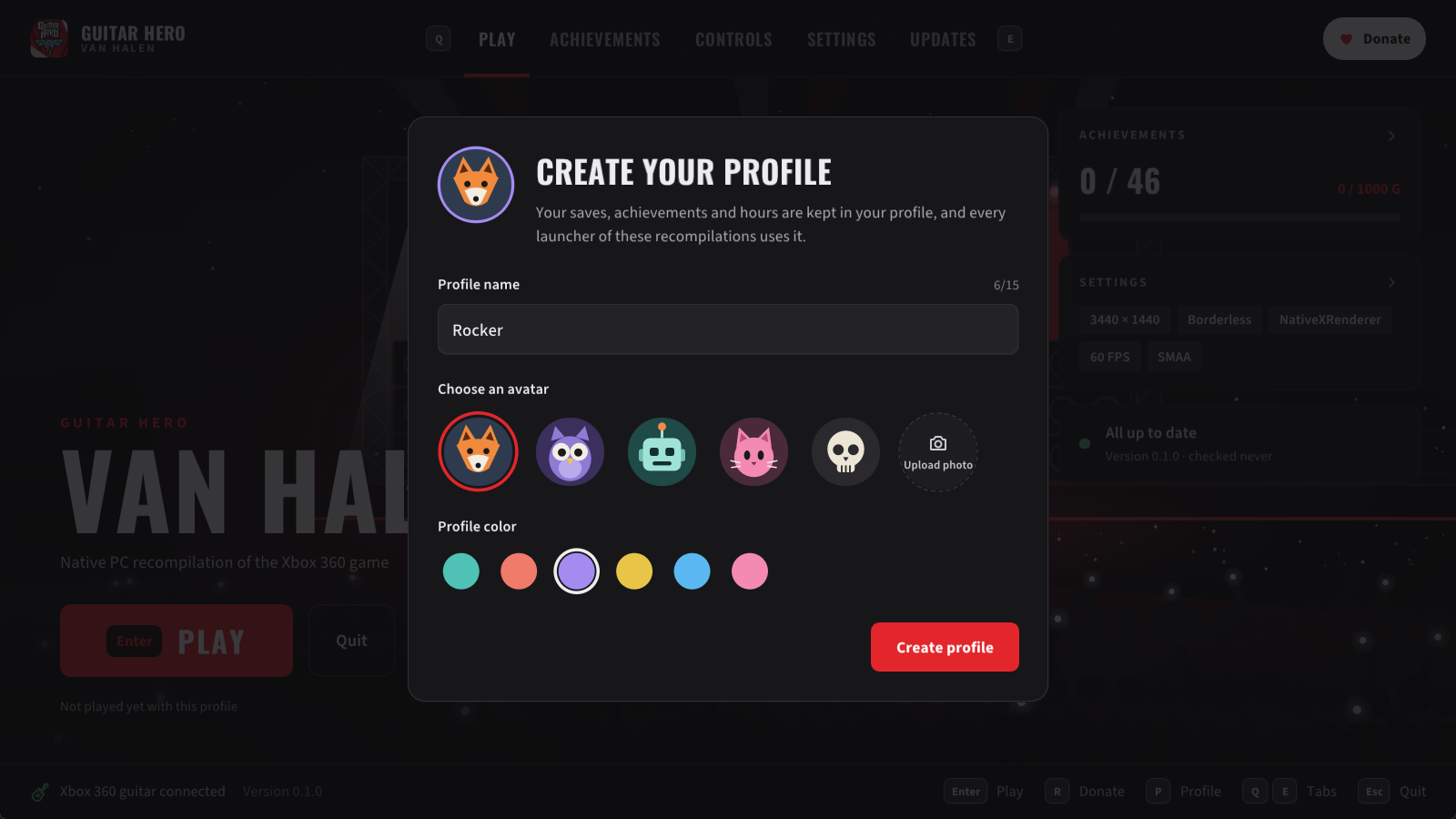
The first run: the launcher checks your ISO, installs the game from it, and asks for your profile.
From then on, the launcher keeps itself up to date: when a new version comes out, it offers to install it for you.
💻 What you need
- Windows 10 or 11 (64-bit).
- A graphics card with up-to-date drivers that support Vulkan (practically any card from the last ten years).
- The Microsoft Visual C++ Redistributable (most PCs already have it).
- An Xbox 360 guitar. Any other controller works as a guitar too, and so does the keyboard.
- To sing (experimental): any microphone connected to the PC, and a controller for the singer.
✨ Features
- 🎸 Your guitar: an Xbox 360 guitar plays as on the console, whammy bar and Star Power included. Any other controller is a guitar too, and the keyboard can be one (experimental: turn it on in the launcher's Keyboard page; frets on D F J K L). Each controller's buttons can be reassigned in the launcher, and a whammy bar that reads pressed at rest (some third-party guitars) can be calibrated there.
- 🎮 Auto-strum, GH2 / GH3 style: on a controller or the keyboard, each fret strums as you press it, so you play with the frets alone (a chord is one strum). Turn it on in the launcher's Controls tab; it only acts during a song, so the menus work as usual. The whammy bar is the right stick, pushed to either side.
- 🎤 Sing (experimental): any microphone on your PC is the game's USB microphone. Choose it in the launcher, and choose which controller sings.
- 🖥️ Sharp, native graphics: the game is drawn by your graphics card at your screen's resolution, with smooth edges (antialiasing) and sharper textures.
- 🔍 Upscaling: AMD FSR 1 or NVIDIA NIS, on any graphics card, with their quality and sharpness (see below).
- ⚡ High frame rates: 60 FPS as on the console, or 120, 144, 160, 165 or 240 FPS if your monitor supports it (experimental). The songs keep their speed and stay in sync. V-Sync is on by default (no tearing, the game in step with your monitor, without V-Sync's usual delay); leave it on with a G-Sync or FreeSync monitor too.
- 🔊 Low latency audio: optional, in the launcher's Settings: the game takes your audio device in exclusive mode, and the sound comes up to about 55 ms sooner (measured in GHMetalRecomp on a USB audio interface).
- 📺 Wide and ultrawide screens: the stage fills 16:9, 21:9 and wider screens, while the note highway, the HUD and the menus keep their shape in the center.
- 👤 Profiles: your saves, achievements and playtime in a profile shared by all the ElGus Recomps launchers.
- 👥 Play together: the controller that presses a button at the title screen plays with your profile; the other controllers join as its guests, as on the Xbox 360.
- 🏆 Achievements: a notification when you unlock one, and all 46 in the launcher or with F7 in the game.
- 🌍 Languages: English, French, German, Italian and Spanish, in the game and in the launcher.
- 🔄 Automatic updates from this page.
🔍 Upscaling: AMD FSR 1 and NVIDIA NIS
For a 4K screen or a slower graphics card, the game can be drawn with fewer lines than your screen has and enlarged to fill it. A plain stretch makes the menus' text, the HUD and every edge soft; AMD FSR 1 and NVIDIA Image Scaling (NIS) enlarge the image keeping them sharp. Both work on any graphics card (AMD, NVIDIA or Intel).
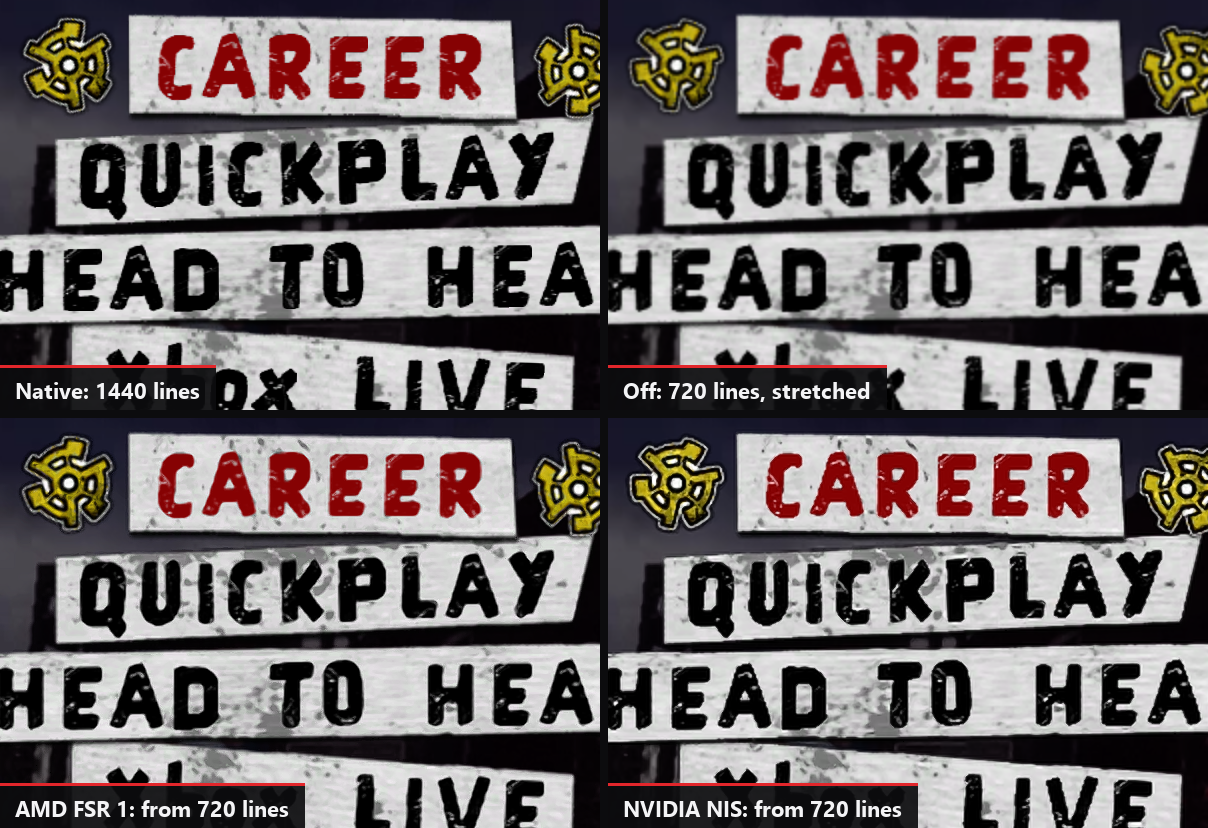
The main menu on a 3440x1440 screen, at its own pixels: drawn at the screen's 1440 lines, then from the console's 720 lines with a plain stretch, with AMD FSR 1 and with NVIDIA NIS.
In the launcher's Settings → Video:
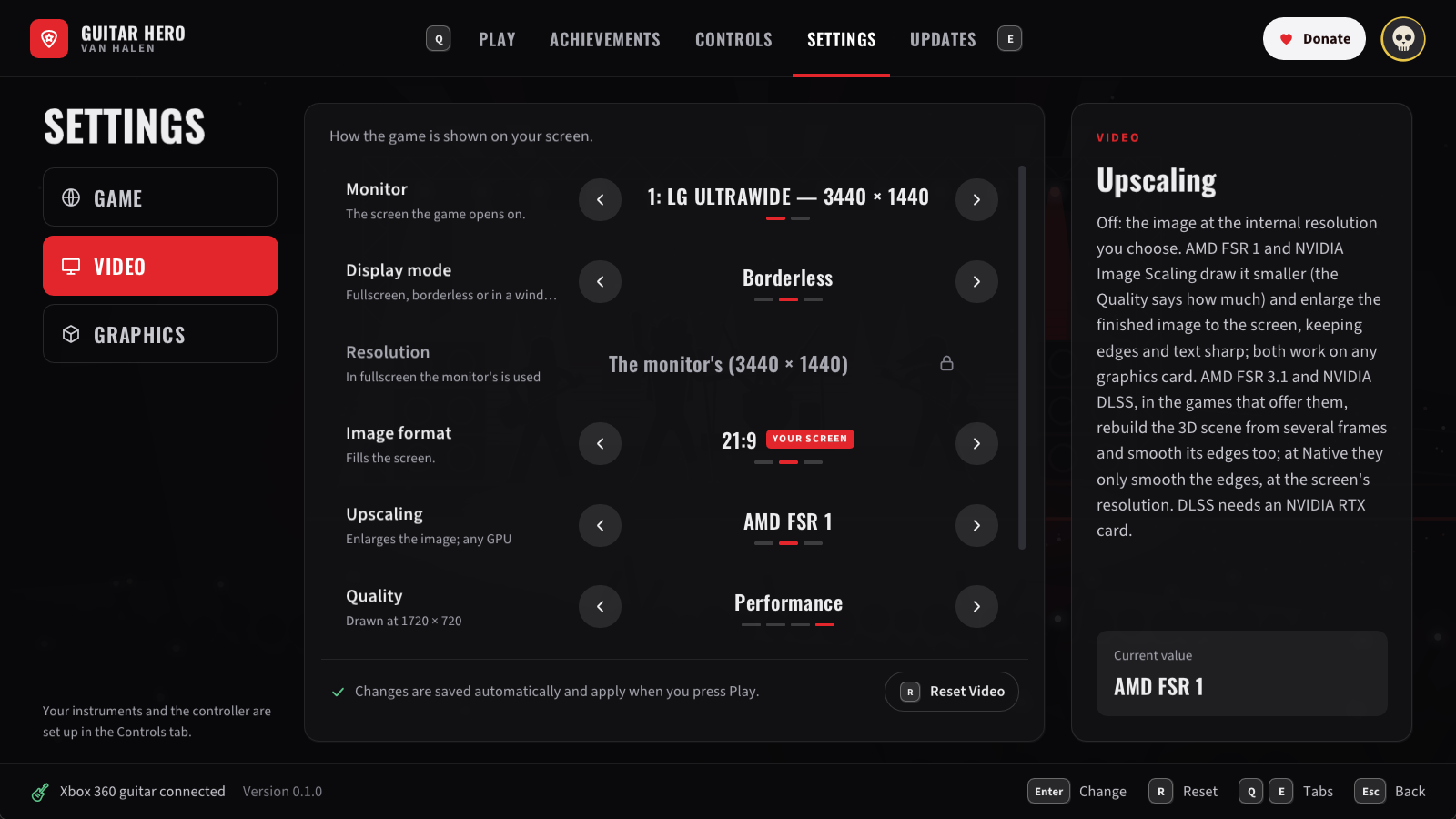
- Upscaling: Off, AMD FSR 1 or NVIDIA NIS.
- Quality: how many fewer lines the game is drawn with: Ultra Quality (77 % of your screen's), Quality (67 %), Balanced (59 %), Performance (50 %) or Ultra Performance (33 %), never fewer than the console's 720.
- Sharpness: Off, Low, Medium (AMD's and NVIDIA's recommendation) or High. It works without upscaling too (AMD CAS).
They are light: GHMetalRecomp, on the same renderer, measured 0.14 ms (FSR 1) or 0.20 ms (NIS) of the graphics card's time per frame, on an RTX 4070 Ti at 3440x1440 from 720 lines (details). Upscaling is for the NativeXRenderer renderer (the default).
🔧 Better than the original
Some problems come from the game itself and happen on an Xbox 360 too. They are fixed here, as in GHMetalRecomp, and each fix can be turned off (the notes say how):
- ⏱️ Songs drifting out of sync. On the later Xbox 360 models the music slowly falls behind the notes during a song, until you pause: the game corrects its clock for the first consoles' timer, which runs 0.25 % slow, and the later ones' does not. Here the game's clock runs at the right rate, and whole songs stay in sync (details).
- 👏 Crowd claps out of time. With Star Power on, the crowd claps on the beat, but the claps ignored your audio calibration and came late by it. They follow the calibration now, as the music does (details).
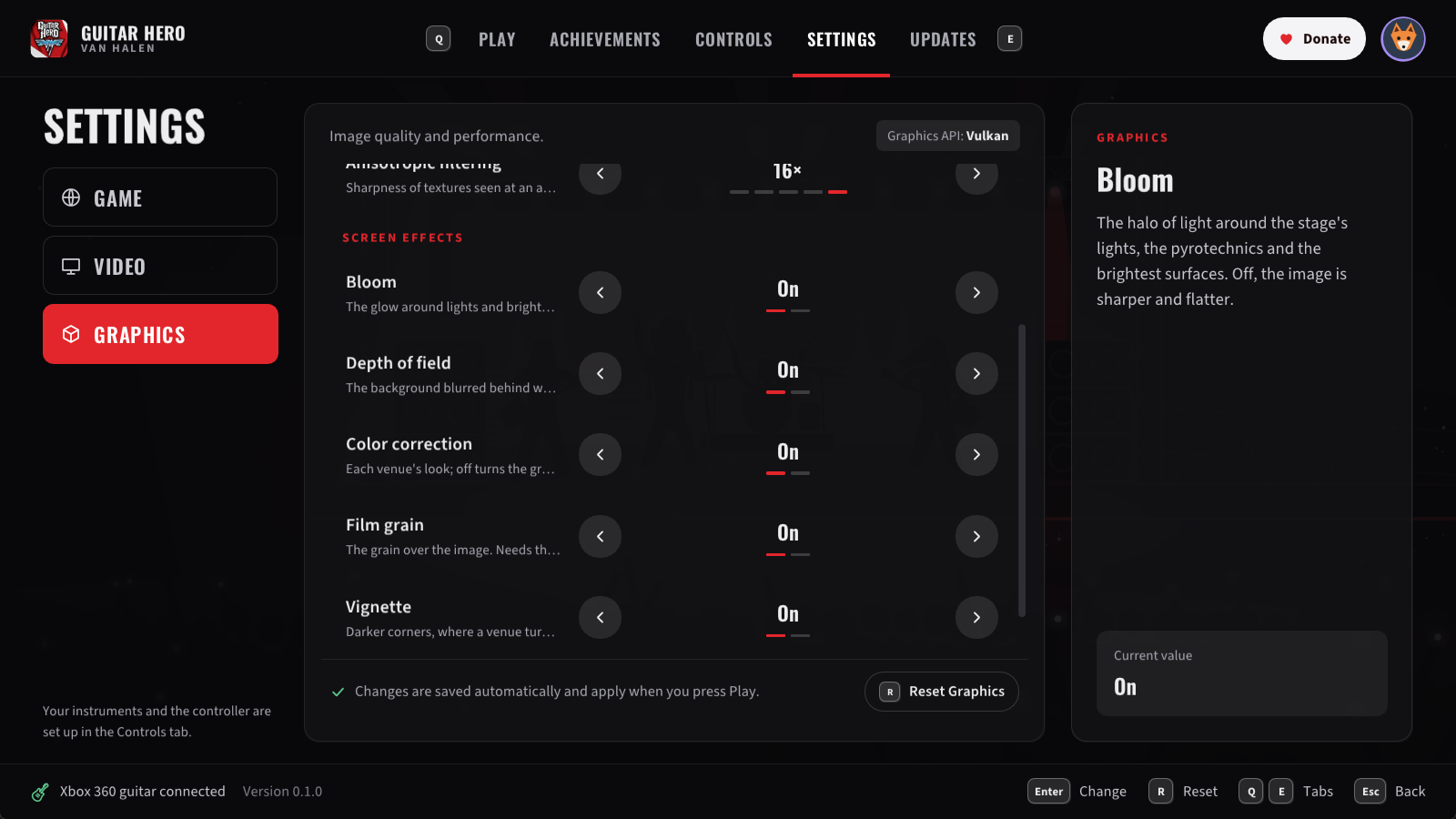
- 🎛️ Screen effects you can turn off. Bloom, depth of field, film grain, color correction and vignette each have a switch in the launcher's Settings → Graphics (all on by default, as on the console; with the color correction off, the grain is off too) (details).
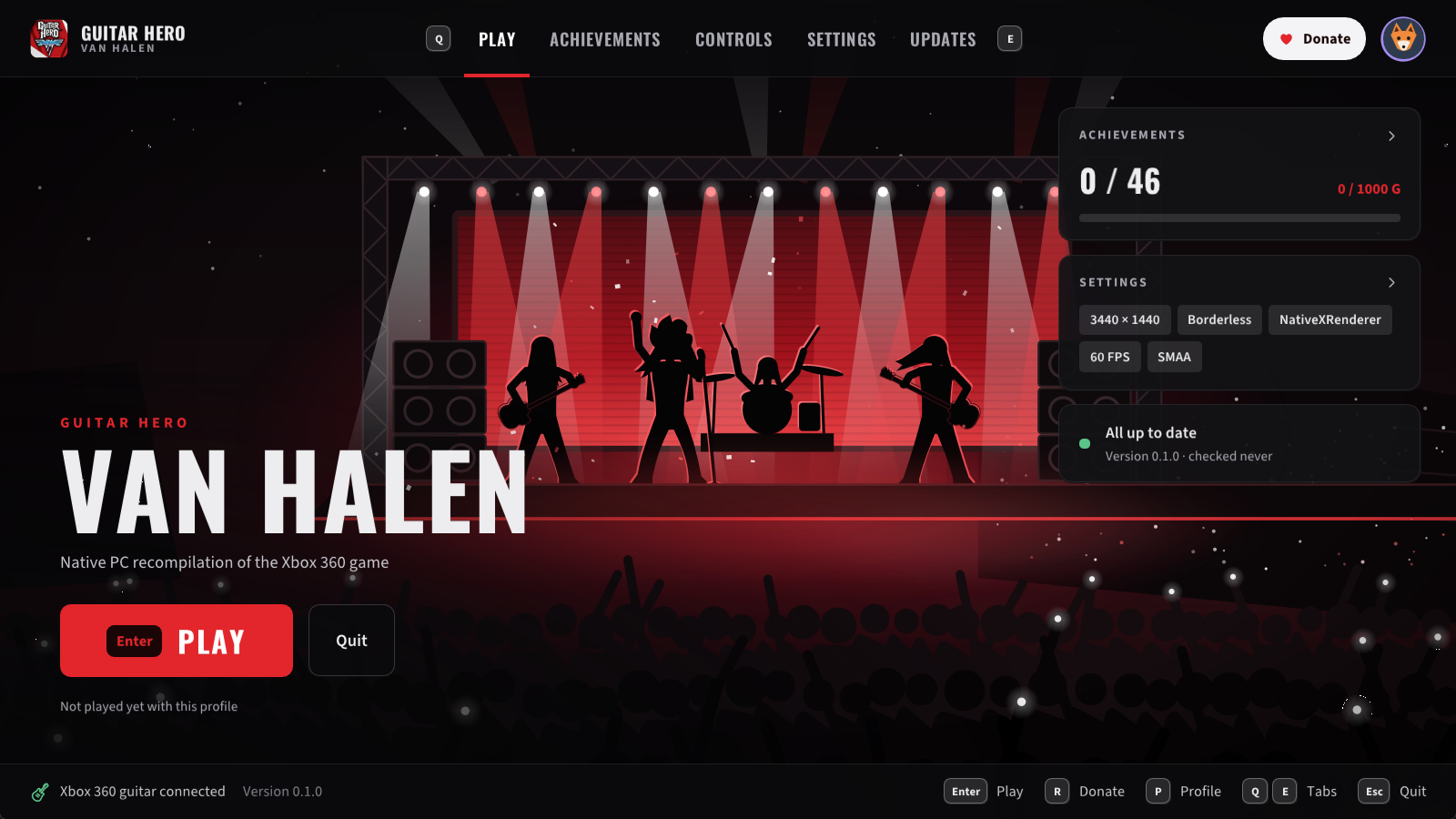
🧭 GH Van Halen Launcher
Everything is set up from GH Van Halen Launcher, with the mouse, the keyboard or a controller:
| Tab | What you find there |
|---|---|
| ▶️ Play | Start the game, and see your settings, achievements and updates at a glance. |
| 🏆 Achievements | All 46 achievements, the ones you have unlocked and when. |
| 🎮 Controls | Your guitars, controllers and keyboard: what each button or key does, and which controller sings. The keyboard as a guitar (experimental). Frets that strum as you press them, on a controller or the keyboard. A whammy bar's calibration. Your microphone (experimental): device, gain and level. |
| ⚙️ Settings | Game: the game's and the launcher's language, Low latency audio. Video: monitor, fullscreen or window, resolution, image format (fill a wide screen or keep 16:9), upscaling (AMD FSR 1, NVIDIA NIS) and sharpness, V-Sync (on by default: no tearing, without V-Sync's usual delay; leave it on with a G-Sync or FreeSync monitor too). Graphics: renderer, frame rate, antialiasing, texture sharpness, the game's screen effects. |
| 🔄 Updates | Your version, and new ones when they come out. |
| 👤 Profile | Your picture at the top right: hours played, streaks, your week, your games and your favorite achievements. |
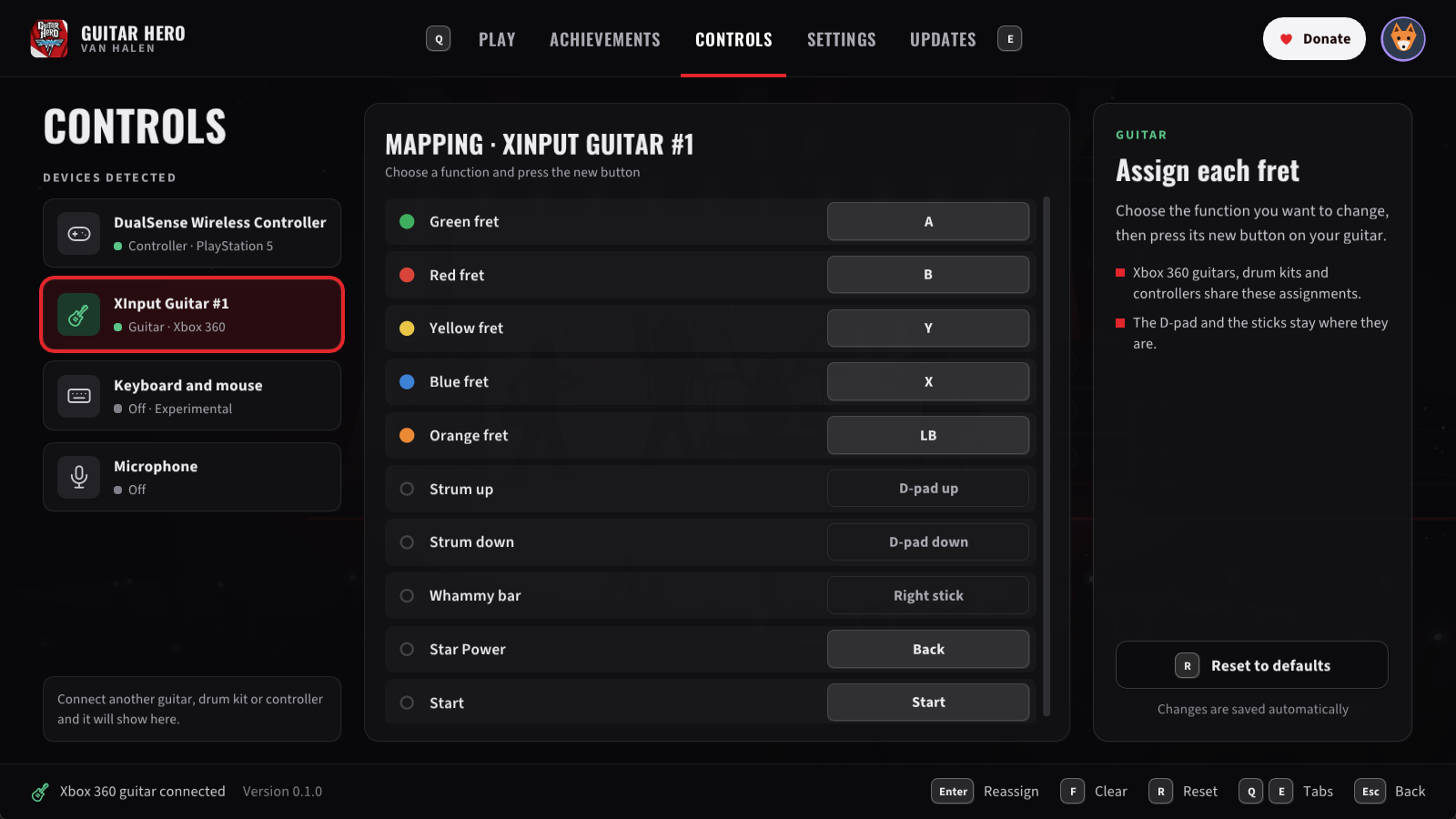
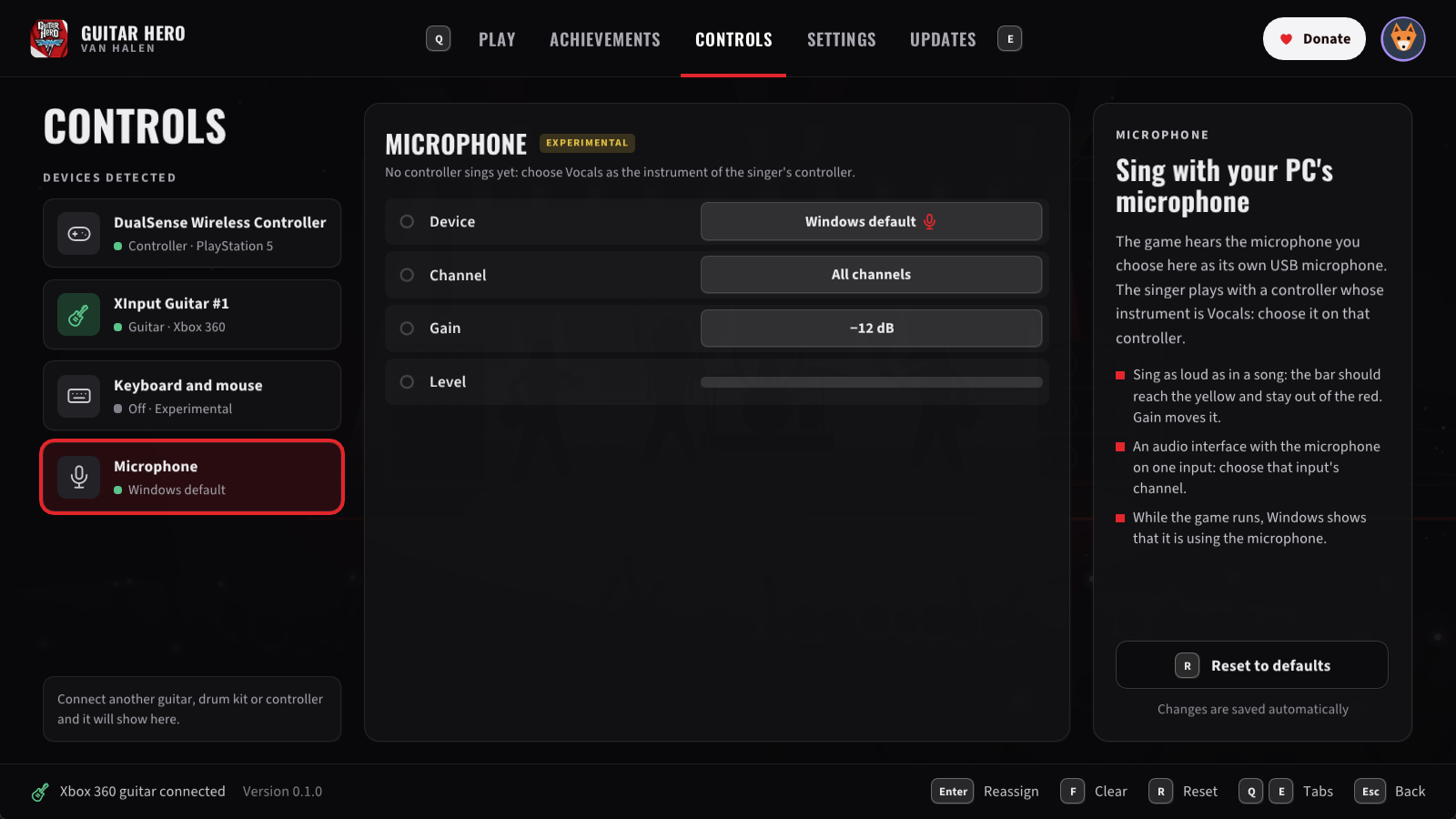
Controls: what each fret of your guitar does, and the microphone you sing with.
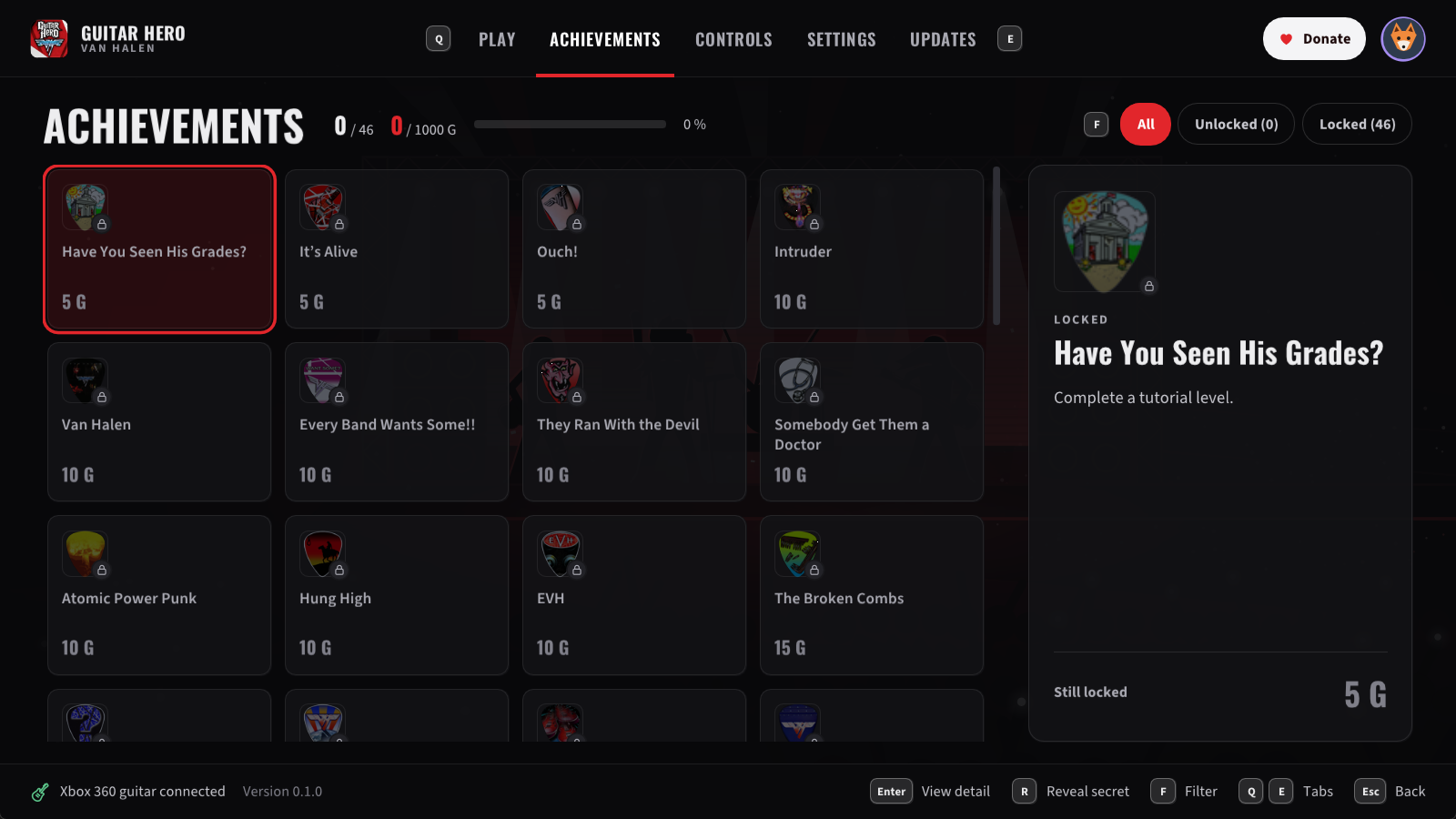
Settings (Video: your screen, window or fullscreen, the image format, upscaling) and the achievements.
Your choices are saved as soon as you make them. When you quit the game, the launcher comes back.
Tips:
- 🎤 To sing: in Controls → Microphone, choose your microphone and sing as loud as in a song: the level bar should reach the yellow without touching the red (change Gain if not). Then choose the singer's controller and set its Instrument to Vocals. Headphones help: with speakers, the microphone hears the song too.
- 🚪 On the title screen or in the main menu, press B (the red fret) to quit the game.
- 🎮 Steam Big Picture: add
GH Van Halen Launcher.exeas a non-Steam game and play from your couch. - 🛡️ "Windows protected your PC": the programs are not signed by a company, so Windows may warn you the first time. Click More info, then Run anyway.
🐞 Reporting a problem
Something looks wrong, sounds wrong, or crashes? Tell us on Discord or open an issue, with:
- where in the game it happened, and a screenshot if you can;
- the latest files in the
logsfolder next to the game:ghvanhalen_NNN.log, and if the launcher misbehaved,launcher_NNN.log(with its.dmpfile if there is one).
If something looks wrong, try the other renderer: in the launcher, Graphics → Xenos (it emulates the Xbox 360's graphics instead), and tell us whether it happens there too.
Known issues
- 🥁 Drums and singing have not been tested in this game yet: guitar and bass parts are known to work.
- 🎤 Singing is experimental: if the pitch line jumps around, lower the microphone's Gain in the launcher; if the game does not hear you, raise it. While a microphone is chosen, Windows shows that the game is using it.
- ⌨️ Playing with the keyboard is experimental.
- 🔊 Some USB audio interfaces add delay in Windows' shared audio mode (a Focusrite Scarlett about 20 ms more than a motherboard's audio): calibrate the audio in the game's options.
- ⚡ Above 60 FPS is experimental: something may still run too fast.
- 🎶 Downloadable content is not supported yet.
- ✨ The first time an effect appears, it may show up a moment late.
❤️ Support
If you enjoy shredding with Van Halen on your PC, you can support the work on Ko-fi ☕. For news about the next updates, follow @ElGuslml on X and join the Discord. And if you'd like more Xbox 360 classics running natively, the other recompiled games are at ElGus Recomps.
🛠️ For developers
GHVanHRecomp is a static recompilation: the game's original Xbox 360 code is translated to C++ and compiled for Windows, on top of the ReXGlue SDK. It is drawn by NativeXRenderer, a renderer that draws the game's graphics calls natively on Vulkan.
- Building and developing: requirements, building from source, configuration, how the SDK is modified.
docs/: a short note on each problem found and how it was solved.
🚧 In the works
New features on the way:
- 🌐 Online multiplayer: play with your friends over the internet.
- 🥁 MIDI drum kits: play the drums on an electronic drum kit connected to your PC.
- 💿 Guitar Hero: World Tour DLC: import your World Tour songs and play them here.
- 🎵 Custom songs: play songs made by the community.
- 🐧 Linux and Steam Deck: a port to play there too.
- ✨ And more...
Follow along on Discord and on X.
🤖 A note about AI
This project is developed with the help of AI (Claude, by Anthropic). I know it's a touchy subject for many people, so I want to be open about it and explain how the work is done:
- 🎮 The game is still the original game. Its code is translated by the ReXGlue recompiler, not written by an AI, so it plays as it did on the Xbox 360: the same songs, the same charts, the same scoring.
- 🧪 Every change is tested by hand. I play each fix and improvement myself, with an Xbox 360 guitar, before it is released, and check it against how the game behaves on the console: the notes in time with the music, its graphics, its sound and how it feels to play.
- ⚡ Performance is measured, not guessed. CPU use, frame times, GPU time and the sync between the notes and the music are measured on real hardware before and after each change, so that the game runs smoothly and doesn't waste your computer's resources.
- 🙌 Claude helps with the research and the code; the decisions, the testing and the care for the game are mine.
If something doesn't run as well as it should, it's a bug like any other: tell us on Discord or open an issue, and it will get fixed. Thanks for giving this game a try! ❤️
🙏 Credits
- ReXGlue SDK, whose runtime is derived from Xenia.
- GHMetalRecomp, whose fixes this game shares.
- extract-xiso, for extracting game files.
- Developed by Gustavo Garcia with the help of Claude (Anthropic): see the note about AI.
📜 License
MIT for this project's own code (see LICENSE). The ReXGlue SDK and the other components keep their
own licenses (see THIRD_PARTY_NOTICES.md). Guitar Hero: Van Halen, its code and its
assets belong to their respective owners.