.hack//Versus — native port for Android and Windows
.hack//Versus is a native port of the PS3 fighting game to Android and Windows built using static recompilation.
- Type: PC port
- Game: .hack//Versus
- Runs on Windows and Android
- By joseflores-dev
- Latest release v0.4.7-windows, 2026-11-01
- Source: https://github.com/joseflores-dev/dot-hack-versus-port
README
.hack//Versus — native port for Android and Windows
English · Español
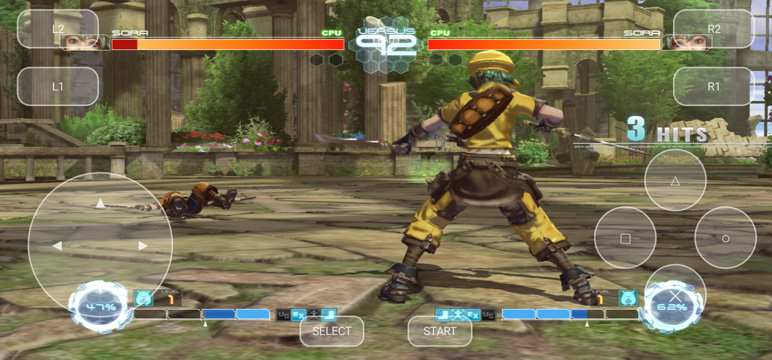
A native port of the PS3 fighting game .hack//Versus to Android (ARM64) and Windows (x64). It is not an emulator: the game's code was translated to C++ by static recompilation with ps3recomp and compiled for each platform; the PS3 graphics chip is reproduced on Vulkan.
Important
No game files are included. You need your own legally obtained copy of .hack//Versus (PS3, BLJS93008) as a
disc image (.iso). A fan project, not affiliated with CyberConnect2, Bandai Namco or Sony.
Contents
- Status
- Download and play
- Controls
- Options
- Character mods
- Known issues
- Building from source
- Credits and license
Status
| Android | Windows | |
|---|---|---|
| Fights | Steady 30 fps (the game's cap), battery saver on | Steady 30 fps |
| Menus, saving, sound | Yes | Yes |
| Controllers | Bluetooth (DualShock 4 and compatibles) + on-screen touch pad | Any SDL controller + keyboard |
| Story Mode | Yes | Yes |
| Online | No | No |
Tested on a Samsung Galaxy S22 Ultra (Snapdragon 8 Gen 1, Android 16) and a Windows 10 PC (Ryzen 7 5700X3D, RTX 3050). Bug reports and pull requests are welcome.
Download and play
Download from Releases.
Supported disc
| Disc | Status |
|---|---|
| BLJS93008 (Japan, the only release) with the English translation patch | Fully tested |
| BLJS93008 unpatched | Should work (texts in Japanese), untested |
The game's translated executable ships with the port: nothing to decrypt, no PS3 firmware.
Android
Needs an ARM64 phone with Vulkan 1.1, Android 12+, 8 GB of RAM recommended, and about 2 GB free for the game's HDD install (the ISO is read in place, not copied).
- Install
hackversus.apk(allow "unknown apps" if asked). - Copy your
.isoanywhere on the phone (Downloads, for example). - Open the app, tap Elegir ISO ("Choose ISO") and select the image. The first start takes a few minutes (the game installs ~2 GB to its virtual HDD and shaders compile); afterwards it starts in about 20 seconds.
Other ways to give it the game, and where data is kept
- Put the ISO in
/sdcard/PS3/and tap Dar permiso ("Grant permission") to allow all-files access (same folder the ARMSX3 emulator uses). - Or extract the disc on a PC (
python tools/iso_extract.py <your.iso> all disc) and copydisc/PS3_GAMEtoAndroid/data/com.hackversus.port/files/PS3/vfs/PS3_GAME.
Android/data/com.hackversus.port/files/
  PS3/dev_hdd0/game/BLJS93008/           the game's HDD install
  PS3/dev_hdd0/home/00000001/savedata/   saves
  PS3/hv_env.txt                         options
  PS3/hv_mods.txt                        character mods
  log.txt                                session log
Uninstalling the app deletes this folder, saves included: back them up first.
Windows
Needs Windows 10/11 64-bit, a CPU with AVX2 (Intel Haswell / AMD Zen or later) and a Vulkan 1.1 GPU.
- Unzip
hackversus-windows.zipanywhere. - Run
hackversus.exeand choose your.iso(or drop the ISO onto the exe). It is remembered for next time.
Windows mounts the ISO read-only while the game runs. Saves, caches and log.txt go to data/ next to the exe.
Controls
| Controller | PS3 layout: ✕○□△, L1/R1/L2/R2, L3/R3, START/SELECT, d-pad and sticks. On Android pair it before opening the app. |
| Touch pad (Android) | Always active as player 1; the PAD button hides it. |
| Keyboard (Windows) | Arrows = d-pad · Z/X/A/S = ✕/○/□/△ · Q/W = L1/R1 · 1/2 = L2/R2 · Enter = START · Tab = SELECT |
| Window (Windows) | F11 or Alt+Enter toggle full screen; Esc leaves full screen. |
The move lists are in the game: during a fight, START → "Command List".
Options (hv_env.txt)
A text file with one VARIABLE=value per line, in files/PS3/ on Android or next to hackversus.exe on Windows.
| Variable | Effect |
|---|---|
PS3_OSK_TEXT=NAME | Name typed for you when Story Mode asks (8 characters max). Default PLAYER. |
HV_KEEP_ASPECT=1 | 16:9 with black bars instead of stretching. |
HV_INTRO=orig | Full intro (by default only the Bandai Namco and CRIWARE logos). HV_INTRO=0,17 skips the logos too. |
HV_PIPE_PREWARM=0 | Do not precreate graphics pipelines at start (on by default; avoids stutters the first time an effect appears). |
HV_JC_PAR=n | Threads for SPU jobs (default 3). |
HV_AUDIO_LEGACY_PACE=1 | ps3recomp's original audio mixer. |
HV_LOG=0 | Do not write log.txt. |
PS3RECOMP_VK_FULLSCREEN=0 | Windows: start in a window. |
Character mods (experimental)
The port can add another model to a character as an extra colour in the character select, leaving the original colours untouched.
Ready to use: Azure Kite (from .hack//G.U. Last Recode) as Kite's colour 3. Download azurekite-mod.zip from
Releases, copy hv_mods.txt and the mods folder to Android/data/com.hackversus.port/files/PS3/ (Windows: the data
folder next to hackversus.exe),
pick Kite and go to colour 3 in "PC Colour Settings". Delete hv_mods.txt to remove it.
Mods are shipped as patches (.hvpatch) that hold only what the mod changes, never data from the disc: on its first
start the port builds the mod from your own game (under a second) and keeps the result next to the patch
(<patch>.built). The list goes in hv_mods.txt (files/PS3/ on Android, data/ on Windows):
# subst <model> <colour index> <carousel slot> <entry offset in DATA.CPK, hex> <entry length> <file>
subst 1kit01 2 3 BE07800 7393184 mods/azurekite.hvpatch
Kite is slot 3 of the carousel (Sora 0, Sakuya 1, Haseo 2, Kite 3, BlackRose 4, Tsukasa 5, Ovan 6, Tokio 7); colour index 2 is the third colour. The file can also be a ready-built entry of exactly the original size. Needs APK v0.4.1 or later (Windows: v0.4.1 or later). To make your own, see tools/mods.
Known issues
- Story Mode asks for a name with the on-screen keyboard; the port fills it in (
PS3_OSK_TEXT) and it cannot be changed later. - No online, trophies or custom music.
- After long sessions the phone heats up and slows down; that is the phone, not the port.
Roadmap: online Versus between PC and Android through a replacement lobby server (the original servers are gone).
Building from source
Nothing is installed system-wide. The toolchains live in one folder shared with other ports, by default
C:\git-personal\toolchains (override with HV_TOOLCHAINS, and the Android sysroot with HV_SYSROOT_ANDROID).
Build steps
- Toolchain (not included), in the toolchains folder: Android NDK r30, CMake ≥ 3.28, Ninja, JDK 17,
build-tools 35.0.1 and the API 35
android.jar, and SDL2 + glslang forarm64-v8ainsysroot-android/. In the project: Python 3.10 in.venv/withpip install -r ps3recomp-0.18.0/requirements.txt. - Lift the game once (
game/EBOOT.ELFis the decrypted executable, e.g. dumped by an emulator):
The SPURS jobs (skinning) are dumped on the phone withP=.venv/Scripts/python; R=ps3recomp-0.18.0/tools $P $R/ppu_loader.py game/EBOOT.ELF -o analysis/ $P $R/find_functions.py game/EBOOT.ELF --seed-json analysis/EBOOT.functions.json --output analysis/functions.json $P $R/extract_spu_images.py game/EBOOT.ELF --output spu_programs/ $P $R/ppu_lifter.py game/EBOOT.ELF --functions analysis/functions.json --hle-stubs analysis/EBOOT.imports.json \ --code-end 0x7bf7b0 --chunks 64 -o recomp/SPU_DUMP_MISS=<dir>intospu_jobs/*.elf. - APK:
tools/build_apk.sh→out/hackversus.apk. The scripts patch the port's hooks into the generated code (tools/apply_recomp_hooks.py) before compiling. Releases use a profile-guided build:HV_PGO=gento build an instrumented APK, play a fight, merge the profile withllvm-profdata merge -o pgo/fight.profdata hackversus.profraw, then build withHV_PGO=use:<path>. - Windows: with llvm-mingw (ucrt, x86_64) in the toolchains folder, run
tools/build_win_deps.shonce, thentools/build_win.sh→out-win/hackversus.exe.
Test helpers in tools/: goto_title.sh, goto_fight.sh, measure_fight.sh (phone over adb, the device is
detected automatically) and win_fight.sh (PC, reaches a CPU vs CPU fight with the keyboard).
What changed from ps3recomp 0.18.0
The toolkit is in ps3recomp-0.18.0/ with this port's changes (MIT licence). Highlights: a Vulkan backend for
Android (merged render passes, draw batches, a submit thread, asynchronous present, pipeline prewarm), shader
register files scalarised for Adreno, SPURS jobs in parallel threads, SPU event queues for the sound driver, VMX and
scalar FP on NEON, NEON vertex and index fetch, a working cellOskDialog, saving, touch pad and controller, and a
file-read hook used by the character mods. For Windows: the Vulkan backend built with mingw, SDL2 for pad and audio,
a GCM callback thread and the keyboard fallback. The ISO reader (hackversus/isofs.c) sits under the host file API.
Details are in the code comments.
Credits and license
- CyberConnect2 and Bandai Namco, creators of .hack//Versus.
- sp00nznet for ps3recomp.
- The team behind the .hack//Versus English translation patch.
- SDL2, glslang, the Android NDK and llvm-mingw.
The code here is under the MIT license; third-party parts keep their own licenses. It grants no rights to the game, which belongs to CyberConnect2 and Bandai Namco. The repository contains no game data; the builds contain the game's code translated by static recompilation and need a legitimate copy of the disc to run. If the rights holders ask, it comes down.