Barthes Launcher
Barthes Launcher is a PC port launcher for the Harry Potter Collection on Xbox, allowing installation, updates, and launching of game ports.
- Type: PC port
- Game: Harry Potter and the Philosopher's Stone, Harry Potter and the Chamber of Secrets, Harry Potter and the Prisoner of Azkaban
- Runs on Windows
- By Barthes-Recompiled
- Latest release v1.1.0, 2026-11-01
- Source: https://github.com/Barthes-Recompiled/Barthes-Launcher
README
Barthes Launcher
One home for the Barthes Recompiled ports of the original Xbox Harry Potter games:
| Game | Port | State | |
|---|---|---|---|
| I | Harry Potter and the Philosopher's Stone (Sorcerer's Stone) | HP1-Recompiled | 1.0.2: playable, Archipelago |
| II | Harry Potter and the Chamber of Secrets | HP2-Recompiled | 1.0.2: playable, Archipelago coming soon |
| III | Harry Potter and the Prisoner of Azkaban | HP3-Recompiled | 0.5.2 Beta, Archipelago coming soon |
Current release: 1.1.0.
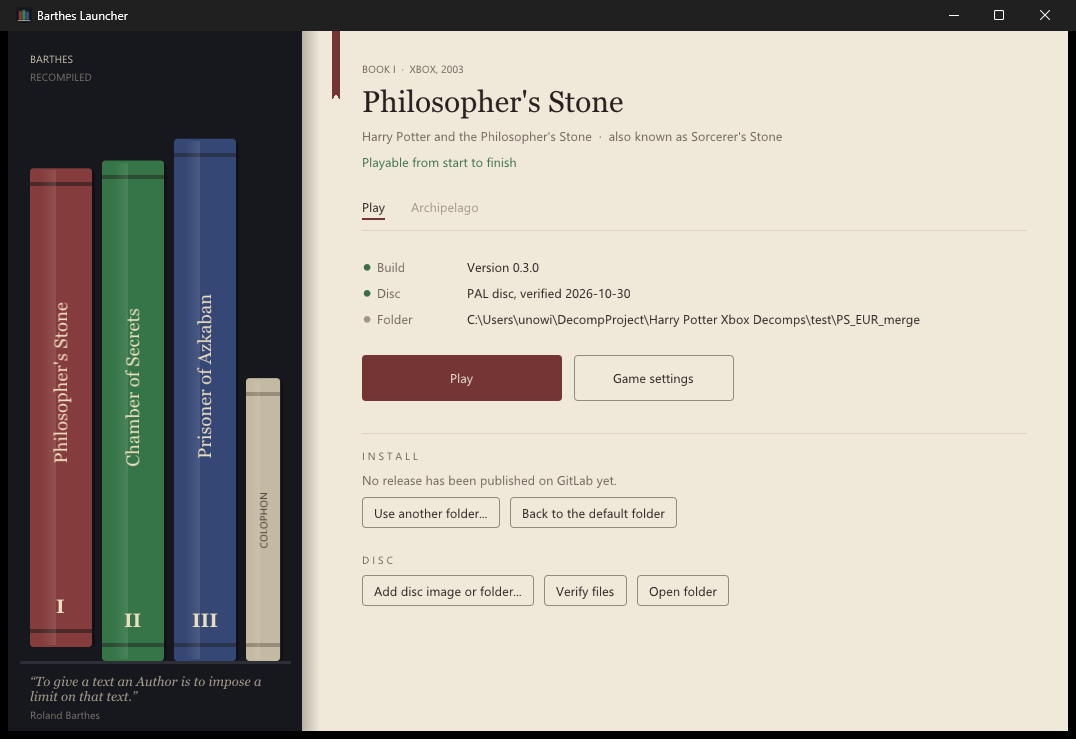
The games stand as books on a shelf. Pick one and its page lets you:
- Install or update the port from its GitHub releases (the download is checked against its SHA-256 before anything
is replaced, when the release carries one; your
game\folder, saves and settings are never touched). A port built per disc edition has a PAL and a USA download; the launcher installs the one for the disc you added. - Add your disc: an
.iso/.xisoimage is unpacked, an extracted game folder is copied. The launcher reads the disc'sdefault.xbefirst and refuses another game's disc, so a Chamber of Secrets image can't end up in the Philosopher's Stone folder. - Verify files against the known-good list of every file on the PAL and NTSC-US discs.
- Play, which starts the game itself (
hpps.exe,hpcos.exe,hppoa.exe), or Game settings, which starts it on the port's settings page (resolution, frame rate, controls and the rest; F10 and the game's own Settings menu change them too). - Archipelago: a page per game for the multiworld randomizer. Philosopher's Stone connects to a room (server, slot name and password; Play starts the game connected). Chamber of Secrets and Prisoner of Azkaban: coming soon.
The three ports, started from the launcher:
| Philosopher's Stone | Chamber of Secrets | Prisoner of Azkaban (beta) |
|---|---|---|
 |  |  |
You need your own copy of the games. No game data is included here or in any release (the screenshots above are hosted with the release, not kept in this repository).
Setting up
- Download
BarthesLauncher-windows-<version>.zipfrom the releases and unzip it somewhere of its own, for exampleC:\Games(it makes aBarthesLauncherfolder). Nothing is installed into Windows. - Start
barthes_launcher.exeand pick a book from the shelf. - Press Install. The port's newest release is downloaded from its GitHub repository.
- Press Add disc image or folder... and choose your
.iso/.xiso, or thedefault.xbeof a disc you already extracted. The launcher reads the disc's edition; if the installed build is for the other edition (PAL or USA), the page says so and Reinstall for this disc fetches the right one. - Press Play.
Repeat 2 to 5 for each game you own. Updates appear on a book's page when its repository publishes a new release.
C:\Games\BarthesLauncher\
  barthes_launcher.exe
  barthes.ini          the launcher's choices
  games\hp1\           Philosopher's Stone: hpps.exe, hpps.toml, saves\, shadercache\, game\ (your disc)
  games\hp2\           Chamber of Secrets: hpcos.exe, hpcos.toml, saves\, ...
  games\hp3\           Prisoner of Azkaban: hppoa.exe, hppoa.toml, saves\, ...
Each game keeps its settings and saved games inside its own folder (saves\, with the game's Xbox disk images in
saves\xbox), so a game folder can be backed up or moved as it is. Already have a port unpacked somewhere else?
Use another folder... on its page points the launcher at it instead. Each game's exe can also be started on its
own, or from a shortcut, without the launcher.
Requirements: Windows 10 (1809) or later, 64-bit. The launcher uses only what Windows ships (WinHTTP, tar.exe
for the release zips, Direct3D 11). The games need a DirectX 12 graphics card; see each port's README.
Controller
The launcher works with an Xbox-style controller (any pad Windows or Steam Input presents as one). On the shelf, left and right pull out the books, A opens a book's page and B asks whether to quit. On a page, the d-pad moves between the controls, A presses one, B goes back to the shelf, LB/RB switch between Play and Archipelago, Menu plays the game and Y opens its settings. The arrow keys, Enter and Esc do the same. A bar along the bottom shows what the buttons do; the Colophon can label them as on a PlayStation or Nintendo controller, or hide the bar. The launcher ignores the controller while a game (or any other window) is in front. With the controller in hand (or in couch mode) the disc and folder buttons open the launcher's own file browser instead of the Windows dialog, and the Archipelago fields open an on-screen keyboard (a real keyboard types into it too, and Paste takes a room address from the clipboard).
Couch mode fills the screen and scales the shelf and pages up for a TV. It comes on with --couch, by itself when
Steam's Big Picture (or a Steam Deck's Game Mode) starts the launcher, or from the Colophon; View or F11 switches at
any time. In couch mode Play minimizes the launcher and waits for the game, then brings it back with the focus on
Play, so a front end that started the launcher (Quiver, Steam) sees one session from start to quit. B on the shelf
quits.
To add the launcher to Quiver or Steam, point the entry at
barthes_launcher.exe and give it --couch as its launch options. For an entry that is one game, use
--page hp1 --play --couch --quit-after-game (hp2, hp3 for the others): the launcher checks the game, starts it
and closes when it does. --window starts in a window even where couch mode would come on.
Archipelago
Philosopher's Stone can be played in an Archipelago multiworld. On its Archipelago page,
tick Play this game in an Archipelago multiworld, enter the room's server (for example archipelago.gg:38281), your
slot name and the password, and press Play: the game starts connected. The room's host needs hpps.apworld from
the HP1-Recompiled release. The password is
kept in the game's saves\archipelago\connection.toml, never on a command line. Chamber of Secrets and Prisoner of
Azkaban are coming soon.
Troubleshooting
| Problem | What to do |
|---|---|
| "No release yet" on a book's page | The launcher couldn't get the release list from GitHub. Check your connection, or a firewall blocking barthes_launcher.exe, and try again later (GitHub limits how often it is asked). |
| The launcher refuses my disc | It is another game's disc, or not an Xbox disc image. Each book only takes its own game. |
| The game says it is the wrong disc | Add the disc on the game's page (not by copying files into game\ yourself), so the launcher installs the build for that disc's edition. |
| A game crashes or loses sound in one place | Press Verify files (Philosopher's Stone, Chamber of Secrets) to find damaged disc files, then add your disc again. |
| The game won't start | Update your graphics driver (DirectX 12 is required), then see the troubleshooting section of that game's README. |
| Play does nothing | The game may already be running (check the taskbar): only one copy of each game runs at a time. |
Problems and questions go to the issues of this repository or of the game's own.
Building
MSYS2 UCRT64, the same toolchain as the games:
pacman -S --needed mingw-w64-ucrt-x86_64-{gcc,cmake,ninja}
cmake -S . -B build -G Ninja -DCMAKE_BUILD_TYPE=Release
cmake --build build
tools/package.sh builds the release zip and its .sha256 into dist/. For testing, the launcher takes
--page <hp1|hp2|hp3|colophon>, --tab archipelago, --verify 1, --import <iso or default.xbe>, --install 1
and --play 1, and barthes.ini takes release_project = owner/repo in a game's section to install from
another GitHub repository (a fork, a test channel).
How a game repo publishes a release the launcher can install: docs/releases.md.
Thanks
MiddleDucky, above all. Their Xbox ports of
Philosopher's Stone and
Chamber of Secrets are the ground every book on this shelf stands
on: the recompiler work, the renderer, the audio and input, and the fixes the Prisoner of Azkaban port is being built
from. This launcher's disc unpacking (src/xiso.c) and file checks (src/gamecheck.c, src/lists/) are adapted
from their code (MIT), put to work for all three games at once; the rest of the launcher is our own. None of this
exists without them. Thank you, MiddleDucky, truly and enormously. If you enjoy these ports, go and star their
repositories.
Athelas, whose launcher showed what a good home for a recomp can be, and set the bar for what this one should do. The look here is our own; the inspiration for doing it properly is theirs.
Dear ImGui by Omar Cornut draws the window.
Why Barthes
"To give a text an Author is to impose a limit on that text, to furnish it with a final signified, to close the writing."
Roland Barthes, "The Death of the Author" (1967), translated by Stephen Heath
"I named this project after Roland Barthes to express - in whatever way I could - that my affection for these games has nothing to do with the author of the books on which they are based."
License
MIT, see LICENSE. The files taken from MiddleDucky's ports keep their MIT notice, and Dear ImGui keeps its
own (third_party/imgui/LICENSE.txt). The games and everything on their discs belong to their owners.