Harvest Moon Decomp
Harvest Moon Decomp is a decompilation of Harvest Moon for the Super Nintendo Entertainment System that allows understanding the game's code and playing it with improvements.
- Type: PC port
- Game: Harvest Moon
- Runs on Windows
- By RodoLy
- Latest release v0.1.0-beta, 2026-10-29
- Source: https://github.com/RodoLy/HarvestMoonSnesDecomp
README
HarvestMoonSnesDecomp — A reimplementation of Harvest Moon (SNES)
English · Español

100.00% of the game's code decompiled and verified: 45176 of 45176 instructions, 778 of 778 routines (100.0%).
Computed with python3 tools/progress.py --decomp ../HM-Decomp over the HM-Decomp disassembly.


The game rewritten, routine by routine, as C a person can read. Every rewritten routine is checked against the original byte for byte: the whole memory (128 KB of WRAM, stack included), the CPU registers and the DMA registers must come out identical.
It is a sister project of the playable port HarvestMoonSNESRecomp and builds on the community disassembly HM-Decomp (ElisaS-Codes and DasK), where the routine names and the memory map come from.
| HarvestMoonSNESRecomp | HarvestMoonSnesDecomp (this one) | |
|---|---|---|
| Purpose | Play: the PC port and its improvements | Understand the game: readable code |
| Output | The game (.exe) | Routines in src/, a test executable, and the playable game built on them alone |
| Needs | Your ROM | Your ROM (the checker also needs the recompilation project) |
Playing it: the native build
With 100 % rewritten, the game plays on the decompiled C alone: no
recompiled code and no CPU emulation. Every routine of the game is a C
function in src/, called directly. All that is still done in software is
the console's picture and sound chips (the cartridge's graphics and music
are in their formats), snesrecomp's runner unmodified, included in
native/chips/. It also brings every improvement of the recompilation and
a new launcher.
Important
You need your own, legally obtained copy of the game. This repository contains neither the ROM nor anything generated from it, nor executables: the game is built on your computer. Please don't ask for ROMs.
How to play it on Windows
⬇ Download the latest version (beta)
- Download
HarvestMoonNative-…-beta.zipfrom the release and unzip it anywhere. - Double-click
build.bat. The first time it downloads a C compiler (llvm-mingw) and SDL3 (about 190 MB, checked by their SHA-256); then it builds the game in about a minute and leavesHarvestMoonNative.exeandSDL3.dllin the folder. Works on Windows 10/11, x64 and ARM. - Open
HarvestMoonNative.exe. The first time it asks for your own ROM of Harvest Moon (USA); it checks it and remembers it.
Why it works this way: the download is the source code plus a build script, not a ready-made program, and the game is put together on your computer from it and your copy of the game. Since you build it yourself, Windows does not treat it as a program downloaded from the internet. Everything starts off: the game is the console's until you turn on what you like in Improvements and Options. On Linux: see How the native build works.
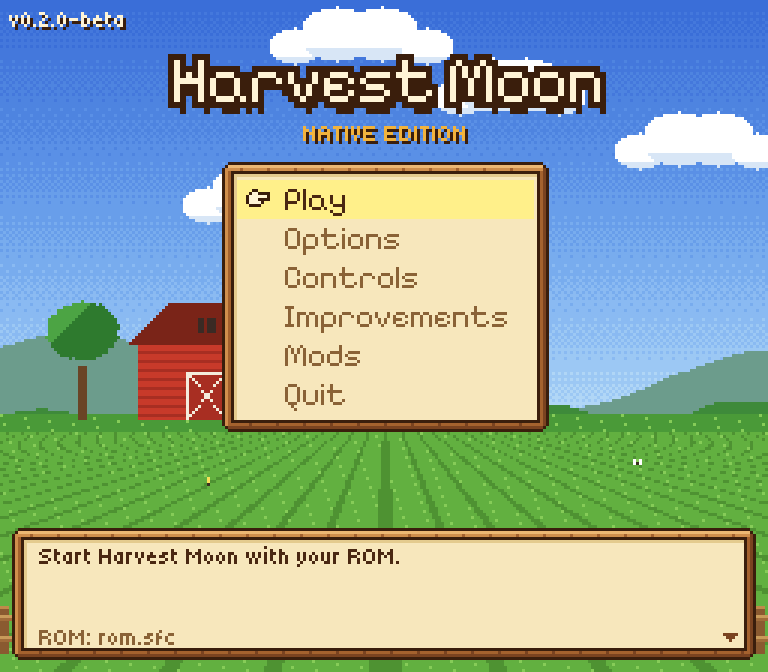
A launcher in the look of the game
A farm at night under the harvest moon, wooden frames, parchment and the pointing hand, all drawn at the SNES's resolution, so its pixels are the game's size. Keyboard, gamepad or mouse, in English (the default), Spanish or Italian. In the game it opens with Esc (or L3 / Guide on a gamepad, or OPTIONS on the title screen), with the game paused and the music playing on.
| Launcher | First time: choosing the ROM |
|---|---|
 |  |
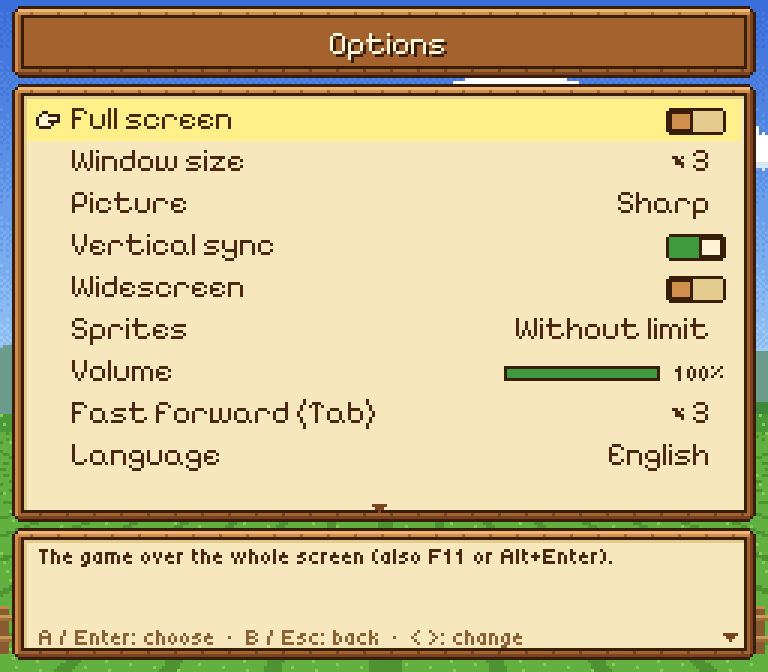
- Options — full screen, window size (×1 to ×6), sharp or exact pixels, vertical sync, widescreen, sprites without flicker or as the console, volume, fast-forward speed, language, and whether this menu shows at start.
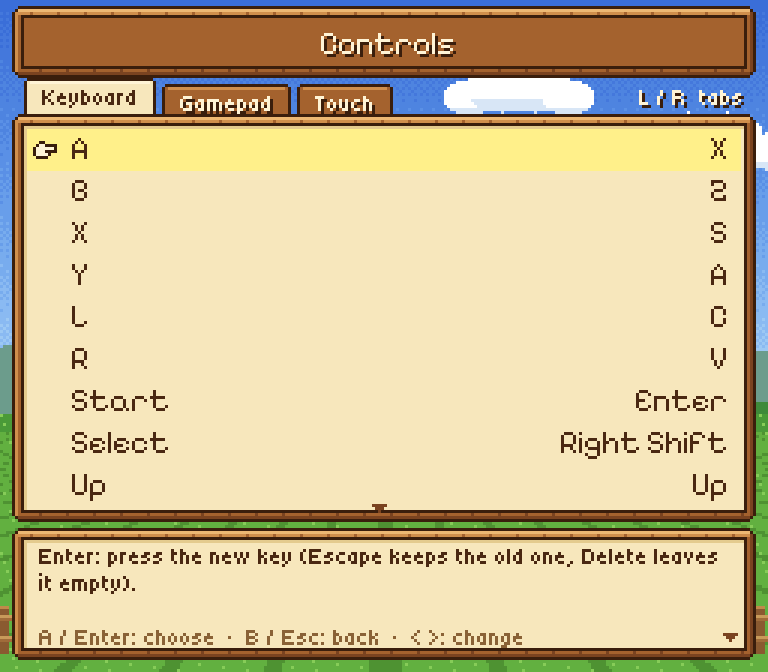
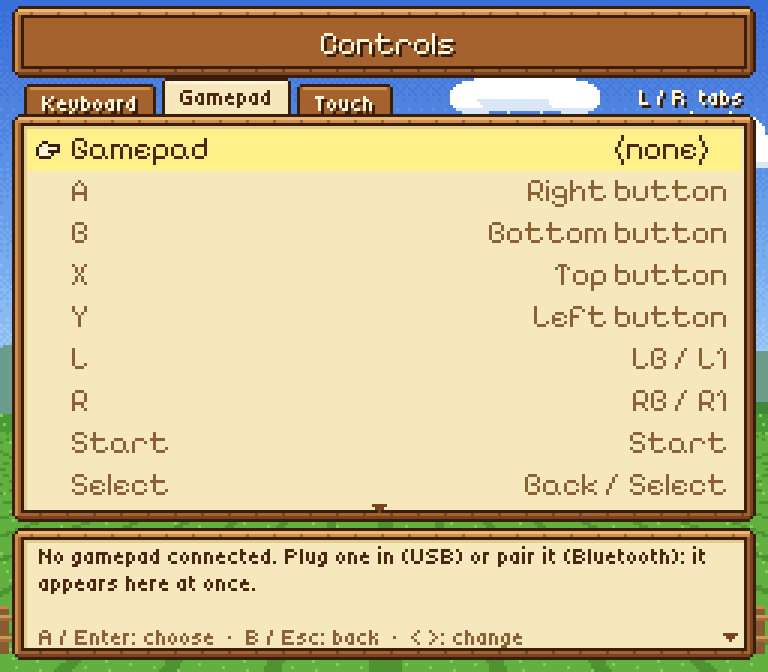
- Controls — each SNES button on the keyboard and on the gamepad (press the new key or button); connected gamepads (Xbox, PlayStation, Switch Pro… USB or Bluetooth) show up at once and you choose which one plays; the button you press lights up to test it.
- Save states — 10 slots (also F1–F10 load, Shift+F1–F10 save). They never touch your diaries.
- Everything is kept in
config.iniandkeybinds.ini(the recompilation's format, so your keys work in both).
(The screenshots show the Spanish menus.)
| Options | Controls | Gamepad |
|---|---|---|
 |  |  |
| In the game |
|---|
 |
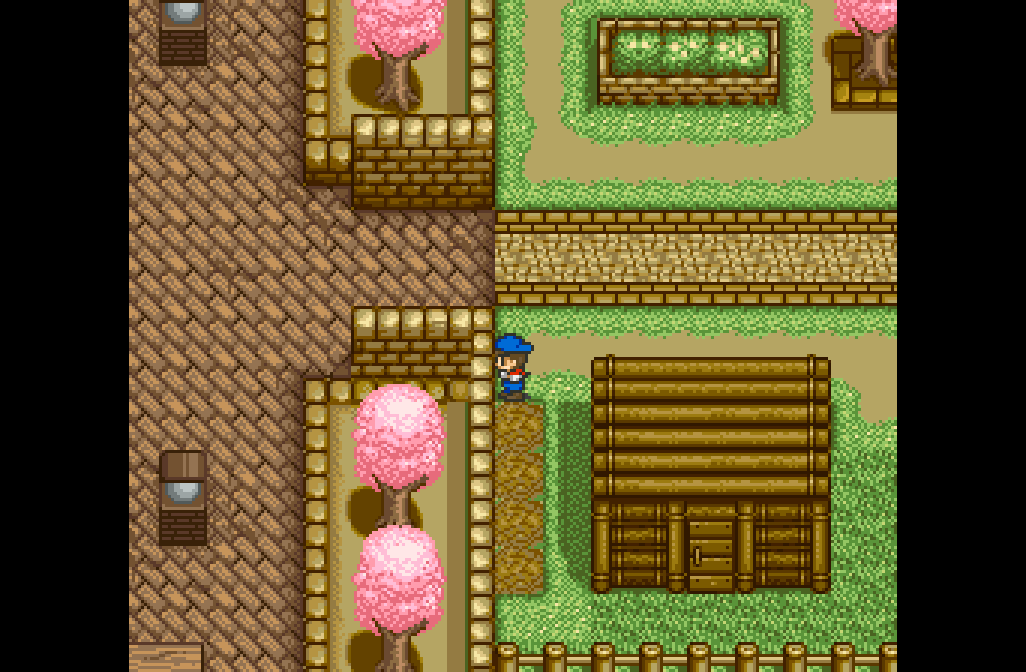
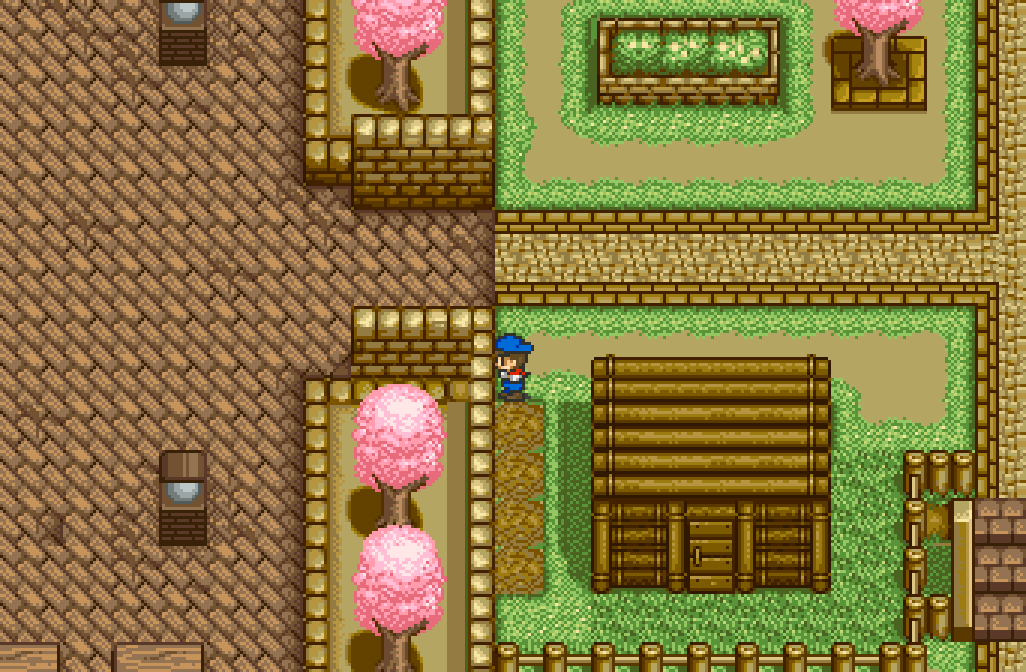
16:9 widescreen (off by default)
Shows more of the map at the sides instead of black bars, with people and animals drawn in the margins too. At a map's edge, in small rooms and on the title screen it goes back to the original 4:3, since the game has nothing to draw there. It can be turned off in Options or Improvements.
| Original (4:3) | Widescreen (16:9) |
|---|---|
 |  |
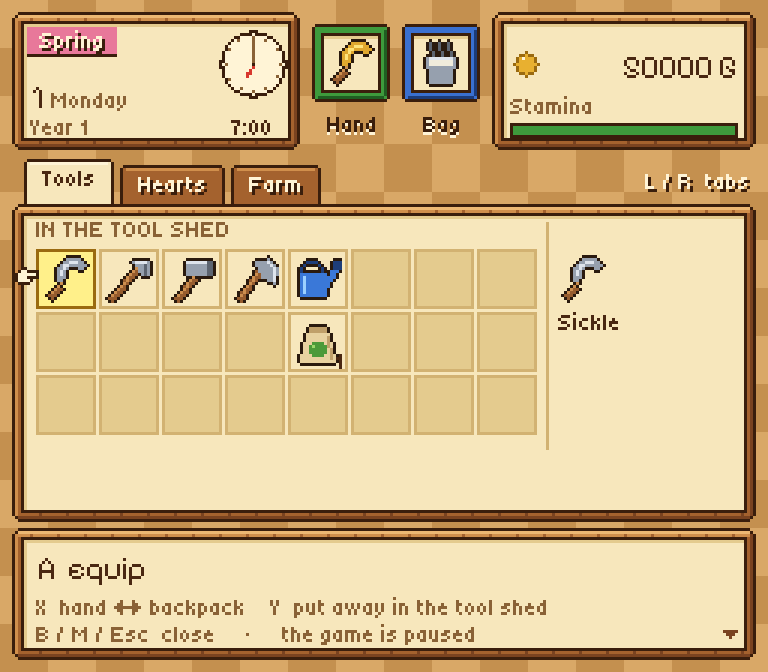
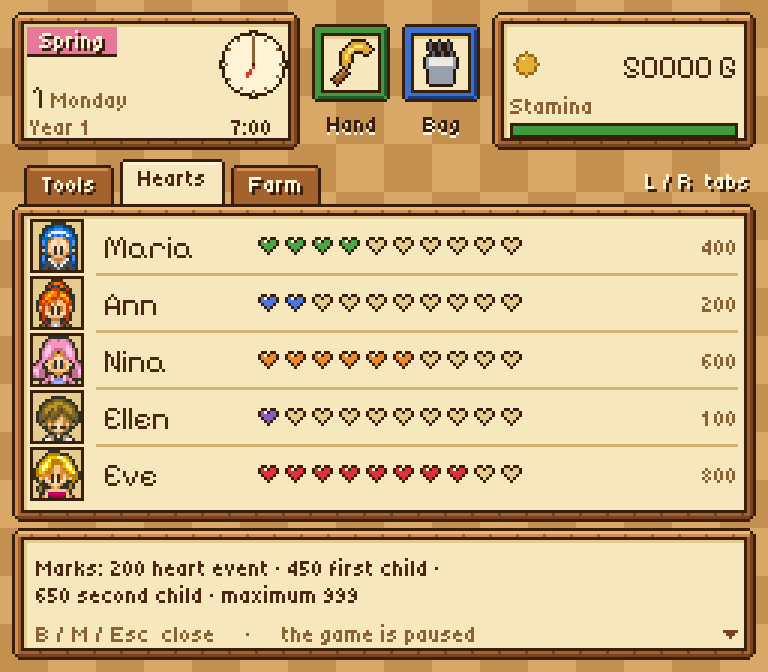
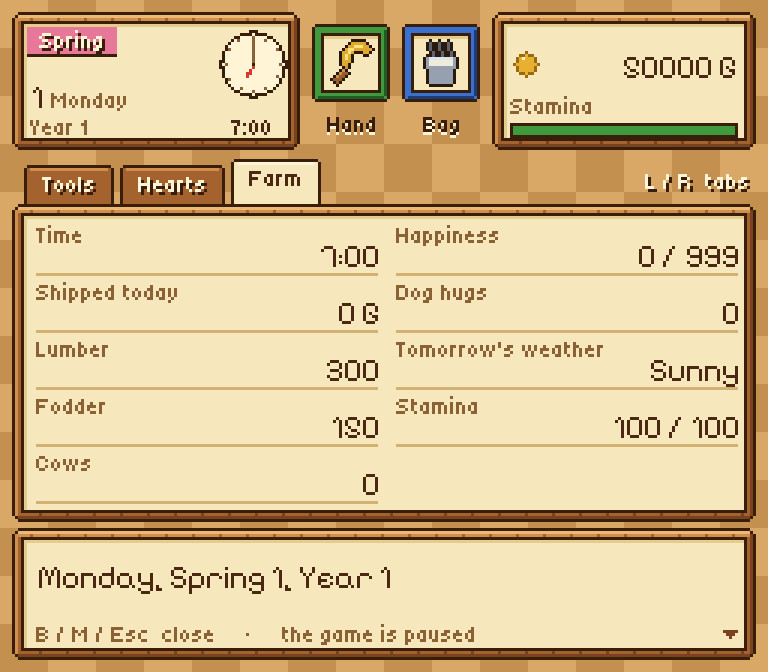
Harvest Moon 64-style pause menu (M or R3)
Date and clock, money and stamina; Tools (hand, backpack and the tool shed: equip, swap and put away by the game's own rules); Hearts (each girl's face, her own sprite read from your ROM, with ten hearts); Farm (shipping, lumber, fodder, cows, happiness, tomorrow's weather). The music keeps playing.
| Tools | Hearts | Farm |
|---|---|---|
 |  |  |
The other improvements (the recompilation's)
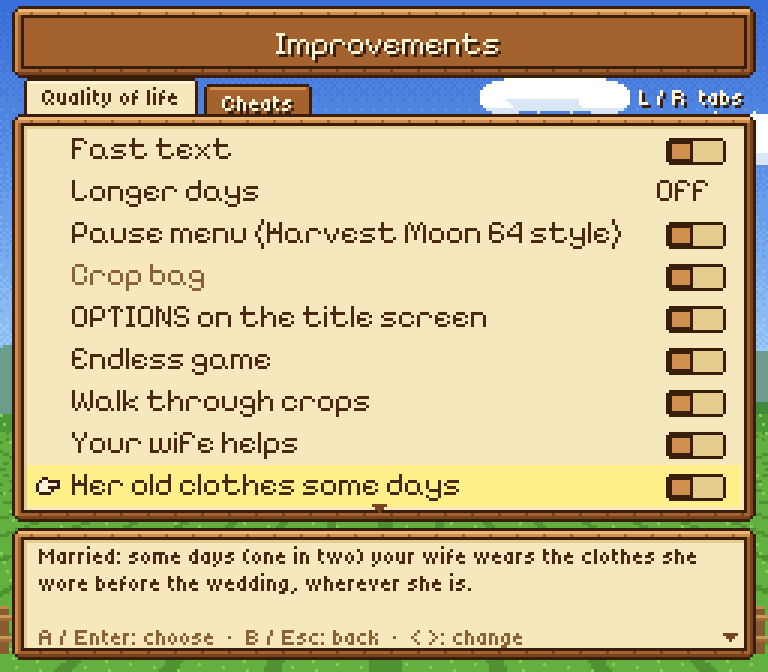
- Endless game (off by default) — you watch the whole Year 3 ending, then carry on with your farm: Fall, Year 4, 5 and beyond; the diary says "4th", "5th"…
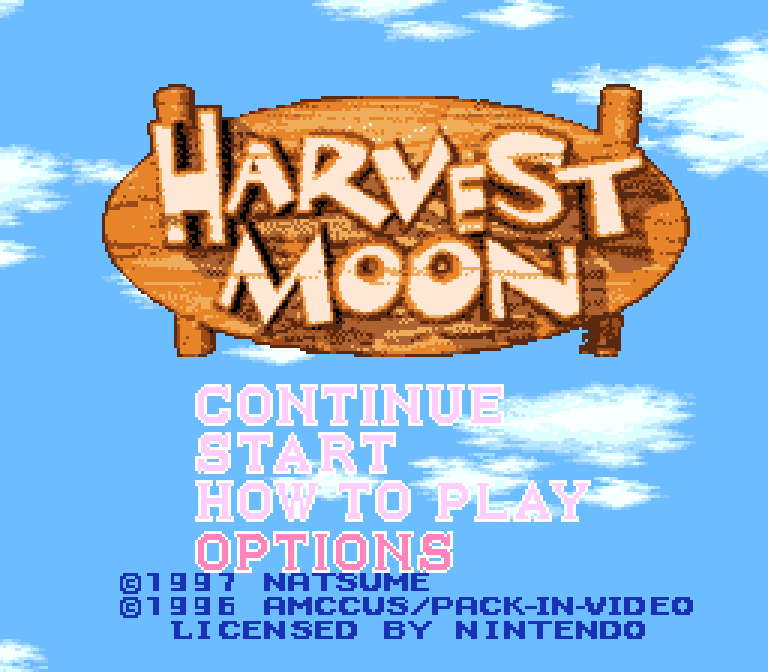
- OPTIONS on the title screen — a fourth entry below HOW TO PLAY that opens the launcher.
- Fast text (4×) and longer days (1.5× to 4×).
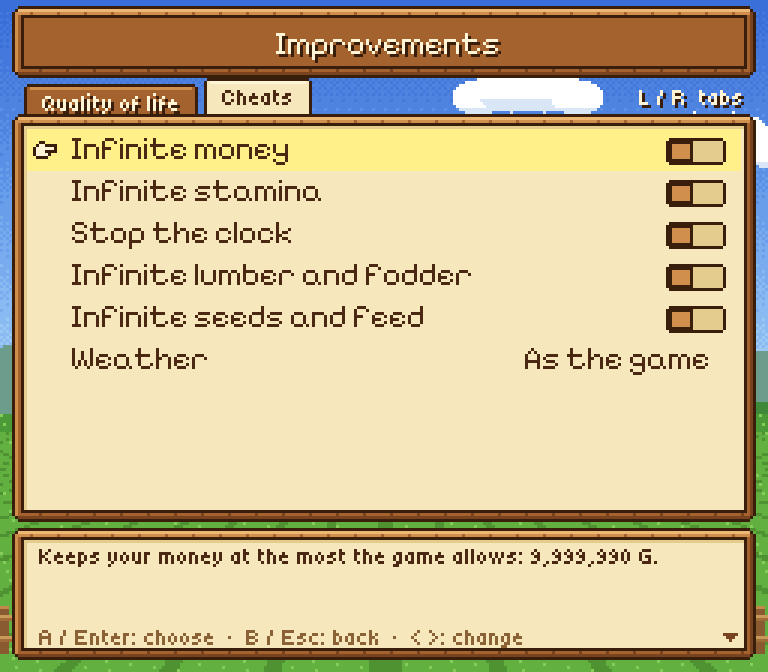
- Cheats (off by default) — infinite money, infinite stamina, stop the clock, infinite lumber and fodder, infinite seeds and feed, control the weather. They only write values the game can have, so your saves stay valid when you turn them off.
- Fast forward — hold Tab (or the right trigger): the game runs ×2 to ×6 and the music speeds up with it.
| OPTIONS on the title | Improvements | Cheats |
|---|---|---|
 |  |  |
Everything starts off, so the game is exactly the console's: turn on what you like in Improvements and Options.
Controls
| Key | SNES / action |
|---|---|
| Arrows | D-pad |
| X / Z / S / A | A / B / X / Y |
| C / V | L / R |
| Enter / Right Shift | Start / Select |
| Esc (gamepad: L3 or Guide) | Launcher (game paused) |
| M (gamepad: R3) | Pause menu |
| Tab (gamepad: right trigger), held | Fast forward |
| F1…F10 / Shift+F1…F10 | Load / save a state |
| F11 or Alt+Enter | Full screen |
All of them can be changed in Controls.
Why it exists
Harvest Moon is one of my favourite games. After the recompilation I wanted to go further: understand the game routine by routine, and have it play on that code alone.
This project was made with the help of AI. I directed it and supervised every step: what to do, how it should behave, testing it on my own PC and deciding what stays. If you don't like that it was made with AI's help, that's fine: just don't use it.
Legal notice
This repository contains no ROM and nothing generated from one (no
generated code, no executables). To build it you need your own legal copy
of Harvest Moon (USA):
SHA-256 73a3aa87ddd5ce5df5ba51292316f42b6e128280179b0a1b11b4dcddc17d4163.
What is decompiled
| System | Routines | File |
|---|---|---|
| Random numbers | GetRNG, RNGReturn0toA ("roll an n-sided die") | src/rng.c |
| Arithmetic | DivisionUnsigned | src/math.c |
| Weather | SetWeatherFlags, WeatherTomorrow, SUB_8281C0 (the TV forecast) | src/weather.c |
| Farm | GetTileIndex, LoadsDamageProbabilities, ClimateFarmDamageCheck, ClimateFarmDamagePrep, NightlyFarmTilesCheck, MonthlyFarmTilesCheck, CalculateFarmDevelopment, Sub_82A9A0 (grazing) | src/farm.c |
| Stock and money | AddWood, AddGrass, AddPlayerHappiness, AddMoney | src/stock.c |
| Player | ChangeStamina, HaveLunch | src/stamina.c |
| People | FindMostLovedName, WifePregnanacyandChilds | src/people.c |
| Calendar | LoadsDateNames | src/calendar.c |
| Animals | GetsCowPointer, GetChickenPointer, AddCowHappiness, CowFeedingandStatus (the animals' night), AddNewCow, AddNewChicken, PlaceAnimalsOnMap (CODE_83C296: chickens, cows, dog and horse on the map you enter) | src/animals.c |
| Ending | RanchMasteryCalculator (the final ranch score) | src/ending.c |
| Event script commands | 57 of the 90: the cow's, the chicken's and the dog's every frame (Event_UNKCowRelated, Event_UNKChickenRelated, Event_UNKDogRelated), jumps and tests (JumptoInstruction, JumpifFlagSet / Equals / Between, JumpIfEqualsRNG, GetRNG), clock (TimeRunning / Stopped, SetHour), player (SetPlayerPosition / Direction, SetTransitionDest, UNKSetAnimation), slots (NewCCStructure, UNKDisableCCstruct, UNKSetsCC10, UNKCCchanges2) and flags | src/eventcmds.c |
| Events | SetCCPoiner, ResetsCurrentCCStructureLong / Short, SUB_8480F8, UNK_LoadCCDataLong / Short (start an event script) | src/events.c |
| Map edits | EditTileonMap / EditTileonMapandsets0181, ChangeMapTile (CODE_81A688), QueueTileGraphicsDMA (CODE_81A6C1), SUB_81A801, SUB_81A83A, SUB_82B060, StartMapAnimation (CODE_81A5E1) | src/mapedit.c |
| Video DMA | AddProgrammedDMA (queue a copy to VRAM / CGRAM for the next NMI), RemoveProgrammedDMA, UNK_SetDMA2 (a 2x2 block of BG3 tiles), UNK_SetDMA1 (one letter) | src/dma.c |
| Menus | SaveSlotMenuInputs, LoadSlotMenuInputs, StartMenuInputs, TitleMenuInputs, ListInputs (the buttons in each menu), ImmobileInputs (with a text box open: speed up, go on, close, choose) | src/menus.c |
| Saved games | SaveGameSlot (the whole save layout), LoadGameSlotResume, CheckSRAMIntegrity (the checker also compares the battery RAM) | src/save.c |
| Sound | UNK_Audio17 / 7 (wait for "ready"), UNK_Audio8, UNK_Audio15 / 19 (sound effects), UNK_Audio16, UNK_Audio2 (commands to the sound chip, checked by recording its answers) | src/audio.c |
| Text box | PrintTextFrame (ADDDDFFFF: the printer, code by code), StartTextBox, CloseTextBox (CODE_8393F9), SUB_83932D (wipe the box), BlinkTextBoxArrow / TextBoxArrow / DrawTextBoxArrow (the "more text" arrow), FindLetterGraphics / DrawLetter / AdvanceLetterCursor / BlinkTextCursor (letters), PrintDigit (numbers) | src/text.c |
| Objects | SpawnMapObject (CODE_81A500), CreateGameObject (CODE_858000), LoadGameObjectComponents, LoadSpriteComponent (sprites and the objects the tools leave on the map) | src/objects.c |
| Tools | GetTileContent, UNK_CheckTileProperty, CheckToolSuccess, CalculateTileinFront, TileAtOffsetFromPlayer, PreCheckToolSuccess / Line / Square, SUB_82927D | src/tools.c |
| Using the tools | All 28 ToolUsed* routines: sickle, hoe, hammer, axe, their gold versions, the five seeds, paint, feed, medicine, potion, bell, milker, brush, beans, gem seed, blue feather, watering can, sprinkler; SUB_829260 (uses the item in hand: one routine per item, through Tool_Used_Table) | src/toolused.c |
A few things found along the way (details in each file's comments):
- "1 chance in n" in the game is not exactly 1/n: RNGReturn0toA slightly favours 0.
- Rain 1/6 in spring and 1/10 in summer and fall; snow 1/3 in winter; hurricane 1/30 in summer (1/60 with the turtle shell).
- The first year has two fixed storms: winter day 8 and summer day 30.
- At night, rain breaks fences (1/96), a hurricane also rips out grass (1/16) and crops (1/4), and the new year wipes grass (1/64) and crops (1/32).
- Crops grow one stage per night only if they were watered; rain waters everything. In fall watered crops just dry out, and on the first day of winter every crop dies back to tilled soil.
- The ending's "ranch development" score is simply the number of farm tiles with fences, crops or grass.
- A hungry cow may fall sick (1/4); a cow sick to the end dies unless tomorrow is a festival. Pregnancy counts down with a global counter, and the calf's starting happiness (20 / 50 / 100) depends on the mother's.
- Children: the first needs 450 hearts with the wife, the second 650 and the first child 90 days old; both need the house at level 2. A child is born 60 days after it is conceived.
- Whether a tool works is a bit in the tile's property table (sickle 01, hoe 02, hammer 04, axe 08, water 10, seeds 20), and only from the sides and in the seasons the tile allows. Any item not on that list "works".
- The date suffix is "st/nd/rd" only for days 1-3, so the game writes "21th", "22th" and "23th".
- A bug in the original game: in CowFeedingandStatus, after a 1-in-16
roll for a cow left outside, the X register stays 8-bit; if a broken-fence
night flag ($0196 bit $0400) is also set,
LDY.W #$0002at $83:BDE1 is decoded as a 2-byte instruction and the leftover00executes asBRK. - Tool finds: hoeing, once a day, 1 in 16 a coin (10 G) or else 1 in 16 a money bag (50 G); in spring and summer 1 in 32 a mole; 1 in 64 a power berry, only twice ever. The sickle finds a frog in summer (1 in 16, +2 happiness). One more berry each from the rock by the spring (hammer, 1 in 4) and from a stump off the farm (axe, 1 in 16).
- Big stones and stumps break on the 6th hit (one shared counter, $096D); the gold hammer and axe break them at once. The gold hoe tills up to 6 tiles in a line and stops at the first it can't; the gold sickle cuts the 9 tiles around. The gold axe forgets the "no finds today" check.
- Seeds only take in their season (corn and tomato in summer, potato and turnip in spring, grass in spring and summer); out of season the tile just becomes a dead sprout.
- Painting the house: four parts of the wall, +10 happiness each.
- The ending's ranch score (0-999) adds up money (at most 78), animals
(3 each), max stamina, the girls' hearts, crops shipped, happiness, the
house, children, clock, turtle shell, farm development and each cow's
happiness. Bugs: hearts and shipped crops are cut with
AND #$1FFinstead of capped (512 turnips shipped count as 0), and only the low 16 bits of the money count (655,360 G count as 0). - The dog's mood changes every 2 seconds between five states, with a random roll picking what it does; each hug counts ($7F1F52). A hen that is not picked up starts a new script every $200 frames.
- There are at most 10 "map objects" (the effects tools leave, like cut
grass). If all 10 are in use when an 11th is needed, the game freezes:
BRAto itself at $81:A528.
Layout
src/— the rewritten routines and the checker (hm_decomp.c/.h).native/— the native build: the game run on the rewritten routines alone (main.c: the window, the pads, the sound;hw.c: the console's chips around the C).data/decomp_names.tsv— names of 499 routines (from HM-Decomp).tools/build.sh— generates, renames and builds the test executable.tools/check.sh— runs the checks (random inputs, a new game, nights).tools/progress.py— computes the percentage above.tools/import_decomp_names.py,tools/decomp_overrides.py— helpers.scripts/— scripted playthroughs used by the checks.GUIDE.md— a guide to how the game works inside, written for someone new to it, with everything found so far (Spanish:GUIA.md).DECOMPILACION.md— the method, explained.ESTADO.md— status and notes. (Both in Spanish.)
Usage
With the three projects side by side:
HarvestMoonSNESRecomp/   (git clone + bash tools/apply_patches.sh)
HarvestMoonSnesDecomp/
HM-Decomp/
cd HarvestMoonSnesDecomp
tools/build.sh --rom /path/to/your/rom.sfc            # HM_RECOMP=... if the recompilation lives elsewhere
HM_ROM=/path/to/your/rom.sfc tools/check.sh 2000 10   # 10 seeds x 2000 random calls + playthroughs
python3 tools/progress.py --decomp ../HM-Decomp --update-readme
The decompilation does not modify the recompilation project: it
generates its own copy of the code from your ROM, applies the names and the
checkers, and builds a test executable in build/. Without
HM_DECOMP_CHECK / HM_DECOMP_FUZZ that executable plays exactly like the
normal game.
How the native build works
native/ builds src/*.c (all but the checker) with snesrecomp's runner
picture and sound chips, unmodified (native/chips/, with their licenses:
PolyForm Noncommercial and the MIT / ISC ones they come from). Every wait
for the next frame goes through hm_nmi, which draws the frame, reads the
pads and lets the sound chip run; the routines that never return (RESET,
the title, the demos, GameLoop…) leave in g_hm_next where they jump, and
main calls the next one. The details are in section 5.34 of the
guide.
cmake -S native -B build/native
cmake --build build/native
build/native/HarvestMoonNative /path/to/your/rom.sfc
For Windows from Linux: add -DCMAKE_TOOLCHAIN_FILE=native/mingw-w64.cmake
(MinGW-w64). SDL3 is built from source when no installed one is found.
--headless --script file --dump-dir dir plays a script (the same commands
as the recompilation's --script) without a window and dumps the picture
and the WRAM; there the improvements are off unless --mods.
| File | What it does |
|---|---|
native/main.c | the window, sound, pads, pacing, save states |
native/hw.c | the console's chips around the C (memory map, registers) |
native/launcher.c, native/ui.c | the launcher and its drawing |
native/mods.c, native/pause.c | the recompilation's improvements and the pause menu |
native/config.c, native/i18n.c | config.ini / keybinds.ini and the text in three languages |
The decompiled C has only three hooks for the improvements, with the
ROM's values by default, so the checker sees no difference:
g_hm_oam_right/left (widescreen), g_hm_no_ending (endless game) and
g_hm_year_suffix ("4th", "5th"…).
The launcher's and the pause menu's type is Pixelify Sans and Tiny5 (SIL
Open Font License, native/fonts/); the icons and the night farm are drawn
for this project, with no game graphics.
License
PolyForm Noncommercial 1.0.0, the same as HarvestMoonSNESRecomp: free to use for non-commercial purposes. It covers this repository's code only, not the game or its data.
Credits
- HM-Decomp by ElisaS-Codes and DasK: the disassembly, the names and the RAM map.
- snesrecomp
(RetroPortingToolKit / Matthew Stanley): the static recompiler the checker
runs on, and the native build's picture and sound chips (
native/chips/, with its license and its MIT / ISC credits). - HarvestMoonSNESRecomp:
the improvements, the pause menu, its text and icons, and the RAM map
hm_ram.h, ported to the native build. - SDL3: window, sound and gamepads.
- Pixelify Sans and Tiny5 (SIL OFL): the menus' type.
- Harvest Moon © 1996 Pack-In-Video / AMCCUS, © 1997 Natsume. A