Haze Recomp
Haze Recomp is a Windows port of the PlayStation 3 game Haze, built using ps3recomp.
- Type: PC port
- Game: Haze
- Runs on Windows
- By zdiemer
- Latest release v0.1.13, 2026-10-25
- Source: https://github.com/zdiemer/haze-recomp
README
Haze Recomp
Experimental Windows port of Haze for PS3, built with ps3recomp. Targets the USA disc BLUS30094, disc version 01.02, application version 01.00.
The Windows installer prepares your ISO, downloads verified firmware from Sony, and installs a ready-to-play launcher. It uses a per-user MSI internally. See installation and upgrades and the automated release process.
Menus, opening-scene gameplay, audio output, and checkpoint saves have been tested. Keyboard/mouse and SDL controller support are implemented. Performance, rendering, and campaign compatibility are still in development. Full campaign completion is not validated. Experimental invite-code campaign co-op has passed two-instance local gameplay, departure and rejoin tests; separate-machine and home-router validation is pending. Internet play requires a configured service; see co-op setup and limitations. Native PAMF movies play with synchronized video and audio; Escape or the current confirm binding skips them.
Install
Run HazeRecomp-<version>-Setup.exe from Releases,
choose your ISO, and click Install. The installer downloads the required
RPCS3 helper and Sony firmware, prepares the game, and installs the launcher.
When it finishes, click Play Haze. Subsequent launches use Haze Recomp
in the Start menu. No separate tools or development environment are needed.
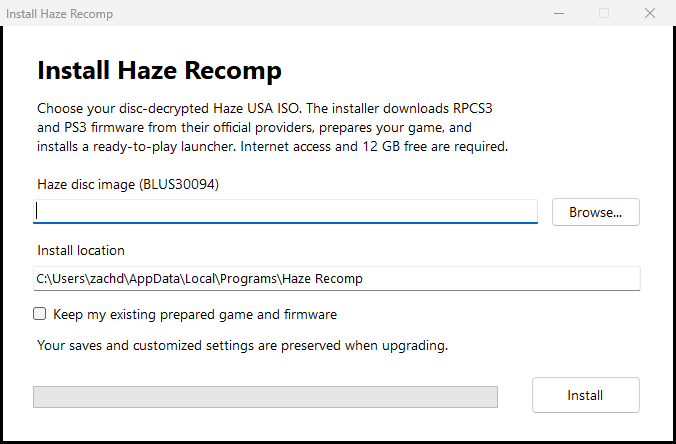
After the installer prepares the game, the launcher is ready to use:
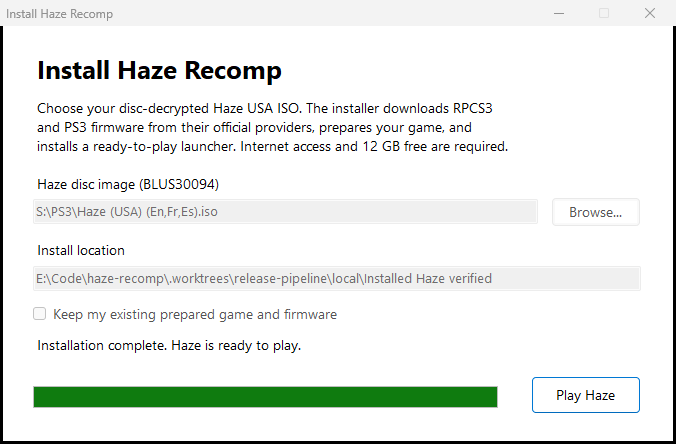
The tested disc-decrypted image is Haze (USA) (En,Fr,Es).iso
(8,498,184,192 bytes), BLUS30094, disc version 01.02 / application version 01.00.
Its SHA-256 is:
e778fff687b4a122146d23160fe1fefdff14dddb5d5709b257cff76832dc2520
Check your image with PowerShell:
Get-FileHash -LiteralPath 'D:\PS3\Haze (USA) (En,Fr,Es).iso' -Algorithm SHA256
This identifies the tested ISO byte for byte. Setup also checks the disc metadata and executable hashes; other regions, encrypted raw dumps and updated executables are unsupported. Supply your own disc image; none is included in releases.
Build from source
Requires Windows x64, Visual Studio C++ tools with the Windows SDK, Clang, CMake and Ninja components, Python 3.11+, Git, and 7-Zip. Supply your own readable (disc-decrypted) game image, RPCS3 executable for EBOOT decryption, and installed PS3 firmware. Game files and firmware are not included.
Run from the repository root in PowerShell, replacing the example paths:
git submodule update --init --recursive
python -m venv .venv
.venv\Scripts\python.exe -m pip install -r external/ps3recomp/requirements.txt

# Extract the disc and decrypt its executable.
.\scripts\extract.ps1 -Iso 'C:\path\to\Haze.iso'
.\scripts\decrypt.ps1 -Rpcs3 'C:\path\to\rpcs3.exe'

# Generate native translations of the game and firmware code.
$env:PS3_DEV_FLASH = 'C:\path\to\dev_flash'
.venv\Scripts\python.exe scripts/haze.py analyze
.venv\Scripts\python.exe scripts/haze.py lift --jobs 4
.venv\Scripts\python.exe scripts/haze.py lift-spu
.venv\Scripts\python.exe scripts/lift_audio_plugins.py
.venv\Scripts\python.exe scripts/lift_firmware.py

.\scripts\build.ps1
# Or double-click build/haze/HazeLauncher.exe after building.
.\scripts\play.ps1
HazeLauncher.exe starts the game without a scripting console, preserves
save/settings/cache paths and retains session logs. Native dialogs select
missing game or firmware paths. After a failed run, or from the Haze Recomp
diagnostics shortcut (HazeLauncher.exe --diagnostics), it exports a redacted
diagnostics ZIP to attach to an issue; see the launcher guide.
Already extracted files belong in game/disc/PS3_GAME/, including PARAM.SFO
and USRDIR/EBOOT.BIN. Decryption produces USRDIR/EBOOT.ELF. Set
PS3_DEV_FLASH again when launching from a new shell, unless firmware is in
local/tools/rpcs3/dev_flash.
The PPU lift is an initial translation; additional function recovery may be needed before a fresh lift boots or runs correctly.
The executable is build/haze/HazeRecomp.exe. Saves live in
local/state/savedata, session logs in local/sessions, and reusable shaders
in local/cache/rsx-shaders. Game assets, generated translations, and build
outputs are ignored by Git. The first launch installs about 4 GB of game data.
Controls and settings
| Action | Default input |
|---|---|
| Move / look | WASD / mouse |
| Fire / zoom | Left / right mouse |
| Reload / use | R / E |
| Jump / crouch | Space / Ctrl |
| Switch weapon | X or mouse wheel |
| Grenade / Nectar or play dead | G / Q |
| Melee | F |
| Menu confirm / back | Enter / Esc (Space / X also work) |
| Open / close pause menu | Esc (in nested menus, goes back one page) |
| Release or recapture mouse | F1 |
Menus also support the pointer: left click selects, right click goes back. Enter and Esc keep their menu actions regardless of gameplay bindings. Holding either key across a menu boundary cannot trigger another action. Space remains jump during gameplay; Enter retains the Start binding outside menus by default. Bindings accept function, numpad and punctuation keys and separate WheelUp / WheelDown directions; see docs/control-settings.md. SDL gamepads connect automatically. Game vibration plays on the controller in use, including PlayStation, Switch and Steam virtual pads, while the game window has focus. Bindings, mouse sensitivity, controller options, and startup skipping live in config/input.ini and reload while running. Action names above assume Haze's default controller layout; zoom and crouch can be changed from toggle to hold in the game's settings.
Settings > Control Setup opens PC Controls for bindings, sensitivity, deadzones, vibration and prompt style. Select a binding to capture an input, review any conflicts, then Apply. Back discards edits; Defaults requires Apply. Game control options opens the original controller layout and toggle/hold settings.
Player Profile on the main menu shows your current name. Use Edit profile
name to type with the keyboard (Enter accepts, Escape cancels), or use Add
character, Delete last character, and Clear name with a controller.
Apply saves the name; Back discards pending edits. Names use 3–16 ASCII
letters, digits, underscores, or hyphens and must start with a letter. The name
is stored alongside your saves in player-name.txt; changing it preserves the
internal profile key, existing save directories, and campaign progression.
The main-menu footer opens Desktop Options through the current Select binding (Tab by default) or a mouse click. Add to Steam lets you select a local account and confirm registration with the executable launcher and artwork; close Steam first. The pause-menu footer opens Quit to Desktop directly. Quit confirmation defaults to Cancel and waits for active saves and settings before shutting down.
Open Video Setup or Sound Setup from the main or pause menu for PC Video and Audio settings. Changes are staged until Apply; Back discards edits. Display changes offer a 15-second Keep/Revert confirmation. Render resolution and shadow resolution require restarting.
Alternatively, edit config/graphics.ini, then press F6 to apply filtering, FXAA, sharpening, exposure, VSync, frame-limit, and performance-overlay changes live. Editing alone does not apply changes; the window title reports the reload result. Display mode, monitor, window size, render resolution, and shadow resolution changes made in the file require restarting.
The Video page offers Performance overlay (Off / Compact / Expanded) and
Overlay position (four corners). F7 cycles modes during gameplay or menus
and saves the preference. Compact is a tiny, single-line presentation FPS counter
with a text shadow. Expanded adds mean presentation interval, guest flips (not
simulation rate), draw packets per guest frame,
cached textures, and process working-set RAM. CPU/GPU timings are marked N/A
because the normal renderer does not expose reliable per-frame measurements.
Launch overrides remain in effect after reloading.
Defaults are borderless at the monitor's desktop resolution with a 30 FPS cap.
Override resolution for one run with
.\scripts\play.ps1 -RenderResolution 1920x1080.
Development
Run regression checks with .\scripts\build.ps1 -Test, or use
-RuntimeOnly -Test for checks without building the game executable.
For a bounded diagnostic run, use .\scripts\run.ps1 -Seconds 90;
logs and captures go to local/runs.
See the script guide for diagnostics, microbenchmarks, build internals and command migrations.
Worktrees can reuse a prepared checkout's SDK, Python environment, generated translations, and game assets while keeping their own builds and logs:
.\scripts\build.ps1 -SharedRoot 'C:\path\to\haze-recomp'
.\scripts\play.ps1 -SharedRoot 'C:\path\to\haze-recomp'
Use -SdkRoot on the build command to select a separate SDK checkout.
The native build downloads a pinned shared LGPL FFmpeg package for movie
decoding. -FFmpegRoot selects an unpacked development package for offline
builds. See movie playback for formats and validation.
Experimental browser build
The Wasm64/WebGL2 build supports menus and opening-scene gameplay, but remains slow and experimental. After preparing the game and translations above, install Emscripten and run:
py -3 scripts/bootstrap-wasm.py
.\scripts\build-wasm.ps1 -Emsdk 'C:\path\to\emsdk'
py -3 scripts/serve-wasm.py --firmware-dir 'C:\path\to\dev_flash'
Open http://127.0.0.1:8085/ in a 64-bit Chromium browser. The build requires
shared memory and about 8 GiB of addressable linear memory; the local server
provides the required isolation headers. Click to enable sound and fullscreen;
F1 releases the mouse. Add ?debug=1 for controls and logs. Browser saves use
IndexedDB, separately from native saves. Browser network play is not implemented.
Native FFmpeg movie playback is not part of the experimental browser build.
Use scripts/playtest-wasm.py --profile-after 30 with your normal playtest
arguments to record worker CPU profiles. Summarize a run with
py -3 scripts/diagnose.py browser-cpu local/wasm-tests/<run>.
The report ranks self samples per worker and shows callers from leaf to root;
--top, --stack-depth, and --json control the output. It also accepts raw
Chromium .cpuprofile files. Counts are samples, not elapsed time; idle and wait
functions remain visible, and workers are reported separately.
License
The port scaffold derives from ps3recomp's MIT-licensed template; see
LICENSE. Input prompt artwork is by Kenney; its license is included
in assets/input-prompts.
Native movie decoding dynamically links FFmpeg under LGPLv3. Its license and
documentation are installed under share/ffmpeg; the matching shared libraries
remain replaceable beside the executable.