Icarus: Sanctuary of the Gods
Icarus: Sanctuary of the Gods (Droiyan) is a native PC port of the 1998 RPG for Windows, Linux, and macOS with a replacement text renderer.
- Type: PC port
- Game: Icarus: Sanctuary of the Gods
- Runs on Windows, Linux and macOS
- By Second Save
- Latest release v1.0, 2026-11-04
- Source: https://github.com/ACR-GD/icarus-recomp
README
Icarus: Sanctuary of the Gods (Droiyan), static recompilation
Recomp by Second Save
A native port of the 1998 Windows 95 RPG Icarus: Sanctuary of the Gods (Korean title Droiyan,
KRG Soft / JC Research) for macOS, Linux and Windows. The game's x86 code (ICARUS.EXE, MSVC 5) is
translated to C ahead of time, and a small runtime replaces the Win32 / DirectX 5 APIs it used with
SDL3.
Nothing is emulated at run time: no Windows, no Wine, no CPU interpreter.
How it works
| Piece | What it does |
|---|---|
tools/recomp.py | Disassembles ICARUS.EXE (Capstone), finds every function (call targets, relocation table, incremental-link thunks, switch tables) and writes one C function per guest function into gen/. |
runtime/rt.h, rt_core.c | CPU state, lazy flags, x87, string ops, dispatcher for indirect calls, host-to-guest callbacks. |
runtime/w32_kernel.c | Imports and COM vtables point at "magic" addresses served by host functions. Also the guest heap, files (case-insensitive, copy-on-write saves) and process queries. |
runtime/w32_user.c | Window, message queue, keyboard/mouse (SDL3), GDI text, wsprintf. |
runtime/w32_ddraw.c | DirectDraw surfaces in guest memory (8- and 16-bit modes), Blt/BltFast/Flip, palettes, presentation. |
runtime/w32_dsound.c | DirectSound buffers mixed in software, plus the CD audio music tracks. |
runtime/w32_mm.c | Multimedia timers (delivered on the game thread), MCI cdaudio, the mmio RIFF reader. |
runtime/w32_avi.c | AVIFile stream reading and a Cinepak decoder for the game's own movie player. |
runtime/launcher.c, runtime/installer.c | Launcher window and the disc installer (ISO9660, InstallShield 3 via runtime/is3.h, CD audio, EXE check, memory image). |
runtime/qol.c | Hardware cursor from the game's sprites, dialogue speed. |
runtime/text.c | Replacement text renderer: anti-aliased, proportional Crimson Pro glyphs blended through the game palette (ICARUS_FONT=original for the 1998 font). |
tools/prepare_data.py, tools/is3unpack.c | Rebuild the installed game from the original discs: ISO9660 extraction, the InstallShield 3 .Z archives (PKWARE DCL), and the CD audio tracks. |
You need
- The two original discs as BIN/CUE images (
ICAR_CD1.cue/.bin,ICAR_CD2.cue/.bin). - A C compiler (clang or gcc; MinGW-w64 on Windows) and SDL3 (
brew install sdl3,apt install libsdl3-dev, MSYS2mingw-w64-x86_64-SDL3). - Python 3 with
capstoneandpefileto regenerategen/(pip install capstone pefile).
Launcher
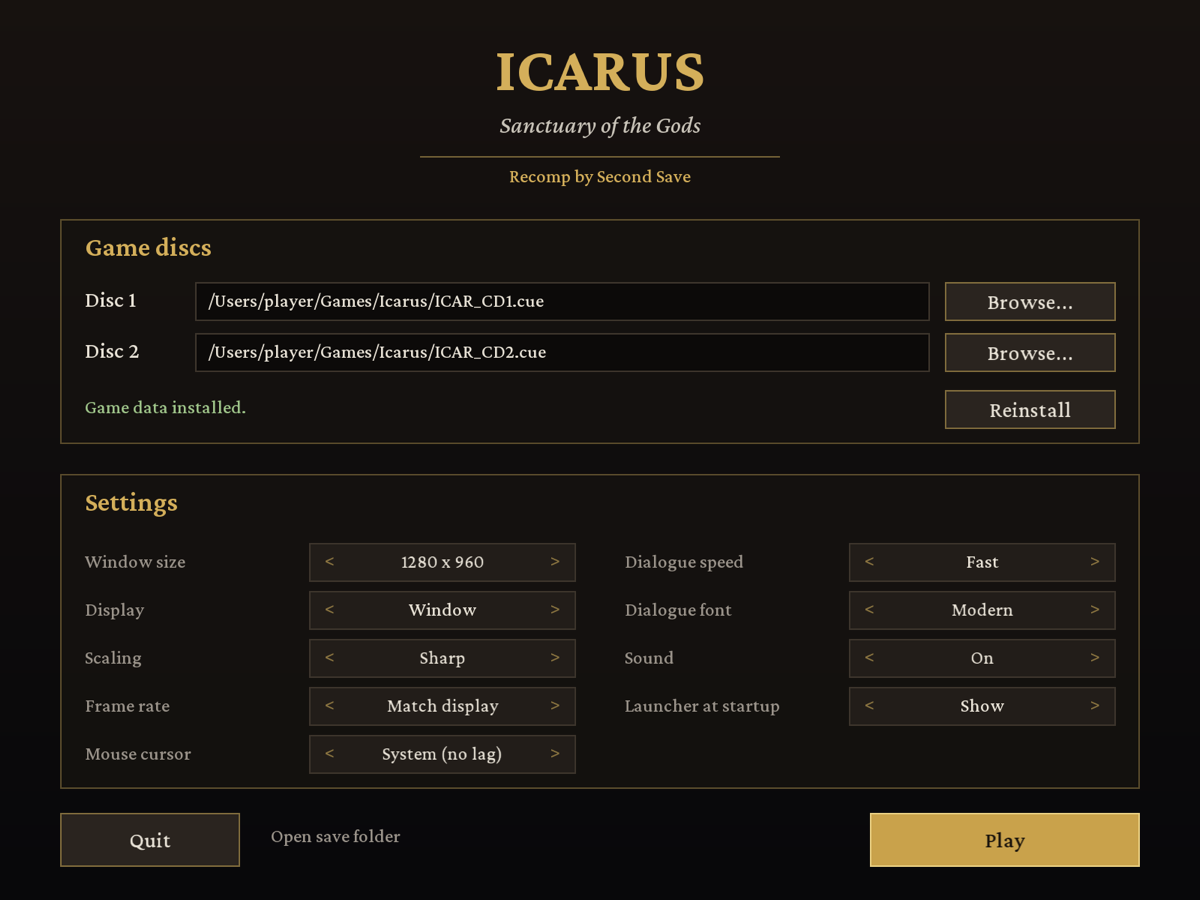
Running icarus opens the launcher:
- Game discs: pick disc 1 and disc 2 (
.cue+.bin, a bare.bin, or.iso), then Install. The game files are unpacked from the original installer archives,ICARUS.EXEis checked against the release this build was made from, and the CD music is saved. This takes a few seconds; disc 2 must be a.cuefor the music. Disc images are only read. - Settings: window size, fullscreen, scaling, frame rate, mouse cursor, dialogue speed and font, sound, and whether to show the launcher at startup. Left-click a setting for the next value, right-click for the previous one.
- Play (or Enter) starts the game; Esc quits.
icarus --playskips the launcher.
Data, saves and settings are stored per user: ~/Library/Application Support/Second Save/Icarus
(macOS), %APPDATA%\Second Save\Icarus (Windows), ~/.local/share/Second Save/Icarus (Linux).
When the working folder has a data/ folder (developer layout, see below), data/, save/ and
icarus.cfg there are used instead.
Build
make build/is3unpack
make data CD1=path/to/ICAR_CD1.cue CD2=path/to/ICAR_CD2.cue   # builds data/ (about 870 MB, 530 MB of it CD music)
make gen PY=python3                                            # translate data/ICARUS.EXE -> gen/
make -j8                                                       # -> ./icarus
./icarus
data/ holds the installed game files, droiyan.ini (the CD drive the game reads from: D:\),
and data/cd/ (the run-time CD contents: maps, movies, music as WAV). Saved games and options go to
save/. The original files in data/ are never modified.
Controls
The game's own controls: mouse for everything, Space or click to skip the intro movie, Esc to skip the prologue. Added by this port:
| Key | Action |
|---|---|
| Hold Tab | Fast-forward (4x) |
| F11 or Alt+Enter | Toggle fullscreen |
| F12 | Screenshot to screenshots/ |
| Click or any key during the boot logos | Skip straight to the title screen |
Quality of life
- Lag-free mouse: the game's own cursor sprite is shown as the system cursor at the window's
scale, so it moves at full display rate instead of one frame behind (
HWCURSOR = 0to disable). - Display-synced frame rate: like on 1998 hardware, where Flip waited for the monitor, the
game runs in step with the display: 60/75/85 Hz every refresh, 120/144 Hz every second one. No
judder from a 60 fps game on a 75 Hz screen.
FPS = 60forces a rate. - Sharp scaling: crisp pixels of even size at any window size or in fullscreen (integer
upscale, then a smooth resize).
SCALE_MODE = nearest | smooth | integer. - Faster dialogue: text types twice as fast (
TEXT_SPEED = 1original,0instant). - Readable font: anti-aliased Crimson Pro instead of the 1998 bitmap font (
FONT = original). - Lower sound latency, music that loops, and sound effects that load reliably.
Settings live in icarus.cfg (created on first run, next to where you start the game). Every
KEY = value there is the same as setting the environment variable ICARUS_KEY.
Environment variables
| Variable | Effect |
|---|---|
ICARUS_DATA=dir | Game data folder (default ./data, or data/ next to the binary). |
ICARUS_SAVE=dir | Save folder (default ./save). |
ICARUS_SCALE=n | Initial window scale (default 2). ICARUS_FULLSCREEN=1 starts fullscreen. |
ICARUS_SMOOTH=1 | Bilinear scaling instead of sharp pixels. |
ICARUS_MUTE=1 | No sound. |
ICARUS_WARP=1 | Let the game move the host mouse pointer (SetCursorPos). |
ICARUS_VERBOSE=1 | Log files, surfaces, sound buffers and MCI calls. |
ICARUS_TRACE=1 | Log every Win32/COM call (ICARUS_TRACE_QUIET=Name1,Name2 hides noisy ones). |
ICARUS_HEADLESS=1 | No window (testing). With ICARUS_SHOT=file%04d.ppm and ICARUS_SHOT_EVERY=n it saves frames. |
ICARUS_FONT=original | Use the game's original 8x16 bitmap font instead of the anti-aliased replacement. |
ICARUS_AUDIO_DUMP=file.raw | Also write the mixed audio (s16 stereo 44.1 kHz) to a file. |
ICARUS_FPS=n | Fixed frame rate instead of following the display refresh. |
ICARUS_SCALE_MODE=m | sharp (default), nearest, smooth or integer. |
ICARUS_TEXT_SPEED=n | Dialogue speed: 1 original, 2 default, 0 instant. |
ICARUS_HWCURSOR=0 | Draw the cursor in the game frame instead of as the system cursor. |
ICARUS_VSYNC=0 | No vsync; host pacing at 60 fps. |
ICARUS_RECORD=f.rgb | Record raw 640x480 RGB frames at a constant ICARUS_RECORD_FPS (default 30), for trailers (tools/make_trailer.py). |
ICARUS_STATS=1 | Print presents/flips per second and the worst frame gap. |
ICARUS_CONFIG=file | Settings file (default: per-user folder, or icarus.cfg in the developer layout). |
ICARUS_LAUNCHER=0 | Do not show the launcher (same as LAUNCHER = 0 in the settings). |
ICARUS_LAUNCHER_SHOT=f.bmp, ICARUS_LAUNCHER_AUTO=play|install|quit | Testing: capture the launcher, then act. |
ICARUS_KEYS=t:vk,..., ICARUS_CLICKS=t:x:y[:right],... | Scripted input at t seconds (testing). |
| ICARUS_SNDTEST=slot:entry,... | Testing: 20 s in, load and play DROYSND.SNF entries through the game's own loader. |
| ICARUS_CDDA_MAXSEC=n | Testing: cut every CD track to n seconds (checks music looping). |
tools/run_headless.sh SECONDS and tools/shots.sh T... wrap the testing knobs. Test runs use
build/testsave, never save/.
Credits
The replacement dialogue font is Crimson Pro by the
Crimson Pro Project Authors, under the SIL Open Font License 1.1 (tools/fonts/CrimsonPro-OFL.txt).
runtime/font_text.h is generated from it by tools/mkfont_ttf.py.
Sharing it
The recompiler, runtime and tools are original code. gen/ (the translated game code) and data/
are derived from the copyrighted game, so share the source tree and let players run
make data / make gen against their own discs, rather than publishing gen/, data/ or a
prebuilt binary that bundles them.
Status
Working: boot logos, title menu, intro movie (Cinepak + audio), prologue, CD music, sound effects,
the opening scene and dialogue. See NOTES.md for what has and has not been tested yet.
Continuous integration
.github/workflows/build.yml builds the runtime and tools on Linux (Debian trixie), macOS
(Homebrew) and Windows (MSYS2 UCRT64, clang) against ci/stub-gen, a stand-in for gen/ with no
game code, and runs ci/smoke.sh. The playable game is only ever built locally from your own discs.