inFAMOUS 2: native PC port
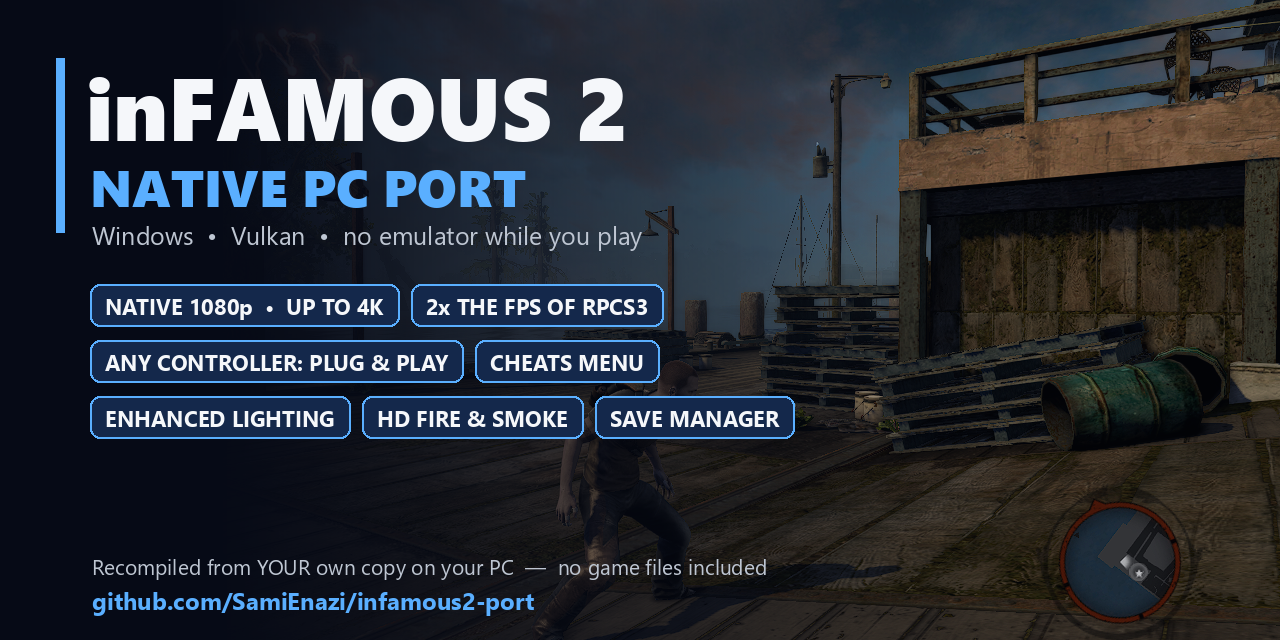
inFAMOUS 2: native PC port is a PC port of inFAMOUS 2 for Windows and Linux with native 1080p up to 4K resolution and 2x the frame rate of RPCS3.
- Type: PC port
- Game: inFamous 2
- Runs on Windows and Linux
- By SamiEnazi
- Latest release v0.5.4, 2026-11-13
- Source: https://github.com/SamiEnazi/infamous2-port
README
⚡ inFAMOUS 2: native PC port
Your own PS3 copy of inFAMOUS 2, recompiled into a real PC program for Windows and Linux.
No emulator while you play.











▶️ How to play: you need your own PS3 copy of inFAMOUS 2 (the Europe or US disc with the 1.04 update, or the digital version 01.03) set up in RPCS3 with the PS3 firmware. Download Setup.exe from the latest release, run it and press Install: it builds the game from your copy once (20–60 minutes), then Play. Details: What you need · Install. On Linux and the Steam Deck: Linux and Steam Deck.
🆕 What's new
v0.5.7
- 🐧 Linux: installing from a launcher (RecompLauncher and others) no longer stops with "unknown option --prepare" (#44). Nothing changes in the game itself.
v0.5.6
- 🔴 AMD Radeon RX 7000 / 780M: a new fix for the flickering black spots on faces in cutscenes (#27): on AMD cards the game's shaders now handle invalid numbers (NaN) the way the PS3 does. Other graphics cards are unchanged. To turn it off, add
PS3RECOMP_AMD_NAN_FIX=0tosettings.ini.
v0.5.5
- 🌃 Shadowed streets no longer turn pitch black after a long session.
- 🔴 AMD Radeon RX 7000 / 780M: a fix for the black spots on faces in cutscenes (#27). To
turn it off, add
RSX_FP_OWNPX=0tosettings.ini.
v0.5.4
- 🧊 Far fewer freezes the first time you play: new graphics shaders are now built in the background instead of stopping the game. In first-session tests, freezes over 50 ms dropped from 13–25 per scene to one (the first frame after loading). While a shader is being built, the last picture can stay on screen for a moment; the game, sound and controls keep running.
v0.5.3
- 🎥 Field of view slider: F2 → Display → Camera → Field of view, 70–130% of the game's. Aiming, the mouse and widescreen stay right, and cutscenes keep their framing.
- 🌫️ Depth of field setting: F2 → Graphics → Game effects → Depth of field: On (the PS3 look), Off in gameplay (cutscenes keep their focus effects), or Off everywhere.
- 🖥️ Ultrawide: at 21:9 and 32:9 the red "hurt" overlay now covers the whole screen, not just the middle.
- ⚡ Faster again on 4–6 core CPUs: the heaviest view at the cathedral spire runs about 14% faster on 4 cores than in v0.5.2, with smoother slow frames (27 → 20 ms).
- 🎮 Steam Deck: confirmed working by a player (#24).
v0.5.2
- ⚡ Faster on every PC: native versions of the game's heaviest SPU jobs (+13–19% on 4-core CPUs, up to +26% on fast ones), six job workers on CPUs with 10 or more cores, and less wasted waiting on 4–6 core CPUs.
- 🚀 Optimise for this PC: Setup can train the build on your own PC for a few minutes, then build a faster game (+5–11% more). It's a checkbox in Setup, on by default; it adds 10–25 minutes to the first install.
- 🎮 Steam, Playnite and other launchers: add the game's own
Infamous2Recomp.exe; Steam Input and the Steam overlay work (#29). More - 🖱️ Mouse: "look up" in the opening tutorial works with the direct mouse camera (#27).
- 📁 Setup accepts game folders with
[ ]in their name (#19), and the Turkey disc (BCES01229) is tested.
v0.5.1
- ⚡ Black lightning works: F2 → Cheats → Black lightning now turns Cole's bolts black. Before, it was on but changed nothing.
- 📁 Renaming or moving the port's folder is fine: the game finds your game folder again instead of showing a black screen after the intro logos (#13).
v0.5.0
- 🔄 Updates from inside the game: a notice says when a new version is out, and F2 → Update installs it. Later updates rebuild only what changed, so they take minutes. More
- 🐧 Linux and Steam Deck: builds and runs natively: unzip, run
./setup.sh. More - 🏆 Trophies in Playnite and RecompLauncher: the port writes its trophies the way RPCS3 does, and reports them to Recomp Achievements. More
- ✨ Glow at high resolutions fixed: no more blocky or doubled glow around lightning and lamps above 720p (#12).
- 🎥 No more stutter at cutscene cuts and loading: the graphics card's drawing programs are made in the background and prepared ahead at the title screen.
- 🗺️ Minimap icons and world objects: the map's icons show again, and objects no longer pop in and out as the camera turns (#7).
- 🎮 The right button pictures: the game shows Xbox or keyboard prompts when you play with those (#10).
- 💾 The "save game error" of the digital (PSN) version is fixed.
- 📦 One repository: the engine and the port base are folders of this repository now, so Setup downloads one thing instead of three.
Every version and its changes: Releases.
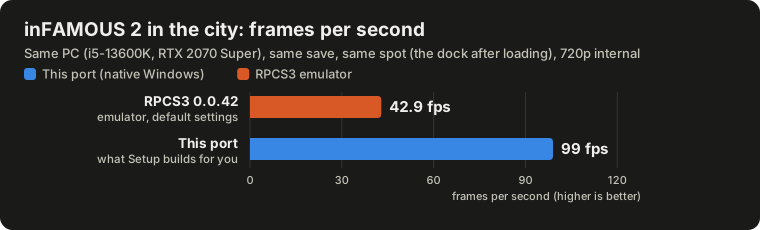
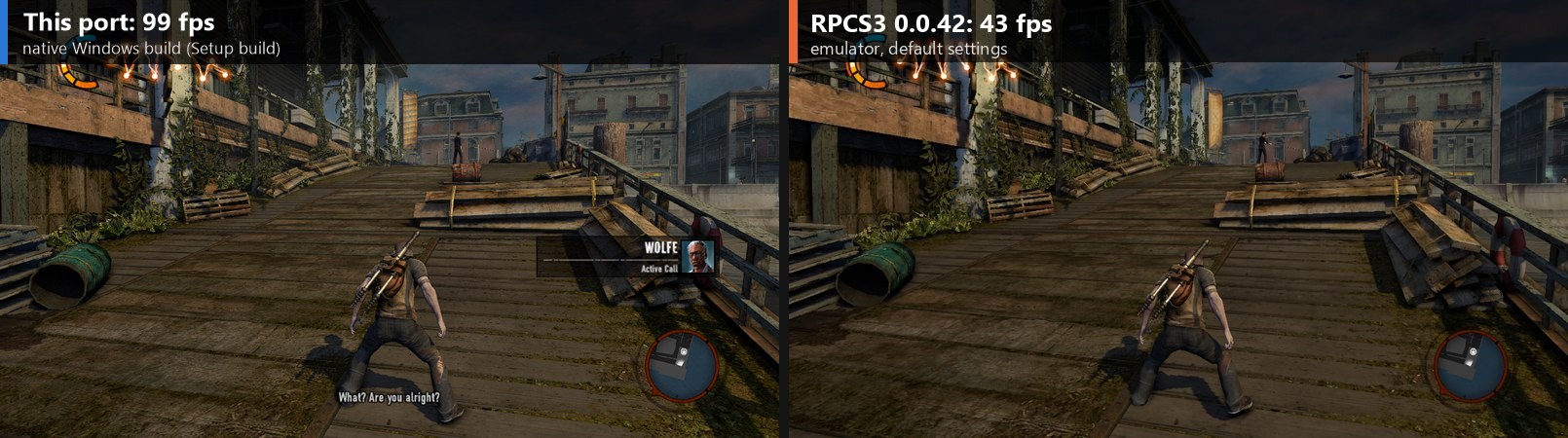
🚀 Performance: native vs RPCS3
| Same PC, same save, same spot | RPCS3 0.0.42 | This port |
|---|---|---|
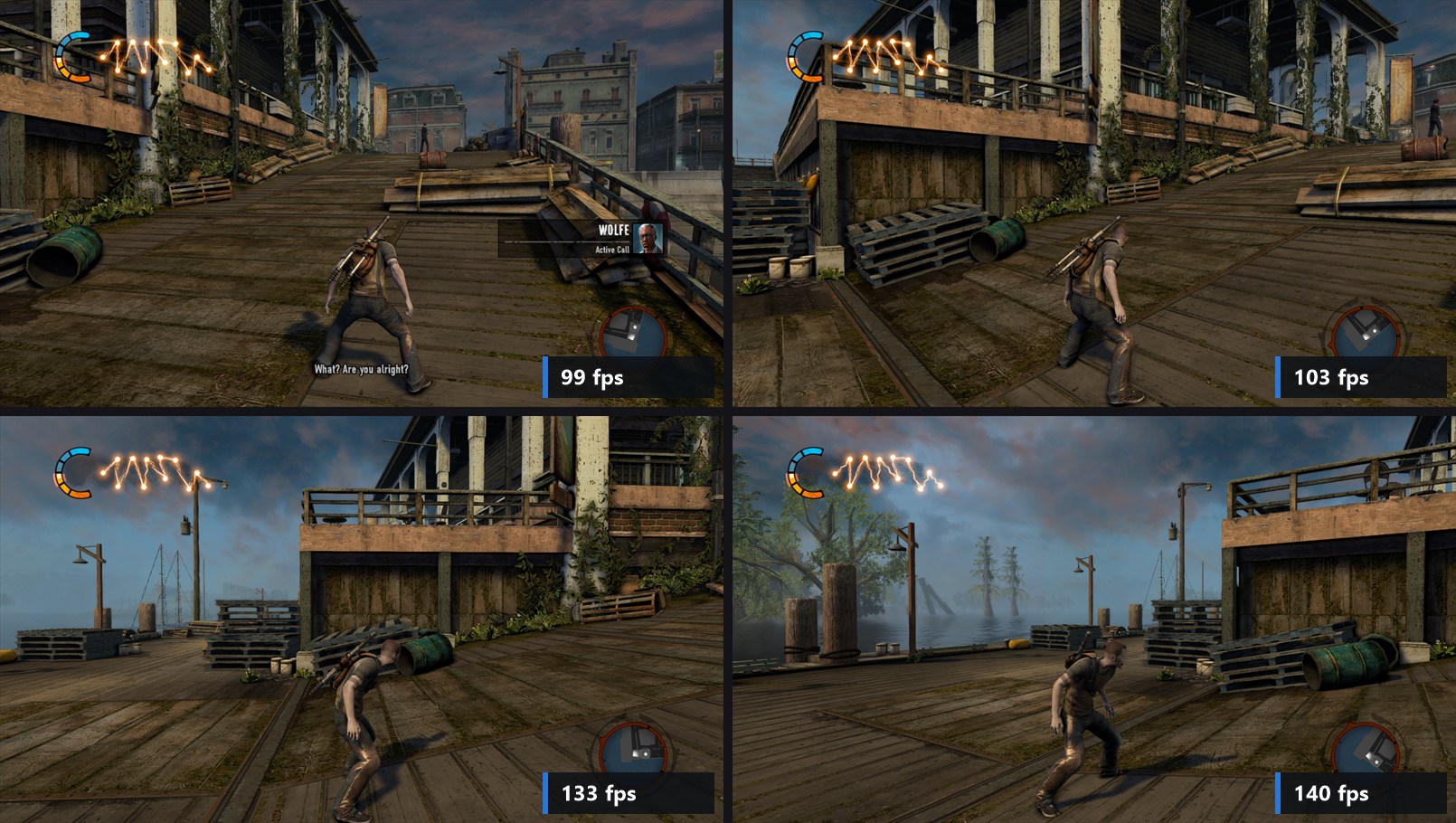
| 🏙️ City: the dock right after loading (720p) | 43 fps (39–46) | 99 fps |
| 🎥 Camera turned to three more views (720p) | not measured | 104 / 132 / 139 fps |
| 🖥️ The same four views at native 1080p with every picture extra on | 99 / 103 / 133 / 140 fps | |
| 🔧 With profile-guided optimisation (Optimise for this PC) and the native SPU jobs, the same four views at 1080p with every extra | 116 / 126 / 161 / 166 fps |
v0.5.2 is faster again. The build Setup makes now has native versions of the game's heaviest SPU jobs. In the same kind of player build on the test PC: +14% to +26% across the city, the dock, the opening fight and the cathedral spire, and +13% to +19% with the game held to 4 cores (in that fight, frames slower than 60 fps went from 770 to 121). Setup's Optimise for this PC adds about 5–11% more. The table above is from the 10 Nov build, before these gains.
✨ What you get
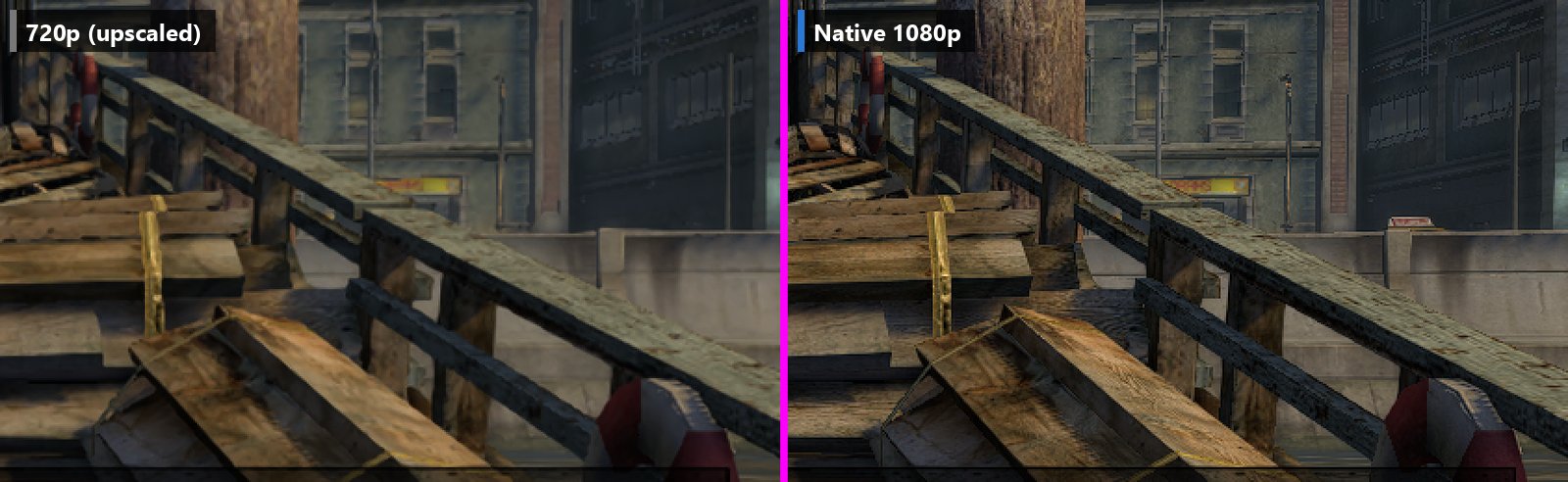
🖥️ Native 1080p and up
The game draws natively at 1080p instead of stretching the PS3's 720p, with sharper edges, a crisp HUD and finer detail everywhere. F2 → Graphics → Internal resolution: 720p / 1080p / 1440p / 4K. Players play at 1440p too, and native 4K runs at about 66 fps on the test PC's RTX 2070 Super. The game's glow and background blur keep the PS3's look at every resolution (F2 → Effects → Glow and blur).
🎮 Full controller support
Plug in any controller and play.
- Xbox, DualShock 4, DualSense, Switch Pro, 8BitDo and every pad in the community SDL_GameControllerDB work out of the box.
- Turn it on before or during the game: it's picked up while you play.
- Buttons work by position, as on a PlayStation pad (bottom = ✕, right = ○).
- The game's button pictures follow what you play with: PlayStation, Xbox, or keyboard and mouse (F2 → Controls says which one it shows).
- Remap any button in the game: F2 → Controls → Buttons and keys lists every PS3 control, each with two
keys, a mouse button and a controller button. Click a cell (✕ on a controller) and press the new one;
right-click (□) clears it. An input that is already used asks first: Swap or Cancel. A change applies at
once and is saved in
input.toml. Reset to defaults puts everything back.
🖱️ Direct mouse aiming
The mouse turns the camera directly, by how far you move it, as in a PC game. Before, the mouse moved a pretend stick, and the game's stick speed limit made quick turns and aiming feel slow.
- F2 → Controls → Mouse camera: Direct (the default) or Like a stick
- Mouse sensitivity, and a separate Aiming sensitivity for while you aim
- in menus, the map and cutscenes the mouse still works like a stick; a controller plays as before
💡 Enhanced lighting
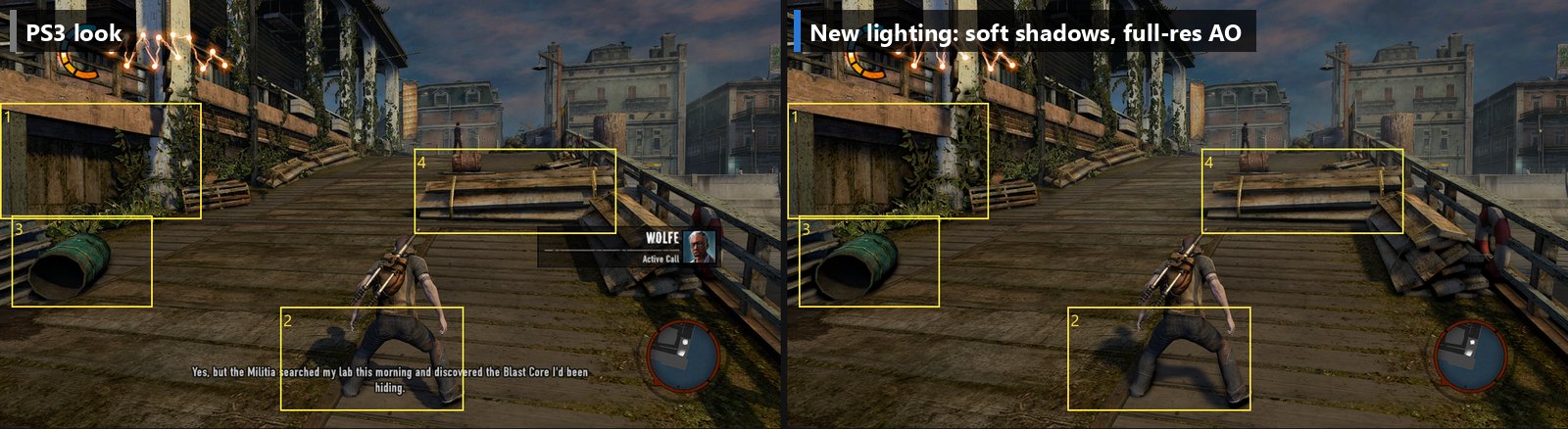
Soft sun shadows instead of stair-stepped ones, contact shadows (ambient occlusion) at full resolution instead of half, and smooth light gradients without banding. Every option is in F2 → Lighting, and F3 flips between your picture and the original PS3 look.
The fine stripes on faces and clothes in the Kuo cutscene at the dock are fixed: the game's shadow offset now reaches the graphics card, as on the PS3.
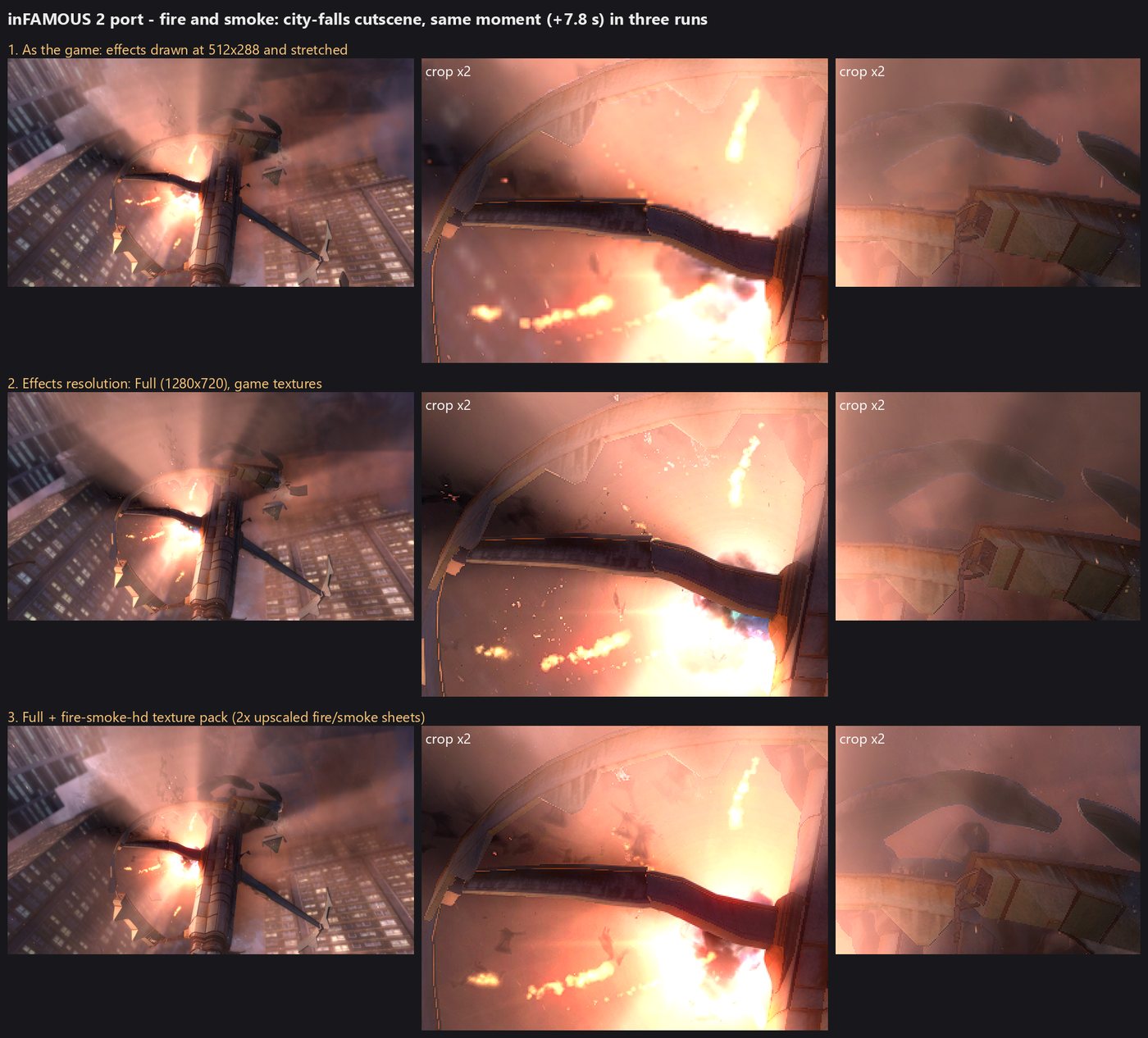
🔥 HD fire, smoke and effects
The PS3 drew every fire, smoke, spark and explosion into a tiny 512×288 image and stretched it over the screen, which gave blocky edges and blobby flames. Here they're drawn at full resolution (F2 → Effects). The port also keeps the glow around lightning, lamps and fire as the PS3 made it at any resolution (F2 → Effects → Glow and blur), and it loads texture packs (PNG/DDS), so the community can make HD versions of any texture. Packs are made from your own game's textures, so none are included.
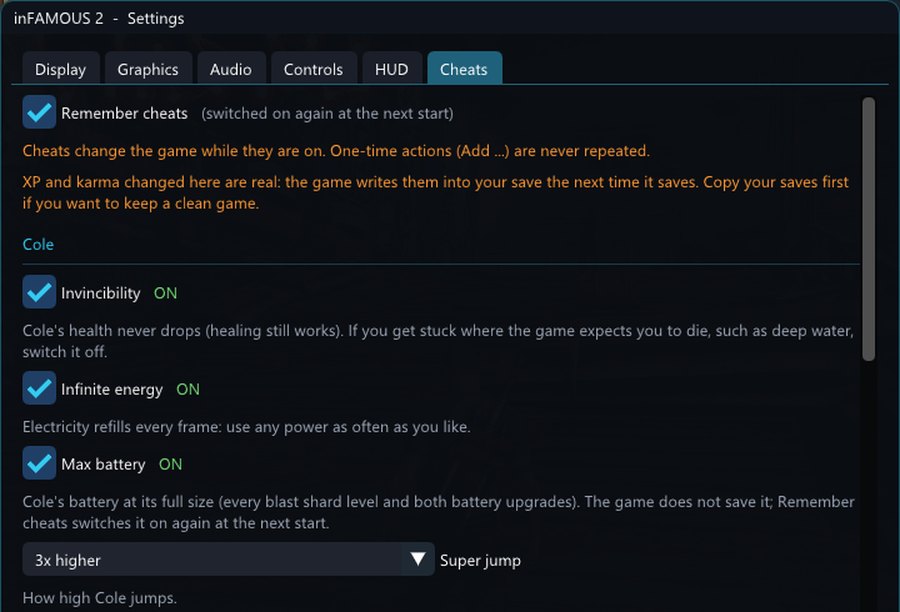
🧪 In-game cheats menu
F2 → Cheats:
- Invincibility, infinite energy, max battery
- super jump (2× to 10×)
- karma rank: pick any of the game's seven ranks (Hero to Infamous) and karma is set inside it when you close the menu, through the game's own karma setter
- karma lock (blue/red only), a karma multiplier, XP for karma, Add karma / Add XP buttons
- unlock all powers: every power in the game is Cole's at once (rockets, Kinetic Pulse, the Ionic powers, every upgrade, hero and evil together), through the game's own power code, and the story can't take them back while it's on; karma powers of both sides alone lets hero and evil karma powers work together. The game saves the powers: try it in a New Save Data slot
- infinite ionic charges: Cole always has 3, the game's most, and they refill the moment one is used
- one-hit kills, enemy speed, enemies hold fire
- longer glide: Cole sinks more slowly while gliding (R1, the Static Thrusters), so a glide lasts up to 3× as long and goes further
- L_'s patches, re-made for the port: black lightning (electric arcs drawn with the game's evil-lightning shader), Static Thrusters flight (while gliding, Cross climbs, Circle dives, neither hovers; needs the Improved Static Thrusters upgrade) and a faster glide
- saved spots: Save this spot remembers where Cole stands, which way he faces and the camera; Go to saved spot (or F7, menu open or closed) puts him back there, through the game's own placing code (two places in New Marais come with it)
Cheats can be remembered between sessions, with a short reminder at start.
🧩 Mods
The community's inFAMOUS 2 mods work as they are: the ones made for tiffsomniac's inFAMOUS Mod Manager (whole files, texture patches, xpps patches, and mods with options).
- F2 → Mods → Add a mod from a zip: the zips in your Downloads folder, checked first (only mod files are
taken out, never a program), installed into the
modsfolder next to the game; or unzip a mod there yourself (mods\<mod>\mod.json) - no Unlocker and nothing to install: your game files are never changed, the port hands the game the mod's files in their place
- F2 → Mods: every mod with its preview picture and what it changes, turn each on or off, pick its options; the page shows at once what the next start will use, and Restart to apply restarts the game to its title screen (Continue there to go on from your last save)
- options that all change the same texture (a T-shirt in seven designs) are one at a time, as radio buttons; options that change different things (a skin for the sword, the amp and the outfit) are check boxes
- two mods that change the same file: Use this one instead picks the one that wins (the page says first what the other loses), else the first by folder name
- a texture patch made for another version of the game is never written beside its texture: the mod is left out and the page says which option to untick (for example "15 textures were made for another version of cole_gold_amp.xpps: untick Solid Gold Amp")
How it works and the mod format: engine/docs/MODS.md.
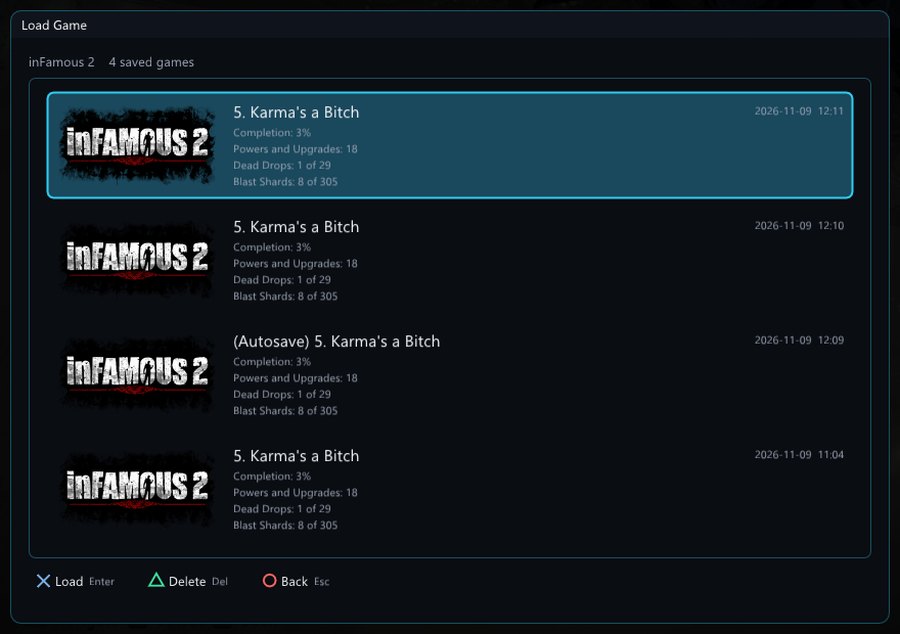
💾 Save manager
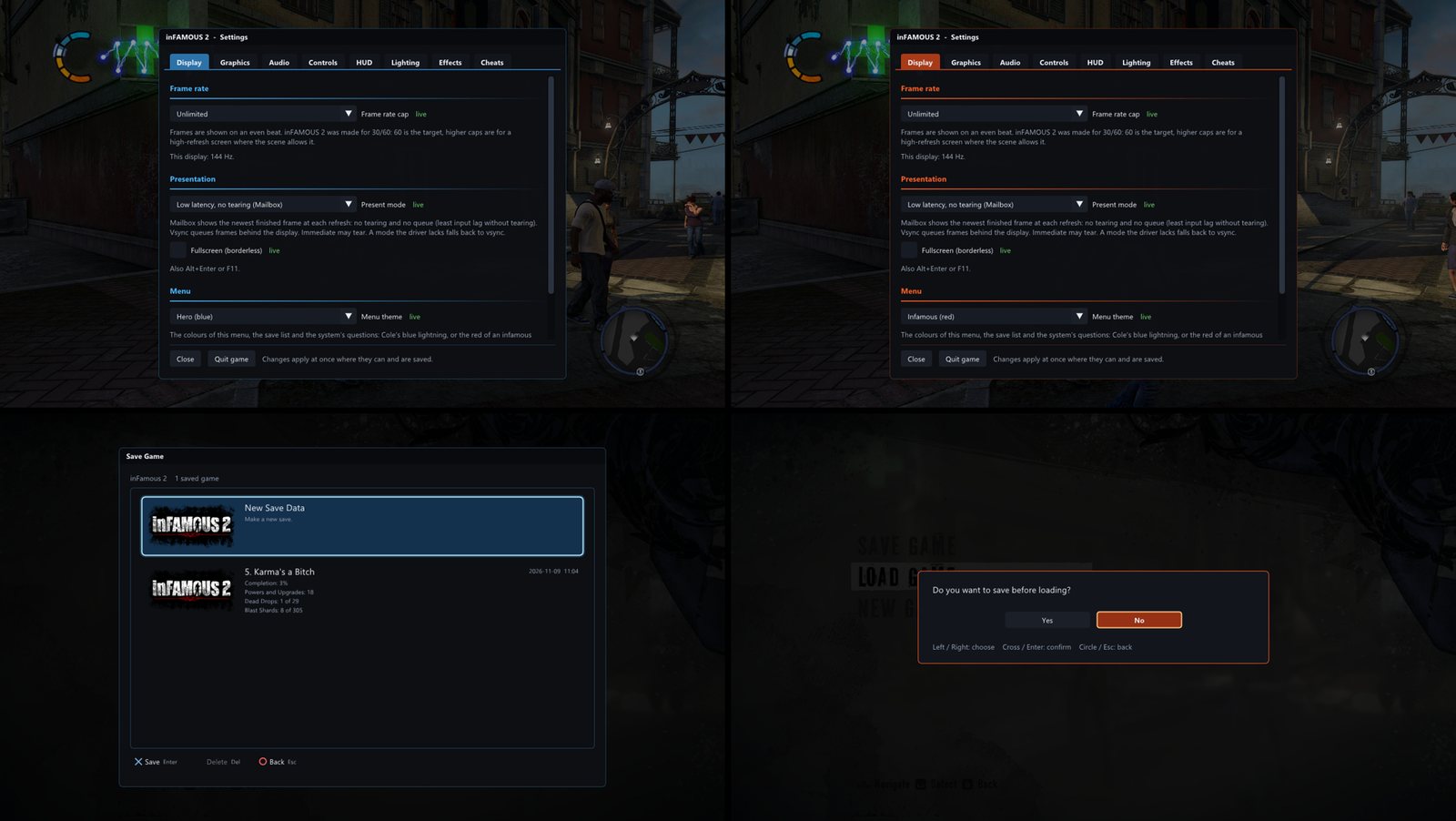
The PS3's own "choose a save" screen, which the port didn't have before:
- every save with its picture, mission, completion and date
- New Save Data, so you never overwrite by accident
- overwrite and delete, each asking first
- real Yes/No answers to the game's questions, like "save before loading?"
🏆 Trophies, in Playnite and RecompLauncher
The game's 52 trophies unlock as on a PS3, the platinum with the last of the others, with a notice in your
language. The port keeps them in game\gamedata\trophies\NPWR01730.json and also writes them the way RPCS3 does,
in game\gamedata\dev_hdd0\home\00000001\trophy\NPWR01730_00\ (the names, the icons and TROPUSR.DAT with the
unlock times), so trophy trackers made for RPCS3 can read them.
Playnite (Playnite Achievements or SuccessStory). Both look for an emulator with RPCS3 in its name, so the port gets one:
- Library → Configure Emulators → Add: name it
RPCS3 inFAMOUS 2 port, installation folder<port folder>\game\gamedata, and one custom profile whose executable is<port folder>\Play inFAMOUS 2.cmd. - Add the game by hand: installation folder
<port folder>\game\disc\PS3_GAME(the plugins find the game'sTROPHY.TRPthere), and a play action of the Emulator type with that emulator and profile. - Playnite Achievements: turn on its RPCS3 source. SuccessStory: Settings → RPCS3 → turn it on and add
<port folder>\game\gamedata\dev_hdd0\home\00000001as a home user folder. - Start the game once (the folder is made then), then refresh the game's achievements.
Already set up for RPCS3? Add PS3_TROPHY_RPCS3_DIR=<your RPCS3 folder> to settings.ini and the port also
copies its unlocks into RPCS3's own trophy folder for the game. It never locks anything or moves a date later
there, and it keeps a copy of RPCS3's file once (TROPUSR.DAT.port-backup). With Playnite Achievements, the
game's Manage Achievements → Overrides → Platform Override: RPCS3, NPWR01730_00 then finds them.
RecompLauncher: started from RecompLauncher, the port reports each trophy to Recomp Achievements. A cheat that changes play (F2 → Cheats) makes the session's later unlocks Casual. Picking or saving a spot and Black lightning don't.
🎨 A menu that looks like the game
The settings menu, the save list and the game's questions share an inFAMOUS-style theme: Hero (electric blue) or Infamous (ember red), in F2 → Display.
⚡ Smoother, too
Looking out over the city from a rooftop used to drop the game to 4–10 fps: the texture cache was too small and every frame rebuilt hundreds of textures. With a 4× larger cache and buffers that grow instead of stalling, the same overflow, forced on purpose, went from 13 to 40 fps. With normal settings the busy street in our test ran at 75 fps with no frame over 37 ms. That rooftop view now runs at 80–91 fps at native 1080p with every extra on.
Cutscene camera cuts and loading used to stutter while the graphics card's drawing programs (pipelines) were
made on the spot. They are made on helper threads now, and the ones the game used before are prepared ahead at
the title screen (pipelines.rcp), so the cuts stay smooth.
Every session also watches itself: a frame that takes longer than 80 ms is recorded together with what each
of the game's threads was doing at that moment (play\<date-time>\hitches.tsv, summed up in summary.txt), so a
stutter you report comes with its cause.
🎮 In the city on this port
🧭 What this is
Setup translates the game's PS3 code into PC code on your machine and compiles it. The game then runs directly on your CPU, with its graphics drawn through Vulkan.
✅ Ready to play. It boots, plays and saves, and players run it on Windows 10 and 11 PCs, on Linux and on the Steam Deck. Found a bug? Please report it with the session's
play\<date-time>folder.
🔒 No game content is included, and none is downloaded. You need your own copy of the game, and RPCS3 for Setup. Builds of the game (the
.exe) are never shared, because they con