inFamous 2 Recomp
inFamous 2 Recomp is a native Windows PC port of inFamous 2 built by statically recompiling the game's code.
- Type: PC port
- Game: inFamous 2
- Runs on Windows
- By bhuiyah
- Latest release v0.1.1, 2026-11-11
- Source: https://github.com/bhuiyah/infamous2-recomp
README
inFamous2Recomp
A native Windows build of Sucker Punch's inFamous 2 (PlayStation 3, 2011), made by statically recompiling the game's own PowerPC and SPU code into C++ with the ps3recomp toolkit and compiling that into a Windows executable. There is no emulator underneath: the game's code runs as x86-64 code, the PS3's system libraries are reimplemented, and the RSX graphics chip's commands are translated to Direct3D 12.
You need your own copy of the game. This repository contains no game code, no game assets, no firmware, no keys and nothing generated from them. You build the executable on your own PC from your own disc and title update; the result stays on your machine.
Target: BCUS98125 (North America), title update 1.04.
Screenshots
Captured from the port running on Windows (2560x1080 monitor); cropped and resized only.
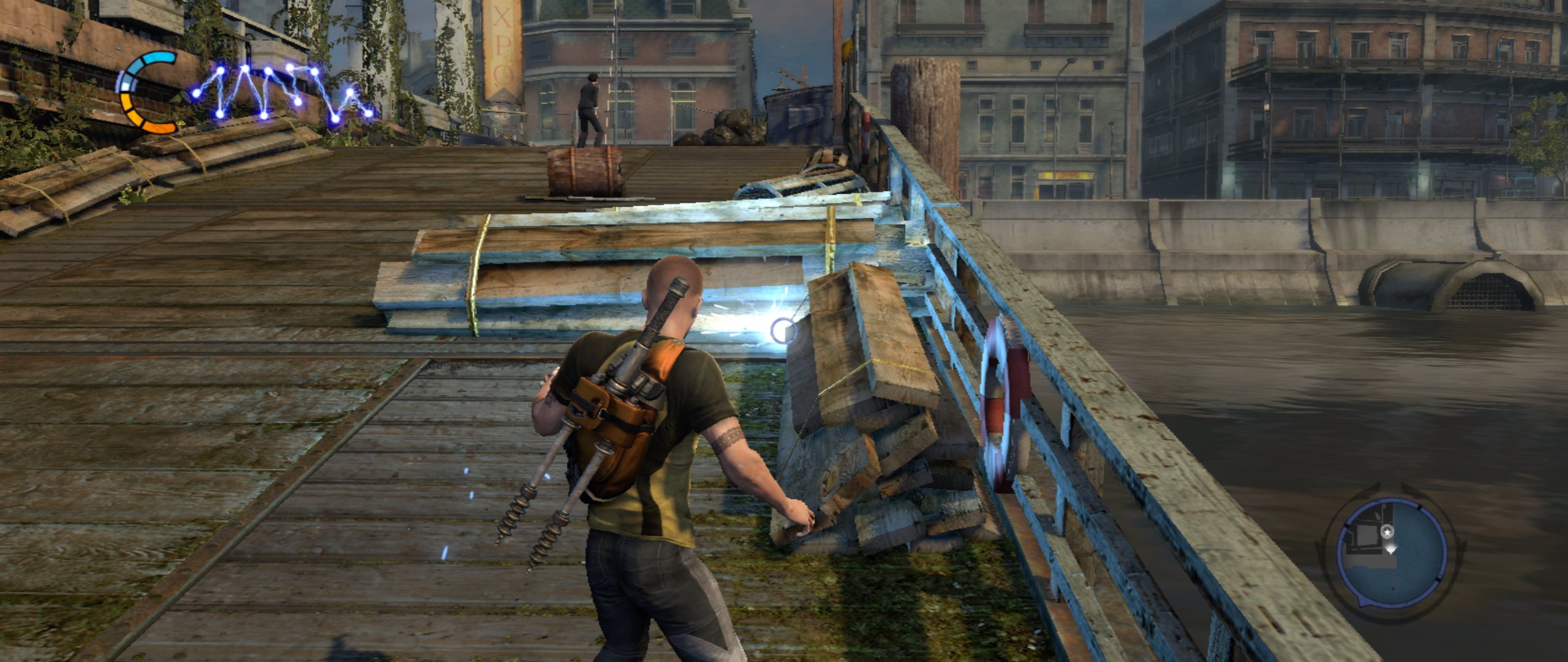 True ultrawide (Hor+, 64:27) in borderless fullscreen at 2560x1080: Cole firing a bolt on the New Marais pier, HUD spread to the screen edges.
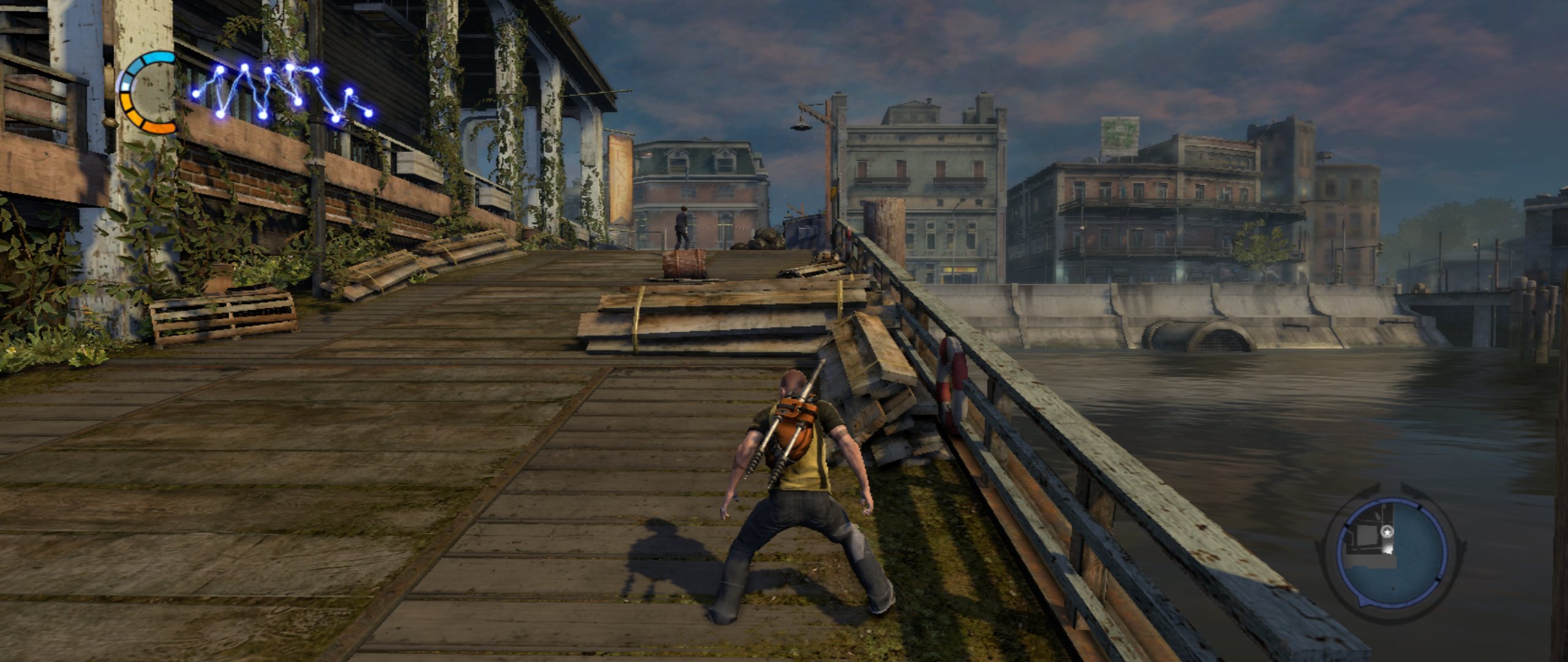 New Marais from the pier, right after the boat ride (ultrawide).
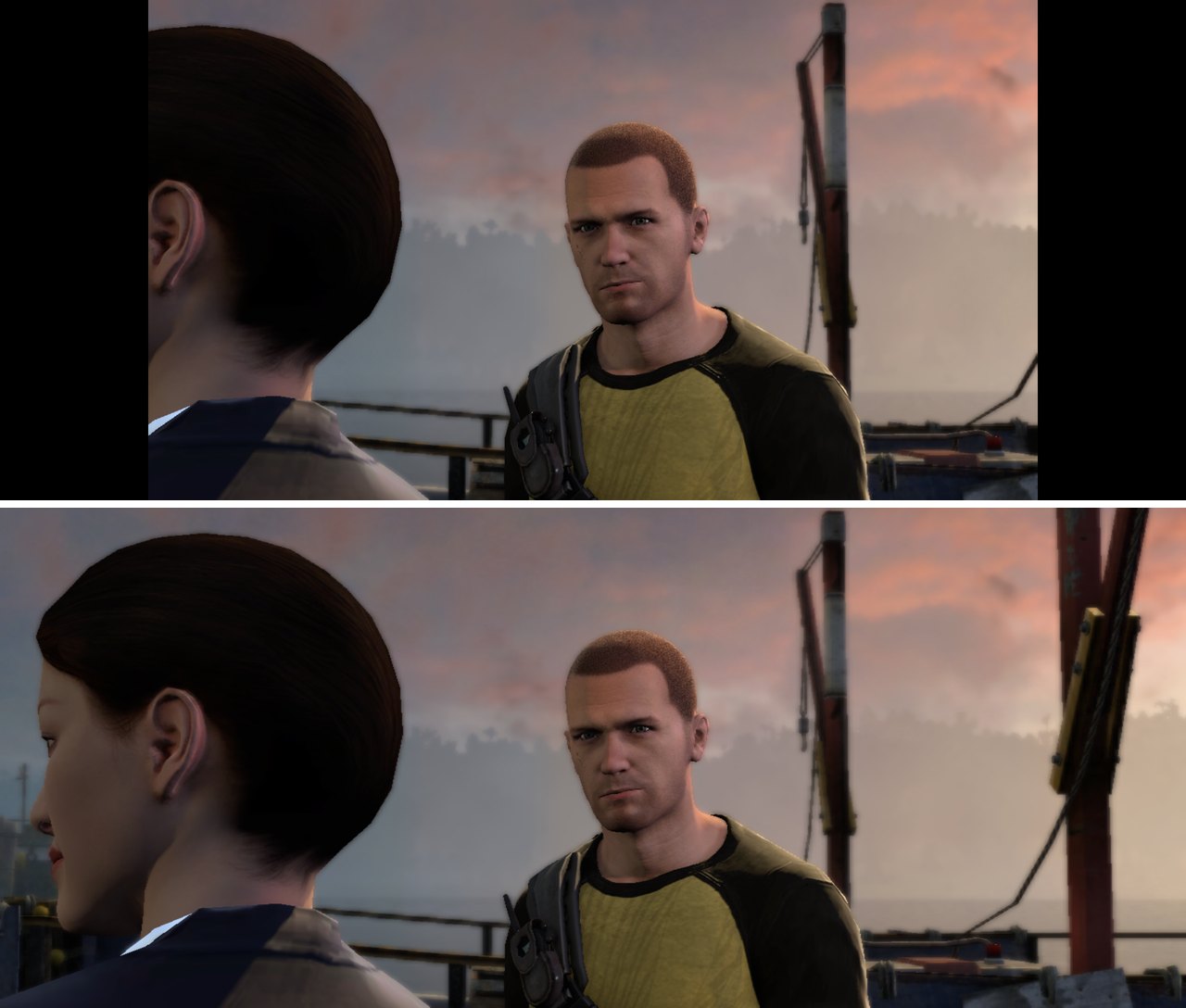 The same cutscene frame: stock 16:9 (
aspect = off, top) and Hor+ ultrawide (aspect = auto, bottom) -- same vertical view, more at the sides.
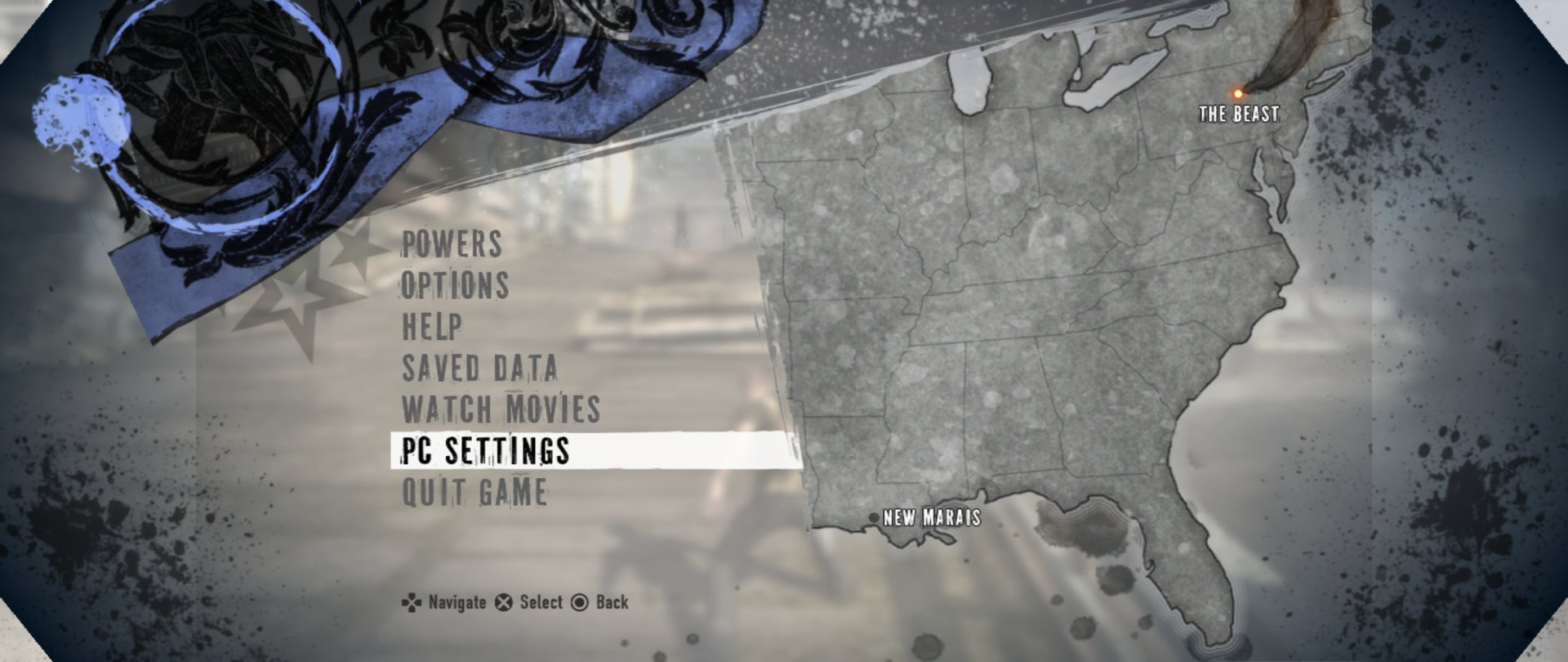 | 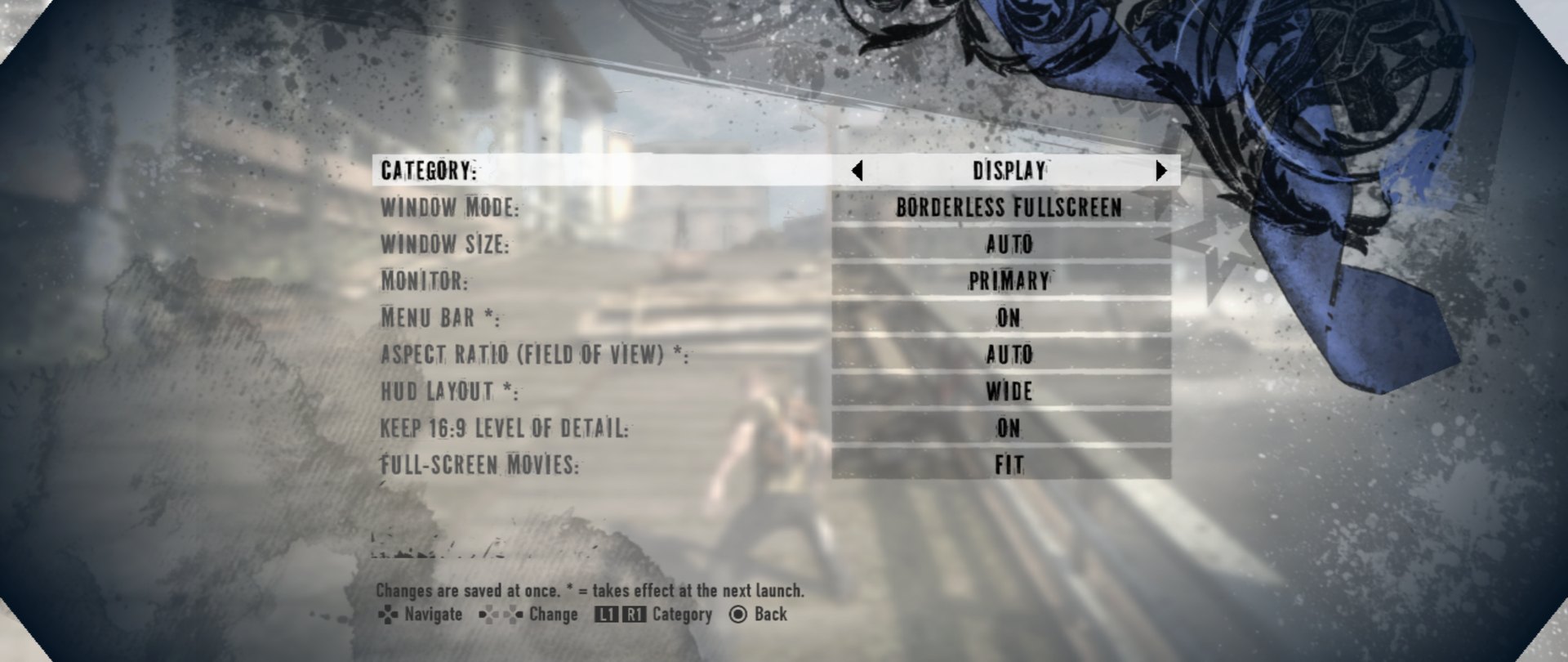 |
| The game's own pause menu gains PC Settings and Quit Game. | PC Settings, Display: window mode, aspect ratio (field of view), HUD layout, LOD, movies. |
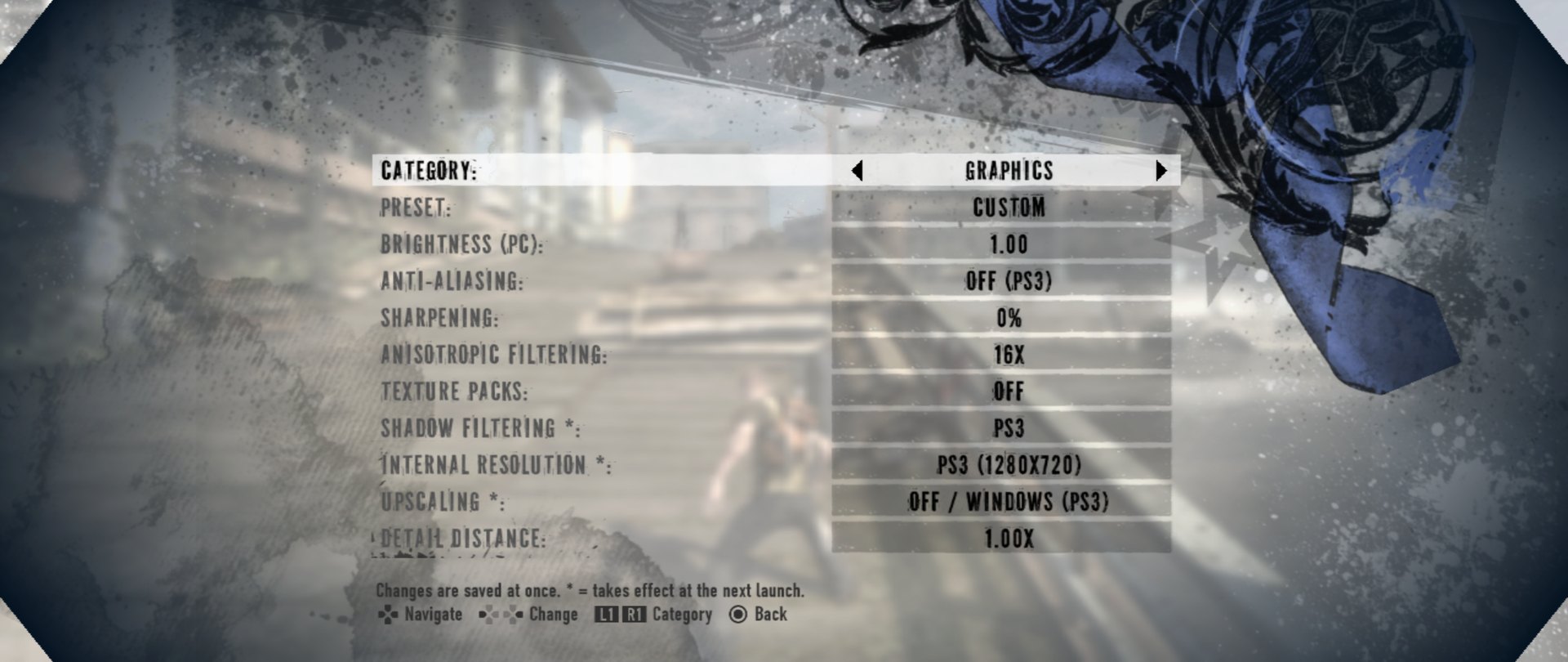 | 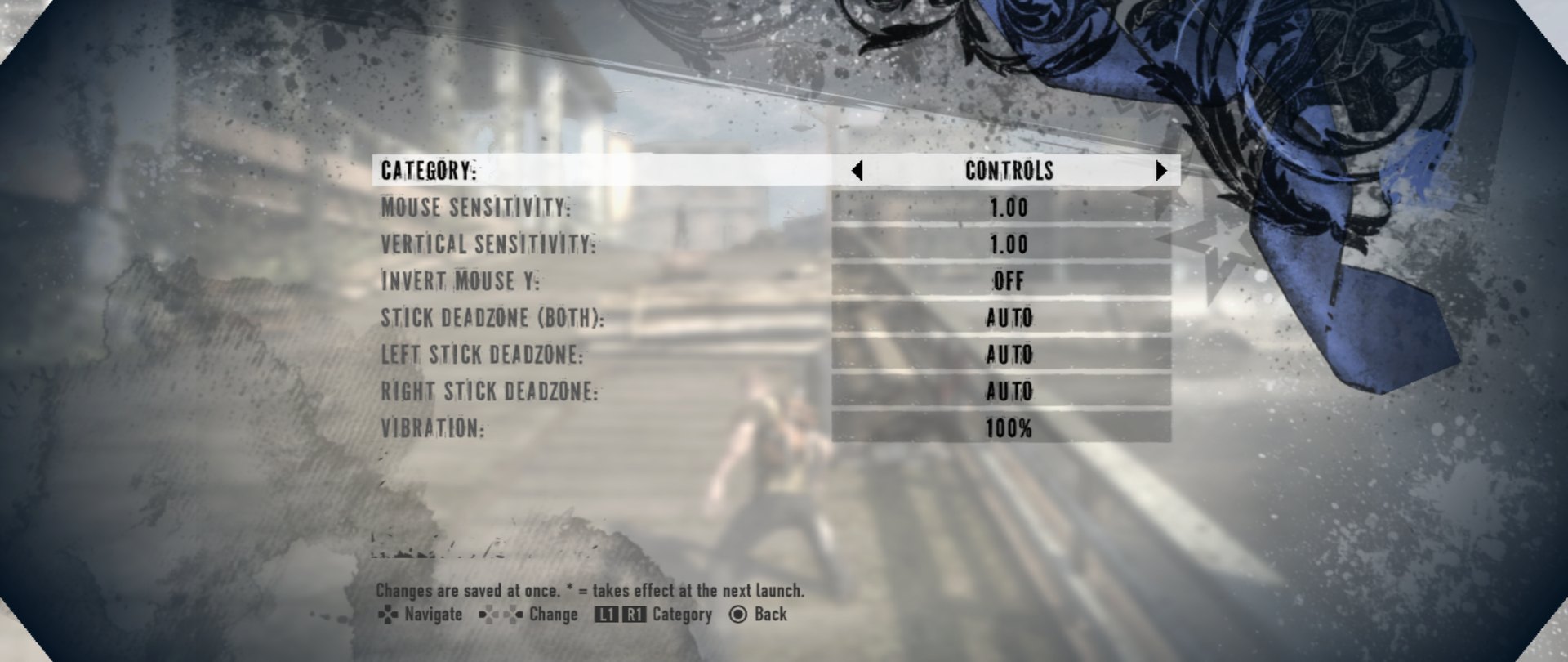 |
| Graphics: preset, brightness, anti-aliasing, sharpening, AF, texture packs, shadow filtering, internal resolution, upscaling. | Controls: mouse sensitivity, stick deadzones, vibration. |
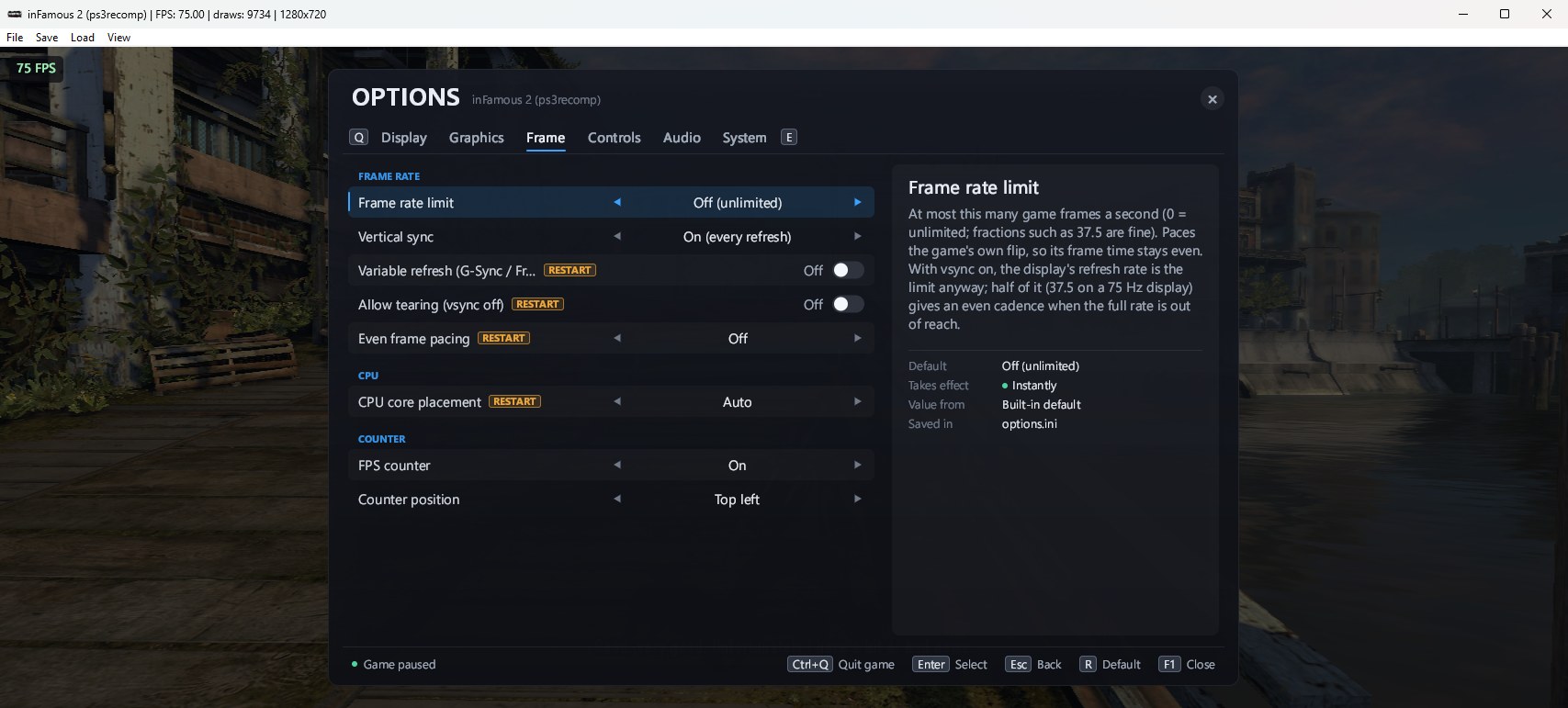 | 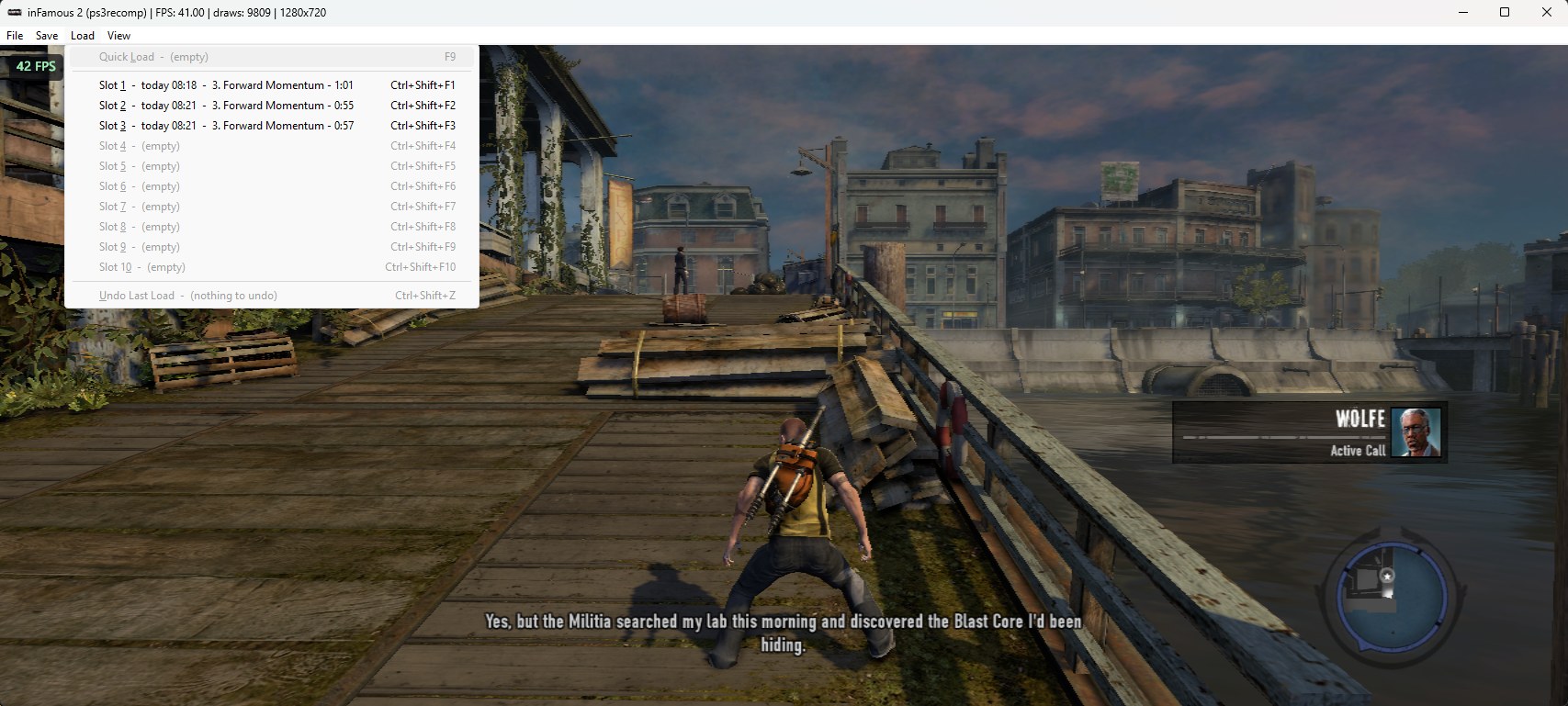 |
| The F1 options overlay (Frame tab: frame-rate limit, vsync, VRR, frame pacing, FPS counter), windowed with the FPS counter on. | The window's Load menu: save-state slots labelled with time, mission and play time. |
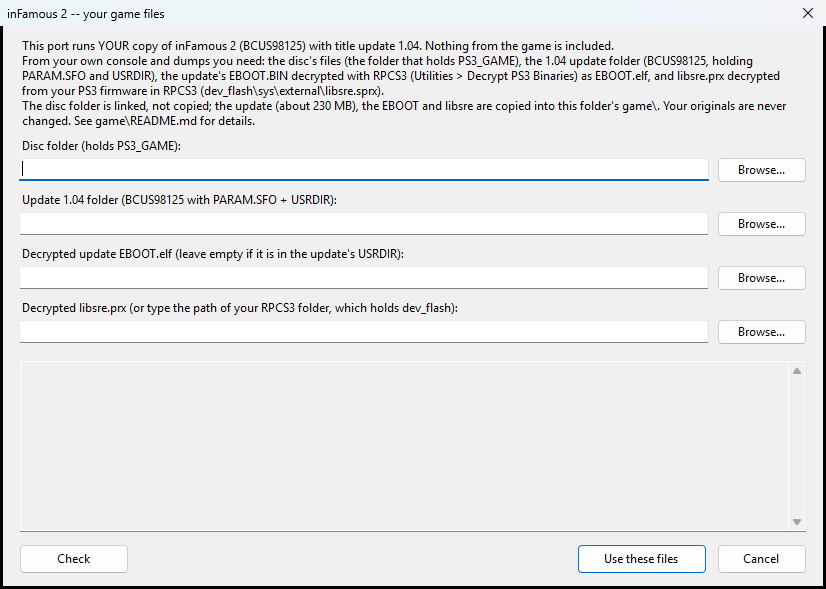
The launcher's first-run game-files screen. After that it checks the build tools, builds, and starts the game.
Features
- The PS3 game, natively on PC: the game's own saves (in the PS3 format: they copy to and from
RPCS3), its HDD install, movies and audio, the 1.04 update's content; DLC unlock files work with your
own licence (
game/README.md). - Ultrawide and any window shape. True Hor+ widescreen: the game renders a wider view (same vertical
view, more at the sides), the HUD spreads to the screen edges (or stays 16:9), movies are fitted;
autofollows the monitor (21:9, 32:9, 16:10, 4:3, any W:H). Resizable window and borderless fullscreen (F11 / Alt+Enter).config/display.ini. - Controllers. Xbox / XInput pads, DualShock 4, DualSense and DualSense Edge, DualShock 3, Switch Pro
and "Switch mode" pads, other HID gamepads -- over USB or Bluetooth, hot-plugged. Motion (SIXAXIS),
rumble, lightbar and player LEDs, pressure-sensitive buttons where the pad has them; remapper copies
(Steam Input, DS4Windows, ...) are recognised so one pad never shows up twice.
docs/CONTROLLERS.md. - Keyboard and mouse, at the same time as a controller, fully rebindable, with mouse camera and
sensitivity settings.
config/input.ini. - Save states. Save the whole game at any moment and load it back in a fraction of a second: F5 / F9
quick slot, ten slots on Ctrl+F1..F10, labelled with the mission and play time, Undo last load.
docs/SAVESTATES.md. - Options in the game. F1, the PS / Guide / Home button or L3+R3 opens the PC options overlay
(display, graphics, frame rate, controls, audio, system), and the game's own pause menu gains
PC Settings and Quit Game: frame-rate cap and frame pacing, variable refresh, anisotropic
filtering, anti-aliasing and sharpening, upscaling filters, shadow filtering, an FPS counter, volume
and more -- applied live and saved to
config/options.ini. - Performance work. RSX command processing with a separate render thread, lifted and register-cached SPU job code, shader and pipeline caches (no compile hitches after the first time), write-watched texture caching, CPU core placement for big-cache CPUs. On the test PC (Ryzen 7 9800X3D, RTX 5080) the heaviest prologue fight measures about 50 fps and New Marais streets 60+ fps; the PS3 version runs at up to 30.
- Texture dumps and replacement packs (
tools/texpack/README.md) and resolution scaling (experimental). - Problem reports built in: every play session writes a small issues file (stutters, slow
stretches, crashes, F8 marks with a screenshot) that holds no personal names;
py tools\play_triage.pyranks them.
What you need
- Your own inFamous 2 (BCUS98125) dumped from your own disc, plus title update 1.04 installed from your own console or PSN (the updates in order, or their 1.04 files).
- RPCS3 (free) to decrypt two files you own: the update's
EBOOT.BIN->EBOOT.elf, and the firmware'sdev_flash/sys/external/libsre.sprx->libsre.prx(install the official PS3 firmware in RPCS3 first). Step by step: game/README.md. - A Windows 10/11 x64 PC that meets the system requirements below. About 20 GB of free disk space (the disc stays where it is; the build takes about 5 GB and the game's own HDD install about 2.5 GB).
- Build tools -- the launcher checks them and offers to install missing ones with winget:
Git for Windows (with Git Bash), Python 3.10+, CMake 3.20+, Ninja, Visual Studio 2022 Build Tools
with the C++ workload, LLVM (
clang-cl).
System requirements
So far the port has been tested on one PC. The hard requirements come from the build itself; the
minimum and recommended tiers are estimates scaled from the test PC. Reports from other hardware are
very welcome (each session's logs\play-*-issues.txt records your CPU, GPU and frame rate).
| Minimum (estimate, ~30 fps) | Recommended (60+ fps in most areas) | |
|---|---|---|
| OS | Windows 10 64-bit | Windows 11 64-bit |
| CPU | 6 cores / 12 threads with AVX2, Ryzen 5 5600 / Core i5-11400 class | 8 cores / 16 threads, Ryzen 7 7700 / Core i7-12700 class or newer |
| GPU | Direct3D 12 (feature level 11_0), 2 GB VRAM, GTX 1050 Ti / RX 570 class | 4 GB+ VRAM, GTX 1660 / RX 5600 XT class (more for a higher internal resolution) |
| RAM | 8 GB | 16 GB |
| Disk | ~20 GB free, plus ~10 GB for the build tools if you don't have them | same, on an SSD |
- Hard requirements: 64-bit Windows 10 or 11, a CPU with AVX2 (Intel 4th gen / Haswell or newer, any AMD Ryzen), and a Direct3D 12 GPU with current drivers.
- The CPU matters most. The game's PS3 code (the PPU and five SPU workers) runs as several busy threads, so per-core speed and core count decide the frame rate. The GPU is rarely the limit: at the default resolution the game used under 1 GB of VRAM on the test PC.
- GPU vendors: tested on NVIDIA only. AMD and Intel GPUs should work through Direct3D 12 but are untested.
- Test PC: Ryzen 7 9800X3D, RTX 5080, 2560x1080 at 75 Hz: about 52 fps in the heaviest fight tested, about 65 fps on busy New Marais streets, and the display's 75 Hz cap in lighter scenes.
Quick start with the launcher
-
Download
inFamous2Recomp-<version>-windows.zipfrom the latest release and extract it to a folder of its own, e.g.C:\Games\inFamous2Recomp. It holds this repository withinFamous2Launcher.exealready inside (no game files). Orgit clonethe repository and build the launcher in a second withtools\build_launcher.cmd(it uses the C# compiler built into Windows). -
Run
inFamous2Launcher.exe. The first time, it asks for your files:- the disc folder (the one holding
PS3_GAME), - the update 1.04 folder (
BCUS98125, holdingPARAM.SFOandUSRDIR), - the decrypted update
EBOOT.elf(if it is not already in thatUSRDIR), - the decrypted
libsre.prx(or the path of your RPCS3 folder).
It checks them (title, update version, the EBOOT's SHA-1, nothing still encrypted), links the disc into
game\and copies the small update, the EBOOT and libsre there. Your originals are not changed. - the disc folder (the one holding
-
Under Build tools, anything missing has an Install button: it shows you the exact
winget installcommand and runs it only if you confirm. Then press Check again. -
Press Build and play. The launcher runs the repository's own pipeline (
tools\build.ps1) one step at a time, with a progress bar, the current step, the elapsed time and a live log (also saved tologs\launcher-<time>.log): fetch and patch the toolkit -> check your files -> analyze -> translate the code to C++ -> translate the SPURS library -> translate the SPURS jobs -> compile. On the 16-thread test PC the whole first build took about 4 minutes, mostly the compile; expect longer on smaller PCs. Cancel stops it; the next run continues from the step that was interrupted. -
When the build succeeds, the game starts by itself. Its first start installs part of the disc into
game\hdd0(as on a PS3); later starts are quick.
Next time the button says Play: nothing is rebuilt unless the sources, the toolkit pin or patch, or your files changed. Rebuild runs every step again; Open logs and Open game folder do what they say. If a step fails, the launcher shows the end of its log; fix the cause and press Retry: finished steps are not run again.
The launcher fetches the ps3recomp toolkit from GitHub with git during its first step. You can also
start the built game directly: double-click build\infamous2.exe.
Updates. At startup the launcher asks GitHub, in the background, whether a newer release exists
(one request to api.github.com; nothing about you or your PC is sent). If there is one, a banner and a
dialog offer Update now: it downloads the release zip, checks its SHA-256, replaces the launcher and
the port's files, and restarts. Your game files, build, saves, settings and logs are kept; the game then
needs a rebuild of a few minutes (Continue build). You can also extract the new zip over your folder
by hand. To turn the check off, untick Check at startup (or set INF2L_NO_UPDATE_CHECK=1);
Check for updates asks on demand. A git clone is updated with git pull instead.
Building by hand
Everything the launcher does is in plain scripts:
:: your files -> game\  (layout and decryption: game\README.md)
:: everything: toolkit, check, analyze, lift, libsre, jobs, compile
powershell -ExecutionPolicy Bypass -File tools\build.ps1

:: one step: setup | check | analyze | lift | libsre | jobs | build
powershell -ExecutionPolicy Bypass -File tools\build.ps1 -Step check

:: just recompile after changing src\ or the toolkit
powershell -ExecutionPolicy Bypass -File tools\build.ps1 -BuildOnly

:: play (log: logs\run-<time>.log); or double-click build\infamous2.exe (logs\play-<time>.log)
powershell -ExecutionPolicy Bypass -File tools\run.ps1
tools\build.ps1 -Disc builds the 1.00 disc EBOOT instead of the update. Build options (PGO, speed
switches) are described at the top of tools\build.ps1 and in CMakeLists.txt.
For developers: the toolkit test test_ss_fsfd needs the PS3's SDAT key, which this repository does not
ship. Give it as PS3_SDAT_KEY=<32 hex digits> or a git-ignored sdat.key file in the directory you start
it from; without one it prints test_ss_fsfd: skipped: no SDAT key and passes. The game does not need it.
your disc + update ──RPCS3 decrypt──▶ EBOOT.elf, libsre.prx
        │
 tools/check_inputs.py   validate SFO / ELF / SHA-1, pick the update EBOOT
 tools/analyze.sh        functions, firmware imports, coverage report, SPU images
 tools/relift.sh         PowerPC + SPU ──▶ C++ in generated/
 tools/lift_libsre.sh    the real SPURS library, from your firmware
 tools/lift_jobs.sh      SPURS policy modules, job modules, job chains
 cmake + ninja           + ps3recomp runtime (PS3 OS, libraries) + RSX ──▶ Direct3D 12
        │
        ▼
 build\infamous2.exe     assets read from game\disc and game\hdd0 at run time
Playing, quitting and reporting problems
- Quit: open the options (F1, the PS / Guide / Home button, or L3 + R3 held) and press △ / Y twice (Ctrl+Q twice on the keyboard), or use Quit Game in the pause menu. Alt+F4 and the window's close button work too. A save the game is writing finishes first.
- Something looks wrong? Press F8: the moment is marked in the session's issues file and a screenshot is saved beside it.
- Reporting: send
logs\play-<time>-issues.txtand any-markN.png. After a crash there is also a-crash.dmp: useful, but it contains your Windows user name in file paths.set PLAY_ISSUES=0turns the issues file off. - Save states (
savestates\), texture dumps and the game's saves (gamedata\) are made from your copy of the game: never share or commit them.
Status and known issues
The prologue and the opening of New Marais have been played and tuned on the test PC with the features above; a full playthrough has not been verified yet. It is a young port; expect rough edges:
- Only BCUS98125 with update 1.04 (or its 1.00 disc EBOOT) is supported; other regions and the updates 1.01-1.03 have no title-specific values and are refused.
- Windows only. The toolkit builds on Linux, but there is no renderer there.
- CPU-bound. The SPU work runs on CPU cores; weaker CPUs see lower frame rates in heavy scenes. The game logic is the PS3's (a 30 fps design); the frame-rate cap is in the options.
- Resolution scaling is experimental; only one anti-aliasing mode (Fast) exists.
- Windows' Smart App Control can block a freshly built, unsigned
infamous2.exe. It is a setting of your PC (turning it off cannot be undone without resetting Windows): your decision. - Open items and the full development history:
docs/NOTES.md(the engineering journal, newest first) anddocs/ROADMAP.md.
Repository layout
| Path | What |
|---|---|
launcher/ | the launcher's source; tools\build_launcher.cmd builds inFamous2Launcher.exe |
src/ | the port: runner, title hooks, menus, checkpoints, clocks |
tools/ | the pipeline, the run script, diagnostics |
patches/ps3recomp/ | the changes to the ps3recomp toolkit, applied by tools/setup.ps1 |
config/ | display, input and save-state settings (options.ini is written by the game) |
docs/ | controllers, save states, ground truth, roadmap, the engineering journal |
game/ | your files (git-ignored; see game/README.md) |
Legal
- This project is not affiliated with, endorsed or sponsored by Sony Interactive Entertainment or Sucker Punch Productions.
- inFamous, PlayStation, PS3, DualShock and DualSense are trademarks of Sony Interactive Entertainment; other trademarks belong to their owners and are used only to describe compatibility.
- No game code, assets, firmware or keys are included, nor anything derived from them. The build
translates the code of a copy you own, on your PC, for your own use. You must own the game and its
update and dump them yourself. Do not share the built executable,
generated\,analysis\, save states or dumps: they contain the game's code or data. - The source code is MIT-licensed (
LICENSE); third-party code and credits:THIRD_PARTY.md.
Author and support
Made by bhuiyah. If you enjoy it, you can support the work on Patreon: https://www.patreon.com/cw/bhuiyah. On Reddit: u/Sajthetaj.
Credits
- ps3recomp by Ned Heller (sp00nznet) and its contributors -- the toolkit this port is built on (MIT).
- RPCS3 -- for the decryption players need and for years of PS3 research.
- Sucker Punch Productions -- for inFamous 2.
- bhuiyah and the infamous2-recomp contributors. Toolkit fixes go upstream to ps3recomp where they help every port; only inFamous-2-specific behaviour lives here.