T.O.R.E-Fighters
T.O.R.E-Fighters is a native Rust rebuild of Jane's Fighters Anthology for PC with multiplayer support.
- Type: PC port
- Game: Jane's Fighters Anthology
- Runs on Windows, Linux and macOS
- By john-overton
- Latest release v0.2.2, 2026-11-03
- Source: https://github.com/john-overton/T.O.R.E-Fighters
- Website: https://john-overton.github.io/T.O.R.E-Fighters/
README
T.O.R.E-Fighters
Tasteful Opinionated Reverse Engineered: a native Rust rebuild of Fighters Anthology










T.O.R.E-Fighters is a ground-up rebuild of Jane's Fighters Anthology in Rust. The target is 1:1 gameplay parity by expression of feature: you should experience what you experience in the original game. It is not a recreation of the original program's code. Bring your own retail copy, no retail game data ships in this repository, and the original executable is never run.
Where the project is going is in the roadmap. What is built and what comes next is on one page in the parity plan. The behaviour being rebuilt is described in docs/spec/.
Getting started
You need your own copy of Jane's Fighters Anthology: either the game installed on a computer, or disc 1. Disc 2 is not needed.
1. Install
Download the package for your computer from the latest release.
| Platform | Package | First launch |
|---|---|---|
| Windows (64-bit, x86_64) | .msi installer, or -portable.zip to run without installing | The build is unsigned, so SmartScreen warns you. Choose More info, then Run anyway. From the zip, unpack it and run tore-app.exe. |
| macOS, Apple Silicon or Intel | .dmg for your processor | Copy the app to Applications and open it. There is no Developer ID or notarization. If blocked, use System Settings > Privacy & Security > Open Anyway, then confirm Open. |
| Linux (x86_64) | .AppImage, or .tar.gz | Make the AppImage executable (chmod +x), then run it. |
On macOS, the 0.2.0 download may say the app "is damaged". In Terminal,
run xattr -dr com.apple.quarantine /Applications/T.O.R.E-Fighters.app, then
open it again. Version 0.2.1 fixes the missing bundle seal. See
first-launch help for
the fallback on other builds; recent macOS no longer has the right-click Open
bypass.
The main menu's Update Available link opens a newer GitHub release, including
prereleases. Leave Feedback opens the project's issues page. Automatic
checks run in the background at most once a day per profile. They send an
anonymous request to api.github.com; disable them with Pref > Check for
updates: Off. Downloads and installation are manual. See the
update-check details.
2. Point it at your game
On first launch T.O.R.E opens the Locate Fighters Anthology screen. There are three ways to tell it where your game is:
- Drag the installed game folder, or the folder of your mounted disc 1, onto the window.
- Pick one of the Detected sources. T.O.R.E looks at mounted discs and the usual install folders for you.
- Type the folder path into the Folder box.
Then press Import.
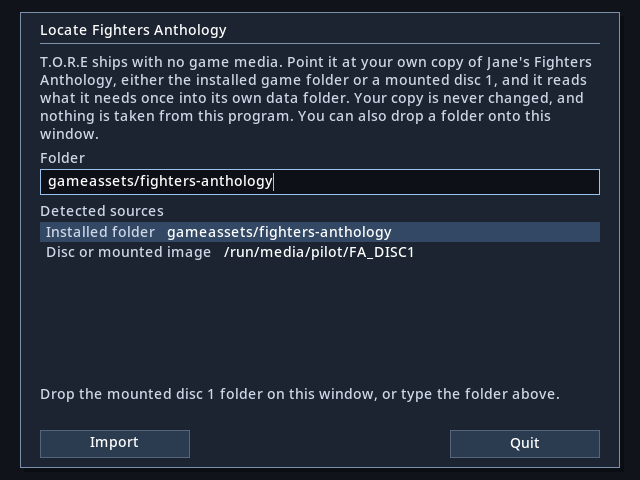
A disc image (.iso) is not read directly. Mount it first, then choose the
mounted folder.
3. Wait for the import
T.O.R.E reads what it needs from your copy once and keeps it in its own data folder. Your copy is never changed. The import takes a few moments and shows which archive it is reading.
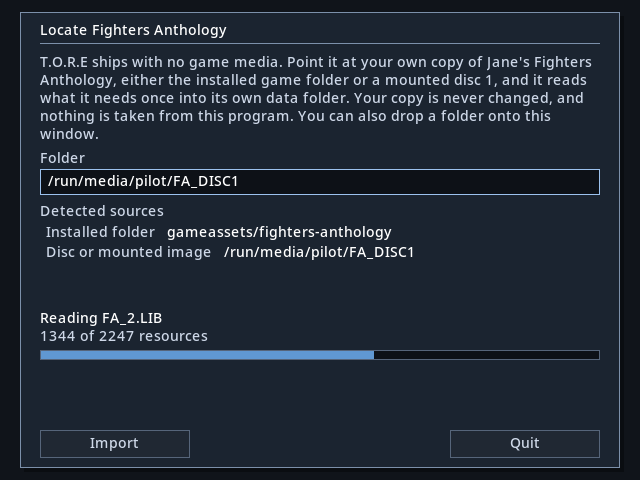
When the import finishes, press Continue to reach the main menu.
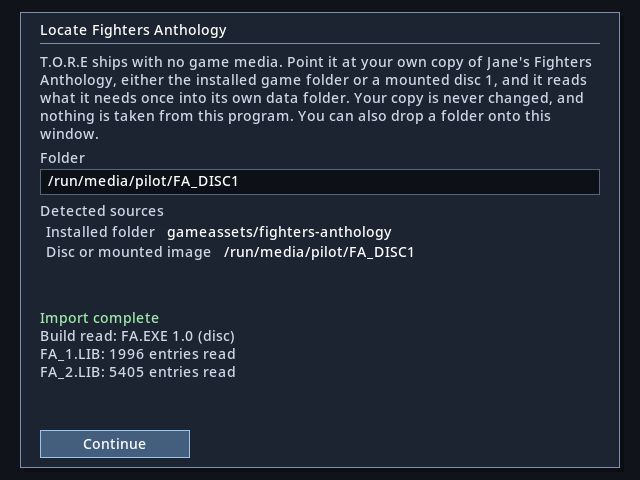
Later launches go straight to the main menu. To import from a different copy, use Pref > Re-import media, which opens the same screen again.
4. Fly
From Choose Activity, pick Create Quick Mission. Click the aircraft name in Wing 1 to choose your aircraft, and the theater name in "You are flying over…" to choose where. Press OK to fly.
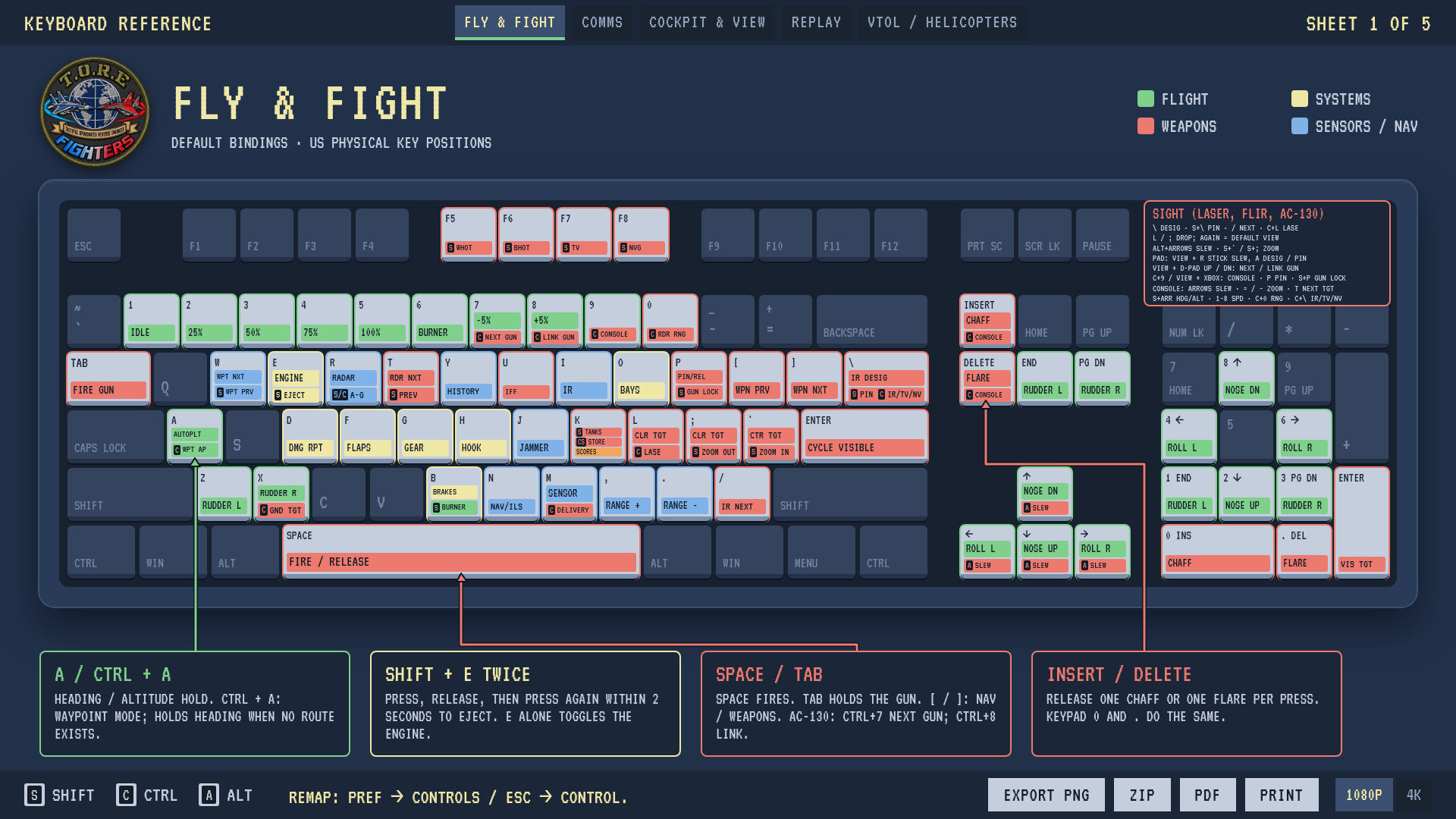
Default keys follow the original game's keyboard layout. Press F11 in flight for keyboard help, or Escape for the flight menu. The interactive keyboard map has Fly & Fight, Comms, Cockpit & View and Replay sheets and exports to PNG, ZIP or PDF. The control reference lists every key, and Escape > Control remaps keys, gamepads, joysticks and head tracking (controller setup).
For slow frame rates, turn on Escape > Debug > Slow-frame log during flight,
play through the slowdown, then send that session's log. Logs are in
%LOCALAPPDATA%\T.O.R.E-Fighters\logs on Windows,
~/Library/Logs/T.O.R.E-Fighters on macOS, and
~/.local/state/T.O.R.E-Fighters/logs on Linux (or under $XDG_STATE_HOME).
Slow-frame troubleshooting explains
command-line options and software-renderer warnings.
If the game does not start, it writes logs and a crash report that help us find
out why. On Windows you can choose Vulkan or DirectX 12 on the import screen or
under Pref > Graphics, and --graphics-api vulkan or dx12 chooses for one run.
Startup troubleshooting
says where to find them. Bugs and questions are welcome in
Issues and
Discussions.
What makes it T.O.R.E
The feature matrix groups menus, flight models, weapons, systems, and maps/weather. Checkboxes distinguish manual-described features from opinionated additions; each row says what is completed, partially implemented or planned, with remaining work and links to details.
Examples of opinionated additions: the shared radar and radar cross-section tuning, authored landing behaviour, the modern input layer with head tracking, graphics options such as MSAA and a spotting aid for distant aircraft, and built-in startup diagnostics. Where the original's exact behaviour has not been recovered yet, T.O.R.E uses a documented approximation labelled fitted. See behaviour provenance.
What works today
Version 0.2.2 follows the Milestone 2: Multiplayer release, 0.2.0. Build a Quick Mission with friends, fly together or against each other, and return to the lobby for the next round. 0.2.0 also brought ground attacks, defended surface targets, more aircraft and a fuller world to single player; 0.2.1 keeps scores across revivals, matches games by compatibility code and fixes the macOS first launch; 0.2.2 flies guided stores on an energy model with physical decoys, reworks AI missile defense, limits Quick Mission distances per theater and fixes a white-window crash on AMD graphics cards on Windows. The release notes for 0.2.2, 0.2.1 and 0.2.0 describe the changes.
Menus. The app launches into the original Choose Activity menu using artwork, button pieces, proportional fonts, sounds and recorded music imported from your own copy. The Quick Mission creator, Load Ordnance and debrief use the original art too. Quick Mission keeps your setup between launches and includes a planning map, ground targets, air defenses and ground starts for either side. Mission systems that are not built yet are refused before launch.
Multiplayer. Open Multi > Direct Connection for a local game or a typed address, or Multi > Internet... to browse online games in the Internet Lounge. Press New to host, or Join to join. The King chooses the mission and rules; players take slots, choose their loadouts, mark themselves Ready and fly. Up to 30 humans can play co-op or PvP, with configurable sides, AI fill and respawn. Player Choice wings let each player choose an aircraft. Chat, shared flight contacts, observers, rejoin and host migration are built. A dedicated server can rotate missions while keeping its players connected. See the multiplayer guide and dedicated server guide.
Aircraft and theaters. Fly 36 reviewed retail aircraft plus the F/A-XX concept. The F/A-18D, Rafale C and other original roster aircraft are joined by Phantoms, the F-15C, F-16C, A-10, transports, radar aircraft, airliners and the variety roster. All 16 theaters have their original terrain and scenery, with redrawn airports at real scale, runway and approach lights, tower radio and ILS guidance. City buildings, trees, bushes, rocks and grass fill out the landscape. Large fixed sites stand on level ground pads shared by the flight model and the view.
Flight. Cockpit and HUD adapt to the window shape, with instrument windows, the original view suite and animated gear, flaps, airbrakes, hooks and control surfaces. Stalls, spins, runway wind, autopilot, wing ground starts and ejection are built. Simulation runs at a fixed 120 Hz, independent of rendering. Helicopters have rotor physics, collective and cyclic controls, trim and hover hold. The V-22 converts between helicopter and airplane flight, and the AV-8B and Yak-141 use vectored thrust. These powered-lift models include fitted handling and still need wider flight testing.
Combat. Guns fire tracers, and air-to-air missiles have seeker search, radar and infrared guidance, HUD cues and seeker tones. Aircraft use their imported sensor equipment, with radar scopes, jammer noise and radar-warning receivers. Air-to-ground radar, bomb sights, CCIP (the predicted impact point), level bombing, rockets, laser designation and buddy lasing support strikes on surface targets. Guided bombs, Mavericks, HARM, targeting pods and weapon seeker views work in single player and online. Loaded weapons and tanks appear on their stations and leave from those stations when fired or jettisoned. Chaff, flares, damage, smoke, debris, blackout and redout remain part of the fight. See the air-to-ground guide.
Surface world. Ground targets include moving columns, vehicles, ships, carriers and parked aircraft. SAM sites, anti-aircraft guns and flak defend them; supply trucks replenish defenses. Buildings burn, destroyed objects leave ruins and weapon craters stay for the mission. Carriers are defended surface targets; full carrier flight operations are still ahead.
AC-130 gunship. Select or link the 25 mm, 40 mm and 105 mm guns, aim through the sensor and let the orbit autopilot fly while you work the full-screen console. It has white-hot, black-hot, TV and night-vision pictures, a ground radar map, target tracking and gamepad controls (gunship console).
AI. Up to six wings and 29 AI aircraft per Quick Mission fly with their own sensors, weapons, fuel and flight model at four skill levels. They fight, defend, follow wing orders, take off and land, and return home. Strike wings attack ground targets; helicopters and VTOL aircraft can be wingmen or enemies and use vertical takeoff and landing. Wing contacts and target assignments are shared through the flight data link (AI spec).
Sky and lighting. Dawn and dusk blend smoothly, with a moving moon and starfield at night. Fires, explosions and tracers glow after dark. Cockpit paint darkens with the sky and weather, red flood lights illuminate it, and HUD brightness and colour are adjustable separately from instruments. Shadows, vegetation, grass and frame rate have their own graphics settings.
Sound. Radio chatter, wingman replies, crew voices and situation-based music come from your own copy. Distant explosions and other shooters' weapons are heard after sound travels to the listener, including in multiplayer and replays. Large blasts throw out dust, vapor or spray according to the setting.
Cheats. The in-flight Cheat menu and the Load Ordnance Cheat button remain available (cheats); multiplayer follows the King's rules.
Replays. A T.O.R.E addition: single-player flights record themselves, and network flights become replays after the session. Watch from any aircraft, a weapon or a free drone camera, forwards or backwards from 1/8x to 16x. The HUD camera has an old video-tape look; Sensor View includes the AC-130 console. New live recordings sample the HUD and console 24 times a second. Panels show AI decisions, flight telemetry, radio calls and orders. Older recordings still play. Exports include mission logs and Tacview files, not yet checked in Tacview itself (mission replays).
Not yet: full carrier operations, the remaining unsupported weapons, standalone missions, campaigns and the original's Replay Last Mission (flying it again). Aircraft handling, multiplayer and visual features retain the validation limits recorded in the feature matrix. Retail comparison is unavailable; this release does not claim proven retail parity.
Online play and anonymous statistics
T.O.R.E has two ways to find an online game. Direct Connection (Multi menu)
searches your local network and joins an address you type, and talks to no
server of ours. Internet Lobby (Multi menu) lists games on a public list
server, the master, at master.jroverton.com (UDP ports 26901 and 26902).
You can point it at another master in Options > Master server. Default
restores master.jroverton.com:26901; OK saves your choice. Listing,
hosting, relay and enabled anonymous statistics all use the chosen master.
See running your own master.
Listing a game on the master tells it the game's name, its mission, the callsigns in it and the address the game answers at, which is what anyone browsing the list sees. Browsing and joining tell it your address, as any server sees the address you connect from.
The game sends anonymous statistics when you use the Internet Lobby: when you list a game, join one through the list, or run a dedicated server that broadcasts. They are on by default. The first time you open the Internet Lobby a line in Messages says so, and Options > Send anonymous statistics turns them off. When a session ends the game sends one small report:
- a random install id, drawn the first time and kept in
install-idin the data folder (turning the statistics off deletes it, and turning them on again draws a new one that cannot be linked to the old); - whether you joined, hosted or served, the game version and your system (Windows, macOS or Linux);
- how long the session lasted and the most players in it;
- how you connected (local network, typed address, forwarded port, IPv6, punched through, or the relay) and how long that took;
- what kind of router the game's port sits behind, and what the port forwarding did;
- how much traffic went through the relay, and (for a host) how many players connected each way.
It does not send callsigns, game names, chat, passwords, addresses or anything
about your computer beyond the system name. The master adds the report to
counts for the day and keeps no address with them (an address can appear in its
operating journal when it enforces a limit). A dedicated server has its
own telemetry setting (operations).
Direct Connection and single player send nothing.
Build from source
Rust 1.91.1 is pinned through rustup. From the repository root:
source "$HOME/.cargo/env"
cargo run --locked -p tore-app
A source build imports local gameassets/fighters-anthology/ media, or the source it remembers, on first run without asking. If it cannot find media it opens the same Locate Fighters Anthology screen as the packaged game. To import another location from a terminal instead:
cargo run --locked -p tore-app -- --import /path/to/fighters-anthology
Use ? → Exit to Desktop or close the window to quit. Escape dismisses a dropdown and Tab/arrows and Enter navigate. Pref → Sound... sets the sound and music volumes.
To check startup, render one frame, and exit without audio:
cargo run --locked -p tore-app -- --smoke-test
To redraw the first-run screenshots above without any game media:
cargo run --locked -p tore-app -- --snapshot locate.ppm --snapshot-state locate
The locate-importing and locate-done states draw the other two.
See development setup for fresh-machine setup, Linux/Windows prerequisites, checks, and troubleshooting.
Fly from the command line
cargo run --locked -p tore-app -- --free-flight --aircraft f18
cargo run --locked -p tore-app -- --free-flight --aircraft rafale --theater FRA
cargo run --locked -p tore-app -- --free-flight --aircraft f14
The default flight model is the researched hybrid adapter (--researched-flight).
Two research options are selected explicitly: --legacy-flight preserves the
older compatibility model, and --native-flight-tables DIR runs a restricted
build from statically extracted tables. See the flight model.
The development weapons range is --live-fire --aircraft f18, and accepts any of
the supported imported aircraft. Space fires, semicolon selects a weapon, backslash
resets the range, and T or a click on the radar page designat