Jet Force Gemini Recomp
JetForceGemini-Recomp is a native PC port of Jet Force Gemini for Windows that includes optional live map and inventory tracking.
- Type: PC port
- Game: Jet Force Gemini
- Runs on Windows
- By TK22-26
- Latest release v1.1.0, 2026-10-09
- Source: https://github.com/TK22-26/JetForceGemini-Recomp
README
Jet Force Gemini Recomp

A native PC recompilation of Jet Force Gemini for Windows x64. v1.1.0 includes a prebuilt game: extract the ZIP, import your supported North American ROM once, and click Play. No developer tools or compilation are required.
Campaign status: fully playable from start to finish through maintainer playtesting. See the playtesting notes below for the conditions of that run.
Get started · Changelog · Known issues · Report a problem · Contribute
Installation
Download JFG-1.1.0-windows-x64.zip from the
v1.1.0 release,
extract the entire ZIP, and open JFG-Launcher.exe. Use Select ROM… to import
your supported US .z64 ROM. Once import finishes, the original file can be
moved or deleted; the launcher uses its private local copy. Existing saves
stay in your game profile. Game > Select ROM… remains available afterward.
The installation approach is inspired by the Zelda64Recomp team and Zelda64Recomp's plug-and-play distribution model. Credit to that project for this setup experience; this is an independent implementation, with no endorsement or affiliation implied.
We do not ship game assets or ROMs. The release includes the compiled game program and runtime libraries. Textures, models, audio, and other game data are read from your locally imported ROM, which is never uploaded. Original game content remains the property of its respective owners.
Version 1.1.0 also restores a centered 4:3 game area so cutscene bars remain correct inside a wide launcher window. See the changelog.
What works
- Full campaign completion, verified through maintainer playtesting.
- Optional live map and live inventory tracking in a custom companion interface.
- Native rendering and audio.
- Keyboard controls and configurable Xbox/XInput controllers.
- Experimental PC controls (single-player): mouse-and-keyboard look/aim and dual-stick controller support, including movement and strafing while aiming. Enable experimental controls for your selected device in the launcher's Controller Mapping window. See PC controls status and remaining work.
- Verified saving and loading, with a launcher for setup and subsequent launches.
Original-console accuracy remains under validation. Playtesting continues across more PCs, controllers, and gameplay. See recent gameplay fixes and development progress for details.
Campaign playtest progress
Campaign status: fully playable from start to finish through maintainer playtesting.
The verification run used optional infinite-health and enemy auto-kill testing mods, plus a testing save with all Tribals unlocked. Saving and loading are also verified.
Live map and inventory
Optional companion tools provide a custom interface for exploring the game and tracking your progress:
- Live map: see your position, room exits, items, NPCs, enemies, Tribals, and doors. Select an object to inspect its requirements and rewards; zoom, pan, or fit the map to the current room.
- Live inventory: track weapons, keys, quest items, and shared ship parts. View Juno, Vela, or Lupus, or follow the active character automatically.
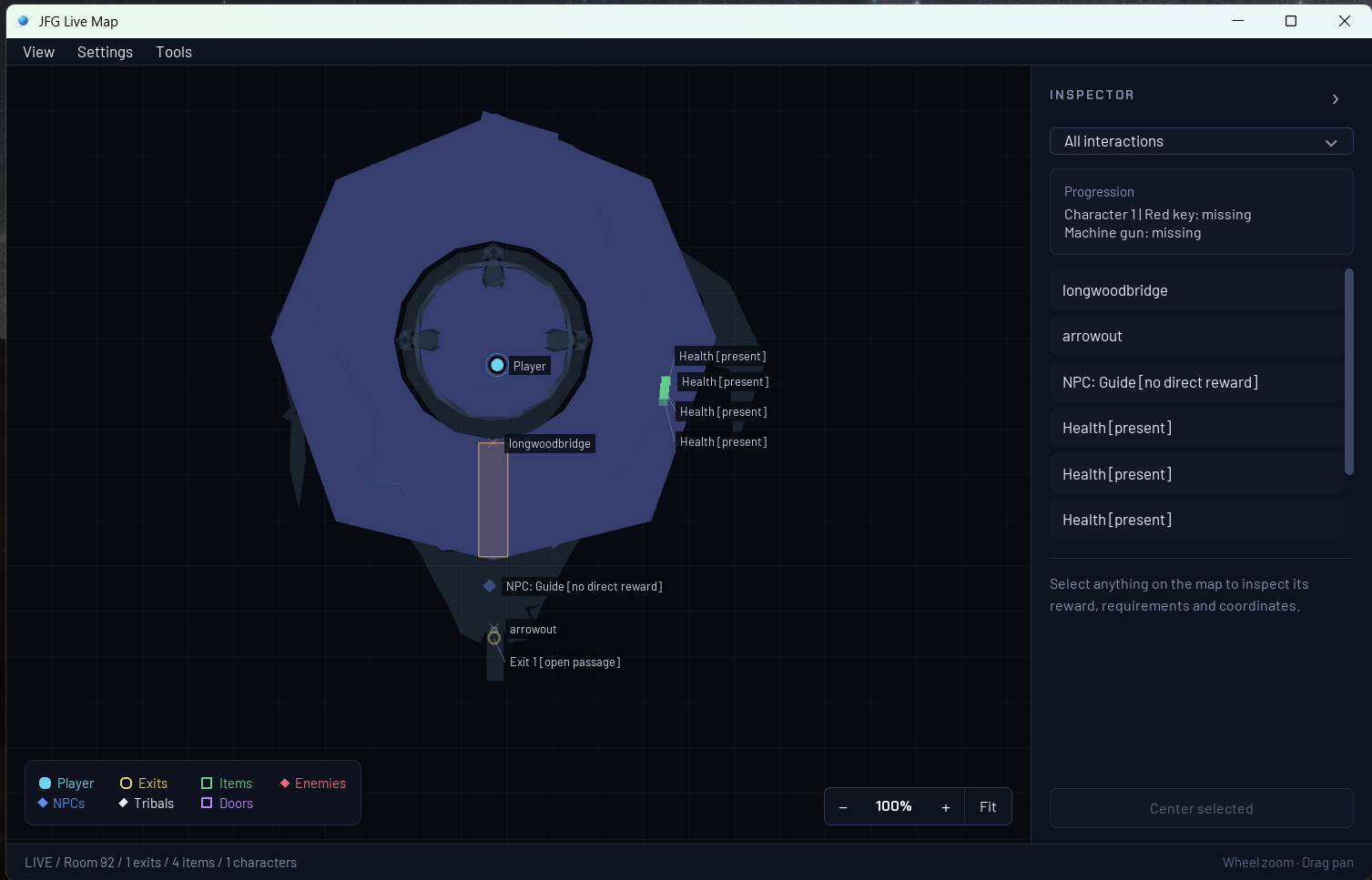
Live map in the custom companion interface.
The inventory's game icons are extracted locally from each player's own ROM; those artwork files are not bundled with the project or launcher. The interface is custom project code. Game content remains the property of its respective owners.
See the launcher and live tools guide for details.
Getting started
Start with the getting started guide for requirements,
downloads, and setup. You need a supported US big-endian .z64 ROM;
the project does not provide ROMs or game assets.
The released bundle is ready to play after ROM import. Developers can still build from source; the guide explains both paths. Older v1.0 setup issues are documented in known issues.
Help by playtesting
Play normally and report problems: crashes, freezes, progression blockers, incorrect controls, graphics or audio, and save/load failures. Check known issues first and attach the launcher's support ZIP when available. Successful sessions do not need a report.
See playtesting and reporting. If you want to contribute code, CONTRIBUTING.md explains the pull request workflow.
Future additions
The goal is a complete, faithful PC version of Jet Force Gemini with optional modern enhancements. Planned work and remaining validation include:
- Original local multiplayer and optional content: broader coverage of the modes and activities beyond the main campaign.
- Ultrawide support: wider aspect ratios with correct gameplay presentation, menus, and HUD layout.
- Higher frame-rate presentation: smoother visuals while preserving the original gameplay timing.
- Mod support: documented interfaces and tools for community modifications.
- A more polished PC experience: smoother setup, broader controller coverage, and better crash and freeze diagnostics.
Compatibility and stability come first. These are development goals; release dates have not been set.
Build and development status
- Build status and CI runs
- Development progress
- Build the playable game from your ROM
- Build and test the project source
- Documentation index and project roadmap
CI checks source, tools, and tests without a ROM. A passing build does not establish that every level or gameplay feature works.
License
Original project code and documentation use the MIT License. Dependencies retain their third-party notices. Jet Force Gemini game content and trademarks belong to their respective owners.