Project Helghast
Project Helghast is a PC port of Killzone 3 built by static recompilation.
- Type: PC port
- Game: Killzone 3
- Runs on Windows
- By undecuple
- Latest release v0.1.5, 2026-10-28
- Source: https://github.com/undecuple/project-helghast
- Website: https://undecuple.github.io/project-helghast/
README
Project Helghast (work in progress)
Killzone 3 // Unofficial PC Port (static recompilation)







Status · Features · Requirements · Getting it · Screenshots · Building · How it works · Known issues · Release criteria · AI use · Changelog · Roadmap · Contributing
Helghast is the name of the game's own faction; Project Helghast is a fan project, not official and not affiliated with or endorsed by Sony Interactive Entertainment or Guerrilla Games.
You need your own Killzone 3 disc dump (a folder with PS3_GAME, or a decrypted ISO), the 1.14 update and a decrypted EBOOT from your own copy. Version 0.1.5 is a pre-release: partly playable, see docs/RELEASE-CRITERIA.md.
A PC port of Killzone 3 (PS3, 2011) made by static recompilation: the game's PowerPC (PPU) and Cell SPU code is translated to C ahead of time and compiled into a native Windows x64 program, so no CPU emulator runs at play time. The PS3 system software the game calls is reimplemented on PC APIs. The hardware around the code is still provided by a runtime layer, much as an emulator provides it: the game's GPU command stream is translated to Direct3D 12 as it runs, and SPU scheduling, DMA and the PS3's memory layout are reproduced. Those layers are replaced by native code step by step: what is native today.
Status: partly playable. Levels load and play at about 16-22 frames/s (target 30), with known bugs; the campaign has not been played start to finish yet. Tested on Windows x64, mostly under Proton; first runs on native Windows 11 on 2026-10-21. What works: the table under Status. A first release that calls itself playable waits for the conditions in docs/RELEASE-CRITERIA.md.
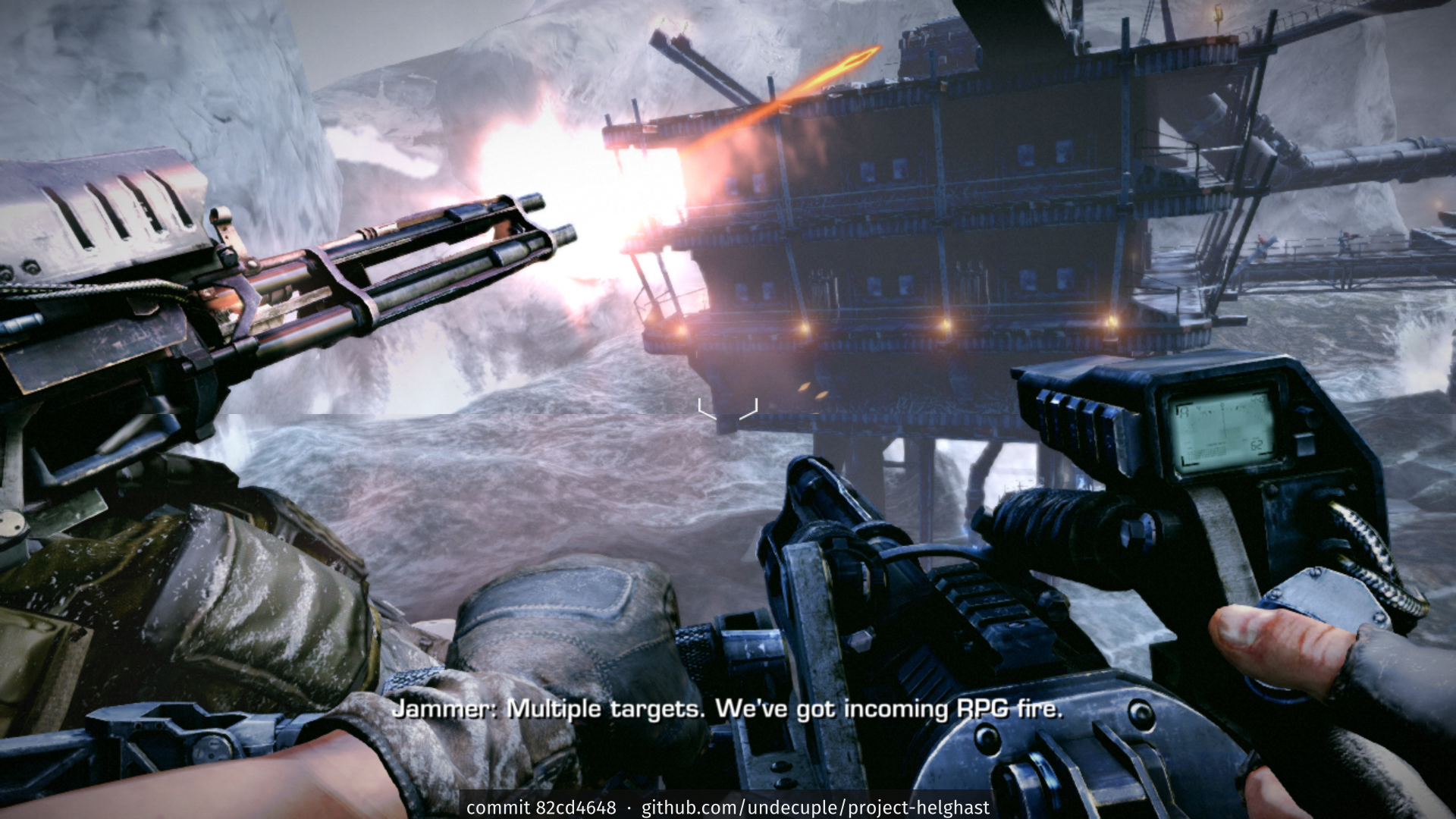
Frozen Shores at 1920x1080 on the current build. More, by milestone: screenshots.
Game imagery © Sony Interactive Entertainment.
You need your own copy of the game. This repository contains only the port: source code, patches to the recompiler, tools and documentation. It contains no game code, data, assets, keys or firmware, and it never will. Killzone 3 is © Sony Interactive Entertainment; this project is not affiliated with or endorsed by Sony or Guerrilla Games.
Status
As of 2026-10-28, on Windows x64, tested mostly under Proton on Linux (first runs on native Windows 11 on 2026-10-21 and on a Windows 10 test machine on 2026-10-22):
| Boot, intro, menus | work at the game's 30 fps; the menu background's red haze and glow match the PS3 emulator RPCS3. Latin and Cyrillic text uses an open-font fallback; Chinese, Korean and Japanese text needs the PS3 system fonts, an optional folder you point the installer at from your own console's firmware files (no firmware is needed otherwise) |
| First level | loads and runs for 10+ minutes (16 of 16 test runs clean). The video decoder threads are kept on performance cores of hybrid CPUs (KZ3_SPU_PCORES=0 turns that off), because on efficiency cores they are the cause found for the loading-screen stall; no frame-rate effect was measured and the stall itself was not seen in those runs |
| In-level HUD | drawn: level 2 shows the objective banner, ammo, grenades and crosshair; in the first level's opening the game shows only the objective marker and reticle, the same as the RPCS3 emulator at that point |
| Input | Xbox (XInput) controllers work directly and PlayStation pads through Steam Input, with the game's own button layout and vibration; SDL3 input (DualShock 4, DualSense, Switch Pro, Xbox pads, rumble, motion sensors) is built in and only partly confirmed on real hardware. Layouts: the game's own, a modern-shooter preset, or a custom one set in an in-game editor. Keyboard and mouse work in the menus and in levels, with rebindable keys and mouse look (sensitivity under Options > Mouse). Details and what is not yet checked: FEATURES.md |
| Display | windowed or borderless with Alt+Enter, exclusive fullscreen as a setting, stretched or aspect-kept picture, bilinear or nearest filtering, VSync on or off, a Bloom setting, a frame rate limit of 30, 60 or 120 and a Field of view setting (Options > Display). In gameplay the view follows the window's shape (ultrawide and 16:10); the HUD, menus, subtitles and movies stay 16:9 and centred. Checked by hand at 1920x1080, other shapes only in test runs. Details: FEATURES.md |
| Campaign beyond level 1 | all 9 chapters load and play for minutes with a picture (picked with Select Chapter from a finished save; about 16-22 frames/s on a first visit depending on the chapter, one scripted run each on 2026-10-27). One chapter, Pyrrhus Outskirts (level 202), has been played by hand to its end in one session (about 29 minutes from a checkpoint, with a few bugs noted); the others have not been played through |
| Saves | checkpoints save during play, Continue reloads them in a fresh run, and quitting to the main menu from the pause menu works; the save's PARAM.SFO is in the PS3's own format (moving a save to a console or an emulator is not tested) |
| Update 1.14 | the port is built on update 1.14; all nine chapters load and play for minutes, each reaching its level start and autosave (scripted runs) |
| Split-screen co-op | the game's own two-player campaign co-op works on one PC with two controllers (vertical split, about 26 frames/s); the two views sit slightly out of place and the right-hand view can flicker (both under investigation); keyboard and mouse as one of the two players is planned |
| Botzone | with the game's own patch layer applying the 1.14 update (KZ3_NATIVE_PATCH, on by default), Botzone reaches Career Selection (Corinth Highway) and the campaign levels 200-208 all load (scripted runs, 2026-10-27); no full Botzone match has been played by hand |
| Online | the game's own client signs in to a local test server and reaches the MULTIPLAYER menu; joining a game is not built; online co-op campaign is on the wanted list |
| Installer and portable zip | both work end to end in testing under Proton; on native Windows 11 the installer builds the game in about 7 minutes and the game reaches the menus (checked 2026-10-21); a game built the way the installer builds it plays the first level from a new profile in our tests (2026-10-28). Disc dumps as a folder, as a folder whose archive is split into parts, or as a decrypted ISO are accepted: see GETTING-FILES.md |
| Performance | a pipeline list from all eight chapters ships with the game, so shaders build in the background while a level loads (about 16.5 frames/s in the busy first minute of a level's first visit, with little stutter); the shader cache carries over between sessions (a warm start builds about 15 shaders instead of about 1,200). Planned: the game builds every shader in the shipped list at its first launch; until then the installer offers an optional shader warm-up step (about 17 minutes, off by default) |
| Speed | about 22-23 frames/s in a busy Frozen Shores window (131-180 s after launch; in-level figures, means of alternated runs on 2026-10-27), target 30; the slowest 1 % of frames run at about 13-14 frames/s; menus and cutscenes hold 30. The renderer's command walker and the SPU job code are the limits, and the PS3 emulator RPCS3 holds 30 on the same scene and machine, so 30 is reachable |
| Known bugs | the full list is in KNOWN_ISSUES.md; audio stutters now and then in levels (the audio mixing code is about 1.2 % short of real time); windows and sky in far views look flat white |
Feature by feature, the PS3 game against the port, and what the port adds: FEATURES.md, with an estimated parity figure overall and per area (generated from the repo's own records). How the port works: docs/HOW-IT-WORKS.md.
What goes online
Nothing, unless you ask for it. Each item is off until you turn it on, and this list names every one:
- New-version check (installer and portable zip): one anonymous request to GitHub for this repository's latest release, made only when you click "Check now" or tick "Check for new versions" (then at most once a day). Nothing about you, your computer or the game is sent; a new installer downloads only when you click it.
- Crash reports (installer, Advanced page, or "Crash reports on or off" in the Start menu): when turned on, the launcher sends one report after a crash (at most one per session): the crash reason, the stack addresses and the last 200 lines of the port's log (64 KB at most), with user names, machine names, IP and e-mail addresses, online ids and your install and game folders removed, to the project's own error tracker over HTTPS. No usage data, never a memory dump (the minidump stays on your PC), and crashes from before you turned it on are not sent. The tracker sees your IP address as part of the connection, as any web server does. Off unless you turn it on; builds without a tracker address show the option as not available.
- Project website (
site/): viewing it loads the Rajdhani and Barlow fonts from Google Fonts, which sees your visit. The repository, installer and game do not. - Online multiplayer (planned): only through a self-hosted server you choose.
- Discord status (optional, off unless you turn it on in Options > Display > Discord status, with "Discord status on or off" in the Start menu, or with
discord_presence = 1inkz3.ini): the port tells the Discord app on your own PC what to show on your profile (the activity text, the game's process id and the port's Discord application id), through the app's local connection. The port itself sends nothing over the network for it; the Discord app shares the status as it does for other games. Still being tested.
The original PS3 game's online play is kept running by the PS Rewired community (their Killzone 3 page). This port is not affiliated with or endorsed by PS Rewired and does not connect to their servers.
Where your data goes
Saves and settings go to %APPDATA%\Project Helghast, and caches (shaders) to %LOCALAPPDATA%\Project Helghast.
To keep everything in the game folder instead, drop an empty file named portable.txt next to the launcher. For one
run only, start the launcher with --portable or --appdata (no file changes). Always start the game through the
launcher: kz3.exe started directly does not apply any of this. The launcher's log (logs\launcher.log) and the
Start-menu "Open saves folder" entry say which rule decided, for example data: portable (portable.txt). The
"Move saves and settings" entry moves your files and creates or removes portable.txt to match.
Getting it
Download: v0.1.5 is a pre-release (partly
playable). Get Project-Helghast-setup.exe (recommended) or the portable zip from the
releases page and check it against SHA256SUMS. No game
code, assets or keys are ever shipped or downloaded: the setup builds the game's code on your own machine from your
own copy, with a bundled compiler. What a release must meet to be called playable is in
docs/RELEASE-CRITERIA.md.
Windows quick start
- Have your three inputs ready, all from your own copy of the game
(docs/GETTING-FILES.md says what each must hold):
- the disc dump: the folder that holds
PS3_GAME, or a decrypted.isofile; - the 1.14 update folder (the one that holds
PARAM.SFOandUSRDIR); - the decrypted 1.14 EBOOT,
EBOOT.elf.
- the disc dump: the folder that holds
- Run
Project-Helghast-setup.exe. It installs for your user only and needs no administrator rights. - Answer its pages: the setup type, the install folder, the tasks (desktop shortcut, "Build now"), the disc dump (a folder, or "Browse for ISO"), the 1.14 update folder, the decrypted EBOOT, and optionally the PS3 fonts and the advanced options. Pages the setup can fill in itself may be skipped. The game pages check your pick before Next and say what is wrong with it.
- Let it build. With "Build now" ticked (the default) the setup lifts and compiles the game's code behind one progress bar; otherwise the first start of the game does it. It takes about 10 to 30 minutes (a player reported about 8 minutes on native Windows 11). If a check fails, the message says which input, the path, what was found there and what it must hold; the full log is next to the installer.
- If the build stops (you close it, or the PC restarts), start the game again: the build resumes at the first step that did not finish.
- Keep it local and fast: install on a local drive (an SSD helps), not in a OneDrive folder (it would sync the build's thousands of files while they are written), and keep your game files on this device (in OneDrive: "Always keep on this device"). The setup refuses a OneDrive install folder, and the first-run check refuses game files that are only online.
- Always start the game through the launcher (below).
Always start the game through the launcher (Project Helghast.exe, or the desktop and Start-menu shortcuts).
kz3.exe started directly skips the launcher's work: it does not apply the data-location rules (saves, settings and
caches would land in the wrong folder) or your launch settings, and it does not check that your install is current.
Requirements
See docs/requirements.md (and Getting your files ready for what each folder must hold): the US disc (BCUS98234) as a decrypted dump, a folder (PS3_GAME) or an ISO file (the EU disc BCES01007, the Asian disc BCAS25008 and the Japanese disc BCJS30066 are accepted as untested regions; other releases are not supported yet; a 1.14 update from any of the four regions can go with your disc, see requirements). A dump whose data_ps3.psarc is cut into .66600, .66601, ... parts (a FAT32 drive) works as it is. The setup checks the disc archive against the known one (our copy's); about half a minute, the 1.14 update, the decrypted EBOOT of your own copy (no firmware needed; this project doesn't provide decryption tools or instructions; the PS3 emulator RPCS3 and its documentation are the usual place people start), and a Direct3D 12 GPU. Hardware figures are provisional until the game runs at speed.
Building from source (contributors)
Players use the setup above. This section is for contributors. The port is built on ps3recomp (MIT), pinned as a submodule at v0.18.0 (commit 4e8f3ca), with the patches in port/patches/ applied on top. The toolchain is a Nix flake (MinGW-w64 cross build on Linux); Windows builds are tested mostly under Proton, plus first runs on native Windows 11 and Windows 10.
git clone --recursive https://github.com/undecuple/project-helghast
nix develop .#re   --command tools/sandbox.sh -- tools/lift.sh                 # recompile the PPU code
nix develop .#re   --command tools/sandbox.sh -- tools/spu/lift_spu.sh         # recompile the SPU code
nix develop .#win  --command tools/sandbox.sh -- tools/build-kz3.sh build/kz3-win
Full steps (game files, SPU inventory, configure, staging, running under Proton, tests without the game): docs/BUILDING.md.
kz3.exe needs no launch options: next to the PS3_GAME folder of your dump (the staged layout) it starts as it
is, from a double-click or a plain Steam shortcut; elsewhere it reads kz3.ini beside it, which names the
decrypted EBOOT and the other folders (docs/BUILDING.md).
How it works, briefly
- PPU: ~59,000 functions lifted to C by ps3recomp's lifter; a few are replaced by host code (fiber scheduler, heap, movie skip) through override hooks.
- SPU: all 22 embedded SPU programs and 75 SPURS job modules lifted; SPURS runs on host threads.
- Graphics: the game's RSX command stream is walked and replayed on Direct3D 12 (shaders translated from RSX microcode), including the SPU post-processing chain's read-backs.
- Data: the game's archive is read in place through a case-insensitive virtual file system; the 1.14 update is layered over the disc data as the PS3 does.
More detail: docs/HOW-IT-WORKS.md; terms: docs/GLOSSARY.md. General fixes found here are offered to ps3recomp upstream (see CONTRIBUTING.md).
How AI was used
The port is developed by one person with AI coding agents (the hands-on work is done by AI assistants run under the maintainer's direction). The agents do
most of the hands-on work: reading the game's binary and the reference material, writing and testing patches, tools
and documentation, and running the builds and test runs. The game and its files are only handled inside a sandbox, with
the game files read-only and no network access. The maintainer sets the goals and priorities, plays the builds, signs
off everything that is published, and is responsible for it. Status claims are dated and say how they were checked;
guesses are marked ASSUMPTION: until they are confirmed in the binary. The PS3 emulator RPCS3 is read as a reference,
never copied. If you find a statement here that was not verified, please open an issue.
Roadmap
Playable campaign at speed and the local-build installer first; then more PC options (higher internal resolutions, keyboard and mouse for the second co-op player), Botzone and online play through a self-hosted server, a native Linux build, and later mod support. Gameplay changes stay optional. See ROADMAP.md.
Related projects
Project Pyrrhus: Killzone 2 (PS3) ported to PC the same way, by static recompilation, with a Windows pre-release. Early and partly playable: its first level loads and draws, checked in one scripted r