Project-Friday
Project-Friday is a native PC port of Landstalker for Sega Genesis that recompiles the game to native code and adds features like widescreen support and quick saves.
- Type: PC port
- Game: Landstalker
- Runs on Windows and Linux
- By CmdrLucid
- Latest release v1.9.1, 2026-11-13
- Source: https://github.com/CmdrLucid/Project-Friday
README
Project-Friday
Static recompilation of Landstalker (Sega Mega Drive) to native code for PC and Steam Deck, built with genrecomp. Friday is Nigel's fairy companion. Bring your own ROM: no ROM, game asset or code generated from the ROM is part of this repository (the game is built on your machine from your own ROM). Non-commercial, open source, a hobby project. Not affiliated with Sega or Climax Entertainment.
Video
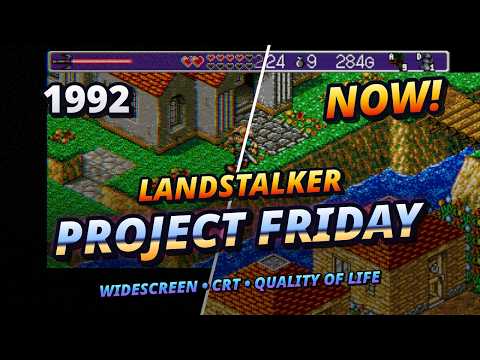
Download and start
Get the latest release from the Releases page:
- Steam Deck / Linux:
Project-Friday-x86_64.AppImage. Make it executable, start it and pick your ROM. The first start builds the game from your ROM (this takes a few minutes); later starts go straight into the game. On the Deck, add it in Desktop mode via Steam > Add a Non-Steam Game. - Windows 10 / 11 (experimental):
Project-Friday-windows-x64.zip. Extract the whole zip and startProject-Friday.exe.
You need a supported ROM (US or European version), described under Compatible ROMs.
How is this different from running the ROM in an emulator?
The game logic is no longer interpreted: the 68000 code of the ROM is translated into C and compiled into a native program on your machine. The picture is drawn by the project's own renderer, and the timing, the video chip's data path, the system start-up, both sound chips, the sound mixer and the Z80 sound driver run on the project's own code; Genesis Plus GX is still the frame around it and the base of the FM chip core, and its renderer is only kept as a test picture. Because the game code is now ordinary C that we can hook into, the project can change things an emulator cannot: draw a wider picture with real map content, fix old bugs, or add comfort features inside the game's own menus.
With every option switched off, the game plays like the original cartridge. All additions are optional and set in a new Options tab in the game's Start menu (next to Use / Equip; also on the file select screen).
Display
- Widescreen Off / 16:10 / 16:9: real map content in the side margins, not stretched. The project draws the picture with its own renderer, and sprites, scrolling and effects are handled for the wider view.
- Full Height: shows the map in the band at the bottom of the screen that the original leaves empty while you walk.
- Filter (Off, Scanlines, CRT, CRT Pro, CRT Curved), Scaling (Fit, 4:3, Integer, Fill), borderless Fullscreen.
Graphics
- HUD Original / Modern: the modern HUD drops the status bar and lays hearts (with the life numbers), the sword charge, gold and the button icons (sword, Quick Items, with the name of the bound button) over the map, so the room fills the whole screen.
- Shadows (Off / On / Soft): a ground shadow under Nigel and airborne objects, which makes jumps easier to judge.
- Sword Effects (On by default): while Nigel swings one of the four special swords the arc takes the sword's colour and a few small particles come off it: embers (Magic Sword), frost glitter (Ice Sword), little bolts (Thunder Sword), green light motes (Gaia Sword); also during the swing on the file select screen.
- Boot Colors (off by default): Nigel's boots take the colour of the equipped boots (Fireproof, Iron, Healing, Spike), like his sword and armour already do in the original; on the map and on the file select screen.
- Lighting (On by default, needs GPU Filters): torches, lava, lit windows and the sword light the rooms, figures and furniture cast shadows that follow their real 3D shape; outdoors a sun casts shadows of houses, trees and Nigel. Runs on the graphics chip; without working GPU filters it stays off. Still tuned room by room: please report odd shadows (a screenshot and the room help a lot).
- Day / Night (On by default, with Lighting): the sun moves over the day, shadows get longer in the morning and evening, the light takes the colour of the time of day, windows glow at night.
- Particles, Enemy Dissolve, Heat Haze, Water Reflections, Cloud Shadows (On by default, each with its own switch): fireflies, sparks and drops; defeated enemies burst apart; air shimmers above lava; figures are mirrored on water; cloud shadows drift over the land.
- Map Behind Text: dialogue boxes sit over the map instead of a black band.
- No Sprite Limit: draws every figure of a room, without the cartridge's limit of 20 sprites per line and its flicker (off by default = the original look).
Audio: separate music and effect volume; speech blips can be switched off.
Movement
- Sprint (On by default): hold R2 (keyboard Left Shift) and Nigel runs faster on the ground (jumps stay exactly as in the original). Sprint Key: Hold or Toggle.
- Smooth Scrolling (On by default): the sprint is 1.5 x and the room scrolls evenly and stays sharp (the scenery is shifted by whole screen pixels inside the display filter); Off = sprint 2 x.
- Native Pace: busy rooms no longer run in slow motion; the picture waits for the game instead of the game losing frames like on the console.
- Fast Forward 2x / 3x / 4x while a button is held, or as a toggle (Fast Forward Key: Hold / Toggle).
Comfort
- Quick Save / Quick Load anywhere, on a button. This uses a hidden extra slot, so your four normal save files are not touched.
- Quick Items: put consumable items (e.g. EkeEke) on two buttons, shown in the HUD.
- Quick Equip: hold a button (R1) and press a direction to open the strip of swords, armour, boots or rings, then pick a piece with left / right, without opening the menu.
- Item Info: a short description of the item under the cursor.
- Buy Quantity: buy several of an item in one go in shops.
- Better Menu: B in Use / Equip goes back to the menu bar instead of closing the menu.
- Fix Ride Objects: Nigel now rides along on an object that stands on a moving platform. In the original he slides off; this is a bug fix.
- Live Gaia Effect: the Gaia rocks stay in the world while the screen scrolls.
Difficulty / Help: damage taken (25 % to 200 %), enemy HP (50 % to 300 %) and Friday Hints (off by default; press Select and Friday flies out of Nigel's bag and tells you where to go next). The hints follow your progress and only mention what Nigel has actually been told: if you listened to an optional character, Friday remembers it (per save file) and gets more precise. In English, German, French, Korean and Japanese.
Dungeon map (bind a button to "Map" in Keybindings): a map of the visited rooms of the current dungeon, turned like the game's own view, the whole floor at once with every door on its real wall. The D-pad moves a selection, A sets a flag and the map shows the way there, L1 / R1 switch floors; dungeon names in every language.
Keybindings: every action can be remapped, for both controller and keyboard, including the keyboard directions; one row switches the keyboard to W A S D.
Language / Region (own options page):
- Language: English, Deutsch (all dialogue, with the names of the original German release), English (JP) (every line rewritten in the tone of the Japanese original: its jokes, characters' voices and the scenes the Western release toned down), Francais and Korean (both translated in the Japanese original's tone), and Japanese: the original Japanese text, only if you put your own Japanese ROM next to your ROM. The translations are written with Claude (see below) and not all have been read by native speakers yet; corrections are very welcome.
- Names: localized or the Japanese original names (Ryle instead of Nigel, ...). Items: the four items that are different things in the Japanese original.
- Bath Scene (off by default): restores the scene in Kayla's room at Mercator castle that the Western releases block with a maid on the door (the Japanese release lets you in; the scene itself is in every version's data).
Defaults for a new install: 16:9, Full Height, CRT Pro filter, Native Pace, and most Movement / Comfort options on (HUD: Original). Change anything you like in Options.
Vision and what comes next
The goal is the definitive way to play Landstalker on PC and Steam Deck: faithful to the original by default, with modern comfort for those who want it. Planned or being looked at (no promises, this is a hobby project):
- More comfort features and fixes, driven by player feedback. Suggestions are welcome in Discussions / Issues.
- German ROM as a base (the European and US versions work already). It is a different program revision and needs its own recompilation; Japanese and hacks like Remix are further away.
- Seamless room transitions (prototype exists, paused) and HD texture packs for the 2D picture (tools exist, paused until there are textures).
- A 3D remake (
remake/, early stage): the recompiled game stays the logic core, and a new front end draws the world as hand-made 3D models in a "toy diorama" style, with the sprites kept. Assets are made and approved one at a time. - Modding groundwork: thousands of functions, variables and tables are named and documented (
landstalker/docs/). The long-term idea is a mod layer for text, items and scripts. - Windows is built and tested automatically but is still experimental. Reports from real PCs help a lot.
Compatible ROMs
Two ROMs are supported, both as a raw 2 MB dump (.md, .bin or .gen, 2,097,152 bytes) of Landstalker: The Treasures of King Nole for the Mega Drive / Genesis:
| Version | SHA-1 |
|---|---|
| US | 24345e29427b000b90df778965dd8834300a9dde |
| Europe | 9fbadc86319936855831ecd096d82d716b304215 |
The European version is the US game with 50 Hz timing constants; the game still runs at the speed of the US version. European support is new and has had less play testing than the US version.
The launcher checks size and SHA-1 at every start and refuses any other file with a message. Not supported (yet): the German and Japanese versions, hacks such as Landstalker Remix, other dumps or patched / translated ROMs, .smd (interleaved) dumps and ROMs inside zip files (convert / unpack them first). The German version differs in a lot of code and would need its own recompilation; the Japanese version and Remix have shifted data.
- Project:
landstalker/(build instructions, tools, documentation) - Entry point for the documentation:
landstalker/docs/HANDOFF.md, thenLESSONS.mdandINDEX.md - Workflow: work happens on
dev;mainis the last state verified on a Steam Deck - Formerly called ProjectL (the repository and the project were renamed to Project-Friday; GitHub redirects the old address)
Credits and what is used from whom
This project stands on the work of others. Thank you!
| Project / people | What we use it for |
|---|---|
| Landstalker (Climax Entertainment / Sega, 1992) | The game itself. We own none of it; you need your own legal ROM. |
| genrecomp by sp00nznet (MIT) | The recompiler: turns the 68000 code of the ROM into C on your machine, plus the runtime around it. build.sh downloads it and applies our patches (landstalker/tools/patch_*.py); the patched copy is not part of this repo. |
| Genesis Plus GX by Eke-Eke, Charles MacDonald and others (own non-commercial licence; contains the 68000 core Musashi by Karl Stenerud, also free for non-commercial use only, and code of the MAME team) | Emulation of the Mega Drive chips (video, sound, I/O) inside genrecomp. We patch it (widescreen, filters, sound mixing, timing). Because of its licence, builds of this project must stay non-commercial. |
| lordmir/landstalker_disasm | Human-made disassembly: its labels give code / data boundaries and thousands of names (landstalker/docs/symbols.json, tier auto-seq). Used locally, not copied into the repo. |
| lordmir/landstalker_editor | Documentation of data formats (maps, entities, text) as a reference when checking the loaded data. |
| Dinopony/landstalker-lib | Room names, entity types, items, story flags and ROM table offsets (docs/ROOMS.md, ENTITIES.md, ITEMS.md, FLAGS.md, imported by tools/import_rooms.py, tools/import_lib_constants.py). |
| SDL2 (zlib licence) | Window, graphics output, audio and controller input. |
| Zig (MIT) | The C compiler that builds the game on your machine from your ROM (bundled in the release packages; zig cc, also cross-builds the Windows package). |
| Python (PSF licence) | Runs the launcher and the patch tools; the Windows package bundles the embeddable distribution. |
| Capstone (BSD 3-clause) | 68000 disassembly in our analysis tools (tools/disasm.py and others). |
Details and licence notes: landstalker/README.md. If you think someone is missing here, please open an issue.
License
The files of this repository (patches, tools, launcher, documentation) are under the MIT License. A built game is non-commercial only: it contains Genesis Plus GX and Musashi, which are free for non-commercial use only (see the table above). Landstalker itself belongs to Sega / Climax Entertainment; this repository contains no ROM, no game data and no code generated from the ROM. The game code is generated locally on your machine from your own ROM when you build and is never committed.
How AI is used in this project
This project is built with Claude (Claude Code, an AI assistant by Anthropic). To be fully transparent:
- All code is written by Claude: the recompilation patches, tools, launcher, packaging scripts, test aids and the documentation (including this README). Many commits carry a
Co-Authored-By: Claudeline. - CmdrLucid provides the ideas and does the testing: what should be built, feature wishes, decisions (for example the release approach and the licence), and playing the game on a real Steam Deck to judge look, sound and feel. Claude can only run the game without a screen, so everything that has to be seen or heard is confirmed by CmdrLucid (the documentation says which checks are still open).
- Limits: Claude makes mistakes. Results are checked with automated comparisons (RAM dumps against the reference emulator core, replays) and by playing, but the code has not been audited by a human programmer. Please report bugs as issues.