ShandalarGodot
ShandalarGodot is a from-scratch remake of Magic: The Gathering duels and Shandalar adventure for PC and mobile with modern rules and LAN play.
- Type: PC port
- Game: Magic: The Gathering
- Runs on Windows, Linux, macOS and Android
- By b0realis
- Latest release v0.60.0, 2026-10-30
- Source: https://github.com/b0realis/ShandalarGodot
README
ShandalarGodot

This project is a love letter to MicroProse MTG: to preserve that special 90s Shandalar feeling — the feel of playing early Magic, up to Fourth Edition, Alliances, and maybe Fifth — while still going for quality-of-life improvements, a modern spin on the gameplay, and the tools to go with it.
The key is in the limitations. A specific, finite spell library is something you can get creative with, instead of losing time to an ever-widening card pool and its obsolescence. It can be fun, it can be creative, and — would you believe it? — it can even be relaxing. :)
All the best to the players, and to the community for its help with the development. Good luck and good health to all!
— b0realis
An open-source, from-scratch remake of MicroProse's 1997 Magic: The Gathering — its duels and its Shandalar adventure — built in GDScript with Godot. Early Magic, a modern rules engine, and the freedom to keep the game alive.
What's in it
- The Shandalar adventure — make a hero and walk a world built from a seed as the 1997 game built them: villages, towns and cities with card shops, traders, wise men and quests; hidden lairs; the five wizards' creatures roaming the land and besieging towns; the World Magics; the castles, the dungeons, Arzakon and the Hall of Fame. Campaign Settings keep every 1997 rule one button away (As 1997) beside modern choices — the card rule, the ban list, the sieges' pace, how creatures notice you, the card hold, starting life and the final battle. Ten save slots per adventure, plus autosaves.
- Duels — the 897-card early-Magic core, four non-cheating computer opponents, hotseat, the Gauntlet, sealed decks and best-of matches that save between duels, Test hands, 1997 or modern rules, and colorblind-safe mana symbols.
- The Deck Builder with AutoDeck, Booster Draft, and nine optional card packs up to the Tempest block.
- LAN duels and tournaments for up to 40 players.
- MPN game records — export a duel, watch it again, or read it as a move list.
- The Deck Lab, the AutoDeck command line and an MCP server for experiments and agents.
Screenshots
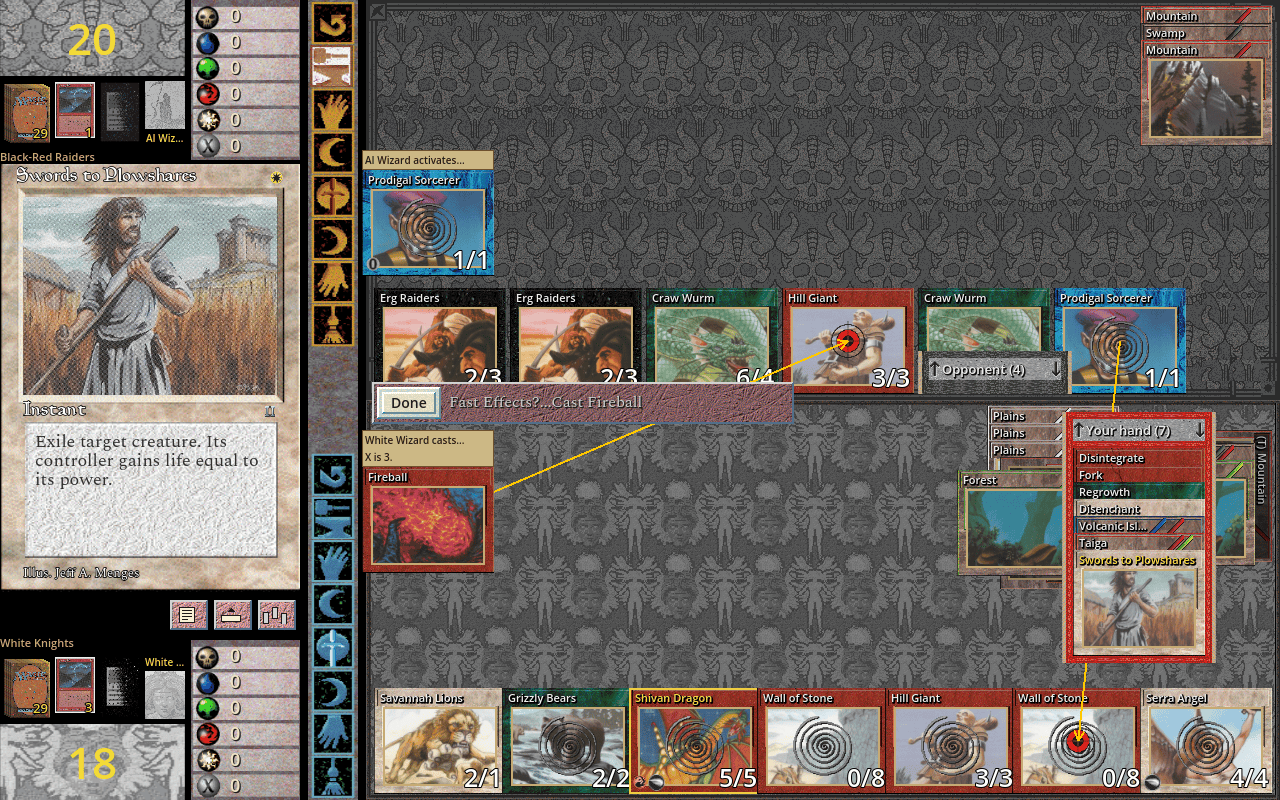
A spell chain in progress during a duel.
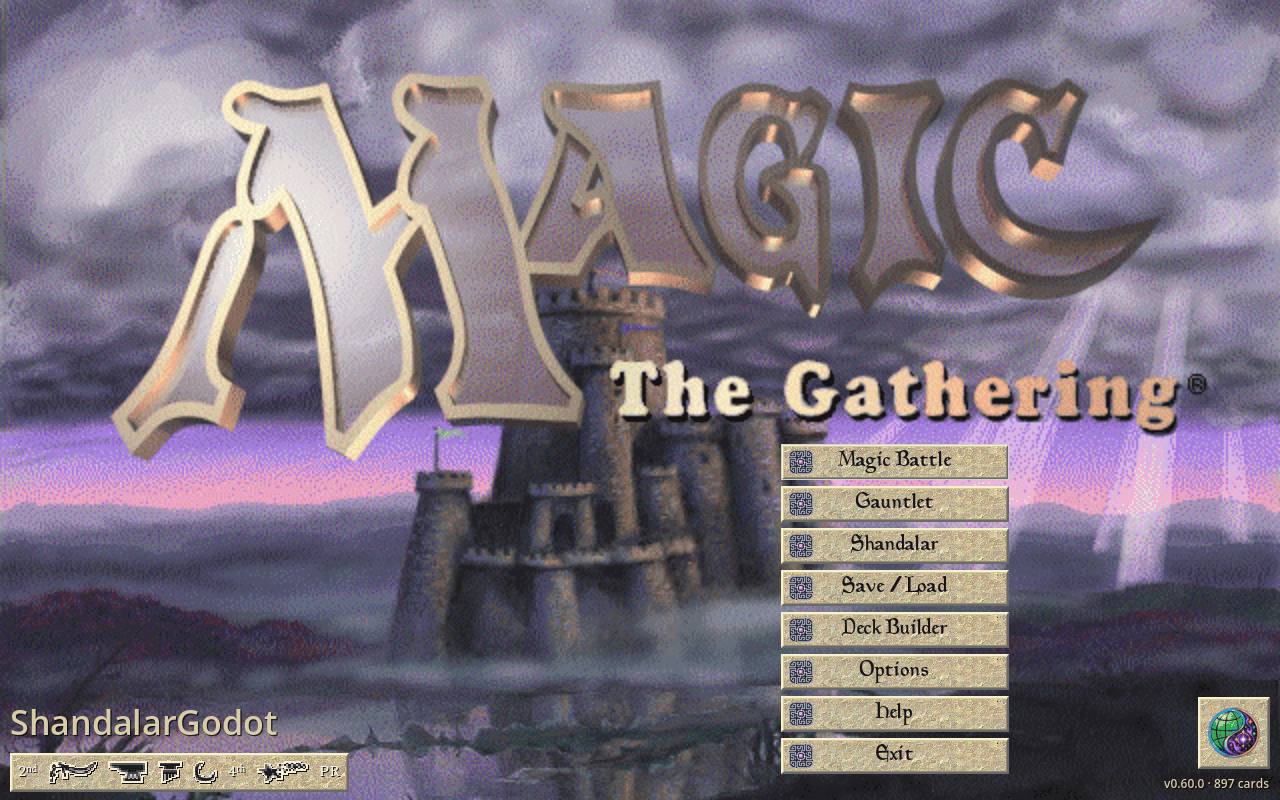
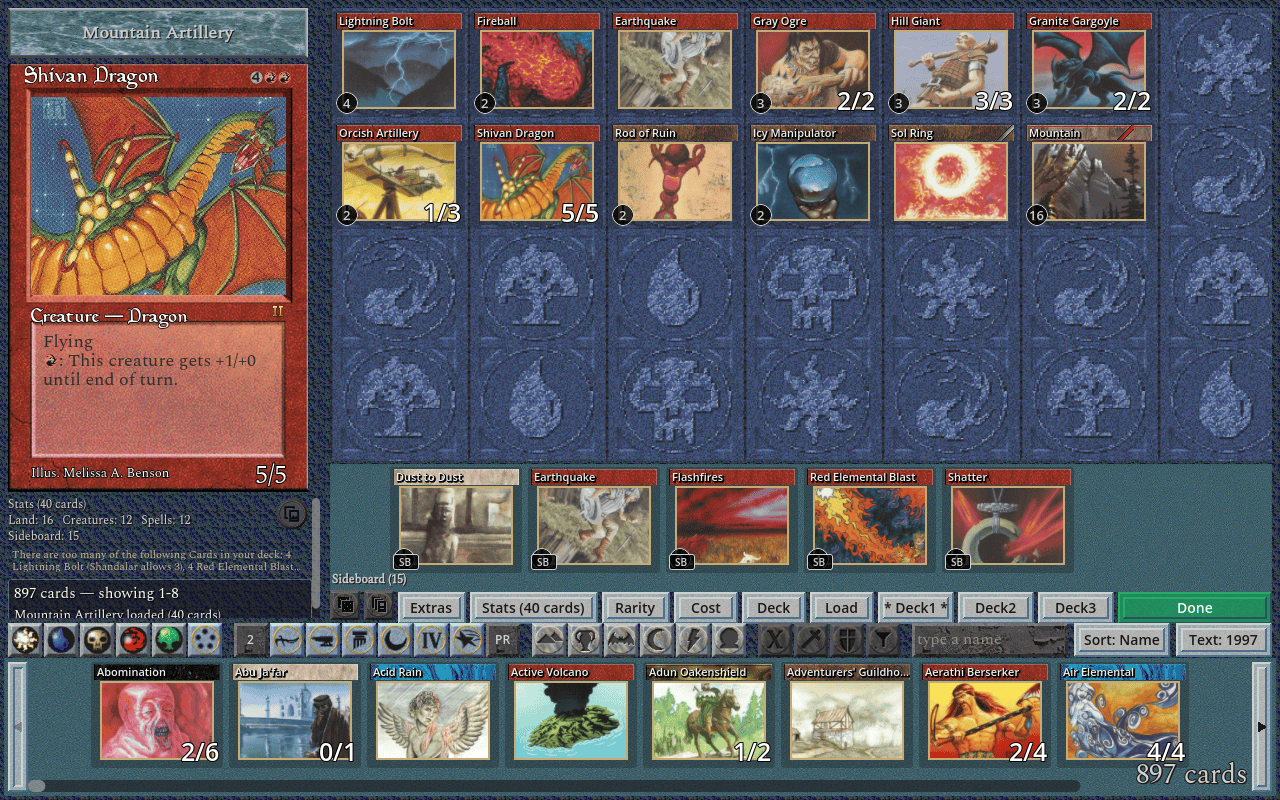
The main menu and the Deck Builder.
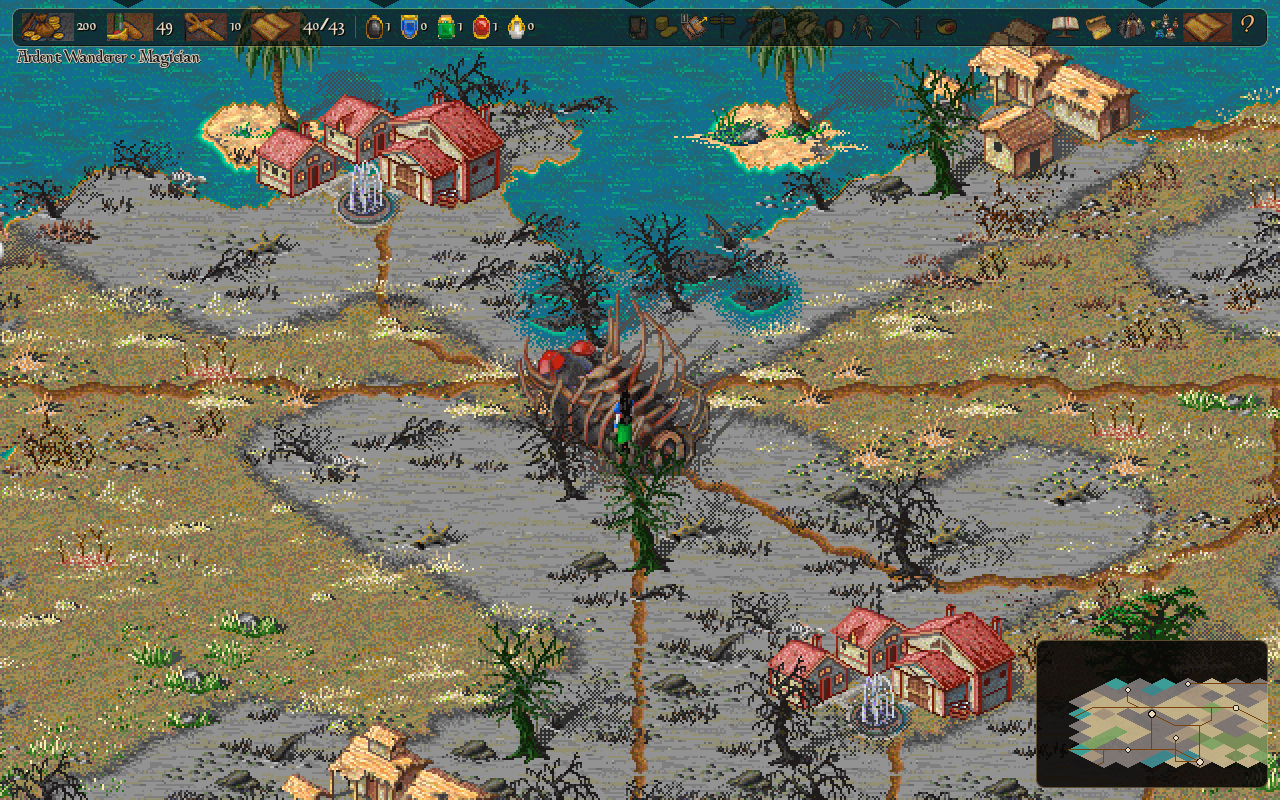

The Shandalar adventure: the world, and a dungeon's board.
Every screenshot shows the optional original-game skin and card pictures.
Play
The Shandalar adventure, duels, deck building, optional expansions, Booster Draft and LAN play.
Download the latest Shandalar release for Windows, Linux, Apple Silicon/Intel Mac, Raspberry Pi 5 ARM64 and web. New to it? Getting Started goes step by step from the download to your first duel, with card pictures and every set up to Tempest. Handheld packages — Steam Deck, ArkOS (experimental), the Meta Quest as a sideloaded flat-panel app, and experimental Android ARM64 — are on the release page too; see docs/handhelds.md and docs/android-experimental.md. Choose a standalone or original-skin package; the release includes launch instructions, a separate skin download and SHA-256 checksums. You can also run the source with Godot 4.7.2 (below).
Play with an 897-card early-Magic core, historic decks, four computer
opponents, local hotseat, Gauntlet, sealed decks and best-of matches with
sideboarding. Matches and Gauntlet runs save between duels (Resume match,
Resume run), and Test hands sets up any position to try a combo. Duel
Screen Options, the button under the large card, adds colorblind-safe mana
symbols, a UI scale and an attack-all key. Optional Pack-1-DotP-complete.zip finishes the eight set
checklists: its title-screen 1-tDotP button can enable 373 additional set
entries, for 1,270 set entries / 901 unique rules identities. The Deck Builder
supports large cards, live filters and keyboard browsing, AutoDeck, which
builds a deck from a set, a dealt pool or a pasted list to your wishes —
colors up to five, a gold deck, the rarity from pauper to rares only, classic
or non-classic lands, the Power Nine on or off, the variety between one seed
and the next — with its lands fitted to the curve and its basics to the pips,
and a Stats window that audits the mana base. The duel's keys are rebindable
under Options, Controls, and a controller's face buttons play beside the mouse.
Further optional packs
add Fallen Empires, Ice Age, Homelands, Alliances, Portal, Portal Second Age,
Fifth Edition, the Mirage block (Mirage, Visions, Weatherlight) and the Tempest
block (Tempest, Stronghold, Exodus), with engine and AI support.
The Shandalar adventure is in this release: press Shandalar on the
main menu, then Go test, and make your hero on the Embark screen. It
plays from the Embark to the end — the world, towns, quests, lairs, roaming
creatures and sieges, the castles, the dungeons, Arzakon and the Hall of
Fame. It is still in development and being playtested: please tell us what
you notice in an issue.
Help on the main menu has a page for each part. Card packs in the
adventure are not implemented yet. Public Internet matchmaking remains
future work.
Card artwork and constructed pack ZIPs are intentionally not release downloads. Every platform package includes the Python builders and construction instructions; no source checkout is needed.
The agent play guide teaches MTG rules, fair-information
play, combat decisions and deck-building strategy without assuming a particular
automation interface. MCP clients can read it through play_guide, a chapter
at a time, or the shandalar://play-guide resource.
LAN play and Booster Draft
The desktop release includes local-network duels — open them with the green globe at the bottom right of the title screen — and random-draw knockout tournaments, including up to 40 players, configurable match lengths and deck policies, the host's own table rules (starting life and the implemented rules forks), an organiser's Master Panel, graphical advancement and final standings. Computer seats use the same four local opponents and separate Unfair challenge; choose how many to add to a tournament. Tables are open by default — the Game Browser lists every duel on the network by name, with its deck rule (bring your own or the host's assigned deck), and joins with a click; switch on Invitation only to admit only the players you send the invitation to. Use matching builds and enabled card catalogues on all participants. Internet play, permanent accounts and MElo are parked for now.
The game also includes an in-game Booster Draft: choose sets/cards, open random packs, and build against a countdown with automatic saves. Find it under Options; no command-line launcher is needed.
Magic Public Notation (MPN) — a proposal to the community
Every duel you play, on your own or on the LAN, can be saved as an .mpn
file: a plain-text public history of the game — everything both players could see, never a hidden hand or a
library's order. Magic Public Notation is our proposal for an open,
shared format for such records, independent of any one engine: reading one
takes a JSON parser and the specification's patch rules — not Godot, a
card database or a rules engine. Export
one at the end of a duel, open it under Options → Game records → View
past-played games, and Watch duel plays it back on the familiar table.
- The MPN 0.1 specification — the grammar, the public-information boundary, how to rebuild each state, and a conformance checklist for writers and readers.
- The player guide — recording, exporting and watching in ShandalarGodot, locally and on the LAN.
- The move list — any recorded game as turn-by-turn text, defined exactly so other Magic programs can show it too.
- Example files to import and test against: four
.mpnrecords — a short finished game, a recording stopped early and two whole duels — and, beside the two duels, their move lists as readable text (.txt).
MPN 0.1 is a draft, not an official Magic standard. If you build a Magic engine, a replay viewer, a tournament tool or an archive, please read it, try it, and tell us what it needs — open an issue with "MPN" in the title. A second implementation is the best test a format can have.
Philosophy
The limitation is the feature. Preserve the finite early-Magic pool and the 1997 feeling. Optional additions should leave that core intact.
Port, don't invent. The original game's decisions guide the remake; quality-of-life changes and rules simplifications are explicit. The source history and fidelity ledger keep those choices open to inspection.
Strong play. Fair information. Apprentice, Magician, Sorcerer and Wizard are non-cheating opponents: none of them reads your hidden hand, secret library order or future draws. Each level plays more carefully than the one below it, and Sorcerer and Wizard also study their own deck, plan their spells and mana, and search combat ahead. Stronger difficulty means stronger analysis, never free resources or special rules. See the fair-play contract.
Art and skins
The game is playable with its built-in appearance. Choose a -with-skin
release for the original look and sounds, or add original_skin.zip
separately. Import packs through Options → Skin; on desktop they can
also live in skin/ beside the game.
Coming from 0.50.34? The adventure's pictures, sounds, music and ending
movie are new to the skin, so an older original_skin.zip or hi-res zip
lacks them. Take this release's skin download, or build the skin again from
your copy of the 1997 game (below); the ending movie is converted when
ffmpeg, or GStreamer with Theora, is installed. Without the skin the
adventure is drawn in plain colors.
Card pictures are not included in the repository or release downloads.
Every package, on every platform, includes the construction tools and
their metadata in tools/, cards/data/ and packaging/card_packs/; no
source checkout is needed. Use Python 3.10+ and run these commands from the
extracted game folder (Windows: use py -3 for python3):
python3 tools/fetch_card_art.py --out cache/cardart
python3 tools/mtg_assets.py --from-cardart cache/cardart --out skin/cardart.zip
Run the ZIP command only after the download succeeds. This creates the base card pictures. Numbered packs include their own set artwork; for example:
python3 tools/pack_3_ice_age.py fetch-art
python3 tools/pack_3_ice_age.py build cardpacks/Pack-3-Ice_Age.zip
python3 tools/pack_3_ice_age.py verify cardpacks/Pack-3-Ice_Age.zip
The card artwork and pack guide gives complete
commands for Pack 1 (1-tDotP), Fallen Empires, Ice Age, Homelands,
Alliances, Portal, Second Age, Fifth Edition, the Mirage block and the Tempest block, cache locations and platform-specific installation details.
It also ships as CARD-ART-AND-PACKS.md and is included in each package's README.
On desktop, keep original_skin.zip and cardart.zip in skin/, and
the exact-name Pack-*.zip files in cardpacks/, both beside the game
executable (beside Shandalar.app on Mac, never inside it). Leave ZIPs
zipped. Use Options → Card Packs → Rescan, then enable the packs;
Add pack... on the same page copies a built pack in from anywhere (on
Android, the only way).
The separate packaging/card_packs/ directory is builder metadata, not an
installation folder. Completed packs and card art are never bundled in releases.
Web can import/fetch the skin and base cardart ZIPs into browser storage; this build has no browser installation path for numbered gameplay packs. Its included Python tools run on your computer and can build packs for desktop.
To rebuild the original skin from your own copy of the game:
python3 tools/mtg_assets.py --install /path/to/game --out skin/original_skin.zip
The original skin requires only the original 1997 MicroProse game: its CD, or the folder you installed it to. Nothing from a later re-release or another project is needed or read. The importer reads your installation without changing it. The 1997 skin is the default; a release carries no other skin than it and its hi-res copy.
No 1997 copy? A Manalink install as a backup. The tool can also read
a later Manalink install, if you add --manalink. Each file the 1997 game
would give is then taken from Manalink's own where it fits the shape the
game draws (some are Manalink's restyles, and a few stay the game's own
drawing). This is only an option of the tool, for your own skin folder:
no release is built from a Manalink install or carries a Manalink skin,
and the release build refuses a skin folder the option wrote into.
--check lists every asset and where it would come from, and writes
nothing:
python3 tools/mtg_assets.py --check /path/to/manalink --manalink
python3 tools/mtg_assets.py --install /path/to/manalink --manalink --out skin/original_skin.zip
A hi-res skin for big screens. tools/upscale_skin.py makes a second
skin out of your 1997 one, original_skin_realesrgan-anime_2x.zip: the
same files under the same names, with every picture at twice the size and
the music, sounds, fonts and coin toss as they are. It runs Real-ESRGAN's
anime model, which is free and open source, then takes the colors back
from the 1997 picture, so the art gets sharper without changing its
colors. On Linux the tool fetches the upscaler once; it needs Pillow and
a Vulkan GPU driver. The hi-res skin is a skin like the 1997 one: choose it
in Options → Skin or drop it on the window, and it is worn from the next
start; choose the 1997 skin again to go back. The game draws each 2x
picture at the 1997 size, so the layout doesn't change and every picture is
sharper on a big screen. To mix, put a 1997 picture back into the hi-res
zip under its own name. The release page also offers it ready-made as
original_skin_realesrgan-anime_2x.zip. An earlier hi-res zip — the
0.50.34 download, say — is reused with --reuse: each 2x picture that still
matches is kept, and only the new pictures are upscaled:
python3 tools/upscale_skin.py --skin original_skin.zip
python3 tools/upscale_skin.py --skin original_skin.zip --reuse old_2x.zip
See the player-files guide for pack locations and the skin catalogue for creating your own skin; the same catalogue as a table lists every file of the skin zip by name. Card pictures stay personal—do not include them in a public web build.
DeckLab CLI
The desktop releases include a headless deck-analysis tool: run computer-versus-computer duels in parallel, compare matchups or gauntlets, and study win rates, confidence intervals, charts and CSV/JSON reports. Seeded runs make it useful for experimenting with decks and comparing ideas.
Run ./deck_lab.sh --help on Linux/macOS or .\deck_lab.bat --help
on Windows. --procs and --jobs control parallel workers (a worker
that dies is replaced by a fresh one for the same slice of the run);
--no-elo keeps experiments out of the ratings ledger. A tournament —
one deck or a folder of decks, each played against the decks that are
known to be good — is --field mine/ --gauntlet decks/ --group tournament:
the field is ranked in report.txt, standings.csv and top.txt, and
--group all makes the gauntlet the whole deck library.
Beside it, ./auto_deck.sh --help (.\auto_deck.bat on Windows) is the
AutoDeck tool as a command line: it builds a folder of seeded decks from
every combination of the switches you give it, and plays no game; its
--packs names the card packs the cards come from, and a field mined with
--packs X is played by the Lab with the same --packs X; --colors pairs --distinct 60 is a field of every color pair with no two decks less than
60% different, and --keep FILE --vary "Fireball, 2 Lightning Bolt" holds a
deck but for the named cards, for the Lab to find a better card for a slot.
The DeckLab manual has examples and all options.
Driving either tool from a script or an agent — the exit codes, the
refusal as one line of JSON, --dry-run's plan, every output file and
its keys — is AGENTS.md. ./shandalar.sh is the one door to
all of it, and ./shandalar.sh mcp serves every tool — the packs, the
deck files, the AutoDeck CLI, the Lab and a duel played decision by
decision through the referee — over the Model Context Protocol, so a
program's client finds them by name and reads what each takes.
On Windows releases, run python tools/shandalar_mcp.py with Python 3.10+
(or py -3); the server uses the bundled console executable, without Bash.
Post-0.50 roadmap
- Adventure — playable from the Embark to the Hall of Fame and being playtested; card packs in the adventure are not implemented yet.
- Internet play — LAN duels and tournaments are built; Internet hosting and discovery are parked.
- Bigger formats, after the adventure matures — the 1997 Sealed Deck tournament, Commander, LAN duels with ante and best-of matches, and a player record.
- MElo (Magic Elo) — community ranking, parked until resources allow.
- Card packs — nine optional, toggleable packs beside the core pool:
Pack 1 (DotP Complete), then Fallen Empires through the Tempest block.
Each is built locally from its guide in
docs/; ZIPs and downloaded art stay local.
Experienced multiplayer, networking and backend developers are especially welcome to help improve LAN play and explore those longer-term ideas.
With all nine packs enabled: 4,083 set entries · 3,093 unique cards. Want to add another set? Follow the card-pack authoring guide.
See the development roadmap for the longer record.
Build and contribute
Use Godot 4.7.2 for source development; export templates are needed to build releases. Start with DEVELOPMENT.md and CONTRIBUTING.md for setup and the test workflow.
godot -e --path .
./run_tests.sh              # the whole suite (half the cores, at most six, on Linux)
SHARDS=1 ./run_tests.sh     # the same suite in one Godot
Explore the architecture, code map, card-authoring guide and cross-platform build guide.