Project Tandem
Project Tandem is a native PC port and recompilation of Mario Kart: Double Dash!! for Windows with online multiplayer, widescreen, and mouse and keyboard controls.
- Type: PC port
- Game: Mario Kart: Double Dash!!
- Runs on Windows
- By badcompany94-rcmp
- Latest release v0.1.0-beta.3, 2026-10-30
- Source: https://github.com/badcompany94-rcmp/project-tandem
README
Project Tandem — Mario Kart: Double Dash!! Online on PC
Play Mario Kart: Double Dash!! online with friends on Windows. Project Tandem is a native PC port and static recompilation project for the GameCube game, with 2–8 player online multiplayer, solo or shared karts, natural widescreen, modern controllers, and automatic menu/racing mouse and keyboard controls.
Download Public Beta 3 for Windows (experimental display features) · Installation and updates · Controls · Online play
Bring your own compatible disc image. Project Tandem verifies your USA GM4E01 ISO/CISO and recompiles the game on your PC. Downloads contain the recompiler, runtime, project features, and installation tools. They do not include a disc image or a compiled copy of the game.
Beta 3 fixes dropped native fallback frames when interpolation is enabled. VSync and interpolation remain experimental, independent and OFF by default in F1 → Display. Output rate still depends on the scene and PC. Changes and testing · Display options and limits · Previous Beta 2
Features
- Mouse and keyboard menus, separate racing controls. Click through the offline and online menus, type names and room codes, then enter a race with a dedicated driving layout. The controls switch automatically. Race bindings stay active through race results and the award ceremony, and can be rebound in F1.
- Switch between mouse/keyboard and controller. Player one accepts both by default: use a mouse in the lobby and pick up a controller to drive. F1 also supports explicit device assignments.
- Online play for 2–8 people. Host a room and share its eight-character code. Take an empty kart or join a friend's back seat. Solo and shared karts can race together.
- Grand Prix and Battle. Play a cup with CPUs filling Grand Prix slots, or compete in Balloon Battle, Shine Thief, and Bob-omb Blast. Battle requires at least two opposing karts.
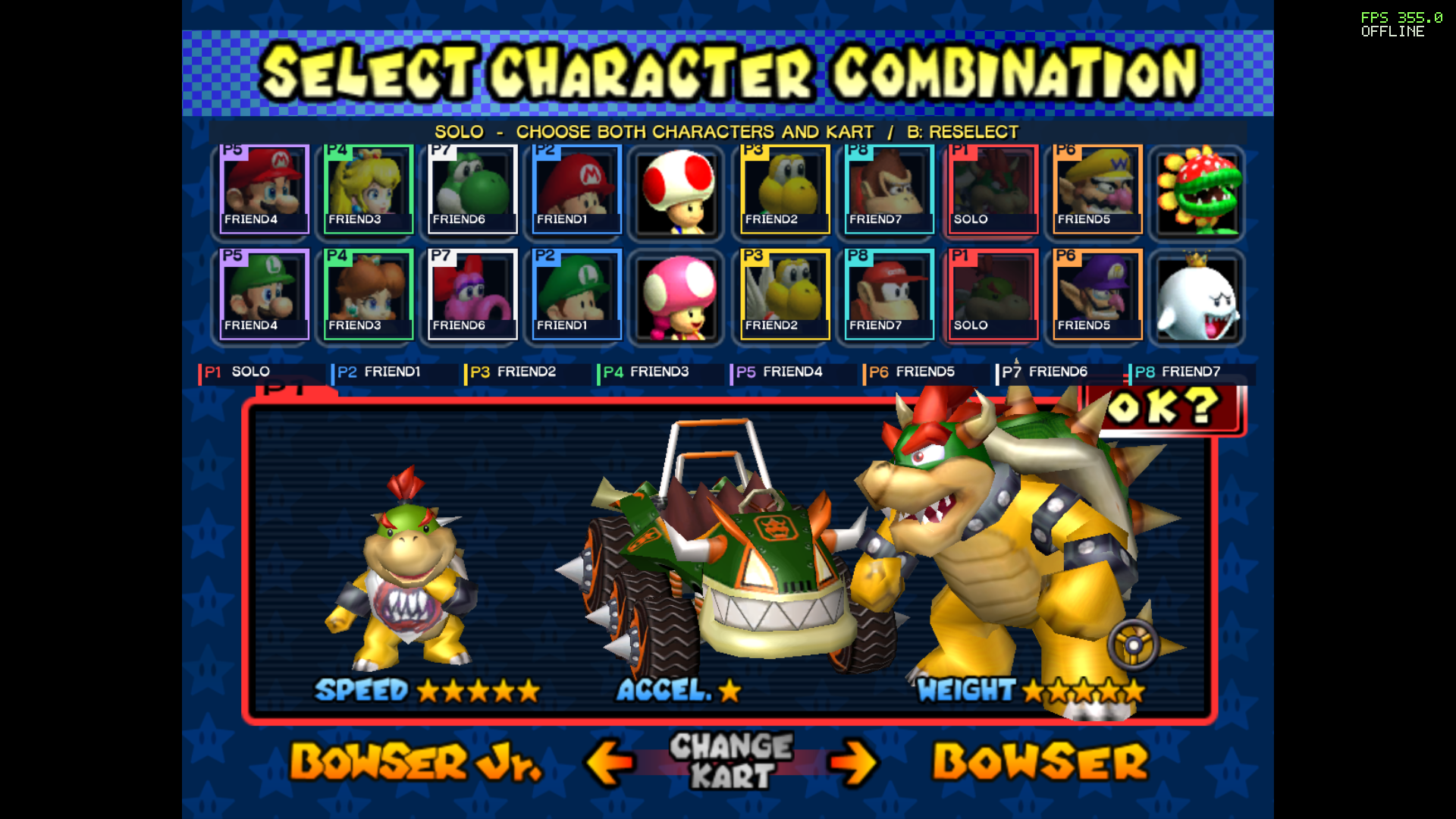
- Shared character selection. Everyone sees live player markers and named, locked choices on the original character grid, with their own kart preview below. Solo players choose two characters; shared teammates choose one each.
- Stay together between events. Return to the same lobby, change seats and modes, edit your name, and keep session medal stars.
- Natural 16:9 widescreen. See more of the course with correctly proportioned HUD elements. Choose common 16:9 resolutions, windowed mode, fullscreen, or borderless fullscreen.
- Controller and local multiplayer settings. Xbox, PlayStation, and Switch controller support through SDL, rebindable controls, and separate device assignments for offline GameCube ports.
- Online prediction and adaptive buffering. Peer-to-peer gameplay uses EOS connection setup and relay fallback. The F10 overlay shows FPS, RTT, and the current input buffer. Performance depends on the PCs and connection.
- Portable setup and updates. Compiler tools are bundled. Update by copying the full patch ZIP over your existing folder while preserving
local-data.
Install on Windows
- Open Releases and download the Windows full package. GitHub's automatic Source code archives are for development, not the player installer.
- Extract the ZIP completely into a writable folder.
- Run
Setup-Tandem.cmdand select your own supported USA ISO/CISO. - Allow setup to verify the disc and compile locally, then run
Launch-Tandem.cmd.
The player package includes its build tools. You do not need Visual Studio, a separate Windows SDK, or Python installation. Online players do not need an Epic player account or developer setup. Ordinary home connections use automatic connection setup and relay fallback without a VPN or manual port forwarding; restrictive networks can still prevent a connection.
Requirements: 64-bit Windows 10 or 11, graphics supporting desktop OpenGL 3.3, a writable installation folder, and space for the toolchain, build output, and a private cached copy of your ISO. This beta targets Windows x64.
The supported disc is USA GM4E01, with main.dol SHA-1 e389e50357d4a5076ab3d38672204658f411123d. Setup rejects an incompatible revision. Other regions and RVZ/GCZ input are not supported by this installer.
Installation and updates · Controls · Online play · Troubleshooting
Mouse and keyboard controls
Menus
| Input | Action |
|---|---|
| Mouse | Point at and highlight a menu choice |
| Left click | Select or confirm |
| Right click or Escape | Go back; confirmation appears when leaving a lobby |
| Arrow keys | Navigate |
| Enter | Confirm |
| Backspace | Go back |
| Typing | Enter your name or room code in an active text field |
| F1 | Open settings |
Mouse clicks also advance the introductions and the initial save prompt. Menu controls change automatically when racing begins; no manual profile switch is needed.
Racing
| Input | GameCube action |
|---|---|
| Left click | A — accelerate |
| Right click | B — brake/reverse |
| A / D | Main stick left/right — steer |
| W / S | Main stick up/down |
| Space | X — use item |
| Q | Y — use/pass item |
| E | Z — switch riders |
| Left Shift | R trigger — drift |
| Ctrl | L trigger |
| Arrow keys | D-pad |
| Enter or Escape | Pause offline / open the online menu |
Race bindings remain active between races and through the award ceremony: left click confirms those screens. Arrow keys navigate result/pause choices and Enter confirms. F1 settings remain available, and all race bindings can be changed there.
Player one can use a controller at any time alongside mouse/keyboard unless you explicitly assign devices in F1. Xbox defaults keep A/B/X/Y matched to their labels, RB is Z, and Menu is Start. Other controller layouts can be customized in F1.
Play with friends
Choose Online Play → Host Room and share the room code, or join using Join Room or F1 → Online → Quick join. Pick seats, ready up, and let the host choose the mode. All players need the same version and build ID, shown in the lobby and settings.
Current compatibility: Public Beta 3 — f4e52689263937fd, based on Alpha25 gameplay. Everyone must update to the same build; Older builds cannot share a room with Beta 3. Display option choices may differ between players.
Use F1 → Exit to desktop, the window close button, or Alt+F4 to exit. Online services close automatically with the game.
Updates and support
Close Tandem, copy all files from the cumulative update ZIP into the folder containing Launch-Tandem.cmd, and accept replacement. Keep local-data. The launcher rebuilds when needed. The cumulative package supports portable installations from Alpha12 onward.
Report problems through this repository's Issues, using the bug-report form. Include the version/build ID, Windows version, player count, mode, and steps to reproduce. For network problems, include each player's FPS/RTT/BUF readings. Share only reviewed diagnostic excerpts; the troubleshooting guide explains which files to keep private.
Source and credits
Project Tandem builds on Ethan Nicholas's mariokartdd-recomp and gcn-recomp. The runtime statically translates PowerPC code from the user's disc image to C and compiles it locally.
Project source uses the MIT License. Third-party libraries, fonts, artwork, and distributed runtime components have separate notices; see credits, third-party notices, end-user terms, and privacy information. The MIT license does not license Nintendo's game content or trademarks.
Mario Kart: Double Dash!!, GameCube, characters, and related marks belong to their respective owners. Project Tandem is an independent project and is not affiliated with or endorsed by Nintendo or Epic Games.