Mario Kart World Recomp
mkw-recomp is a native PC port of Mario Kart World for Windows and Linux that runs the game at 30 fps with optional frame generation.
- Type: PC port
- Game: Mario Kart World
- Runs on Windows and Linux
- By adriadam10
- Latest release v0.1.10, 2026-11-13
- Source: https://github.com/adriadam10/mkw-recomp
README

mkw-recomp
Mario Kart World (Nintendo Switch 2) recompiled to run natively on Linux and Windows.



Releases · Help wiki · Changelog · Contributing · Sources · Roadmap · Performance · Issues · Discussions · Archive
English · 简体中文 · Español · العربية · हिन्दी · Português (Brasil) · Português (Portugal)
A static recompilation of Mario Kart World (Nintendo Switch 2, versions 1.0.0 and 1.8.0) into a native PC program for Linux and Windows. It needs your own copy of the game, dumped from your own console: nothing of the game is in this repository or in its releases.
It is a recompilation, not an emulator. The game's AArch64 code is translated to C ahead of time and compiled
for the PC's CPU (x86-64, or AArch64 on Linux); there is no CPU interpreter or JIT. The GPU is not emulated either:
NVN2, the Switch 2 graphics API, is reimplemented on top of Vulkan at the API level, and the game's SM86 shaders are
translated to SPIR-V ahead of time. Nintendo SDK functions (nn::*) are replaced by name with our own code.
Status
Early, and moving fast. On 12/11/2026:
- It boots, plays the intro movies, goes through the menus and races, on Linux and on Windows (x86-64), and on Linux on AArch64 (its own AppImage; tested on an Adreno 740 handheld).
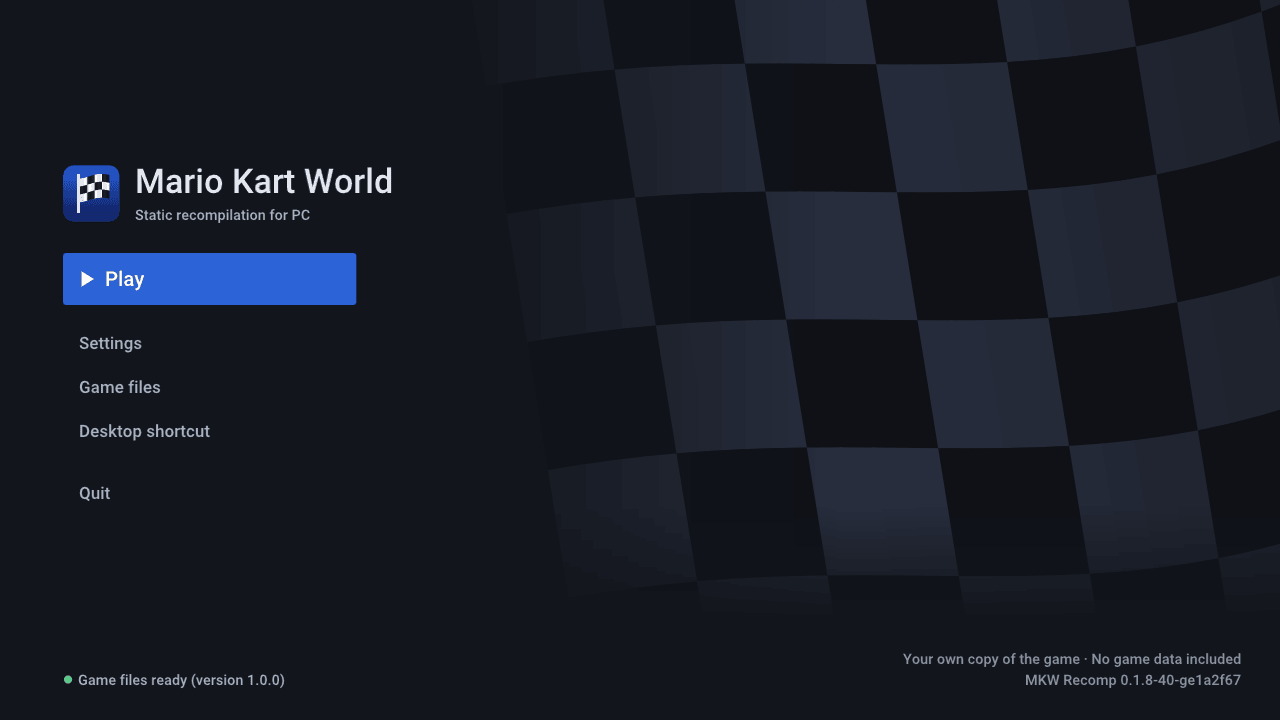
- The start screen sets the game up from your copy on your machine (generates and compiles the C, translates the shaders, warms up the pipeline cache) and holds every setting: display, graphics quality, controls, hacks.
- Races run at 60 fps on high-end GPUs and at 30 on mid-range ones; see Performance.
- Known problems: a few menus (mode, character and vehicle select) still need work, the kart's shadow misses a frame now and then, some audio cuts during movies, and on some AMD drivers the GPU can hang. There is no online play.
Roadmap
The main open work, in order; the details are in docs/roadmap.md.
- 60 fps in races. Today a race frame is a serial chain: the game finishes its frame (~3 ms*), then the Vulkan back end records the game's big submit (~19 ms*), then the GPU runs it (~10 ms*), and only then does the next frame start. Recording is on the critical path, so the work is recording with less CPU: dynamic state only when it changes, draw caches across frames, parallel recording, and a faster game thread.
- The picture as on the console: the last shader translator bugs, the kart's shadow, push constants, zero Vulkan validation errors.
- Every menu checked against the console: mode, character and vehicle select are next.
- No GPU hangs and less GPU memory, then loading without stutter and a Linux package for non-rolling distributions.
- 1.8.0 on par with 1.0.0: its ultrawide aspect, shadow map size and fixed seed (#19).
* Measured on 09/11/2026 on our test machine: Radeon 660M APU (Ryzen 5 7535HS), Linux, 720p internal resolution.
Performance
Measured frame times, each with its date, are in docs/performance.md. To add your machine, open a performance report: it goes into the table with the date of the report. The times are the game's own frames: frame generation shows more frames but does not shorten them. 16.7 ms is 60 fps; Frame rate on Automatic (the console's) drops to 30 fps when 60 is out of reach, and a frame over 33.3 ms runs the race slower than real time.
| Date | GPU | Internal resolution | Race fps | Race frame time |
|---|---|---|---|---|
| 11/11/2026 | RX 7900 XTX (Windows) | 2160p | 60 | 16.7 ms |
| 11/11/2026 | RX 9070 XT (Linux, RADV) | 720p to 2160p | 60 | 16.7 ms |
| 10/11/2026 | RTX 3060 (Windows) | 1080p | ~48 | ~21 ms |
| 11/11/2026 | RTX 3050 Laptop (Windows) | 720p | ~37 | 26.7 ms |
| 09/11/2026 | Radeon 660M (Linux, RADV) | 720p | 30-32 | 31-33 ms |
| 11/11/2026 | GTX 1650 SUPER (Windows) | 1080p | ~24 | ~41 ms |
| 09/11/2026 | GTX 1050 Ti (Windows) | 1080p | 22-24 | 42-45 ms |
Playing
Stuck or have a question? Search the wiki first: installation, settings, controls, known errors by their log line and a FAQ.
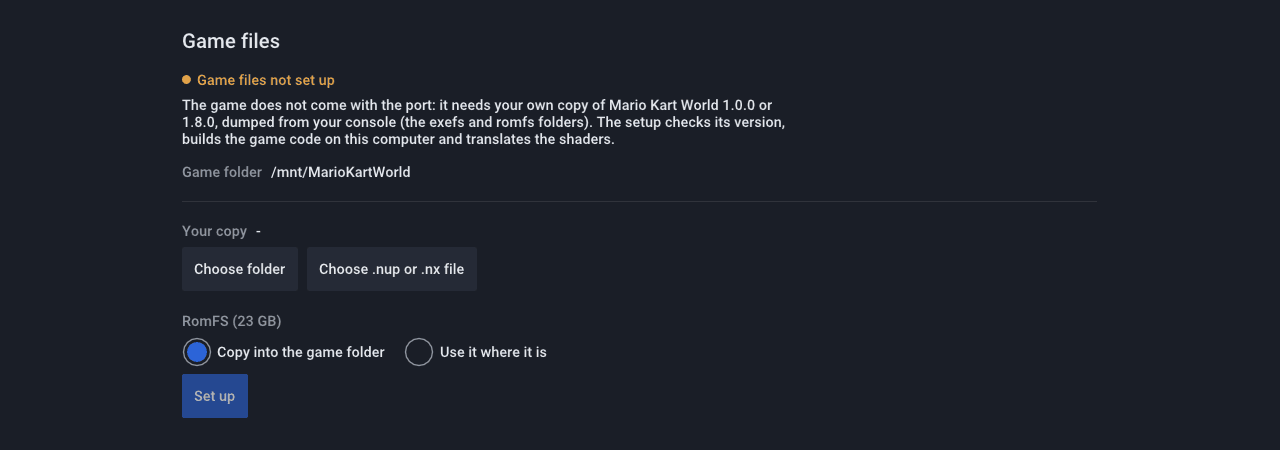
- Dump Mario Kart World 1.0.0 or 1.8.0 from your Switch 2 (
exefs/andromfs/, decrypted; 1.8.0 with the update merged into the base game's RomFS), or the same dump packed as one.nupor.nxfile. - Download the launcher for your system from Releases: on Linux
the
.AppImage(-aarch64on ARM; the default game folder is~/.local/share/mkw-recomp; glibc 2.31 or newer: Debian 11, Ubuntu 20.04, SteamOS and later), on Windows the.zip, unpacked into a folder. Either needs about 30 GB free. - Run the AppImage (
chmod +xfirst) ormkw.exe, open Game files, optionally use Choose game folder to select where the game will be installed (or an existing installation), then point it at your dump (Choose folder or Choose .nup or .nx file) and press Set up. The launcher remembers the installation folder; the compiled game, prepared files, saves, settings and caches live there. Selecting another folder keeps existing files in place. The first setup takes a while (it compiles the whole game and downloads NVIDIA'snvdisasmandptxas, 84 MB on Linux and 126 MB on Windows, to describe the shader encoding on your machine); after that, Play. - When a newer release is out, the start screen offers it (Update to vX): it downloads it, checks it, replaces the program and sets up again only what changed. Settings → Menu → Check for updates turns the check off.
Requirements: x86-64 CPU with AVX2 (or, on Linux, AArch64 with ARMv8.2: LSE, FP16, RCpc, DotProd,
CRC32), a GPU with Vulkan 1.3 (VK_EXT_mesh_shader recommended; without it, task and mesh shaders run as compute),
16 GB of RAM recommended. In a Docker or Podman container on Linux, allow userfaultfd in its seccomp profile (Docker's
default refuses it): without it the port cannot tell which game memory changed, and runs several times slower.
Extra features
Beyond the console, all optional and off (or at the console's value) by default:
- Display: internal resolution above or below the console's, 21:9, 32:9 and 48:9 (races show more at the sides), AMD FSR 1 scaling, HDR on HDR screens, VSync, mailbox or immediate presentation.
- Frame generation: frames made between the game's (a race at 30 fps shown at 60, or at 240 on a 240 Hz screen). Smoother, not faster: the picture is up to one frame later, and fast motion and the minimap can smear.
- Frame rate: 20 and 15 fps besides the console's 60 and 30; Automatic drops to them when frames take too long, so a slow graphics card keeps the race at its real speed. Low latency (on by default: it changes no picture, only when each frame starts) starts each frame as late as the card allows, so a press reaches the screen sooner.
- Graphics: texture filtering and quality, detail distance and shadow quality above or below the console's.
- Sound: 5.1 surround.
- Controls: every key and button rebindable, mouse camera, Nintendo, Xbox or PlayStation button icons, motion steering, vibration strength; local multiplayer with one controller each. Switch 2 controllers (Pro Controller, Joy-Con, GameCube) work over Bluetooth and, on Linux, over USB; on Windows USB needs a one-time driver step, below.
- Hacks: turbo (hold or toggle F2), skip movies, unlock everything, the same randomness every time, straight to time trial or free roam.
- Languages: the menus in 20 languages; the game itself also in Catalan, Galician and Basque.
- Game files: choose the installation folder; a dump as folders or as one
.nupor.nxfile, used where it is; updates from the start screen. - Performance overlay (FPS, or CPU, GPU and memory in full) and a one-click system info for bug reports.
Switch 2 controllers over USB on Windows
These controllers only start after a command sent to their second USB interface, which Windows leaves without a driver an app can use. Once per controller, with Zadig:
- Plug the controller in with a USB-C cable and open Zadig.
- Options → List All Devices, then pick the controller's Interface 1 (USB ID
057Eand2069for the Pro Controller,2066/2067for the right/left Joy-Con,2073for the GameCube controller). Not Interface 0: that one is the controller's normal input, and replacing it hides the controller from every other app. - Driver WinUSB, then Replace Driver (or Install Driver).
The same steps apply to a virtual controller that shows up with those USB IDs (Switch2Connect's USB/IP mode). To undo it, uninstall that interface's device in Device Manager with "delete the driver" ticked.
Mods
The start screen's Mods page installs mods as they are published for the game, and lists them in two tabs:
- Find on GameBanana: Mario Kart World's mods on GameBanana, listed or searched, with each mod's author, license, screenshots and description. Install downloads the file from GameBanana, only when you ask for it.
- Installed: your mods, each with an on/off switch; Import zip / Import folder takes a mod you already have
(
.zip,.raror.7z, withromfs/and/orexefs/anywhere inside, including theatmosphere/contents/layout).
Mods that replace game files (romfs/: skins, textures, texts, courses) take effect at the next start. Mods that change
the game's code (exefs/ .ips or .pchtxt patches, such as 200cc or 30 FPS) are built into the game code: turning
one on or off rebuilds it before you play (a few minutes). Two mods that change the same archive are merged file by
file, and the page asks which one wins where both change the same file. The page warns about mods that replace the
game's graphics settings or shaders, which the port handles its own way.
Mods are made by other people and are not tested by this project: one can crash the game or damage your save. Read a mod's page before installing it, keep a copy of your save, and report a mod's problems to its author; when you report a bug here, say which mods were on (the log lists them), or try again without them first.
Building from source
Linux, with uv, clang, lld, ninja, SDL3, Opus, libvpx, zstd, xxHash, the Vulkan headers and VMA 3.4.0 (details in
tools/build/README.md). Put your dump in game/ (game/exefs, game/romfs) or set
MKW_GAME=<dir>, then from the repo root:
uv run python recomp/gen.py --exefs game/exefs --out build/generated --jobs 8 --patches recomp/patches-mkw.txt  # 1.8.0: patches-mkw-180.txt
uv run tools/shaders/extract.py && uv run tools/shaders/translate.py
uv run tools/build/build.py              # build/mkw; --target windows builds mkw.exe with llvm-mingw
build/mkw
Shortcuts for these flows and the release ones: make build, make appimage (make help lists them all).
From a packed dump (.nup, .nx) and for Linux on AArch64: tools/build/README.md
and its AArch64 section.
Translating the shaders needs the SM86 encoding specification, generated from NVIDIA's nvdisasm (not shipped):
see tools/shaders/README.md. Everything generated goes to build/, never to git.
| Folder | Contents |
|---|---|
| recomp/ | The generator: AArch64 → C |
| runtime/ | What plays the console: kernel, memory, SDK replacements, NVN2 over Vulkan, audio, input, menus and launcher |
| sm86/ | The shader translator: SM86 SASS → GLSL → SPIR-V |
| i18n/ | The menu, start screen and setup texts in every language (gettext .po) |
| tools/ | Analysis, setup, build, game runs and diagnostics |
| tests/ | Tests without the game or a GPU, in the CI on Linux and Windows |
| docs/ | Research, sources and performance |
.github/ | CI, issue and pull request templates |
At the root: pyproject.toml and uv.lock (the Python environment of the tools), .gitignore, LICENSE,
CONTRIBUTING.md, CHANGELOG.md (each release's changes, its notes), AGENTS.md (a guide for coding agents) and
Makefile (shortcuts for the build flows: make help).
Design decisions (30/10/2026)
| Topic | Decision | Why |
|---|---|---|
| CPU | AArch64→C lifter based on totk-pc-recomp's (MIT), extended to ARMv8.1-8.3: LSE atomics, CAS, LDAPR; PAC as identity, MTE tags as 0 | Same engine family as MKW, and it already scales to a large executable |
| System | The SDK's nn::* functions replaced by name; signatures from the mangled names of main's 1 289 imports | No console services to emulate |
| Graphics | NVN2 over Vulkan: 529 of its 699 functions share their name with NVN1 (signatures known from totk-pc-recomp and nxnative); 170 are new | Recompilation, not GPU emulation |
| Shaders | Our own SM86→SPIR-V translator, offline, with a decoder generated from the DocumentSASS / nvsass-disassembler specification | Covers mesh/task and what Maxwell lacks |
| Optional Switch 2 features | HDR on by itself when the display is in HDR, as on the console (Settings > Screen > HDR: Automatic or Off); DLSS, ray tracing and touch behind options, off by default; off, their NVN2 functions exist but do nothing so the game keeps its normal path | Console hardware extras, not needed to play |
| Defaults | The console's look and resolution; lower settings are options | The player chooses |
How it was made
This port was written with Claude (Anthropic's coding agent) doing most of the typing, under my direction, in about ten days of full-time work: 489 commits from 30/10/2026, every one of them reviewed, measured or tested before it went in. It was not one prompt and done. Behind it:
- Method more than prompts. Every change of performance was measured with an A/B inside the same run (two runs of the same build differ by up to 12 ms per frame); every rendering fix was checked against the console's own image; shader translator changes are tested off the GPU on every one of MKW's 11 561 programs before a game run; frame captures replay the back end in seconds without the game. The rules that came out of mistakes are written down and enforced by scripts, so the same mistake does not happen twice.
- What I had learnt before. The recompiler and the runtime grew out of totk-pc-recomp and its Linux port, and out of my earlier work on other recomps (SavageWindRecomp, smo-recomp): the lifter, the launcher and the setup that builds the game on the player's machine, the button icons, the shader control flow. As a maintainer of AnyPS5 I learnt how to translate GPU shaders faithfully, run mesh shaders as compute on GPUs that lack them, and keep a large project honest with checks and measurements.
- The community's research. eden-nx2's notes on Switch 2, NVIDIA's SASS encoding as documented by DocumentSASS and nvsass-disassembler, Ryujinx and Mesa NAK for shader semantics, and the other Switch 2 ports listed in the sources.
Licenses and credits
This project is under the MIT License. Code taken from other projects keeps its own license, next to it
(LICENSE.* files in recomp/, runtime/, sm86/decode/ and
runtime/third_party/): totk-pc-recomp, nvsass-disassembler, Dear ImGui, bc7enc,
stb_image, AMD FidelityFX FSR 1 and Roboto. Every source used, with its license and what was taken from it (code from MIT
projects only; from GPL projects, ideas only), is listed in docs/research.md.
Mario Kart World is © Nintendo. This project is not affiliated with or endorsed by Nintendo, contains no game code or assets, and does not help to obtain them.
Mods belong to their authors and come under their own licenses. This project is not affiliated with or endorsed by GameBanana or any mod's author, does not host, review or distribute mods, and is not responsible for what a mod does: the start screen only shows GameBanana's public listing and downloads a mod from GameBanana when you ask it to.
Contributing
See CONTRIBUTING.md. Bugs and performance reports go to Issues, questions to Discussions.