KartPad
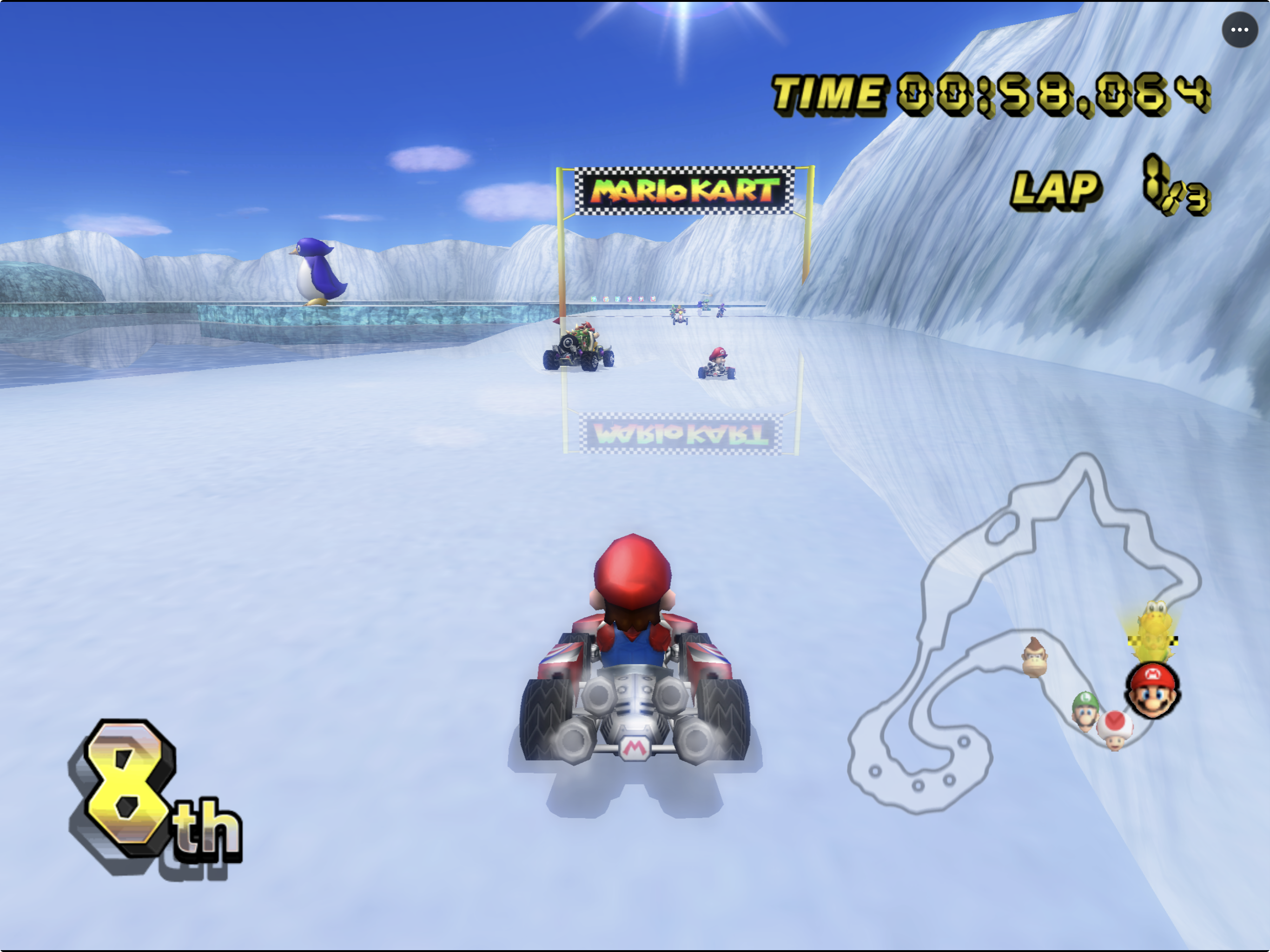
KartPad brings Mario Kart Wii to PC.
- Type: PC port
- Game: Mario Kart Wii
- Runs on macOS and Android
- By chrissotraidis
- Latest release v0.5.3, 2026-09-27
- Source: https://github.com/chrissotraidis/kartpad
README
KartPad
Mario Kart Wii and Retro Rewind, native for Android, iOS, iPadOS, and macOS.
Native static recompilation through Vulkan on Android and Metal on Apple platforms, with touch controls, motion steering, controllers, and optional Retro Rewind content. tvOS is currently an experimental preview.
KartPad builds on WiiCompiled, the original Mario Kart Wii static recompilation project created by patchzyy. WiiCompiled provides the foundational translator and runtime; KartPad maintains the Apple and Android integration, native controls, game chooser, game-data management, packaging, and releases. The projects are independently maintained.









[!IMPORTANT] Bring your own game data. KartPad requires a legally obtained supported PAL
RMCP01revision 0 Mario Kart Wii image. tvOS remains experimental.AI disclosure: KartPad uses substantial AI assistance for code, tests, documentation, debugging and maintenance. Some support replies and maintenance tasks are automated. There is no audited percentage of AI-generated code. Build, test and device records describe what was checked. This disclosure concerns KartPad's workflow, not the authorship of its upstream projects.
Downloads
Previous builds have been retired; a new version is in progress.
0.4.22 moved KartPad to maintained WiiCompiled source with pinned platform branches, preserving the existing game behavior and repository history. Source parity, rollback and build checks passed; the owner accepted loading, running and starting games on iPad and Android. macOS reached a race in the host smoke check. New-license Retro WFC login worked on iPad; an existing profile's serial mismatch reproduced on both builds and remains unresolved. Completed online races/reconnect and broader hardware coverage are not new claims. See the migration validation.
Playing
Need help or found a bug? Where to report and follow up. Suspected runtime bugs can go directly to WiiCompiled; identify your KartPad build. Use KartPad for app/platform problems or when the cause is unclear.
Frequently asked questions · Controls · Save transfer and troubleshooting
- Choose Mario Kart Wii or Retro Rewind when KartPad opens. Retro Rewind 6.12.8 content installs separately; KartPad requires a matching native profile when the mod updates. Follow your platform's setup guide above.
- Touch controls, motion steering and controllers are available on mobile; Mac also supports keyboard input. Touch layouts can be moved, resized and hidden. See controls and multiplayer.
- On iPhone/iPad, ••• → Return to KartPad Menu pauses the current game. Resume continues it; switching games or applying license edits requires fully closing and reopening the app. See iPhone/iPad setup.
- For save transfer, player identity, display settings or diagnostics, see the support guide and known issues.
Android Original gameplay with a Razer Kishi was accepted on Pixel 9 Pro XL; earlier Android testing confirmed Retro WFC login and worldwide lobby entry on that device. Frame drops, stutter, complete results and reconnect remain open. The iPad release candidate has owner-accepted controller gameplay and menu checks. These results do not establish every device, complete online results or reconnect behavior. Native private-room hosting and Wiimmfi support for Original remain unfinished. Online status records the limits.
Startup shader compilation, track-dependent dips and warm slowdown remain known issues. Android's suggested starting point is 1x Native. Sustained 60 FPS and external-display output are not generally verified.
Frequently asked questions
Can I download an IPA or playable app?
Previous builds have been retired; a new version is in progress.
Are Android and Apple TV supported?
Android targets ARM64/Vulkan on Android 9+. Device-specific graphics corruption, freezes and slowdowns remain unresolved; a successful Pixel run does not certify other phones. Apple TV is an experimental tvOS 17+ preview with separate controller and hardware acceptance. See Android setup and Apple TV setup.
Does online multiplayer work?
The tested iPad migration build reached Retro WFC with a new license. An existing license's serial mismatch reproduced on both old and new builds. Earlier Android tests reached Retro WFC and the worldwide lobby, but this release does not claim a newly verified complete online race/reconnect sequence or compatibility on every device. Native room hosting and Original Wiimmfi compatibility remain unfinished. See online status and friend-room guidance.
Does KartPad support Retro Rewind, and what if it updates?
Yes, with the separately installed 6.12.8 content and matching compiled profile. A newer Retro pack can require a new KartPad build; replacing files alone does not update translated game code. Apple checks the version before launch; Android checks the official version during installation and validates installed content at launch. Follow your platform setup guide if a compatibility update is requested.
How do I switch between Mario Kart Wii and Retro Rewind?
Choose the game when KartPad opens. On iPhone/iPad, ••• → Return to KartPad Menu pauses the session; Resume continues it. Choose Use on Next Launch for the other game, fully close the app, then reopen it. Returning to the chooser alone does not apply pending license edits. Mac game selection also applies after reopening. See the platform installation guides for their distinct flows.
How do touch controls, acceleration lock and motion steering work?
On iPhone/iPad, hold A for one uninterrupted second to lock acceleration; tap A again to release it. Touch settings let you move, resize, hide and restore controls, including the normally hidden D-pad for tricks. Motion steering is optional and offers recenter, inversion and sensitivity. See the mobile controls guide for floating-stick behavior and controller handoff. Android has its own controls/settings guide.
Can I use controllers or local split-screen?
Yes. Pair controllers in the operating system, choose Multiplayer in the game and press each pad’s mapped A button to register. On iPhone/iPad, the first controller shares Player 1 with touch; the other players keep stable slots. Full three/four-player and reconnect acceptance remains incomplete. See controller setup and adapter limits.
Can KartPad set my player name or import a custom Mii?
On iPhone/iPad, ••• → Game Data & Saves → Player Identity… manages names and exact license slots. Restart to apply edits. Standard 74-byte .mii appearance import is experimental, not a full Wii Mii editor. Renaming a Mii and renaming one license are different actions. See identity instructions. Android save/rating transfer does not include the Mii database.
Can I connect a Wii Remote and Nunchuk without a DolphinBar?
Experimentally, on macOS only, using the direct Bluetooth pairing flow. It still needs broader original-hardware, reconnect and long-session testing; it is not an iPhone/iPad feature. See pairing instructions and hardware limits.
How much storage does KartPad use?
Package size varies by platform and version; the iPhone/iPad app is about 65 MB. Extracted base-game data is roughly 2.5 GiB, and Retro content, the original image and temporary installation files require more. Android setup recommends at least 6 GiB free. Check the platform guide and leave room for updates; the app size is not the installed-data footprint.
Does this repository include Mario Kart Wii?
No disc image or extracted retail assets are included. Supply your own legally obtained supported PAL RMCP01 revision 0 image. Public packages contain compiled translated logic, so software licensing and game-content rights are separate; see rights and provenance. Do not request or attach game data in issues.
Is KartPad a general Wii emulator?
No. It is a game-specific static recompilation for supported Mario Kart Wii and Retro Rewind profiles, not a loader for arbitrary Wii games.
Is KartPad using Dolphin or streaming from a Mac?
The game runs locally as native ARM64 code translated by WiiCompiled, with Vulkan on Android and Metal on Apple platforms. It is not streamed from another computer or run inside the Dolphin emulator. KartPad does use Dolphin-derived components, including game-data handling; third-party notices preserve that attribution.
Does KartPad use a PowerPC JIT on iPhone or iPad?
No. PowerPC code is translated ahead of time and compiled into the app. The iPhone/iPad app does not JIT-compile PowerPC or execute a newly downloaded PowerPC patch. New executable profiles require a compatible app build.
Why is it slow or freezing, and are distorted graphics fixed?
First-use shader/pipeline compilation can cause stalls, and heat or higher render resolution can worsen performance. Not every freeze is shader compilation. Android has separate unresolved character corruption, online-menu stalls and cup-transition crashes. Start at 1x Native, but do not treat a settings change or passing renderer probe as a confirmed fix. Use known issues and diagnostic guidance to match your symptoms; the preview adds useful changes and logs, not a blanket stability guarantee.
Why are the inherited experimental modes absent?
Those settings applied to Sunshine-specific CPU-clock and 60 FPS behavior and did not affect KartPad’s Mario Kart Wii runtime. They were removed because they were misleading no-ops. Use actual display controls and the performance guidance.
Do saves survive an update, and can I transfer Retro ratings?
Supported in-place updates preserve saves; do not uninstall or clear app data. Keep backups and the same signing identity/bundle ID. Android private previews have a different signer and need a planned migration. Raw save backups do not include every companion file: Android preview 1 adds matched offline Retro rating restore, and the reporter confirmed that workflow succeeded. Mii transfer and online/server synchronization remain separate unfinished work. See save and rating transfer.
Is everything finished? How do I report a problem?
No. Check current platform acceptance, known issues and technical debt. Report your exact build, device/OS, selected game, settings and reproducible steps using the reporting guide to choose KartPad or WiiCompiled. Export a problem report using the support guide, review it before sharing, and keep saves, identities and game data private.
Build and contribute
Maintainers and automated support agents: start at the support-agent hub for priorities, replies, diagnostics and build-test handoffs.
WiiCompiled translates PowerPC game code ahead of time; KartPad compiles it for ARM64 and renders through Vulkan on Android or Metal on Apple platforms.
- Apple builds: prerequisites, Mac self-build and iOS workflows.
- Android builds: source-only shell and complete runtime.
- Source maintenance: editable WiiCompiled source, upstream comparison, and migration status.
- Documentation: user guides, architecture and release evidence.
- Current status and maintenance board: accepted results, active work and outstanding tests.
For a bug report, include the exact app/build, device, OS, game, settings and reproduction steps. Review diagnostics before sharing; never attach game data, saves, account identifiers or signing material. Choose the relevant tracker in the reporting guide.
Credits and license
KartPad builds on WiiCompiled, Aurora/Dawn, SDL and Dolphin-derived work. SunPad supplies the pinned mobile touch/menu component; its provenance and third-party notices record attribution and licenses. Original artwork provenance is recorded separately.
Aedan Pilkington contributed the native macOS controller and settings enhancements, including controller assignment and remapping, persistent profiles, keyboard remapping, settings shortcuts, and fullscreen/notch integration. See the macOS controller and settings guide for implementation details and source-build testing instructions. These are source-build enhancements; they should not be read as features of the published Mac release until a corresponding release is published.
KartPad is free software under GPLv3, including its WiiCompiled modifications and the integrated application where GPLv3 requires. GPL rights to use, modify and redistribute the software are separate from game-content rights. See rights, licenses and Corresponding Source. Mario Kart, Wii and game imagery belong to their respective rights holders. KartPad is not affiliated with or endorsed by Nintendo.