mdk-sdl
mdk-sdl is a PC port of MDK for Windows, Linux, macOS, and Android that supports stereo 3D and optional HD textures.
- Type: PC port
- Game: MDK
- Runs on Windows, Linux, macOS and Android
- By nautilusbits
- Latest release v1.2.4, 2026-10-28
- Source: https://github.com/nautilusbits/mdk-sdl
README
MDK in C# and SDL3




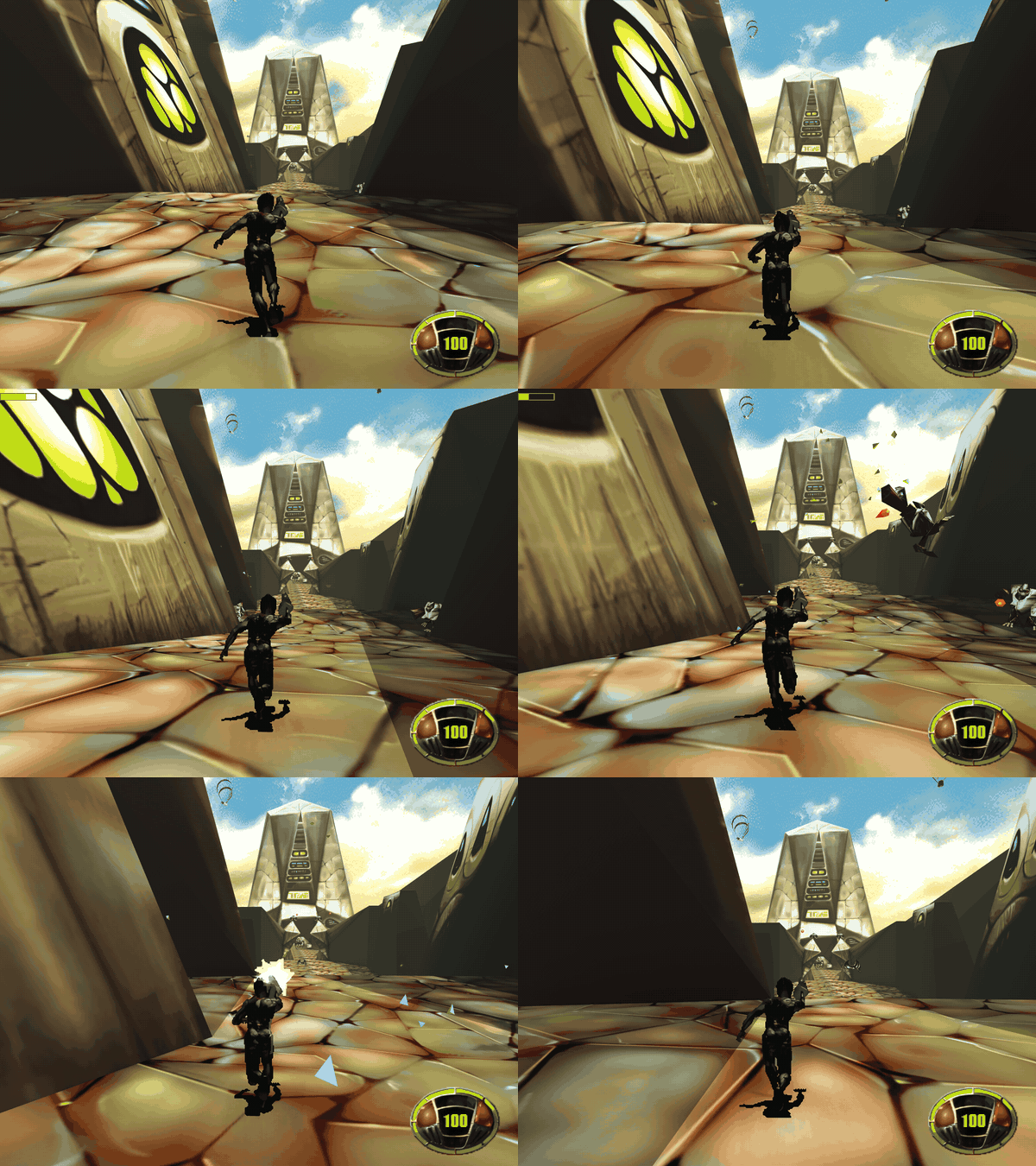
A port of MDK (Shiny Entertainment, 1997) to
C# on SDL3. It's the successor of the Godot port
mdk-godot and reuses its reverse engineering of the
original game's data files and executable (MDKD3D.EXE). Instead of Godot's renderer and physics
it renders and collides like the original: Kurt moves through the arenas' BSP trees with the
original's box sweeps.
Important
You need the original game to play. This port contains no data from MDK: no levels, textures, models, sounds, music or videos. It reads them at run time from your own installed copy of the original game (available for example on GOG). Without the original game data the port won't run.
Features
- Stereo 3D (optional): side by side (half and full), crossview, row-interlaced, interlaced-reversed, top and bottom and reversed top and bottom, with real eye separation and convergence (below).
- VR viewer (optional): a phone in a Cardboard-like viewer, lens corrected, the view turned by head tracking (gyroscope); also on the desktop with PC VR / 3D glasses (full side by side).
- Gamepads: Xbox, PlayStation, Switch and Bluetooth pads, on the desktop and Android, buttons rebindable (Options).
- The whole game: every level, the fall before it and the stream after it, rides, menus, briefings, statistics, saves, the end movies. Plays like the original (its BSP collisions, scripts and sound laws, reverse engineered).
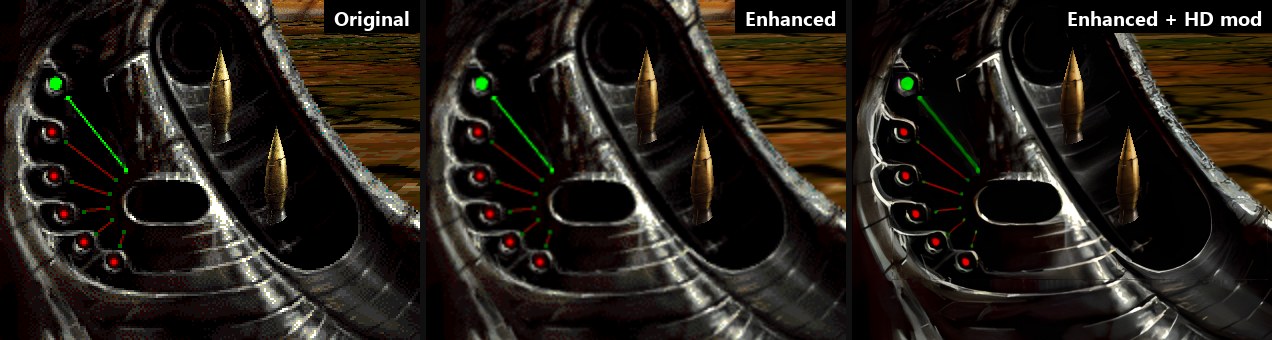
- HD textures (optional): Options, Mods, "Make HD textures" upscales the game's textures and HUD 2x with the AI upscaler Real-ESRGAN, locally on your GPU, from your copy of the game, into a mod (Options, Mods switches it). Nothing upscaled is distributed. Details.
- Modding: replace textures, the HUD and menus' images, fonts and models (glTF) in the
enhanced look, from mod folders or zips;
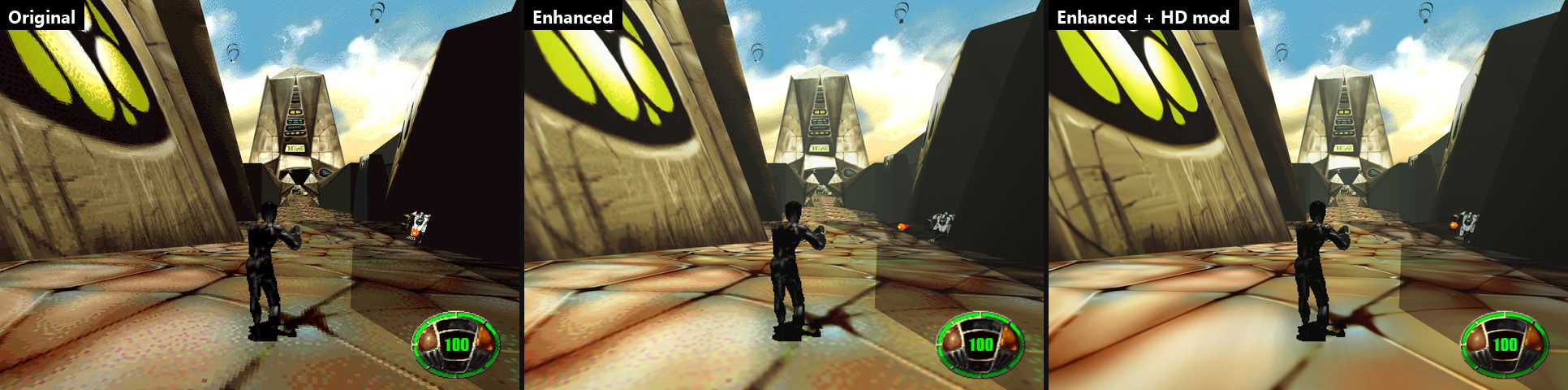
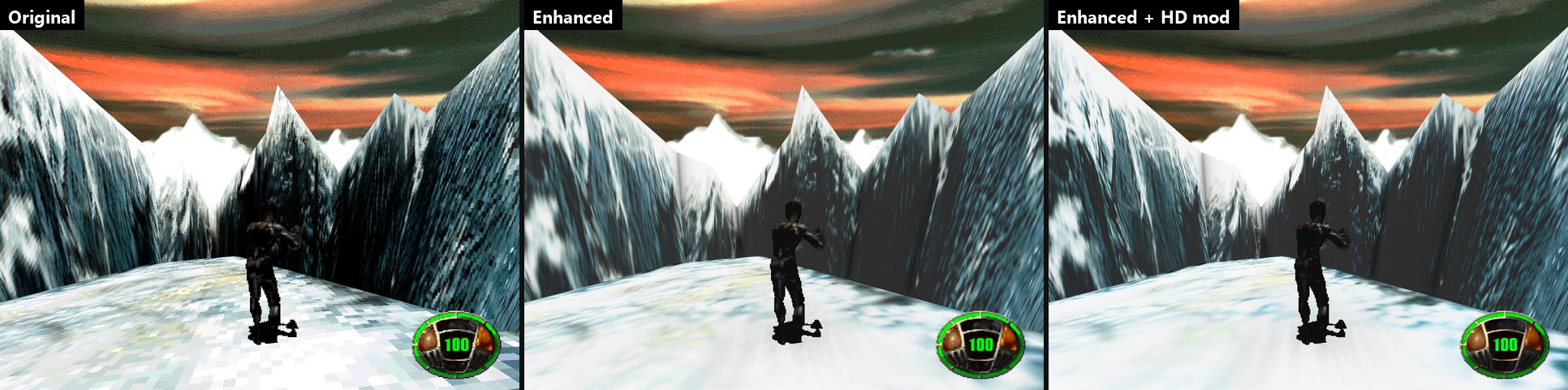
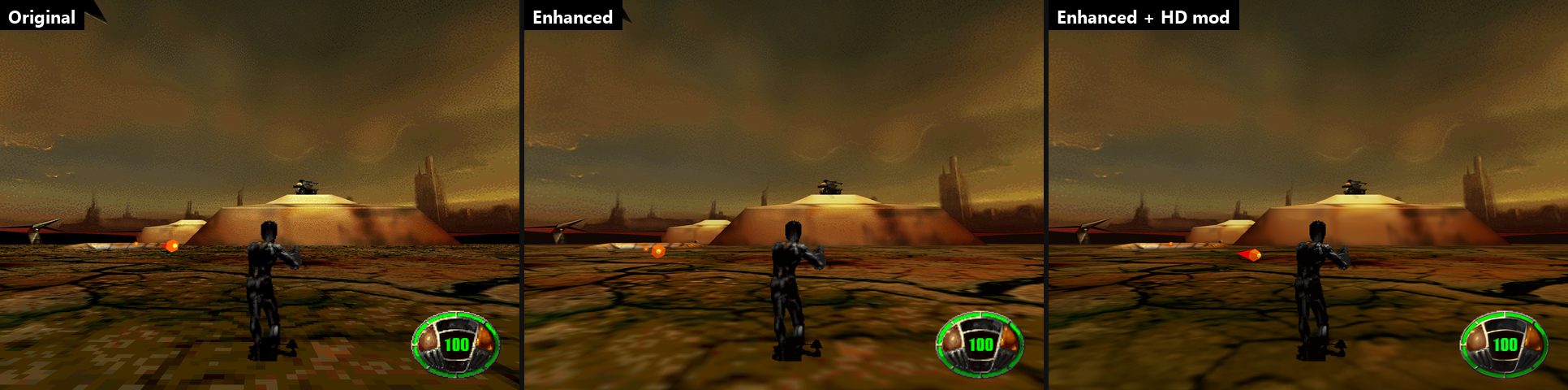
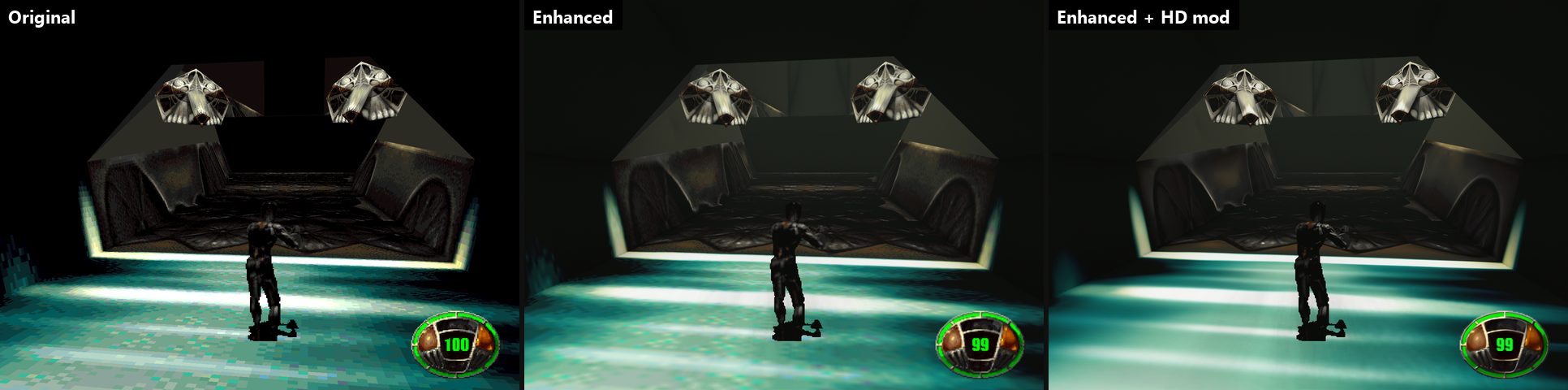
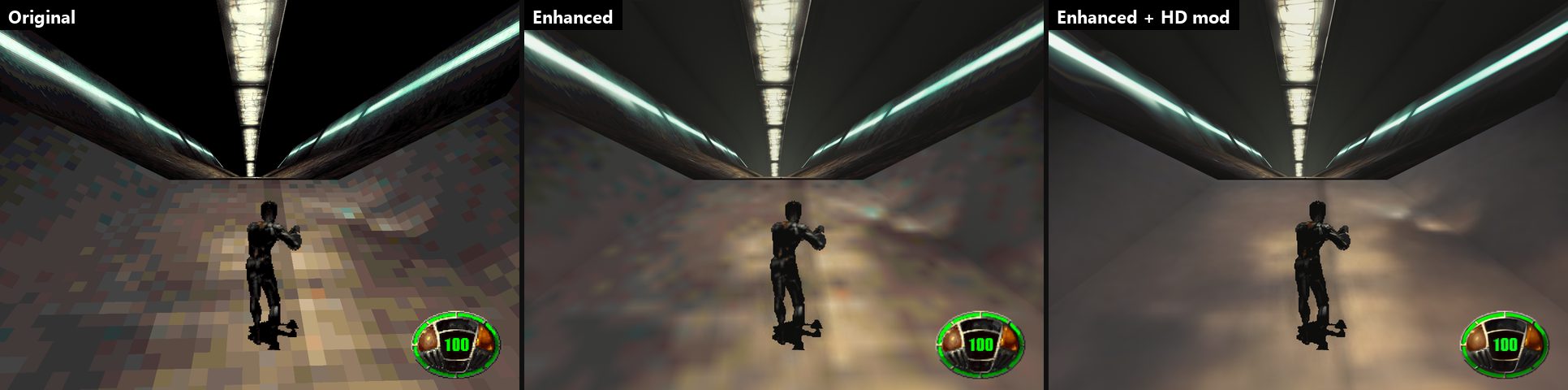
--export-assetswrites the originals to start from. docs/modding.md. - Enhanced look (optional): filtered textures, each level lit from its sky (sun and shadows outdoors), dynamic lights of muzzle flashes, explosions and fires, ambient occlusion, glow, haze, anti-aliasing. The original look stays pixel-exact.
- Windows, Linux, macOS, Android and Steam Deck (touch controls on Android, notes; Steam Deck).
- Quick save and load (F2, F9), a developer console and overlay, cheats.
Downloads: mdk-win-x64.zip, mdk-linux-x64.tar.gz,
mdk-linux-arm64.tar.gz (Raspberry Pi 5, ARM handhelds),
mdk-osx-arm64.zip, mdk-android.apk. They need the original game's data (GOG, Steam or CD;
below).
Stereo 3D
Contributed by agrofubris (#2).
A stereo renderer draws each frame twice, once through each eye's camera, and composites for the display. The eyes are parallel; their images meet at the convergence distance (0 parallax there), nearer things come out of the screen and the sky stays at infinity (its panorama uses the eye's own frustum, so it keeps the full eye separation's disparity).
- Modes
sbs— half side by side: the left eye in the left half, squeezed (3D TVs stretch it back).sbsfull— full side by side: each half with its own aspect, seen as it is (phone VR viewers, PC 3D glasses).crossview— full side by side with the halves exchanged, for crossed free viewing.int— row-interlaced: even rows the left eye (row-interleaved/passive 3D displays and shutter glasses).intr— row-interlaced the other way: even rows the right eye (displays whose rows start with the other eye).tab— top and bottom (over-under): the left eye in the top half.tabr— top and bottom with the halves exchanged: the right eye in the top half.vr— a phone in a VR viewer (Cardboard-like): full side by side, each half bent against the lens, the HUD and the menus kept to the middle, no touch controls (play with a gamepad).
- Options, 3D Stereo (main menu and pause menu): Mode, Separation (the eyes' distance apart,
in the game's units) and Convergence (the distance their images meet at; at the most,
far: parallel rays, meeting at infinity). Left/Right change them and, held, keep stepping; the settings apply at once and are saved (settings.cfg:stereo,stereo_separation,stereo_convergence). Head tracking (head_tracking): the phone's gyroscope turns the view as the mouse does. - Console:
stereo off|sbs|sbsfull|crossview|int|intr|tab|tabr|vr [separation] [convergence](saved). - Command line (tests, not saved):
--stereo=off|sbs|sbsfull|crossview|int|intr|tab|tabr|vr,--stereo-separation=0.25,--stereo-convergence=10.
Notes: the scene is rasterized twice, so stereo costs more GPU time (fine on a discrete GPU even with the enhanced look and the HD textures). Row-interlacing is drawn 1:1 with the window: keep the window at the display's native resolution (and 100% scaling) on a row-interleaved display. The menus, the HUD and the videos are drawn whole in both eyes (zero parallax), so they stay readable.
Screenshots
Original | enhanced | enhanced with the HD textures mod (click for full size).
Status
1.0. The whole game can be played through and has been playtested level by level; please report bugs (with the console's pos output). Every level loads, Kurt walks it and the level scripts run:
aliens spawn, walk and fly their paths, doors open, pickups fall on their chutes. Kurt fires his
chain gun, throws his items, gets hurt, knocked down and dies, and the HUD shows his health,
inventory, messages and the target's health bar. Aliens blow up into pieces, sparks fly, slime
bleeds and the fans lift Kurt. He grabs ledges and climbs them, slides down level 6's wind
tunnels on his back, gets hurt by hard landings and dies falling out of the arena; the camera
rolls, shakes and pushes him away from the walls behind him. He snipes through the scope with every kind of round and calls
Bones' air strike. Only Kurt's arena and the one behind an open door are drawn and solid, as in
the original; doors move into Kurt's arena, so they open from either side, and a teleport into
a corridor loads the arena behind it.
The game starts with the splash and the main menu (options, key bindings, saved
games) and plays the levels in order with their loading screens, briefings, the end of each level,
the statistics and the save prompt; when Kurt dies, "Continue" starts the level again. After each
level Kurt steers down the stream's tube until Bones' crane picks him up (after LEVEL8 he follows
Gunter to the planet). Before each level he falls from orbit onto the minecrawler, dodging the
radars' missiles and catching pickups. Kurt rides level 4's snowboard and level 7's walker
(XD2) and bomber (XE), the end of a level tears the arena apart around him as he rises, F2
makes a full save of the level, and the Score-O-matic spins its heads. Each arena plays its music with
the original's fades, scripts animate textures, switch the sky and film cutscenes, sniper rounds
leave bullet holes, and ropes, twisters' ribbons and the glass panes' outlines are drawn. An
enhanced look (Options, Graphics) filters the textures, lights each arena from its level's sky
(a sun and its shadows outdoors), lights muzzle flashes, explosions and fires, and adds ambient
occlusion, a little glow and a haze, and can draw AI-upscaled textures made from your copy of the
game (HD textures); anti-aliasing smooths the edges. The three
levels of the 1996 beta demo play as extras (below). The game can be played
through. The Godot port is no longer developed.
Progress
| Area | Done |
|---|---|
| Data formats: levels, textures, models, sprites, sounds, fonts, scripts, videos | ██████████ 100% |
| Rendering: arenas, glass, sky, mirrors, Kurt's sprite, effects | ██████████ 100% |
| Enhanced look: filtering, mipmaps, sky light and shadows, point lights, occlusion, glow, haze, HD textures; anti-aliasing | ██████████ 100% |
| Collisions: the original's BSP | ██████████ 100% |
| Kurt: walking, turning, jumping, chute, ledges, slides, camera, damage, death | ██████████ 100% |
| Sound mixer (the original's laws) and music | ██████████ 100% |
| Script VM, aliens, objects, doors, effects, fans | ██████████ 100% |
| Weapons, items, sniper mode | ██████████ 100% |
| HUD (health, inventory, messages, health bar) | ██████████ 100% |
| Menus, saves, level flow | ██████████ 100% |
| The fall and the stream between levels, rides | ██████████ 100% |
| Videos: the menu's FLC and slideshow, the end movies | ██████████ 100% |
| Dev tools: console, F3 overlay, cheats, quick save/load | ██████████ 100% |
| Mods: textures, 2D images, fonts, models (glTF), export | ██████████ 100% |
| Playtesting and bug fixing (every level played through) | ██████████ 100% |
| Android: APK, data import, touch controls (controls to tune) | █████████░ 95% |
| Overall | about 99% |
Recently added: 3D stereo and a VR viewer mode (Cardboard) with head tracking, gamepads with rebindable buttons, touch controls that hide while a gamepad plays, gamma, a Linux ARM64 build.
The plan is in docs/architecture.md. How the original works: docs/original-engine.md (engine, script VM) and docs/formats.md (data files).
Running
Windows x64, Linux x64 and ARM64, and macOS (Apple silicon): one executable each, mdk_sdl.exe or mdk_sdl (see
Building). It is played on Windows; the Linux and macOS builds are only built and
started on CI so far. Put the program (or this folder) inside the MDK installation folder (for
example C:\GOG Games\MDK\mdk-sdl), install MDK in the default GOG or Steam location, or set the
MDK_DATA_DIR environment variable, or name the folder in a file mdk_paths.cfg next to the
program:
[paths]
mdk="C:/GOG Games/MDK"
beta="C:/Games/MDK (1996-08-06) (beta demo)"
On Linux and macOS copy the installed game's folder (from
Windows, Wine or the GOG installer); file names match whatever their case. macOS keeps a downloaded
program in quarantine: xattr -d com.apple.quarantine mdk_sdl.
Steam Deck
The Linux build, with the Deck's controls as a gamepad (Options); not tested on a Deck yet. In desktop mode:
- Extract
mdk-linux-x64.tar.gzinto a folder, e.g.~/Games/mdk-sdl. - Point it at the game: put the folder inside the MDK installation, or write its path into
mdk_paths.cfgnext tomdk(MDK from Steam, installed through Proton:~/.local/share/Steam/steamapps/common/MDK). - Steam, "Add a Non-Steam Game", choose
mdk_sdl; in its controller settings pick the "Gamepad" layout (not "Keyboard and mouse").
Then it starts from game mode too.
mdk_sdl.exe
- No option: the splash, then the main menu.
--level=N: play level N (3 to 8) at once, without the menu (the game plays them in the order 7, 6, 3, 4, 8, 5); 961, 963 and 966 are the 1996 demo's.--menu: the main menu without the splash (--splashwith it);--options,--controls,--gamepad,--beta-levelsopen those pages.--stats=N: the screens after level N (--phase=1-4starts at a page: 1 the Score-O-matic, 2 the intermission, 3 the briefing, 4 the debriefing;--counts=shots,hits,sniper,sniper hits,kills,enemies,heads,--towns=bits);--briefing=Nits briefing alone;--endthe end movies.--fall=N: the fall before level N, then the level (--profileprints it every second,--walk=secondsholds "forward" from--delay=secondsof fall).--stream=N: the stream after level N (--health=NKurt's health; its tube is always the same one, for tests).--load=NAME: load a saved game (a full save prints its hash);--save=NAME: save the first level when it starts;--snapshot=NAME: a full save (as F2) at the screenshot, its hash printed (tests).--at=x,y,z[,yaw]: where Kurt starts (MDK coordinates).--fly: start with the flying camera.--mute: no sound.--enhanced,--original: the enhanced or the original look instead of the settings' (not saved).--upscale-textures[=3,7]: make the enhanced look's HD textures, then quit (below).--export-assets=dir: write the game's textures, 2D images (PNG) and models (glTF .glb) intodirfor modding, then quit (docs/modding.md).--mod=a,b: only these mods (folders or zips ofmods/, by name) for this run (not saved).--bloodyes,--nobloodno: gore on or off instead of the settings' (not saved; the original's-bloodyes,-nobloodno).--gpu=d3d12|vulkan|metal|auto: the GPU backend instead of the settings' (not saved).- Tests:
--screenshot=file.bmp(after--wait=secondsof game time, then quit),--walk=seconds,--delay=seconds(held keys start later),--jump,--fire,--give=SW_HBOMB,...(pickups to start with),--use(uses the item after 1 second),--profile(prints the objects of Kurt's arena every second),--trace(prints Kurt, the camera and what carries him every frame),--sniper[=zoom[,pitch]](sniper mode once Kurt stands),--zoom=seconds(zooms in),--sniper-fire(one sniper round),--strike[=dive](Bones' full-screen strike),--die(Kurt dies after 1 second),--event=N(aspecial_eventafter 1 second: 1 ends the level). After--delay:--teleport=ARENA,x,y,z,--kill=TYPE(kills the first object of that type),--ride=TYPE(Kurt on that walker),--bomber[=drop](level 7: calls theXE, boards it, and withdropdrops a bomb once unlocked),--beta-teleport=N(the 1996 demo's teleport N),--roll=left|right(holds a roll of the demo's levels).--console="pos;god"opens the console and runs those commands, on any first screen (--menu --console="map 6"). With--screenshotbut without--level, the screen shown after--waitseconds (menu, statistics...) is saved.--soak[=seed]: random but seeded keys on every screen (menu keys too when it starts in the menus), 0.1 s a frame; in a level Kurt is healed and problems print asSoak problem(--tour: every arena in turn during--wait, doors shut before each teleport).--press=QuickSave@1,Menu.Accept@1.5: presses game keys, or menu keys afterMenu., once at those times.--frames=dir,count[,every]: after--wait, saves every Nth frame of a level or of the fall (4: 15 a second) asframe000.bmp..., then quits (the animation above).--fps=N: test frames a second instead of 60; above 60 they are drawn between the steps (240: 4 a step). For videos:--size=2560x1440sets the hidden frame's size (1280x960 by default),--record-audio=file.wavsaves the sound from the start (with--mute, in step with the frames).
Settings (the options below, the mods' switches) and saved games
are kept next to the executable (settings.cfg, saves/*.sav; MDK_USER_DIR overrides the
folder). If that folder can't be written (Program Files, a protected Steam or GOG folder), they go to
%APPDATA%\mdk-sdl (Linux ~/.local/share/mdk-sdl), mods too. The first run copies them from where older builds kept them (%LOCALAPPDATA%/mdk-sdl). LASTGAME (written when Kurt dies) is deleted at start, as in the original.
Options
From the main menu or the pause menu; a page per kind, each change applied and saved at once
(settings.cfg), Esc goes up a page.
- Display: display mode (windowed, fullscreen on the desktop, exclusive fullscreen in a mode of the display's own), resolution (window sizes that fit the display; the display's modes, each at its highest refresh rate), render scale (50-200 % of the window's size: faster or supersampled; the HUD too), VSync (on; off: may tear; adaptive: SDL_GPU's mailbox, no tearing, the newest frame shown; falls back to what the display supports), frame limit (60, 120, 144 a second with VSync off or adaptive) and GPU backend (Auto, Direct3D 12 or Vulkan on Windows, Vulkan on Linux, Metal on macOS; after a restart; a backend that fails falls back to Auto). Gamma (0.5-2: above 1 brighter, the HUD and menus too). Android has render scale, VSync, frame limit and gamma (always fullscreen, Vulkan).
- Graphics: the original or the enhanced look, anti-aliasing, gore.
- 3D Stereo: the stereo layout, the eyes' separation and convergence (above).
- Audio: master, music and effects volumes, the music filter.
- Keyboard & mouse: mouse sensitivity and inversion, key bindings.
- Gamepad: look sensitivity and inversion, button bindings (Start stays pause; a key cancels).
- Touch (a touch screen only): the touch controls: Auto (hidden while a gamepad, keyboard or mouse plays; a touch brings them back), Off or On; their opacity; "Edit touch layout": drag a control to move it, its corner handle or - / + to resize it (overlaps show red, Done keeps them), Reset, Done or Cancel (asking first when something changed); the tools move away from a dragged control.
- Game: difficulty.
- Mods: each mod on or off, "Make HD textures" (desktop), "Import from folder" (Android).
Gamepads (Xbox, PlayStation, Switch, Android Bluetooth pads), by default: left stick walks, right stick looks, RT fires, LT toggles sniper mode, A jumps, B runs (turbo), L3 always runs, X uses the item, Y / RB / d-pad right the next item, LB / d-pad left the previous one, d-pad up and down zoom, Start pauses. In the menus: d-pad or left stick, A accepts, B or Start goes back.
At start the log (and the console) names the build, the GPU and its backend, the display and the frame (sizes, formats, MSAA, present mode; again when they change) and the look; F3 shows them too:
MDK SDL 1.0.0-beta.1 | .NET 10.0.12 Native AOT | SDL 3.5.0
GPU: NVIDIA GeForce RTX 3060 (Vulkan via SDL_GPU), driver 616.56.0.0
Look: Enhanced, mods: hd-textures
Display: 3440x1440 @ 144 Hz, window 1280x960 (windowed), render target 1280x960, swapchain B8G8R8A8_UNORM (8 bits per channel, SDR), depth D32_FLOAT, MSAA 4x, present mode VSYNC
Controls: W/S or Up/Down to run, A/D to strafe, the mouse or Left/Right to turn, Space to jump (hold it while falling to open the chute; running into a ledge while falling grabs it), Shift for turbo (Caps Lock keeps it on while locked; another "always run" key toggles it), Ctrl or the left mouse button to fire, Enter or E to use the item, Tab, [ ] or the mouse wheel to select it (or 1-5), the right mouse button for sniper mode (the mouse wheel or PageUp/PageDown zoom, Tab or [ ] select the ammo), F1 for the flying camera (E/Q to go up and down), F2 for a quick save (the original's full save: the name