melonPrimeDS
melonPrimeDS is a modded version of the melonDS emulator for playing Metroid Prime Hunters on PC with mouse and keyboard support.
- Type: PC port
- Game: Metroid Prime Hunters
- Runs on Windows, Linux and macOS
- By makinori
- Latest release livetek-release, 2025-03-14
- Source: https://github.com/makinori/melonPrimeDS
- Website: https://melonds.kuribo64.net
README

melonPrimeDS
Modded version of melonDS emulator to play Metroid Prime Hunters.
It's a bit of a hack but the goal is to make the game as fun as possible using mouse and keyboard.
I originally made this for controller but because there's no lock-on, it wasn't really fun to play.
Please read the instructions carefully.
⚠️ Livetek 2.0 release
There was an attempt at a new release for melonPrimeDS,
but it was moved to a seperate branch as it wasn't as stable.
See release: https://github.com/makinori/melonPrimeDS/releases/tag/livetek-release
and branch: https://github.com/makinori/melonPrimeDS/tree/livetek
This repo will eventually get a big update with those fixes properly merged in.
...that is when I feel motivated enough to do so
Download
Releases for Windows, Linux and macOS here!

⚠️🖱️ Warning if using mouse acceleration!
Please disable mouse acceleration or it will feel strange.
Find a guide for Windows here and use SteerMouse if on macOS
Wasn't able to get raw mouse input unfortunately.
⚠️ Warning for macOS users!
Once you start the program, you're going to have to go into macOS settings:
> Privacy & Security > Accessibility, and ensure melonPrimeDS is enabled.
Instructions
-
Fyi. the emulator hack uses a different config path than melonDS, so this won't conflict
-
Aquire a copy of the USA 1.1 rom of Metroid Prime Hunters
Other regions don't work because memory injection is used -
Make sure to set all DS bindings to
Nonein
Config → Input and hotkeys → DS keypad
Defaults should already be empty
(click binding and press backspace) -
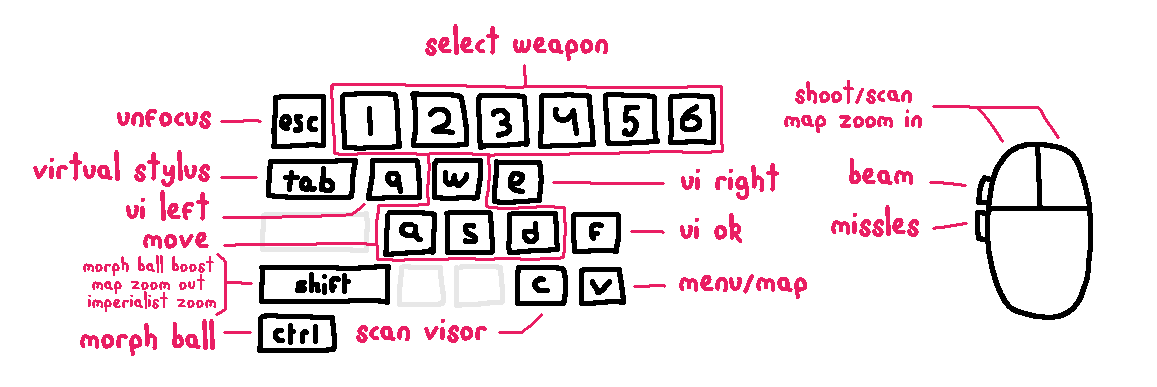
Find Metroid related
Keyboard mappingsin
Metroid → Input settings
Recommended defaults have already been set, but feel free to change them if you want toNotes:
- Focusing the window will capture your mouse. Use
ESCto release. - The stylus gets placed in the middle of the DS screen for aiming which can cause accidental presses
- Whilst holding the virtual stylus button
Tab, use your mouse to click around on the touchscreen - UI OK
Fwill press "OK" on the touch screen, which will also jump and briefly break aiming - UI left
Qand rightEwill also press on the touch screen, for scan visor messages - When in map view, press
Shiftto zoom out andLMBto zoom in
- Focusing the window will capture your mouse. Use
-
Find Metroid sensitivity settings in
Metroid → Other settings
When in-game, make sure to set the aim sensitivty to the lowest!
The DS touchscreen isn't very precise, so setting it to lowest helps -
Also recommended to set audio settings in-game to headphones
Default settings changed from melonDS
- Fullscreen toggle set to
F11 - Screen layout set to horizontal
- Screen sizing set to emphasize top
- Screen filter set to false
- 3D renderer set to OpenGL
- 3D scale factor set to 8x for 1440p
- JIT recompiler set to enabled (helps with performance)
VSync was already disabled but keeping it off also helps with performance
Build
I modified melonDS and played Hunters on Linux. Building is straightforward
mkdir build
cd build
cmake .. -DCMAKE_BUILD_TYPE=Release -GNinja
ninja
Downloadable builds were made using GitHub actions
Todo
- Change controls when map is open. Need to find memory location
- Update to latest melonDS
- Would be really nice if weapon switching was done through the memory
Livetek Release
There was an update trying to improve multiplayer, but it broke lots of other things.
Find code here: https://github.com/makinori/melonPrimeDS/tree/livetek
Download here: https://github.com/makinori/melonPrimeDS/releases/tag/livetek-release