NoisyFairy
NoisyFairy is a Windows port of the PS4 runtime for Mobile Suit Gundam Battle Operation Code Fairy, supporting ultrawide resolutions and FSR upscaling.
- Type: PC port
- Game: MOBILE SUIT GUNDAM BATTLE OPERATION Code Fairy
- Runs on Windows
- By rhobiusvoid
- Latest release 0.7, 2026-11-19
- Source: https://github.com/rhobiusvoid/NoisyFairy-GBOCF-Windows-Experimental
README
NoisyFairy
NoisyFairy is a Windows port of the PS4 runtime for Mobile Suit Gundam Battle Operation Code Fairy. It is a game-specific Windows port of HekamiAeon/GBO-Code-Fairy-PS4RT, a compatibility runtime for MOBILE SUIT GUNDAM BATTLE OPERATION Code Fairy (PlayStation 4, CUSA28763, v01.03). All of the runtime design, PS4 service layers and game-specific work come from Hekami's original Linux project; this repository adapts it to run natively on Windows 10/11 and is not affiliated with it. See Credits.
PS4RT runs prepared original PS4 x86-64 game code through Windows-hosted PS4 service compatibility layers and a shadPS4-derived Vulkan renderer. It is not a general PS4 emulator, a recreation of the game, or a substitute for owning the game.
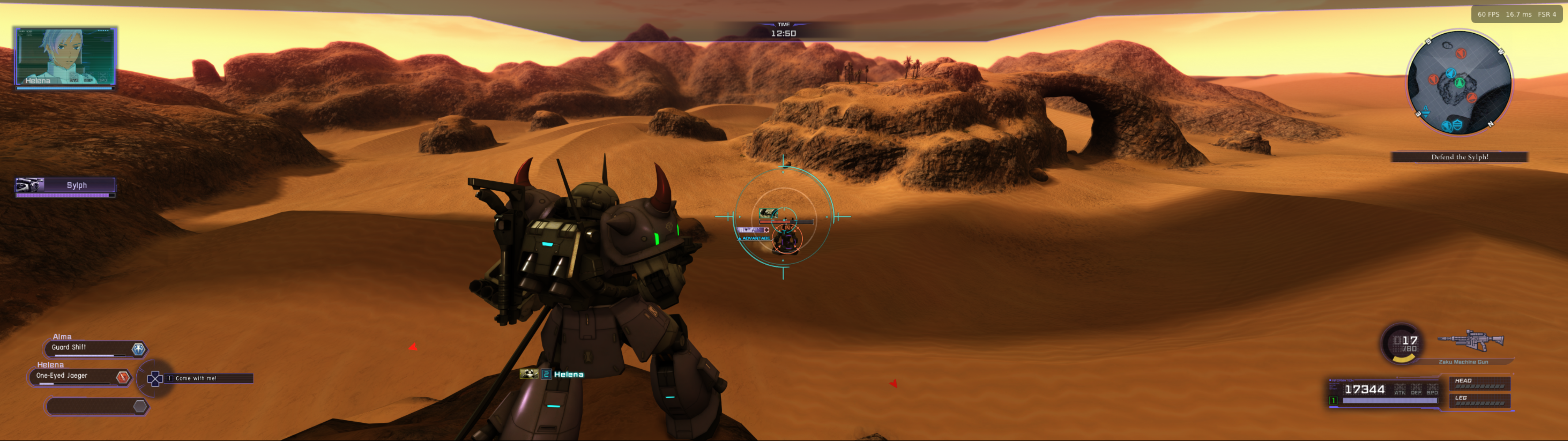
Bring your own game and volume unlock keys. To access Code Fairy's three episodic volumes, you need (1) the extracted CUSA28763 game, (2) game version v01.03 in PKG format, and (3) all three volume unlock-key PKGs. If your extracted game is already v01.03, you do not need to apply a separate update PKG. The volume keys are not optional gameplay DLC: they unlock the corresponding episodes already in the game, and the game will not progress past the title screen if you don't own Volume 1 at least.
PS4RT neither supplies these files nor bypasses the game's volume locks. No PS4 firmware, user saves, decrypted executables or PlayStation Network authentication is provided. This project is independent of the game's rights holders, Sony and AMD.
Download and play
- Download the latest build (
NoisyFairy-0.8-Beta.zip) from the Releases page and extract it to a short, writable path such asC:\CodeFairy\. - Double-click
NoisyFairy.batto open the launcher. - On the Launcher tab, press Browse, pick your extracted
CUSA28763folder, then press Play. The folder is remembered for next time. - If your game is v01.00, a setup window asks for your v01.03 update PKG on the first launch. Install your three volume keys with Install Volume Keys... (the button disappears once they are installed), then restart the game.
That's all you need: no command line required. The Options tab has the graphics settings and a Write log file switch (on by default) that saves a log to out\CUSA28763\user\log for bug reports.
The game should start within a few seconds. If it sits on a black screen and never shows the Bandai Namco logo, it has stalled: close it and report it on the Issues tab with the newest file from that log folder.
Requirements: Windows 10 1803+ (64-bit) and a Vulkan 1.3 GPU. Full guide: Running on Windows.
Required v01.03 game version and episodic volume keys
Code Fairy v01.03 is required.
- Already have extracted v01.03: the launcher validates and prepares the game directly.
- Have extracted v01.00: the setup window asks for your own matching CUSA28763 v01.03 update PKG and applies the update before launching.
- Important: Applying that update modifies the selected extracted CUSA28763 directory in place. Back up the original v01.00 directory beforehand if you need to preserve it for another application. Your source PKG is not modified.
- Three volume unlock-key PKGs are required to access all three volumes. Code Fairy is episodic: these keys unlock existing story content; they are not conventional add-on DLC. After applying an update, a package picker may offer to install them. You can skip it, but the volumes stay locked until their keys are installed. Install them any time with Install Volume Keys... on the launcher (or Install DLC... in the in-game overlay, opened with Insert), then restart the game.
- If setup is interrupted, press Play again and supply the same update PKG to repair the installation.
See Player update and volume-key setup for details (it also lists command-line alternatives for advanced users).
Keyboard and mouse
Keyboard and mouse play works out of the box (mouse look is on by default and does not affect controller players). Every key and mouse button can be rebound in the launcher's Controls tab or in the in-game menu (Insert), and the number keys 1-8 switch weapon slots like the official PC layout. Settings live in ps4rt_mouse.ini next to ps4rt.ini; F8 toggles mouse capture.
Graphics and controls
Choose your settings on the launcher's Options tab before you start; they are saved immediately and apply on the next launch. The same settings are available in-game: open the PS4RT menu with Insert on the keyboard, or hold L2 and click R3 on a controller. Use the D-pad to navigate, Cross to select, and Circle to return. The menu separates Graphics from Achievements, with Code Fairy's compact two-tab layout. The Graphics page also provides FPS and game-related controls.
Available features include:
- Internal resolutions & UltraWide Support: 1024×576 (the low-end “540p” option), 720p, 1080p, 1440p, 2160p/4K, plus 21:9, 24:9 and 32:9 ultrawide modes up to 5120×1440. Internal resolution changes require restarting.
- Upscaling: Off, FSR 1, FSR 3.1, or FSR 4 v07 on capable hardware. FSR reconstructs the 3D scene before the HUD is composited; output resolution is selected separately, within the same aspect-ratio family. Upscaler selection is live.
- Graphics quality: Max (original), Medium, and Low. Medium reduces the 4096² sun-shadow atlas to 2048²; Low uses 1024². Restart required.
- Frame rate: The game's original 60 FPS behavior, with an optional 30 FPS cap for weaker devices.
- Anisotropic filtering (game default, 2×, 4×, 8×, 16×), sharpening, display options, and an FPS counter.
- Local achievements: The game triggers trophy unlocks; the PS4RT overlay saves and displays progress, earned timestamps, icons and hidden entries. This is not PSN trophy synchronization, and previously completed objectives are not guaranteed to unlock retroactively.
- Volume key installation: use Install Volume Keys... on the launcher (or the overlay's Install DLC... button, which keeps its generic name because the keys use the same PS4 add-on package mechanism; no separate DLC is required). Restart after installing keys so the game recognizes the unlocked volumes.
See Running on Windows for details.
Current compatibility status
Windows port (0.8 Beta): it boots to the main menu, plays through the Chapter 1 tutorial and has been played in long sessions; trophy unlocks and save data work. Chapters beyond that and Volume 2/3 are untested on Windows, and the port is still a beta: expect rough edges.
| Hardware | Result |
|---|---|
| GTX 1050 Ti (Windows 10) | Plays; Pascal model glitches (see Known limitations) |
| GTX 1650 Ti | Plays through long sessions; occasional colour-change texture noise when video memory runs out |
| GTX 10-series, RTX 30/50-series, AMD cards | Reported to boot (0.7 Beta and later) |
| Radeon 9070 XT + Ryzen 9700X (Linux build, Hekami) | Tested through Chapter 9 |
A rare, random black-screen stall at boot has been seen; see the note under Download and play.
Original Linux build (by Hekami): playable and tested through Chapter 9 (Volume 2) on a Radeon 9070XT and Ryzen 9700X, covering the tutorial, story missions, combat and bosses, cutscenes, menus, saving/loading and completion of Volume 1. Volume 3 has not been fully gameplay-tested. Screenshots document a particular configuration, not a performance guarantee.
Known limitations and notes:
- Ultrawide is experimental. Some camera-driven HUD elements, may appear misplaced or flicker. Reproduce at 16:9 before reporting a widescreen-specific regression. Cutscenes and pre-recorded videos remain at 16:9 aspect ratio as they were designed for that size and can look distorted otherwise.
- FSR 4 v07 needs compatible Vulkan GPU features; use FSR 3.1, FSR 1 or Off where unsupported.
- 30 FPS mode is intended for lower-power hardware. The runtime may lift the limiter for 60 FPS video playback to avoid the videos playing at half speed and during dialogue as they are less intensive.
- FPS depends heavily on GPU power, internal resolution, graphics-quality preset and shader/cache state.
- Older GPUs (Pascal / GTX 10-series and earlier) may show model glitches: on a GTX 1050 Ti, weapon and shoulder parts on some Zakus (Chapter 1) render with missing polygons or colored dots until the camera gets close. The cause appears to be GPU-side (a compute shader that builds the recolored textures), not a setting. Toggling the optimization, MSAA, barrier and interpolation options made no difference. Newer GPUs are expected to be better; reports welcome.
- CPUs older than Coffee Lake (or equivalent) may be missing required functions Another user tested with an i5-3470, which is missing MOVBE, BMI1, and LZCNT instructions. Your mileage may vary. If your CPU is too old, there's no real chance for support.
- Pascal glitches will not be fixed: a fix would risk breaking newer GPUs.
- Rainbow textures on 4 GB graphics cards: with 4 GB of video memory (reported on a GTX 1650 Ti) the texture cache can run out of room and drop old GPU-written textures. On screen this is occasional rainbow noise on colour-changing suit textures, usually gone again within moments. It is the price of not crashing with an out-of-memory error, and there is no setting that avoids it on those cards.
- Rare boot stall: the game restarts itself and usually recovers (
PS4RT_BOOT_RETRIES=0turns this off). If it happens, open an issue with your GPU, driver and newest log; this repository's build also carries the hang dump (written when the launcher's log option is on) for investigating it. - Overlay hooks (for example OBS game capture) can change timing and may make stalls more likely.
- Backups: the
savedata-backupssnapshot copy is best-effort; saving itself does not depend on it. - Known deadlock risk in the model manager (Chapters 1, 3, 5 per Hekami); see WINDOWS-MUTEX-NOTES.md.
- DLSS is not available in Windows builds (FSR 1/3.1/4 are).
- Version v01.03 / CUSA28763 is the tested and required title combination. Other title IDs or executable versions are unsupported.
Please report reproducible defects on the published project's GitHub Issues page with your game version, mission/chapter, GPU/driver, resolution, graphics preset, upscaler and reproduction steps. For visual problems, also include whether they reproduce in 16:9 with FSR Off.
Build from source (developers)
You do not have to trust the prebuilt executables: BUILDING.md explains how to build everything from this repository, and scripts/build-windows.sh does it in one command (Linux, or WSL2 on Windows). This repository keeps the developer tooling that the clean public release has removed (hang dump, stick sweep, warm-up debug switches); DIAGNOSTICS=1 additionally enables upstream's own PS4RT_DIAGNOSTICS tooling. Run the tests with python3 -m unittest discover -s tests -p 'test_*.py'; CI does the same on every push. See also CONTRIBUTING.md and SECURITY.md.
Generated state lives under out\CUSA28763\ (prepared game code, saves, trophies, caches, volume keys). Never publish or commit out\. See Windows data layout.
Documentation
- Running on Windows
- Update and volume-key setup
- Windows package and data layout
- Mutex/deadlock notes
- Building from source and why the flags are what they are
- Environment variables (generated)
- Release notes
- Upstream source credits and licensing
Credits and licensing
Original project: huge thanks to HekamiAeon for GBO-Code-Fairy-PS4RT, the Linux runtime this port is built on (GPL-2.0-or-later). Without that work there would be nothing to port.
PS4RT adapts open-source compatibility runtimes and renderer work from gow3_pc, bloodborne_pc, shadPS4 and related contributors. The integrated PKG extractor is adapted from AzaharPlus/shadPS4Plus. Local trophy handling also incorporates work credited in scripts/trophy_crypto.py. REA and Ghidra were used for analysis, not bundled as runtime dependencies.
Runtime source is GPL-2.0-or-later; third-party code, fonts, shaders and media retain their individual terms. Refer to Upstream credits and notices, LICENSE and FSR 4 asset notice. No copyright or trademark ownership of the underlying game is claimed.